❌

Reading view

There are new articles available, click to refresh the page.

This Overlooked Linux mv Option Replaces Three Commands With One

mv exchange

Every Linux user has done the three-step dance at least once. You want to swap two files, so you move the first one to a temporary name, move the second one into its place, and then move the temporary file back.

Ever felt that this is a bit... clumsy? And for a moment, one of your files simply doesn't exist. That doesn't feel right!

Since version 9.5, GNU coreutils has a better way: mv --exchange.

In this article, I'll show you what it does, how to check if your system has it, where it actually helps, and the mistake I made the first time I used it on directories.

The old way: three moves and a temporary name

Let's say you have two configuration files, nginx.conf and nginx.conf.new, and you want the new one to take the place of the old one while keeping the old one around.

The classic approach looks like this with the mv command:

mv nginx.conf nginx.conf.tmp
mv nginx.conf.new nginx.conf
mv nginx.conf.tmp nginx.conf.new

There are two problems here:

  • There is a gap. Between the first and second command, nginx.conf doesn't exist. If a service reads it at that exact moment, it finds nothing (and trust me, one day that will happen).
  • It can fail halfway. If the second command fails, you are left with a temporary file and a half-finished swap to clean up by hand.

The exchange option does this in a single command:

mv --exchange nginx.conf nginx.conf.new

Swap files with mv --exchange

The --exchange option tells mv to swap the two paths in a single operation. On Linux, it uses the kernel's renameat2() system call with the RENAME_EXCHANGE flag, so the swap is atomic: at any moment, both names exist and point to a file.

Check if your mv supports it

First, check your coreutils version:

mv --version

On my machine, running NixOS, I get:

mv (GNU coreutils) 9.11

You need version 9.5 or newer. Careful here: version numbers are not decimals. They are compared part by part, so 9.11 (nine point eleven) is newer than 9.5. You can also check whether the option is listed in the help:

mv --help | grep exchange

If this prints nothing, your mv doesn't have the option yet. I'll talk about which distributions ship it later in this article.

Swap two files

Let's create two small files to test:

echo "config A" > a.conf
echo "config B" > b.conf

Now swap them:

mv --exchange a.conf b.conf

Check the result:

cat a.conf b.conf
config B
config A

That's it. The contents traded places in one command, and no temporary file was involved.

Swapping two files with mv --exchange in the terminal

Swap two directories (and the mistake I made)

It works for directories too, which is where it really shines. But the first time I tried it, it failed:

mkdir release-old release-new
touch release-old/v1 release-new/v2
mv --exchange release-old release-new
mv: cannot exchange 'release-old' and 'release-new/release-old': Unknown error -1

Look at the second path in the error: release-new/release-old. When the last argument is an existing directory, mv assumes you want to move things into it, just like a regular mv. So it tried to swap release-old with a path inside release-new that doesn't exist.

The fix is the -T (--no-target-directory) option, which tells mv to treat the last argument as a plain name instead of a destination folder:

mv -T --exchange release-old release-new
ls release-old release-new
release-new:
v1

release-old:
v2

Now the whole directory trees were swapped, no matter how many files they contain, because only the names changed.

Where it actually helps

Here are a few situations where I find mv --exchange useful:

  • Rolling out a new configuration. Swap the new config into place and keep the old one under the other name, ready for a quick rollback with the same command.
  • Switching release directories. If you deploy a new version of a site into a separate folder, you can swap it with the live folder in one step (remember the -T).
  • Undoing a swap. Running the same command again swaps the files back.

Limitations you should know

mv --exchange is not magic, and a few things can trip you up.

Both paths must be on the same filesystem

The swap only works when both files live on the same filesystem. If you try to exchange a file on one filesystem with a file in a tmpfs mount like /dev/shm, the kernel refuses the operation:

mv --exchange b.conf /dev/shm/x.conf
mv: cannot exchange 'b.conf' and '/dev/shm/x.conf': Unknown error -1

The message is not very helpful (it is the same "Unknown error -1" we saw in the directory mistake above), so it's worth knowing the real reason: the kernel can't swap names across two different filesystems.

Regular mv gets around this by copying the file and deleting the original, but that can't be done atomically, so --exchange doesn't even try.

mv --exchange failing when the files are on different filesystems

The filesystem must support it

The underlying system call needs filesystem support. Common Linux filesystems such as ext4, Btrfs, XFS and tmpfs support it.

Conclusion

mv --exchange is one of those small additions that removes a whole category of fiddly, error-prone shell work. If you are on a recent distribution like NixOS, Fedora or Debian 13, it is already on your system.

Next time you reach for a temporary file name to swap two things, try mv --exchange instead. Just remember to add -T when you swap directories.

✍️
Igor Giamoniano is a developer and teacher from São Paulo, Brazil. He contributes to the Brazilian Portuguese translation of the Linux kernel documentation and runs Coisa de Dev, where he teaches Linux and programming to a Brazilian audience. You can find his open source work on GitHub.

I Got Tired of Remembering Ports for 30 Docker Apps in My Homelab. Here's How I Fixed it

Tailnet with Tailscale Services

My homelab runs on 5 machines with around 30 Docker containers. For a long time, the way I reached them was a bookmarks folder full of entries like http://100.101.12.4:8096.

Tailscale took care of getting me into my network from anywhere, but once I was in, I was back to remembering which box ran what on which port.

The usual fixes each have a catch. A reverse proxy with your own domain works, but it's one more thing to maintain, and every new app means touching two config files instead of one. Giving each container its own Tailscale sidecar gets you nice names, but it also turns the Machines page into a list of containers, each with its own auth key and state volume.

When Tailscale released Services, it looked like the thing I had actually wanted: names for apps, not for machines. I've been running my containers that way since, and this is a write-up of how it works, how to set it up by hand, and the two things worth knowing before you start.

What a Tailscale Service actually is

A Service is a name plus a virtual IP on your tailnet, for example jellyfin.your-tailnet.ts.net. It doesn't belong to a device. Instead, one or more of your machines advertise it, and Tailscale routes clients to them.

So your Docker host stays a single machine in the tailnet, and the apps on it become Services. Access rules can point at a Service directly, so you can let someone reach Jellyfin without giving them the whole host.

Here is what a request looks like once it's set up:

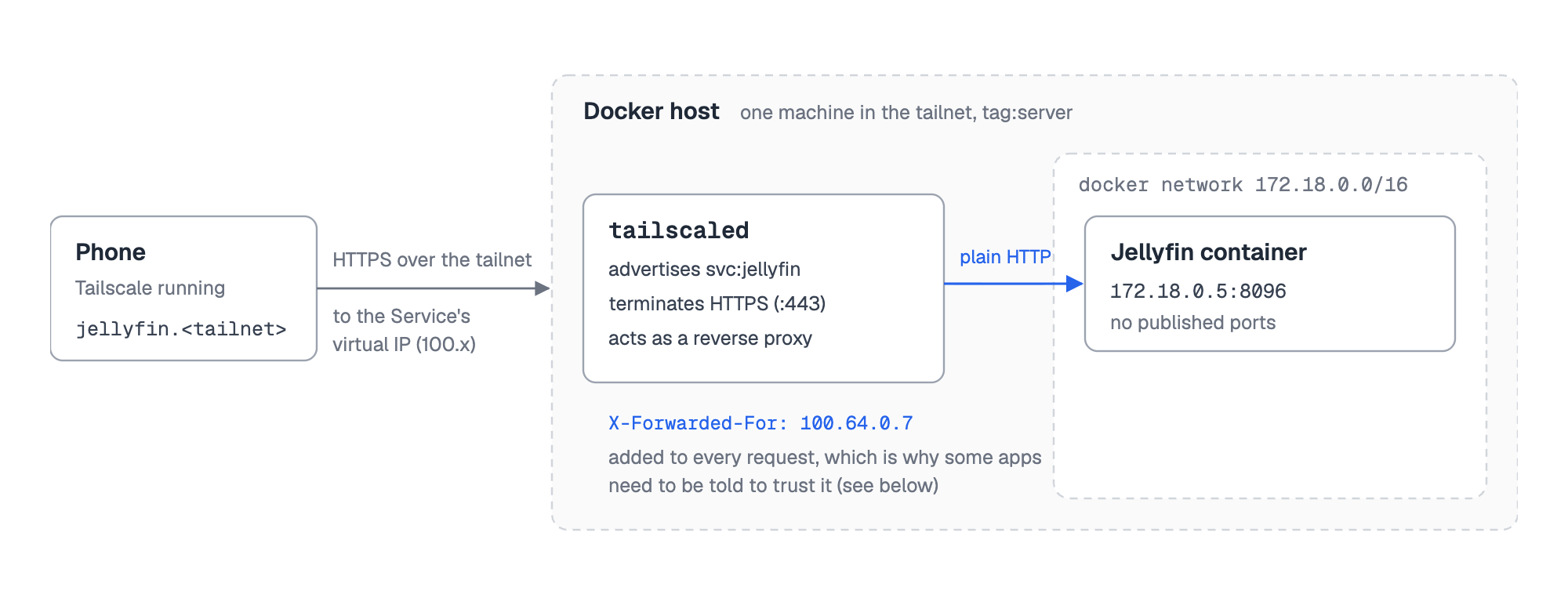
Request path for a Tailscale Service: a phone on the tailnet opens jellyfin.your-tailnet.ts.net, Tailscale routes it to the Docker host, tailscaled terminates HTTPS and forwards plain HTTP with an X-Forwarded-For header to the Jellyfin container on its Docker network IP

Two details in that picture matter later: tailscaled on the host terminates HTTPS and talks plain HTTP to your app, and it adds an X-Forwarded-For header. To your app, Tailscale behaves like a reverse proxy.

Setting one up by hand

Before automating anything, it's worth doing it manually once for a single container. You need three things.

1. A tagged host. Services are advertised by tagged machines, so give your Docker host a tag:

sudo tailscale up --advertise-tags=tag:server --reset

2. A policy that allows it. In the admin console under Access controls, the tags must exist, and an auto-approver saves you from clicking "Approve" for every Service:

{
  "tagOwners": {
    "tag:server": ["autogroup:admin"],
    "tag:container": ["tag:server"]
  },
  "autoApprovers": {
    "services": {
      "tag:container": ["tag:server"]
    }
  }
}

3. The Service itself. On the Services page of the admin console, choose Advertise, then Define a Service, name it jellyfin and give it the tag:container tag. Then, on the host, point it at the app:

tailscale serve --service=svc:jellyfin --https=443 127.0.0.1:8096

This assumes Jellyfin publishes port 8096 on the host. If HTTPS certificates are enabled for your tailnet (DNS page in the admin console), https://jellyfin.your-tailnet.ts.net now works from every device that runs Tailscale.

For one app, that's fine. For 30, it gets old quickly: one definition in the console and one serve command per app, plus published ports again. And nothing updates by itself when you add, remove or move a container.

Why I ended up scripting it

The part that bothered me most was that the configuration lived in two places. The app was defined in a Compose file, and how to reach it was defined somewhere in the admin console and in tailscaled's state. Remove a container and its Service just stays there.

Traefik solved the same problem for reverse proxies years ago with Docker labels, and I didn't find anything like that for Tailscale Services. So I wrote a small Go program that does it, DockTail. It runs as one container per host, watches Docker events, and turns labels like these into the steps above:

services:
  docktail:
    image: ghcr.io/marvinvr/docktail:latest
    restart: unless-stopped
    volumes:
      - /var/run/docker.sock:/var/run/docker.sock:ro
      - /var/run/tailscale:/var/run/tailscale
    environment:
      - TAILSCALE_OAUTH_CLIENT_ID=${TAILSCALE_OAUTH_CLIENT_ID}
      - TAILSCALE_OAUTH_CLIENT_SECRET=${TAILSCALE_OAUTH_CLIENT_SECRET}

  jellyfin:
    image: jellyfin/jellyfin:latest
    restart: unless-stopped
    volumes:
      - ./config:/config
      - ./cache:/cache
      - /path/to/media:/media:ro
    labels:
      - "docktail.service.enable=true"
      - "docktail.service.name=jellyfin"
      - "docktail.service.port=8096"
      - "docktail.service.service-port=443"

With an OAuth client (Services: Write, Devices Core: Write, scoped to tag:server) it also creates the Service definition, so the manual console step goes away. Note that Jellyfin has no ports: section: the traffic goes straight to the container's IP on its Docker network.

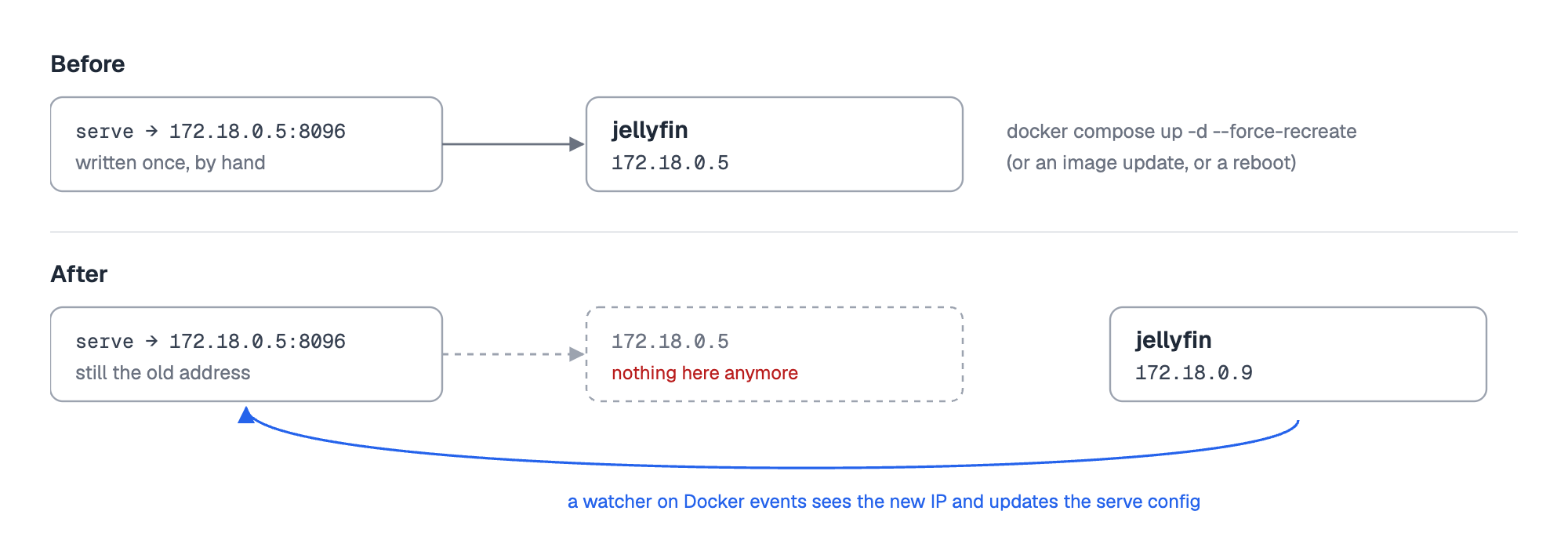
That's also why this needs something that watches Docker. If you skip published ports and point serve at a container IP by hand, it breaks the next time the container is recreated:

When the Jellyfin container is recreated, its Docker network IP changes from 172.18.0.5 to 172.18.0.9. A serve config written by hand still points at the old address, while a tool that watches Docker events updates it

DockTail is open source (AGPL-3.0). You don't need it to use Services, though, and everything in the next section applies either way.

Two things worth knowing

If a Service doesn't show up, it's almost always the tag. The host needs to be tagged (check tailscale status), and if you haven't set up an auto-approver, the Service waits for you on the Services page.

Apps that check proxy headers may complain at first, because Tailscale adds an X-Forwarded-For header. Home Assistant answers with "400: Bad Request" until you trust the proxy in configuration.yaml:

http:
  use_x_forwarded_for: true
  trusted_proxies:
    - 127.0.0.1

On a Docker bridge network, use the address Home Assistant names in its log instead of 127.0.0.1. Jellyfin has the same setting under Dashboard → Networking → Known proxies, but it works fine without it.

Was it worth switching?

For me, yes. What I like most is that the network config now sits right next to the app in the same Compose file. Adding an app means adding labels, removing it takes its Service with it, and my Machines page shows machines again.

I'd still use a reverse proxy for anything public with my own domain. Tailscale Funnel is great for a webhook or sharing one thing with a friend, but it's not a replacement for that. And if you run a handful of containers that rarely change, the manual tailscale serve route above is perfectly fine and needs no extra tool.

If you want to try the label approach, the code and docs (including complete guides for Jellyfin and Home Assistant) are at github.com/marvinvr/docktail and docktail.org/docs.

And if you've solved this differently, I'd honestly like to hear how. Leave a comment, I'll read all of them.

✍️
The article is contributed by Marvin von Rappard, creator of open source project Docktail.

Your medical provider might be recording your mental health care visits

Mental health providers are increasingly using AI technology to record conversations, raising privacy concerns among patients and practitioners.

An illustrated composite image shows two people in conversation, one taking notes while the other appears distressed. Audio waveforms, a microphone icon and the word “REC” are layered over the scene, suggesting a recorded or transcribed discussion.
Illustration by Roxsy Lin, American Community Media

In 2024, Kaiser Permanente announced the rollout of Abridge. Described in a press release as “ambient listening technology,” the AI-powered scribe is designed to help clinicians including mental health providers securely capture clinical notes during patient visits.

But what the description fails to indicate is that the tool records entire medical appointments, including deeply personal mental health sessions.

During these sessions, mental health professionals are required to obtain patients’ consent before using the tool. However, as shared by multiple providers, that consent process does not include explanations about how the information is handled. Nor does it say how long and where recordings are stored, or who has access to the data.

This happens in part because that information has not been shared with providers, despite their attempts to obtain it.

‘Empty assurances’

Ilana Marcucci-Morris chose not to use the platform with her patients. She is a licensed clinical social worker with Kaiser psychiatry in Oakland, California. She is also a member of a bargaining committee. In that role, she regularly meets with various Kaiser representatives, including Northern California’s director of mental health.

Marcucci-Morris describes how, during those meetings, she and other committee members have asked questions about patient privacy protections, HIPAA compliance, and the safeguards in place for the use of these technologies.

According to her, the response from leadership has often been empty assurances: “We are compliant. That’s it. That’s all you need to know. We vet the technology, therapist. Don’t worry. That’s not your job. We have tech experts. That’s their job,” Marcucci-Morris said in an interview with American Community Media.

“They won’t show us, right? And my feeling is, if you have nothing to hide and you’re doing it totally […] ethically, then you would show us, prove it. They can’t, and they won’t, and they declined to when we ask.”

Ligia Pacheco is a psychiatric social worker who provides remote therapy services for Kaiser patients in Southern California. She said Kaiser also refused her requests to provide further explanations.

In an interview with American Community Media, Pacheco recalled how a coworker once raised concerns to a supervisor. The response: that “it’s unprofessional for you to provide your personal beliefs on AI in our work setting.”

For Pacheco, “that leads to just low morale, no space to advocate for patients. We’re supposed to be the voice of patients who are coming in their most vulnerable state. And we can’t even be that voice for them, so we feel discouraged.”

“Patient after patient after patient”

Providers have been required to see more patients in recent years. That creates intense pressure to keep up with documentation and workloads, Marcucci-Morris highlighted.

“You’re just like seeing patient after patient after patient after patient with barely enough time to go to the bathroom, eat a snack […] get some fresh air,” she said.  

According to Marcucci-Morris, refusing to manage the increased patient volume can be treated as a failure to meet job expectations. It may also lead to disciplinary action.

As a union steward, she said she often represents colleagues during workplace investigations related to delayed documentation or difficulties managing heavy caseloads. In those situations, she said management frequently recommends the use of Abridge to save time and avoid further discipline.

In her view, the providers she knows who use the technology are not doing so because they support or trust it. Rather, it is because they feel pressured to protect their jobs and comply with workplace demands.

“I consider that to be coercive because you’re putting someone in a position to either lose their job or use the software. That’s another choice that’s under duress,” she explained.

Provider, patient concerns

Brian Hoberman is chief information officer for The Permanente Medical Group. In a Kaiser press release, he said, “Abridge’s advanced technology supports our doctors’ well-being by reducing the documentation burden.”

He added, “We implemented this new technology after careful review and diligent testing and found it to be well received by patients and doctors…”

For at least one patient interviewed for this story such assurances fall short.  

“I fear that this kind of information that’s being recorded now can get into the wrong hands,” said the patient, who asked not to be identified for privacy reasons. “I may not want my employers, I may not want my family members, I might not want people to know some of these very kind of intimate conversations and deep conversations I have with my doctors [and] with my mental health provider.”

Adriana Webb is a social worker at Kaiser Panorama City in Los Angeles. “I work with patients who have sensitive medical diagnoses, like […] HIV and AIDS, and a lot of times my patients don’t even want that in their chart.”

A spokesperson for Kaiser Permanente insisted in an emailed response to American Community Media that clinicians are required to gain patient consent prior to using Abridge. “No one is recorded without their knowledge and consent,” the statement read.

It added that recordings are stored for no longer than 14 days, and that data processing meets all HIPAA requirements as well as Kaiser Permanente’s own privacy and security standards.

“Abridge helps clinicians spend more time focused on patients and less time on administrative tasks,” it said.

Weaponizing mental health data

According to Nicole Alvarez, senior analyst for technology policy at the Center for American Progress, “a record of someone’s lowest moments can be used against them in ways that, you know, […] a high blood pressure reading cannot.”

She said mental health data can be especially sensitive because of the stigma surrounding mental health conditions. For patients, that stigma carries real-world consequences in areas such as employment, child custody cases, immigration matters, and security clearances. She emphasized that, like other forms of personal data, mental health information can be weaponized against individuals.

Agreements between health systems and AI vendors can vary widely, she said. This includes terms related to whether audio recordings or transcripts can be used to train AI models, whether patient data is de-identified, how long the data is retained, whether it can be shared with other clients, and what happens to the information once a contract ends.

Kaiser insists any data it collects is not used to train AI models.

Still, in Alvarez’ experience, patients often have little visibility into these arrangements. She argued that health systems have a responsibility to clearly disclose how patient information is being handled and used.

Alvarez also emphasized that, in most cases, patients have the right to refuse recordings. But, she said, the opt-out process is not always clearly presented. According to her, consent options may range from direct questions at check-in to language buried in intake paperwork, making it important for patients to carefully review forms and disclosures.

She said meaningful consent requires patients not only to know they are being recorded and that they can decline, but also to understand how their information may be stored, shared, or used afterward.

Coercive consent

Pacheco experienced this during a personal appointment at Kaiser. Her doctor did not ask for permission to use the app and instead informed her that it would be used. After a moment, she decided to refuse the platform’s use. Although the doctor stopped the recording, she felt a noticeable discomfort in the doctor’s demeanor afterward.

She later decided to change doctors.

Situations like this are a concern for Marcucci-Morris, who said the company’s approach to obtaining consent for the use of Abridge during appointments can feel manipulative and coercive. In her view, providers are trained to present the tool in a way that places the needs of patients and doctors in opposition to one another.

She explained that patients are often told the system will help doctors with documentation, reduce burnout, and allow them to spend more time with their families. As a result, patients may feel guilty declining the use of the tool because they do not want to make their provider’s job harder.

She believes this framing pressures patients into agreeing rather than allowing them to make a fully comfortable and independent decision.

According to Kaiser, Abridge is available in “40 hospitals and more than 600 medical offices in eight states and the District of Columbia,” part of a larger embrace of AI technology by the health care industry. Abridge operates in more than 14 languages.

American Community Media reached out multiple times to Abridge AI Inc. for comment but received no response. According to the company’s website, Abridge describes itself as a “Business Associate” to providers. Patients are advised to consult providers’ privacy policies for information on how their data is protected.

“Therapy is most effective in privacy and when trust is achieved through two human beings,” said Marcucci-Morris. For her, “healing occurs when human empathy is offered sincerely as part of any sort of mental health treatment relationship.”

She added, “I believe recording a therapy session changes human behavior.  It changes the patient’s demeanor.”

❌