
 Login
Wallpapi gives you a cooler way to change wallpaper on GNOME
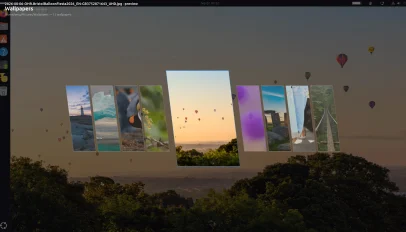 Wallpapi is an Omarchy-inspired wallpaper switcher for GNOME desktops that offers a slicker. When installed, it lets you “browse a folder of wallpapers as a full-screen carousel of parallelogram cards”. As you page through available options, the focused image is previewed as your wallpaper in the background, so you can see it larger, which is pretty cool. When you spot the drape you want, you hit Enter to set it as the desktop background. Choices are scheme-aware. If a light or dark variant is available, Wallpapi will set the correct version of an image per your system dark mode preference. […]
You're reading Wallpapi gives you a cooler way to change wallpaper on GNOME, a blog post from OMG! Ubuntu. Do not reproduce elsewhere without permission.
 The official wallpaper for the upcoming Ubuntu 26.10 ‘Stonking Stringray’ release has been revealed, alongside artwork bearing the official mascot. No huge surprises to see the standard formula hole. The distro’s designers have, once again, opted for a dark purple/aubergine backdrop that bears a vectorised mascot in the middle, which for this release is a stingray: No illustrative nod to the “stonking” adjective of the codename, but as most people aren’t even aware it is a word, perfectly understandable. There are 4 variants of the default wallpaper for Ubuntu 26.10. The colour one you see above, plus dark and a […]
