❌

Reading view

There are new articles available, click to refresh the page.

Convert HEIC to JPEG on Your Mac in Seconds

One of macOS's handiest little tricks is hiding in plain sight, and it could save you a surprising amount of time.

Ever taken a photo on your iPhone, transferred it to your Mac, and then discovered that the website you're trying to upload it to doesn't particularly like HEIC files?

It's a familiar frustration.

Apple's HEIC format is rather clever. It produces high-quality photographs while generally taking up less storage space than a traditional JPEG. That's great for your iPhone and your photo library, but not quite so great when a website, application or someone else's computer insists on a JPEG.

The good news? Convert HEIC to JPEG on Your Mac in Seconds

No downloads. No third-party apps. Not even a trip into Preview.

Convert HEIC to JPEG using Finder

Here's how to do it:

  1. Open Finder and locate the HEIC photograph you want to convert.

  2. Right-click the image (or Control-click if you prefer).

  3. Select Quick Actions → Convert Image. On some versions of macOS, you'll find it under Quick Actions → More → Convert Image.

  4. In the window that appears, choose JPEG as the format.

  5. Under Image Size, select Actual Size if you want to keep the original dimensions.

  6. Click Convert to JPEG.

That's it!

Your Mac creates a JPEG version of the photograph, ready to upload, email or share.

The original HEIC file is retained, so you don't have to worry about losing it.

Even better — convert multiple photos at once

Here's where this little trick gets genuinely useful.

You don't have to convert your photographs individually.

If you've got ten, twenty or even a hundred HEIC photographs that need converting, simply select them all in Finder, right-click and choose Quick Actions → Convert Image.

Choose JPEG, select your preferred image size and let macOS do the rest.

Each photograph gets its own converted JPEG file.

It's particularly handy when preparing images for a website, sending photographs to someone who can't open HEIC files, or getting a batch of pictures ready for an online submission.

A little extra tip

You'll notice that the conversion window also lets you choose a smaller image size.

That's useful if you're preparing images for email or the web and don't need the original full-resolution photograph.

Just remember that converting to JPEG doesn't necessarily make every photograph smaller than its HEIC equivalent. HEIC is already a very efficient format.

And one more thing: don't simply rename a file from .heic to .jpg. Changing the filename doesn't convert the photograph's format.

The Apple Geek verdict

This is exactly the sort of small macOS feature I love. It's not particularly flashy, it isn't buried behind a subscription, and it doesn't require downloading yet another utility that you'll probably use twice and forget about.

It's just there, quietly doing its job, once you know about it, you'll probably wonder why you ever bothered opening an image editor just to change a file format.

Sometimes the best Mac tricks are the ones Apple doesn't make a fuss about.

Paste Without Formatting on a Mac

There's a particular little annoyance that drives me mad when working on a computer.

You find a useful paragraph on a website, copy it into a document, and suddenly everything goes a bit strange. The font changes, the text becomes enormous, the colours don't match, and what should have been a simple copy-and-paste job turns into five minutes of tidying things up.

It's particularly irritating when you're writing articles, putting together emails or gathering information from several different websites. Fortunately, macOS has a solution, although the keyboard shortcut is rather more complicated than it probably needs to be.

The Magic Shortcut

You're almost certainly familiar with Command (⌘) + C to copy and Command (⌘) + V to paste.

But next time you're copying text from one application to another, try this instead:

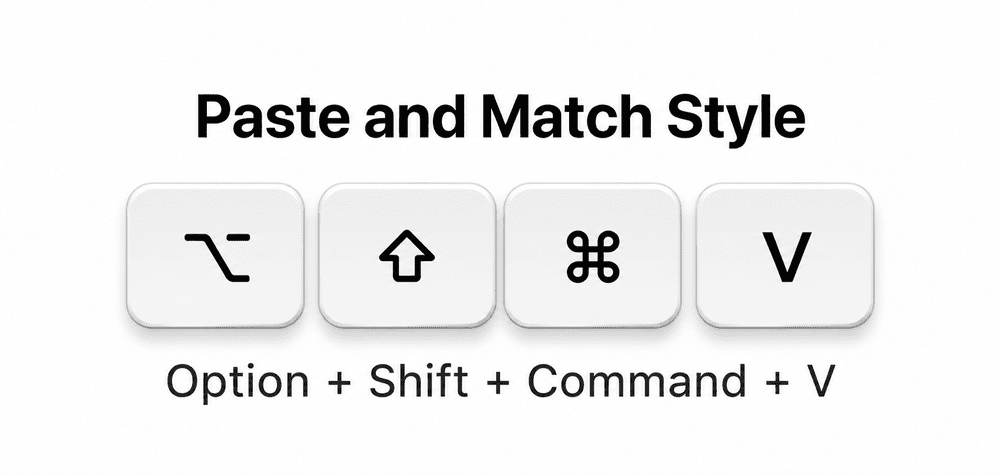
Option (⌥) + Shift (⇧) + Command (⌘)+ V

In applications that support it, this activates “Paste and Match Style”. Rather than bringing across the original font, size, colour and other formatting, the pasted text adopts the style of the document you're working in.

It's a tiny change, but it can save a surprising amount of irritation.

Why Doesn't Every App Behave the Same Way?

This is where things become a little confusing.

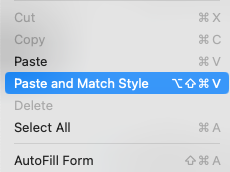
Not every Mac application handles pasting in exactly the same way. Some use different keyboard shortcuts, while others offer their own options for pasting plain text. If the shortcut doesn't work, look in the application's Edit menu for something called Paste and Match Style or a similar command.

The menu will usually show which keyboard shortcut that particular application expects.

It's also worth remembering that matching the destination's formatting isn't necessarily the same thing as stripping every possible bit of formatting from the clipboard. The receiving application still decides how pasted content is handled.

A Little Shortcut Worth Remembering

It's hardly the most exciting feature Apple has ever added to macOS, but if you spend your days moving text between websites, emails, documents and notes, it's one of those tiny discoveries that can make your Mac noticeably less frustrating.

And once you get into the habit of using it, ordinary copy and paste starts to feel rather old-fashioned.Now, if only Apple had chosen a shortcut that didn't require quite so many fingers.

How do I exorcise a nightmare client and ensure they don't rise from the dead?

With Halloween almost upon us, we've picked a Dear Boom missive that reads like the opening of a horror film.

A creative writes: "I've been working with a client for nearly two years. Every job starts as 'something really simple'. The brief changes halfway through. Finished projects come back from the dead. And somehow, I always end up agreeing to one more thing. I've been calling it a learning experience. But I think I've had enough now."

"The good news is, I'm ready to leave. But then I try to write the email. I've softened the latest draft so much it now sounds like I'm not trying to move away at all. I want to leave professionally, wish them well and experience the enormous pleasure of never receiving another 'quick question' from them on a Sunday evening, ever again."

So how do you make a clean exit when you're very good at saying yes and bad at saying goodbye? We put the question to our community on Instagram and The Studio. A couple of you suggested calling in an exorcist (Keiron Lewis helpfully notes you'll need it authorised by a bishop), but most had rather more practical advice...

1. Goodbye or renegotiation?

A few of you asked whether a break-up is actually necessary. Designer Nicholas Robb suggested explaining the problem in plain language and proposing a fix, such as fixed briefs or higher fees, arguing that you have nothing to lose. Illustrator and animator Csaba Klement suggested updating your contract so that changes cost money: "If they won't sign, your exit is clearly on them."

These sound like good options in some situations. But we'll believe our correspondent when they say they've firmly decided to leave. After all, if you'd be secretly disappointed when they said yes, any negotiation won't be a win, but a potential own goal.

2. Check your contract

As illustrator Charlotte Goodman-Brooks points out, when you break up with a client, check your contract first. If there's a notice period, honour it.

If there's no contract, though, creative director and consultant Paul Leon suggests you owe nothing beyond finishing what you agreed to. "I'd do my last project and walk away," he says. "You don't have to explain anything; you don't have to metaphorically pour petrol on the bridge and set it on fire, unless you really want to make a point.

3. Explain, but don't litigate

The biggest split in our discussions was over whether to give reasons at all. Designer Matthew Gallagher argues you don't owe anyone an explanation. "Merely let them know that your schedule is booked and you won't be able to take any more work from them," he recommends. "It gives them a heads-up, and you can move on by being gracious and without having to burn any bridges."

Photo retoucher and creative artworker Sandrine Bascouert, however, takes the view that the truth can be one last service to a client who's been surrounded by yes-people and has no idea they're a nightmare. "You don't have to be harsh or rude," she says. "Just tell it like it is, keep it short and make it clear there's no coming back."

Illustrator Lucila Solier Feiguin agrees. "You should probably give them the reasons, at least broadly speaking ('due to X/Y/Z the situation has escalated beyond the agreed budget and contract multiple times, which has made me take a step backwards to reassess')," she says. "Try focusing on the facts and what kind of consequences those had."

4. Writing the exit email

Now for what some might consider the biggest challenge: emailing the client. Designer Jessica Rebelo knows exactly where our correspondent is coming from. "I'm a people pleaser and have been there, accepting a lot of work, sometimes for very little money," she admits. "It's tricky!"

Lucila's tip is to put yourself in the shoes of "the boss" when you write the email, and allow yourself to state your boundaries. Then, crucially, don't undo them in the sign-off. "Don't add anything like 'but we could work together again', or you'll be basically telling them that your boundaries mean nothing," she warns.

A good exit email needs to tick three boxes. The client needs to clearly understand you won't be taking on further work. You need to define an end point: when you've caught up with the work you owe them, and you're done. And finally, a sincere good wish—but one that acts as a full stop, rather than a signal for further chat.

Madalena Studio did exactly this last year. "We said that our business focus was moving in a different direction and, whilst we had personally enjoyed and greatly appreciated working with them and their team, that they might be better finding a partner who was more aligned with their needs," the studio explains. "We politely gave them a four-week notice period, wished them well and sent their files over at the end."

Hand-painting illustrator Lee Gruber took a similar approach when ending a retainer. "I gave a month's notice, kept scope firm, and offered a handover with a clear end date," he says. "I even offered alternatives to fill my role."

5. The happy ending

Here's the part our correspondent will enjoy most. After all that agonising, how did Madalena Studio's client of four years respond? Quite simply: "I am aligned on this."

It often goes like this. You spend all that time pent up, dreading your reaction, and then nothing happens. It's anti-climactic for sure. But on the plus side, it leaves you to get on with your life, and that has to be a good thing.

The final part of this horror story? Make sure the sequel never gets made. As Paul stresses, solid contracts, terms, and work schedules protect you next time. Designer and founder Brian Winkeler goes further, telling every new client his agency has two set-in-stone rules. "We don't work with jerks," he says. "Anyone who can say 'No' must be part of the process." Do that, and your next horror story might never make it past the trailer.

30 Google Secrets You’ll Wish You Knew Years Ago

Think you know Google? Think again—hidden deep within that simple search bar is a subterranean network of secret search operators, hidden diagnostic tools, and buried privacy toggles that change everything. From listening to your saved voice logs to uncovering secret files and bypassing algorithm bubbles, here are 30 game-changing Google secrets you were never supposed to find.

Busier briefs, shorter days: 8 ways to survive the last quarter of the year

We asked fellow creatives how they avoid running on empty from October through to December. Here's the best advice they shared.

Is it just me, or does the last quarter of the year always feel like the busiest? Maybe it's because we're on countdown for Christmas. Maybe it's because so many people are off, desperately trying to use up their annual leave before it's too late. Or maybe it's because briefs that sat around all summer suddenly need turning around before year's end.

Whatever the reason, clients want everything done and signed off ASAP. So you put in more hours, drink more coffee, take fewer breaks, get less quality sleep. Yet none of that seems to touch the sides.

We asked the community in our own creative network, The Studio: what's the one thing you do to get through the end of the year without running on empty? Here are some of the best tips they shared with us.

1. Walk, and make it fun

We'll start with the one that everyone knows, but few of us actually do: take regular walks. It makes sense, though: the time you spend out in nature will be repaid in a refreshed body and a sharper mind.

Struggling to motivate yourself? If you're already thinking of getting a dog, now's the perfect time. "I don't know where I'd be without my daily dog walk," says video producer and animator Nick Hill. "It's in one of two local parks, so it never varies much, but it helps me declutter my mind before pitching into work."

If you're not a dog person, though, just borrow the idea and form the habit anyway. That becomes easier if you have a clear goal in mind. Artist and illustrator Selena Tabakovic's suggestion: "Walk with some music that puts you in a cathartic mood. Find a place where you can look at the horizon, and nothing is between you and the vista."

2. Chase the daylight

One of the biggest challenges of Q4 in the northern hemisphere is lack of light. So maybe follow the example of designer and art director Asa Rodger. "In Scotland, especially further north, the light is SO short," he explains. "So I've started striving for the daylight a bit more proactively. I've been swatting up about light: circadian rhythms, cortisol, melatonin; how it all works together."

The typical work times felt like they were working against him, and winter was feeling tougher to handle each year. "So I started taking a big hour-long walk after lunch to get the light. Then I'd work an hour later at night, 5-6pm, when it's dark anyway."

The first year he tried it, winter felt less of a slog, so the habit stuck. If you're freelance, it should be easy to do the same. If you're not, and your boss is unwilling to be flexible, a lunchtime walk is the next best thing.

3. Cut the noise

Often, the stress we feel from work is simply compounded by the constant noise we get from our phone apps. But there are easy steps you can take to dial that down. "Turning off notifications was fantastic for me," says author and illustrator Juliana Salcedo. "It lowered my anxiety a lot." Her next goal is to leave the phone far from her bedroom.

Designer Steel Grimpeur has gone further. "Here are a few things I've begun implementing. No social media, no notifications, just a massive waste of time. Creative Boom is the ONLY place I go. Which means all I need is a dumb phone. I only add a number in when I have to call it; forget the rest."

4. Nap without guilt

We often associate napping with elderly people, but in truth it can be hugely helpful with stress, whatever age you are. "Even short naps make a big difference for me," says artist Destiny Hankerson. "They help my brain rest and shut the outside world out for a while." Writer Jamie R takes a similar line. "I plan to replenish myself with lots of naps. I've done great things for myself this year, and I feel tuckered out; I'm going to be gentle with myself."

5. Protect your time off

Even if the fourth quarter is the busiest, that doesn't mean you shouldn't take proper time off. Indeed, it's actually the best reason to do so.

"I started to protect holidays from business encroachment a few years back," says designer Matthew Gallagher. "Early in my career, for easily the first 10-15 years, I worked non-stop and never had a proper holiday because there was always a gig popping up, and I couldn't pass up the money. Now, however, those holidays at the end of the year are sacrosanct, and they provide the joy and celebration that sustains me and fills me up for the new year."

Programmer Martin Beroiz keeps it simple: take a week off in October if you can. Graphic designer Aneala Wilson, meanwhile, always has a mini treat to look forward to, whether that's a holiday, an art class or a festival, and treats a break as non-negotiable.

If that doesn't feel like it'll help, though, why not follow in brand designer and illustrator Wajeeha Abbasi's footsteps? "I took three months off from my corporate job because of severe burnout," she reveals. "I went to the mountains, ate good food, slept in on days I felt exhausted, limited social media, reconnected with old friends, created art for myself. And now I feel like a brand new person."

6. Step away mid-deadline

When you're drowning in deadlines, it's tempting to keep at it and never switch off. That, however, isn't just bad for your health; it's counter-productive because it's going to drain your productivity and creativity. So why not follow this advice from Selena: "Take a few hours or days in the middle of a tight deadline and do something completely unrelated to your work. Find a way to laugh until you cry."

That might sound reckless, but staring at a problem rarely solves it. Walk away, do something fun, come back sharper. You may fix in 20 minutes what you previously couldn't fix in a day.

7. Ask for help

Remember too that you don't have to do any of this by yourself. "I'm notoriously bad at reflecting," says graphic designer Lyndsey Yates, "so I join the quarterly review calls with the Being Freelance community, which help me look back at what's worked and what hasn't."

"It also means I can hear what other freelancers have been up to, the difficulties they've experienced, and offer my own advice and support where I can," she adds. "Sometimes just knowing you're not the only one is a real comfort."

8. Give yourself some credit

Finally, part of what makes a busy period stressful is that we stop being kind to ourselves. Yet as architecture and interior design photographer Erik Sven points out: "You've made it this far because you've worked hard and had a few wins. So take a look at the progress you've made."

In other words, rather than hitting November with a mental list of everything that went wrong, write a list of what went right instead. Then follow Erik's other advice: "work smarter, stay hydrated, and recognise the need for rest. Guard your time. Let your feet touch dirt. Winter is coming… at least that's my Seattle mindset."

Seven lines of client feedback that knock you sideways, and how to stop them living rent-free in your head

Got a sentence that's keeping you awake at night? Here's how to reclaim your confidence.

No one likes to be criticised. But it can sting even worse when it comes from a client who doesn't understand the first thing about what you do. So if you ever see a group of designers, illustrators or art directors gather together, it won't be long before they start sharing horror stories of clients from hell.

Sometimes, though, getting client feedback off your chest isn't enough. It starts to bury itself, deep down in your brain. And it doesn't matter how successful you get in your career; it never quite goes away.

One thing that can help is to recognise it's not just you; thousands of your fellow creatives have probably had similar things said to them, for reasons that have more to do with the client than their actual work.

So we asked the Creative Boom community to share their client feedback horror stories, and there was no shortage of replies. You can view the full discussions on LinkedIn and our own creative network The Studio. In the meantime, we've selected seven of the most common types below, along with some practical ways to respond.

1. The pre-emptive threat

The feedback: Lee Davies, creative strategy director at Peter and Paul, was once told: "I just want you to be clear: if the final work ends up looking like what you've presented this week, I am going to be extremely unhappy."

What's behind it: This is not critique; this is fear cosplaying as authority. The client is nervous about their boss, their stakeholders, their own standing. Not you or your ideas.

How to respond Rather than getting defensive, be the bigger person. Stay calm and confident. They are being weak, so you have to be the strong one here. Try to find out who else needs to sign off, what they're worried that person will say, and how you can help ease their fears.

2. "Can you make it look less designed?"

The feedback: It's one of the most common "complaints" creatives shared with us: a client asking for the work to look less than professional, even though they hired a professional to make it!

What's behind it: As brand strategist Richard Davis puts it: "Often the problem isn't the design itself, but that the client hasn't yet found the words for the feeling or business concern underneath the feedback."

How to respond: There's usually an underlying fear which you'll need to draw out. Ask not what something "less designed" would look like, but what it would let them do that this version doesn't. For example, would it feel more approachable, seem cheaper, look less corporate? Questions like this will help uncover what they're really worried about (even if they don't know it themselves yet).

3. The Canva comparison

The feedback: "One thing that still haunts me," says graphic designer Max Mann, "is when a head of marketing said to me: 'It looks like I can do this in Canva, do it again'." Another common niggle is when clients mock up their own version in Canva first.

What's behind it: Clients typically take this approach because they have no idea what's involved in crafting a professional design (as opposed to slapping some text onto a template) and think they can do better.

How to respond: Bury that flash of anger, and save it for that pub conversation later. Remain calm and patient, and avoid the impulse to be patronising. Walk them through what the design process actually involves, and "show your working", as they used to say with maths homework at school.

For example, you might show them the options you rejected and why (which will soften the blow when you reject their Canva efforts), explain the demands of accessibility and the need for brand systems, and so on. Don't drown them in jargon, but convey how this stuff is more complicated than they think.

4. The phantom budget

The feedback: Marketing director Claire Mcdivitt describes a familiar trap. "The client says: 'We haven't got a budget in mind.' So you spend ages developing ideas, working out how to make them and putting together different options at different price points.

"Then they come back and say: 'They're all far too expensive.' Turns out there was a budget. You just had to design past it to find out."

What’s behind it: Why would clients withhold a budget? Surely it would save time and effort to declare it up front? It's sometimes out of embarrassment, sometimes out of caution… but often they just don't know what design costs, and don't want to tip their hand.

How to respond: Firmly ask for a figure upfront. If they say they don't know, share ballpark costs from comparable past projects, so they at least have an idea what they're getting into. Then keep pressing them to share an estimate before getting into creative work and wasting everybody's time.

5. "I'll know it when I see it"

The feedback: This phrase came up again and again in our discussions, and it's a real red flag. As creative coach Vicki Lovegrove recalls about one project, "Despite several changes in the brief, lots of visuals, the client never did 'see it'. We parted ways. Months later, I saw what had been done; it was just a word in Arial."

What's behind it: This phrase sounds confident, but in truth it's usually a sign of weakness. The client doesn't know what they want and is hoping your hard work will somehow, magically, help them find it.

How to respond: Rather than crafting a full concept, slow the process down and limit yourself to smaller, easier steps. You might, for instance, pull together a spread of references and ask the client to react to each one in a sentence or two. Once you've got a sense of the direction they want to go in, sketch something small and rough, and again check it against their reaction before you go further.

6. Feedback by committee

The feedback: Illustrator Kotryna Zukauskaite was once told about a picture of a tall building: "Some people at the office thought it looked a little phallic." Richard Lowes, creative director at Punch Hospitality, remembers this piece of feedback from the ex-chairman of a major football club: "My wife wants you to make the owl look more scary and angry. Yours is not scary or angry."

What's behind it: Feedback filtered through anonymous colleagues, partners or relatives is a way that clients can avoid making a decision themselves and also insulate themselves from criticism, because they're not really sharing their own opinion, just quoting others (who typically aren't in the room).

How to respond: Don't just take comments like this as read. Politely ask whether you can hear directly from whoever raised it. If that's not possible (it probably won't be), ask the person actually sitting in the room whether they agree, and why.

7. Damning with faint praise

The feedback: Christina Cooksey, founder of Ceiling Train, remembers one line above all others: "'Approved with disappointment.' Fifteen years later, and it haunts me to this day." Lukewarm 'approval' like this can be worse than total rejection, because there's no obvious way forward.

What's behind it: The client might have personal issues that they need to take out on someone else. The client may just be a bully who likes intimidating people. Or the client may just be weak, indecisive and sick of the whole process.

How to respond: It's tempting to just take the money and walk on. But if Christina is still bothered by it 15 years on, chances are you will be too. So schedule a proper meeting, and ask directly what would have made it an enthusiastic yes rather than a disappointed one. Make it clear you're not fishing for praise but looking for a way to improve in future.

You may unearth something that leads to a better understanding of the actual problem, and an easy fix. Or you may not… but at least you'll have done everything you can. And that in itself will probably help you sleep better at night.

Are you getting ghosted more than ever? You're not alone!

It's not about you; it's about a broken business culture.

You've spent a lot of time, effort and emotional energy forging a working relationship. It's all going well. Then… nothing. The founder who said they loved your first concept simply vanishes. A marketing lead who's briefed you thoroughly and has promised a purchase order suddenly leaves you high and dry.

It's a horrible situation to be in. From a financial standpoint alone, it can be crippling. But more fundamentally, you also start to doubt yourself. Was the quote too high? Were the concepts lame? Did they find someone cheaper, or use AI? Did you have some food on your face during the Zoom call that everyone was too polite to point out?

Horrific, right? But here's what we've learned from our community on LinkedIn and Instagram. In 2026, ghosting has become systemic. So you shouldn't take it personally. Because it's not really about you at all.

Why silence has become the default

"I've seen a lot of this so far this year, and it can feel really hollow at times," says director and cinematographer Rob Pinney. "I'm still getting a good number of approaches for new projects, but many more of those now end up with a dead email chain than before."

So what's behind the trend? "There seems to be a lot more budget hesitancy right now," Rob suggests. "And I suspect some of that is to do with clients weighing up that potential spend on video production, in my case, versus what they could do with it elsewhere, including with AI tools."

Film director Farai Dube has had similar experiences. "It's a lot of stop and start," he says. "When you're at the start of the conversation, there's actually a budget, but that's in jeopardy depending on sales and generally how much money's coming in. I get that: the part that's frustrating is keeping you on the hook. I'd rather have clarity upfront."

Yet it's not just cash-strapped clients who are guilty of ghosting. Creative director Rich Holt, for instance, complains about "recruiters who appeal for specific people to contact them—even though they're supposed to know the industry and have CVs on their desk already—and then just never reply." Director and lecturer Luke Tonge, meanwhile, calls out: "folks not replying when you invite them to speak at an event. It can hold up planning for weeks and even months."

So why does ghosting seem to be getting so much worse these days?

The fear factor

Graphic designer and photo retoucher Sandrine Bascouert reckons there's something deeper going on than just laziness or poor organisation. "I think some people are afraid of communication as a whole," she says. "Ghosting has become a way to avoid normal conversations where there could be feelings hurt and disappointment."

That certainly chimes with my experience as a member of Generation X. When I first entered journalism in the 1990s, almost the entire job was phoning people. As long as you were polite and respectful, everyone was happy to chat.

By around the mid-2000s, though, I noticed that many creatives under 30 were screening their calls and wouldn't pick up if they didn't know the caller personally, even if they were actively trying to promote themselves and their work, which never made any sense to me.

Eventually I admitted defeat, and switched to email. But by the mid-2010s, many creatives were keeping their emails private—despite, again, ostensibly wanting self-promotion—and I had to start relying on social media DMs instead.

In 2026, many of those creatives are now seniors and CEOs. So it's no surprise to me that some might lack the ability to have difficult conversations, and not be willing to put in the emotional labour when times get difficult. I don't wish to generalise about an entire generation, of course. But still.

Good reason or bad actor?

Poor communication skills, though, are only one reason for ghosting: there are plenty more. If we're being generous, for instance, we might assume that there's been something like a family emergency, and the other party just doesn't have the capacity to even open their inbox right now.

At the other end of the spectrum, some people can just be dicks. We've all heard of companies who interview people, ask for their ideas, and then simply steal them. There was never any job, freelance work or collaboration opportunity in the first place. It was all a scam.

Then there are those who sit somewhere in the middle, who aren't malicious, but just fail to cope. That doesn't help you, of course. As designer Nicholas Robb points out: "It starts to feel unfair after you've done a couple of calls with the stakeholders, bordering on consultation to help them scope it up. It would take 30 seconds to email back and say 'not interested + a reason why'."

Yet as an entrepreneur himself, he can also empathise. "I think business owners in particular are just so overwhelmed these days that they can't afford the time or mental space to do even that," he reflects. "So I try not to take it personally."

How we should respond

Other than not beating yourself up for being ghosted, though, what can you practically do?

As a rule of thumb, designer Alexander Clark has developed a script. "After two or three of my emails go unreplied, I write this", he says, "Since I've not heard from you, I'll be pausing this and moving forward with other projects. Please let me know when you'd like to proceed or if you've changed priorities." It usually yields a response within a day."

This is a good strategy because it removes all ambiguity. You've stopped chasing them (giving them the power) and are about to close the door (giving you the power). They have no choice but to make a decision. At this point, silence and doing nothing becomes a decision in itself.

And if that's what happens? Then move on, feeling empowered that you took control of the situation. And remember: their silence is not a poor reflection on you; it's a poor reflection on their lack of professionalism and communication skills.

Setting boundaries upfront

Ultimately, prevention is always better than cure. So if you want to avoid getting ghosted, it's always good to set boundaries upfront, such as a deadline for responding to proposals. That might seem a little overbearing, but remember that clients and employers are often super-busy, and a deadline can actually be helpful for them too.

Content creator Jacob Elias Nurse offers a further suggestion: have a lot of plates spinning. "One thing I've learned from my nine months of being a full-time freelancer is that keeping busy helps you not worry too much about replies from companies that want to dangle a carrot in your face," he explains. "If you keep grinding at your craft, the money will follow."

He even finds a way to frame ghosting as a positive. As he puts it: "Their disrespect isn't a reflection of your craft or your quote. If anything, it helps you weed out who you want as a client and who you don't want as one."

Founder and creative director Kirsten Murray agrees. "A person who ghosts you is not someone you want to work with," she says. "Mutual respect and open communication make for the best creative partnerships."

So maybe that's the main takeaway. Ghosting sucks, for sure, but it's not necessarily a calamity. In fact, in the long term, it could be a good thing: saving you from a nightmare client and freeing you up to find a good'un instead.

Should you rebrand yourself this September, or just hold your nerve?

Autumn is a good time for career invention. But that doesn't mean you should.

After the searing heat of summer, autumn has finally arrived: hooray! But while the weather might be more relaxed, a lot of us are getting itchy feet. One anonymous creative writes: "Every September, without fail, I get the itch to reinvent myself.

"It's the back-to-school feeling, I think," they continue. "New pencil case energy. But this year it's hit harder than ever. I've spent the past week sketching a new portfolio, rewriting my bio, even toying with a new name for my whole practice.

"Part of it feels properly exciting. My style has been shifting all year, and the work I want to make doesn't quite match the work I'm known for. Maybe this is the moment to commit. But another part of me wonders what I'm actually doing. Things have been slower than I'd like, and a rebrand is a lovely, absorbing project that conveniently isn't pitching, or emailing art directors, or doing any of the scary stuff. It feels productive. I'm just not sure it is."

So how do you tell the difference? Is rebranding yourself a good use of your time, or just a way to feel in control, in a world that feels out of control? To hear a range of perspectives, we asked our community via Instagram and The Studio, our own free-to-join private network. We share some of their best pieces of advice below.

Examine your motives

The question of whether to rebrand yourself is a dilemma that hits home every autumn for fantasy author and creative advisor Samantha Garner. "The New Pencil Case Energy is always so strong!" she exclaims. "Over the years, though, I've had to ask myself, am I reinventing towards something, or away from something like boredom, anxiety or FOMO? And will reinventing actually solve any of the issues I think it will? Sometimes big change helps, but more often than not I'm just being distracted by something shiny."

For Samantha, the key question is this. "Are you moving towards a new direction because you've evolved and your old positioning no longer fits? Or are you running away from something that feels scary?"

Caroline Addison, founder of England's North, adds a further note of caution. "There's loads of research that shows creatives get bored of their brand long before other people do," she says. "Just look at how many rebrands have been reversed!"

It's a fair point. You might be sick of your branding, but much of your audience might only have just encountered it. Even if they haven't, they might love it anyway. In that case, changing it overnight might mean losing the attention of the one person who's about to offer your work.

So ask yourself honestly: what makes you think your branding isn't working anymore? If there's a clear, identifiable reason, fine. If not, then why mess with what works?

The experimental approach

Let's assume you have a clear reason to rebrand. Maybe the initial branding was rushed, when you got bundled out of a job and flung into freelance, and had to launch something super-quickly. Or maybe you've recently added new skills to your resume, specialised in a particular sector, or pivoted to a different career entirely.

At this point, you may have a clear need to rebrand. But you still don't want to alienate or lose your existing clients, followers and audience. In which case, maybe you just need to take a more subtle approach: a refresh rather than a rebrand.

As creative director and consultant Paul Leon notes: "There's rebranding and there's rebranding. You don't have to rebuild the house when you get antsy: you could redecorate the interior, buy some new furniture, change up your art, or move things around to get them in the best places. It's not always about tearing out the foundations. Sometimes you have to build, support and tweak what you have."

Samantha has a framework for this. "If I really feel like evolving something, then I try to broaden the scale," she explains. "Maybe I do something small like rewrite my bio now, but decide to spend the next few months trying out a new direction alongside my usual work. If I'm still excited about the new stuff after that time, then I take that as a sign that it's something to pursue more deeply."

Want to go further, faster? As artist and illustrator Paul Garland suggests, you could simply launch a secondary brand. "A pseudonym is always a good option if you're worried about losing current clients," he suggests. "Play and experiment, then promote it separately from your current named work, and see which generates the most interest."

Ultimately, only you know whether now is the right time to revamp your personal brand or leave well alone. As multidisciplinary designer Rikki Janae puts it: "Either decision is a potential risk. You stay the same, you risk things slowing down. If you change, you risk losing some of your followers and clients." Basically, you just have to choose and stick with it.

The important thing is: just be honest with yourself. And if that's difficult, maybe try imagining yourself as an entirely separate person: a client asking for your input. What advice would you give to "them"? The answer will soon reveal itself.

A hidden Ubuntu feature that stacks desktop icons, macOS-style

Desktop Icons NG text written around the outline of some icons.Ubuntu’s Desktop Icons NG (DING) extension has a little-known way to bring order to a chaotic desktop: stacks. Stacks groups multiple files of the same type in a collapsible icon, e.g. images in one stack, PDFs in another and so on. Folders don’t get grouped, and if there is only one of a type of file on the desktop, it is not stacked. Expanding a stack by clicking on it reveals all files in the stack (other file icons bump out of the way). Multiple stacks can be expanded or collapsed at the same time, and stacks can be left […]

You're reading A hidden Ubuntu feature that stacks desktop icons, macOS-style, a blog post from OMG! Ubuntu. Do not reproduce elsewhere without permission.

💾

A hidden Ubuntu feature that stacks desktop icons, macOS-style

Desktop Icons NG text written around the outline of some icons.Ubuntu’s Desktop Icons NG (DING) extension has a little-known way to bring order to a chaotic desktop: stacks. Stacks groups multiple files of the same type in a collapsible icon, e.g. images in one stack, PDFs in another and so on. Folders don’t get grouped, and if there is only one of a type of file on the desktop, it is not stacked. Expanding a stack by clicking on it reveals all files in the stack (other file icons bump out of the way). Multiple stacks can be expanded or collapsed at the same time, and stacks can be left […]

You're reading A hidden Ubuntu feature that stacks desktop icons, macOS-style, a blog post from OMG! Ubuntu. Do not reproduce elsewhere without permission.

💾

How to say yes to the big job when you're a one-person studio

If you're turning down work because there aren't enough hours in the week, read on. Here's what it looks like to bring in temporary help on Upwork, and how to do it without the usual faff of hiring.

You know how it goes. The work you pitched for but half-forgot has finally come through, the client is ready to go ahead, and the deadline is, as you'd expect, yesterday. It's a great feeling, for a second or two, until you open your calendar and realise you don't have the capacity.

I hear about this dilemma all the time. A studio might win a big rebrand and suddenly need a motion designer for three weeks. An illustrator may get a book deal but has a backlog of client projects. The in-house team of two finds itself covering the output of six full-time staff. Or the freelancer who has become a small studio, unintentionally.

Across all of these scenarios, the problem isn't ambition, it's access. Upwork's own research discovered that nearly half of small and medium-sized businesses put "finding people with the right expertise" among their biggest concerns. They'll know exactly who they need, but they don't know where to find them or whether they're available... even if they're any good.

Everyone is hiring this way now

Looking closely at Upwork's recent survey of US-based business leaders, 71 per cent of small and medium-sized firms said they planned to increase their use of freelancers over the next three months, just ahead of the 66% planning to hire more full-time staff. That might suggest we're back to similar vibes we saw during the global economic crisis days of 2008, when flexible help was no longer the fallback businesses turned to when they couldn't afford a permanent hire; it was their first choice. It's how it always goes during downturns.

Man in brown shirt presenting to colleagues around a desk in a bright office with framed artwork on the wall

Whether it's a permanent shift this time, no one knows. Whatever happens next, right now is a lucrative moment for the self-employed in the creative industries. And there's also talk in our private community that rates are going up again, just as opportunities flood freelance boards once more. It's all looking very optimistic.

That's all speculation, though. If we look at the actual reasons uncovered in the survey: speed to hire and get the project finished (28%), access to specialist skills (27%), and covering a temporary gap in the team (17%). The point is, the work turned up, and it needed doing.

Flexible help is no longer the thing you fall back on when you can't afford a permanent hire; it's a first choice.

So how does it actually work?

If you've never used Upwork, it's pretty straightforward. You post a job describing what you need. Proposals start coming in, usually within a few hours, not days. You review verified work history, portfolios, and reviews, talk with a shortlist, and hire. Sorted.

Laptop displaying a project dashboard with a circular progress chart showing 20%, surrounded by a coffee cup, mouse, and person's arm on a wooden desk

You can structure your listing a few ways, too:

  • Hourly: for open-ended or ongoing work – everything tracked and billed regularly.
  • Fixed price: exactly what it says on the tin – a defined price for a defined project.
  • Project catalogue: ready-to-go packages you buy off the shelf.
  • Contract-to-hire: a proper trial run before anything permanent.

Payments are held and protected on the platform, so that's peace of mind. No one is chasing anyone. Signing up and posting a job costs nothing. Upwork takes a 5% service fee on payments to talent on its 'Basic' plan, or 10% on 'Business Plus', which includes extra tools for teams doing this regularly.

Note the small print: there's a modest contract initiation fee per contract, and 'Business Plus' adds 30-day payment terms for eligible US clients.

Six hours, not six weeks

The biggest change to Upwork lately is the shortlisting. Its AI agent, Uma, now reads your brief and comes back with a curated list of relevant people within six hours. And, as of spring 2026, the feature is available across all plans.

It also generates work summaries, which might sound like nothing, but it makes an enormous difference. For example, instead of ploughing through 40 profiles trying to work out who has actually done something like your job before, you get the relevant bits pulled out and laid side by side.

Person in blue jacket and grey beanie working on a laptop while checking their phone, with potted plants and wooden panelling in the background

There's also a contract generator that drafts an agreement from the details of your initial video call, work diary summaries that turn tracked hours into a readable weekly progress chart, and a continuity feature that offers a replacement with the project context intact should someone step away. Upwork has also put its marketplace inside ChatGPT and connected it to Claude, so you can find talent inside the tools you're already using.

"SMEs have always had big ambitions, but what they don't always have is easy access to the right people to bring those ambitions to life," says Anthony Kappus at Upwork.

But is the work any good?

As a business owner myself, it's a fair question I'll ask first. No one wants to hand a client's brand to a stranger and hope for the best. That was always my biggest concern.

But the numbers are encouraging. And you know we don't write about tools or products unless we genuinely think they're worth your time. In Upwork's survey, 84% of small and medium-sized businesses described their experience of working with freelancers as positive or very positive. And clients are spending more with the same people over time – average spend per active client rose 5% year on year between this April and June, the eighth consecutive quarter it has grown. That pattern shows people coming back, not trying the platform once.

Even better, there are signs of green shoots. As I said before with our community, many of Creative Boom's readers will recognise this. Upwork's Future Workforce Index 2026 found that 38% of US skilled knowledge workers now freelance, up from nearly a third a year earlier, with 58% of full-time employees saying they'd consider it.

Man with beard wearing checked shirt in a creative studio space, gesturing while speaking

All this shows the talent pool isn't what it was five years ago. It's increasingly experienced folk who chose this path deliberately, and who bring judgment as well as craft to the table. Which, of course, is exactly what most of you are. The person on the other end of that job post might well be reading this too.

Start small, then trust the process

If you're new to this, advice from studios that hire well is consistent: don't start with the big stuff; start with a contained, clearly briefed project where success is obvious. That might be a set of social templates, a landing page rebuild, retouching, a chunk of copy... whatever. Write the brief you'd love to receive yourself. Spell out what "done" looks like. Then, when someone gets it right, keep them.

Because the studios who get real value from freelance support aren't endlessly posting on things like Upwork and hoping for the best; they've built a small team of five or six reliable people they trust, and they call them whenever a new project lands.

So the next time that hot lead arrives in your inbox and your stomach does a triple somersault, you've got options. Post the job on your train commute home. Wake up to a shortlist of talented creatives. Get the job done.

And for anyone still cynical about Upwork, or platforms like it, no one's forced to be there. Every member is looking for work and empowered to do so, as part of a growing community of talent worldwide. In our book, that's a very good place to be, so what are you waiting for?

Two women collaborating at a laptop during a working meeting, one wearing a white blazer and the other a green jumper

Six pieces of advice for juniors in their first month (which the rest of us might need to hear too)

Here's what I wish someone had told me when I first got started.

When you've got a few years under your belt and have learned a thing or two, it's a great feeling to pass those learnings to juniors. Especially if that's advice you wished you'd received when you were younger.

It's worth reflecting that some professions don't do this regularly. In some cut-throat sectors, people feel like promotion is a zero-sum game and keep hard-won information close to their chests, lest they get overtaken by rivals, even people who are technically below them.

Gary Stevenson's excellent book The Trading Game, for instance, details how he started as a trader at Citibank, only to spend months being ignored and literally sitting at his desk all day, not knowing what to do. Thankfully, creatives are a friendly and supportive bunch, and generally keen to encourage, instruct, and mentor others.

But maybe your colleagues just don't have time, maybe you work alone, or maybe you just haven't asked the right questions. With that in mind, here are six pieces of advice from the Creative Boom community that are worth passing on—whatever stage of your career you're at.

1. Get known as a safe pair of hands

"Measure twice, cut once," says creative director Asa Rodger. "Your work is going to go for review as a brand new junior employee: it's probably not going straight out the door. So try hard to first become a 'safe pair of hands', then you can build from there."

Asa speaks the truth. Junior work rarely makes the final cut: it passes across several desks first. But that's expected, so don't be disheartened. Instead, make sure your work is as polished as possible, and reaches those desks punctually and efficiently. That's what people will admire: not the work itself, which will probably need a lot of changes.

Everyone remembers the junior who needed chasing, whose files were a mess, whose typos made it halfway to the client deck. Don't be that junior. You don't need to be brilliant; you just need to be reliable, and people will start to trust you.

2. Ask questions

Designer, artist and creative leader Matthew Gallagher's biggest piece of advice to juniors is this. "Ask all the 'stupid' questions," he says. "Avoid digital comms in favour of face-to-face interactions that build real relationships, which may lead to mentoring opportunities."

I couldn't agree more. Yes, the instinct to stay quiet rather than admit you don't know something is the most natural thing in the world. But it's also the worst thing you can do as a junior. People don't know what you don't know, so you need to tell them; otherwise, they may get very frustrated with you.

Worried they'll think you're an idiot? Honestly, don't. Every senior was once in your shoes, so they know exactly what it's like. Which is exactly why I've always said to juniors and interns (and I've used this exact wording): "Please ask questions. There are no stupid questions. If you don't ask me, I can't help you."

3. Talk to people

In an extension of the previous point, book cover illustrator Nosheen Ahmed urges you to "Put down the phone! Be willing to talk to people. If you're on your socials on your phone, you're missing out on so many real-life conversations."

My take: this piece of advice doesn't expire after month one. In fact, many seniors might learn from this too. Why am I so sure of this? Because hands down, the best contacts I've made in three decades of freelancing came from actual conversations in real life, not from scrolling on a screen.

Most seniors will think it's rude that you're paying more attention to your screen than them. So stop it, basically. Your phone will still be there in 20 minutes. The person standing next to you might not be.

4. Explain your thinking

Designer Kultar Ruprai is clear about what he's looking for in a junior. "Good attitude and energy," he says. "You don't need to know it all. You're gonna make mistakes: that's okay. Be prepared to defend your design, your art. Justify, explain, present every design decision and why."

That last part is the one juniors often miss, and the one plenty of more senior creatives could also step up with, if I'm honest.

Nobody expects you to be perfect on day one, or even day 1,000. But what they do expect, though, is that you're able to explain why you made a choice. "Because it felt right" isn't enough. "Because it does X, for Y reason" does. Even if the senior doesn't agree with your decision, as long as they respect your reasoning, you're golden.

5. Get out there and network

Networking is a dirty word for many people. But it's not about being insincere or pretending to be something you're not. It's just about making a personal connection that may help both of you in the long term. That's why brand and web designer Matthew McGuigan's advice is to: "Connect with people, whether they are in the industry or someone you've bumped into for the first time whilst getting coffee. You never know what might come from it. I got work from chatting to someone whilst waiting for a padel court to free up."

In truth, this is the one people find hardest to act on, because it sounds like luck rather than advice. It isn't, really, whatever stage you're at. It's just proof that being mildly sociable and genuinely curious about other people, wherever you are, tends to pay off eventually.

You can't schedule serendipity. But you can show up ready for it.

6. Don't beat yourself up!

Our final piece of advice is wonderfully simple. "Relax," says 3D artist Andre Schneider. "Nobody really knows what they're doing either."

Personally, I vibe with this one massively. It speaks to imposter syndrome, which is widespread throughout the whole profession. It's particularly obvious in juniors, but many seniors feel it too: they're just better practised at not showing it. To paraphrase the great science-fiction author Douglas Adams: "Imposter syndrome? Oh, everyone in the universe gets that".

Lindsay Adler on why a photographer's perspective will matter more in the future, not less

As AI reshapes creative work, the photographer and founding member of Adobe Creative Collective explains why picking up a camera helps to sharpen your creativity.

If you're a designer, illustrator or art director, there's a decent chance photography lives somewhere in your working life. Or maybe just your life in general. Either way, you love taking pictures, but probably don't think of yourself as a professional photographer, which is why, every now and again, it's worth listening to one.

Lindsay Adler is a New York-based fashion and beauty photographer, director and educator, and a founding member of the Adobe Creative Collective, a new group of creative leaders who are exploring where the industry is heading.

As workflows continue to evolve across creative disciplines with the introduction of AI, she believes the instincts that photography teaches you – seeing, framing, noticing – will become more valuable, not less. "As technology becomes more accessible and AI makes technical execution easier, your perspective becomes your greatest asset," she says.

It's a simple statement, but it's also a refreshing take on the panic around AI in creative work. If the mechanics of image-making are becoming commoditised, then curation, taste and a point of view – which is, let's face it, the more satisfying stuff – will become more in demand.

Find your voice, and exercise it

Lindsay is worth paying attention to here, because she's more than put in her 10,000 hours of practice. Photography's been the backbone of her life since she was a pre-teen, when wielding a camera gave her a fresh burst of confidence. "Photography became my excuse to step into new situations and meet new people," she recalls. "It opened doors I never would have expected or had the courage to open on my own." Her mother, aunt and grandmother were all hobbyist photographers, too, which must have helped.

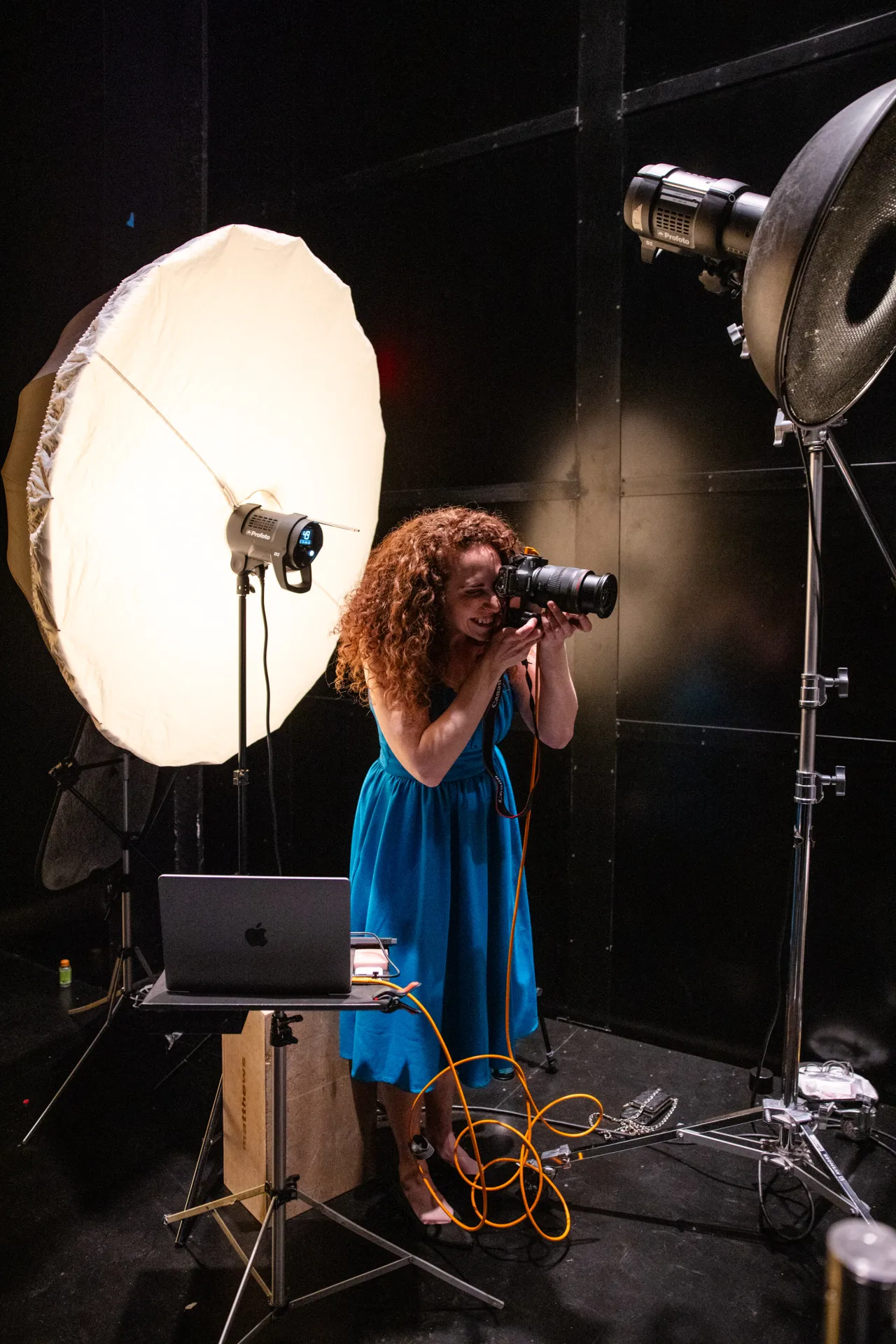
Photographer with red curly hair in a blue dress holding a camera to her eye, surrounded by professional lighting equipment and a laptop in a studio setting

That early grounding shapes the advice she imparts today, to photographers trying to work out what makes them distinctive. "One idea I often share is the Japanese concept of ikigai, your reason for being," she says. "Ask yourself: what are you naturally good at? What are you passionate about? What does the world need? Where do those things intersect?"

To Lindsay, then, finding your creative voice is less of a technical exercise and more of a personal one. "Creativity is a muscle," she stresses. "So work it out. Try different subjects, lighting, concepts and techniques." She also encourages you to notice themes you keep drifting back to – whether that's a colour, an emotion or a type of story – and treat those patterns as clues to what you're really interested in, and really good at.

As technology becomes more accessible and AI makes technical execution easier, your perspective becomes your greatest asset.

Finally, she urges creatives to stop looking exclusively at other photographers for inspiration. "When we all look to the same people, our inspiration becomes stale," she warns. The alternative? "Read books, visit museums, travel, watch films and music videos, and so much more. Your unique voice is shaped not only by the photographs you see, but by the experiences and perspective that only you bring to the camera."

Use AI as an assistant, not a director

Within Lindsay's own workflow, AI is mostly a planning and communication tool; something that helps her get an idea out of her head, and onto a page. "Whether I'm creating visual references, building mood boards, refining concepts or organising the logistics of a shoot, AI helps me communicate ideas more clearly to both my team and clients," she explains.

Even when she does turn to AI for ideas, they don't usually make the final cut. "Instead, they spark an unexpected thought or send me in a creative direction I might not have considered," she says. AI, for her, is less a collaborator with its own opinions, and more a very fast, very patient brainstorming partner.

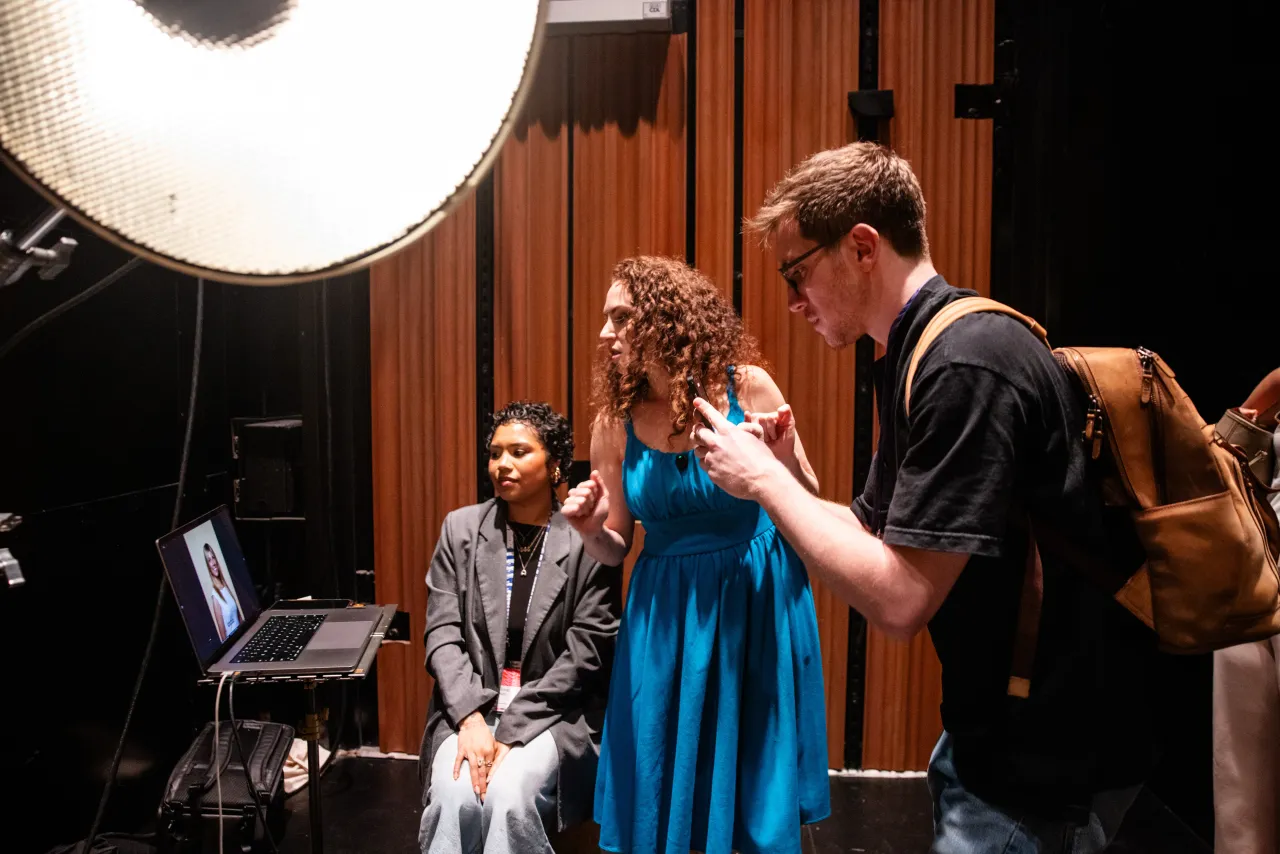
Lindsay Adler speaks on stage with a woman in a blue dress and a man in black, with a laptop and large studio light visible behind them

That said, she's not precious about keeping AI out of the final image either. For a recent album cover, an artist wanted to appear as though they were hovering off the edge of a building. Lindsay photographed them safely in the studio, then used Generative Fill in Photoshop to build matching environment before compositing the two together. The camera captured the human moment; the software built the world around it.

Learn to get on with people

Another skill Lindsay thinks the next generation needs is one photographers rarely list on their website: being personable. "Photography's always been about people," she points out. "Whether you're directing a subject, collaborating with a creative team or presenting ideas to a client, your ability to communicate is often just as important as your technical ability." That will make total sense for those of us who've been around a while.

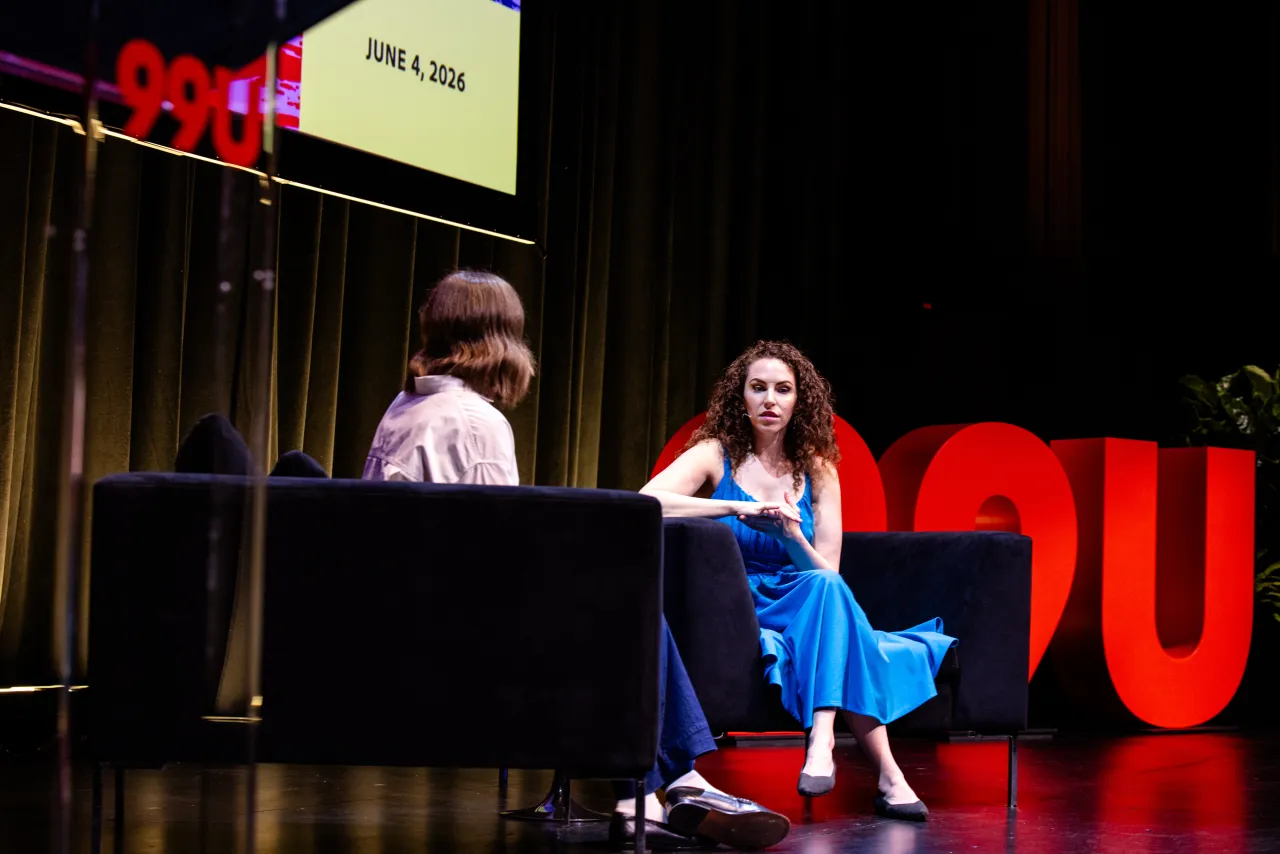
Lindsay Adler speaking on stage at an event dated June 4, 2024, sitting in a blue dress next to another panellist at a table with large red letters visible behind them

Belief in collaboration runs throughout Lindsay's career, from her educational platform Learn+, where she regularly invites photographers she admires to teach alongside her, to the fashion and beauty shoots she directs as a working photographer. And today, what started as a solo pursuit for a shy pre-teen has become something closer to a team sport.

"What brings me the most joy is the magical creative synergy that happens when talented people come together to create," she enthuses. On World Photography Day, then, think of this: pick up the camera, but don't forget to bring people with you.

Writing Tips: Just Write!

I add a new post to my old Writing Tips series of posts. This one focuses on simple tools to get the job done.

When I sat down to write this post this morning, I thought I was starting a new series. But then I looked at my list of about 3,100 blog posts here and realized I already had a series it could fit into: Writing Tips. So with a little bit of editing, I wrangled what I’d written today to fit that series. I do, however, want to start with a new introduction.

About Me and This Series

I’ve been a writer since I was 13. I was always driven to write, to tell stories. I wrote them in spiral bound notebooks with the Bic fine point pen I preferred. I filled notebooks with my writing and I still have many of them. This was before the days of computers and word-processing, mind you. The two choices available for writers was longhand or typing. (It wasn’t until much later that I’d get my first typewriter.)

I’ve been a published — yes, by a real publisher — author since 1987 when I was about 26. (You can do the math; it won’t bother me.) That was an article for a professional newsletter. No money, but my first published clip. (There’s a chance I still have it around somewhere; I should hunt it down.) My first paid writing gig came in 1991 as a ghost writer on a John Dvorak book. I wrote 4 chapters and was paid $500 per chapter. My writing career took off from there — I’m sure I’ve covered its trajectory somewhere.

(Hmm. I just did a quick search of blog posts and can’t find one with the full story. I guess I’ll have to write it. In the meantime, here’s a list of all of the books I’ve written and all of the non-blog articles I’ve written.)

The point is that I’m a real writer. I’m driven to write, I have written books and articles that have been published, and I have even made a good living as a writer. Although I’m mostly retired now, I still write; my most recent article for Passagemaker Magazine was published this past week.

I’m telling you all of this because I want you to know who this series is by and for. You know about me; how about you? This series is for people who want to write. It’s not for people who are being forced to write by a boss or job requirements or even a teacher. It’s not going to cover things like grammar and spelling and style. It assumes you already know enough about all that to actually write.

This series is for the folks who, for some reason, want to write but are having trouble doing it. If that’s you, read on.

The Simplest Writing Tool and System

Mastodon Post


Mastodon Post


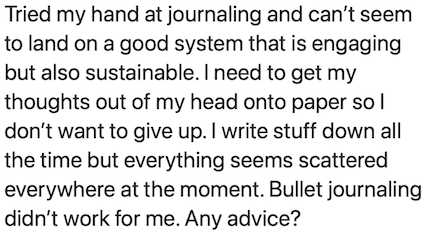
Two Mastodon posts by writers who can’t seem to understand that the simplest solution is right in front of them.

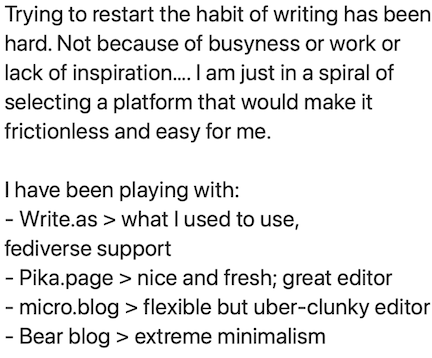
I’ve been thinking a lot about writing lately, looking at ways to get more motivated about doing it and seeing all kinds of weird (to me) posts on my social media platform of choice (Mastodon) from people writing or struggling to write. Two of them just came up in my feed today. I’m including screen grabs of them here for reference and have purposely omitted anything that identifies the poster. (I don’t want to embarrass anyone. If this is your post and you want to be identified as its author, let me know and I’ll modify it for you here.) These posts motivated me to sit down and answer the questions they posed, which I also answered online in replies to them.

In both examples, the author is talking about writing tools or systems to help them write. One mentions bullet journaling, the other lists software platforms. Neither seems ready to acknowledge the simplest tool/system available to them. I’ll give you a hint: it’s the same tool I used when I was 13 years old.

A pen and a notebook.

The Writing Tool/System Trap

Let me start by saying that I was also caught up in the writing tool/system trap that these folks are in. In today’s world, there is always an established and promoted solution for a problem. If someone can cash in on potentially solving a common problem, they will.

That’s what I think of bullet journaling, anyway. It seems that the guy who “invented” it is writing books and creating videos and selling notebooks with dots (instead of lines or grids). You can’t look up “bullet journal” without seeing him pushing his products.

As for software tools, it seems like a race to give writers the perfect app or platform to get their thoughts out there. Even Apple got into the game with its disappointing Journal app. (Why disappointing? Am I the only one who doesn’t want to lock my writing into a cloud-based app?) I even went so far as to spend good money on the app that every writer seems to use and rave about. And then not use it for writing. (I did find another use for it.)

Julia Cameron and The Artist’s Way

A few months ago, still searching for something to help motivate me to sit down and write, I began reading The Artist’s Way by Julia Cameron. This book has been around for 30+ years and still sells well. Every professional writer I know — including me — would love to have written and published a book like this.

Not only did I begin reading it, but I also listened to the audiobook version at the same time — a process some people refer to as “immersive reading” — and took notes. I wanted to squeeze everything I could out of this volume.

I didn’t last long. You see, Julia’s philosophy leans heavy on “spirituality,” her poorly disguised religious beliefs. In her world, a person’s success as an artist (including writers) relies on support from a Great Creator. Although she denies throughout the book that she’s talking about God, you’d have to be an idiot to believe her.

I’m a firm believer that we are each ultimately responsible for our own successes and failures so her Great Creator did not sit well with me. I stopped reading after the Week 2 chapter where her list of 10 “Rules of the Road” included three affirmations that rubbed me the wrong way:

In order to be an artist, I must:

…
6. Be alert, always, for the presence of the Great Creator leading and helping my artist.
…
8. Remember that the Great Creator loves creativity.
…
10. Place this sign in my workplace: Great Creator, I will take care of the quantity. You take care of the quality.

I found #10 especially offensive. (Here’s a newsflash for anyone waiting for a Great Creator to edit their writing: He’s already busy not stopping wars, famine, and injustice. What makes you think your writing is more important to Him than all of those other things that He apparently ignores anyway?) And since it became clear to me by then that a certain amount of religious belief (which I lack) would be necessary to get the most out of the book, I decided not to waste any more time with it.

Anyway, religion aside — I’m certainly not willing to discuss it here so keep your comments about it to yourself, please — I did come away from the book with one thing of great value: Morning Pages.

Morning Pages

The Artist’s Way program requires writers to write Morning Pages every day.

Morning Pages are three full pages, handwritten, about anything you want to write. It could be what you’re thinking or doing or seeing. It could be stream of consciousness. It could be notes for a book you want to write or are already working on. Anything. Words on paper, handwritten.

Since this requirement is stated early on at the beginning of the book (before I decided the book wasn’t for me), I started writing Morning Pages every morning. I had a spiral bound, college ruled notebook — the 8-1/2 x 11 inch kind, not the smaller ones they make to save money on paper. I was already using it for occasional notes, including (ironically) the notes I was taking while reading The Artist’s Way.

I did my Morning Pages every morning during my coffee in bed time with my pups. I’m an early riser, often up before 5 AM. I get up, make coffee, and bring it back to bed. I had been using that time to do some puzzles, catch up on Mastodon, and write a quick journal entry in a blank book I had for that purpose. But instead, I started doing Morning Pages and following that up with the journal entry.

It was easy. I can’t begin to tell you just how easy it was. If I can keep myself distraction-free, I can knock it out in 30 to 45 minutes. That might sound like a long time, but we’re talking about three densely packed pages of writing, roughly 1,000 words. With distractions, the time stretched. But in the 71 days I’ve been doing it — I number the entries — I only missed two days and did a short entry one day — all due to scheduling-related time constraints.

One of the reasons I think it’s so easy is because it doesn’t matter what you write. I usually write about the previous day and what I got done. I write about things I thought about, people I communicated with, and things I want or need to do. I write about the weather and the air quality — it’s smoke season here, after all. I write about my health. I write about ideas for blog posts and articles. I scold myself for not doing things I should be doing.

Seriously: I write about anything that comes to mind. It’s rapid-fire stuff with no formatting or editing. Heck, I don’t even create paragraphs. In one sentence I might wish for rain and in the next I might start writing about a new decorative paper process I’d like to try in my studio.

What is this doing for me? Well, it’s a brain dump, to be sure. Isn’t that what both of the Mastodon post examples I shared above seem to be looking for? It helps me organize my thoughts and create threads that often lead to new thoughts or solutions or even action plans. (I’ve actually begun writing my Morning Pages with my To Do list for the day nearby so I can add items to it.) It has also replaced my journal, which I had been keeping quite faithfully for nearly 2 1/2 years. I was a bit sad to see it go, but I realized that there was a lot of repetition. The additional space I have in that spiral notebook makes it possible to go into detail I could not fit in the old journal page format.

And it’s easy enough to make into a habit. Isn’t that specifically what one of those Mastodon posters wanted to do? Set a time of day to do it, make sure you’ve blocked out enough time, and just get it done.

It also reminded me of how I wrote way back when I was 13. Those notebooks! Those pages of neat printed writing in ink! I was able to be creative back then, to write longhand without editing.

Oh, how I rejoiced years later when word processors made typewriters obsolete! But did they really help me? Or hinder me? Morning Pages makes me wonder.

How Writing Tools/Systems Stifle Us

I mentioned earlier that I was once stuck in the mindset that I needed to use a special tool or system to be productive as a writer. Like the folks I quoted above seem to be. And I tried (and set aside) many software-based tools over the years.

Why? Well I found that once I had decided to use a specific tool to do all my writing, I could not write unless that tool was handy.

For example, when I write on a computer, I want to use a keyboard. A regular keyboard that I can touch-type on. I’m a pretty quick typist when I have the right keyboard, a normal sized one that fits my fingers. I can type nearly as quickly as I can compose in my brain. But needing a keyboard means I have to have a desktop or laptop computer with me to write. I cannot write on a phone or tablet. Unfortunately, it’s not possible to have a laptop or desktop with me all the time. So without that tool, I don’t write.

My blogging solution

My blog lives online, but I don’t need to be online to write posts for it. I’ve been using an offline post editor for the past 20+ years. My current tool is called MarsEdit and it rocks. I could not imagine blogging without it (or something like it). Yes, it requires a desktop or laptop to use, but it does not require an Internet connection until I’m ready to upload my post.

That’s the most basic problem. The problem is worse when you have a cloud-based tool such as the sites listed in the second Mastodon post I shared above. They require you to be connected to the Internet to use them. Another hurdle. While many folks can’t imagine not being connected to the Internet, I can assure everyone that there are times and places where it simply is not possible to connect. What do you do then?

Using a specific writing app locks you up the same way. When you don’t have access to the app, do you find other ways to write? Or do you not write at all?

That pen and notebook are looking better all the time, no? Pretty easy to slip into a purse, messenger bag, backpack, or tote bag, no? (It doesn’t have to be letter-sized, you know. Try a steno pad.) Easy to pull out when you’re waiting for a friend to meet you for lunch or while killing time at the local DMV or even when heading out to the park for an hour of people watching or mindfulness exercises. I’ve begun taking a tote bag with me when I leave home to do my errands. Guess what’s in the bag? That same Morning Pages notebook; I can write anything in it.

If it’s always there with you, ready to receive what you want to give it, there’s no excuse not to use it to write.

Just Write

Any pen you like will do.

A side note here. I read something recently that also pushed the notion of writing every day, longhand, on paper. The author of that piece, however, demanded that you use a fountain pen. Can you believe that? What a freaking snob!

(Ditto for the idiot who said you need to write in cursive. Why? I’m 65 years old and have been printing my entire life.)

Although I loved the Bic Accountant Fine Point pen when I was a kid, these days I prefer a uniball Micro Deluxe roller ball pen. It makes a nice, fine line and feels good on the paper. But that’s my preference. If you do any writing on paper already, I’m sure you have your own preference. Go with it. Writing should be friction-free and there’s nothing that adds more friction than a crappy writing instrument.

Even if you don’t like the idea of Morning Pages, there’s something you can take from them: the idea of writing longhand to get what you want to remember out of your brain and onto paper.

Isn’t that the goal of writing? To write?

Don’t worry about having your writing in a format that isn’t “usable.” You can make it usable later. Consider what you write a draft. Then, when you need to create a final work based on it, you can edit it as you type it into your word processor (or blogging platform or whatever) of choice to create your second draft.

Oh, and I need to clarify one more thing. If you’re already diligently working in a writing tool — like maybe a word processor? — to write a book, story, or article, the advice here might not apply to you for that project. If you’ve already established a writing routine that works for you to create specific pieces, keep using it! The advice I’m offering here is mostly for brain dumps, journaling, and getting the random thoughts floating around your head out on paper where you can consult them later.

Is Writing Important to You?

If it is, stop making excuses that revolve around finding the perfect tool or system. Buy yourself a note book and a good writing instrument and just sit down and write.


But wait! There’s more!

This is not the only thing I’ve written about writing. I’ve been writing about writing since the very beginning of this blog. If you want to do a deep dive, I recommend checking out posts in The Writing Life category or posts tagged writing. Remember, all posts are listed in reverse chronological order with the most recent ones first.


Is there a retirement crisis in the creative industry?

We keep hearing about senior creatives who are planning to exit the industry earlier than expected. So what exactly is going on?

There's a conversation in creative industries right now that's largely going under the radar. It's happening in DMs, in whispered conversations at events, and at 3am when people can't sleep. The conversation starts with this: "I think I need to retire."

Take illustrator and designer Jason Roberts. "I've gone from thinking 'I might never retire' to 'I might have to retire early' in a pretty short space of time," he admits. "I genuinely thought I'd never earn enough to truly retire. But if AI forces me out of my own industry, I might need to retire early, find a way to get by, maybe sell my home and downsize."

He's not alone. From many conversations we've had recently, it's emerged that house moves are being postponed, holidays are being cancelled, household budgets are tightening, and people are rushing to boost their pensions and savings.

Those of us who are living from paycheck to paycheck and struggling to keep their heads above water might think "Huh, chance'd be a fine thing". And just to be clear, I am personally very far from being in a position to retire any time soon. But the fact that so many senior creatives are both serious about it and in a position to make it a reality could well become a big deal over the next few years.

Why's this happening?

So why is this happening, exactly? As design consultant Richard Brandon Taylor puts it: "I think the design game for many has got tougher post-COVID. If you live in the world of consumer goods it’s especially hard: wars have pushed raw ingredients through the roof and manufacturers thin margins have become non existent."

The world of AI may have helped the design industry in terms of productivity, but at a macro economic level it's made raising finance more difficult. "People are removing their investments and place them into tech," Richard points out. "What was once the safe double-digit growth stocks have become the boring ones. That pressure has led to global restructures and less investment in brand."

Then of course there's the impact of AI on design in general. "It’s in my mind's eye a great running partner and we should lean into it," Richard says. "But many are exhausted by where the industry is going and has gone. Most design businesses were running on low profit margins. When they evaporate, what’s left? I can see so many are leaving the industry and retiring early."

Not a silver bullet

That said, retirement isn't always everything it's cracked up to be. In my town of Weston-super-mare—a seaside resort where people dream of moving post-career—I've met loads of retirees who rely on a second income from things like Airbnb, only to find out that running a business is no picnic, and that said income proves neither steady or generous.

Even if it does, retired life has a habit of throwing you curveballs, just like life as an employee or freelancer. For instance, creative director Myriam Lopez retired at 50 from corporate media and trained as a Pilates teacher. She thought she had a plan. Then her pension shrunk by a third. She eventually recombined her two passions into a new business.

Her takeaway: "Even if you do the sensible thing, saving, and even build a plan B, there's no guarantee on anything retirement promises you. But here's the part I love: none of what I built in 30 years got thrown out to make that pivot work; it just got recombined."

Where work still exists

We wouldn't want you to panic unduly. Right now, human skill still matters, and is sure to be demand for some years to come. As designer Helen Law puts it: "AI artwork is rarely print-ready, especially for clothing. It still takes a creative eye and technical expertise to refine the design, make it original, ensure it works at the required size, choose the right colours and optimise the placement."

Brand strategist Jacob Cass takes a similarly optimistic view. "I think the fear is real, and I've been having similar conversations with members in my community," he says. "But my view is that AI isn't just replacing work, it's redefining what clients value.

"If our value is producing visual assets, then yes, I'd be worried. But if our value is helping businesses make better decisions, solve complex problems, build trust and connect strategy with creativity, I think the opportunity actually grows. We have to shift our role from creative executors to brand builders."

And bear in mind, uncertainty over AI cuts both ways. "I'm predicting a big bust soon," says motion designer Matt Wilson. "OpenAI's profit and loss report is eye-watering. They're burning cash at an unsustainable rate. The only way they can turn it around is to raise subscription prices majorly, but I don't think they can without scaring off the user base."

Key takeaway

So what have we learned? In summary: yes, the threat is real, and yes, production-based work is under genuine pressure. And yes, the uncertainty is causing people to plan for early retirement in ways they never expected to.

But as far as the Creative Boom community is concerned, the idea of a complete collapse in creative work is far-fetched. What seems more likely is a transition period where some work disappears, some shifts toward strategy, and some persists because clients value handmade or specialised craft.

The creatives who'll survive are the ones who can move into strategy, who can specialise in the (many) areas AI struggles with, and who can adapt their skills. The people who'll struggle are the ones still competing on production speed and cost in five years.

For most of us, then, the answer probably isn't to retire early: it's to start repositioning what you offer and where you offer it.

More Thoughts on Claude’s AI Summary of a Video Transcript

An update to my October 13, 2025 blog post about the Claude AI system summarizing the transcript of a video I really liked.

I’ve been thinking about the 30 Habits video I shared earlier this month a lot. Maybe too much.

First of all, I really do like the 30 “habits” listed in the video. Maybe not all of them, but most of them. I really think they are good things to make part of your life. (If you haven’t watched the video and are looking for little things to make your life better, please take less than 20 minutes of your day and watch it.)

I decided that in order to make them part of my life I needed to be reminded of them. The idea was to make myself a little cheat sheet that I could put in my daily planner and look at once in a while. No one can expect me (or anyone else) to remember all 30 things on the list.

So I went back to the Claude summary and used it as the basis for my cheat sheet. The initial design would be bullet points. But I quickly realized that for some of the items, a bullet point would not be enough. For example, what does “small trust deposits” mean? Clearly, I needed more info on my cheat sheet.

Tips Sheet
The laminated insert fits into my Traveler’s Notebook in the middle of the bullet journal I use for miscellaneous notes.

I changed the design to a folding insert with the bullet list on the cover and the details inside and finishing up on the back. And rather than rewrite the summary myself, I just copied and pasted the Claude AI summary. I edited it a bit for length and clarity — honestly, it didn’t need much in the way of changes — and applied a font size that would make it fit while retaining legibility. After a little formatting, it was finished. I printed it, laminated it, and inserted it into my Traveler’s Notebook style planner. (The planner, by the way, has gotten yet another upgrade since Part 3 of that series and I may blog about it briefly.)

This is exactly what I needed to keep these 30 Habits front and center — or at least within arm’s reach — in my life.

This has changed my view of AI — at least a little. Clearly MDY’s use of Claude has a lot of merit — maybe even more than I originally admitted. (I have since messaged her on Mastodon and told her this.) While she used it to summarize the video’s transcript and used the summary as a decision-making tool for watching it, I can see it as a way to summarize something I’ve already watched that means a lot to me. Yes, I’m talking about letting it take notes for me.

I’m wondering if it always does such a good job or if this was a fluke. I’m also wondering whether Claude is better at it than its competitors.

But I’m not wondering enough to actually try it for myself. At least not yet. I don’t want to support AI and I believe that using it is supporting it. I really do want to think for myself, to keep my own summarization skills. And I sincerely hope that folks who have not built those skills yet try to do so without leaning on AI.

And there’s another 500 words for you. ;-)

A Short Self-Improvement Video, an AI Summary of It, and What I Think about Both

I’m impressed by a 15-minute you tube video and surprised by how the Claude AI/LLM summarized it.

I’ll try to keep this short. Let’s see how I do.

As some people know, I often watch boring YouTube videos on my iPad in the middle of the night to help me sleep. The other morning — probably too late to get back to sleep anyway — this one was suggested to me. I tapped it and was soon pulled in by the concise way the creator presented 30 excellent tips in about 15 minutes.

If you’ve got 15 minutes to spare and think your life could use some improvement, I highly recommend watching this. (If you don’t think your life can use some improvement, you’re only fooling yourself; we can all improve.)

My post on Mastodon
I shared the video on Mastodon, as I often do when I see something I believe is really worth watching.

Now if you were expecting some talking head with a big microphone in front of his face and lots of letters after his/her name to read off a teleprompter while mostly unrelated stock footage appears randomly in the background, you will be disappointed. Or, in my case, pleased — I hate those kinds of videos.

This video has some simple graphics to look at while listening, but it doesn’t need to be seen. You can just listen. Or you can do what my Mastodon friend MDY did: feed the transcript to Claude AI and let it summarize it. She shared the link on Mastodon, too: https://claude.ai/public/ artifacts/d5ad56a1-46fe-47ab-9fc7-5f3958dd1b08.

I clicked the link and was immediately impressed (and a little surprised) by the well-organized summary that appeared. I was impressed because, on first glance (and subsequent analysis), it appears to be both accurate and correct — something I’m not accustomed to seeing with AI results. That’s why I was surprised.

Now I’m no fan of AI systems. Not only are they failing miserably most times they’re used to take a human out of a process, but they have huge environmental impacts, sucking power and water that is already costly to produce or downright stupid to waste. I have read more than my fair share of AI horror stories, from lawyers idiotically trusting them to write briefs (that clients are paying hundreds of dollars per hour for a legal processional to write) to programmers spending more time fixing AI-generated code than writing it from scratch.

But at the very top of my list of reasons to hate AI systems is the simple fact that they are being developed and promoted as a way to cut labor costs — yes, the primary purpose is to add to worldwide unemployment.

Mastodon Post
MDY explained how and why she uses AI to summarize content.

During our subsequent discussion on Mastodon, MDY made a good argument for using an AI like Claude to summarize video. She uses it to summarize content in seconds and then uses that summary to decide whether it’s worth watching the video (or one can assume, reading the article). I have to agree that if the content is long and the summary is concise, AI can save someone a lot of time, enabling them to focus on details in the content they find most valuable.

I do wonder how much time was saved in this example, though; the summary was more than 1600 words.

I also worry about people leaning on AI for tasks like this and losing the ability to create summaries for themselves. I compared an AI summary to the book reports we were required to write in school. What happens if we all just use AI for tasks like this and are then put into a position where we have to do it for ourselves?

I compare the potential loss of this skill to my own loss of spelling capabilities. I used to be a good speller. Really! But that skill is slipping away. I find myself more and more dependent on my computer or mobile device to flag or correct spelling on the fly. Sometimes, rather than look up or make an educated guess at the spelling of a word, I’ll type in something close and let my computer tell me the word I want. I’m not happy about this, but not motivated to turn off spelling check and tackle spelling on my own.

(For the record, I don’t and won’t use a grammar checker. For Pete’s sake, I am a writer. If I can’t get grammar and related style issues correct, I shouldn’t be writing at all.)

And has anyone ever considered the motivations of AI developers to get us addicted to using their systems for things we should be able to do on our own? Do you think the free systems will be free forever?

I guess my thoughts can be summarized as follows:

  • This video (and yes, the AI summary) is chock full of useful tips that can make your life better. Seriously, if you haven’t watched it yet or read the summary, why the hell not?
  • Yes, there are things an AI can do for you to make your life easier. But I still don’t think that includes creating original content that requires thought and creativity.
  • AI should not be replacing people in jobs. Related: A person’s job should not be to check and correct “original” content created by AI.
  • People should avoid technologies that do the thinking for them. “Use it or lose it” applies to your brain, too.

I don’t know about you, but I like to think for myself. While I can see the utility of the Claude summary MDY shared, I won’t be playing with AIs to summarize content for me any time soon. I’d rather do it the old fashioned way: by paying attention to what’s in front of me and, when appropriate, taking my own notes for future reference.

And look at that! I kept it under 1,000 words!

Project Red Flags for the Solo Dev

As a solo WordPress developer, you wear every hat—coder, designer, project manager. But autonomy comes with risk: one overlooked red flag can sink your project.

Ignoring warning signs breeds burnout, unpaid scope creep, and fractured client relationships. Vague requirements, refusal to sign contracts, or dismissing security best practices force you into reactive firefighting, leaving no room for growth.

In this article, we discuss strategies to spot and neutralize red flags early, so you can build sustainably, protect your boundaries, and focus on work that fuels your career.

Client-Related Red Flags

Client behavior can make or break a project. Watch for these red flags early to avoid chaos later.

Unrealistic Expectations

A client demanding a complex, custom-built site with a shoestring budget and impossible deadlines signals a disconnect from reality. These expectations often lead to rushed, subpar work or unpaid overtime. Protect yourself by setting boundaries in a contract that outlines deliverables, timelines, and costs. Take time to educate clients on WordPress’s advantages and limitations, and the true cost of custom development.

A two-panel screencap from the Simpsons with new text. 1st panel: SO, YOU WANT to pay $500 for An ecommerce marketplace, combined with a real-time
social network that's also a cryptocurrency exchange? 2nd Panel: And Also, it should use machine learning to dynamically generate Recommendations!

Scope Creep

Clients who tack on requests mid-project—like asking for a membership portal after agreeing on a basic blog—without adjusting timelines or budgets erode your profitability and sanity. Scope creep turns straightforward projects into endless marathons. Address it by formalizing changes with written change orders and renegotiating terms.

Poor Communication

Ghosting for weeks only to demand immediate updates creates unnecessary stress and delays. Poor communication stalls progress and forces rushed, error-prone work. Define expectations upfront: specify response times, preferred tools (e.g., email vs. Slack), and update schedules. For example, insist on weekly check-ins every Friday to keep projects on track. If a client consistently disregards these protocols, consider it a sign of deeper disorganization and walk away.

Vague Requirements

A client who describes their vision as “modern and engaging” without specifics sets the stage for endless revisions. A lack of clear goals leaves you guessing, only to face criticism when expectations don’t align. Combat this by sending a detailed questionnaire upfront: ask about preferred color schemes, competitor inspiration, and must-have features. Convert their answers into a bulletproof project brief both parties sign off on.

Technical Red Flags

Clients may prioritize aesthetics or speed, but overlooking these red flags can leave you maintaining a fragile, insecure site. Position yourself as an educator—explain why cutting corners harms their business. If they resist, consider whether the project is worth the long-term headaches.

Outdated or Pirated Tools

A client insisting on using nulled plugins or unlicensed themes is a disaster waiting to happen. Pirated software frequently contains malware, backdoors, or outdated code that conflicts with core WordPress updates. Worse, it exposes you to legal liability if the client’s site is flagged for licensing violations. Refuse outright, and explain that security and compliance are non-negotiable. Offer alternatives by recommending trusted plugins or premium tools that fit their budget.

Neglecting Performance and Security

Clients who dismiss SSL certificates, caching, or backups may simply need education on how critical these are for user trust and SEO. It only becomes a red flag if they continue to dismiss these concerns.

Financial Red Flags

Money talks—but when clients avoid the conversation, your income and stability take the hit. Solo developers must spot these financial pitfalls before they drain your resources.

Lowball Budgets

A client who wants a “world-class” site “on a tight budget,” either undervalues your work or plans to exploit your goodwill. These projects often demand disproportionate effort for minimal pay, breeding resentment and burnout. Instead, propose a scaled-down minimum viable product that aligns with their budget.

Payment Reluctance

Pushback against deposits, milestone payments, or clear invoices, signals distrust or cash-flow issues. Clients who balk at standard payment terms may be more likely to delay or dispute fees later. Protect yourself by requiring a deposit before starting work and tying payments to project phases (e.g., 30% at kickoff, 40% after design approval). If they refuse, walk away. It’s cheaper than chasing payments.

Mr. Burns: NATURALLY, I CAN'T PAY 
you MUCH, BECAUSE I'M
 STRAPPED FOR CASH.

Learn to spot subtle indicators that a client may be less than truthful.

Legal & Ethical Red Flags

Navigating legal gray areas or ethical dilemmas isn’t just about protecting clients—it’s about shielding yourself from liability or reputational harm. Ethical red flags often reveal clients who prioritize shortcuts over sustainability. Position yourself as a guide: “I want your site to thrive long-term, which means doing this right.” If they resist, let them become someone else’s problem.

Black-Hat SEO Requests

A client asking you to spam forums with backlinks, scrape content, or stuff keywords into invisible text might frame it as “growth hacking.” But tactics like these risk their site being penalized or banned by search engines, in addition to risking your own credibility and reputation. Politely decline and educate them on sustainable strategies.

Ignoring Compliance

Clients who dismiss GDPR cookie consent, accessibility standards (WCAG), or industry-specific regulations (e.g., HIPAA for medical sites) may learn the hard way when lawsuits or fines arrive. Neglecting data privacy laws puts you both at risk.

Ownership Disputes

A client demanding, “Do I own the code you wrote?” might not understand WordPress’s GNU GPL licensing, which allows anyone to reuse or modify theme/plugin code. However, custom work (e.g., unique features you develop) can still lead to tense “who owns this?” conversations. Clarify licensing terms in your contract: specify that while the client owns their content, WordPress’s open-source nature means the underlying code is community property. For custom solutions, offer to transfer exclusive rights—for an additional fee.

Small Red Flags with Big Consequences

Not all red flags announce themselves loudly. These subtle yet critical issues can quietly derail projects if left unchecked.

Withholding Access

A client who refuses to share hosting credentials or domain access—claiming “We’ll handle it ourselves”—creates bottlenecks and distrust. Without full access, you can’t troubleshoot effectively or implement critical updates. Make access non-negotiable in your contract: specify that you require FTP, database, and admin permissions to complete the work. If they resist, clarify that partial access risks incomplete deliverables.

Frequent Developer Changes

A client who casually mentions, “You’re our fourth developer this year,” hints at unstable expectations or a history of conflict. Probe gently: “What challenges did you face with previous teams?” Their answer might reveal mismatched priorities, scope disputes, or refusal to pay—all warning signs to address upfront or avoid entirely.

No Documentation

Clients dismissing the need for user guides, style documents, or maintenance checklists set you up for endless support calls post-launch. Build handoff documentation into your pricing and process.

Three Tips for Mitigating Red Flags

Turning red flags green starts with proactive strategies. The key is using practices that help you recognize red flags immediately, see if they can be mitigated, and then exiting the project if they can’t.

Get It in Writing

Every project, no matter how small, demands a contract outlining scope, payments, timelines, and ownership terms. Use templates from platforms like Bonsai or Lawyerist to save time, and tailor clauses for WordPress-specific risks (e.g., GPL licensing, plugin compliance). A client who won’t sign isn’t worth the risk.

Educate Clients Early and Often

Clients don’t know what they don’t know. Explain WordPress’s strengths and weaknesses upfront, and frame recommendations as collaborative wins. Use analogies they’ll grasp—compare SSL to a storefront lock or bloated plugins to a cluttered garage.

Trust Your Gut—It’s Usually Right

If a client dismisses your expertise, pressures you to cut corners, or gives off a “too good to be true” vibe, listen to that nagging feeling. Losing a paycheck hurts less than losing sleep over a toxic project.

Conclusion

Vigilance isn’t just a skill—it’s a survival strategy for solo WordPress developers. From clients offering “exposure” as payment to sites held together by pirated plugins, red flags test your ability to balance collaboration with self-preservation. But avoiding pitfalls isn’t about distrust; it’s about fostering partnerships where both sides thrive.

Prioritizing sustainable work over quick wins protects your most valuable assets: time, energy, and peace of mind. A client who respects your boundaries today is a client who refers you tomorrow. And a project grounded in clear contracts, realistic goals, and ethical practices becomes a portfolio piece that attracts better opportunities. The road to a fulfilling freelance career is paved with projects you’re proud of, not ones you’ve merely survived.

What red flags have you encountered in your career? Let us know in the comments!

The post Project Red Flags for the Solo Dev appeared first on Delicious Brains.

❌