❌

Reading view

There are new articles available, click to refresh the page.

Crisis-Ready Teams

Crisis-Ready Teams

I’m by no means a serial corporate dinner attendee, but I do feel I’ve sat through my fair share of after-dinner leadership talks. The speakers are usually held up as shining examples of courage, resilience and leadership under pressure. Their stories have a reliable shape, generally including a man, a mountain and some frostbitten fingers – the typical hero’s journey. They run longer than scheduled. As my colleague put it the morning after one particularly arduous tale, by the end of the evening we felt we’d been up and down the mountain with him.

I don’t want to be too dismissive, because the power of storytelling is huge. Hearing stories of extreme peril offers an inspiring reminder that people can act well under extraordinary pressure and that teams can hold together when everything is falling apart. Stories like these, told well, are worth hearing. The problem is that these stories tend to gloss over the most helpful parts for anyone trying to build a team that will actually perform in a crisis. The mountain story always focuses on the leader’s heroism at the moment of peak drama, but the evidence about what makes a difference for teams in crisis points somewhere else entirely.

Mary J. Waller and Seth A. Kaplan’s Crisis-Ready Teams draws on ten studies, nine of which compare high and low performing teams under crisis conditions. What emerges from that body of research cuts against the mountain-summit view of crisis leadership: performance under pressure is shaped less by what happens at the peak than by what happens before it. 

annapurna sanctuary sunrise

Setting the tone

For teams that work together already, the patterns of behaviour that will matter in a crisis are built – or not – in ordinary working conditions. Whatever interaction patterns they settle into will be the ones they fall back on when things get hard; they are unlikely to change once pressure mounts. 

In contrast, in ‘swift-starting teams’ – groups brought together specifically to manage a crisis such as an accident response team – there are no established patterns to fall back on. These teams are usually composed of experts; highly trained people who may not know one another already, but must immediately “engage in the immediate interdependent performance of complex tasks.” What distinguishes the high performing from the low performing swift-starting teams turns out to be remarkably similar – it’s still about what happens first, but in this case that means how deliberately and effectively they set the tone for working well together in the very short opening phase of their teaming.

You can see this in a simulation study into medical teams that only met for a short period before a patient arrived for resuscitation. The teams with more balanced communication during that initial window went on to engage in higher levels of implicit coordination – the kind of fluid, almost wordless teamwork that looks, from the outside, like a well-oiled machine. However, teams where the lead physician dominated that early forming time by monologuing at their new teammates performed less well. A parallel finding in flight crew research found that greater reciprocity and stability in pre-flight conversations predicted higher performance in the air. The teams who hadn’t been able to have open and reciprocal communication from the start struggled to perform in their respective crisis contexts.

But what does ‘balanced’ communication mean? There is nuance here, and balance does not mean enforced equal airtime, where everyone must contribute the same number of words or talk for the exact same amount of time before the meeting can end. But it is about giving everyone a chance to speak and making sure everyone’s voice is heard. Connected to this, ‘reciprocity’, another early indicator of later performance, is about responsiveness – a pattern of exchange in which information offered is acknowledged and built on by other team members, rather than landing in silence or being cut across.

So establishing from the start how the team will work together matters. What we want to hear is a balance of voices with no single voice dominating, and people listening and responding to each other. 

The phases teams go through

Research into multidisciplinary crisis management teams found that they naturally move through three recognisable stages when they come together: 

  1. Structuring – clarifying roles, knowing who will do what
  2. Information sharing – finding out what each person knows about the situation, and what they can find out
  3. Decision making – deciding what to do with this information to try to solve the problem

Interestingly, high performing teams appeared slower at getting going, tending to spend longer in both structuring and information sharing phases. This, it turns out, is especially important when we bring together individuals from diverse professional backgrounds; they might individually come to quite different conclusions about similar information, so we actually need those interpretations to be spoken and shared so that other team members can “compare the voiced interpretations with their own understanding and, if needed, correct or add to this interpretation.” The outcome is a better overall understanding of the situation than any single team member could have reached by themselves.

Lower performing teams moved far quicker to decision making, but with little shared understanding to build on, their decision making was laboured and often inconclusive, a kind of meandering indecision. Because they’d never fully established how to best work together, they struggled to make good decisions as the situation unfolded.

A helpful way of thinking about it is that crisis-ready teams carry multiple shared mental models, including one that they’ve constructed together about how to best work together. They understand that a crisis is not a single moment requiring one quick response, but a sequence of phases, where their understanding of the situation and therefore the ‘best next thing’ to do will keep changing.  There is no space in this picture for a competing-for-the-right-answer dynamic, where team members vie for power, and there’s also no room for the unilateral hero, who pushes forward with a solution without discussing it with or listening to the rest of the team.

During the crisis

So the research is clear that adaptability is essential, and crisis-ready teams need to do far more than simply execute a plan. This requires an ability to let go of existing work structures and move into active, collective sensemaking – to co-construct a shared understanding of what is actually happening, rather than what was anticipated.

The pull in the opposite direction is threat-rigidity: the tendency, under pressure, to fall back on established patterns even when those patterns no longer fit. As Staw, Sandelands and Dutton (1981) found, under threat a team restricts the information it takes in, narrowing its attention to a few dominant cues, and it also constricts control, so that power and decision-making concentrate upwards to whoever sits highest in the hierarchy. This is unsurprisingly corrosive for psychological safety and can tip a team into solution fixation: it locks onto an early answer, and few voices are able to challenge it. Yet crisis situations keep moving, so a fixed answer defended by a single voice is unlikely to remain the best answer. The reflex to shift authority upwards and narrow who gets heard strikes just at the point that teams need to be able to gather wide input and have many eyes, minds and voices working together to come up with solutions. 

Adapting well starts with going out to meet the changing situation. In Waller’s (1999) aviation study, the difference that stood out during the crisis itself was that the high performing crews collected and moved information between each other earlier: they built a picture of the situation as it unfolded, passed it quickly to the people who needed it, and were faster to sort what mattered from what did not.

And this prioritisation of the information in the room is also key. In their own research, described in the book, Waller and Kaplan and their colleagues studied mine rescue teams and found that the faster-acting teams did two things more than the slower ones. They used more closed-loop communication, in which the sender speaks their message, the receiver reads it back and the sender confirms that they have it correct. While it might seem slow, this makes it clear to all what has been heard, not just what has been said. 

Related to this, the faster teams also used more explicit coordination, spelling guidance out in detail rather than leaving it to be inferred. This looks like it should contradict the earlier point about implicit coordination being the marker of a well-functioning team, but as Waller and Kaplan argue, implicit coordination only works when the whole team already shares the same picture. In a novel crisis situation, you cannot count on that, so the faster teams say the thing rather than assume it goes without saying and have to repair the misunderstanding later. This is low-context communication under pressure, the explicit, spelled-out kind I’ve written about before. The kind of explicit communication that already earns its place in ordinary work, for reasons of clarity, inclusion and psychological safety, matters even more in a crisis.

What the research actually shows

The after-dinner speaker is not wrong that crisis performance is visible in the moment, whether that’s up the mountain, in surgery or managing a critical incident. But we miss the most important part if we don’t pay more attention to what gets built before that. The team that moves fluidly through a crisis shares information, speaks up, listens, builds on each other’s ideas and adapts without freezing – and that team has been working on this since they first started working together. The mountain story locates the heroism in the ascent. Waller and Kaplan locate it in the preparation, the patterns, the reciprocity, the quality of the communication and the willingness to structure before acting. It’s less dramatic, perhaps, and not such a compelling story. But it is far more effective.

Further Reading

Reading the air: high and low context communication in teams

Déformation professionnelle 

Crisis-Ready Teams by Mary J. Waller and Seth A. Kaplan

Zijlstra, F. R. H., Waller, M., & Phillips, S. (2012). Setting the tone: early interaction patterns in swift starting teams as a predictor of effectiveness. European Journal of Work and Organizational Psychology, 21(5), 749-777. https://doi.org/10.1080/1359432X.2012.690399

Uitdewilligen S, Waller MJ. Information sharing and decision-making in multidisciplinary crisis management teams. J Organ Behav. 2018; 39: 731–748. https://doi.org/10.1002/job.2301

Staw, B. M., Sandelands, L. E., & Dutton, J. E. (1981). Threat Rigidity Effects in Organizational Behavior: A Multilevel Analysis. Administrative Science Quarterly, 26(4), 501–524. https://doi.org/10.2307/2392337

Waller, M. J. (1999). The timing of adaptive group responses to nonroutine events. Academy of Management Journal, 42(2), 127–137. https://doi.org/10.2307/257088

Su, L., Kaplan, S., Burd, R., Winslow, C., Hargrove, A., & Waller, M. (2017). Trauma resuscitation: can team behaviours in the prearrival period predict resuscitation performance?. BMJ simulation & technology enhanced learning, 3(3), 106–110. https://doi.org/10.1136/bmjstel-2016-000143

The post Crisis-Ready Teams appeared first on Psych Safety.

Accountability

Accountability

Accountability, quite literally, is the ability to give an account: account-ability. An account is a narrative – the telling of an honest story about what happened, why we did what we did, what was known at the time and what wasn’t, told from our particular position, and situated within the context of what was actually happening. To be accountable is to have the ability to give an account. This isn’t a wordplay or a clever rhetorical manoeuvre. It’s the simple etymology of the word – accountability is meant to be about our capacity for honest explanation. To be accountable is not the same as to be punishable.

But accountability has been colonised by blame. In the world of work, almost without us noticing, the meaning of accountability has been displaced by its near-opposite. The tell is the phrase “Someone must be held accountable” (or something similar), and what that usually means in practice is that someone should suffer consequences. It’s rarely used to mean that someone should be given the conditions in which they can honestly explain what happened, but that someone should bear the cost of it happening. Accountability has turned into blame with better marketing.

Roberts (1991) formalised accountability as a relational tension between an account giver and a recipient, and that framing is important. Accountability requires at least two parties, someone willing to give an account and someone capable of receiving it; it’s relational and dynamic. Philip Tetlock’s work on accountability and cognition shows why the receiving end is so consequential. What he found was interesting but unsurprising: when people know who they’re accountable to and can anticipate what that audience wants, the account they give is shaped accordingly – designed to satisfy the audience rather than give the truest description of events as they actually happened. Every performance review, every post-incident investigation, every board report is subject to this dynamic. The account we receive is the account that the teller believed the audience wanted.

Accountability as a construct has been studied extensively across public administration (Bovens), organisational behaviour (Tetlock, Frink & Ferris), philosophy (O’Neill), and safety science (Dekker), and what strikes anyone who reads across these fields is how rarely any of them mean the same thing by it. The kaleidoscopic definitional confusion is part of the core problem with accountability. Even the classic RACI matrix (the popular tool that gives the appearance of clarity while achieving the texture of a spreadsheet) gets accountability wrong. Much of that confusion is semantic and probably unavoidable, but some of it has structural consequences. The most significant conflation is between accountability and responsibility. Ieraci (2007, via Parris, 2025) draws the distinction clearly: responsibility involves doing, accountability involves reporting. Responsibility is about the work itself, and accountability is about the account of the work. They overlap and interact, but they are not the same thing, and treating them as synonyms has problematic consequences. 

Misunderstanding Accountability

Accountability and responsibility have been used interchangeably for so long that even legislation gets it wrong. This isn’t just pedantry. The conflation matters because once accountability is understood to mean “being responsible for outcomes,” the logical next step is: if the outcome was bad, the accountable person is at fault. Consequence then follows automatically and the account (the narrative, the context, the conditions that were actually present) gets dismissed before it can be heard. And accountability for outcomes is, in any case, the wrong target. Outcomes are partly beyond any of our control. What we can reasonably ask people to account for is their reasoning, their decisions, and their actions, situated within their context. Not the outcome.

“People aren’t just people, they are people surrounded by circumstances.”

— Terry Pratchett

Karl Weick’s sensemaking work is useful here, and shows why this is even worse than it first appears. Accountability in organisations is almost always exercised retrospectively, after the outcome is already known, and hindsight does much of the work before the inquiry begins. The account becomes a post-hoc justification exercise rather than a genuine rendering – an attempt to prove innocence in a process that has already assumed guilt. Structural bias is at play, and the knowledge of the outcome contaminates the inquiry before it begins.

Parris’s example from maritime law shows both mechanisms operating at once. New Zealand’s Maritime Transport Act assigns responsibility to vessel Masters where it clearly means accountability in the liability sense, and the confusion has structural consequences for who gets blamed when things go wrong. The Master at the sharp end becomes legally exposed for outcomes shaped by systemic decisions made at the blunt end. The legislative conflation and the retrospective framing work together: context and conditions get set aside because the outcome is already known, and the law reaches for the nearest human rather than the most relevant cause.

“…they took the captain to court, even though there was not a thing I could have done to have stopped it, to have known about it, or anything… I was held accountable… But I wasn’t responsible.”
Parris, 2025 pp.35

And here’s the crux: responsibility is actually closer to what organisations think they mean by accountability. Responsibility is about roles, obligations, and the act of doing. We can assign responsibility, but we cannot assign accountability – an account is given, not extracted, and every organisational system built around ‘holding people accountable’ rests on a category error with real-world consequences. If accountability cannot be assigned, only taken, then the pressure organisations apply in its name does not produce genuine accounts. It only produces performances of them.

Accountability without context is blame

When we strip the account (the narrative, the context, the local rationality of the person who was there) and retain only the assignment of fault, we haven’t done accountability. We’ve dressed something much older and more primitive in accountability’s clothes.

Blametropism is the organisational tendency to orient toward fault, the way a plant orients toward light, regardless of whether finding fault serves any operational (rather than emotional) use. The organisational or political apparatus of accountability (the investigation, the finding, the consequence) is seldom deployed to truly understand what happened, but instead to locate where the fault should land. The true account is rarely sought; what’s more often sought is a name, a goat that we can expel from the village, laden with our sins. Accountability-as-blame is blametropism in its business suit. It gives the impression of rigour while reliably producing the outcomes of blame.

Marilyn Paul’s systems framing captures the consequences well: blame generates fear, fear generates cover-up, cover-up degrades information quality, degraded information produces more errors, more errors generate more blame. The feedback cycle is self-sustaining and self-defeating, and as reliable as it is depressing. An organisation that uses accountability as a pressure tool destroys its own capacity to learn what’s really happening inside it.

When people learn that giving an account: an honest one, with all its uncertainty and complexity and acknowledgement of error, leads to punishment, they naturally stop giving honest accounts. Instead they give performed accounts – narratives designed to survive scrutiny rather than enable learning.

And the demand for a single account is itself part of the problem. Real situations are experienced differently from different positions within a system. The account of the nurse who administered the wrong medicine, the ward manager who created the rota, the software developer who designed the drug cabinet interface, and the executive who approved the staffing budget are all partial, all genuine, and all necessary. Accountability-as-blame doesn’t just suppress honest accounts. It demands that a complex, plural reality be rendered as a single story with a single author. 

Take the cases of Hadiza Bawa-Garba and RaDonda Vaught: both clinicians who made errors in systemically compromised conditions, both of whom were honest about what happened, and both of whom were subsequently prosecuted. In both cases, the logic was that someone had to be held to account. Investigations were conducted, findings were made and severe consequences followed. What was not sought, in any meaningful sense, was a genuine account. Both clinicians were already carrying the burden of what happened before their prosecutions even began, and the prosecutions compounded an existing problem by converting private grief into public liability. The systemic conditions and the context behind the errors (staffing levels, equipment failures, normalised workarounds and more) were noted but set aside. The apparatus of “accountability” produced the outcome that blame always produces: a conclusion that foreclosed rather than opened inquiry. Our simulation of that day in Leicester in the Learning Lab lets a team see those systemic conditions from the inside.

The lesson that clinicians drew from both cases was not “be more careful.” It was “be less transparent.” That is what accountability without context reliably produces. Onora O’Neill saw the same mechanism from a different vantage point: systems designed to demonstrate transparency often produce performances of transparency rather than the thing itself. The safety audit, the Ofsted inspection and the compliance checklist all create the appearance of account-giving while systematically degrading the conditions in which genuine accounts are possible. The mechanism defeats its own purpose.

An organisation that punishes honest accounts will eventually receive only dishonest ones.

You can’t assign accountability, only take it

The moment an account is compelled, demanded, or extracted under threat of consequence, it ceases to be an account and becomes testimony. Modern societies do not treat confessions given under duress as genuine, and for good reason –  what is said under compulsion is shaped more by the compulsion than by the truth. The same mechanism operates inside organisations. Forced accountability produces self-protection, not transparency. A performance of accountability, not learning. It’s worth noting in this light that we tend to call the most common formal accountability mechanism in organisations an “annual performance review”.

“Currently fashionable methods of accountability damage rather than repair trust.”
– Onora O’Neill

A genuine account has to be a voluntary act. It requires the account-giver to be willing to be seen: to expose their reasoning, their uncertainty, their errors, and their context. That exposure carries real interpersonal and career risk, and where candour carries significant risk but little benefit, most of us will err on the side of caution and silence. This isn’t a character flaw, it’s a rational response to the environment, and changing that calculus is the only reliable route to better accounts.

The distance between the account an organisation says it wants and the account it actually rewards is navigated through social inference: reading the room, calibrating our degree of honesty to the audience, knowing instinctively how much truth is too much. It’s also a skill that is unevenly distributed in most organisations. For many neurodivergent people, candour is simply how to communicate, not a choice to be weighed against consequences. An organisation that performs a desire for honesty while punishing it in practice fails those workers and risks actively deceiving them.

Cultivating the conditions for honesty is considerably more difficult than demanding it, and considerably more effective. The phrase “holding people accountable” implies a power that organisations do not have. We cannot hold someone else accountable. We can only nurture the organisational substrate in which people are able and willing to give an honest account.

What real accountability looks like

Real accountability is dialogic rather than monologic. Roberts draws on Senge’s distinction between discussion and dialogue: discussion in this sense, is like a debate, with positions defended and a winner declared. Dialogue is different: meaning, nuance, context and information flow freely between parties, with the intention of surfacing something neither party could reach alone. Organisational accountability processes are almost universally structured as a defensive discussion – and a genuine account cannot be extracted through cross-examination. It can only emerge through a more open, reflective dialogue, which requires the account-giver to feel safe enough to think out loud, be uncertain, and say “I don’t know” without it becoming evidence against them. Both giving and receiving are equal components of accountability, and the receiving requires its own kind of discipline: the willingness to be changed by what we hear, rather than confirm what we already believed. Maybe the hardest part is the moment right after the event, when everyone is nervous and the pressure to find a name is enormous, and someone has to be the person who says: let’s slow down, let’s find out what actually happened.

Parris’s typology reinforces this binary. Backward/hierarchical accountability is structurally monologic: it already knows what it’s looking for. Forward/process accountability requires dialogue, because it’s genuinely interested in what the system contributed, which can only be discovered, rarely confirmed.

“But surely there have to be consequences sometimes?” Yes, but consequences and accountability are separate questions. We can impose consequences without ever actually receiving an honest account. And if negative consequences are attached to the account, we will never receive an honest one. Consequences cannot come first without contaminating everything that follows. The desire for consequence after failure is often a desire for justice, and that is a fundamental human impulse worth taking seriously. But retributive justice and learning are different projects, and the accountability mechanisms most organisations use are poorly designed for either.

The question after a failure, Dekker argues, is not just “who is accountable?” but (more importantly) “how do we learn?”, and answering the second question well requires the conditions that make genuine accounts possible. It follows that psychological safety and true accountability are mutually dependent. We cannot give a true account if we don’t feel safe, and accountability as punishment makes honesty unsafe. A genuine account shouldn’t feel like a confession. It should feel like a contribution to our collective understanding, and treating it as the former guarantees we will never receive it as the latter. Building the conditions in which genuine accounts are possible is what accountability, properly understood, actually requires.

Account-ability

In the vast majority of organisations, accountability is expected to flow upwards. The powerful receive accounts; whilst they are seldom required to honestly account for themselves to those ‘below’ them. And I’d argue that the most valuable accounts are actually those that flow sideways, worker to worker, where honesty isn’t calibrated to hierarchy.

We have collectively spent considerable energy perfecting the art of demanding honesty from the people for whom we have made honesty unsafe. “Accountability”, a word that belonged to everyone who needed to give an honest account, was appropriated by institutions that needed a more respectable name for blame. Blame is cognitively cheap, emotionally satisfying, and operationally useless. It produces a very clear answer to the question of what to do next, and it is almost always the wrong one.

However, blame is also often politically useful. Blame doesn’t just emotionally satisfy: it secures power. When the investigation concludes and the name is named, someone’s position is secured and someone else’s is eroded, or ended. The apparatus of “accountability” in this case is functioning exactly as designed, just for purposes that aren’t on the tin. 

This is why genuine accountability remains so rare. It asks the powerful to submit to the same conditions they currently use accountability to avoid: to give an honest account of themselves, to be uncertain in public, and to say “I don’t know” to the people they lead. In cultures where blame secures position, a genuine account risks it. The rarity of genuine accountability in organisations is its rational consequence.

Many organisations “hold people accountable” by imposing negative consequences for failure. The organisations that actually handle failure best are the ones that make it safe to give an honest account – they foster account-ability. They are not the same thing. They are, in fact, complete opposites.

References

Bovens, M. (2007) ‘Analysing and assessing accountability: a conceptual framework’, European Law Journal, 13(4), pp. 447–468.

Dekker, S.W.A. (2012) Just Culture: Balancing Safety and Accountability. Farnham: Ashgate. (See also: Dekker (2011) in the map)

Frink, D.D. and Ferris, G.R. (1998) ‘Accountability, impression management, and goal setting in the performance evaluation process’, Human Relations, 51(10), pp. 1259–1283.

Ieraci, S. (2007) ‘Responsibility versus accountability in a risk-averse culture’, Emergency Medicine Australasia, 19(1), pp. 63–64.

O’Neill, O. (2002) A Question of Trust. Cambridge: Cambridge University Press. → Explore in map

Parris, R. (2025) Accountability: A Lived Experience. MSc thesis. Lund University. → Explore in map

Paul, M. (1997) ‘Moving from blame to accountability’, The Systems Thinker.

Roberts, J. (1991) ‘The possibilities of accountability’, Accounting, Organizations and Society, 16(4), pp. 355–368. → Explore in map

Roberts, J. (1996) ‘From discipline to dialogue: individualizing and socializing forms of accountability’, in Accountability: Power, Ethos and the Technologies of Managing, pp. 40–61.

Tetlock, P.E. (1985) ‘Accountability: the neglected social context of judgment and choice’, Research in Organizational Behavior, 7, pp. 297–332. → Explore in map

Weick, K.E. (1995) Sensemaking in Organizations. Thousand Oaks, CA: Sage. (See also: Weick & Roberts (1993) and Weick (1993) Mann Gulch in the map)

The post Accountability appeared first on Psych Safety.

The “Utility” of Psychological Safety

The Futility of Utility

If we want to make the argument for psychological safety in most organisations, we often need to speak the language of value. There is genuinely strong evidence that psychological safety is associated with better team performance, including decades of work linking psychological safety to reduced error rates in healthcare, aviation, and high-stakes industries. There are real, measurable outcomes of high psychological safety: better retention, more innovation, fewer incidents and faster learning.

And if we can’t make this case, we often won’t get in the room. Budgets are limited, and if we can’t demonstrate value, programmes don’t get funded – and psychological safety becomes a privilege of only exceptionally well resourced organisations rather than reaching the places that need it most.

I’ve made these arguments myself when pitching, justifying a budget line, or helping a client make the case internally. The evidence is real and it’s worth citing.

So the impulse to frame psychological safety in utilitarian terms: to ask what it’s for, what it produces, what return it delivers, is not cynical. It comes from a legitimate place.

But there’s a problem with it too.

What utilitarian logic actually does

Utilitarianism, in its classical form, aggregates welfare across a population and optimises for the greatest good for the greatest number of people. On the surface, this sounds fair: everyone counts, everyone’s interests are included in the calculation. But the utilitarian framework contains a structural flaw that philosophers have been wrestling with for centuries: the welfare of a minority can always be legitimately overridden if the aggregate calculation favours doing so. This isn’t a misapplication of utilitarianism. It’s how it works.

“A man’s virtue is tested by whether he treats those who are useful to him and those who are not useful to him in the same way.”
Simone Weil, The Need for Roots

When we ask whether psychological safety “delivers ROI”, we’re (whether we intend to or not) invoking this logic. We are setting up a calculation in which the value of each person’s ability to speak up is weighed against organisational cost. And once that calculation is running, its conclusions are unfortunately rather predictable.

Who loses?

Helping people speak up is not equally easy across a workforce. For some people – those who are already confident, possess more power, or who resemble the leadership – many of the conditions for speaking up exist more or less by default. Creating psychological safety for these people is low-cost, because the system was largely built around (or by) them.

For others, it’s much harder. Improving psychological safety for someone who is neurodivergent, for a person of colour in a predominantly white organisation, for a woman in a male-dominated team, for LGBTQ+ folks in more conservative cultures, for a manual worker in a professional environment, for people from lower socioeconomic backgrounds, or for anyone with a “marked identity” (something that marks them as different from the contextual norm), this work is often slower, more structural, more disruptive and challenging to existing habits and hierarchies. Essentially, in terms of resources, time and money, it may be genuinely more expensive.

A utilitarian approach can keep finding reasons why this particular work, for these particular people, is not quite “worth it”. Not because anyone is being deliberately cruel, but because the framework itself will keep producing that answer. The least safe people are often the most costly to serve, and in a cost-benefit world, cost wins.

And it’s worth noting that it always seems to be other people who are judged to be receiving “too much” psychological safety – as costing too much. The people (who are almost always people for whom speaking up is already safe) making that argument never seem to volunteer themselves for experiencing less psychological safety.

A different framework: capabilities and rights

The philosopher Amartya Sen argued in Development as Freedom, that human wellbeing cannot be captured by utility measures (such as GDP) alone. What matters is whether people have genuine capabilities (the real and practical freedoms to do and be). Martha Nussbaum extended this to describe central human capabilities that function as threshold conditions that must be met regardless of what an utilitarian argument might warrant. The key point is that these capabilities are not inputs to an equation. They are things that must be in place, for everyone.

I believe that the safety to speak up without fear of punishment or humiliation fits squarely within this framework. It is not (solely) a productivity lever. It is a basic condition of full participation in our own working lives. 

“Each person is an end, and none is merely a means to the ends of others.”
Martha Nussbaum, Creating Capabilities

This is also what rights-based thinking has always understood. Rights function not as goods to be weighed against other goods, but as constraints on what we are permitted to do regardless of the cost / benefit calculation. We don’t ask whether freedom of speech delivers ROI. We don’t (or shouldn’t) evaluate the right to education, or to bodily autonomy, or to freedom of conscience in terms of economic return. We treat them as things that cannot be sacrificed even when the utilitarian maths might point that way. In the human rights sphere at least, the opposite way lies fascism.

Psychological safety belongs in this category of capabilities. Not as a productivity lever, but as a fundamental condition of dignity at work.

Noting the benefits is not the same as measuring utility

None of this means we should stop talking about what psychological safety produces. We should talk about it. Better innovation, improved quality, reduced harm, greater retention, stronger wellbeing are real and very important outcomes and they’re worth naming. 

But there is a difference between noting the benefits of something and making those benefits the justification for its existence. We note the benefits of free speech in that it produces better public discourse, more accurate information, and more accountable institutions, without treating those benefits as the reason we defend it. The defence comes from somewhere more foundational.

And I wonder if the same shift is needed for psychological safety. We can point to what it produces but we should not make production the point.

What this means in practice

Framing psychological safety as a right rather than a utility makes the practice of it more honest. It means we stop asking “what might it cost us to foster psychological safety” and start asking “who are we currently excluding, and what does that cost them?”

It means that the people for whom creating safety is hardest: the people with the least power, who are the least visible or represented, and with the least resemblance to whoever set the norms, are no longer at risk of being deprioritised when budgets get tight or attention moves on. And it means we can hold a clearer line when the utilitarian cost/benefit pressure mounts (as it always eventually does) and someone asks whether all of this is really “worth it.”

The answer is that it’s not a question of worth. It’s a question of what kind of organisation, and what kind of working life, we think people are entitled to. 

The post The “Utility” of Psychological Safety appeared first on Psych Safety.

Learning Teams

Learning Teams

Often, when we’re trying to improve how work gets done, we start with principles. We agree what we believe in, or are working towards, at a high level, and then figure out how those ideas translate into day-to-day practice. This piece takes a different route.

Instead of beginning with abstract principles, I want to start with a concrete practice: Learning Teams, from the world of HOP (Human and Organisational Performance). Through the excellent work of Sam Goodman and others, Learning Teams have evolved into a reasonably well-defined way of bringing people together to learn from everyday work.

By looking closely at how Learning Teams are designed and facilitated, we can surface the deeper principles they rest on – principles that reach far beyond pure safety contexts, and have important things to say about learning, power and psychological safety at work.

Let’s dive in…

What Are Learning Teams?

Learning Teams are a way of creating space to learn from events at work, from work as it is done, not work as imagined or prescribed in tidy process maps or policies. They focus on real work – the complex, sometimes messy and often adaptive way that real work gets done, shaped as it is by context, constraints and trade-offs. 

The purpose of a Learning Team is to bring together the people who are closest to the work, those at the sharp end, to share their knowledge of how the work really happens, so that the organisation can learn.

Learning Teams can lead to many different outcomes, but there is only one true requirement: that we learn more about “normal work.” If a Learning Team helps an organisation better understand how work is actually done, then it has been a success. 

Events with Learning Potential

When we get stuck into the world of organisational learning, it quickly becomes clear that, in theory, we could learn from absolutely everything that happens at work – the good, the bad and the truly horrific. 

In practice though, running a Learning Team requires an investment of time, so it simply wouldn’t be possible to do one for everything that happens at work. So the question becomes, which events are most worth learning from?

Rather than automatically choosing the things that went most wrong or had the most severe impact, Learning Teams invites us to consider which events have the most learning potential (as does PSIRF). This might be a failure or breakdown, but it might also be something that went unexpectedly well, or a situation that could have gone wrong but didn’t, perhaps a “good catch”.

We’re often looking for “goldilocks” events that sit in the middle ground. Not so rare that they tell us very little about everyday work (a meteorite strike), but not so common that we’re already well aware of what’s happening. Not so severe that they automatically trigger a formal investigation, with all the emotional, regulatory or legal burden that can bring, but not so trivial that there’s nothing very interesting to explore.

This isn’t a precise science. We can never know in advance exactly what learning a conversation will surface. But when deciding whether an event is a good candidate for a Learning Team, it can be helpful to weigh up factors such as:

  • the effect on the team
  • scale and impact
  • frequency
  • how generalisable the learning might be
  • regulatory or legal implications
  • alignment with existing improvement work
the factors affecting the learning potential of an event

When we explore Learning Teams in our HOP workshops, this is often the point where people start to see themselves in it. The examples of what might trigger a Learning Team vary wildly, depending on the kind of work people do.

For some, it’s a spike in complaints after a shiny new IT system goes live. For others, it’s a team restructure that didn’t quite go as planned. And sometimes it’s something more positive – like a particular store or location suddenly outperforming the rest, leaving everyone asking, what on earth are they doing differently?

It doesn’t really matter whether these are successes or failures, as long as they spark some organisational curiosity. We can see all of these as opportunities to ask better questions about how work is really getting done, and what people are adapting to in order to make things work.

Roles in a Learning Team

Once we’ve chosen an event with learning potential, the next question is to decide who to include in the Learning Team.

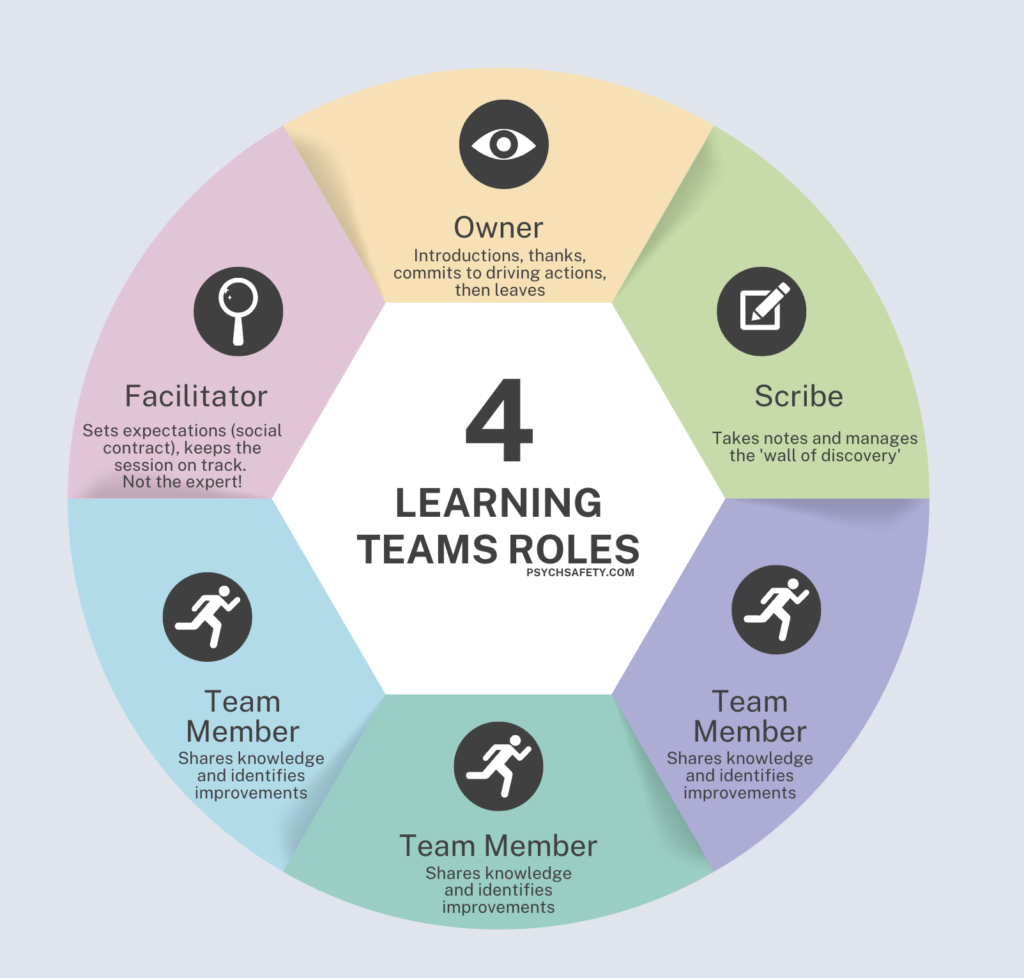
the various roles of a HOP learning team - owner, facilitator, team members

There are a small number of distinct roles, each with a specific purpose:

Owner: The Owner is someone with enough organisational authority to get the Learning Team off the ground. They ensure the right people are invited, and they commit to championing any organisational actions that emerge afterwards. Crucially, the Owner opens the session, welcoming people and setting the intent, and then leaves. (We’ll explore why this matters shortly.)

Facilitator: Sometimes referred to as the Coach, they are there to facilitate the learning, not to be the technical expert. They don’t have detailed knowledge of the event being discussed, but they are skilled in holding the process. They set expectations, often through a social contract, keep the conversation on track, and help the group stay focused on learning. 

Scribe: The Scribe plays another essential, but often underestimated, role. Like the Facilitator, they are not someone with direct knowledge of the work being discussed. Their focus is on capturing the qualitative richness of the conversation as it unfolds. They manage the “wall of discovery”, where insights and learning are made visible to the group.

Team members: There may be two, three, or more team members in the Learning Team. These are the people closest to the work, who hold first-hand knowledge of how work is actually done at the sharp end and ideally, they were present during the event being discussed. Their primary role is to share that knowledge. They may identify improvements along the way, but that is not their main aim. 

Learning Teams may also include people who weren’t directly involved in the specific event, but who do similar work or interact with the same system. This broadens any learning beyond a single episode and helps surface patterns in normal work that might otherwise remain invisible.

Structure of a Learning Team

One of my favourite things about Learning Teams is their intentional structure. They are deliberately designed in two distinct parts, with a pause in the middle. 

Before the Learning Team itself, there is some preparation required: being clear about the focus of the learning, identifying who needs to be involved, and making the practical arrangements to bring people together. Then we have the meetings:

Meeting 1: Learning from the work
The first meeting typically lasts around 60–90 minutes – long enough to allow for depth, but not so long that we lose focus. If it feels like we need more time than this, it’s often a signal that the event we’ve chosen is too broad and needs narrowing.

The sole purpose of this meeting is to understand what happened, or what happens, in the flow of real work. This is not a space for jumping to solutions or improvements, however tempting that might be. The Facilitator’s role here is to protect that intent, and they may need to be quite firm about it! This is in deliberate contrast with many “traditional” investigations, which tend to focus on a single incident and work backwards to identify where things failed. Learning Teams spend proportionally more time understanding how work usually succeeds, what people were adapting to, and why actions made sense in their context at the time.

“Soak time”
Between the two meetings, it’s helpful to allow some “soak time” – often around a day. This pause gives people space to process and reflect on what emerged, and sometimes realise what was missing or left unsaid in the first conversation.

Photo by cottonbro studio

Meeting 2: Making sense and improvements
The second meeting brings the group back together. The Facilitator supports the group to recap what was learned in Meeting 1, invites them to add any new reflections, and only then opens up the conversation about possible improvements or changes. This meeting is usually a similar length to the first.

Outputs of Learning Teams

As already touched on, the only essential outcome of a learning team is an improved understanding of normal work.

Sometimes, depending on the event, this learning will naturally surface areas where things can be improved, and maybe even some ideas for improvement. But improvements are a possible by-product of Learning Teams, not their primary purpose.

A Learning Team that ends with richer insight, a more nuanced understanding of work, and perhaps the ability to ask better questions about how work happens, has still been successful – even if it doesn’t produce a tidy list of actions. 

Evidence supports this shift in emphasis. Interestingly, a comparative study in a large NHS hospital found that Learning Teams generated more actions overall, and a substantially higher proportion of system-focused improvements, than conventional root cause analyses, possibly because they explore work across multiple contexts rather than compressing learning into a small number of technical or individual “root causes”. 

Reducing Power Gradients

The success of a Learning Team hinges on psychological safety. Do the people in the team feel safe to be honest about what happened? If not, we’re unlikely to learn very much.

This sits at the heart of why the Owner of a Learning Team will usually step out after the introductions. The Owner is, by definition, someone with greater organisational authority – they have the clout to convene the Learning Team and the responsibility to act on what emerges afterwards. But their presence in the discussion itself can unintentionally introduce a power gradient that makes candour harder.

This isn’t because of bad intention, or a failure on their part to reduce the power gradient. It’s a very pragmatic recognition that hierarchy shapes behaviour. When someone with formal authority is in the room, people are more likely to soften their accounts, or steer away from what feels risky to say.

There’s also a more practical reason for the Owner leaving. The Owner typically doesn’t hold first-hand knowledge of the work at the sharp end; their role in the Learning Team is to enable learning and respond to it, not to be the source of it. By stepping out, the Owner helps create the conditions for more open, real conversations, where the people closest to the work can speak with fewer filters.

A different way of learning

In many organisations, when something happens that we want to learn from, we default to an investigation. A group is brought together, often with more senior people in the room, and the focus quickly turns to understanding what went wrong, often who did wrong, and what needs to change.

Learning Teams take a different approach.

Rather than being judged from on high, the people who do the work are treated as the ones who know most about it. Time is spent first on understanding what work looks like in practice, before determining whether anything needs to be fixed. We put a bit of space between learning and decision making. 

“I learned very early the difference between knowing the name of something and knowing something.”
― Richard P. Feynman

This doesn’t mean Learning Teams replace formal investigations altogether. Some events will always need a formal response. But if we’re serious about learning from everyday work, not just from catastrophic failures, then we need approaches that make it easier for people to speak honestly about how work actually gets done.

That, for me, is what Learning Teams really offer. They invite us to take a better stance, one that starts with curiosity, treats people at the sharp end as experts in the work, and accepts that understanding has to come before improvement.

Taking it further

Interested to learn more? Join our next HOP Fundamentals workshop, where we explore Learning Teams and much, much more. 

Further Reading

Work as Imagined vs Work as Done

The Sharp End and Blunt End of Education

Reducing Power Gradients

Just Culture

Robbins, T., Tipper, S., King, J., Ramachandran, S.K., Pandit, J.J. and Pandit, M., 2021. Evaluation of learning teams versus root cause analysis for incident investigation in a large United Kingdom National Health Service Hospital. Journal of Patient Safety, 17(8), pp.e1800-e1805.

The post Learning Teams appeared first on Psych Safety.

#189 – Weston Ruter on Unlocking WordPress Performance

Transcript

[00:00:19] Nathan Wrigley: Welcome to the Jukebox Podcast from WP Tavern. My name is Nathan Wrigley.

Jukebox is a podcast which is dedicated to all things WordPress. The people, the events, the plugins, the blocks, the themes, and in this case how WordPress Core continues to strive to unlock greater performance.

If you’d like to subscribe to the podcast, you can do that by searching for WP Tavern in your podcast player of choice, or by going to wptavern.com/feed/podcast, and you can copy that URL into most podcast players.

If you have a topic that you’d like us to feature on the podcast, I’m keen to hear from you and hopefully get you, or your idea, featured on the show. Head to wptavern.com/contact/jukebox, and use the form there.

So on the podcast today, we have Weston Ruter. Weston is a longtime WordPress user and contributor. He has been a core committer for 10 years, and he co-led the WordPress 4.9 release. He worked in the WordPress agency space, and has also been sponsored to work on the Core Performance Team. He lives in Portland, which as you will hear, was quite handy for this interview.

We start the conversation by getting into the big picture, why website speed matters more now than ever, and how WordPress performs out of the box. Weston shares details about measuring true performance. Revealing, for example, that achieving a perfect Lighthouse score isn’t the end game, and that real user experience metrics like Core Web Vitals and Largest Contentful Paint should shape how developers and site owners think about optimization.

Throughout the episode, you’ll learn about the advances made by the WordPress Performance Team, from lazy loading and new image formats, to speculative loading that shaves precious milliseconds off page transitions. Weston explains how many performance improvements are designed to work automatically, democratizing speed, so that even casual WordPress users benefit without needing to be technical experts.

The conversation also touches on the balance between adding features and avoiding plugin bloat. The hidden impact of browser and device differences, and how large companies, like Google, are working hand in hand with WordPress to raise the bar on speed and usability.

Weston offers practical tips, deep technical wisdom, and a glimpse of where WordPress performance is heading next, and it’s sure to inspire you to think differently about how your sites load, how your users engage, and how you can squeeze out every last drop of speed from the platform you love.

Whether you’re a developer, designer, site owner, or just someone curious about what keeps the web running smoothly. This episode is for you.

If you’re interested in finding out more, you can find all of the links in the show notes by heading to wptavern.com/podcast, where you’ll find all the other episodes as well.

And so without further delay, I bring you Weston Ruter.

I am joined on the podcast by Weston Ruter. Hello.

[00:03:28] Weston Ruter: Thank you for having me.

[00:03:29] Nathan Wrigley: You are very welcome. I’m quite jealous of Weston because we’re in Portland, Oregon at WordCamp US. I had to get on a plane, which was no hardship really in the grand scheme of things. Nevertheless, it was a lengthy plane journey. You, on the other hand, had to get on some public transport to get here because you live in Portland. That must be nice

[00:03:45] Weston Ruter: I live about five miles to the east of here, and so I jumped on the bus and I got off and walked to coffee shop and over to the conference center.

[00:03:53] Nathan Wrigley: And twice, two years in a row as well. You’re very, very lucky.

[00:03:56] Weston Ruter: I was very happy when I found out.

[00:03:57] Nathan Wrigley: Yeah. So Weston’s here today because of a presentation that he’s giving at WordCamp US. I will read into the record the title of the presentation that you’re giving, The Site Speed Frontier with Performance Lab and Beyond. So it’s all about performance, this episode essentially.

This is one of those subjects where I feel you have to tell us your credentials so that we understand that what you are saying is true. Because I think there’s a lot of snake oil, certainly from my point of view, quite a lot of ignorance. I don’t really understand this topic inside and out. So would you mind, a minute or something like that? Just tell us about you and your history with, well, WordPress, but also performance and so on.

[00:04:32] Weston Ruter: Yeah, sure. I have been a WordPress Core committer for 10 years. And I was in the agency space working at XWP, working on enterprise WordPress sites. And then I joined Google and I was a software engineer working on developer programs engineer, then develop a relations engineer working on the AMP project, which is all about making webpages faster using the AMP framework. And from there I transitioned into working on the Core Performance Team for the past couple years. And we are focused on making WordPress fast for everybody.

[00:05:15] Nathan Wrigley: Okay, great. Thank you so much. So the topic at hand then is going to be about performance. Why are you interested in this? I know obviously there’s a career in it and what have you. Is this something that you lie awake at night thinking about? Do you obsess about this kind of stuff?

[00:05:28] Weston Ruter: Yeah, it’s a passion of mine because who likes a slow webpage, right? So it’s fun to eke every bit of performance out of the loading of something. There’s a lot of little technical details and things to know and best practices to observe. And so it’s a fun challenge to be as fast as possible and there’s always room for improvement.

[00:05:52] Nathan Wrigley: And it kind of feels as if the mantra over many, many years has basically been that, you know, if you can make your website faster, it will be successful. People will visit it, people are getting weary of page load time or what have you. And so maybe we’ll get into the weeds of all of that.

How does WordPress, if I was just to go, okay, ignore the hosting that it’s on. Let’s just imagine we’ve got a good host, we’ll just use that term. If I was to download a vanilla version of WordPress and use the default theme, currently 2025, and do nothing else with it, I’ve written a few blog posts, maybe that’s it. How does it do out of the box like that?

[00:06:25] Weston Ruter: Yeah, it turns out my talk is exactly about this, and it uses the 2025 theme as a test case to show how the performance of WordPress fares out of the box. And if you were to load up a site running 2025, the theme and nothing else, and you run it through Lighthouse, the performance testing tool from Google, you’ll most likely get a 100 score, performance score. And you would think, I’m done, there’s nothing else to do. But if you dig into it, just because you get a good score, that doesn’t mean there’s still not room for improvement. And there’s still head room even after 100.

But yeah, WordPress Core does great out of the box, but there are still many opportunities to make it even faster. And as you had Felix on previously to talk about speculative loading, that’s one example where the performance is improved yet further. And in the performance lab plugin, which the performance team maintains, we have different performance feature plugins that implement additional optimisations that address different scenarios and use cases that WordPress doesn’t do well out of the box.

[00:07:40] Nathan Wrigley: It’s kind of interesting, and I’ve never heard it framed that way. I’ve never heard that there was a ceiling above 100. It kind of feels as if that is the ceiling. If you score 100, all bets are off, game over, you’ve succeeded, hooray, have a party, kind of thing. But no, there’s still room to be squeezing a little bit out here and there.

[00:07:57] Weston Ruter: Yeah, if you look at a Lighthouse audit, Lighthouse is an example of a lab metric. It simulates a page load for a user, but it’s not an actual page load for an actual user. It’s just a simulation. And if you really want to know how your site is actually performing, you need to measure those visits from actual users.

And if you load up a popular site in Google’s page speed insights tool, you’ll see there’s two different sections on the page. At the top, you’ll see what users are experiencing, and then at the bottom you’ll see lab data. And the top is coming from actual site visitors through what’s called the Chrome User Experience Report. And that tells you how the site is performing in terms of the Core Web Vitals that Google has spearheaded.

And one of those is called the Largest Contentful Paint or LCP, and that measures the time it takes for the largest element that is most likely going to be the main content of the page to be rendered, from the time you start navigating to the page and that element finishes rendering.

And a good LCP value is considered from 0 to 2.5 seconds. And so you can have, within 2.5 seconds there’s a big range in the user experience. So if it’s just under 2.5 seconds, it’s considered good, but that doesn’t mean a 1.5 second page load is actually way better, and a 0.5 second page load is even better yet, and a 0.05 second page load is great, is perfect. That would be the perfection. And that is what we’re working on.

[00:09:36] Nathan Wrigley: There’s gradations of it, okay. So within that 100 there may be room to do, aspects of the 100 can be improved. And in this case, by taking the LCP time down.

We’re at a conference event. There’s over a thousand people. There must be designers, developers, SEO people here. There’s everybody. There’s the whole gamut of people that use WordPress, probably some people that are new to the whole platform as well. Do you think that performance is something that everybody needs to worry about or are you happy to be one of the few that obsess about it? Is it basically better to leave an expert like yourself to worry about it, or is this something that we can all have a little dabble at and be successful about?

[00:10:14] Weston Ruter: Well, that’s what we’re concerned about with the Core Performance Team is making it so that the regular WordPress user doesn’t have to worry about this, because nobody’s got time to spend learning like, what is LCP? What is time to first bite? What are these different metrics? And nobody has time to worry about optimising for all these. So WordPress Core should do all this out of the box, and the WordPress ecosystem should implement best practices so that users don’t have to worry about it.

[00:10:44] Nathan Wrigley: It’s kind of interesting. I remember, I’m thinking it was about six years ago, but I don’t really remember the date. But Google kind of informed everybody that in a period of time, a year’s time or what have you, these metrics, LCP and, Core Web Vitals basically were going to come in.

And it felt like everybody in our industry was running around like a headless chicken, trying to understand something that they knew, there was this sword of Damocles moment, this date in the calendar where the SERPs were going to change. It didn’t feel like a comfortable time. In some senses, it felt like Google was kind of poisoning the water a bit because they were alienating developers who suddenly had to learn this new thing, because they realised their client websites were going to probably tumble in the SERPs.

And so they had to upskill in this thing that probably they didn’t want to be involved with. So it was a curious time, but the dust seems to have settled. I don’t know too much about, you know, whether they were penalties that really were paid by people because they didn’t have these fabulous Core Web Vital scores. But it definitely put the cat amongst the pigeons for a while anyway.

[00:11:38] Weston Ruter: The factors that go into ranking pages and Google search are, I never knew what they are, so the knowledge I have is that the performance of a page contributes to the ranking in some way. And basically, as I understand it, all things being equal, you have two sites with the same content and same relevance to the user, and one has better performance, then in theory that would rank higher.

How much value you get in terms of your ranking is debatable or unknown. I don’t know. But what is important is the user experience and the benefits that you get for your users. And if they have a good experience on your site, then they’re more likely to come back. More likely to result in a conversion or a purchase, or whatever you’re looking to get out of your site. So that’s where I would focus the concerns.

[00:12:34] Nathan Wrigley: If this were the Squarespace or Wix podcast, which of course it isn’t, it would be much more straightforward to have a conversation about why your site was quick because, you know, it’s this proprietary platform. There’s constraints about what you can do on that platform, and they run the whole thing, you know, they’ve got their arms around everything.

WordPress, you download it from .org in most cases, and start to pile things on top of it. And very quickly we get the problems developing I guess, you know, the more things that you throw into it, the more plugins and what have you. Would your advice simply be circumspect about what you throw in, or can you, for want of a better phrase, can you concentrate on additional tech to mask over any problems that you have?

You know, with the best one in the world, if you’ve got an LMS, it’s probably going to slow your website down because it’s doing a lot. If you’ve got WooCommerce, it’s probably going to slow yourself, the website, down from the vanilla install with using the 2025 theme that you just mentioned.

But there’s this whole marketplace of hosting companies and performance companies who are selling you things that kind of undo the, and I’m doing air quotes, the damage that you did by putting the plugins in.

So I don’t know if you’ve got anything to say to that. You know, the whole thing about bloating the website, slowing it down, unpicking it with different tech.

[00:13:49] Weston Ruter: Yeah, well, the WordPress ecosystem has a problem with the kitchen sink issue and a plugin that has more features is somehow valued more highly than a plugin that does one thing and does it really well.

And so in the Performance Lab plugin in our suite of plugins that we feature, we have the goal that a plugin should do one thing and do it really well. And if you don’t like what the plugin is doing, you deactivate it and switch to another one that is doing that one issue and doing it well.

But if you have plugins that do so many things, then you’re really kind of, your hands are tied and it’s difficult to switch. And maybe that’s a strategy by some plugins to lock you in to their ecosystem, but it’s a difficult problem, yeah.

[00:14:39] Nathan Wrigley: And we also have a, you know, we have plugins which are performance plugins. I mean, there’s dozens of them. I’m sure we could rattle off, whose job is to fix the problems that you may have created elsewhere in the website. If you’re in the weeds of it, like you are, you’ve probably got some vague understanding about it. You understand whether something is snake oil or not, but for the rest of us, that is a Pandora’s box, and there’s only chaos in there.

I don’t know what will slow my website down. If I download, I’m going to use LMS again, if I download an LMS platform, I’m going to hope that the work has been done successfully. But I’m probably also going to be thinking about, okay, now do I need to talk to my host, get a different hosting environment, get it set up so it’s perfect for that? Do I need a performance plugin? Caching layers, putting things on the edge.

And on and on it goes. It makes WordPress a difficult thing for many, many people to use. And so this idea of democratising publishing sort of goes out the window a little bit because it’s really extraordinarily hard to use.

[00:15:34] Weston Ruter: Yeah. And I think that in addition to democratising publishing, WordPress should also be as part of that democratising performance. And again, making it so that users don’t have to worry about that.

And what we’re doing in Core, we’re doing exactly that where as one of WordPress’s core philosophies is decisions, not options, and things should work out of the box.

But when it comes to the ecosystem, it’s a open source environment and there’s no top down control over what a plugin does. So I think there’s opportunities with projects like the Plugin Check plugin to do more analysis on the performance, in addition to the security and the best practices for being accepted into the directory.

But if there’s also a surfacing of performance issues or additional audits that are done on the impact of installing a plugin, that could be really valuable for site owners to get a sense of, this may cause problems if you install it.

[00:16:37] Nathan Wrigley: How long has the Performance Team been a thing? I feel like three years or something like that, but I could be really wrong.

[00:16:43] Weston Ruter: About four years I think.

[00:16:45] Nathan Wrigley: Okay, yeah. And could you just run over the history of that? I was going to say organisation, but let’s go with team. Could you run us through the history of that team and what you’ve been able to do?

Each of the little steps, some of them are quite profound. Some of them feel less profound, but very important. But over those four years, a lot of really incredible work has been done actually. Certainly from my perspective, it does seem that without that team we’d be in a very, very different place.

[00:17:15] Weston Ruter: I hope that’s true. I think it is. Yeah, well, it started out focusing on, I think lazy loading of images was one of the first things to land through this team. And with that we also then uncovered that actually lazy loading everything, which while great for reducing the weight of a page, because you’re not downloading images that aren’t actually shown. If you lazy load images that are in the initial viewport, that actually hurts the Largest Contentful Paint metric because the browser wastes to start downloading those images until it knows that they’re in the viewport.

So out of that came work to not lazy load images that are in the initial view port, and then also moving on to this attribute called fetch priority, which you can have the value of high, for example. So if you add fetch priority high to an image, then the browser’s going to prioritise loading that first. And so a lot of work was done to add sensible defaults in WordPress Core so that, for example, the featured image of a post gets fetch priority high, so that it gets loaded sooner over images that are not going to be the Largest Contentful Paint, most likely.

So there’s that. And then there was also an issue with like emoji in posts where, on every page load there’s some JavaScript that runs in the head of the page, and it computes whether the browser supports the emoji, like all the emoji. And if the browser doesn’t support all the emoji, then it loads the Twitter emoji library to render them. And that JavaScript was causing a long task in lower performing browsers, or devices, that was hurting the largest contentful paint as well. So that was fixed as well.

And then work has been done to add support for new image formats, like AVIF and WebP so that site owners can upload those image formats instead of JPEGs, which take longer to download.

We talked about speculative loading, and you talked about that with Felix. So that landed in 6.8, which by default will start prefetching the HTML for a page when you mouse down or tap or click, pointer down on a link to give the browser a bit of a headstart. But then the API allows you to be more aggressive about starting that process, just when you hover over the link, for example, and then not just to prefetch the HTML, but to actually render the whole page.

And so in my talk, which I gave earlier today, I showed the difference between no speculative loading, speculative loading as in WordPress Core right now, the default, and then moderate prefetch. And then lastly, moderate pre-render.

[00:19:57] Nathan Wrigley: Is that done with the plugin? Well, I guess you could do that with code, but there’s an option to, if you download the plugin, you’ve got a UI for that as well.

[00:20:04] Weston Ruter: Exactly. There’s a UI in the plugin that allows you to opt into moderate eagerness, or to use pre-render instead of prefetch. And in the example I showed, let’s say your time to first bite is a second. Then in the initial example, like on a slow, or on a fast 4G connection, you’re going to get like 2.27 seconds to load the page. But then with conservative prefetch, that shaves off like 50 milliseconds because the amount of time it takes to mouse down and mouse up is just a little bit of time that it can shave off that’s just a little bit to the loading of the page.

But then when you go to moderate prefetch, then the browser can load the page fully in the background. And so then the time to first bite in that case becomes zero because the whole page is already in the browser’s cache. And that can reduce it to like one second because you totally eliminated the time to first bite.

And then with the moderate pre rendering, then when you’re hovered over that link, the browser not only downloads the HTML, but also all the images, builds out the layout, runs the JavaScript. And so then when you click on that link, the page can load instantaneously.

[00:21:12] Nathan Wrigley: So literally instantaneous.

[00:21:14] Weston Ruter: 0.05 seconds.

[00:21:16] Nathan Wrigley: Yeah. It’s instantaneous. I mean that’s pretty incredible. All of that is available inside of WordPress, but just to rewind, probably about 50 seconds, the default is not aggressive. The default in WordPress in order to satisfy the kind of 80 20 rule and what have you, the default is to make it so that there has to be some interaction. The mouse has to be invoked. There’s a click involved.

That’s fascinating. So if you really want to get into the weeds of that, you can basically make the next page load almost instantaneously, should you wish to do that.

One thing that I did get into with, I believe it was Adam Silverstein not that long ago when I had a podcast episode with him. And I don’t mean to go deeply into this, but there’s a curious balancing act here, I think with the environment and all of this speculative loading. Because it wouldn’t be desirable to load, I don’t know, there’s 12 navigation links and the mouse happens to go across all of them. And suddenly 12 unnecessary pages were entirely pre-rendered and what have you. So yeah. I don’t know if you’ve got any thoughts on that, whether there’s a balancing act between performance and environmental concerns.

[00:22:23] Weston Ruter: Yeah. By default, speculative loading only operates on pages when you’re not logged in. And so when you’re not logged into WordPress, that is most of the time when you’re going to have a page cache that can serve it from the cache. And so as long as you have page caching in place, then the server isn’t going to be overly taxed by those requests.

In the newest version of the Speculative Loading plugin, it has an opt in to speculative loading for logged in users as well. But there’s a warning that shows up if you don’t have a persistent object cache active, for example. So, yeah, it’s important to have good caching in place, good best practices for scaling.

However, in addition to pre rendering, which the speculative loading plugin enables, there’s a much older technology for instant page loads that browsers all support, and that is the back forward cache.

And WordPress sites, by default when you’re logged out, will benefit from this most of the time. But as soon as you login or if you’re navigating to like a shopping cart page, or an account page, or checkout page in an e-commerce site. Oftentimes the plugin will invoke this no cash headers function that tells the browser, primarily tells the page cache, hey, don’t hold onto this response because you don’t want to cache the shopping cart for one user and then serve it to another user, because then you would be seeing something embarrassing potentially.

And so that is one of the benefits of sending that header. But it also has the effect of preventing the browser from holding onto that page as well. So if you navigate back and forward from the shopping cart, then you’ll notice that it doesn’t load very fast. It loads slow, because the browser has to re-fetch it all from the server, and has to rebuild everything from scratch.

And so there’s a effort underway for 6.9 to stop doing that. To allow the browser to hold onto that in memory. And then to address, one of the issues that turned this off to begin with, allowing the browser to store the pages in the cache. Is if you aren’t logged in, for example, into WordPress. You’re on some sensitive page maybe putting some API key in or something, and you go to log out, with this back, forward cache, you could hit the back button to go back into the WordPress admin as another person, maybe on a shared computer and look at that page, even though the user had logged out.

[00:24:50] Nathan Wrigley: Yeah, really not good.

[00:24:51] Weston Ruter: Not good. So there’s a ticket for 6.9 which would solve that problem by invalidating those pages from bfcache so that that privacy concern isn’t there. And this issue is not just about, well, these back, forward navigations are very common. So the Chrome team found that one in 10 navigations on desktop are these back, forward navigations?

[00:25:15] Nathan Wrigley: A tenth?

[00:25:16] Weston Ruter: Yeah. And on mobile, I think it’s one in five. So 20% of the time on mobile, you’re going back and forward using a gesture instead of hitting a link.

[00:25:25] Nathan Wrigley: That maps to my life, but I hadn’t thought about it.

[00:25:28] Weston Ruter: But the benefit here is not just in that you get a faster page load, but also bfcache, this back, forward cache will preserve the entire state of the page. So in my talk, I showed an example where you, if you have BuddyPress installed, you start typing in an update, a status update, and then you click away to a separate tab, and then if you hit the back button to go back to that initial tab, then you’ll find without this back, forward cache that your update’s gone because that input field was constructed with JavaScript. And when you don’t have back, forward cache, then the entire document object model has to be rebuilt. All the JavaScript has to re-execute. This is also an issue for the block editor. If you navigated away from a page and you didn’t save a draft, then everything gets lost without this back, forward cache.

So back, forward cache not only improves performance, giving you the possibility of these instant page loads, but it also preserves that important state on a page that could be lost otherwise.

[00:26:25] Nathan Wrigley: You have a plugin if memory serves, recently in the repo.

[00:26:30] Weston Ruter: Yes. And I got some feedback that it’s a terrible name, which I agree.

[00:26:32] Nathan Wrigley: What’s the name? I’ve forgotten.

[00:26:33] Weston Ruter: It’s called no cache, bfcache.

[00:26:36] Nathan Wrigley: That was it, yeah.

[00:26:37] Weston Ruter: But if I were to rename it, which I probably will now, it would probably be called Instant Back Forward Navigations or something. It’s not so short, but.

[00:26:43] Nathan Wrigley: So is the intention to take, are you spearheading that basically? is the intention to roll the learnings from that plugin into Core?

[00:26:50] Weston Ruter: Yeah.

[00:26:50] Nathan Wrigley: And I’m just going to read this into the record so that everybody understands. You are talking about backwards and forwards by using the buttons, which I guess typically live at the top left of a browser. Those buttons, the arrows that point backwards and forwards.

[00:27:03] Weston Ruter: That’s right, or the navigation in like the gesture on Android to go back.

[00:27:07] Nathan Wrigley: Yeah, so swipe typically and swipe right. okay. Yeah, that’s really interesting because I do that all the time. It really hadn’t occurred to me that was something that could be cached. And if, as you say it’s 20% on mobile, or 10% on, that’s a lot of time that you’re saving.

Because you do, it’s a journey, isn’t it? And sometimes you get to a dead end, and so you just back three times, because you know that you wanted to go back to that product that you saw a minute ago, but you kind of got lost along the way. So that’s kind of almost like a roadmap item. That’s 6.9, hopefully. Are there any other things coming in 6.9 that are interesting?

[00:27:39] Weston Ruter: Well, one of the new features in WordPress Core is this Interactivity API.

[00:27:44] Nathan Wrigley: Oh, so nice.

[00:27:46] Weston Ruter: And one of the great things about the Interactivity API is one of its key design principles is server side rendering. So let’s say you have a navigation block, or you have an image block with a lightbox. All of the HTML and the CSS needed to render those blocks are output on the server. There’s no need for JavaScript to construct the user interface.

Nevertheless, there’s JavaScript needed because there’s interactivity involved in these interactive blocks. And so with each of these interactive blocks, there’s a script module that gets added to the page, and it’s added in the head of the page. And browsers download those script modules with a high priority. And the impact of that is, well, the browser doesn’t know that these aren’t important. It could be important, it could not be important.

But by loading them with a high priority, they compete with loading of more important critical resources like the Largest Contentful Paint image, for example. So by having these modules in the head, then they cause the LCP metric to degrade. And so there’s a ticket to add fetch priority low to these script tags, which causes the browser to bump them down in priority so that the Largest Contentful Paint image has a chance to load sooner.

[00:29:04] Nathan Wrigley: Yeah. It seems like a game of tennis, this whole thing. For example, the Interactivity API, what a fabulous thing that is, but smuggled into that with something, it sounds unexpected that nobody foresaw that one and okay, need to address that. And here we are, 6.9, that gets addressed.

[00:29:21] Weston Ruter: Yeah, and one of the great things about the Interactivity API as well is that it has really pushed forward the new Script Modules API in WordPress, where what are also called ESM modules or scripts. And these are a new way of writing JavaScript and they are, by default they don’t block the rendering of the page.

Whereas if you have a classic script like jQuery in the head of your page, as you start loading the page, the browser has to stop parsing the HTML, it has to fetch the JavaScript, it has to execute the JavaScript, and then because that JavaScript may be doing something like document.write, where it like adds HTML to the page as it’s executing. Then only after that’s all finished then the parser can continue and continue laying out the page. So it’s very bad for performance to have any external, or even inline sometimes, JavaScript in the head.

And so one way to solve that issue is to slap a defer attribute on that script tag, or an async attribute, and that causes the script to then not block rendering, and it will be executed once the page has finished loading.

And a nice feature of script modules is that they’re deferred by default. You can’t have a blocking script. And so the thinking was, oh, they don’t block rendering, so we can just put them in the head. But it turns out that they do impact the network, because there’s other things on the network than just the scripts. And we need to make sure that the critical resources are prioritised, like the LCP image and not just load everything with high priority.

[00:30:55] Nathan Wrigley: It’s kind of curious because the past of WordPress has been about, you know, you click on links and you generate, I don’t know a post, a page or something, but you’ve got this static piece of content, largely. You know, there may be some JavaScript or something, which is doing something fun.

But the interactivity, API suddenly presents a page which, I don’t know, you might be stuck on that page for quite a while doing other things. I don’t know how that leans into the whole performance thing. I don’t know we could search and filter a bunch of houses or real estate or what have you, and update things. And we are on this one URL but everything’s getting changed in front of our eyes. So I don’t know how that whole LCP thing gets bundled into that. It suddenly becomes a much more difficult problem to identify and solve, I guess.

[00:31:35] Weston Ruter: Yeah. So with LCP, it is for that initial page load. So as soon as you interact with the page, then whatever is the largest element then going to be.

[00:31:47] Nathan Wrigley: Oh, that ceases there does it?

[00:31:48] Weston Ruter: Yeah, it stops at that point. However, there are other problems with performance that can arise after that Largest Contentful Paint. So one of the newer Core Web Vital metrics is the Interaction to Next Paint, and that is this INP value. And that is all about how much JavaScript is executing on the page. And JavaScript functions can do a lot of work, so much work that they cause the user interface to appear to halt.

[00:32:19] Nathan Wrigley: Hang.

[00:32:20] Weston Ruter: Yeah, hang. And so that’s called jank. And it can cause animations to stutter, it can cause a user interface to be sluggish, and you click a button and then nothing happens and then all of a sudden it opens up. And so that’s an example of a metric that is still very relevant with the Interactivity API. And there’s been work to establish best practices to make sure that the event handlers for these interactive blocks are using the best practices. Like, it’s called scheduler.yield, and it allows you to break up a long running task to give the browser a chance to catch its breath so that it doesn’t cause those long tasks.

And then another important metric, which continues to matter even after the page is loaded is called the Cumulative Layout Shift or CLS. And that is a very common issue with, where you have ads or something that will just expand as you’re scrolling down and you lose your place in the page and that hurts your cumulative layout, that CLS score.

[00:33:19] Nathan Wrigley: Yeah. You end up with your finger in entirely the wrong place just as you’re about to click on things.

[00:33:23] Weston Ruter: That’s exactly right.

[00:33:24] Nathan Wrigley: Old TechCrunch website. I don’t know if you’ve ever came across that one. That was a WordPress one, I believe. And I don’t know how many times I click entirely the wrong article because it just shifted just at the moment that my finger was descending.

[00:33:33] Weston Ruter: Very aggravating yeah.

[00:33:34] Nathan Wrigley: Yeah, really annoying. We’re really in the weeds here and what’s kind of fascinating, obviously you understand it all, I’m just holding on for dear life here. But it feels as if there’s a dance between what we’re expecting the browser to be able to do, and what it actually can do. And I don’t know if that’s the case.

You know, I don’t know if the fact that I’ve got a shiny new Mac means that my experience of the web in the future will be better than my 8-year-old Mac over there. That never used to be something that I worried about. It took time to boot that machine, but once it was up and running, that machine was probably just as good at displaying the web as the shiny new one. But now it feels as if that’s maybe not the case.

[00:34:13] Weston Ruter: It’s funny you say that because this emoji issue that I described earlier where it was causing this long task as the page was loading, I only discovered that as a problem because I was using a Chromebook as development device.

[00:34:25] Nathan Wrigley: Yeah, notoriously low on specs.

[00:34:27] Weston Ruter: Relatively, that one was even a fast one. But yes, much slower than one of the newer Macs. And so it’s important to always be testing in an average device, and not always just use the latest and greatest. Because you’re going to miss performance issues that are probably impacting a lot of users.

And one of the issues with emojis is, going back to what I described earlier with this long script in the head, now there’s just an inline script, and even with an inline script, there is still a performance impact where it will stop, because the browser has to stop parsing the page, execute the JavaScript, and then keep going.

And so I used my new Mac to analyse the performance of that and I didn’t see a problem. But then I tried the CPU throttling in Chrome Dev Tools where you can emulate low end, low tier device. And in that case, then all of a sudden I saw this 100 millisecond long task pop up, I can’t remember how long exactly, but it negatively impacted the LCP because it had to spend that time with this underpowered device.

So, yeah, there’s many opportunities for optimising things that, if you’re using devices that people are actually using.

[00:35:41] Nathan Wrigley: I don’t really know what the expectation is from WordPress over the next decade, but it doesn’t feel like it’s going to be limiting itself to websites. It feels like that’s a portion of it, but Matt Mullenweg often has talked about it being almost like the operating system for the web. Whether or not that will transpire, I don’t know.

But certainly for me, a lot of the things that I used to associate with a downloaded app that would run on MacOS or Windows or what have you, I’m now fully expecting that to be in a browser. And so I expect that the same would be true of our websites. We’re going to be doing more with them. They’re going to be requiring more grunt in the background, you know, more interactivity, more filtering, more searching, more database queries. And yeah, I guess WordPress has got to try and keep up with all that.

[00:36:29] Weston Ruter: In improving web performance, it’s a top down and a bottom up problem. Browsers are working to get faster. They’re competing with each other, trying to be as fast as possible for all the bragging rights, right? But oftentimes it’s impossible for the browser to know, even if it’s as smart as possible, what to prioritise when loading a page.

So that’s why when I was working at Google, we were prioritising improving the web at scale through WordPress to implement best practices in how WordPress builds pages so that Chrome doesn’t have to figure out everything because it’s impossible for Chrome to figure that out from the top down.

So if you look at the, over time these Core Vital Metrics, they all consistently are going up and improving, even if a CMS isn’t necessarily focused on a performance. They all are inching upward. And that’s because the browser is getting better at performance as well. But when a CMS like WordPress also invests in improving performance, then you can start to see it edging out other CMSs in terms of the relative improvement in performance.

[00:37:35] Nathan Wrigley: Yeah, okay. Let me just parse that. So whether WordPress is at the top or the browser is at the top, you’ve got this top bottom thing, and it’s kind of inching in from the top, coming down. Maybe that’s the browser, and then WordPress at the bottom inching up, if they happily meet in the middle.

So what you’re saying is that even if no performance work was done by a Performance Team in WordPress, there would have been in recent years a performance improvement, But the fact that there’s those two things in symphony with each other means that there’s a greater performance improvement.

Given that WordPress, I don’t know what the number is right now, but the statistic of 43% was always banded around. So it’s a huge proportion of the internet. Does WordPress have a voice toward Mozilla and Chrome? Does it get to say what the future of browsers might look like? It feels like with that market share, It ought to have a big voice, but I don’t know if it does.

[00:38:26] Weston Ruter: Well, I remember back when responsive images became a thing, and as I recall that it was WordPress implementing these responsive images that caused browsers to say, okay, we’re going to implement these now as well. So I think Chrome, I can’t remember which browser did at first, but it was kind of a catalyst that caused everything to get going.

And similarly, recently with the speculative loading, it being adopted by WordPress has, I think, caused other browsers to say, okay, we’re going to implement this as well.

And yeah, I know that when I was working at Google, and still I’m in contact with people at Google who work on web standards work, there are initiatives that they’re working on that they want feedback from WordPress developers to know like, is this going to work for WordPress? And if WordPress can leverage this, and going back and forth between what works for WordPress and what works for browsers and there’s ongoing conversations, yeah.

[00:39:25] Nathan Wrigley: Yeah, it is kind of interesting. I was talking to somebody from Google, from the Site Kit team, they obviously put up quite a lot of money to be marquee sponsors, if you like. I don’t know what the word is, you know like a top tier sponsor often at these events. I don’t know if they’re sponsoring this one, but there does seem to be some interest from Google.

I know that Mozilla doesn’t have the deep pocket, so we’re not really expecting that. But it’s nice to hear that, even if it’s kind of back channels, and it may not be that WordPress gets asked all the time, that there is some sort of symbiosis there. That’s nice to know.

[00:39:55] Weston Ruter: Well, I remember also seeing recently that Site Kit was voted one of the most trusted WordPress plugins.

[00:40:01] Nathan Wrigley: Yeah, 5 Million plus installs in under five years. And I was kind of surprised by that actually. when I did that interview, I didn’t realise the numbers were so big. And then after the interview I went out and asked a bunch of random people whether they’d used it, and a hundred percent of the random selection of 10 people that I asked used it on everything.

[00:40:20] Weston Ruter: Yeah. I use it for sure.

[00:40:22] Nathan Wrigley: Yeah, yeah. It’s kind of amazing. So just sort of rounding it off a little bit, I’m guessing that if you were to have your performance hat on, I could be wrong about this. You would be advising people to step away from the classic way of doing things in WordPress with, you know, the classic editor, the classic themes and things. I genuinely don’t know if there’s a performance improvement in full site editing, block-based themes, and what have you. Over to you really, it’s an open ended question.

[00:40:46] Weston Ruter: Yeah, there definitely is a performance benefit to using block themes, and that is because the way that classic themes load, they load progressively where they will print out the head, head tag in the page and then before they render any of the template, they basically locked in the scripts and styles that the page is going to need even though that doesn’t actually know what’s going to be in the page for sure. It can make some guesses, but it doesn’t know for sure.

And so for classic themes, you’ll have these massive style sheets that are printed in the head, you’ll have a whole bunch of scripts that you may or may not use. And as we said before, those scripts may be blocking the rendering and causing all kinds of problems in performance.

But with block themes, the way that a template is rendered is completely different, where it actually will render all of the blocks in the content first before it goes about rendering the head, the links, the style sheets and the scripts that go in the head of the HTML. And so because of that, a block theme is able to selectively load just the styles and just the scripts that are relevant to the blocks on that specific page. And so the amount of CSS and JavaScript that’s on a page can be greatly reduced, which greatly improves performance.

And also, one of the initiatives that we’ve been working on in the Core Performance Team is related to these responsive images that we were talking about. Where a responsive image, it has all of the different intermediate image sizes that are available. When you upload an image, it’ll reference all those different image sizes in the source set attribute. And then there’s the sizes attribute that says which of those intermediate image sizes should be loaded for that image in the page. But because WordPress doesn’t know classically, in the classic themes, how big an element is going to be, it uses by default the image that is the width of the view port.

And so on a mobile device, that’s often fine because images are often the full width of the content. But on a desktop you often have a center column with margins on either side, and maybe the image is going to be in a column or floated to the right. And so oftentimes on desktop, you’re going to download a much larger image than is relevant to that container on the page.

And so there’s a, one of the plugins in Performance Lab is called Enhanced Responsive Images. And what it does is it leverages the block structure in block themes to be able to figure out what the width is for the container of a given image. And then it can craft that sizes attribute to be much more accurate compared to the default sizes attribute. And in my talk, I showed that the performance gains from that enhancement alone are one of the largest that you can have, much more than just using AVIF or a modern image format.

[00:43:51] Nathan Wrigley: Really?

[00:43:51] Weston Ruter: Yeah because, for example, in my test page, I had a jpeg and then I tried it again with an AVIF and the AVIF was 20% smaller, so maybe I could compress it even further. But the Largest Contentful Paint improvement for that was only 2%. But with the Enhanced Responsive Images plugin active, it was able to use a much smaller image size, which is much fewer bites, even as a jpeg compared to the AVIF. And that improved the LCP by I think 45%. So a magnitude and a half higher.

[00:44:28] Nathan Wrigley: It feels like this work is never, ever going to come to an end. There’s always going to be little things to tweak and squeeze out here, there and everywhere. And there was a really good example just there.

I think somebody listening to this podcast, if they’ve got to this point, it’s kind of really fascinating that most of this stuff would go under the radar for most people.

I’m sure almost everything that you’ve mentioned, for the casual WordPress user, they would never know that that happened. Not many people are going to read the change log or delve into the weeds of what the Performance Team are doing. And yet there it all is, laid out in front of us over the last 40 minutes or so. Yeah, absolutely loads and loads of work. and never ending. You’ll be here this time next with new things to say.

[00:45:06] Weston Ruter: Hopefully. I don’t want to work myself out of a job.

[00:45:07] Nathan Wrigley: That’s absolutely true. Where do you go to find information about this? You know, who are the scholars, or the YouTubers, or the blog post authors? Who are the people that are pushing the boundaries here?

[00:45:20] Weston Ruter: Well, I have recently been loving the WordPress newsletters that go out, like the Repository and Remkus de Vries, his WP, I forget the name.

[00:45:32] Nathan Wrigley: It’s okay.

[00:45:33] Weston Ruter: It’s something in, WP in the name. I think, Within WP, but don’t quote me on that.

[00:45:36] Nathan Wrigley: Oh, it is, Yeah Remkus, Within WP, you’re right.

[00:45:39] Weston Ruter: Yes. So I subscribe to his performance blog. So Jono Alderson, Jono or Jono?

[00:45:46] Nathan Wrigley: I think Jono. Yeah, we’ll go with that. And apologies if it’s not.

[00:45:49] Weston Ruter: Yes. And so all of his posts are brilliant, so yeah. And then, yeah, following just the newsletters, because I don’t have time to keep up on social media anymore, but I really am thankful for those newsletters because it really saves me a lot of time. It gets me what I need to know.

[00:46:05] Nathan Wrigley: Yeah, I will, link to the ones, the three that you’ve just mentioned.

Yeah, that’s amazing. Thank you. Honestly, it seems a bit trite, but I’ve been following what the Performance Team have done for the last four years now, from the capacity that I have to understand it, which is pretty low in all honesty. You know, most of what you’re saying, I can get a purchase on the overarching idea, but as soon as you were to draw back, if you were to show me what you were doing, the code and so on, I would immediately lose my purchase.

I’d just like to express how profoundly happy I am that people like you are taking the time to do it. I don’t know how much thanks you get for stuff like this, but for my part, thank you.

[00:46:42] Weston Ruter: Well, thank you, but no thanks are required because I enjoy doing it, so.

[00:46:45] Nathan Wrigley: Yeah, great. Well thank you. anyway.

[00:46:46] Weston Ruter: I’ll do it anyway.

[00:46:47] Nathan Wrigley: Yeah, well Weston Ruter thank you so much for chatting to me today. It’s been a pleasure.

[00:46:51] Weston Ruter: Thank you very much.

On the podcast today we have Weston Ruter.

Weston Ruter is a long-time WordPress user and contributor. He has been a core committer for 10 years and he co-led the WordPress 4.9 release. He worked in the WordPress agency space and has also been sponsored to work on the Core Performance Team. He lives in Portland, which, as you will hear, was quite handy for this interview.

We start the conversation by getting into the big picture: why website speed matters more now than ever, and how WordPress performs out of the box. Weston shares details about measuring true performance, revealing, for example, that achieving a perfect Lighthouse score isn’t the end game, and that real user experience metrics like Core Web Vitals and Largest Contentful Paint (LCP) should shape how developers and site owners think about optimisation.

Throughout the episode, you’ll learn about the advances made by the WordPress Performance Team, from lazy loading and new image formats, to speculative loading that shaves precious milliseconds off page transitions. Weston explains how many performance improvements are designed to work automatically, democratising speed so even casual WordPress users benefit without needing to be technical experts. The conversation also touches on the balance between adding features and avoiding plugin bloat, the hidden impact of browser and device differences, and how large companies like Google are working hand-in-hand with WordPress to raise the bar on speed and usability.

Weston offers practical tips, deep technical wisdom, and a glimpse of where WordPress performance is heading next, and it’s sure to inspire you to think differently about how your sites load, how your users engage, and how you can squeeze out every last drop of speed from the platform you love.

Whether you’re a developer, designer, site owner, or just someone curious about what keeps the web running smoothly, this episode is for you.

Useful links

The Site Speed Frontier with Performance Lab and Beyond – Weston’s presentation at WordCamp US 2025

A post about the presentation (above) on Weston’s own website

Accelerated Mobile Pages (AMP)

WordPress Core Performance Team

Lighthouse

Podcast – Felix Arntz on How Speculative Loading Is Speeding Up Your WordPress Website

Performance Lab plugin

CrUX – Chrome User Experience Report

Largest Contentful Paint (LCP)

Plugin Check (PCP)

Optimize resource loading with the Fetch Priority API

Podcast – Adam Silverstein Explores Transformative Browser Features Impacting WordPress Sites

Back/forward cache

Weston’s Instant Back/Forward plugin (mentioned in the podcast with an older name)

Interactivity API Reference

Script Modules API

Interaction to Next Paint (INP)

Introducing the scheduler.yield origin trial

Cumulative Layout Shift (CLS)

Site Kit plugin

Enhanced Responsive Images plugin

Within WordPress

Jono Alderson’s website

The Repository

❌