❌

Reading view

There are new articles available, click to refresh the page.

LibreOffice launch a TikTok account to reach a younger audience

TikTok addicts can now doomscroll videos about LibreOffice, which now has an official account on the platform. The Document Foundation’s Mike Saunders – a name familiar to former readers of the now-defunct magazine Linux Format – says the suite wants to “explore new places and ways” of reaching a younger audience. “At the […] LibreOffice Conference in Italy, we had a discussion about doing more short-form, vertical videos and setting up a TikTok channel”, he writes. Admittedly, when I think of TikTok it’s viral dance crazes, vacuous food reviews and shallow influencers shilling supplements and/or a fatal misunderstanding of medicine […]

You're reading LibreOffice launch a TikTok account to reach a younger audience, a blog post from OMG! Ubuntu. Do not reproduce elsewhere without permission.

LibreOffice launch a TikTok account to reach a younger audience

TikTok addicts can now doomscroll videos about LibreOffice, which now has an official account on the platform. The Document Foundation’s Mike Saunders – a name familiar to former readers of the now-defunct magazine Linux Format – says the suite wants to “explore new places and ways” of reaching a younger audience. “At the […] LibreOffice Conference in Italy, we had a discussion about doing more short-form, vertical videos and setting up a TikTok channel”, he writes. Admittedly, when I think of TikTok it’s viral dance crazes, vacuous food reviews and shallow influencers shilling supplements and/or a fatal misunderstanding of medicine […]

You're reading LibreOffice launch a TikTok account to reach a younger audience, a blog post from OMG! Ubuntu. Do not reproduce elsewhere without permission.

Reform politcian tells journalist ‘how dare you ask that question’ during press conference ‘defending’ free speech

Reform in Wales has been criticised after one of its Senedd members told a journalist they weren’t allowed to ask a question during a press conference supposedly defending free speech. 

In a press conference outside the Senedd today, Reform announced it would not be attending plenary to defend the free speech of Reform Senedd member Joe Martin.

During the same press conference, Martin turned on a journalist for asking a question.

The Senedd speaker has banned Martin from speaking in the Welsh Parliament until he apologises for claiming white people are being replaced in the UK.

Martin’s comments in the Senedd on Tuesday echoed the great replacement theory, a far-right conspiracy theory that the white population is being deliberately replaced by the immigration of other ethnic groups.

He said: “Can I have a statement from your government on the demographic replacement of white British people taking place in the UK?

“Mass immigration and differing birth rates mean that, in just 37 years’ time, in 2063, we will be a minority in our own country.”

In response, the leader of Reform in Wales, Helen Jenner MS, said Reform would boycott the Welsh Parliament in protest against Martin’s speaking ban. 

Rupert Lowe, the leader of far-right party Restore Britain also backed Martin on social media, who called for the Senedd to be “shut down” if it was “going to shut down” debate about immigration.

Talking to the media, Jenner said Reform felt they were being “silenced”. 

While speaking to the press yesterday, Jenner was asked if Reform is a racist party.

The Welsh Reform leader told the journalist: “Of course we’re not, I’d never have anything to do with a racist party. Half of my family are Filipino.”

Martin, who is thought to be eyeing up defecting to Restore Britain, snapped at the journalist for asking the question, stating: “How dare you ask that question, how dare you”.

Martin’s comment has prompted criticism on social media, with people pointing out the irony of Reform Senedd members staging a press conference to defend their right to free speech while dismissing a journalist’s right to ask a question.

Olivia Barber is a reporter at Left Foot Forward

The post Reform politcian tells journalist ‘how dare you ask that question’ during press conference ‘defending’ free speech appeared first on Left Foot Forward: Leading the UK's progressive debate.

Reddit is moving to “a logged-in-only experience,” CEO says

In the future, you won’t be able to use Reddit without logging in.

Reddit CEO Steve Huffman confirmed the impending change in a letter (PDF) to shareholders today about Q3 performance. He said that Reddit is shifting “to a logged-in-only experience," adding:

Moving to primarily logged-in will ensure our users have the best Reddit experience possible, and can find the content and communities most relevant to them. It is better for our business because we will have more signals for ads targeting, and being logged-in leads to higher engagement generally. It also allows us to protect access to Reddit’s extremely valuable corpus of data, and helps us better adapt to emerging regulations around the world.

Huffman also said that the login requirement will help Reddit better retain new users.

Read full article

Comments

© Getty Images | picture alliance

Meta drops the word "train" from its commercial TOS after AI backlash

Hoping to quell criticism, Meta has dropped the word “train” from its “streamlined” commercial terms of service that kick in on October 30.

Last week, Meta faced backlash after legal experts warned that the tech giant’s sweeping new commercial terms of service seemed to give Meta permission to endlessly scrape websites linked on business pages. Talking to Nieman Lab, experts suggested that Meta could possibly use the policy to avoid millions in licensing fees from news organizations by requiring all business users to share a wealth of AI training data simply for running a business page.

A Meta spokesperson confirmed that Meta did not alert users to the changed language following backlash. This potentially only adds to confusion ahead of the policy rollout. In response to backlash, Meta's spokesperson provided a statement to Ars, acknowledging Nieman Lab's initial report but not its follow-up report reiterating experts' concerns:

Read full article

Comments

© filo | DigitalVision Vectors

Exclusive: Reform councillor reposted image of a pig defecating on a Quran on his X account

Nigel Alderson, a Reform county councillor and former Reform parliamentary candidate, reposted an image of a pig appearing to defecate on a Muslim prayer book on his X account.

In February this year, Alderson reshared a post by Frankly Speaking, a US-based Conservative Christian account which posts anti-Islam content. The post showed a pig defecating on what appears to be a Quran.

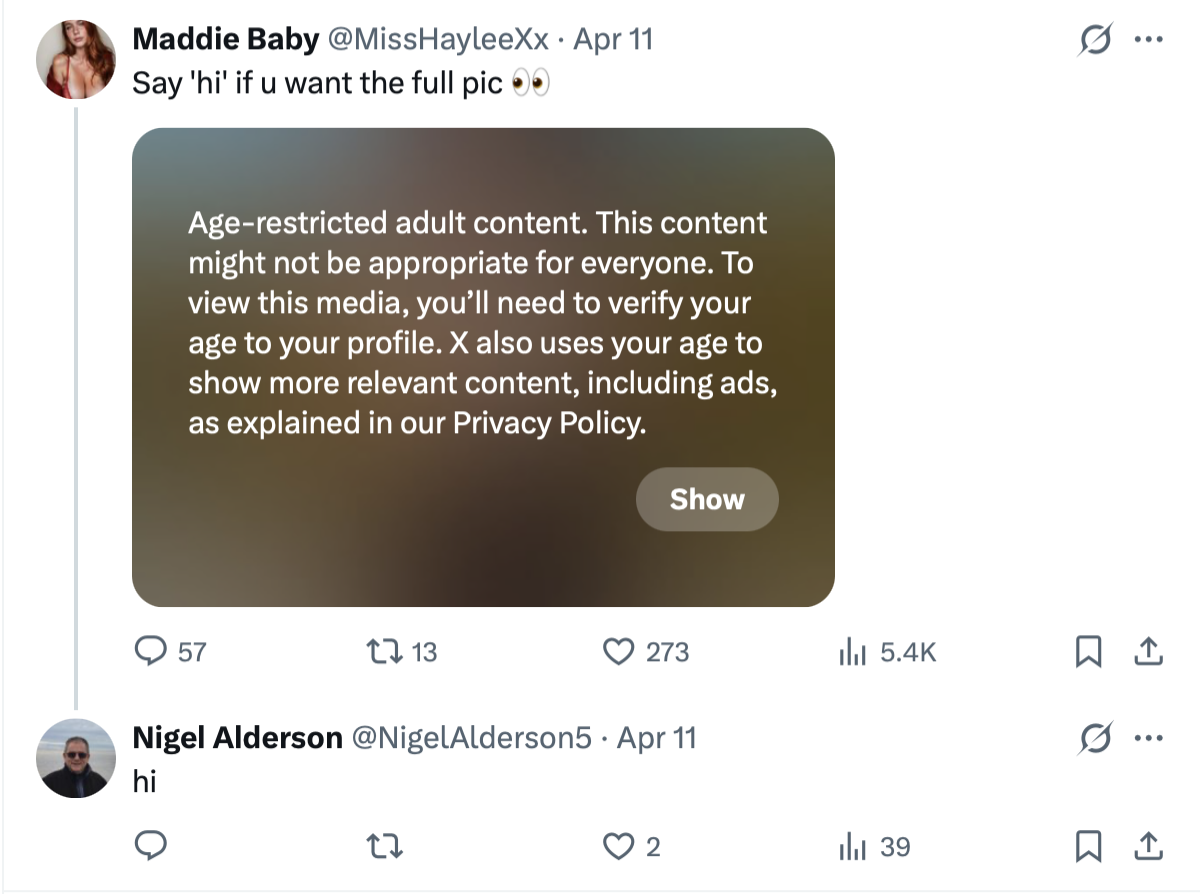
Left Foot Forward can also reveal that Alderson’s X account engaged with posts by Only Fans accounts and adult content creators, including leaving comments in which he appeared to solicit nude images.

Alderson has been a Lancashire county councillor since May 2025, when Reform took control of the council after winning 53 out of 84 of the local authority’s seats in the local elections.

In April of this year, Alderson commented “hi” on several posts by female adult content creators.

A post by OnlyFans creator @lucien on 13 April read: “F*CK it, sending nudys to everyone who says ‘hi’.” Below the image, Alderson’s account commented “hi”.

He also responded “hi” to a post which read “Say hi if you want the full pic.”

Alderson also commented on a photo of a young woman posing in lingerie, with the caption: “Would you accept a friend request from a japanese girl? Asking for a friend.”

The Reform councillor responded: “yes”. 

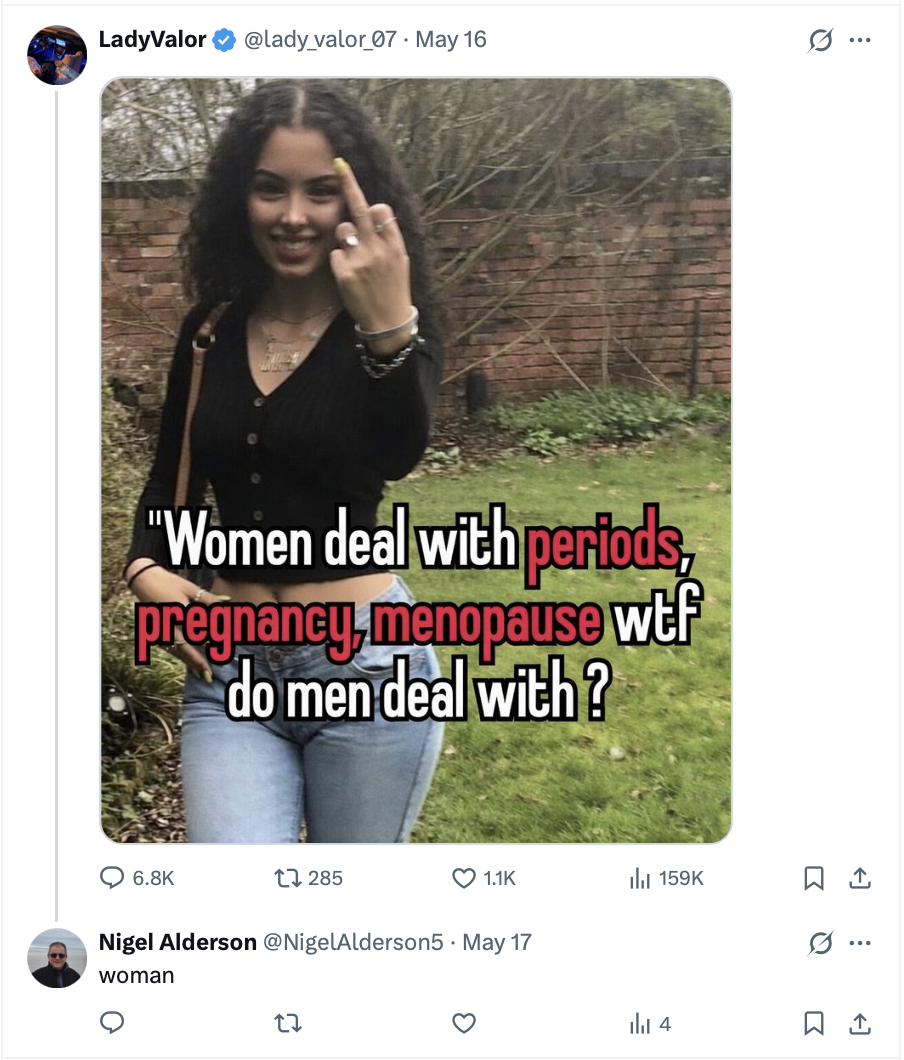
In another post which reads: “Women have to deal with periods, pregnancy, menopause wtf do men deal with?”, Alderson replied: “woman”.

Alderson has confirmed ownership of the account but claimed that someone else had been posting on it. 

Samara Barnes, the Labour councillor for Rossendale West in Lancashire, called the posts “nothing short of disgraceful”.

“I find them deeply offensive, the women ones particularly misogynistic,” she said. 

Referring to the image of the pig defecating on the Quran, Barnes said: “It left me aghast when I opened it.”

“He’s shown he has disdain for certain elements of our community, and as a woman I would not feel comfortable going to him to represent me,” the Lancashire county councillor said. 

She added: “I’m sure people who that first picture [of the pig and the Quran] rightly offends would not feel comfortable either.”

Barnes also criticised what she sees as Reform’s lack of disciplinary process, stating: “There is no party discipline and they tend to get away with these kind of things”.

Barnes has now reported the posts to the council’s Standards Committee and said she will also raise them with Jo Ash, a Reform councillor and Lancashire County Council’s Member Champion for Combatting Sexual Exploitation and Violence Against Women and Girls. 

Reform has been approached for comment and requested screenshots of the posts, but did not confirm whether the party will take any action against Alderson.

Alderson also stood as Reform’s parliamentary candidate in Lancaster and Wyre in the 2024 general election, but came third behind Labour’s Cat Smith and the Conservative candidate Peter Gordon Cartridge. 

A furious Alderson declined to comment on the posts, and has now deleted his X account.

Olivia Barber is a reporter at Left Foot Forward

The post Exclusive: Reform councillor reposted image of a pig defecating on a Quran on his X account appeared first on Left Foot Forward: Leading the UK's progressive debate.

Reform mocked over plan to deliver party political newspaper ‘The Reformer’ to 15 million households

Reform has been mocked over a plan to send out copies of its own newspaper, The Reformer, to over 15 millions households.

As reported by the Spectator, Reform is preparing to launch its own eight-page newspaper, which it will distribute to 15 million households within the coming weeks.

This comes after a rocky few months for Reform and Nigel Farage, and is aimed at helping the party “bypass traditional media”.

Reform has been hit by successive scandals due to recent media investigations. 

These include Farage’s undeclared £5 million donation from crypto billionaire Christopher Harborne and a Verbatim investigation which exposed senior Reform officials plotting about how American donors could donate to the party. 

Reform also received two donations of £36 million from crypto investors Ben Delo and Christopher Harborne in September. 

On X, Reform’s newspaper plan has been widely mocked by social media users.

One user wrote: “Free toilet paper is always welcome in these trying times.”

“The toilet paper industry is expecting a drop in sales due to people receiving an ample supply,” said another. 

Another suggested returning the newspaper to sender, writing: “Sounds like a good time to bookmark the Reform UK free post address?”. 

Another said: “For years Reform have warned us about the sinister influence of wealthy elites on the media. 

“Anyway, here’s a newspaper paid for by their crypto billionaires shoved through your letterbox.”

Olivia Barber is a reporter at Left Foot Forward

The post Reform mocked over plan to deliver party political newspaper ‘The Reformer’ to 15 million households appeared first on Left Foot Forward: Leading the UK's progressive debate.

Judge weighs if Trump can charge $100K for early access to Truth Social posts

Likely in the next few weeks, a federal judge will decide if Donald Trump can become the first president to personally profit from selling early access to government information in his social media posts.

At a hearing Wednesday, Department of Justice civil attorney Brantley Mayers argued that there was no conflict whatsoever with Trump charging up to $100,000 monthly for instant API access to Truth Social posts that often break news from his administration.

Trump is the largest stakeholder and majority owner of Trump Media & Technology Group, the parent company that owns Truth Social, and the value of the API access comes largely from Trump’s role as president.

Read full article

Comments

© BRENDAN SMIALOWSKI / Contributor | AFP

How to improve the user experience of videos and images​

In September’s Content Improvement Club, we looked at how we use videos and images on our websites. We covered how to improve the accessibility and usability of embedded media and we discussed the role that videos and images play in making our sites more sustainable.

Examples of pages with and without images

Images and videos are common features on University websites.

For example, here’s the University homepage as it looks today:

Screenshot of the University of Edinburgh homepage. The Study with us card includes an image of students in front of Edinbugh castle. The Undergraduate Open Day card shows two students smiling at the camera.

University of Edinburgh homepage

One click away, we get to a page with an embedded video:

Screenshot of the Edinburgh Local website. An embedded video about the Community Plan 2025-30 is in the centre of the page.

Edinburgh Local homepage

But in the early days of the web, images weren’t so common and videos were more or less nonexistent. Here’s what the University homepage looked like in 1997:

Homepage of the University of Edinburgh website in 1997. The homepage features a roundel logo but is otherwise entirely text.

The University homepage archived on the Wayback Machine

This might seem like an outdated way to present a navigational page. But even today, some major public sector websites use a predominantly text-based design without many images or videos.

Here’s the NHS Health A to Z page:

Screenshot of the NHS Health A to Z page. The page is entirely text.

NHS Health A to Z

For another example, see Edinburgh Council’s page about council tax:

Screenshot of the Edinburgh Council webpage about Council Tax. The page has no images.

Edinburgh Council: Council Tax

Aside from the site logo and a few icons in the menu bar, there’s not an image to be seen. Weird, right?

Reducing media use has some benefits

Pages like this can look a bit sparse, but there are good reasons for taking this approach.

One benefit of reducing the amount of media content on your site is that you reduce the amount of data needed for a user to load the page. This means the page loads more quickly, which is useful for anyone on a slow internet connection. Reducing data transfer like this also reduces the carbon cost associated with a site.

Reducing media use also reduces your content maintenance overhead. Like any content, images and videos need to be monitored, kept up to date and replaced every so often.

These screenshots from the NHS and Edinburgh Council are cherry-picked examples, and it’s worth noting that they’re from outside of our context working in higher education. They’re communicating fairly dry information and they aren’t trying to sell anything. Edinburgh Council don’t need to make Council Tax seem interesting or attractive, and the content reflects that.

But pages like this are an interesting provocation. Why do we add images and videos to our sites? What value do they bring for our users?

The University of Bath’s Digital Content Team address these questions in their content guidance. They say: “Only use an image if it directly relates to your content and helps to communicate your message more clearly.”

University of Bath: When to use images on the web​

Videos

After our discussion about the purpose of adding media to our websites, we looked at videos.

In the session, attendees discussed what types of videos they have on their websites. These included:

  • instructional videos​
  • events / presentation recordings​
  • student experience videos​
  • building / facility tour videos​
  • short-form videos on services​
  • staff talking about degrees and facilities
  • interviews with supervisors

One attendee suggested that videos add texture to text and image content. We thought this was a neat way of describing the role of a video embedded on a page.

We talked about how people interact with videos

When we add videos to a website, we typically assume that they will be of use to someone visiting the page. We discussed what evidence we have for this. One attendee said that they ask their users about videos on their website in post-event surveys. They reported that recordings of events were popular with people who had wanted to attend the event but hadn’t been able to make it.

Personas can help us think through how users might respond to a video

In an ideal world, we would watch people using our site and observe how they interact with the videos. In the absence of that, one way to quickly assess a page is to imagine how different personas might respond to it. For a page with a video, we presented some statements that could describe four potential user personas:

  • I’m happy to watch a short video.
  • I’m in a rush and don’t have time to watch a video.
  • I cannot watch a video with sound because I’m on a bus.
  • I cannot watch a video at all because I have a poor internet connection.

Looking at the content from different angles like this can be useful as part of a website review process. In this case, it can highlight problems with video content where there isn’t an equivalent text alternative.

What we learned from our team’s research into video use

We shared some work that our Green Digital Design intern Dono Abdurahmanova carried out this summer. This was with a small sample of participants, but the findings supported some practices that can improve the usability of videos.

For example, we recommend the following:

  • Give the video a clear title.
  • Provide a transcript and a written summary of the video.
  • Make sure the video has accurate human-corrected captions.
  • Use timestamps (chapters) to help users navigate to a particular part of the video.
  • Keep autoplay turned off and let users choose when they want the video to start.

You can read more about Dono’s research here:

Do students actually watch videos on websites?

Testing alternatives to video in student communications

We shared guidance on adding timestamps, summaries and captions

We demonstrated how to add timestamps in Media Hopper Create. This option is available under the three-dot menu for a video, in the Edit > Timeline section.

Screenshot of the timeline interface in Media Hopper Create. An arrow points at where to find the Timeline tab. The timeline has several markers on it.

We also watched a short video and worked in groups to write an introductory summary for it.

Some attendees said they had used the human corrected captioning service to improve the accuracy of captions on a video.

Information Services Learning Technology: Our human corrected captioning service

Images

In the final part of the session, we looked at the role of images on our websites. Attendees compared two pages, discussing what value the images are adding and whether they would do anything differently.

We referred attendees to the University’s brand guidance on image use. This outlines some reasons for including images in our content. For example, it highlights that images and videos can command attention and convey emotion.

Brand: Photography and video guidance (University login required)

How to improve the user experience of images

We shared some guidance on how to improve the user experience of our images:

  • Add alt text (a text description for anyone who cannot see the image)​.
  • Add image captions where needed (these add context to the image by echoing information elsewhere on the page)​.
  • Avoid using images of text to convey information​.
  • Think about what the image is adding (sometimes less is more).

We also shared some resources that provide further guidance related to images:

EdWeb 2 Hub: Best practice for adding images (University login required)

Videos and images – when do they add value and not just page weight?​ (Blog post by Katie Spearman)

BBC: Captions vs text descriptions​

Applying what we’d discussed to our own content

In Content Improvement Club, we often make time for attendees to evaluate their own sites in relation to the topic under discussion.

This month, attendees worked in pairs to assess the media on their own sites, and talked about two questions:

  • How well are the images and videos working on our own sites?
  • Is there anything we could do differently?

Thinking through our use of videos and images like this helps us to ensure that we’re using media effectively in the places where it’s needed.

How to hear about future sessions

We promote these sessions via our mailing list. If you’re interested, please sign up:

Join the UX and Content Design mailing list (University login required)

Suggest a topic for a future session

We’re keen to continue covering topics that colleagues across the University would find useful. It would be really helpful if you could let us know any ideas you have using this form:

Suggest a topic for Content Improvement Club (University login required)

Other training that we offer

More training is listed on the User Experience Service website:

Training | User Experience Service

WP Offload Media 3.4 Released: WordPress 7.1 Compatible, Preparing For Future Features & Performance Improvements

We’re super excited to bring you a new release of WP Offload Media.

Version 3.4.0 delivers full support for WordPress 7.1, performance improvements and bug fixes, along with foundational changes that unlock future features and further performance improvements.

WordPress 7.1 Compatible

WordPress 7.1’s client side media handling brings along three new fields to the _wp_attachment_metadata records in the postmeta table related to Media Library items.

Namely:

  • source_image: The uploaded image file that needed to be converted to another format, e.g. an HEIC file.
  • animated_video: The MP4 file created from an uploaded animated GIF.
  • animated_video_poster: A JPG extracted from an uploaded animated GIF to act as a placeholder for the MP4 version.

WP Offload Media now knows about these extra files, and will offload and remove them from the server as appropriate.

To accomplish this, we had to tap in to some in-progress changes to the plugin.

Preparing for the Future

We’ve been working on some changes to the internals of WP Offload Media to prepare for some features our customers have been asking for, while also improving performance, especially for sites with very large Media Libraries.

Custom Table Changes

When you upgrade to WP Offload Media 3.4.0, depending on how many offloaded items you have, you may see an upgrade notice in the settings page.

This upgrade routine will quietly background upgrade WP Offload Media’s metadata related to offloaded items to create a new as3cf_files table that lives alongside the existing as3cf_items table.

Although you won’t be able to make any changes to WP Offload Media’s settings or run any of its bulk management tools while this upgrade is in progress, all existing and new offloads will continue to work as usual.

This new as3cf_files table holds a wealth of information:

  • 1-to-1 mappings of local media files to their path in the cloud storage bucket.
  • Information related to whether the files are private in the bucket or not.
  • A reference to the as3cf_items record which ties multiple files to a Media Library item or BuddyBoss avatar or cover item.

Performance Improvements

The as3cf_files table gives WP Offload Media much improved flexibility in how it keeps track of offloaded media, crucial for supporting the new Media Library metadata fields mentioned above.

However, the new table’s data structure also makes it far simpler and therefore faster for finding matching records when performing unique name checks, or rewriting URLs between their local and remote versions.

WP Offload Media no longer needs to reduce file names down to their base non-sized suffixed name and do potentially expensive LIKE table scans, it can do much simpler equality checks that use indexes for speed.

Because of these changes, it has been possible for us to reduce the processing required when doing URL rewrites. We’ve removed a whole pass through post content and its associated processing, and removed other loops that are no longer required.

We’ve also been able to vastly improve the way we cache the relationship between the URLs in a post’s content with their associated Media Library items. As such, you may see a second upgrade routine notice related to the removal of ye olde amazonS3_cache records from the postmeta table, which will be replaced by much better behaved as3cf_url_cache_local and as3cf_url_cache_remote records.

And for our most advanced customers that have their whole site behind a CDN such as CloudFront, and only use WP Offload Media to manage media in the bucket, we have a big performance boost for you. WP Offload Media no longer implements many of the usual frontend content filters if “Deliver Offloaded Media” is turned off, cutting out a lot of unnecessary checks and processing.

Small Steps

Along with the custom table changes that unlock future features and performance improvements, WP Offload Media will need to change how some of its internal code is organized.

We’re very lucky to have a number of plugins that integrate with WP Offload Media, and are aware of many customers that have custom code that relies on the existing internal API.

As such, we’ve been very careful to make these changes in a backwards compatible way, keeping the existing as3cf_items table data in sync with the data managed in the new as3cf_files table, and ensuring the classes and methods that work with the old data still work.

However, we have marked some functions as deprecated, and do intend to eventually remove them.

Our work in this area is not complete. WP Offload Media still uses some of the deprecated methods itself, and we have plans for further improvements to the data handling that unlock some exciting features, and continue to improve performance.

And More

As always, there’s a number of other bug fixes and improvements in this release.

For a full list of new features, improvements, and bug fixes, see the 3.4 Changelog.

Next Up

We hope you enjoy this foundational release of WP Offload Media.

We’re already working hard on the next release, and are excited to bring you the features and improvements you’ve been asking for.

The post WP Offload Media 3.4 Released: WordPress 7.1 Compatible, Preparing For Future Features & Performance Improvements appeared first on Delicious Brains.

Testing alternatives to video in student communications

Our previous research found that students often skipped videos on University webpages. This follow-up explores whether audio, timestamped videos or structured transcripts better support students in finding the information they need. 

In June, I wrote a blog post about whether students watched videos on University webpages, describing my research as part of the UX Service. 

Do students actually watch videos on websites? 

As part of that research, we ran a small qualitative study with three student participants, observing their natural behaviour as they encountered video content embedded in a student-facing newsletter from the University. We asked a simple question: when a University-wide communication points students to video content, do they actually watch it? 

Our first case study suggested the answer was often no. Two of the three participants were not engaged by video content, with one actively avoiding it and another being highly selective. In contrast, one participant was receptive to video, likely due to its relevance to his current situation, highlighting the importance of timing and context in determining video engagement. 

This blog post continues where that left off, testing why and what students would rather have instead. 

We investigated student reactions to alternative forms of video content

The obvious next question was what students would choose instead of a video if given the option. We decided to run A/B tests, which are controlled experiments that typically compare multiple versions of a digital interface, for example, a webpage to determine which performs better based on user behaviour. We recruited six participants and showed them the same newsletter in three different formats. 

  • Two participants were shown an audio version. 
  • Two were shown a video with timestamps. 
  • Two were shown a transcript, restructured into digestible text rather than auto-generated wall of text. 

The findings from this short experiment were interesting. We learnt that, of the three alternatives, the audio format was the least well perceived by the participants. The main reason was because an audio version offered no visual elements, no way to scan ahead, no quick way to extract the one piece of information someone actually needed. Even when the participants were explicitly told that audio was lighter in weight and reduced the carbon footprint of the web estate, it was still the least preferred option. 

The video with timestamps on the other hand, was much more positively received. Timestamps allow people jump straight to the relevant section rather than watching linearly, therefore allowing a more efficient way to consume information. 

Of all three alternative formats, the transcript was the clear preference of the participants, since this permitted them to quickly skim through the content and find the key information they were looking for. The transcript participants favoured wasn’t just “text instead of video”,which can often appear as a ‘wall of text’ it was text that had been deliberately restructured to pull out the key takeaway points. Taking these findings together, we learned that, for video transcripts to be easily read, and to ensure people can extract most value from them, it is worth putting effort into structuring and presenting text from transcripts, and not simply relying on the auto-generated ones.  

Our research revealed ways to make video content more impactful and effective

From a relatively small experiment, we learned a lot about the effectiveness of different formats of student communications and student preferences. The main findings were as follows: 

  1. When it came to assessing content in student communications, students did not seem to be primarily concerned with the digital sustainability of the format. While digital sustainability considerations did not drive student format preferences, it’s worth noting that the most preferred format (structured text) had the lowest environmental impact of those tested. 
  2. Audio did not appear effective for this type of student communication. Audio formats lack the scannability that students rely on, making them a less suitable choice for this type of communication. 
  3. Complying with accessibility requirements does not guarantee usability or a good user experience. A transcript can meet accessibility requirements, yet still fail to provide adequate scannability, highlighting the importance of considering both accessibility and usability. 
  4. Students prioritise their time and seek relevant information, emphasising the need for formats that can be easily updated and kept current. 
  5. More research is needed on video and text complementarity. Further study is required to determine the most effective ways to combine video and text to support communicating with students in the most effective ways possible.  
  6. When researching the effectiveness of student communications, hearing direct feedback from students is essential. A useful next step would be to ask students directly about their experiences with structured text content versus timestamped video and compare the accuracy as well as the completeness of their recall. 

We’re planning to continue our research into effectiveness of video content

Our findings have implications for the development of educational content. We shared our results with the Careers Service, who were interested in using our research to inform their content development. This collaboration has the potential to impact how they work with media in the future. Looking ahead, we would like to investigate how students interact with videos on social media platforms like LinkedIn, as their attitudes towards video seem to differ depending on whether it’s for entertainment or educational purposes. This could provide valuable insights into the role of video in student learning and engagement.

WP Offload Media 3.3 Released: Modern Standards, Global Regions, and Enhanced Stability

We are excited to announce the release of WP Offload Media 3.3! This release focuses on modernizing our codebase to support the latest server environments, expanding our global footprint with new storage regions, and refining the user experience with key stability improvements.

As WordPress and PHP continue to evolve, we are committed to ensuring WP Offload Media remains the most reliable solution for offloading your assets. Let’s dive into what’s new.

🚀 Embracing Modern Standards: PHP 8.1+ and WordPress 5.9+

To deliver the best performance and security, we have updated the minimum requirements for the plugin. Starting with version 3.3, WP Offload Media now requires PHP 8.1+ and WordPress 5.9+.

By raising these minimums, we can leverage more efficient code and ensure compatibility with the latest technologies. This release introduces full compatibility for PHP 8.4 and PHP 8.5, as well as support for WordPress 6.9.

Additionally, we have updated the underlying AWS PHP SDK to v3.360.1 along with other critical PHP and JS dependencies, ensuring your connection to Amazon S3 remains secure and robust.

🌍 Expanded Global Reach

For users targeting specific geographic audiences, latency matters. We have added support for several new selectable regions across our three major providers:

  • Amazon S3: Asia Pacific (Taipei) and Asia Pacific (New Zealand).
  • Google Cloud Storage: North America (Querétaro) and Europe (Stockholm).
  • DigitalOcean Spaces: Atlanta (ATL1).

These additions allow you to store your media closer to your visitors in these regions, further improving load times.

And even if you use a CDN to provide faster media access to all your site visitors worldwide, being able to use a bucket nearer to your site’s server improves media offload performance.

💾 Improved Metadata Integrity

For those who frequently move media between the cloud and their local server, we’ve made an important improvement to data preservation. Previously, when an item was downloaded from the cloud back to the server, the file size attachment metadata value could be removed.

In version 3.3, this value is no longer removed during the download process, ensuring your attachment metadata remains complete and accurate regardless of where the file currently lives.

🛠️ Integrations and UI Fixes

We are always working to ensure WP Offload Media plays nicely with the rest of the WordPress ecosystem. This release fixes a specific conflict with Rank Math SEO, where deleting an item via the Media Library’s grid mode would fail. This functionality has been restored.

We also polished the user interface on the “Edit Media” page. Now, when you toggle the Public/Private access status of a file, the “Download File” link updates dynamically to reflect the change immediately, without requiring a page refresh.

🤩 And More…

  • Robustness: We’ve added protection against invalid values being passed to the core the_post action, preventing potential crashes.

  • Legacy Support: The legacy file size upgrade routine has been patched so it no longer throws errors if attachment metadata is missing.

For a full breakdown of changes, you can view the changelog.

Are you ready to update? As always, we recommend backing up your site before performing any major updates. Let us know what you think of the new changes in the comments below!

The post WP Offload Media 3.3 Released: Modern Standards, Global Regions, and Enhanced Stability appeared first on Delicious Brains.

A YouTube Channel Post

I share a short post on my YouTube channel.

About Buy Me a Coffee

If you haven’t heard of this service, Buy Me a Coffee is an easy way for folks to contribute to the efforts of their favorite creators. I signed up years ago and, over the years have gotten a reasonable number of contributions. Occasionally, I’d go to my account and sweep the balance into my savings account. Easy peasy.

Then, for reasons I don’t understand, Buy Me a Coffee got a third party credit card company involved, Stripe. I had to jump through hoops to set up a Stripe account and provide a lot more personal information than I wanted to in order to get my money. (I don’t see why they need a photo of my driver’s license to give me $46.) So I decided to stop using them and, instead, set up a Buy Me a Coffee item on my Square account. This way when folks make a contribution, Square takes its fee and just puts the rest in my bank account. Very easy and no need for a third party intervention.

Unfortunately, a bunch of those old Buy Me a Coffee links were still out there and that’s what my latest contributor used. So I spent this morning squashing every link in my blogs. I still need to go through all of my YouTube video descriptions. I’ll wait until I know I’ve squashed all the links before doing a final sweep and closing my Buy Me a Coffee account.

It never ceases to amaze me how many organizations need to get a piece of the action every time a creator is receives money for work.

This morning, I got a notification that a YouTube channel subscriber had contributed $25 to my publishing efforts via Buy Me a Coffee. His accompanying message to me told me a bunch of things that he liked and wanted to see.

I Need Motivation

Getting positive feedback — yes, with money, although that didn’t really matter as much — reminded me that I usually don’t just sit on my ass and watch the clock hands spin my life away. I’m usually working on creative projects like my blog or YouTube channel content or the book I started writing about my Great Loop adventure. Or making jewelry in my studio (or mobile studio).

But lately I’ve been feeling kind of meh — I think world events and the fall of the United States’ democracy have something to do with that but won’t discuss it here — and have been spending entirely too much time on social media (Mastodon), doing word and number puzzles (even I think 8 sudokus a day is extreme), and watching YouTube videos. It was only over the past two days that I decided to practice using my drone and exploring livestreaming from it that I’ve been making better use of my time.

And that’s what prompted my latest supporter, who watched the livestream, to contribute and speak up. So that’s all good.

It also got me motivated to check out new comments on my personal YouTube channel and respond to them. And to write a post letting subscribers know I was still alive and what my plans were for the next few months. Here’s that post.

The Post

I just caught up with a bunch of comments on this channel and thought it was time for an update.

It’s winter and I’ve left my home in the very capable hands of my regular winter housesitter so I can return to Arizona, California, and sunny warm weather. I’m in my RV pulling a small utility trailer that contains my jewelry studio and the equipment I need to appear at art shows. I’ve done two art shows in Arizona; one was a bomb and the other was good (but not great). Right now I’m boondocking in my rig on BLM land between Buckeye and Gila Bend, AZ. From here I’ll go to Quartzite, the Holtville Hot Springs, Death Valley, and then, depending on the weather, home.

Boondocking by Drone
Golden hour drone photo of my campsite on BLM land between Gila Bend and Buckeye.

I’ll spend today working on a blog post (and maybe video) about my boondocking setup and philosophy, which is remarkably similar to my boat anchoring out setup and philosophy. With luck, I’ll finish and publish later today or tomorrow morning. I’d like to mention here that the topic was requested by a channel subscriber who watched my drone livestream yesterday and was kind enough to donate to the channel using the Buy Me a Coffee links on some videos and blog posts.

Meanwhile, my boat is languishing on its trailer in my garage. I’ll get it in the water in Bellingham WA in April, have all its scheduled maintenance done before month-end, and then take it on a two-week shakedown cruise in the San Juan Islands and Inside Passage. I’ve already got one training client booked to spend three days on board with me. After that cruise, it gets a final preparation for the charter season and will then be available for charter through San Juan Yachting. It’s already booked for several weeks. I’ve scheduled a total of five weeks for myself during the season, including two weeks in September so I can attend the Ranger Rendezvous at Roche Harbor. I’ll be doing training on my boat during my charter time and already have a client scheduled for two days in July. I’m also planning on making a lot of boating videos over the summer and am open to your suggestions on topics to cover.

So yeah: I’m keeping busy and have plans for the future.

I also want to take this opportunity to remind everyone that this channel is 100% human created. I don’t use AI for anything. I urge you to support human creators on YouTube. We work hard for very little recognition. It’s absolutely heartbreaking to see AI slop getting thousands of views and drowning out our voices.

If you have any questions or comments regarding this channel and the directions I plan to take it, please let me know. I’m always interested in feedback.

So Now, Back to Work

I’ve pulled out my daily planner and jotted down the things I want to accomplish today. That’ll help keep me focused. It’s a dreary day for the Arizona desert, with high clouds filtering the normally strong sunlight. I don’t think it’ll get very warm. In fact, I just put on a flannel shirt and made myself a hot cocoa to help warm up. Perfect day to stay indoors and write.

Do you miss the ads?
Isn’t it nice to visit a website that isn’t plastered with advertising or sponsor messages? If you appreciate the (mostly) ad-free experience, how about buying me a cup of coffee to thank me?

Buy me a coffee!

So I’ll write a post about my boondocking and anchoring setups and include some photos to illustrated what I’m talking about. And maybe I’ll even get motivated enough to capture some video or assemble some photographs to turn them into a vlog post for YouTube. Meanwhile, I’ll stay off social media and avoid distractions. I’ll get something worthwhile done.

Your comments are always appreciated. Use the form for this post. I usually respond within 24 hours.

❌