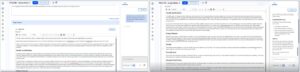
❌

Reading view

There are new articles available, click to refresh the page.

#241 – Tiffany Farriss on Drupal Funding, Community, and a Shared Journey With WordPress

Transcript

[00:00:19] Nathan Wrigley: Welcome to the Jukebox Podcast from WP Tavern. My name is Nathan Wrigley.

Jukebox is a podcast which is dedicated to all things WordPress. The people, the events, the plugins, the blocks, the themes, and in this case, Drupal funding, community, and a shared journey with WordPress.

If you’d like to subscribe to the podcast, you can do that by searching for WP Tavern in your podcast player of choice, or by going to wptavern.com/feed/podcast, and you can copy that URL into most podcast players.

If you have a topic that you’d like us to feature on the podcast, I’m keen to hear from you and hopefully get you, or your idea, featured on the show. Head to wptavern.com/contact/jukebox, and use the form there.

So on the podcast today we have Tiffany Farriss. Tiffany has spent the last 30 years working in web design, development, and creation, and she’s been deeply embedded in the Drupal community for the past two decades. She’s currently the interim CEO of the Drupal Association and is the organization’s longest serving board member after Drupal’s founder Dries Buytaert.

This episode is a bit of a departure as we usually focus squarely on WordPress, but Tiffany brings a wealth of experience from the broader PHP family, and this conversation explores the similarities and differences between the WordPress and Drupal ecosystems, particularly when it comes to infrastructure and the sustainability of open source projects.

Tiffany explains the maker-taker problem, and the challenges of sustaining free software platforms that end up in millions of sites across the web. She shares her insights on the real costs behind open source stewardship, drawing from both data and experience, and discusses how tiny groups have shouldered the burden for everyone, and why that might no longer be viable.

The discussion explores the Drupal Certified Partner Program, the push towards quantifying contributions, and how the open source community can improve transparency and sustainability.

Tiffany also touches on the role of public sector procurement in shaping the future of open source, the impact of new regulations, and how community driven recognition could incentivize more organisations to buy their round of beers for the ecosystem.

If you’re interested in the sustainability of open source, the evolution of governance models, and how WordPress professionals can learn from the broader PHP landscape, this episode is for you.

If you’re interested in finding out more, you can find all of the links in the show notes by heading to wptavern.com/podcast, where you’ll find all the other episodes as well.

And so without further delay, I bring you Tiffany Farriss.

I am joined on the podcast by Tiffany Farriss. Hello, Tiffany.

[00:03:19] Tiffany Farriss: Hi Nathan.

[00:03:20] Nathan Wrigley: Thank you for joining us. So this is a little bit of a departure. Usually we talk about WordPress. It’s WordPress on the menu every single day of the week. And that is going to be the case, I suspect a little bit today. But there’s also going to be a foray into Drupal because Tiffany is very much connected with the Drupal community.

So Tiffany, really just to get this podcast started, can I just offer you a chance to give us your little bio, tell us who you are and what you do over on the Drupal side, lo these many years. It’s been multiple decades that you’ve been involved in various different ways I think.

[00:03:52] Tiffany Farriss: It has been. Yeah. Thank you Nathan. I’m really glad to be here. I do consider all of us part of the PHP family, whether we’re Drupal or WordPress or Joomla or TYPO3, like I think we all have so much in common.

But I am Tiffany Farriss. I’m currently the interim CEO over at the Drupal Association. I have been involved in web design, development, creation for the last 30 years. And I’ve been heavily involved in the Drupal community for the last 20.

In particular in its governance. I’m the longest tenured board member of the Drupal Association, the 501 (c) (3) that is responsible for the governance. Other than Dries Buytaert, who is the founder of the Drupal Project.

So I’ve been around a long time and I’m currently on leave from my own company, palantir.net to take a year to help Drupal kind of navigate this time of kind of intense disruption, I think it is for all of us. Pretty safe to say, that we are all experiencing the same disruptions from AI. And then just economic pressure in general.

[00:04:50] Nathan Wrigley: So Drupal, I suppose, it would be a good thing to say at this point, Drupal is very similar in its project, in its status, in its goals, in its aims, in its infrastructure and technology to the CMS that most people listening to this are familiar with. It’s a PHP based CMS used by millions of websites all over the world. So broadly it’s the same.

Now you mentioned the foundation. Would you just be able to dig into that a little bit more because that may be confusing for people on this side. There may be some significant differences there. What does the foundation get itself involved with? I know that you described that a little bit there, but if you could go into a bit more depth, that would be great.

[00:05:26] Tiffany Farriss: I do think our governance is one of the places where WordPress and Drupal are a little bit different. In Drupal, we have the Drupal Association, which is an independent 501 (c) (3), which is a US-based not-for-profit. And we have specifically an educational and scientific mission that we’re authorised to do.

We run Drupal.org. We run all of the infrastructure. We support all the security coordination. And we are responsible for Drupal Cons around the world. We do have a founder as well, right, Dries, and he is currently the Executive Chairman of Acquia. But Acquia doesn’t have the same single privileged actor role, that say Automattic does in the WordPress community.

Dries serves on the board, but he doesn’t control the board and he doesn’t control any of the technical steering committees, although he is still the founder and the lead of the project.

[00:06:17] Nathan Wrigley: Okay. So there is a significant difference there, isn’t there? That’s kind of interesting.

[00:06:20] Tiffany Farriss: Yeah.

[00:06:20] Nathan Wrigley: Okay, we’ll dig into that in a moment. However, in the preparation for this podcast episode, Tiffany was very kind to send me three things.

One of them was a YouTube video. It runs to about 20 minutes and sort of summarises what we’re going to talk about, I think, fairly well.

Another one was a blog post that you wrote in June of this year. It’s called Freedom is Not Free, A model for Open Source Sustainability. Again, very much aligned to what we’re going to talk about. That’s on palantir.net, which I’m at pains to point out is not the palantir that you are probably thinking about when you say the word palantir. And there’s another one which again, tackles the same subject, written broadly the same time. It was July this year, written by Dries, the founder of Drupal.

And what we’re trying to deal with here is, what I think Dries has summed up in the past is this maker, taker problem. And it’s very difficult to summarise. I must confess, I genuinely cannot articulate this problem. No matter how many times I’ve tried to articulate it to friends, to colleagues, to relations. At some point I get lost. At some point, the dynamics of it and the argument of it kind of boils boils down to it’s a moral thing.

So I’m just wondering, could you paint the picture of what you were trying to say in that YouTube video and in your blog post. What is the open source sustainability problem that you think, amongst many others, we have at the moment?

[00:07:47] Tiffany Farriss: We like to talk in open source about free and the four freedoms, especially for projects that are based in the GPL, right? But one of those freedoms, I think it comes down to the idea of the word free, right? There’s free is in speech. Where I am free to say what I want and when I want, and accept the consequences of that.

But then there’s also this idea of free as in beer. And the reality is that the beer was never free. And the problem we have in open source is that for the last 25 years of Drupal, a really small group has been buying the rounds of beer for an entire ecosystem. And what I’m saying is that, beer has never been free. You just haven’t been taking your turn at buying the round, right?

So as we deal with kind of the pressures of the current economic situation, the uncertainty and opportunities created by AI, the number of people who are still buying those rounds is dwindling. But there’s still a lot of people who want to drink that free beer. There’s still a tonne of people who use WordPress, a tonne of people who use Drupal and get a lot of value out of it, right? They’re enjoying that.

But what the problem is, is that we have this open source licence, and the licence is what conveys the freedom, right? It makes the code available. And in open source the more people who use the code, the cost of that code goes to zero. And no one’s use of the code is diminished by someone else also using that code.

However, there’s more to being an open source project than just the code. And this is where the concept of stewardship comes in. Stewardship is what makes it dependable. It’s what has made it so that millions of people around the world can feel confident in downloading the software, using the software, hiring someone to create a WordPress or a Drupal implementation for you.

And that stewardship includes things like code hosting, or packaging. Testing frameworks. The security coordination. All of those things, which as more people use it become more expensive, not less.

So, there are these tensions around people who are getting value from open source software, but who currently don’t help pay for the cost that they impose on the project, largely because it’s invisible, right? So I think the first step is that we need to make those costs much more visible. So that’s something I’ve been working on in Drupal for a while. And so I want to expose it, right?

We have 2,800 organisations in the last year who contributed into Drupal, but under 5% of them did two thirds of it, right? There are, I think as in WordPress, you know who really is driving and doing the work. And we do too, right? Obviously in Drupal we know who that is. And because we know who they are, and we know that they’re invested, and that they are passionate about open source and our project. They’re the ones who are easy to ask for financial contributions, or sponsorship to Drupal Con.

So you keep going back to the same pool. And in Drupal’s case, that means that 94% of our financial contribution comes from this tiny group of 5%. So they’re buying the rounds of beer for everyone. And that’s not a sustainable proposition.

[00:11:00] Nathan Wrigley: Do you think, I’m going to rewind the clock a little bit. So, I regard the internet as an ongoing experiment. Where we are now is definitely not where it’s going to end up. And where we were 10 years ago, I don’t know that anybody would’ve predicted that we’d end up where we are today. You know, the internet came around and it evolved in the way that it did.

Do you see in the last, let’s say 25 years that many people have had access to the internet. Can you see moments where, and I’m doing air quotes, mistakes were made, which led to this problem? Or was it just happenstance and serendipity? We just got to this point? There’s no real pointing of a finger. There’s nobody to blame. There’s nobody to say, okay, you made dreadful mistakes. It’s just the way it evolved. There’s no question there, but do you understand what I’m saying?

[00:11:49] Tiffany Farriss: I do.

[00:11:50] Nathan Wrigley: With the benefit of hindsight, can you look back and point the finger, or is it more a case of okay, let’s just deal with the reality of where we’re at now.

[00:11:56] Tiffany Farriss: I can point to that moment. I was on the board at the time when Drupal moved over to Composer, right, and to modern packaging. And what I can tell you is that the board was never, wasn’t a big deal, right? They came to the board and I don’t even think we were really notified that this was happening or what it would mean.

And nobody modelled that packaging costs scaled to infinity, the more people who use it, right? There was no financial model put around it. We became a utility as opposed to just a repository. And I think that’s the moment for us that really changed things. You can continue to run events, Drupal Cons and Drupal Camps and all of that stuff. Those have pretty known economic models, and you can continue to run a website that promotes things. And you probably could even continue to be a collaboration platform.

But once you start to become a packaging utility, then you become part of everyone’s infrastructure. And if you start to provide that for free, and people will expect it to continue to be free. And so I’m, really it’s only in the last couple of years that I’ve started to look into those costs. And for Drupal, we provide the Drupal Association itself provides $10 in services to every site, every year, every modern Drupal site every year.

[00:13:16] Nathan Wrigley: Oh, that’s an interesting stat.

[00:13:17] Tiffany Farriss: It is.

[00:13:18] Nathan Wrigley: You’ve figured that out, you’ve done the maths and it costs $10 for every Drupal site that exists, whether or not they pay anything? That’s such an interesting number.

[00:13:26] Tiffany Farriss: Isn’t But I actually only take in $7.50. So I’ve been pushing forward in technical debt things for years. And that’s a risk, right? That’s a risk for me. And it’s also just unpleasant. I think that if we all start to become a little clearer around what the costs are as a utility, it’s actually not a lot.

When it goes unpaid, it does have a cost, a compounding cost. And in Drupal’s history, what we used to say was if you want to support the project, support the conference. We all learned, obviously, during the pandemic that having an economic model based around a conference wasn’t the best choice.

I still think our ability to get together in person as a community is incredibly valuable, but I don’t see it as the way that we make the money to support the infrastructure. I really don’t like this idea that our revenues, and our expenses are so decoupled like that. And I think that’s really charity thinking.

And part of what I’m working to do is to evolve it into utility thinking? For a couple of reasons, right? One, it’s, not a charity. We are providing a service that people build businesses on, and they expect it to be there. But then also, especially in the case of Drupal, we have such a huge footprint in public sector work, and very large enterprise level government sites. And institutional sites, things that people need to have enterprise level expectations of. And they do, they hit our infrastructure every 15 minutes, right?

Procurement has no way to pay either a community or a charity. However, they can pay for their costs if you can explain it to them in a cost recovery model that this is your share. And I want to be clear, as I talk about what the Drupal Association provides, that leaves aside the volunteer labor for what I like to consider the operational roles that also exist as a part of stewarded open source. Which are the release management, the security team, all of that work that we’re all so very hyper aware of after last week, that also has a cost.

So beyond the $10 that the Drupal Association is providing, there’s $30 provided just by the community as a keep the lights on sort of level. If we had to boil it down to its essence. Beyond what it takes to scratch your own itch, right?

We all know that open source succeeds because I needed to write a module for this, I want to extend that. There are operational roles that aren’t actually in someone’s self-interest to perform, or to underwrite, if you’re an organisation. And so quantifying it has been something I’ve been working on for the last couple of months. And so we’re working now with this $40 a year figure around the services that are provided in addition to the code, that we don’t have to, right? The licence says it’s used as is, but nobody actually does that.

[00:16:08] Nathan Wrigley: No. Okay. That’s an interesting thought. I’m just going to pivot ever so slightly and just talk about the community that you’ve got. I imagine it maps broadly to the community that we’ve got. Do you find having these conversations is challenging? Let’s go with that word. Because over on the WordPress side, is a reluctance for many people in the community to bring money into the conversation at all. You know, it is just almost a taboo in many senses.

And obviously you are pioneering this, the word dollar comes out a lot. You know, you’re actually putting specific numbers out there quite a lot. What’s the pushback like over there? Are there two camps? It’s like the “we’re never going to do this, is crazy,” and the acceptance? Or is there some sort of homogenous bit in the middle where people are starting to realise, okay, Tiffany’s making sense, this adds up. This is what we need to do in 2027, 2028.

Basically, how’s it going? How much pushback are you getting from your community?

[00:17:02] Tiffany Farriss: I think Drupal is a little bit different than WordPress because we don’t have a paid plugin economy. All modules are GPL’d and they’re free. So anyone who is working on Drupal has no direct way to monetize it. And I think that has made this conversation, this recognition a little bit clearer, right?

Our entire economic base of support has been from a lot of the agencies. That’s the segment of our entire ecosystem that’s under the most pressure right now, and so if I say to them, I think we need to stop asking so much of you and we need to start asking more of the others in the ecosystem. It’s been a little bit of a recognition, like yeah, maybe that’s true.

Our ecosystem, our agency ecosystem, they give well beyond what they take from Drupal. And so I think for me, quantifying what just the general site takes from Drupal, has made it really sharp and clear that this isn’t a huge ask. And maybe the labor costs, maybe the infrastructure costs. It is time for us to be able to mature, and to recognise that more people need to be involved in supporting that.

[00:18:09] Nathan Wrigley: I know that you are not involved in the WordPress space in the same way that you are with Drupal, but I’m just wondering if, from what you’ve just said, it sounds a little bit like you have more of a bat-phone into the people who need to be on side. In the WordPress space, I feel like there may be more people who, I don’t know, they own a plugin business, and they make money in that way, but they might contribute nothing back to the community.

There’s people who turn up to events, there’s people who own hosting companies. They’re all spread out in different ways, and earning money in different ways. And so when messaging about, I guess our equivalent would be called Five For The Future, it’s very hard to know where to put that messaging, because you can’t really sum up where these people all are. They’re all over the place and there’s no one place where they gather.

But it sounds a little bit like, and I said bat phone, I hope you knew what I meant by that. It sounds like you have a line of communication which is much more easy to tap perhaps than we do on the WordPress side. If I’ve misunderstood that, please say.

[00:19:10] Tiffany Farriss: I think I do feel like we have a lot of engagement from a lot of the organisations. One of the major changes that Dries put in place back in 2014, was our contribution system. And so we know, it’s public, who is contributing to Drupal, and that’s not unique to us.

But I think the innovation is that every commit has the opportunity for an organisation as well as a sponsor. So when work is done in Drupal, we do have a lot of telemetry around who’s doing that work. So I think that’s given us insight into where some pieces of the value have been experienced over the last 25 years.

And so we’re able to recognise that. But I do think we over index on those agencies who are involved. And so have a lot of, currently we have a Drupal Certified Partner Program, where a lot of those agencies participate. And they know that they’re supporting and underwriting the infrastructure and they take a lot of pride in that.

I think the difficulty is that one, we’re not a 501 (c) (6), we’re not a trade association. So I can’t deliver benefits specifically back to that group. You know, I can’t go out and say to procurement agents, “hey, you really should drive business to these folks. These are the ones who are actually supporting and working on Drupal,” because it feels like a pay to play. And in our case, there is some payment there, but it’s really you can’t become a Drupal Certified Partner without having made the maker contributions, you know?

[00:20:32] Nathan Wrigley: Oh, so there is a sort of quid pro quo there. If you contribute, I don’t know what the specifics are there, but if you manage to get over whatever the hurdle is, you can then access something. What is the something there that you can access? Sorry, I interrupted.

[00:20:48] Tiffany Farriss: Nothing. There’s nothing you can access, right? I mean, we recognise our makers on our website as Drupal Certified Partners.

But I do think that because it’s just a wall of logos, and it isn’t actually an attestation, it’s a lot of marketing copy, right? It becomes hard for procurement to put any credibility in it. And so this is actually the big innovation that I’m working on involving the Drupal Certified Partner Program, which is largely built around those agencies into a Drupal Certification Program that encompasses our entire ecosystem and essentially sets the standard.

[00:21:21] Nathan Wrigley: Tell us a little bit more about the things that you are doing there then. Because that sounds really intriguing.

[00:21:25] Tiffany Farriss: Yeah, I think that what I recognised is that as a 501 (c) (3), one of the things I can do is I can recognise those who are being good citizens. Now we have to come up with what that standard is. And I think in open source, it’s something that you know, but maybe hasn’t been articulated.

And part of that process has been to recognise that there are three pillars of contribution that are all essential for Drupal to be successful.

First is making, those who are actually contributing code, or code adjacent activities to Drupal.

Patronage, right? Those who are actually funding the infrastructure. Funding the core release managers, the core maintainers, the security maintainers.

And then there’s also advocacy. Helping the world to understand what Drupal is and what it does, and to create the documentation, and to go out to events, and to help others learn to use it.

So those are the three pillars of success. And so what we’re doing is we’re taking that idea of the contribution credit that we’ve had for a long time, which has always recognised more than just code contributions, and explicitly breaking it into these three areas.

And then our Drupal Certified Partner Program has been about agencies. So the eligibility requirements for who we recognise were based around what agencies already were doing. And what we’re evolving that into is different kinds of certification for all the parts of our ecosystem.

So we have platforms that are specifically Drupal tuned. Our platforms as a service partners. We have shared hosts. There are cloud hosts. There are infrastructure CDNs. There are end users. There are individuals. And so that entire spectrum of who’s participating, and getting value and benefit from Drupal, I want to create the opportunity for them to become Drupal certified.

And what that means is that Drupal certification is a badge of recognition of those who are engaging with Drupal in a net neutral, or net positive way. That they’re giving back at least what they are taking from the community, or more.

I think we start to move from something that is more like a sponsored badge wall, into a public trust register, which I think is, very helpful. And I, currently on Drupal.org, you can look up any individual, or any organisation, and you can see how they contribute. But unless you’re super in the weeds, it doesn’t mean much to you.

So I think that the lever here is around procurement, and around making this a trust ledger, something that can’t be bought. But something that is understandable to a procurement officer to say, who is contributing to Drupal? What are they contributing to Drupal, so that they can make decisions. Especially if they have two different potential vendors. One who contributes and one who doesn’t.

I think this is all a conversation we can now have because of the way that Europe is leading the way with their open source strategy. You know, that they want there to be more open source used in the services that they provide. From a digital sovereignty perspective, it’s essential for them.

[00:24:18] Nathan Wrigley: Let me see if I’ve understood that correctly. So on one level, I’m just going to use the word Brussels. I hope that everybody understands what I mean when I say Brussels.

[00:24:25] Tiffany Farriss: Yeah.

[00:24:26] Nathan Wrigley: So, Brussels encapsulates the EU, the governance of the EU. Because of the posture that Brussels takes. It could, coerce is the wrong word, but let’s go with that. It could apply a certain degree of pressure to big procurement initiatives to say, look, I don’t know, we need a new website for the French Health Service or whatever. And Drupal is right in there, and we’re looking for organisations that can help us to build that Drupal infrastructure.

Given that’s the case, we are now going to go to this extra layer of what do these agencies that are competing for this contract, what is their position vis-a-vis Drupal? And if it looks good, in that you’ve contributed in the past and you have all the accreditation and what have you, you will more likely have a favourable outcome in that procurement procedure. Did I sum that up right or have I completely misunderstood?

[00:25:22] Tiffany Farriss: No, I think that’s a part of it, right? I think that Brussels has already recognised that it’s in their interests to use open source products, right, open source solutions, and has for a while. But I think procurement’s the real lever where we start to enshrine or encourage bad behaviour, right? What we were calling extractive use of open source.

So if you think of open source as just lumber that you can take and use however you want, right? If nobody is replanting the trees, cutting it down, sawing the boards, then it doesn’t exist anymore, right?

And also on the government side, when we talk about public money, public code. It’s important that you actually get the benefits of it. So it wasn’t just a starter kit that you take and then you own, right? We know that good use of open source, whether it is WordPress or Drupal or TYPO3, right? You want to minimise the amount of code that you own. That’s the advantage. That’s how we all experience the network effects.

So you need to have some behaviours, and I think that procurement officers don’t care, don’t need to know, about what open source is or our specific projects. But what they need to know is that when they are procuring any project, or any solution, that has open source as a component of it. That open source isn’t going to end up being code that they own down the road. They have the right to use it, extend it forever, and they know that somebody can’t turn it off on them, which is I think a very important.

[00:26:48] Nathan Wrigley: Oh, big thing at the minute.

[00:26:49] Tiffany Farriss: Big thing right now, especially in light of the 2018 USA Cloud Act, right? So that’s really been the driving impetus around digital sovereignty. But when we think about good open source use, responsible open source use, there are some behaviours that regardless of project we know are true.

And it is that when you write a new plugin or module, you release it, right? So others can use it so that you’re sharing the maintenance burden moving forward. If you don’t, then you own that and you’re going to maintain those lines of code yourself.

Two, if you patch something, you want to release that patch upstream because otherwise you may have ended up inadvertently forking it. Or in some cases the government pays for the same patch over and over and over again, right? If there are economic benefit to using open source, you need to know that whatever vendor you’re using is contributing the patches back upstream so that you continue to stay, anything that’s non-confidential, obviously, but so that you can stay current and up to date, right? Woe for those who were not current and up to date last week with PHP, right? It made that problem all the more difficult.

So when I think about making it open source use at the government level very sustainable, there’s really three policies I think that they need to implement to help really get the benefits of open source, right?

One is that the patches are contributed upstream if they’re non-confidential within 30 days.

Two, I think that they need to understand that there is a cost to their use. And so creating whether it’s 2% or 5%, creating a line item in every project that uses open source of any flavour, for the delivery of the project, that there is a standard percentage that is contributed back upstream to that open source project, to offset that use. Because right now, the agencies and the companies that are responsible open source users, they bear their contributions and their participation in open source as a tax. So it becomes baked into their hourly rates. Which then as economic conditions get constrained, it becomes a disadvantage to do the right thing for open source.

So I’m very worried about that. But if it is instead a flat line item that all who are responding to a tender have to meet, then the virtuous behaviour that continues the virtuous cycle of open source isn’t a burden on any one firm.

And then the third piece is you want to know, are they a contributor to that open source project? And so this speaks right to Dries’ maker taker dilemma, which I’ve extended to the maker taker faker dilemma. Which is obviously, I think makers and takers are pretty clear, right? You either are someone who’s making and contributing into your open source project. And takers being the ones who are like, thanks for the wood little elves who magically made it in the woods. Great. This is all good. Good luck with that forest.

I think that the fakers are, in some ways, much more dangerous, because they have this, it’s like open source washing. The fakers are the ones who maybe sponsored a coffee one time at an event, but they’re not really giving things back. So they’ve got a badge. Procurement, they can say, oh look, I’m a sponsor.

I appreciate anyone who sponsors at any level. But I think that when you’re talking about competing on a public procurement, there is a very important difference between someone who maintains modules, contributes to the security team, and someone who sponsors a coffee. And I think that it’s on us as open source projects to make that clearer.

So the Drupal certification is our attempt to really become a very trusted public ledger about who’s contributing what, and why it matters to folks who aren’t in our community. I think today, where we stand and where we’re starting, it is a very transparent ledger. But there’s a difference between transparency and clarity. And I think if we want Brussels, and other governments and procurement, officers to be able to differentiate and give a preference to those who are good open source citizens, if you will, those who are actually involved in the projects that they’re using and implementing, for these very important public projects, I think it’s on us to make that easier. So that’s something I’ll be focused on next year.

[00:31:02] Nathan Wrigley: It sounds to me like you could kind of sum this up in the word clarity. Everybody needs clarity. Those people who are procuring things need to be clear on what they’re going to get. Those people who are delivering things need to be clear on what they’re going to do. And the notoriety, for want of a better word that they’re going to get from that.

It also seems like you are in a very interesting role, where you are like this go-between between all the people doing the work on Drupal, and the people who are procuring, and I’m sure that’s really fascinating work. Like what is the proclivity of, let’s say for example, USA or Canada. What are the requirements that they have around, I don’t know, 20% of all public software needs to be open source or something like that. That must be utterly fascinating work. You’re right at the chalk face of all this. Wow, that’s so interesting.

[00:31:52] Tiffany Farriss: It’s absolute candy to my brain. Like I just, I can’t tell you how much I really am enjoying being part of those conversations. And I never would’ve thought that I would’ve been invited to speak at a plenary at the United Nations, and yet I was. And that blog post that you mentioned, that’s on palantir.net, actually those are remarks I gave to the German Consulate, in New York, right?

It all comes from this conversation we’re all just starting to have about what does it mean to sustainably and responsibly use open source as we look ahead to the next 25 years, next a hundred years.

There was a board member I had served with in Drupal a long time ago, Donna Benjamin, and this was, I don’t know, maybe almost 20 years ago now. And she always used to say, what’s our a hundred year plan? And at the time, I was taken back. I’m like, uh, I can’t even with that.

And now as we fast forward to where we are today, I actually can start to see that. And it’s about understanding that nobody intends and sets out to be a taker, right? You can’t pay for things that you don’t know are there, or things you don’t know are already happening. And you can’t meet expectations that aren’t communicated.

So this is the opportunity for open source projects to say, this is what it takes for us today. This is what it takes for us where we want to go. And here’s your share of it. How do we make it easy, and expected that everyone does a little, so we’re not resting on a few who have to do a lot?

[00:33:22] Nathan Wrigley: This is going to sound like a really poor summation of it, but it feels like open source, up until this point, you know, the analogy, carrot and stick, you know.

[00:33:30] Tiffany Farriss: Yes.

[00:33:30] Nathan Wrigley: So the carrot is, we hope that you’ll come along and, you know, follow the lead and do all of the right things. Where a stick is more, if you don’t do the right thing, there’ll be a punishment for that. It feels like open source for the last 20, 25 years, there’s been more carrot than stick. And although it’s incorrect to summarise this as stick, is there a little bit of stick here? Are we trying to cast a, let’s say, a glowing light on those that do everything well, who are the makers? You know, we want to raise your profile, shout from the rooftops that you did things well.

Conversely, is there a bit of okay, those that don’t, we are going to shame. Or is it more a case of we just leave you alone? You just don’t get a mention. You don’t get to be part of the community in quite the same way.

[00:34:15] Tiffany Farriss: Coming back to that frame as open source stewardship as a utility. Nobody considers it a donation to their electric company. They pay the bill because the lights matter. And I think it’s about resetting this frame. We’ve never sent utility bills to people. We’ve never even exposed what that looks like, or maybe we don’t know ourselves. Based on projects, Drupal certainly didn’t until I started this work.

So I think that there’s this expectation that we’re going to continue as we always have on this balance of goodwill and volunteerism. But as last week showed, PHP Foundation, which WordPress is very involved in, Drupal as well, has one full-time employee. And 70% of the web runs on it. So it’s something that we have taken for granted for too long. And I think that this moment is brokered by the blessing and the curse that is AI.

[00:35:07] Nathan Wrigley: I wonder if the wider issue at stake really is notifying the general public. Letting all of humanity know that when you are picking up your phone and using that app, and it’s connecting with that service over here to enable you to, I don’t know, book a restaurant or get a taxi. There’s probably some layer of free software around there.

And would you do anything for free? Is that, I’m not asking you that question by the way. I’m just saying, you know, dear app user, would you do things for free in the same way that you’re expecting this software to be free?

And I think that argument’s fairly persuasive, but it’s not something that has leaked out into the public. You know, the coverage of the PHP thing, nobody knew. The guy that came on the BBC, who was the BBC correspondent, he’d never heard of PHP. And he’s the cybersecurity correspondent for the BBC had never heard of PHP.

And so getting it out into the vernacular, getting it out into the mainstream, that all of this stuff that you’ve taken for granted, we all need to pay a little bit. I wonder if that’s an interesting. It’s like the stick that I was talking about earlier. If the public are more aware whether they will be able to pressure things a little bit more. I don’t know. I’m not sure there’s any mileage in that, in all honesty, but it’d be an interesting experiment to run.

[00:36:20] Tiffany Farriss: I think we’re about to see that experiment, right? So the Cyber Resilience Act in Europe is requiring SBOMs, which are Service Bill Of Materials to be disclosed. And I think that once SBOMs are readily available, it may become clearer, at least to decision makers, exactly how much open source software is in the solutions that you’re providing. And I really am curious to see how it evolves when you do have these manufacturers or organisations, whether they’re service organisations or actual manufacturers, starting to become liable for the risks in your security chain.

[00:36:56] Nathan Wrigley: Right.

[00:36:56] Tiffany Farriss: As I look at this, I look at it as a supply chain issue. And so we’ve now exposed that there are weaknesses in our supply chain. So the argument isn’t, it’s really less of a shaming. It’s saying hey, this is a risk management approach. And I was looking at it as a design flaw. That open source was an idea around writing software. It wasn’t actually envisioned at any time that this was going to run the world. It was just, this is a good idea to do good way to do things. Let’s try it.

But now that we understand that open source does run everything, we need to come back and treat this as a design problem and say, how do we align the incentives? What needs to be true?

I appreciate the work that’s going on in Europe right now, and I think that becomes a bit of the stick. It’s not coming from us. It’s saying, actually if you sell a product that’s based on open source, and that open source has a security issue, you are liable. You’re the manufacturer. See, as an open source steward, the Drupal Association does not have liability. We have responsibilities to disclose, which we have done, all the way back through 2007.

Drupal is a CNA, right? We’re a numbering authority for CVEs. We’ve had a very mature security practise for many years, and we will continue to do so, and meet our CRA disclosure requirements. But those who have blindly been using open source in products or in services for others, they’re now manufacturers. And come December of next year, they’re really going to start to understand how liable they’ve become for any issues in the supply chain.

[00:38:34] Nathan Wrigley: There’s something quite virtuous about that. In that it’s allowing the open source posture to carry on in the same way that it always has. Shifting the responsibility over to the governments in a way. You know, that they’ll create the legislation, which means that if you fall foul of this, that and the other thing, you will now be responsible. And if you are responsible, it’s it’s the same reason we have car insurance and buildings insurance. You need to know what your position is going to be in the event of a fire or a crash. You just have to know it. Because if your business were to go under because you weren’t thinking about those things, that would just be negligence. And so that’s such an interesting way of framing it. I like that a lot.

I also like your definition there. You described the internet over, you know, the last 20 years and how nobody knew that it was going to work this way, and now here we are. And, I guess it would be a bit like, I don’t know, going to a lemonade stand or something like that and getting a really cheap lemonade from a child who’d done it because it was a nice thing to do for the community. Let’s sell cheap lemonade.

But then turning up with 12,000 people and saying, we would like 12,000 cheap lemonades, please. Immediately. No, that’s not available. That’s not the way it was designed. And that feels to have certain overlaps here.

Nobody knew that open source was going to take over the world. Now it has. It’s chronically underfunded. There will be a collapse at some point if companies and businesses are allowed to just have a taker mentality. So you are putting things in place to make sure that is checked. And I think that’s really interesting.

[00:40:06] Tiffany Farriss: It goes from this idea that we passively consume whatever we get. Whether it’s a website or a phone. To this idea of having some sort of active upstream strategy. And again, I don’t think that many of us had the opportunity to understand what software was running on our phone. You didn’t know, right? You can’t mitigate a risk that you don’t know is there. I do think it is unreasonable to think that we don’t know the risk is there now, especially after last week.

[00:40:33] Nathan Wrigley: There’s just no bit of me which would walk into a store and pick things up and just wander out and say. There it is. I’m going to have it because it’s there for me to take. And yet, broadly speaking, I think it’s fair to say that the vast majority of the people in the world consuming things on the internet have exactly that position.

You switch on the device, the device itself is probably working on, in many cases, open source software. And then I’m just going to consume all the things that are there, you know, it’s all free. You know, it might not be free, it might be sponsored by advertising or what have you know, we all have opinions on that.

But we have got ourselves into this position where we completely pick up the devices and think, all free, from top to bottom, free. And we need to change that mentality. So, going back to what I said earlier, getting the message out to the population at large, I don’t know how you do that.

[00:41:25] Tiffany Farriss: I’m a big believer in what Buckminster Fuller called the trim tabs, right? I don’t set out to turn the ship. I turn the little piece, the trim tab that turns the rudder, and that turns the ship. And I think that whether we’re talking about compliance, or we’re talking about OSBOs, and helping compliance within organisations, I think that’s how we turn the ship, right?

We need to create an economic model that really does protect the supply chain. This is a consumer problem. It is a consumer risk. And I think that’s exactly what many governments were set up to deal with.

And so I think they do have the opportunity that the governments, whether it’s the EU or the US or the Canadian government, they spend so much money. And if they change the way that they spend money, and they change the way that they look at open source and how they understand it. And to be a responsible open source consumer, who’s asking for, are we giving back? Are we minimising our footprint? Are we restoring services that we use? Are we treating it like the utility that it is? That alone makes such a huge difference, such a huge difference.

And helps us to move away from this idea of licence only open source economics. Which is essentially that idea that I’m just going to take it because the cost of code go to zero over time, right? That’s not it alone, right?

We expect that when someone finds an issue, especially an issue that can cause remote execution, right? That they’re going to tell us about it. That they’re going to fix it. And that we’re going to be able to have access to that fix. And that’s where we move beyond this idea that the licence itself is free, and it will be free forever.

Those services that is about the human capital, and the human technology that make those things possible. And they are not free, they have never been free. You just haven’t known who was picking up the bill on your behalf.

[00:43:17] Nathan Wrigley: What kind of timeframe? This is going to be my last question by the way. What kind of timeframe do you put on this. How far into the future are you gazing? I’m guessing the answer is it’ll never be complete, this work. But how far into the future are you hoping to get so that you can look in the rear view mirror and say, yeah, we’ve achieved most of what we wanted to do there.

[00:43:37] Tiffany Farriss: Because we’re kind of on forefront here in having these conversations, and we’re certainly not alone. Every one of the open source foundations is having some version of this conversation, or some approach that they’re trying, to make sure that they have the base of support that is commensurate to the folks that they serve, right?

I really am approaching this as a pilot for the next six months, and seeing can we, as we broaden and understand different segments of our ecosystem, and the ways in which they can contribute that align with their interests, right? I’m always looking for the triple win. The win for Drupal. The win for the end agency. And the win for the public, right? Because I am a public facing charity, right? I want all of those things to be true.

And I’ll be experimenting and having conversations with infrastructure providers, with our shared hosting platforms, with cloud providers to say, okay, what does it make sense for you to contribute? What does it mean for you to be a good Drupal citizen, and to give back in a way that feels appropriate to the amount of value that you’re generating from this?

I don’t think that any system can be designed where it requires a hundred percent good behaviour, or a hundred percent participation. It’s going to be a process of iteration and learning as fast as I can. Making sure that we’re being transparent about it, and approaching it from this cost expensing perspective. I’m not looking to maximise profit or other things. I’m a not-for-profit, and I care about resources, and money, and attention going to Drupal. If it comes to the DA, through the DA or directly into the Drupal community, all of those states are a win.

So it creates a great table for conversations with different kinds of players and providers who haven’t engaged. But at least now I can go to them and say, hey, this is what you’re already consuming from our ecosystem. And here’s a pretty good back a napkin for what I think you’re making from it. If we didn’t exist, what would you do? How would you do the security pieces? How would you do the packaging pieces?

And it’s okay if one of the answers in those conversations is, oh, wow, I didn’t realise we were using so much. We can dial that back. That’s perfectly valid. I want to make sure that open source and that Drupal is there for whoever wants it in as secure and as innovative a way as possible.

And so whether you reduce how often you ping my packaging server or you are like, yes, I need this, this is part of my critical infrastructure, and you fund it as if it is a utility part of your infrastructure. Both of those are valid answers to me.

[00:46:03] Nathan Wrigley: There’s so many people in the WordPress space who will resonate with everything that you are doing here. I said I was going to ask no more questions. I have one more. Do you have lines of communication open with, for example, WordPress and maybe PHP? Are you doing this very much in isolation, even though there may be overlaps? Do you have that? Would you welcome that? Would you like to have introductions to people? And if so how can people communicate that to you?

[00:46:29] Tiffany Farriss: I’m always happy to talk to everyone. I will say Drupal and Joomla, WordPress and TYPO3, we have the Open Web Alliance, and so we do talk every month. And we’ve just invited PHP to be a part of that obviously. I have Slack access to all of those folks and we do talk regularly.

In addition, there’s just a broader open source community of leaders. There was the Open Source Congress, that happened in September. I really appreciate being able to talk to my colleagues whether it’s RubyCon for the Apache Foundation, which actually put on this year’s Open Source Congress and did a fantastic job. All of us being able to talk together.

I can say to the CEO of Python, I can say, oh you know, hey what lawyer are you using right now? Or what software did you use for your community elections? I’m looking for some new ones, right? And they have tonnes of ideas and then I’m able to say, oh, here’s how we are doing this, or here’s how we’re doing that. And I just think that level of collaboration and conversation, has been incredible. Right. Rust Foundation, UN Open Source Week and the EU Open Source Week, and Open Source Congress. Those conversations among colleagues have been fantastic.

Any new colleagues I’m happy to talk to as well. You can reach me on many different Slacks, whether it’s the Open Source Congress Slack, or the Alpha Omega Project for Drupal. I’m in Drupal Slack. You can reach me in all of those places, is @Farriss. That’s FARRISS.

[00:47:51] Nathan Wrigley: Nice. Thank you so much. It really is fascinating work. I would really be genuinely curious to watch what you are doing over the the next six months. Where you end up. How the project is received at both ends.

[00:48:04] Tiffany Farriss: Me too.

[00:48:04] Nathan Wrigley: To see what the pushback is like. I would really love to keep a track of what’s going on. But for now, best of luck. I hope that it all pans out in the way you’re anticipating. So, Tiffany Farriss, thank you so much for making the time to chat to me today.

[00:48:16] Tiffany Farriss: Nathan, thank you for having me.

On the podcast today we have Tiffany Farriss.

Tiffany has spent the last 30 years working in web design, development, and creation, and she’s been deeply embedded in the Drupal community for the past two decades. She’s currently the interim CEO of the Drupal Association, and is the organisation’s longest-serving board member after Drupal’s founder, Dries Buytaert.

This episode is a bit of a departure, as we usually focus squarely on WordPress. But Tiffany brings a wealth of experience from the broader PHP family, and this conversation explores the similarities and differences between the WordPress and Drupal ecosystems, particularly when it comes to infrastructure, and the sustainability of open source projects.

Tiffany explains the ‘maker-taker’ problem and the challenges of sustaining free software platforms that underpin millions of sites across the web. She shares her insights on the real costs behind open source stewardship, drawing from both data and experience, and discusses how tiny groups have shouldered the burden for everyone, and why that might no longer be viable.

The discussion explores the Drupal Certified Partner program, the push towards quantifying contributions, and how the open source community can improve transparency and sustainability. Tiffany also touches on the role of public sector procurement in shaping the future of open source, the impact of new regulations, and how community-driven recognition could incentivise more organisations to ‘buy their round of beers’ for the ecosystem.

If you’re interested in the sustainability of open source, the evolution of governance models, and how WordPress professionals can learn from the broader PHP landscape, this episode is for you.

Useful links

Tiffany on Drupal.org

Drupal Association

 Dries Buytaert

Palantir.net

Drupal.org

DrupalCon

Drupal Events

Acquia

Five for the Future

Drupal Certified Partner Program

2018 USA Cloud Act

 Cyber Resilience Act

Joomla

TYPO3

Open Web Alliance

Open Source Congress

Apache Foundation

UN Open Source Week

EU Open Source Week

 Alpha Omega Project for Drupal
💾

“I’m still not a coder”: A humanities student’s journey into Web Governance

A student in Philosophy and English Literature is probably not what most people picture when they hear “web governance administrator”. Angelina initially did not picture herself in this role either.  

Two summers ago, after finding an ISG vacancy through Unitemps, she joined the University’s web governance team only expecting a summer job. Recently, she graduated as part of the class of 2026. In this interview, Angelina reflects on how the experience has changed how she sees the IT sector, the value of her humanities degree, and her own career options.  


Q: What is the story of how you joined ISG, and specifically your current role? 

I was looking for a part-time job over the summer when I came across the advert on Unitemps. The role sounded interesting because it covered quite a wide range of things. I would be helping to keep track of the University’s web estate, but there would also be opportunities to work on side projects depending on what the team needed. 

My dad worked in IT, so I guess I had always found the sector intriguing. I just never thought I would have the right skills for it because when people see an IT job, the usual immediate associations are with coding, math and very STEM-based skillsets. None of which I had as a student in Philosophy and Literature. The thing that really caught my attention and prompted me to apply in the end was that the advert specifically stated that they were “NOT JUST looking for Computer Science students.” Indeed, working here for the past two years showed me that there is much more to digital service work than purely technical skills. 


Q: What does your role as a web governance administrator actually involve?  

My main project has been auditing the University’s web estate. The University owns a huge number of websites. Different schools, departments, services and groups might create their own sites, but those websites still need to follow University standards around things like accessibility, editorial content and data protection. Additionally, sometimes a website has been sitting there for ten years, and the person who originally owned it has retired or moved on. If nobody is actively responsible for it, that can become a security and governance risk. 

A lot of my job is thus making sure our records are accurate. We bring together lists from different departments, work out where each website belongs, ensure it fits guidelines and requirements, and track down its owner. If there is no current owner, we contact the department and ask them to appoint someone. In short, our work is looking after the quite important behind-the-scenes structure that a lot of ISG works sit on top of. 


Q: Was the work what you expected when you started?  

Only partly. From what I had heard from previous interns in my position, I thought I would mainly be looking after an existing list of websites. 

My manager, Stratos, wanted us to take a more thorough look at the whole web estate. Thus, we were not just checking that a website appeared on a list. We were asking whether it was under the right department, whether the named owner was still there, and whether there were other University websites that had never been recorded in this comprehensive collection. 

The role expanded quite a lot from what I had imagined. It was more challenging, but that also made it more interesting. I’m always looking for ways to develop new skills, so I enjoyed having work that made me think problem-solve, rather than doing the same administrative task repeatedly. 


Q: Is any part of the job more complicated than people would assume? 

Definitely. Almost every process is more complicated than it looks from the outside. 

One might assume the University already has one perfect, complete list of all its websites. In reality, the web estate is enormous. To build an accurate picture, you have to speak to departments, website owners, suppliers, and different University services. A task that sounds simple can involve a very long chain of communication. 

Last year, for example, we worked on a SharePoint site explaining what people need to know before creating a university website. I initially thought we would simply put the information onto SharePoint and finish it in about a week. That was not the case at all. First, we needed to work out which departments had relevant expertise. Then we had to gather their information, review it with managers, and also make sure the SharePoint site itself was accessible. There are so many stages of checking, reviewing, and going back and forth. 

It made me appreciate how much work happens behind the scenes. As a student, it can be easy to look at a university system and think, “Why isn’t this more organised?” But once I started working from the staff side, I realised how many people and processes are involved in making anything happen. 


Q: Has your background in humanities prepared you for this job in ways people wouldn’t usually expect? 

Yes, especially Philosophy. A lot of what I do academically involves taking an argument apart, identifying gaps in information and thinking about possible criticism. That transferred surprisingly well into the auditing process. My degree taught me critical thinking. I became very good at asking “what if” questions. What if the website owner has retired? What if somebody else has taken over, but the record was never updated? What if a site exists but has not been included in any of our lists? Humanities subjects taught me to consider different possibilities of scenarios, which enabled me to predict potential hurdles and thus prepare solutions in advance or respond accordingly. 

It may sound cliché, but my degree taught me a lot about efficient and effective communication. In Philosophy and Literature tutorials, we constantly discussed ideas, explained our perspectives, and responded to each other’s ideas. It transferred directly to when I lead meetings with suppliers. I can explain why we need something, keep the discussion focused, and emphasize the information points that matter most.  


Q: What surprised you the most about working in digital services? 

How nice everyone is. I thought it would be a very intense environment where everyone knew exactly what they were doing and had strict expectations for you to match their pace. Instead, everyone has been really easy to talk to. 

 The working environment is one of the things I have loved most about the role. My manager Stratos also made it much easier to settle in. When I started, I was slightly overwhelmed by everything I had to learn. He is patient and very good at explaining not only what I needed to do, but why we were doing it. That made the work feel collaborative. It did not feel like I was just being handed tasks. I understood what we were working towards as a team. 


Q: Which part of your internship experience stood out to you the most? 

Aside from my work tasks, I joined the panel that recruited this year’s summer interns. I was involved in reading CVs, shortlisting candidates, conducting interviews, and making final decisions. As someone who had only recently been on the other side of the table, it was really interesting to see what employers actually notice. 

Obviously, your experience and practical skills matter. You need evidence that you can do the job. But being able to communicate and collaborate also makes a big difference. When interviewing you, employers are also imagining what it would be like to work with you. You want them to be able to picture you as part of the team.  


Q: Congratulations on graduating. Looking forward, do you think the internship impacted your future career plans? 

Before this role, I always thought I would probably follow a more typical route that people picture for Literature students, like journalism or teaching. However, my first ideal choice currently would be to continue working in web estate. I would also be interested in other governance or risk-management roles, now that I have experience working in maintenance of a large set of information and containing risks around websites and data. The internship has helped me see past the stereotypes of disciplines and fields, and showed me career paths into a sector that I didn’t even realise were possible. 


Q: What advice would you give to students and new student interns? 

For university students in general, try to expand your scope and get experience outside the classroom as much as possible. One of the experiences that unexpectedly helped me get this role was being Competition Secretary for the University Volleyball team. I was managing the administration of a national-level team, scheduling competitions, booking halls, and arranging transport. It had nothing to do with websites or coding, but it showed that I could organise things, communicate with different parties, and manage a large estate. You never really know which experience will lead you to something else, so keep exploring things while keeping your academic work on track.  

To myself two years ago, and also to all future interns, I would say do not be afraid to ask for more opportunities. I asked whether I could join the recruitment interviews. I asked whether I could be involved in procurement work with external suppliers. Even when you do not have a speaking role, ask for the chance to be in the room, even just to listen in. Sometimes you would have to put yourself forward, because not all opportunities are automatically included in your job description.  

Building QuillMark: testing a Drupal style-guide assistant with web publishers

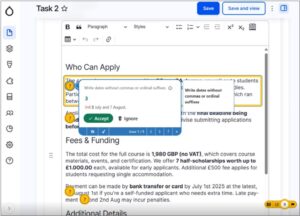
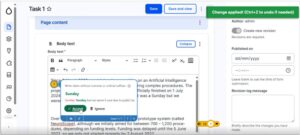
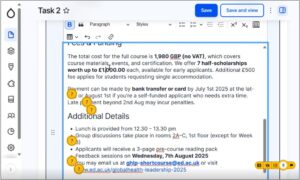
I introduce QuillMark, a Drupal prototype designed to help web publishers check content against the University’s editorial style guide. I reflect on how I developed and tested the tool with publishers, focusing on what their feedback revealed about usability and how it will shape the next version.

Introduction

My name is Shlok, and this summer I am working as an AI and UX Innovation Intern in the Information Services Group (ISG). During my internship, I have been developing QuillMark, a prototype tool designed to help web publishers check their content against the style guide. This blog post explains the problem I was trying to solve, how I built and tested the prototype, what I learned from publishers and what I plan to do next.


The problem

Our style guide contains more than 60 rules covering areas such as spelling, punctuation, tone, formatting and terminology. Previous research showed that web publishers found it difficult to remember and apply every rule while writing and editing content.


This is understandable. Publishers are often working under time pressure, and checking a page manually against dozens of rules adds a significant cognitive burden. Even experienced publishers can miss small details, particularly when they are concentrating on the meaning and accuracy of the content.


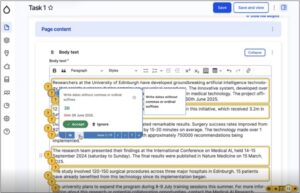
I began exploring whether a tool could make this process easier. The aim was not to replace publishers’ judgement or rewrite their content automatically. Instead, the tool would identify possible style-guide violations, explain the relevant rule and allow the publisher to decide whether to apply or dismiss each suggestion.


This became QuillMark.


Read more about the Style Guide


Why I built the prototype in Drupal

Drupal is where publishers already create and edit web content, so it made sense to build the prototype directly into that environment rather than create a separate tool.

Before starting development, I attended Drupal in a Day to understand the platform, its content-editing interface and how a custom tool could fit into an existing publishing workflow.


Building QuillMark within Drupal meant publishers could check their content without copying it into another system. It also allowed me to test the tool in a realistic environment, using the same types of fields, buttons and interactions that publishers encounter in their day-to-day work.


Read more about Drupal in a Day


Planning the checking process

Before writing the prototype, I planned the system in detail.


One of the main design decisions was that QuillMark should highlight individual issues in the existing content instead of generating a completely rewritten version. Rewriting an entire page could introduce unnecessary changes and would require the publisher to audit every sentence. Showing individual findings makes it clearer what the tool has identified and keeps the publisher in control. This also prioritises the HITL (Human-in-the-Loop) framework, which I intend to use in my AI-based projects to ensure that people remain involved in reviewing decisions made by AI.


The system design proposed three types of checking:

  1. Deterministic checks for clear violations that can be identified using code or regular expressions, such as prohibited words or spelling conventions.
  2. A smaller AI model for relatively straightforward issues that require more context than a simple text search.
  3. A larger language model for more complex, judgement-based rules involving areas such as tone, structure or plain language.


The plan also used a MapReduce-style approach. Rather than asking a language model to apply all 60–70 style-guide rules in one prompt, the rules would be divided into smaller groups. Each prompt could then concentrate on a limited number of rules before the results were combined. This was intended to reduce the risk of the model overlooking instructions because it had been given too many at once.


The original design included an additional AI step to remove duplicate findings and resolve overlaps. I left this out of the prototype because duplicates were expected to be relatively uncommon, while the extra model request would increase cost and complexity.


Read more about the technical system plan: https://blogs.ed.ac.uk/website-communications/quillmark-the-technical-details-behind-my-drupal-style-guide-assistant/

Coding the prototype

I developed the prototype iteratively, beginning with a small number of style-guide rules and expanding the checks once the basic workflow was working. For development, I used Codex. I gave it my plan and asked it to design the architecture. After reviewing it, I asked it to proceed with the implementation.


The first stage used deterministic checks for issues that could be found reliably without AI. These checks searched the content for recognisable patterns and returned the location of the issue, the relevant style-guide rule and, where appropriate, a suggested correction.


The second stage used a large language model to identify issues that depended more heavily on context. I divided the rules into smaller prompt groups so that the model could focus on a manageable set of instructions during each request.


The prompts asked the model to return structured findings rather than a rewritten page. Each finding needed to include enough information for QuillMark to:

  • identify the relevant content;
  • explain the problem;
  • show the related style-guide rule; and
  • suggest a possible correction.


Publishers still had to approve or dismiss each finding. This human-in-the-loop approach was intentional. Style rules can depend on context, and an automated suggestion will not always be appropriate. QuillMark was designed as a decision-support tool, not an automatic editor.


Watch a video demo: https://media.ed.ac.uk/media/t/1_yozad8ie


Designing the usability test

Once the first iteration was complete, I adapted an existing usability-testing template to create a test for QuillMark.


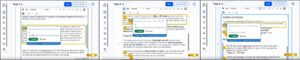
I conducted three sessions with web publishers. Participants were asked to work through a series of tasks covering the main parts of the prototype, including running the checks, understanding the two stages, locating an issue in the editor, reviewing a rule and applying or reverting a suggested fix.


I observed how participants used the interface, where they hesitated and whether the information on screen matched their expectations. I also asked how they might use the tool as part of their normal publishing process.


The purpose was not only to find technical bugs. I wanted to understand whether the concept itself was useful and whether the interface communicated how the tool was intended to work.


What publishers told me

The publishers thought the tool would be useful as a final check before publishing. They said they would still use their own judgement and would not automatically accept every suggestion.


Most of the feedback was about the usability of the tool. Some parts were unclear, such as the difference between the two stages and some of the button labels. There was also too much information on the screen, and some issues were repeated. The publishers also wanted to see what a suggested fix would change before applying it.


What I learned

The testing suggested that the core idea is useful, but the user experience needs to become simpler.


Publishers do not necessarily need to understand which checks use regular expressions and which use an AI model. They need to know what issue has been found, why it matters, what the proposed change is and what action they can take.


The sessions also reinforced the importance of designing for scanning. More explanation does not always create more clarity. In a publishing workflow, concise labels, clear states and well-grouped findings may be more valuable than displaying every piece of supporting information at once.


Next steps

My next step is to refactor and review the prototype code before making changes based on the usability feedback. This will include reviewing the AI-generated code to check whether each section is needed, whether the same result could be achieved more simply, and whether any parts repeat code that already exists. I will compare the generated code with the rest of the codebase so that it follows the same structure and does not add extra functions or files without a clear reason.


Where the code is longer than needed, I will simplify it by removing repeated checks, combining similar sections, and reusing existing functions. I will also keep individual files to a manageable size, generally no more than 1,000 to 3,000 lines depending on the file. Larger files will be split where this makes the code easier to follow, and hardcoded rules will be moved into the database where possible.


The next iteration will focus on:

  • clarifying or simplifying the two-stage workflow;
  • reducing repeated and overwhelming findings;
  • improving button labels, status messages and colour distinctions;
  • previewing changes before they are applied; and
  • making the interface more concise and easier to scan.


Drupal In A Day: What we learned (and what we still want to learn): reflections from the UX team

Drupal In A Day (DIAD) is an in-person training event, designed as a beginner-friendly hands-on introduction to Drupal, the open-source content management system. When the University hosted DIAD, several of the UX team took the chance to attend.

As content management systems go, Drupal is one of the mainstays. It’s been around for 25 years and is particularly famed for its robustness, reliability and flexibility – so much so it’s trusted to power websites of enterprises, governments and higher education institutions around the world. It’s open-source so there’s no proprietary lock-in – the functionality, features and innovation available in Drupal comes from a thriving worldwide community of contributors – as individuals, agencies and organisations.

One of the best places to learn about what Drupal is, what it stands for and what it aims to achieve is the blog site of its founder, Dries Buytaert.

Dries Buytaert blog

In 2025, Hilmar Kári Hallbjörnsson taught the first Drupal In A Day on the final day of DrupalCon Vienna.  Hilmar had been teaching Drupal to students at the universities of Reykavik and Iceland for many years and felt strongly that teaching Drupal to new generations, to inform them of its capabilities, and to inspire them of its potential was something the Drupal community needed, as a way to nurture the longevity and sustain the future of Drupal. Through a tremendous effort, he made the first Drupal In A Day happen in Vienna in October 2025. It was very well-received, successfully establishing the Drupal In A Day format going forward.

Read more about the first Drupal In A Day in Hilmar’s blog post from 2025

Drupal in a Day: Vienna 

Hilmar travelled to Edinburgh to deliver Drupal In A Day with our own Web Development Team Manager, Gareth Alexander at the start of June 2026.  Nick (Senior Content Designer), Shlok (AI and UX Innovation Intern) and Hannah (Digital Content Style Guide Intern) from the UX team signed up for the event along with other LTW interns and staff from the wider University with an interest in learning about Drupal. Here, they reflect on their experiences of the day.

Nick’s reflections 

I attended this training to bring my understanding of Drupal up to date. The last time I set up a Drupal site was in the early 2010s, and a lot has changed since then. With Drupal providing the backbone to EdWeb 2, I wanted to get to grips with some of the terminology and concepts that underpin conversations within our team about what our central CMS can do. 

I was particularly interested to learn more about Drupal CMS, a new service that helps you set up a Drupal site more quickly and with less need for technical understanding. 

After getting the required software set up on my laptop (thanks Kirsten), I clicked along with Hilmar and Gareth as they walked us through the various sections of Drupal CMS. We worked through steps to create a new content type and we created different Views to display the same content. We tweaked image formats. We also learned how to attach tags to a piece of content and how these tags can act as a filter for overview pages. 

By the end of the day, I hadn’t suddenly become a Drupal expert. But I did have a better understanding of how EdWeb 2 works behind the scenes. In particular, I felt like I knew more about how EdWeb 2 takes the content you enter when you create a page and presents this in different ways elsewhere on a site. 

Alongside that, I would now feel more confident in setting up a new Drupal CMS site, and I now have a better understanding of what this system offers in comparison to other ways of operating a website. 

Finally, the day gave me a better sense of how the community aspect of Drupal is central to how this project keeps going. Hilmar and Gareth emphasised that there are various events in the calendar where people working with Drupal can meet up and collaborate. That’s a powerful message: that anyone is invited to learn more, become part of the community and contribute to how this system works. 

Shlok’s reflections

Before starting my internship, Drupal was a completely new concept to me. I did not really know what a content management system was, how Drupal worked, or why it was used by universities and other large organisations. Because of that, Drupal In A Day was a really useful introduction for me. 

I thought the format worked well because going through everything in one day helped keep a flow of information. It was quite intense and sometimes fast-paced, but that also meant we were able to cover a lot of concepts in a short amount of time. I would say I was able to follow around 70% of the session, which felt like a good start considering Drupal was completely new to me. 

One of the parts I found most useful was the introduction to Drupal itself. It helped me understand what Drupal is, what a CMS is, and why the University uses it. I learnt that Drupal is valued because it is stable, secure, flexible and open source, which makes it suitable for large and complex websites like those used by universities. This helped me understand why Drupal is still used by many major institutions. 

I also found it interesting to learn about the Drupal community and the different ways people can work with Drupal. Before the session, I assumed Drupal was mainly for developers. However, I learnt that people can build careers around Drupal in different ways. Some roles involve coding and development, while others focus more on design, content, user experience, training or project work. That helped me see Drupal as more than just a technical platform. 

One point that really stood out to me was when we were told that Drupal has a steep learning curve at the start. This was useful to hear because it made the difficulties I was facing feel expected. Since many people find Drupal challenging in the beginning, it was reassuring to know that not understanding everything straight away was normal. It made me feel more comfortable continuing to learn. 

During the practical parts of the day, I learnt about some of the basic Drupal features, such as creating and managing content pages. At first, this was quite confusing because the concepts were new to me. However, as the day went on, I started to become more comfortable with the terminology and the way Drupal is structured. 

Another part that I found very helpful was the follow-up assignment where we had to build something from scratch. After learning so much in one day, I think it was important to have a task that allowed us to apply what we had learnt. It helped me consolidate my knowledge, see which parts I had not fully understood during the session, and become more comfortable with Drupal before starting work on my internship prototypes. 

One thing I would have liked to learn more about was the command line and the use of terminal commands. We touched on some setup and development processes, but I think spending more time on what the commands do and how they fit into the Drupal workflow would have helped me. I would also have liked to learn more about the coding side of Drupal, especially how to build custom Drupal modules. This is particularly relevant to my internship because my work is focused on AI and innovation within Drupal. 

If I could suggest one change, it would be to make Drupal In A Day into a two-day or three-day format. The first day could stay mostly the same, giving everyone a broad introduction to Drupal. The second day could be a slower guided session where participants build something with support from the instructors, similar to the assignment we were given afterwards. A third optional day could focus more on coding and custom module development for those who want to explore the technical side further. 

Hannah’s reflections 

I signed up for the Drupal in a Day training with very little knowledge of the CMS beyond working with existing EdWeb 2 sites, such as when creating prototypes of Style Guide pages or writing blog posts. So, I was interested in increasing my knowledge of Drupal as well as gaining the ability to build a site. Before the training began, I was unsure how well I would follow the instructions as a beginner, but Hilmar, Gareth, and all of the members of the Drupal community who were present at the training were extremely helpful, informative, and patient when it came to giving assistance at points where I was confused or behind. 

Once I had overcome a technical error with my laptop and decided to use Drupal Forge, I was able to follow along with the instructions being provided and replicate the Artist biography pages that Hilmar and Gareth were demonstrating. The course was fast-paced and detailed, and while maintaining this pace was a challenge, it made the course engaging and the product of the day felt like a genuine accomplishment. 

With the knowledge that I gained throughout the training, I feel that I have a strong foundation that will allow me to continue to develop my skills in building a Drupal site further in the future. In particular, I think the example site that we were creating during the training was incredibly useful in that it allowed us to try out several different aspects of building a site with Drupal, such as different content types, tags, and images, as well as exploring some different design options as well. 

I was impressed to learn about how community centred Drupal is, and that contributions and developments to Drupal are made by users and members of the community. Gareth and Hilmar’s explanations of how this works really helped me to understand why Drupal is as adaptive and intuitive as it is (such as in its security and bug fixes), which is that these developments are a direct result of user experience. Furthermore, Gareth and Hilmar also emphasised the flexibility of Drupal, due to the ability to install ‘recipes’ that customise the functionality of sites that you are building. 

Overall, I think Drupal in a Day was an extremely useful and practical training session that has equipped me with the skills to build a basic site and further develop these skills whenever I have the chance.  

Emma’s reflections

When it comes to Drupal, I am largely self-taught – pretty much everything I know has been gleaned from reading, attending/watching sessions from Drupal events, and (predominately) pestering people in-the-know with my questions. When Drupal In A Day came to the University, I pondered whether I should attend. I’ve contributed to the community since 2022. I’m on the Drupal leadership team. Surely I should know Drupal by now? I took a split second to reflect and realise that you never fully know Drupal. There’s always something new to learn, something to challenge what you thought you understood, or something to clarify an area you weren’t quite sure about. Conscious of not taking a space away from a complete Drupal beginner, I opted to sit in on the event, to follow along, while working on other things.

The day combined practical exercises with general Drupal knowledge. Hilmar and Gareth began with the basics, covering key parts of the process to get started and familiarise with Drupal – like setting up DDEV, using Drupalforge and creating a Drupal.org profile. As the day went on, it was great to see quick progression to experiment with some of Drupal’s flagship modules, especially Drupal Views which holds huge power for presenting and displaying structured content in a range of adaptive ways.

Drupal CMS, Drupal’s low-code product provided the playground for learners. Having worked on Drupal CMS since it began, I found it heartening to see it being used to introduce Drupal to new audiences, to help them learn what Drupal has to offer and to help them start ideating on how they might use it. Adopting a UX perspective, I tuned into comments from fellow attendees about Drupal CMS, noting observations to follow up and logging areas for UX improvement to carry forward in my ongoing Drupal UX contributions.

Reflecting on the day as a whole, it helped attendees achieve what is often the hardest thing about Drupal: Getting started. All too often people new to Drupal can find it overwhelming, and they find when everything is possible it’s hard to choose a direction. Drupal In A Day sets learners on a path to start discovering Drupal and making it their own, in other words, planting a seed from which the community can continue to grow.

Embedding the rules: What we learned UX testing a style guide helper tool built with Drupal Editoria11y

Our Editorial Style Guide contains many conventions and we know from research that publishers struggle to remember to apply them. Could automation help? We experimented embedding style guide rules into a Drupal module that checked content against the rules in the editorial interface and suggested corrections when the rules weren’t followed.

As part of a concentrated effort to make it easier for publishers to apply our style guide rules, Mostafa Ebid, a student who came to work with us in summer 2025, installed Editoria11y, an open-source Drupal feature and configured it with selected rules from our University style guide. Applying this feature to a site with demo content, he tested it with University staff to see how well it worked, and how useful and usable they found it.

Read more about our ongoing style guide work:

Collection of blog posts about the Editorial Style Guide

Drupal Editoria11y is an open-source accessibility checker

Editorial accessibility ally (shortened to Editoria11y) is a module developed by John Jameson from Princeton University that enables automated content checking directly in the editorial interface. Originally created to help content editors catch accessibility issues, its configurable architecture makes it well suited to embedding other kinds of rules, such as institutional style guide conventions. The checks can run in real time as content authors type, and can also be applied to content in published pages and previews, to flag issues to be corrected.

Editoria11y can include more than 50 built-in content tests covering image alt text, link quality, heading structure, and general content issues. Flagged issues are noted at the page level by an indicator bar, which includes a count and a categorisation of the type of issues (default categories are headings and alt text). Through this bar it is possible to identify the precise inline location of the problematic content with visualisers. Each visualiser is associated with a modal that contains detail about the problem element and plain language tips explaining how to fix it.

In addition to the on-page alerts, it is possible to review issues across a site via a reporting dashboard which can be configured to log recurring issues or most problematic pages, as required.

Read more about Editoria11y on Drupal.org:

Editoria11y Accessibility Checker project page

We designed tests to learn if Editoria11y would be useful and usable to embed style guide rules

Editoria11y presented itself as a mechanism to enable web publishers to check their content against style guide rules, and we wanted to understand the kind of experience this provided in EdWeb2. In particular, we wanted to understand:

  • If Editoria11y could effectively check content against our style guide rules
  • How Editoria11y presented results of the checks in the editorial interface
  • If publishers could use Editoria11y to correct content that misaligned with the style guide

Moreover, we wanted to learn if the addition of Editoria11y to the EdWeb2 editorial interface improved the publisher experience or not.

We picked deterministic rules about dates and numbers for the tests

Like many Drupal features, Editoria11y is very flexible and customisable to fit a range of different use cases. Since it was new to our publishers, we were keen to avoid overengineering it, taking care to configure it to present the minimal information necessary to achieve our testing goals.

The University’s Editorial Style Guide contains between 60 and 70 separate rules, of which fewer than half are deterministic (in other words, can be applied directly without editorial judgement). It made sense to include deterministic rules in the tests, to enable us to accurately assess how effective Editoria11y was at checking them.

Rules in the dates and numbers section of the style guide seemed a good fit for the tests, so these were configured into Editoria11y.

We set up Editoria11y to display an indicator bar, visualisers, modals and a dashboard

The module was set up to display the indicator bar, the inline visualisers and the reporting dashboard. Content that contained sentences with dates and numbers was saved in draft in a demo interface which had Editoria11y applied. In the test scenario, participants were asked to assume they had been asked to review this draft content before it went live and to use a checker tool to help them with this.

Screenshot of the Drupal Editori11y tool in action, showing the yellow indicator bar at the bottom right of the interface, tallying the total number of style guide errors on the draft page

Screenshot of the Drupal Editori11y tool in action, showing the yellow indicator bar at the bottom right of the interface, tallying the total number of style guide errors on the draft page


Screenshot of Editoria11y showing on the left, the indicator bar at the bottom right of the page, and on the right, the editorial interface revealing the locations of the style guide errors (activated when the indicator bar is pressed)

Screenshot of Editoria11y showing on the left, the indicator bar at the bottom right of the draft page, and on the right, the same draft page, but revealing the locations of the style guide errors (activated when the indicator bar is pressed) and an example of the modal giving detail of the error and the suggested fix


Screenshot of Editoria11y showing on the left, the display with the indicator, and on the right, the reporting dashboard summarising all the errors

Screenshot of Editoria11y showing on the left, the display with the indicator, and on the right, the reporting dashboard summarising all the errors (which opened in another window in the interface)

Watching participants use Editoria11y, we learned what worked and what didn’t

Tests were carried out with seven participants. Observing how they made sense of the different parts of Editoria11y and interacted with it, we were able to draw conclusions about how useful and usable it was to support the context of web publishing in EdWeb2.

Participants understood the relationship between the indicator and the visualisers

The first part of the tests involved showing participants the draft content in the editorial interface with Editoria11y applied. All of them were able to understand that the number of style guide errors on the page were tallied in the indicator bar at the bottom right of the page, and that they could use the indicator bar to reveal precise locations of the errors on the page, together with a modal for each error, explaining the error and the suggested fix.

Placement of the visualisers and modals often made it hard to read the draft content

Taking an overview of the visualisers in the draft content, participants commented that they felt a bit overwhelmed to see so many. Some felt the placement of the question mark visualisers made it difficult to ascertain which parts of the content needed to be corrected, which was slightly helped by yellow outlines around the text. Placement of the modals masked the text beneath, however, meaning participants found it difficult to engage with the original context of the errors to be corrected to assess whether to accept the suggestion or not

Screenshot of Editoria11y showing a modal detailing the error about writing dates with ordinal suffixes

Screenshot of Editoria11y showing a view that some participants found overwhelming: indicator bar, question-mark indicators, yellow outlines and an open modal

Descriptions of the errors in the modals were not clear to some participants

Reading the information in the modals, some participants were unclear of the error it was pointing out. Specifically, in a modal describing the rule to write dates without including ‘th’ or ‘rd’ after numbers was written as ‘Write dates without commas or ordinal suffixes’. Some participants were unfamiliar with what ‘ordinal suffixes’ were, but seeing the suggested change presented as a ‘before and after’ tracked change with the error crossed out (in red) and the suggested change presented in green helped participants understand the proposed correction.

Screenshot of Editoria11y showing a modal explaining the rule to not include ordinal suffixes when writing dates

Screenshot of Editoria11y showing a modal explaining the rule to not include ordinal suffixes when writing dates

Participants were able to use the modals to correct some style guide errors

When they had read and understood the errors being highlighted, most participants were able to assess whether to accept the suggested fixes and apply them based on the information contained in the modal. Several participants entered into a flow of using the arrow keys in the modals to clicking through the different errors and accepting the fixes, especially when the fixes related to a recurrent error – for example, capitalising the first letter when writing days of the week. They appreciated a notification alerting them that the fix had been applied, which temporarily appeared at the top right of the screen, although some said they would have appreciated this notification to remain for longer as it was easy to miss. They were also unclear whether they needed to save after applying each fix, or if this could be done when they had worked through all of the fixes on the page.

Screenshot of Editoria11y showing a notification in the top right of the interface to confirm the fix had been applied

Screenshot of Editoria11y showing a notification in the top right of the interface to confirm the fix had been applied

Not all errors were fixable with automatic rule application – some required interpretation and judgement

Viewing the suggestions in the modals, several participants noted a problem with the fixes being based on automatic application of the style guide rules. Specifically, relating to the rule about omitting ordinal suffixes for numbers, there were several instances where it didn’t make sense to apply this rule directly. For example, a date written as ‘5th of December’ contained a suggested fix to remove ‘th’ but not to remove ‘of’. Another relating to ‘4th year’ of studies suggested removing the ‘th’ but not writing ‘fourth’ as a way to make the sentence readable, and similarly, another advised removing ‘st’ from ‘1st floor’ which was an incomplete fix.

Screenshots of Editoria11y showing instances where the ordinal suffix corrections couldn't be directly applied

Screenshots of Editoria11y showing instances where the ordinal suffix corrections couldn’t be directly applied

Some participants’ trust in the checker waned when they realised it didn’t catch all the errors

Of those who took part in the tests – some were more familiar with the rules of the style guide than others, and this impacted the trust they placed in Editoria11y. When they reviewed the Editoria11y outputs against the draft content and spotted corrections that hadn’t been picked up or flagged by Editoria11y, they were inclined to disregard the tool and check the content for themselves to ensure the text was completely compliant.

Screenshot of Editoria11y showing a style guide error where the pound sign is missing from an amount that the tool has not picked up

Screenshot of Editoria11y showing a style guide error where the pound sign is missing from an amount that the tool has not picked up

Few participants said they would use the dashboard as they felt that was for a site administrator

Navigating through the different options on the indicator, participants were able to access the dashboard interface, which was titled ‘Content Accessibility Issues’. Reviewing what was there, in sections called ‘Top issues’, ‘Pages with the most issues’ and ‘Recent issues’ most participants said they didn’t feel they would use this feature, and presumed it would be for someone with full responsibility for the whole site.

Editoria11y has potential as a style guide helper tool, but would need contextual refinement

Taking the findings together, Editoria11y showed promise as a way to embed the style guide rules into draft content, to avoid web publishers needing to navigate away from the editorial interface to check the rules in the guide itself to then apply them. Participants understood what the indicator bar was there to achieve, and liked the idea of being able to check off corrections to their content through the modals. Some identified areas for improvement included:

  • Refinement of the style guide rules embedded in Editoria11y, to include examples, exceptions and applications based on scope and context
  • Embedding a more complete set of style guide rules into Editoria11y to help build trust in the tool
  • Adaptation of the modal options to include ‘Accept with edits’ as well as ‘Accept’ and ‘Ignore’ to account for instances where editorial judgement needed to be applied to the suggested correction
  • A way to show corrections in categories (for example, all those relating to numbers together, all those relating to punctuation together and son on) which could be addressed by the editor in sequence, to avoid overwhelm in the interface
  • Suggestions for correcting content when reworked sentences were required – powered by an LLM such as ELM

As well as Editoria11y surfacing style guide rules, there is potential to use it for its intended purpose, as an accessibility checker, containing checks about the heading hierarchy and alt text on images. If this was to be included as well as style guide rules, however, progressive disclosure of the information should be used to avoid the interface becoming too cluttered.

Many of these areas overlap with work currently progressing in open-source Drupal, firstly develop a Context Control Center – as a way of handling rules to enable AI-assisted content production, and secondly to develop an AI Content Review feature, capable of reviewing content against defined rules and conventions.

Read more about these Drupal developments in my related blog post:

Think like a machine: How building a Drupal context-handling feature is providing a new lens on content design and style rules 


Stop chasing, keep researching: Why continuous contextual learning is the only way to build useful AI features

AI development keeps evolving as do the ways people seek to use AI. Traditional software development runs the risk of trying to perfect AI features people won’t use. Revisiting our previous AI research helped me tease out new opportunity spaces for AI features to help with content design tasks.

Last summer, Mostafa Ebid joined the UX team for a summer internship and built an AI assistant tool which integrated the University’s main AI provider ELM into EdWeb2, our Drupal content management system. The idea for the tool came from hearing University describe the difficulties they experienced when publishing web content. The tool included the capability to write content, design content and proofread, and was designed to work by typing prompts in a chatbot interface, right-aligned to the main part of the editorial interface. When prompted, an orchestration of AI agents were triggered to read textual content and use ELM to make suggestions for improvement based on what the publisher had asked for. Improved text was displayed in the sidebar chatbot interface for the publisher to review and consider using.

Read Mostafa’s blog post about how he developed the tool:

Integrating ELM with EdWeb – Building an AI tool for publishers

Initial tests of the tool with publishers revealed some potential, but identified the need to do further tests, specifically to understand limitations around the user interface display and to learn if the tool was useful to publishers in the context of content they were familiar with (as opposed to generic stock content that was used in the first round of tests).

Read my blog post about the initial tests of the tool:

Initial insights from UX testing our Drupal AI content assistant tool 

Mel Batcharj accessibility tested the tool, focusing on keyboard navigability, and Nick Daniels ran tests with two publishers in October last year. I recently reviewed the findings of this research to consider advancements in Drupal AI in the past 12 months, to assess whether the original premise for the tool was still valid, and to think about residual content design challenges AI could potentially help with.

Advancements in Drupal AI have resulted in improved AI features

The Drupal AI Initiative began in April 2025 with a group of participating organisations making a commitment to collaborate to build the future of AI in Drupal. As a result of the initiative, various workstreams began to shape Drupal’s infrastructure to support AI, to experiment with new innovations and to improve the UX.

Read more about this workstream:

Drupal AI Initiative project page on Drupal.org

A more accessible AI chatbot is now available as a Drupal recipe

Our original AI content assistant tool was built into a panel of the editorial interface as a custom build, which worked well when using a mouse, but which accessibility testing showed was restrictive when navigating using a keyboard. Since the tool was built, however, accelerated development in the wider Drupal AI community prompted the creation of an open-source AI chatbot freely available to apply. Adopting this chatbot was preferable as it avoided the need to maintain custom code and it was possible to use it with a keyboard only.

There’s an active Drupal issue to address the need for the AI chatbot interface to be expandable

Several of the participants who took part in Mostafa’s tests of the tool last year found it awkward to scroll through the AI chatbot output as it was presented in the narrow left-aligned interface. The same problem had been noted in the wider Drupal community, and therefore I raised an issue to have this rectified, which is being worked on as part of the AI Initiative task backlog.

We did more tests on our AI tool – this time using participants’ own content

In the first round of tests, four participants were all presented with the same piece of content (on the topic of safety procedures) and asked to use the AI tool to improve it in specific ways (such as writing it for user needs, making link text better, and so on). This approach turned out to be limited, as since participants were unfamiliar with the content, they were unable to assess whether the outputs of the AI tool were an improvement on the original content or not.

In a subsequent round of tests we therefore adopted a looser approach – asking participants to supply a piece of content they were already working on, and then asking them to use the AI tool to improve it to suit their needs. The results from these tests were more indicative of how useful publishers found the tool to make content improvements.

Results of these tests highlighted how the AI tool needed to change

Since we placed participants in a situation where they were using AI on content they knew well and could critique and appraise authentically, the results of these second-round tests gave clearer indications of what worked with the existing tool, what didn’t and where AI could be best applied to help with content design tasks.

Participants didn’t notice the content options in the AI tool, or the help text

The tool contained three different content options: Design Content, Write Content and Proofread, presented in a dropdown menu in its interface.

Initially, participants didn’t notice these options and used the default Write Content option.  When they later experimented with the Proofread option they found no discernible difference between these options in terms of outputs, which led them to believe that a simpler version with a single conversational interaction option would be preferable.

The tool defaulted to reading the content on the page, and working on this when prompted. Participants were initially unclear that this is how it worked, and they didn’t notice the help text to enable or disable this mechanism presented in the tool interface. Taken together, this feedback suggested that a simpler version of the AI chatbot, such as the one from the Drupal recipe, would be easier for publishers to use.

Close-up screenshot showing detail on the AI assistant tool chatbox

Close-up screenshot showing the content options and the help text on the AI tool

The AI tool had some value as a writing partner to suggest restructures to textual content

Responding to the task to experiment with the AI tool to improve their content, the participants quickly got used to how the tool worked, and recognised its use as a writing partner to prompt about their content and receive suggestions for improvement in a conversational way.

Prompts they used to improve a page of content in the body text field included:

  • ‘Rephrase copy to condense, highlight key messages and make it accessible to pet owners looking to join practice’
  • ‘Proofread copy so that it appeals to pet owners non clinicians’
  • ‘Turn this page into web ready content. It needs to be concise, easy to scan, readable to a wide range of audiences’

These prompts resulted in edited versions of the page content, typically including structural elements like headings, bullet points and calls to action, delivered in the chatbot interface.

Screenshot showing the output from the AI tool before and after a prompt to rephrase the content for a specific audience (before on the left, after on the right)

Side-by-side screenshots showing the prompt entered in AI tool to improve content for an audience (on the left) and after (on the right), with the output response to the prompt.

The tool lacked capacity to tweak or iterate on previous versions of content – which participants wanted

Once they had reviewed the tool’s initial outputs, both participants entered conversational turns with the tool, asking it to perform successive tasks on the content it had previously produced, to edit it further, in line with their specific requirements and rules.

Prompts they used to tweak initial AI outputs included:

  • ‘Remove adjectives and exclamation marks’
  • ‘Remove brackets’
  • ‘Remove any unnecessary words, fix typing errors, suggest improvements for SEO’

With every new prompt in the conversation, the tool produced a fresh output, meaning the publisher was left to review a succession of different versions of the edited content, presented in the chatbot interface, without any indication of what had been changed. Participants found it difficult to review edits, as they would usually do when working on a piece of content, in order to compare the ‘before’ with the ‘after’ – ultimately to assess whether the AI tool outputs were to their satisfaction.

They said they would have liked the tool to have presented the edits in a ‘tracked changes’ format that they were familiar with from word processing programmes.

Screenshots showing outputs of the tool before and after a prompt to iterate on improved content

Side-by-side screenshots showing a prompt entered to improve existing content (on the left) and (on the right) the output from this prompt – showing a new version of the content

Participants didn’t really need the tool in the interface as they tended to edit text content elsewhere

When describing their usual content process, participants said they would usually prepare their content in a word processing programme like Microsoft Word rather than edit directly in the Drupal editorial interface. There were several reasons they chose this method – a key ­­reason being the need to involve others to check (and in some cases, sign off) their content in preparation for the website. They were more familiar with referring others to check their content or proofread it when it was in the Microsoft suite, than when it was in the Drupal editorial interface.

Furthermore, Microsoft Word accommodated the addition of comments and tracked iterative changes to pieces of content which was not possible within the Drupal editorial interface. This content preparation habit suggested that while the AI tool was useful to suggest content edits, this would have been more useful before the content was in the interface, and therefore could be achieved by pasting content to be edited into a browser-based AI tool or app (such as ELM).

Within the interface, the tool only had use as a ‘final check’ mechanism, to catch any typos, errors or style misalignments before the content was ultimately published.

The tool needed to be able handle more than text as pages were typically made of multiple elements

Reviewing the test set-up and comparing it to their usual ways of working with EdWeb2, the participants said the pages they worked on would usually be made up of more than just textual content in the body text field. They would typically work on pages with multi-column layouts, making more extensive use of Drupal paragraphs or including structural elements like accordions, feature boxes and cards. They were interested to know how the tool may make appraisals or suggest improvements for those sorts of pages to help them arrange their content in appropriate ways.

We identified new opportunities for AI content publishing features

Extrapolating on the feedback from the tests, several use cases and scenarios for applying AI to content design tasks emerged, which will help inform our ongoing work to apply AI to make content design tasks easier for publishers.

AI-assisted content structuring

Describing their typical content writing workflow, participants said they found it difficult to move from a text-based editor like Microsoft Word into the Drupal editorial interface where they needed to make use of Drupal Paragraphs as well as page elements like accordions to structure the content. Potential areas for AI development could therefore include:

  • A mechanism to convert textual content into appropriate structural elements
  • A way to make suggestions for accordion labels or structure
  • A feature to ensure uniform creation of cards or feature boxes
  • A means of cross-checking style consistency of pages made of multiple elements or with a specific layout

AI- assisted content design for SEO/GEO/AEO

Having their content picked up by search engines or being machine read was something participants wanted, but they were unsure how to write, tag and structure their content to make this happen effectively. Potential areas for AI development could therefore include:

  • A way to have their content analysed for SEO effectiveness, based on signals like content quality, scannability and key word alignment
  • A mechanism to suggest content changes aligned to specifically defined SEO goals and target user engagement measures

AI assisted content reviews – against specific style conventions and contexts

As well as ensuring their content followed the rules of the University’s Editorial Style Guide, both participants mentioned other conventions that they needed to apply to their content, that existed at a more local website level. For example, one participant’s site had a rule not to use brackets or exclamation marks, or to overuse adjectives, so they would have found it helpful to have a way to cross check content against these rules before publishing.

The Drupal Context Control Center is an emerging feature designed to handle the application of context rules within a site across various scopes and use cases, and Drupal AI Content Review is a related feature, designed to appraise content against given context rules and conventions. Together, these Drupal features may be a good fit to help University web publishers make use of AI to shape their content with the uniformity they require.

Read more about the Drupal Context Control Center and its development in my recent blog post:

Think like a machine: How building a Drupal context-handling feature is providing a new lens of content design and style rules

Read about AI Content Review on Drupal.org

We’re changing the direction of the AI tool based on what we’ve learned

Last summer it seemed certain that an in-interface AI chatbot content assistant helper was what we needed to build. A few improvements to the UI to make it expandable and navigable with a keyboard and it would be ready to go. As it turned out, things had moved on, and these problems were addressed by the wider Drupal community. This meant we could go back to our research findings to re-examine how AI could be best applied to aid content design tasks, and to consider how it could best fit into existing workflows of our publishers to assist them with difficulties they faced. As we continue with internships this summer, we’re excited to re-focus and plan more research to explore some of these emergent opportunity areas. Aligning with in-progress Drupal AI developments, we’re open to learning how we can apply and adopt the work of the Drupal community to our University digital publishing context.

❌