❌

Reading view

There are new articles available, click to refresh the page.

Charities and unions voice ‘deep concern’ about Milburn review’s recommendation to cut young people’s benefits

Trade unions and disability charities have raised concerns about the disability benefit cut recommendations made in Alan Milburn’s youth unemployment review.

The 278-page report published today has included youth benefit cuts as a key recommendation for tackling the growing crisis of young people who are not in education, employment or training (Neet).

According to official figures, an estimated 981,000 of 16- to 24-year-olds in the UK are Neet, accounting for 13% of that age group. Milburn’s report says the government should get that figure down to 5% by 2036.

One of Milburn’s key recommendations is for the government to scrap the health element of Universal Credit and the disability benefit, Personal Independence Payment (PIP), for under 25s. 

In his report, Milburn argues that the reforms to Universal Credit and PIP are necessary to reduce the benefits bill and prevent more young people from getting “trapped in economic inactivity”. 

He says they would save £3.6 billion per year by 2036.

Milburn proposes replacing the health element of UC for under 25s with a Youth Allowance, which would pay the same amount as the standard rate of UC.

PIP would be replaced with a new “additional costs allowance”, which would help cover extra costs relating to a condition but is likely to be available to fewer claimants than PIP is. 

Milburn, who served as health secretary under Tony Blair and has worked as a consultant to several private healthcare firms since leaving Parliament, is facing criticism for his benefit-cutting proposals.

Disability charity Scope has welcomed Milburn’s proposal to improve employment support for young people, but criticised his benefit cut recommendations.

James Taylor, executive director of strategy at Scope, said: “We welcome Alan Milburn’s ambition to transform employment support for young people. Too many young disabled people are being shut out of work, so more personalised help to find and stay in jobs, and action to get employers hiring young disabled people, could transform a generation’s prospects.

“But we are deeply concerned by proposals that could leave some young disabled people with less financial support. PIP helps with the extra costs of disability, whether someone is in work or not. Taking that support away could make it harder, not easier, for young disabled people to get into work and live independently.”

George Bangham, head of social policy at the New Economics Foundation, said: “There’s much to welcome in Alan Milburn’s review, including calls for more investment in employment support and a guarantee of a job, training or support for every young person. But the positives risk being overshadowed by his argument for cuts to health and disability benefits.

“There is little evidence that health benefits are too generous or that they are driving young people out of work, while cutting them is likely to push people into poverty and make it harder for them to find work.”

Citing recent NEF research which found that, in Blackpool, there are only five online vacancies for every 100 people out of work, Bangham said: “Cuts to benefits also don’t solve the fundamental problem that there aren’t enough opportunities for young people.”

Fran Heathcote, the general secretary of PCS union, said: “The mental health crisis among our young people is not the fault of public services but is a result of decades of under-funding by successive governments. 

“Moving now to cut payments for under-25s will not fix their issues or provide them with a better future, they will need both financial and specialised work-coach support to help bring them into the working environment.”

Heathcote added: “PCS is absolutely opposed to any tightening of sanctions, and the cutting of benefits which will only push claimants further away from the labour market and deeper into poverty, potentially creating an even worse crisis”.

UNISON general secretary Andrea Egan said: “The prime minister is right to say young people should be prioritised for investment rather than targeted for cuts. That means he must reject proposals to slash disability support for under-25s.

Egan added: “However they’re rebranded, these are still welfare cuts. Ministers may no longer be demonising claimants but that’s cold comfort to the young people singled out in this review. 

“Many of them are neurodivergent or living with mental health conditions. What they need most is support and treatment.”

Olivia Barber is a reporter at Left Foot Forward

The post Charities and unions voice ‘deep concern’ about Milburn review’s recommendation to cut young people’s benefits appeared first on Left Foot Forward: Leading the UK's progressive debate.


Specialized’s Tarmac SL9 S-Level is built to wreck your Zone 2 ride

I love a good Zone 2 ride. There’s nothing like getting on the bike, settling into a groove, and letting the miles (and hours) flow by. But sometimes when I hopped on the Specialized Tarmac SL9 S-Level, Zone 2 would turn into a tempo ride. It was like having a little imp—the stereotype dressed in red with the pitchfork—on my left shoulder whispering into my ear: “Go fast. This bike was built to go fast. Speed is good. You can do a Zone 2 ride tomorrow.” Normally, I'd count on the good imp—the dude with the harp and wings—on my right shoulder to restrain these urges. But the Tarmac is so seductive that he would just shrug and say “he’s got a point.” And in a moment of weakness, I would drop the hammer and head into the red, just because the SL9 makes that so rewarding.

The Tarmac SL9 is Specialized’s aero road bike, with the S-Level sitting just below the S-Works in Specialized’s top tier of carbon, aero road bikes, where it replaced the Tarmac SL8 Pro. After it got an update this year, I spent several weeks riding it, putting nearly 1,000 miles on it

Specialized offers the Tarmac SL9 in four models, all available with SRAM and Shimano drivetrains (Ars tested the SRAM version). Notably, you don't need to buy the top-of-the-line bike to get the top-of-the-line groupset. Here's the breakdown of the Tarmac SL9 lineup (note that the Shimano versions of the Expert is 20 g lighter and Comp is 70 grams heavier than the SRAM versions):

Read full article

Comments

© Eric Bangeman/Ars Technica

Learn Linux and Cybersecurity Skills With Hands-on Interactive Labs

LabEx for learning Linux and Cybersecurity Skills With Hands-on Interactive Labs

Till a few years ago, learning Linux was mainly through ebooks and videos. Those methods are still valid, but things have evolved.

Interactive learning makes it easier. Hands-on labs without setting them on your own give you the option to jump straight into the learning. Less intimidating for beginners as well because setting up servers and lab scenarios by hand could be too much when you are just learning the concepts.

Of course, doing things by hand teaches a lot but that could come up later when you have learned the concept, practiced some labs. You are better equipped then.

This is where a platform like LabEx comes in. It is an AI-assisted educational platform that focuses on learning-by-doing by providing you hands-on labs, flashcards, quizzes, and playgrounds to practice in simulated environment.

📋
The article contains affiliate links. Please read our affiliate policy.

What can you learn at LabEx?

A lot actually. The platform offers lab-based learnings on a wide variety of tools and topics. Some of the main ones if I can categorize them are:

  • Platforms: Linux, Kali Linux, RHEL, etc.
  • Frameworks: Shell, Git, Docker, Kuberneter, MySQL, PostgreSQL, SQLite, MongoDB, etc.
  • Certifications: CompTIA certificates, RHCSA, CKA, etc.
  • Tools: Nmap, Hydra, Wireshark, etc.
  • Cybersecurity courses
  • Languages: Python, Rust, Java, C, C++, etc.

There are hundreds more, all of which are listed right on the home page.

Ways of learning

Of course, too much could be overwheling. That's why LabEx has the concept of Skill Trees.

Skill Trees

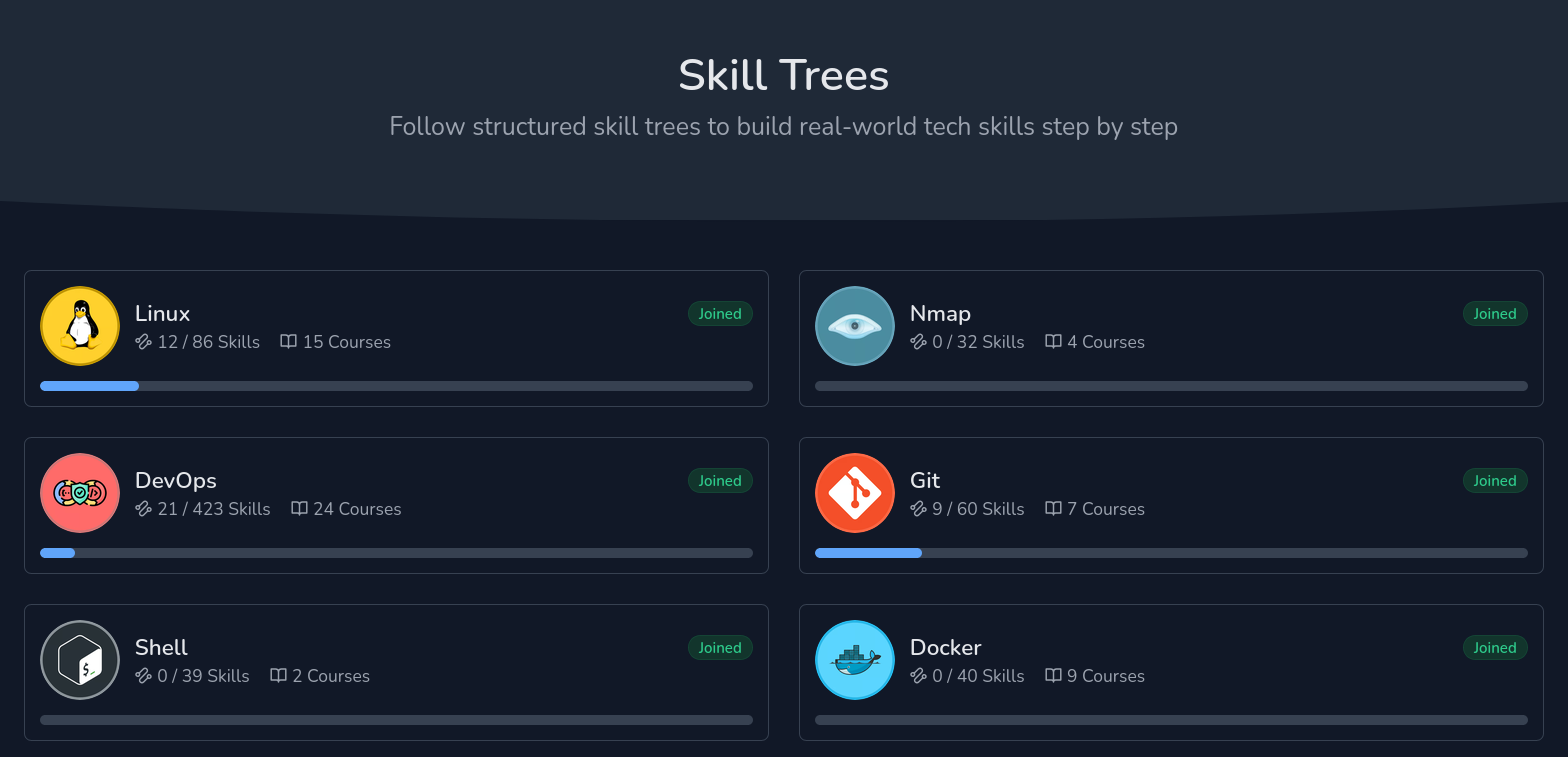
Skill Tree are like roadmaps. Multiple courses are grouped under one umbrella and in a given order, too. Within each tree, there are a definite number of "skills" and courses, which helps keep track of progress.

Skills are basically an essential concept of a course topic. Let's say you learned pipe redirection under Linux course. That pipe redirection is a 'skill'.

Courses are made of skills (think of them as chapters on a mini concept) and skill trees are groups of courses.

Skill trees on LabEx

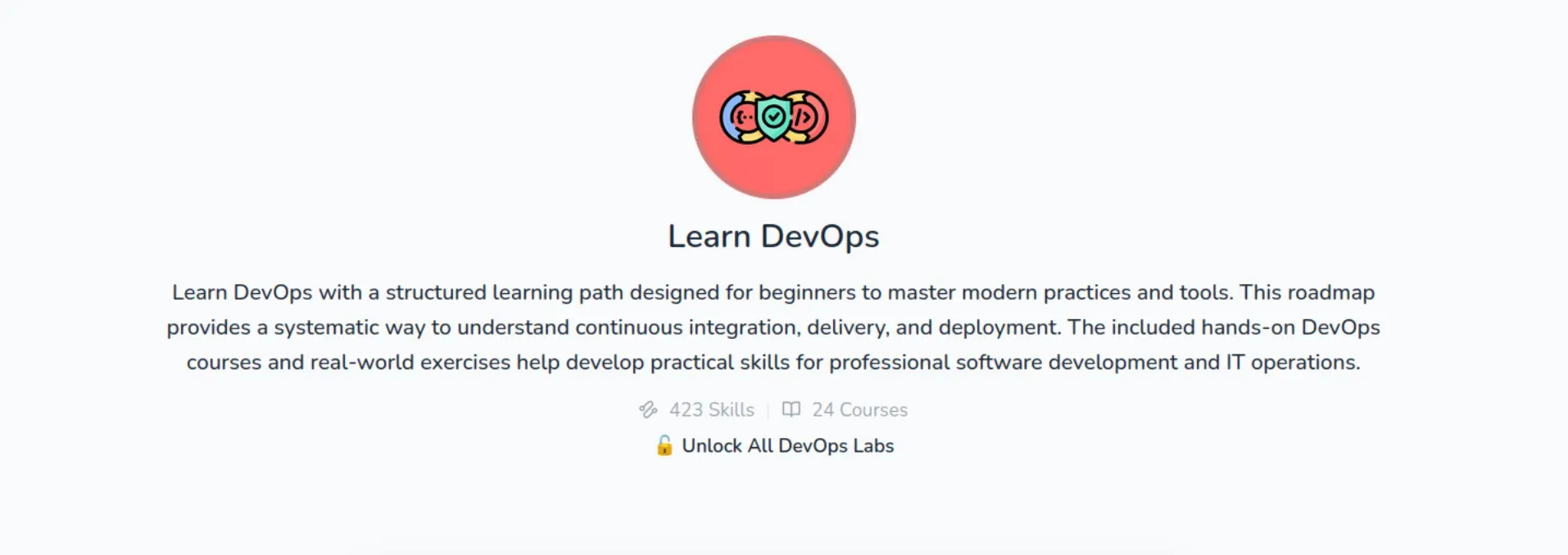
If you look at the DevOps skill tree, it has 24 courses. It covers everything from basic Linux to Kubernetes. You get comprehensive learning.

Devops Skill tree from LabEx

Practice Labs

And then there are practice labs, which take a more project-oriented approach to learning.

For example, "Searching for Specific Files" project makes you look for certain filenames within a directory, following the instructions given on the project page.

Playgrounds

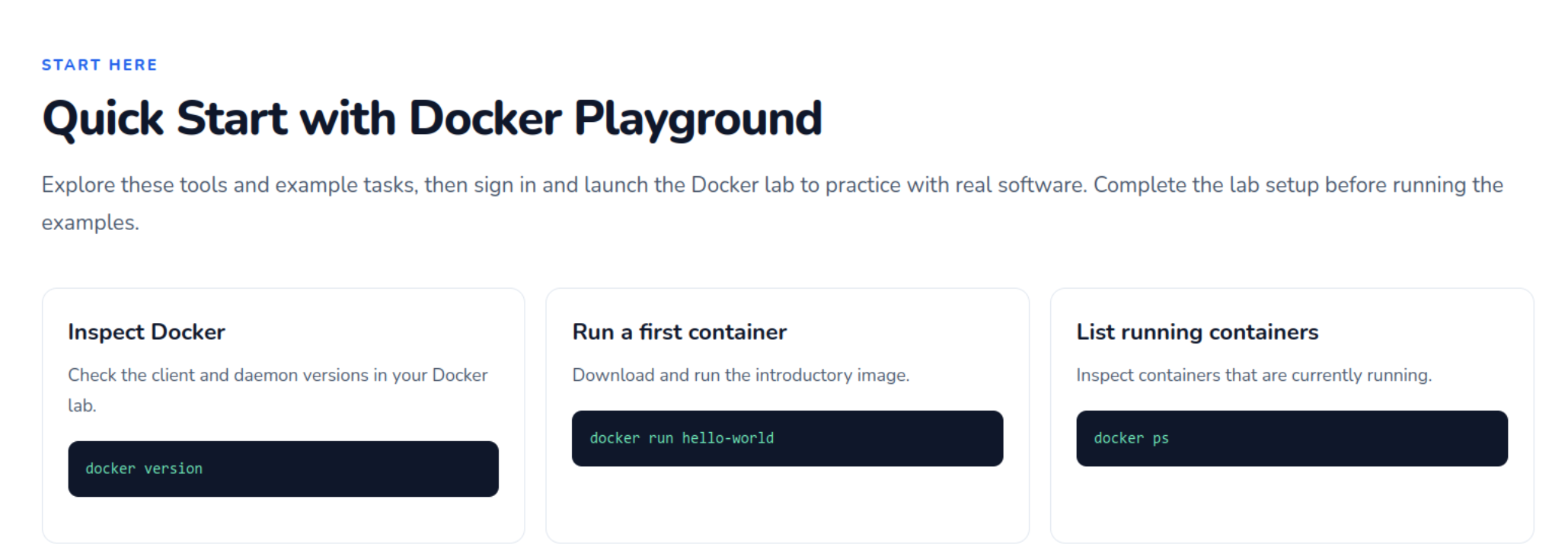
LabEx also has several "Playgrounds" where the concerned system starts up and guides you through the various aspects of the same. It is basically a virtual machine running on LabEx servers.

LabEx playground starts a virtual machine

You would assume that a "playground" means it will let you roam around and explore whatever you might want to freely, but that isn't quite the case.

While you can enter whatever commands you want to, it only lets you through to the next stage if you've completed the tasks on the page, making it pretty much the same as a regular tutorial but with hands-on practices.

LabEx Docker playground

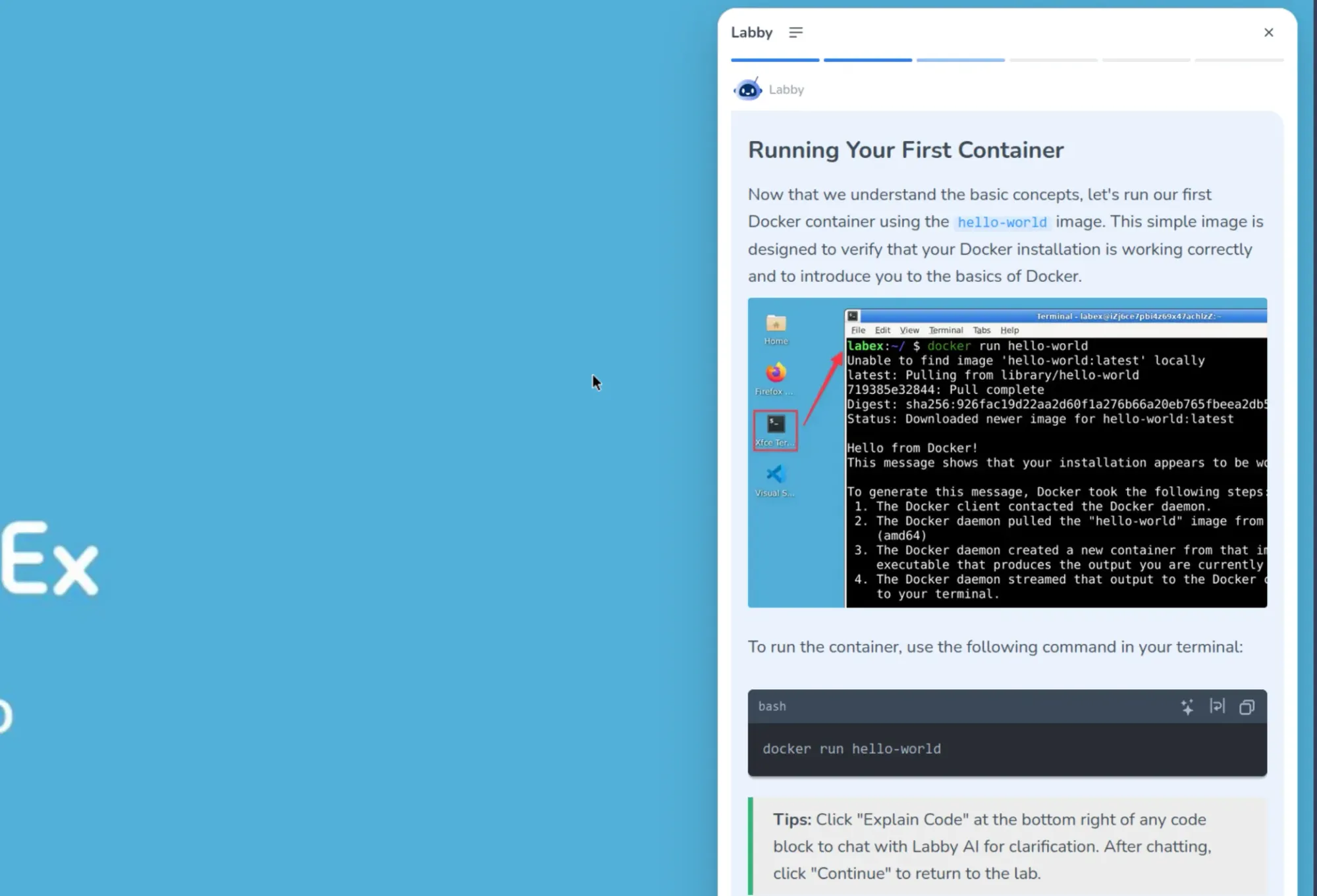
Labby to guide you

There is an AI teacher to help you with guided learning. You will find it in the sidebar of the labs and playgrounds. It shows the supported text form of the concept you are learning.

Labby Linux

When you run the provided commands for hands on, it also validates your response. You can also ask it questions to clear your doubts.

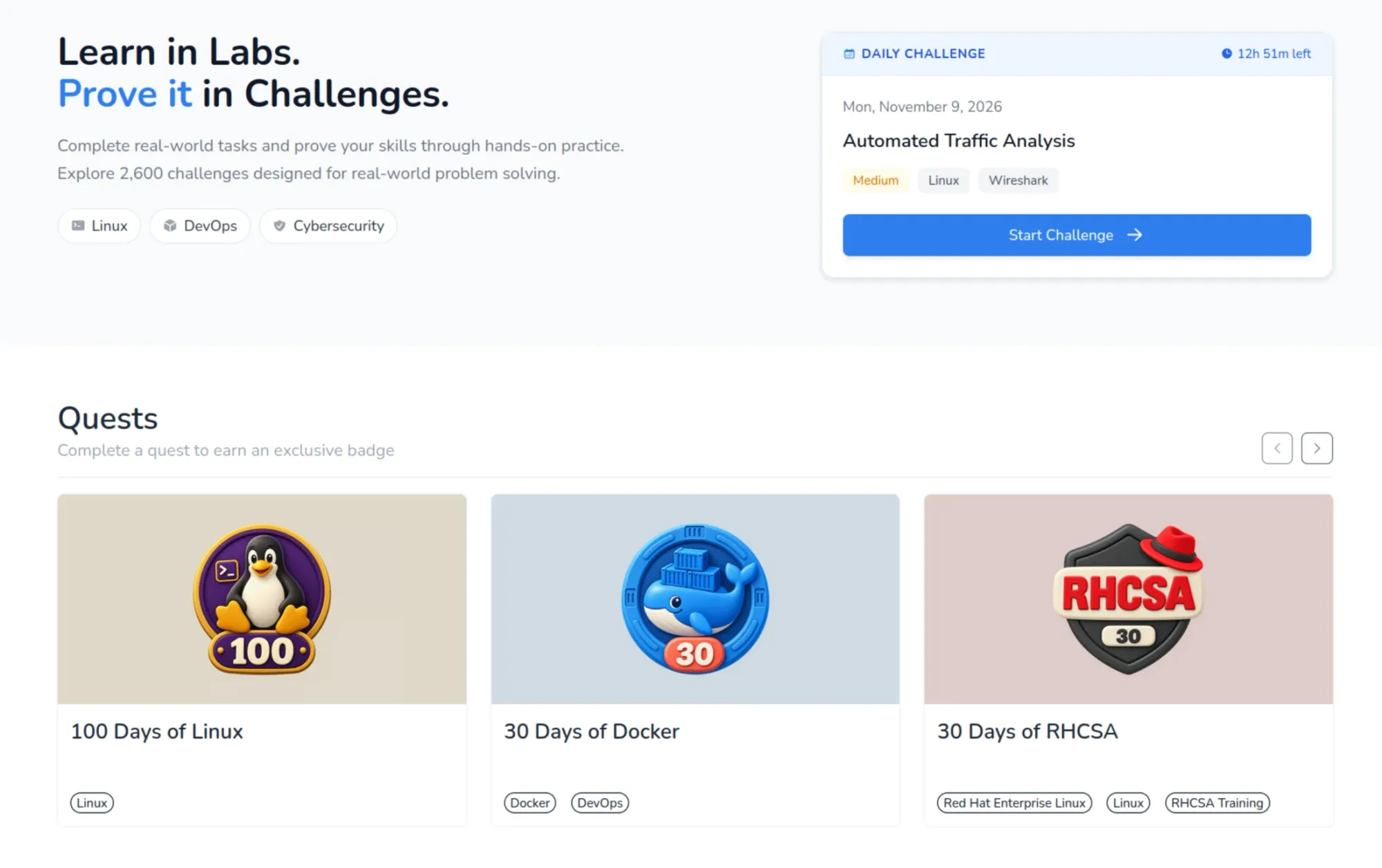
Challenges

LabEx challenges

There are thousands of challenges on LabEx that test various skills that you have. These span over all the courses that are present, and add to your overall skill count if you finish them correctly. You can find all challenges here.

Keeps you motivated to continue learning

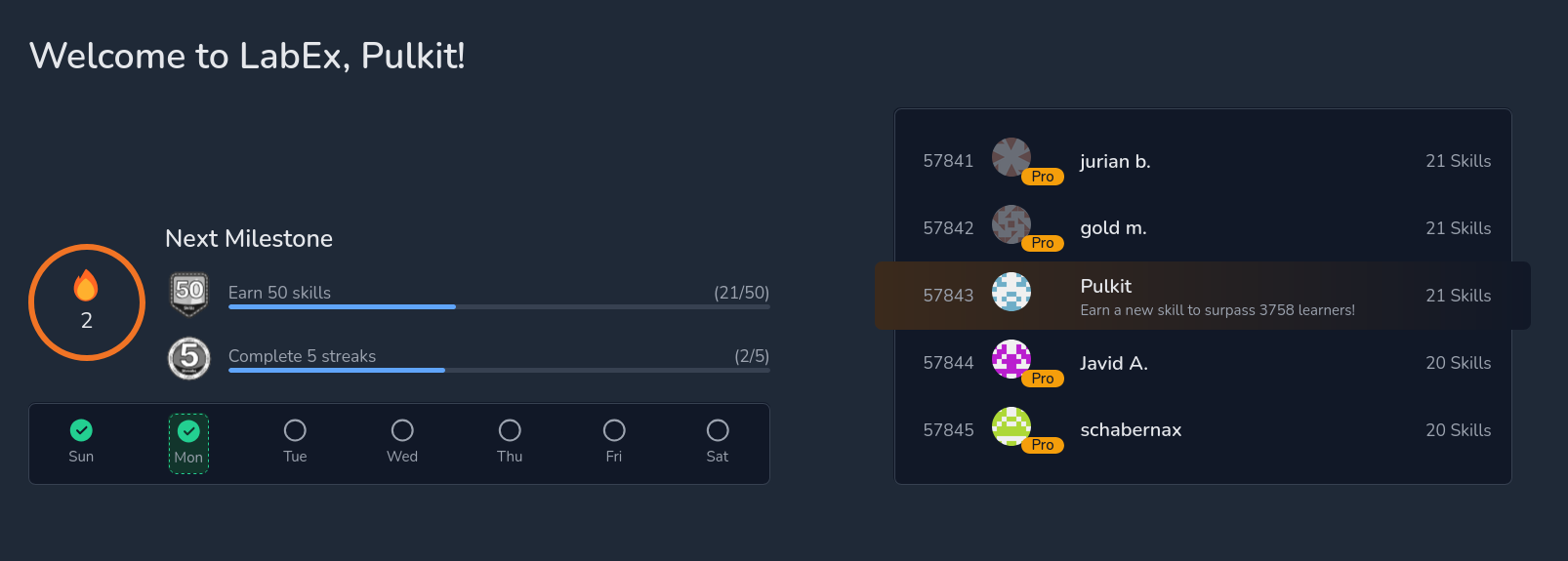
As any good educational service, LabEx paves your learning progress with tiny achievements. This game-ification of progress helps keep a steady track of progress.

Firstly, on the front page itself, there's a display of how many days in the week the lessons have been accessed. This is accompanied by milestones, which are measured by "skills earned" and "streaks completed". There's also a leaderboard right next to these, which shows a global ranking based on skills earned.

Progress tracking on LabEx

LabEx also gives you flashcards to revise whatever you've learned, which is a very well-proven method that helps retention. It also gives you badges, like "First Lab Conqueror" and "Rising Talent Badge", which help with the feeling of progress, much like a game.

LabEx Badges

My learning experience with LabEx

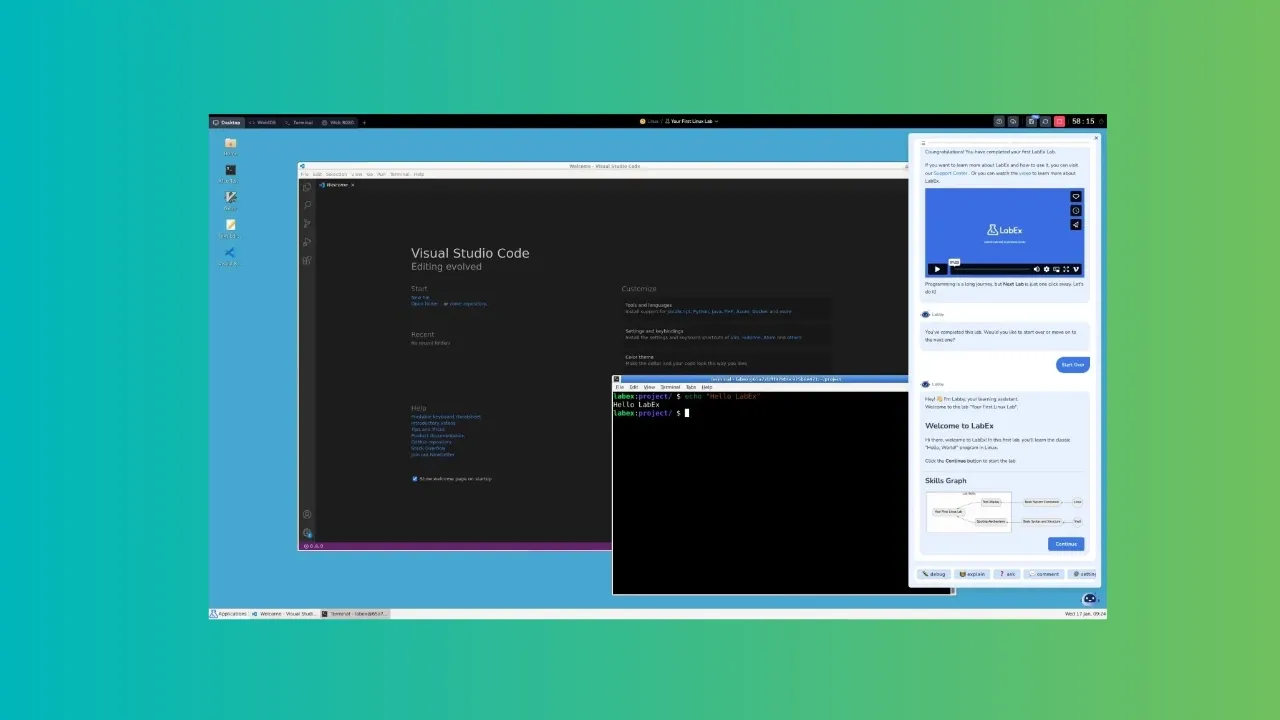
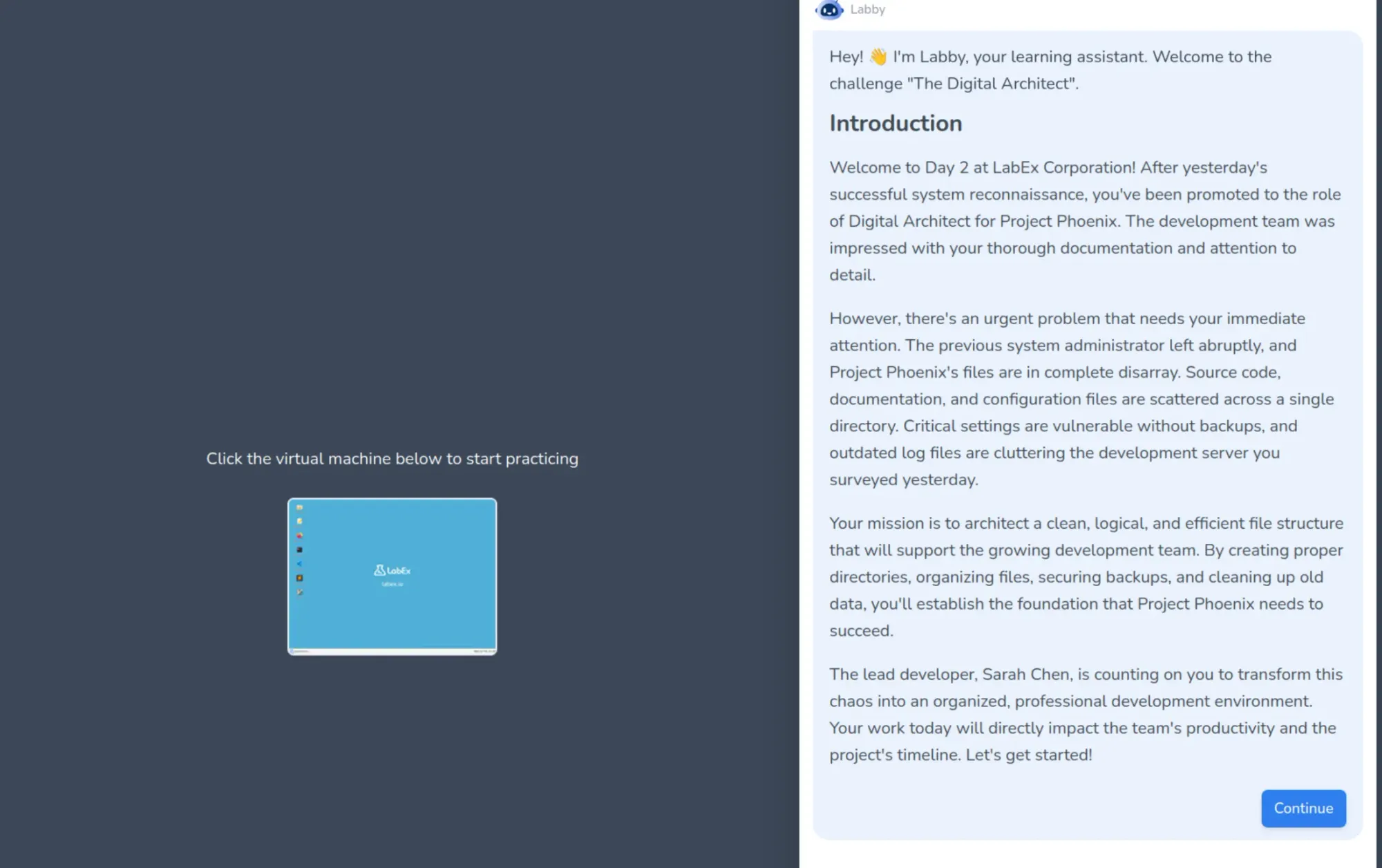
The tutorials are all based in a virtual machine which run Ubuntu with Xfce with a minimum number of options present (unless you are working on the Kali Linux labs).

Most of the work will be done on the terminal, of course. Do note that you need good and stable internet connection so that there is no latency between typing in the command and it appearing on the screen of the VM. The execution of the commands is pretty jiffy.

LabEx tutorial user experience

There are 4 tabs on the top, the first one being the desktop itself, as described. The second one gives you a web-based IDE for your programming needs. This is followed by a terminal, which you can imagine as an only-CLI desktop, and finally there's Web 8080, which shows the localhost for any web-services you might host.

About the lessons, the entire structure is supported by the Labby AI, which checks your work at every step, and encourages you (a bit too much sometimes, as AI tends to do). This is aimed at beginners to guide them at every point.

As someone used to a little hardship in learning technical stuff with books, this was quite unusual for me. The tutorials are split into very easily digestible chunks, where Labby AI makes you use the learned commands after they're taught, making sure you retain what you've learnt.

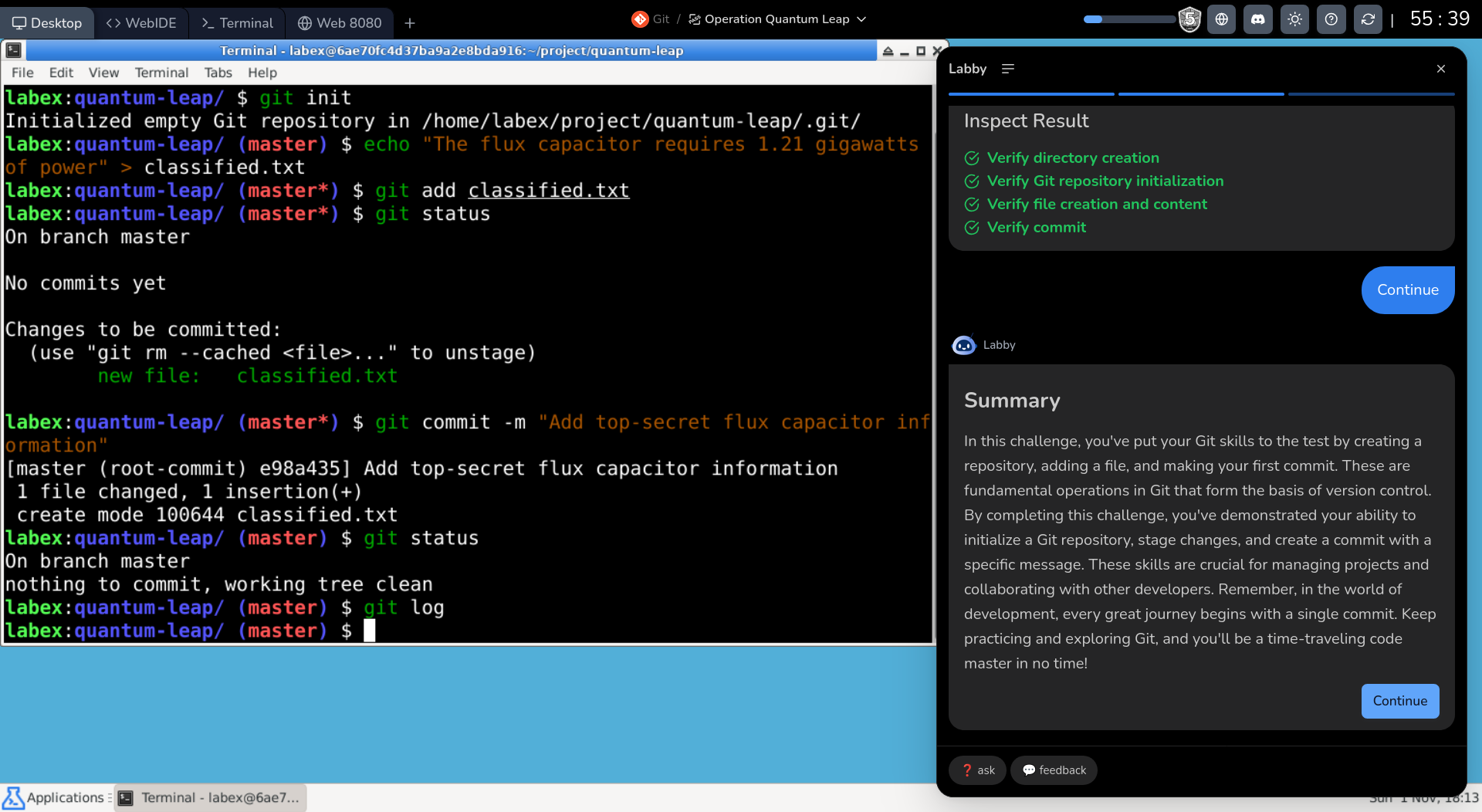
After completing the course, I tried the related playground. Playground gives you hands-on exercises but still in guided fashion. The main test of your learning is with the Challenges where you are given a scenario and you have to troubleshoot or provide a solution in the given playground/VM.

LabEx challenge example

Getting LabEx

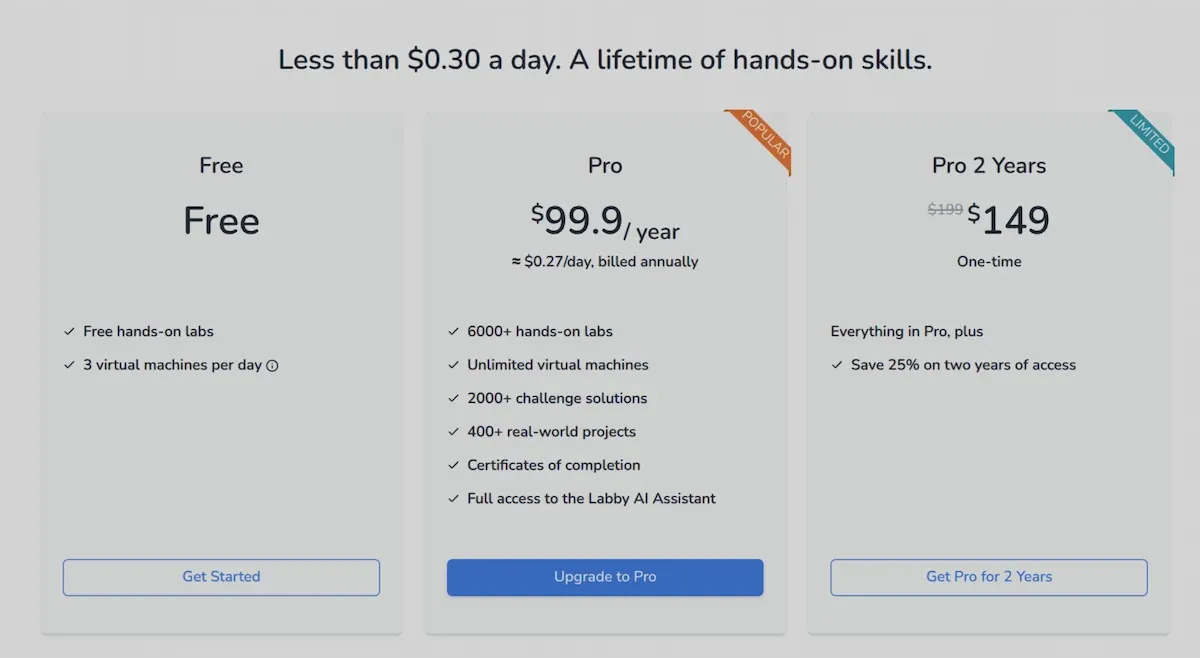
LabEx offers free and paid tiers.

The free tier offers 3 virtual machines per day, and access to all hands-on labs. That's a limitation because it means you can't really exceed 3 tutorials in a day. This is good enough to explore the platform and see if it's worth getting the paid subscription or not.

The paid subscription plan gives you everything LabEx has to offer. It gives you access to unlimited VMs, project labs, challenges and certificates of completion.

Annual subscription costs $99.9 and there is also an option to buy 2 year subscription for $149.

LabEx pricing

Is it worth trying LabEx?

LabEx offers a very wide variety of courses, covering pretty much every major software skill you might need. More than software, I am glad to see that their focus is on Linux, devops, and cyber security.

The interface is pretty smooth, and so are the tutorials.

The guided learning is helpful for beginners as it gives them the foundation of the topic. Combine it with labs, playgrounds and challenges, LabEx has pretty much everything a modern online tech education platform offers. So if you are a beginner, LabEx would suit you.

Experts or people who are accustomed to learning with books or even videos, might feel different because guided learning may feel like spoon feeding to some. But even an expert can benefit by practicing skills with LabEx Challenges here.

You would need a high speed, stable internet connection here to avoid lags with the VMs.

If you are looking for learning Linux and getting certifications, the hands-on learning by LabEx should help you for sure. Besides, $99.9 a year is one of the most inexpensive learning subscriptions you will get in this field.

Give it a try with the free tier and see if LabEx is worth it or not.

💡
LabEx is running Black Friday discount. So for a limited time, you can get 30% off on the annual and two-yearly plans. You need to be logged in to use the special links.

Of course, you'll only know if it is for you if you try it out yourself. Let us know what you think of LabEx in the comments. Cheers!

BMW bumps battery for the better: The 2027 i7 60 xDrive, driven

When BMW debuted the new 7 Series in 2022, it set a new standard for large luxury sedans, increasingly irrelevant though that class is. Rather than siloing off an electric alternative like Mercedes, with its EQS alongside the normal S-Class, BMW simply made the powertrain an option. Stick with a V8 if you want, or consider the rather good electric version instead—only subtle differences like the badging and lack of exhaust pipes give the game away.

Since then, BMW has brought out a string of even newer electric vehicles for the 5 and 3 Series (plus their SUV counterparts). It has switched from battery packs made of prismatic cells to more energy-dense arrangements of cylindrical cells. The motors are still electrically excited synchronous ones, but now the drive units feature silicon carbide inverters and more compact packaging.

This sixth-generation electric powertrain was designed for the clean-sheet Neue Klasse family, which also threw out the legacy cruft of dozens and dozens of discrete single-function electronic control units for a handful of powerful domain controllers. These computers take over those functions but with much faster processing power—and therefore more capabilities in terms of chassis control or powertrain efficiency—as well as the ability to be more easily updated.

Read full article

Comments

© Daniel Kraus/BMW

2027 Nissan Rogue Hybrid: Drives like an EV, but there's no plug involved

Nissan has a new version of its bestselling Rogue SUV, and it’s launching the model here with the latest version of its e-Power hybrid system, which Ars tested in February. Most hybrid cars you can buy today are parallel hybrids, which means that they have an internal combustion engine and an electric motor, both of which drive some or all of the wheels—everything works in parallel. But there’s another approach. Instead of connecting the engine to the wheels via a transmission, it can act as a generator and charge the traction battery, which in turn powers the electric motor. Since the engine and motor work in series, this is known as a series hybrid.

That’s mostly how the Chevrolet Volt worked. As does Honda’s hybrid CR-V. Well, mostly; engineers worked out it was more efficient for those cars' gasoline engines to directly drive the wheels at highway speeds, something that to this day makes a certain subset of hybrid car enthusiasts irrationally angry. If you know anyone like that in your life, send them to wherever the nearest Nissan dealership is, because the 2027 Rogue Hybrid is exactly what they’ve been asking for.

Series hybrids

Under the hood, with its crisp shut line and slim horizontal lights that give me something of a Range Rover vibe, there’s a 1.5 L, three-cylinder turbocharged direct-injection engine that generates 148 hp (110 kW). It only revs to 5,200 rpm because it’s optimized to charge the battery, not cope with the various loads of an engine connected to a gearbox and the wheels. That also allows the engine to operate at a rather impressive 42 percent thermal efficiency—we would need to look at Formula 1 engines to find higher.

Read full article

Comments

© Nissan

Cadillac Escalade IQ review: Huge battery, huge range, huge SUV

“Please have at least 125 miles of range left when we pick it up.” That request from the people who look after the Cadillac press cars wasn’t going to be hard to honor. The electric Escalade IQ arrived with an indicated range of 440 miles (708 km), and with a full week of work to squeeze in, getting anywhere close to needing to recharge it seemed unlikely. With more than 200 kWh of lithium-ion battery between its axles, range is one thing the big electric Caddy needn’t worry about.

Designed and debuted during a time of greater EV optimism, the Escalade is Cadillac’s statement that swapping out a V8 for a pair of powerful electric motors is no compromise to its ambitions, even if the brand’s future will now include a mix of electric and combustion cars beyond 2030. It shares a battery pack and much else with other full-size GM EVs we’ve tested: the Chevrolet Silverado EV, the GMC Sierra EV, and of course the divisive Hummer EVs. And like those trucks and SUVs, the Escalade is large and heavy—just small enough to fit into a standard parking space, with a curb weight sufficient to push it into the Class 3 truck category.

So, the side mirrors are flat, and there’s no formal EPA range—Cadillac says it achieves 460 miles (740 km) on the EPA test cycle—but there are plenty of airbags, even though the 9,046 lb (4,103 kg) curb weight does not require them. Yes, you did read that right, it does weigh 4 tons. And yes, the electric Escalade does weigh a third more than the last gas-powered one we tested.

Read full article

Comments

© Jonathan Gitlin

Electric or gas? BMW goes both ways with new 2027 X5 and iX5.

When we first drove BMW’s first Neue Klasse model, the iX3, it quickly revealed that BMW knows how to make a good electric vehicle. A clean-sheet design, it featured the automaker’s sixth-generation electric powertrain, a completely reimagined dashboard, and powerful computers to run the whole show. Now, much of that technology is being ported over to the larger X5 line.

But BMW knows not all its customers are ready to go electric, especially in the US, so it’s sticking with its powertrain-agnostic CLAR platform, as used in cars as diverse as the large 7 Series and the new gasoline 3 Series. Which means in addition to the all-electric iX5, there are also mild hybrid and plug-in hybrid X5s available, and in time, even a hydrogen-powered option. For now, as I’ll explain, I think the EV is the pick of the bunch.

A BMW iX5 drives on the road.
Get used to it, because this is what BMW SUV kidney grilles look like from now on. Credit: BMW
A BMW iX5 drives away from the camera
If you looked very carefully you'd see this was an iX5 because there's no exhausts. Of course, reading the badge is probably easier. Credit: BMW

Pick your power

The most conventional option is the X5 40 xDrive, powered by a 3.0 L turbocharged inline six-cylinder engine that generates 394 hp (294 kW) and 428 lb-ft (580 Nm). The 48 V mild hybrid system can contribute a decent slug of torque (148 lb-ft/200 Nm) if necessary, and the engine operates under the Miller cycle for better efficiency, as well as featuring the usual BMW engine technology, like variable valve timing. Expect around 26 mpg (9 L/100 km) from this powertrain and a full-to-empty range of 569 miles (915 km).

Read full article

Comments

© BMW

Googlebook review: Android on a laptop is still Android

Android was designed for phones, but that hasn't stopped Google from trying to adapt the OS and its apps to larger machines over the years. Googlebooks are just the latest attempt after tablets, Chromebooks, and foldables induced little change in how people interact with Android software. These new Android-powered laptops are designed to pick up where the web-focused ChromeOS left off, offering premium hardware and native support for Android apps.

Google sees Googlebooks as an alternative to Windows and macOS, but these platforms are entrenched with decades of software and UI conventions that keep users locked in. Googlebooks have to offer something very special to steal users away from either of the dominant operating systems.

For devoted Android phone users, there are some cool things in Googlebook OS, but the Android roots of these machines are impossible to miss. Sometimes it feels like using a Chromebook, and sometimes it feels like using a giant phone. It almost never feels like using a premium laptop, and that's the problem.

Read full article

Comments

© Ryan Whitwam

AI coding agents generate more code, but not more software

Anyone who has even tangentially associated with computer programming knows that modern AI coding assistants and agents can be incredibly efficient at generating huge amounts of functional code. But coders making use of those tools also know better than to trust the accuracy of that code, meaning substantial effort needs to be spent reviewing any AI-generated output.

A recent study of actual coding practices across hundreds of firms finds that human code review forms a significant "bottleneck" for the overall efficiency of AI coding tools, resulting in "little evidence that firms increase software output or reduce employment" by using them. Any efficiency increased during the actual coding phase, the study authors find, is "absorbed by downstream constraints in the production process"; as "the code review process significantly increases in length, pull requests are more likely to require revisions, and reviewers leave more comments."

Cut once, measure twice

To come to these conclusions, Harvard University researchers Fiona Chen and James Stratton made use of aggregated analytics data from Jellyfish, which measures the granular output of engineering teams. That data encompasses 300 million individual "work events" (e.g., commits and pull requests) and issue management software data across more than 700,000 employees at over 700 relevant software development firms from 2021 through March of 2026.

Read full article

Comments

© Getty Images

CleanupBuddy

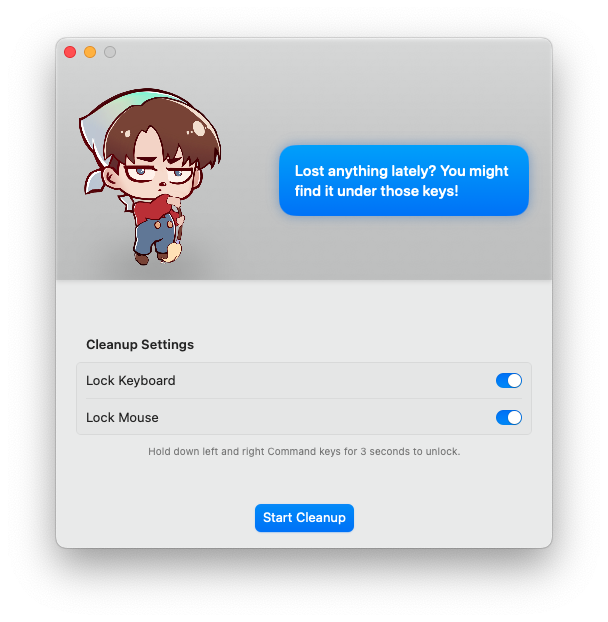
CleanupBuddy is a simple little app I’m always using on one of my Macs. What CleanupBuddy does is lock the keyboard and mouse/trackpad so inputs are ignored during cleaning.

On a MacBook, cleaning the keyboard often risks shutting the device off or forces you to quit everything and be extra careful; with CleanupBuddy you can confidently go to town cleaning without causing any trouble.

You can lock both keyboard and mouse together or either one independently, and it works on any Mac running Ventura or later — so giving the keyboard and mouse a thorough clean on your Mac mini or iMac can be done without powering them down.

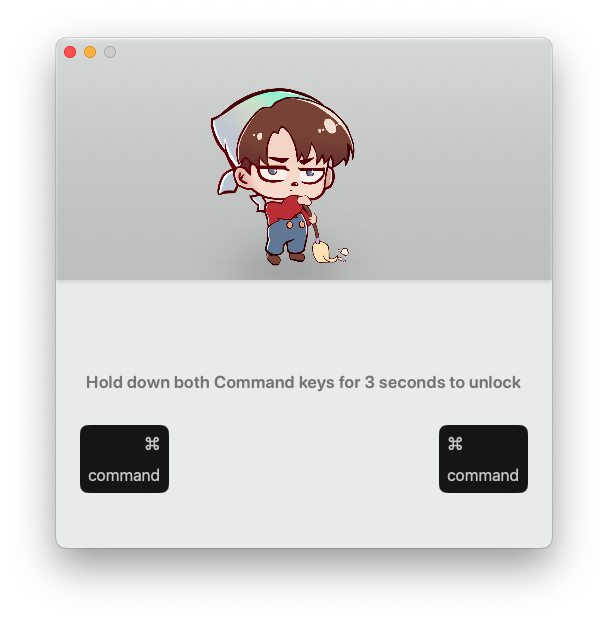
To unlock the keyboard once you’ve finished cleaning you simply press and hold both the command keys.

CleanupBuddy is developed by Gui Rambo, who is the developer of AirBuddy another app in constant use in my ecosystem.

❌