
 Login
LoginWallpapi gives you a cooler way to change wallpaper on GNOME
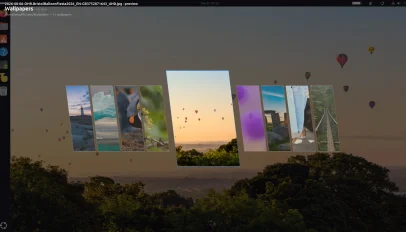 Wallpapi is an Omarchy-inspired wallpaper switcher for GNOME desktops that offers a slicker. When installed, it lets you “browse a folder of wallpapers as a full-screen carousel of parallelogram cards”. As you page through available options, the focused image is previewed as your wallpaper in the background, so you can see it larger, which is pretty cool. When you spot the drape you want, you hit Enter to set it as the desktop background. Choices are scheme-aware. If a light or dark variant is available, Wallpapi will set the correct version of an image per your system dark mode preference. […]
You're reading Wallpapi gives you a cooler way to change wallpaper on GNOME, a blog post from OMG! Ubuntu. Do not reproduce elsewhere without permission.
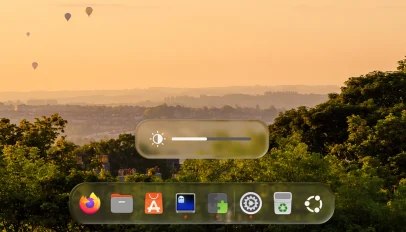 You can now give the Ubuntu desktop a ‘Liquid Glass’ makeover using a new GNOME Shell extension that was written with ‘significant’ help from AI. Its developer, Ryosuke Watanabe, said they loved the look of Liquid Glass – Apple’s new design material that gives UI elements light-bending surfaces with depth and motion – but, not owning an Apple device, wanted a way to enjoy it on their Linux desktop. So they created an extension to do it. “The design, the shader math, the architecture decisions, and all of the testing on real hardware are mine”, says Watanabe, but adds that […]
 Ubuntu’s Desktop Icons NG (DING) extension has a little-known way to bring order to a chaotic desktop: stacks. Stacks groups multiple files of the same type in a collapsible icon, e.g. images in one stack, PDFs in another and so on. Folders don’t get grouped, and if there is only one of a type of file on the desktop, it is not stacked. Expanding a stack by clicking on it reveals all files in the stack (other file icons bump out of the way). Multiple stacks can be expanded or collapsed at the same time, and stacks can be left […]
 You can bring Ubuntu’s clock, calendar and weather app icons to life with the Dynamic Calendar, Clocks and Weather Icons [Reborn] GNOME Shell extension – which has been updated with new icon styles. The extension already has Yaru, Adwaita, Paprius, Big Sur and other icon styles built-in (the dynamic versions don’t depend on the icon sets themselves), so you see real-time clock, date and weather info on icons that look like their static equivalents. Two new icon choices land in latest update, v9, released this week (17 August 2026), Stylish and Pure: In the screenshot above, you can see how […]
 If you remember that desktop picture widget for GNOME I wrote about last year, but found it a bit too basic for your personalisation preferences, you weren’t alone. Another user felt it could lacked enough flexibility, so forked and improved it. Picture Desktop Widget Remake improves on the original. It lets add multiple picture widgets to your Ubuntu desktop, and assign each one a different folder to pull images from, at random. Plus, you can set the size, position, border radius and aspect ratio of each widget individually. Each photo frame has its own on/off button in Preferences, so you […]
 An updated version of Dynamic Music Pill, the GNOME Shell extension to put now playing track info and lyrics in your panel or dock with animated flourishes, is out. If you’re prone some desk-side crooning, Dynamic Music Pill v1.3.0 brings two new lyrics provider APIs, BetterLyrics and BiniLyrics, with TTML parsing to provide word-by-word karaoke-style highlighting. If there’s word-level synced lyrics for the track being played, the extension shows them in the applet controller (click on the album art inside of to access the lyrics view) or the panel, depending on how you’ve configured it: Dynamic Music Pill can show […]
 Dropbeat is a new riff on an old tune, a panel-based music applet for GNOME Shell that gives you an alternate way to pause, play and skip tracks in MPRIS-friendly Linux media players. Applets of this ilk are legion, and this panel applet doesn’t do anything that different to ones you may have tried in the past or currently use. But it does do some things differently. When installed, it adds a button to your panel that, when clicked, “shows a cool card to control your media player”, to quote the project’s GitHub. Dropbeat uses imagemagick to generate the blurred […]
 Mosaic brings automatic tiling to GNOME Shell, but without asking you to use it permanently. Turn it on when you want windows to arrange themselves, turn it off when you want floating windows back. The extension works with GNOME 45 and up, adding a toggle to Quick Settings to enable the auto-tiling mode. When off, you’re in floating mode (which still has tiling features). Expand the toggle to access more options or get at Mosaic’s settings. It’s the easy on-demand nature that makes Mosaic different to similar extensions that exist. When the auto-tiling mode is active (the toggle is turned […]
 Night Light Scheduler is a new GNOME Shell extension that lets you control how warm your screen is throughout the evening (or day). GNOME’s built-in Night Light feature offers a customisable daily schedule, and lets you pick a colour temperature that’s more or less orange (which will reduce blue light emitted by your device’s display). But that temperature you set holds the entire time Night Light is switched on. It eases in and out at each end but it never changes in between. For most of us, the default behaviour is fine. It’s set-and-forget to a fixed schedule. But if […]