❌

Reading view

There are new articles available, click to refresh the page.

Ubuntu 26.10 Beta released with Linux 7.3 & GNOME 51
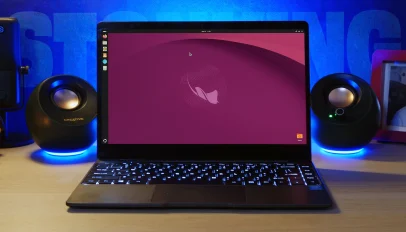
A laptop on a desk shows Ubuntu 26.10 Stonking Stingray desktopThe beta release of Ubuntu 26.10 (Stonking Stingray) is now available for download – a week later than planned. Ubuntu 26.10 Beta runs on the Linux 7.3 kernel (release candidate) and ships the GNOME 51 desktop. Lower-level changes include a complete set of Rust core utilities and better handling of low-memory situations. Beta builds are not final or stable, but generally more reliable than earlier snapshots. Users and developers alike can test the new release and report any bugs they find so any fixes can land in time for the final, stable release of Ubuntu 26.10, out on 15 October […]

You're reading Ubuntu 26.10 Beta released with Linux 7.3 & GNOME 51, a blog post from OMG! Ubuntu. Do not reproduce elsewhere without permission.

Ubuntu 26.10 Beta released with Linux 7.3 & GNOME 51

A laptop on a desk shows Ubuntu 26.10 Stonking Stingray desktopThe beta release of Ubuntu 26.10 (Stonking Stingray) is now available for download – a week later than planned. Ubuntu 26.10 Beta runs on the Linux 7.3 kernel (release candidate) and ships the GNOME 51 desktop. Lower-level changes include a complete set of Rust core utilities and better handling of low-memory situations. Beta builds are not final or stable, but generally more reliable than earlier snapshots. Users and developers alike can test the new release and report any bugs they find so any fixes can land in time for the final, stable release of Ubuntu 26.10, out on 15 October […]

You're reading Ubuntu 26.10 Beta released with Linux 7.3 & GNOME 51, a blog post from OMG! Ubuntu. Do not reproduce elsewhere without permission.

GNOME replaces an ‘inappropriate’ screenshot sound

Say goodbye to people thinking you’re a creep next time you take a desktop screenshot in a public space, as GNOME 51 has changed the sound effect that plays when you do. For a while now, when you screen grab your desktop or an app window, the accompanying sound effect is a camera shutter, like the one you hear when you take a photo on a smartphone. Cute in the privacy of your own home, but rather problematic in a public setting like an office or café. The sound is the issue: how are people to know you’re taking desktop […]
You're reading GNOME replaces an ‘inappropriate’ screenshot sound, a blog post from OMG! Ubuntu. Do not reproduce elsewhere without permission.

💾

💾

GNOME replaces an ‘inappropriate’ screenshot sound

Say goodbye to people thinking you’re a creep next time you take a desktop screenshot in a public space, as GNOME 51 has changed the sound effect that plays when you do. For a while now, when you screen grab your desktop or an app window, the accompanying sound effect is a camera shutter, like the one you hear when you take a photo on a smartphone. Cute in the privacy of your own home, but rather problematic in a public setting like an office or café. The sound is the issue: how are people to know you’re taking desktop […]

You're reading GNOME replaces an ‘inappropriate’ screenshot sound, a blog post from OMG! Ubuntu. Do not reproduce elsewhere without permission.

💾

💾

GNOME 51 released with passkey login and smoother UX

GNOME 51 new release heroGNOME 51 is out, bringing FIDO2 passkey login, a Reduced Motion option and frame scheduling changes that make UI animations and scrolling feel smoother. Core apps pick up improvements too. The desktop Maps app gains offline area downloads and live transit data, Papers now lets you add visual signatures and Nautilus speeds up the loading of large folders. While this is a more modest release than we’ve become accustomed to – some planned changes, like a GTK4 port of Disks and a slider to change touchpad scroll speed, didn’t make it in – there is still plenty to look out […]
You're reading GNOME 51 released with passkey login and smoother UX, a blog post from OMG! Ubuntu. Do not reproduce elsewhere without permission.

💾

💾

💾

GNOME 51 released with passkey login and smoother UX

GNOME 51 new release heroGNOME 51 is out, bringing FIDO2 passkey login, a Reduced Motion option and frame scheduling changes that make UI animations and scrolling feel smoother. Core apps pick up improvements too. The desktop Maps app gains offline area downloads and live transit data, Papers now lets you add visual signatures and Nautilus speeds up the loading of large folders. While this is a more modest release than we’ve become accustomed to – some planned changes, like a GTK4 port of Disks and a slider to change touchpad scroll speed, didn’t make it in – there is still plenty to look out […]

You're reading GNOME 51 released with passkey login and smoother UX, a blog post from OMG! Ubuntu. Do not reproduce elsewhere without permission.

💾

💾

💾

GNOME Sushi gets a GTK4 revamp, new features

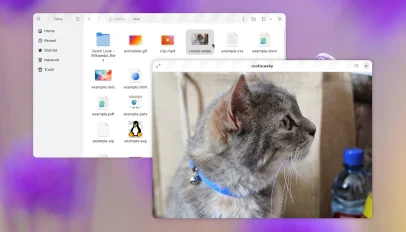
Sushi, the spacebar preview utility for Nautilus file manager, has been ported to GTK4 for GNOME 51. For anyone unfamiliar with it, Sushi is like Quick Look on macOS: you highlight a file (image, music, video, document, etc) in Nautilus, press the spacebar and an instant preview of its content appears. Press the spacebar again to dismiss it. For v51, Sushi’s GTK4 port means it looks nicer on newer GNOME releases. It uses a flatter headerbar with icon buttons, and you’ll see overlay controls on certain file types (like media or PDFs) that allows content to bleed through from underneath. […]

You're reading GNOME Sushi gets a GTK4 revamp, new features, a blog post from OMG! Ubuntu. Do not reproduce elsewhere without permission.

💾

💾

GNOME 51 brings a floating search overlay to the Shell

GNOME 51, due out in September, could include a redesigned search experience. Presently, when you trigger a search from the GNOME Shell overview, a dedicated search results screen replaces the one you were looking at, either the workspaces or app picker. But a change targeted for GNOME Shell in v51 plans to change that. Modern GNOME Shell is designed around a ‘semantic’ model, where elements visibly enter and exit from a specific place (with animations providing cues) so you know how one screen relates to the next. Under this model, search results would appear in an overlay that ‘spawns out […]

You're reading GNOME 51 brings a floating search overlay to the Shell, a blog post from OMG! Ubuntu. Do not reproduce elsewhere without permission.

💾

❌