Login
Just do it for me? Balancing human and AI input in content improvement
Working with student interns and contributing to the Drupal community, I’ve experimented with AI in various tools designed to support content improvement. I reflect on what I’ve learned about peoples’ preferences for engaging with AI tools and consider wider design challenges for web content to support co-browsing.
Writing good quality, user-centred content has always been a challenge, and accordingly, a suite of tools evolved to address this; Hemingway, Grammarly and many more. With their ability to learn patterns and predict word sequences, the advent of LLMs provided a new direction for content improvement. Where previous tools had used fixed rules, algorithms and formulas to flag content problems and score sentences, LLMs changed the playing field as they were able to be prompted to rewrite and create text and to adapt words and sentences not only in line with fixed rules, but also aligned to different interpretations of style.
The UX Service’s content design course, Effective Digital Content, and our ongoing Content Improvement Club meet-ups are both designed to help staff publishing digital content for the University. It’s been encouraging to see a positive uptake for both training formats, however, we realise we can do more to help staff publish the best quality content they can, and to this end, for the past few years it’s been a privilege to support a series of interns in the UX Service to look at how we can innovate and apply AI to the persistent challenge of writing good quality, user-centred content.
Thinking beyond – embracing the spirit (or grasping the nettle, depending on how you look at it) of AI innovation, it’s sensible to note that, more broadly, the browsing landscape of the web is increasingly shifting to include AI agents as well as humans, giving cause to consider what using AI to design content to be consumed by AI might look like. That’s the subject of another blog post (or several).
For now, as I begin another phase of work with a new student in the role of AI and UX Innovation intern (Viktor Sharha), it felt timely to pull together what I’ve learned so far.
Designing, creating and editing content happens in various ways
When designing any user-centred assistive features, a good place to start is the current workflow or user journey people adopt to achieve the task in question. In other words, to look at the stages content editors currently go through to make sure their content is as good as it possibly can be.
One of my earliest research tasks when I joined the University was to usability test the Editorial Style Guide, to find out how publishers used it to keep their content consistent in EdWeb. This work gave me insight into the type of workflows publishers followed to get compliant content published. Some publishers worked in Microsoft Word, using the in-built spelling checker for typos, and cross-checking against a printed-out copy of the style guide for University-specific errors before pasting content into the EdWeb body text. Others went straight to EdWeb, checking their content line-by-line with a PDF version of the guide. Others relied on colleagues giving their work the once-over before pressing publish. Some used Grammarly and Hemingway, some didn’t.
Overall, there wasn’t a dominant content-publishing workflow, with unified friction points waiting to be alleviated through a standard user-centred design process. Instead, there were varied approaches, habits and ways of working which people had adapted over time to suit their specific circumstances and to address the areas they found difficult as individuals. Tools were used at different stages of the process, and to a greater or lesser extent depending on personal preferences.
Therefore, designing content improvement tools isn’t one-size-fits-all
It follows that, since people follow different pathways to create, design and edit content, tools to assist this process need to be developed in different ways to suit varied preferences. Since 2025, interns in the UX team have prototyped our own different content improvement tools to test with publishers, and we’ve also tested open-source tools that exist already, developed within the Drupal community. From our testing and research, we found pros, cons and nuances associated with different tools. The summary below pulls together detail of the tools and how they compared.
Tool 1: Drupal Editoria11y – no AI, flags errors in the editing interface
Editoria11y is a Drupal module built by John Jameson from Princeton University that automatically checks content inside the editorial interface. It was originally designed to catch accessibility issues, but it can be configured to check content against other rules too, such as institutional style guide conventions.
What it does and how it works: Editoria11y checks content as authors type, and also on previews and published pages. It includes an indicator bar to show how many issues are on the page and has inline markers to show where each issue is, as well as a dashboard summarising site-wide errors. When an issue is opened, a pop-up modal explains the problem and suggests a fix.
What worked well: In tests, publishers were able to make sense of the inline markers and understand how these related to the indicator bar for the whole page. They liked the tracked change visualisation in the pop-up modals, and were able to work through successive modals, accepting or ignoring the suggested changes.
What needed improvement: Some publishers found the number of markers overwhelming, and since the pop-ups covered the text, it was difficult to judge each recommendation in context. In the pop-ups, some of the rule descriptions used formal grammatical terms (such as ‘ordinal suffixes’) which were unfamiliar to some publishers meaning they were confused about the problem to be fixed. Since rules were applied mechanically, there were instances where errors were missed, or where awkward fixes were suggested (such as swapping ‘1st floor’ for ‘1 floor’ due to straight removal of the ordinal suffix) – these degraded publishers’ trust in the tool.
Read more about what we found testing Drupal Editoria11y
Tool 2: ELM-powered content design chatbot – with conversational advice
This tool was developed by student Mostafa Ebid during a 2025 summer internship. It connected ELM, the University’s AI platform, to EdWeb2, so publishers could get help with their content by conversing with the University’s suite of LLMs without leaving the Drupal editing interface.
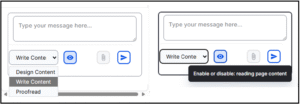
What it does and how it works: This tool sits in a chat sidebar next to the main Drupal editorial interface and offers three modes: Write Content, Design Content and Proofread. In response to a user prompt to improve content, it activates an orchestration of agents (each with specific tasks such as checking the style guide, structuring pages, profiling audiences) which read the page content and act on it accordingly, publishing the revised content in the chatbot window.
What worked well: In tests, publishers understood how the tool could be used as a writing partner, and were impressed with the way it restructured content with headings, bullet points and calls to action and hyperlinks.
What needed improvement: When faced with the empty chatbot interface, some publishers weren’t sure where to start, and they didn’t notice the three modes to work on content. Some were also unsure of the sources the chatbot was using for its revised content and skeptical that the revised content contained hallucinogenic content. They would have appreciated tracked changes to be able to pinpoint what had changed and found the long thin sidebar chat interface awkward to review the updated text. The chatbot was also limited to reviewing body text content, whereas publishers needed it to review content in other page components used in Drupal.
Read more about what we found developing and testing the ELM-powered content design chatbot:
Initial insights from UX testing our Drupal AI content assistant tool
Tool 3: QuillMark v1 and v2 – some AI, clusters errors with correction suggestions
QuillMark was an AI-enhanced tool which worked in Drupal to check content against the University’s Editorial Style Guide. Shlok Gupta built and tested two iterations of Quillmark during his 2026 summer placement as AI and UX Innovation Intern.
What it does and how it works: QuillMark sits in a side panel of the Drupal editorial interface and scans content on the page in two stages. The first stage uses code-based pattern matching (without AI) to catch straightforward errors. The second stage brings in AI to find deeper issues (such as passive instead of active voice) and to suggest fixes. Findings from both stages are displayed in the side panel – each finding describes the problem, links to the relevant rule in the style guide and offers an ‘Apply fix’ button (which can be reverted). Findings are grouped by category, and this panel also includes an indicator of the environmental impact and cost of the scan.
What worked well: In tests, publishers understood that the tool was there to help them correct content on the page, they liked the environmental and cost indicator, the suggested fixes and the links to the style guide reassured them that the tool was applying University-specific rules.
What needed improvement: Publishers reported feeling overwhelmed by the number of findings on a single page and they wanted a way to deal with related findings and fixes in bulk, to avoid going through them one-by-one. Related to this, they wanted
Read more about what we found developing and testing the QuillMark tool:
QuillMark, iterated. How user research helped us evolve an AI-enhanced Drupal style guide assistant
Tool 4: Drupal AI Content Review – full AI, with a plan provided to improve content
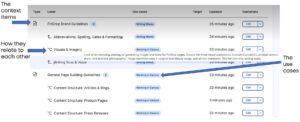
As part of the Drupal AI Initiative, I’ve contributed to shaping the self-explanatory Drupal AI Content Review module. This module plugs into a Drupal site, references content rules and good practice from context items in Drupal Context Control Center (within the same site) and uses the configured AI provider to review site content
What it does and how it works: The feature reads the page content and checks it against criteria set by the site owner, such as tone and voice guidelines, inclusive language rules and target readability levels. These rules are stored in the Drupal Context Control Center, along with examples of good and bad content. The review gives the page a score for each criterion and recommends fixes to improve it. Accepted recommendations become an improvement plan, which is applied in the editorial interface. Re-reviewing the page shows the updated scores, with the option to keep making improvements. Over time, the rules can be refined by adding more examples of good and bad content to the Context Control Center.
Read more about Drupal AI Content Review on Drupal.org
Read more about the Drupal Context Control Center on Drupal.org
What worked well: In tests of this module within the AI demo, people liked seeing the red, amber and green indicators against page content for an easy visual highlighting areas to be worked on, and they liked being able to select a checklist of recommended improvements to apply to improve their content.
What needs improvement: The screens explaining the recommended improvements were difficult to scan read, and it was also difficult to compare the original text and the text with the recommended improvements side-by-side (despite colour shading to denote which was which). The stage where the recommendations were turned into an improvement plan felt like an unnecessary extra step, it would have been better to have implemented the recommendations directly. Also, it was presumed that implementing the plan would have corrected all errors resulting in a score of 100%, without the need for further work and re-review. Finally, it wasn’t immediately clear how to use the Drupal Context Control Center and the AI Content Review together.
When designing AI-enhanced tools, consider three AI design maxims
Taking on board variations in blending human effort and automated operations, there are three approaches to designing AI features and AI-assisted workflows worth considering. These are defined below, with ideas for how they may apply to content improvement.
1. Human-in-the-loop
In this set-up, humans typically share the task-load with AI – actively working alongside an automated operator to supervise or influence actions, and to approve AI decisions before they happen (ensuring AI outputs are not released without the green-light from a person).
Human-in-the-loop tends to be adopted when:
- there is a need for human judgement to get something correct
- the consequences of an error could be high-profile or damaging
- trust in an automated tool is still being built, and the boundaries of its capabilities are still being realised
- the goal is for the system to facilitate shared learning between the person and the automation
For content improvement, human-in-the-loop is appropriate in these scenarios:
- ensuring correctness of important factual data – for example, prices, dates, contact details, terms and conditions
- checking the tone of sentences in line with inclusive language guidance
- verifying accuracy of high-stakes published content such as legal information, policy wording or written instructional content
- rewriting complex topics in plainer language
- writing meta descriptions or page summaries to be accessed by search mechanisms
- translating content into other languages
2. Human-on-the-loop
These systems involve the AI or automator acting on its own, with the human reviewing and spot-checking at intervals, monitoring output quality over time, and intervening to correct failures periodically, where required.
Human-on-the-loop tends to be adopted when:
- there is a high volume of low-risk tasks to be completed, which would be tedious for humans to do themselves
- consequences of errors are minimal
- there’s a need for tasks to be completed quickly, and including human-input at each task would be too time-consuming
- consistency is required across tasks, and there’s a risk of human error introducing variability
For content improvement, human-on-the-loop is appropriate in these scenarios:
- fixing straightforward style rule violations such as correcting spelling errors
- categorising and tagging text content (for example, to facilitate its discovery in search)
- scanning content for readability and accessibility, to flag or report areas to be addressed
3. Human-out-of-the-loop
In this arrangement, the human sets up the AI to act autonomously, and leaves it to proceed, with no routine review.
Human-out-of-the-loop tends to be adopted when:
- there are very low-risk, behind-the-scenes tasks to be completed where errors have little or no consequence and can be fully reversed
For content improvement, human-out-of-the-loop is appropriate in these scenarios:
- autocorrecting typing errors
- detecting content duplication
- auto-optimising media content to defined parameters
Choice, pacing and transparency are constant design requirements
Testing four different tools has showed that options always need to be available, whatever balance of human and AI the tool includes. People approach AI differently based on preferences and past experiences. Some love nothing more than a good grappling of a sticky sentence, some just want an agent to do the work for them, and many sit somewhere in between, happy to have some AI help as long as they have the final say.
Alongside humans in, on and out of the loop, it’s important to remember the fourth option: human only, where people can choose to do their content unaided, using the methods they relied on before AI came along. AI shouldn’t be forced on anyone, so all tools need to come with a ‘no thanks to AI’ option.
AI is a fast-evolving and non-deterministic technology, so at any point in time it may work differently to the way it did before. Responding to challenge from a design perspective, it’s important to factor in pacing. People need to be taken through how a tool works, and the options available. They need time and space to experiment and try it out, so they can learn for themselves how it can work for them. Pacing not only matters in the way tools are introduced, but also in the way their outputs are presented, to avoid the overwhelm that comes when AI does the heavy lifting all at once, and so people know what changed and how, and they have a way to accept, decline or edit what it produced.
If people don’t trust an AI tool, they won’t use it. Earning trust requires transparency, explainability, relatability and reliability – so AI tools need to be upfront about what they can and can’t do, with clear, intuitive interfaces and labels. Reliability will always be hard to promise given AI is probabilistic, so instead of accuracy guarantees which may fall short, a better approach is to design for experimentation, so people can find their feet and make their own judgements.
Designing for humans and AI together – metadata, markdown and MCPs
Looking at the broader digital landscape, the challenge widens from designing tools that help humans make content to designing websites with content ready for both humans and agents to use.
In co-browsing, people are increasingly arriving at a website with an agent alongside them, handing off some tasks while keeping control of others and wanting to see what their agent is doing. That means firstly deciding which tasks belong to humans and which one to AI, and secondly designing for each. Humans need intuitive interfaces. Agents need data they can read and act on without ambiguity:
- metadata, such as schema markup that tells an agent what a page is about, who it’s for and how it connects to other content
- markdown versions of pages and llms.txt files, which give agents clean, structured text without layout and navigation getting in the way
- MCPs (Model Context Protocol servers), which let sites expose what they can do as well as what they say, from simple actions declared directly in HTML to more complex ones written in JavaScript – in preparation for use by the emerging WebMCP browser standard.
Labels matter for humans and agents alike, because words are becoming a currency that machines read as well as people. Alignment on terminology facilitates the creation of a single source of truth, to prevent the human experience from drifting from the agentic experience. On another level, humans need a way to consistently communicate with AI – to give AI the rules and instruct it and to train it with new insight. ‘Rosetta stone’ mechanisms like the Drupal Context Control Center will play an important part in designing for human and AI interaction and collaboration and I am excited to keep working and researching in this area to address these evolving design challenges.