
 Login
LoginLaser is a new, modern CD ripper for Linux
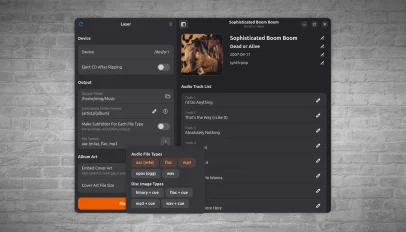 Under my bed is a giant box of CDs that I’ve been meaning to rip for years. Some aren’t on Spotify, some are, but not the right version and one is by an artist I’m half convinced is a folk memory – perhaps the Mandela effect in action. Laser is a new GTK4/libadwatia CD ripping application for Linux that’s coaxed me into getting on with the job. It’s not just old timers who may have need. CD sales in the UK are booming as younger buyers put off by the gentrified price of vinyl turn to cheaper physical formats. A […]
You're reading Laser is a new, modern CD ripper for Linux, a blog post from OMG! Ubuntu. Do not reproduce elsewhere without permission.
 The latest update to Calibre, the popular open-source ebook manager, features an AI-powered writing game. Calibre v9.15’s “Create Your Own Adventure” mode, per the release notes, lets you build a fictional world and hand control of it to an AI who will manage it in real time based on your responses. A bit like old text-based RPGs, I guess. The changelog notes, with obvious understatement, that the feature is “a little different” from Calibre’s usual fare, adding it began as a way for developers to test the tool’s AI backend before developing into “something fun to use”. Like all AI […]
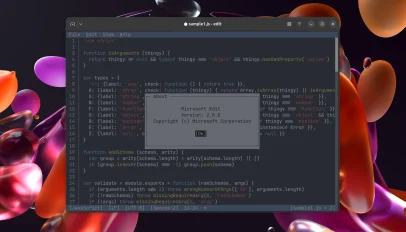 Edit, Microsoft’s open-source command-line text editor, added syntax highlighting, improved regex handling in Find & Replace and new editing shortcuts in its v2.0.0 update. Microsoft open-sourced Edit last year. It’s a small, cross-platform text editor with VS Code-style keybindings, mouse support, handles LF and CRLF line endings and lets you open multiple file. The clean terminal user interface (TUI) is super easy to use. The Edit v2.0.0 release came out earlier this year, but the unofficial Linux snap package (msedit, maintained by Canonical’s Aaron Prisk) only updated on 14 September – that update is how I heard a new version […]
 In the mood for testing? The fourth monthly snapshot of Ubuntu 26.10 is now available for download. It’s unusual for Ubuntu to produce a snapshot the same month a beta release is due, and this is also the second snapshot published this month: Ubuntu 26.10 Snapshot 3 arrived in early September. Strange times with the Stonking Stingray! “These should be very close to what the Beta candidates will look like next week, so don’t shy away from testing them”, said Canonical’s Utkarsh Gupta in the mailing list announcement. Since Snapshot 3, more package updates have been updated: the GNOME 51 […]
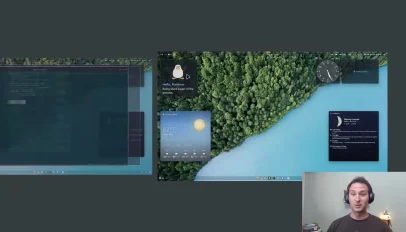 Miracle-wm v0.11.0 gains a fancy new overview mode inspired by GNOME Shell. For those unfamiliar with miracle-wm, it’s a tiling window manager built around the Wayland compositor Mir, created to be a “hackable and flashy” alternative to other tiling WMs, like hyprland and sway. The overview mode gives users an easy way to select windows and workspaces. One tap of the action key (configured in the config file) enters a window selector, while a double tap of the action key will enter a workspace selector. Once open, windows and workspaces can be navigated using keyboard shortcuts, mouse scroll wheel or […]
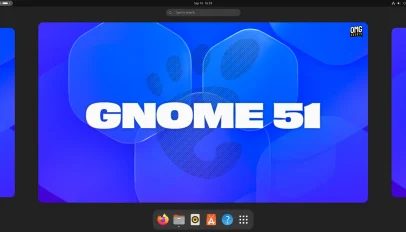 GNOME 51 is out, bringing FIDO2 passkey login, a Reduced Motion option and frame scheduling changes that make UI animations and scrolling feel smoother. Core apps pick up improvements too. The desktop Maps app gains offline area downloads and live transit data, Papers now lets you add visual signatures and Nautilus speeds up the loading of large folders. While this is a more modest release than we’ve become accustomed to – some planned changes, like a GTK4 port of Disks and a slider to change touchpad scroll speed, didn’t make it in – there is still plenty to look out […]
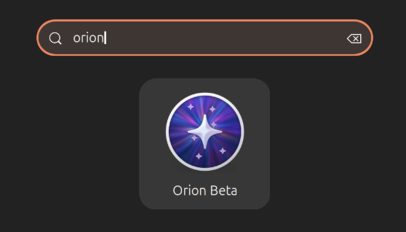 A new beta of Orion for Linux, the native WebKitGTK port of Kagi’s iOS and Mac web browser, is out. Orion Beta v0.4.3 continues to flesh out the browser’s feature set to reach parity with its Apple kin. You can now customise the toolbar. A context menu option was present in earlier beta builds but opened a button picker that wasn’t functional – now it is. Drag items out of the ‘current toolbar’ area on the palette to remove them, or drag ones from the palette to the top block to add them. You can re-order buttons by dragging too. […]
 Firefox 156 is out with faster start-up times for its built-in PDF viewer and lower CPU usage when viewing large JPEG images. As you browse the web you (pretty much always) see images smaller than their native resolution. To wit, if I embed a 4K JPEG in this post, for example, you don’t see it at full size: it’s downscaled to fit on the page. Same amount of pixel data, but squeezed by CSS. In Firefox 156, the browser now uses libjpeg-turbo’s IDCT scaling to reduce images during decoding, rather than loading a full-size image into memory and then shrinking […]
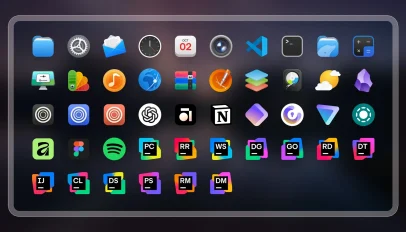 Conflux is a new Linux icon set that aims to be both beautiful but neutral – I think it succeeds at both. The author of Conflux said they struggled to find a “modern-looking” icon pack for their desktop, deigning many as overly stylistic, outdated or, in some cases, poorly designed. Another impetus to solve was the way un-themed icons look. “Conflux should blend seamlessly into your system”, reads the Github page, “so that you don’t even notice you’re using an icon theme.” It’s not flat, block colours and simplistic – which is refreshing. It won’t be for everyone, though. Few […]
 Shotwell 33 is out, the first stable version of the photo manager for GNOME desktops to use GTK4. A GTK4 port of Shotwell has been in the works since 2025. It’s the first big toolkit port the image tool has since since it migrated to GTK3 in 2012 (v0.12.0). Yet despite the leap, the user-facing result is just a plain port; it’s not as visually transformative as gThumb’s GTK4/libadwaita port (which looks like an entirely new app) A more substantive visual revamp using GTK4/libadwaita may follow. For now, Shotwell 33 looks like Shotwell v32 – the benefit is more in […]
 Ubuntu 26.10 completes the distro’s move to Rust-based core utilities, with the commands previously held back due to security issues now migrated to memory-safe versions. cp, mv and rm were held back on their GNU versions in Ubuntu 26.04 LTS due to a crop of TOCTOU (time-of-check to time-of-use) issues that needed to be fixed in the uutils versions. With those issues resolved upstream, Ubuntu 26.10 finishes the job. The ‘Stonking Stingray’ ships a full set of Rust core utilities, which encompasses common command-line tools like ls, cat, chmod and du. Canonical donates €40k a year to help fund work on Rust software Canonical’s engineers began ‘oxidising’ the distro – replacing foundational […]
 Canonical had to pull the Ubuntu 24.04.5 desktop ISO because of a bug that crashes the installer when users select the extended install option.
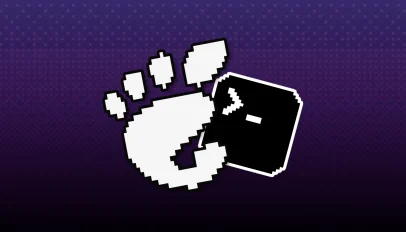 An option pick a default terminal is to GNOME Settings, as the image above, teased by developer Ignacy Kuchciński last week, shows. Those of you who don’t use the command line often enough to care about what terminal is set as your system default, may be surprised to hear you can’t currently change it via a GUI. If you go to Settings > Apps > Default Apps you can pick your preferred web browser, email client, imager viewer and others apps, but you can’t set a terminal emulator as your system default. For developers, the missing option can be annoying. […]
 Two new apps are coming to Linux Mint later this year: a new calendar and eBook reader. Plus, the Ubuntu-based Linux distribution has redesigned its (overlooked) document hub, Library, to make it easier to find and manage documents scattered across you device from one place. Both new apps join the XApp Project, Linux Mint’s collection of home-grown, cross-desktop GTK apps (which now has a new website wearing the popular Claude design aesthetic). Clockenstien is Mint’s new Calendar app Clockenstein is Linux Mint’s new calendar app but, lest anyone scream in horror at the terrible name, the user-facing label is just […]
 GIMP 3.2.6 has arrived, a new maintenance update in the 3.2.x series that made a splash earlier this year. You won’t find any major new features, but plenty of improvements – not least in font handling. GIMP say font loading is faster, with start-up times, Text tool typing and closing large font lists all nippier when lots of fonts are installed. The team note “some lag remains”, and solving that would require a GTK4 port – for which some initial prep has begun. On the editing side, Cut now works on layer groups; Color Picker can picks up filters applied […]
 Ubuntu 26.10 'Stonking Stingray' is getting a newer kernel than planned. Canonical has switched its target from Linux 7.2 to Linux 7.3.
 The fifth (and final) point release of Ubuntu 24.04 LTS is available to download. Ubuntu 24.04.5 LTS delivers refreshed installation media (ISOs) that includes the software updates, bug fixes and security patches released since the last ISO was produced. This cuts down on the number of updates that need to be downloaded post-install. More important than that, this release runs on a new hardware enablement (HWE) stack, back-ported from Ubuntu 26.04 LTS. The 24.04.5 LTS HWE stack brings the Linux 7.0 kernel and updated graphic drivers, plus a few other key hardware-related packages. Existing users already have it; the HWE […]
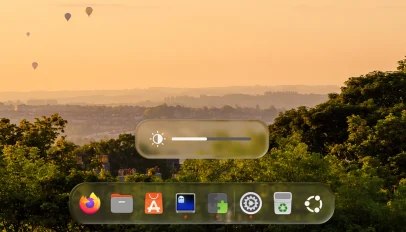 You can now give the Ubuntu desktop a ‘Liquid Glass’ makeover using a new GNOME Shell extension that was written with ‘significant’ help from AI. Its developer, Ryosuke Watanabe, said they loved the look of Liquid Glass – Apple’s new design material that gives UI elements light-bending surfaces with depth and motion – but, not owning an Apple device, wanted a way to enjoy it on their Linux desktop. So they created an extension to do it. “The design, the shader math, the architecture decisions, and all of the testing on real hardware are mine”, says Watanabe, but adds that […]
 A new version of BleachBit, an open-source system cleaning tool, is out. BleachBit 6.0.4 brings everything I mentioned in my spot on the BleachBit 6.0.4 beta release, including macOS support for the first time – albeit in an early state, and including a Cleaner for Safari and a choice of the (neat) BleachBit CLI or an early GUI. Windows and Linux users all benefit from faster startup times and scanning speeds, and gain new cleaners for Android Studio, Gradle’s cache, fish and Zsh shells and Python CLI. Top-level log files are cleared by the Claude cleaner, and browser “super cookies” […]