Reading view

There are new articles available, click to refresh the page.

Representing the University at UCISA Women in Tech 2026: My takeaways and reflections

I was pleased to have a talk accepted at the annual UCISA Women in Tech (WiT) conference. I went to Newcastle for a day of talks, workshops and networking. I left with a better understanding of the WiT community , and a reinforced appreciation of the need for inclusivity in Higher Education.    

UCISA is an industry body supporting digital professionals working in the education sector. I have been actively involved in UCISA since 2022 when I helped set up the UCISA UX Group and became co-chair of this UK-wide community of practice. I’ve organised many UCISA UX events but had not attended one of UCISA’s flagship annual conferences, the Women in Tech event, until this year. My presentation about our project on staff profiles resonated with attendees, I learned a lot about diversity and representation in the sector from attending the other talks and I enjoyed connecting with other Higher Education professionals over shared inclusivity challenges. Here, I reflect on my highlights from an interesting day.

Sharing our staff profiles work piqued interest from other universities

As well as the clear focus on inclusivity, one of the themes of this year’s WiT was real-world applications and problem-solving. I felt our staff profiles project spoke to this theme, so I submitted a talk to share what we learned from research and the steps we have taken towards finding a new profiles solution.

My session was well received – perhaps unsurprisingly, colleagues from other institutions shared the same concerns and challenges in designing a profile solution that showcases staff in the best light, keeps them findable in searches, and yet remains easy for staff to update. I valued the chance to make new contacts, exchange ideas, and learn about other institutions’ diverse approaches to the ‘profiles problem’. I resolved to stay in touch as we take steps towards implementing a profiles solution at the University, recognising just how universal this need is across the Higher Education sector, and seeing an opportunity for meaningful collaboration.

Read more about the staff profiles project in the blog post series:

Collected blog posts about staff profiles project

Results of a 2025 WiT survey revealed risks and opportunities

One of the core activities of the UCISA WiT committee is to regularly collect data to understand diversity within IT departments across the FE/HE sector. At the conference, WiT committee co-chairs Christi Hopkinson and Katie Wilde shared a preview of the results of the 2025 survey, completed by more than 200 respondents from 66 institutions, with 74.5% of the respondents identifying as female. Several findings stood out from the preliminary report in terms of risks and opportunities.

There’s a risk of retention due to barriers to progression

Responses to a question about progression routes revealed significant proportions of respondents had started in IT in the following areas:

  • First/Second Line Support
  • Application Support
  • Business Analysis
  • Project Management
  • Web Development

Responses to a follow-up question about the roles respondents were currently working in showed continued representation in these areas, which indicated a degree of stasis when it came to progression in the sector. Areas where women were underrepresented included:

  • Infrastructure
  • Security
  • Enterprise Architecture
  • Senior Management.

The survey results showed a third of respondents had considered leaving their institutions or the sector, citing pay, workload and progression as popular reasons motivating them to think about moving on. Common blockers to progression included:

  • Lack of available higher-grade roles
  • Promotion structures tied only to management, not technical excellence
  • Career pathways not transparent
  • Women having to ‘prove more’ to progress

There’s potential to be gained by investing in non-technical skills

Most respondents cited the following skills as important for the roles they were currently in as well as for progression:

  • Problem solving
  • Communication
  • Analytical skills
  • Customer service
  • Business analysis
  • Strategic thinking

This spread of skills reinforced the value of focusing training and development on non-technical abilities to complement technical skills, and to ensure expertise was appropriately directed to deliver on broader institutional goals.

There’s room to improve on diversity, inclusion and discrimination

Responses to questions about inclusion and belonging revealed positives and negatives about the workplace respondents were part of.

On the positive side:

  • 79% felt valued as part of a team
  • 67% felt they were treated fairly and equitably

On the less-positive side:

  • Only 34% felt the leadership reflected diversity in the workforce
  • 41% felt there were opportunities for careers advancement
  • 46% felt their organisation supported under-represented groups
  • 47% were satisfied with their organisation’s diversity initiatives

The spread of these numbers provided a clear steer of areas to focus on to achieve less exclusive, and better-balanced IT workplace.

Achieving inclusivity starts with individuals and requires thinking beyond statistics

The survey data gave a snapshot of the current state of inclusivity in the sector, however, anecdotes from individual presenters painted a more vivid picture of what inclusivity could look like. The WiT programme included several women sharing stories of their induction into tech and reflecting on their individual progression routes. It was refreshing to see the diversity of pathways they had taken and interesting to hear about what they had learned along the way, and their tips for success.

Monica Jones, Chief Data Officer at the University of Leeds acknowledged that career progression paths rarely run smoothly, and advised setting personal goals and milestones to work towards, to be best-prepared for promotion opportunities when these came up. Julia Lloyd, College Manager – Business and Law, at the University of the West of England, emphasised the benefits of ‘quiet leadership’ and shared tips to create space for different voices – such as thoughtful structuring of meetings, design of communication channels and rewarding contributions over confidence. A joint talk ‘The Not-So IT Crowd’ from Catriona Blair, Joanna Addison and Sasha Titus from the University of Kent, and a session by Amber Mothersille from the University of Northampton emphasised the value of non-technical skills in technical roles – recognising the need for empathy, trust-building and adaptability to strengthen teams and build excellent digital services.

Breaking barriers requires breaking old biases and habits

A final takeaway from attending the WiT event was a call-to-action to question the way we work – specifically to foster inclusivity by making room for new ways of thinking and for fresh perspectives.

In an interactive exercise led by Katie Wilde, we considered five roles necessary for the operation of successful teams (the Navigator, the Connector, the Builder, the Challenger). In a period of honest reflection, we shared the roles we naturally adopted in team settings, and the roles we tended to overlook or disregard. Going through this exercise was a good leveller as well as a reminder to make room for diversity in everyday team settings instead of relying on familiarity.

The day closed with a thought-provoking talk on male fragility, delivered by Jake Dovey, a UCISA mentor. Drawing on personal anecdotes experienced through his involvement with UCISA, Jake’s talk described instances where men had overreacted defensively to being challenged and where women had inadvertently softened situations to avoid potential conflict and ‘keep the peace’. Jake challenged the women in the room to recognise these instances going forward, and prompted a call-to-action for all to recognise these harmful patterns and call them out to collectively help break the disruptive cycle.

Final thoughts – WiT26 was less about women and more about inclusivity

WiT26 delivered a packed programme which encouraged me to think outside my work in UX and more broadly about the joint responsibilities we all have in creating and fostering an inclusive work environment. I came away with recommendations of books to read and concepts to learn more about, and a heightened awareness of embedding inclusive practices in my day-to-day work and activities. I am keen to see the full results of the WiT 2025 survey and to remain part of the WiT community going forward.

 

Studying ITIL Foundations: What I learned and what I questioned

Working in information technology, I have been aware of ITIL for a while but had never formally studied it. I attended a three-day training course and passed the ITIL Foundation exam. Here, I share my reflections and my review of ITIL.

ITIL (Information Technology Infrastructure Library) originated in the 1980s, developed by an agency of the UK government as a way to standardise IT service management practices. It’s now owned by AXELOS and used globally across a range of industries, including Higher Education. The University of Edinburgh uses ITIL to structure aspects of organisational governance as well as many of its processes. I was curious to learn about ITIL as I felt it would help me make sense of the way some things work within ISG.

Read more about ITIL:

ITIL website

I studied the ITIL 4 Foundation course, which covers concepts like the Service Value System, value co-creation between provider and consumer, the four dimensions of service management, guiding principles, and key ITIL practices like the service desk, service request management, incident management and change management. Going through the course and completing the exam, I came away with several reflections about ITIL and its application to modern digital services.

First rule of ITIL: It’s not supposed to just be about IT (but it mainly is)

For a discipline with IT in its title, it was surprising to learn that ITIL is actually intended as a more generic service management framework, supposed to be applicable to non-technical as well as technical services. ITIL’s IT roots were clear, however, as many of the examples intended to ground the abstract concepts related to management of very traditional technical services, and it was hard to visualise practices like deployment management applied to non-technical realms. Conversely, it was difficult to visualise ITIL flexing to be applicable to the management of emergent technical services, such as machine or AI-based services with rapidly evolving operating models.

Service dominant logic, continuous improvement and systems thinking were familiar

Many of the ITIL artefacts are expressions of service value, based on a fundamental concept that value from a service can only come if it is co-created. In other words, if a service is not used, it cannot create value (no matter how good it is). I’d previously learned about Service Dominant Logic, (described in 2004 as a marketing concept by Stephen Vargo and Robert Lusch), so it was interesting to make the connection between these two disciplines. Whereas Vargo, Lusch and others focus on value dimensions, and the interplay between operand and operant resources, however, ITIL delineated service value through models like the Service Value System and the Service Value Chain.

Continuous improvement was another key ITIL focus, but guided by artefacts like Service Level Agreements and practices like Service Request Management, and motivated by efficiency and compliance focused targets rather than user-focused improvement drivers like UX or CX.

Systems thinking was another thread running through ITIL, however, it seemed limited in its use to describe sequences of inputs and output from different activities in value streams – without inclusion of Soft Systems Methodology (described by Peter Checkland in 1989), universally useful as a way to diagnose problems.

ITIL’s terminology tended to overwhelm the logic and the purpose

Naming things is hard and changing the names of things can lead to even more confusion. When it came to the words used in ITIL, it seemed that those who developed ITIL had thought long and hard about what to call the models, processes, practices and so on. For the uninitiated coming to ITIL fresh, however, it was natural to question why things were named in certain ways and to forget and mix up the terms, as well as question the absence of certain concepts. There seemed little scope to mould the rigid ITIL glossary to real-life scenarios, instead it seemed at risk of institutions trying to fit ITIL rather than the other way around.

Considering this conundrum, I was reminded of work I began a while ago to reduce jargon in Drupal, and of my ongoing work to shape the Web Sustainability Guidelines to be universally applicable. In both instances I had learned of the difficulty in choosing the right words and phrases to meaningfully describe abstract concepts, and therefore could appreciate the length of time it could take small changes to take effect in such a well-established standardisation mechanism as ITIL.

Read about my work on Drupalisms in this blog post:

De-jargoning Drupal – working with the community to open up Drupal’s terminology

Read about my work on the W3C Web Sustainability Guidelines in this blog post:

Shaping the future of the sustainable web: The advent and development of the W3C Web Sustainability Guidelines


Drupal In A Day: What we learned (and what we still want to learn): reflections from the UX team

Drupal In A Day (DIAD) is an in-person training event, designed as a beginner-friendly hands-on introduction to Drupal, the open-source content management system. When the University hosted DIAD, several of the UX team took the chance to attend.

As content management systems go, Drupal is one of the mainstays. It’s been around for 25 years and is particularly famed for its robustness, reliability and flexibility – so much so it’s trusted to power websites of enterprises, governments and higher education institutions around the world. It’s open-source so there’s no proprietary lock-in – the functionality, features and innovation available in Drupal comes from a thriving worldwide community of contributors – as individuals, agencies and organisations.

One of the best places to learn about what Drupal is, what it stands for and what it aims to achieve is the blog site of its founder, Dries Buytaert.

Dries Buytaert blog

In 2025, Hilmar Kári Hallbjörnsson taught the first Drupal In A Day on the final day of DrupalCon Vienna.  Hilmar had been teaching Drupal to students at the universities of Reykavik and Iceland for many years and felt strongly that teaching Drupal to new generations, to inform them of its capabilities, and to inspire them of its potential was something the Drupal community needed, as a way to nurture the longevity and sustain the future of Drupal. Through a tremendous effort, he made the first Drupal In A Day happen in Vienna in October 2025. It was very well-received, successfully establishing the Drupal In A Day format going forward.
Read more about the first Drupal In A Day in Hilmar’s blog post from 2025

Drupal in a Day: Vienna 

Hilmar travelled to Edinburgh to deliver Drupal In A Day with our own Web Development Team Manager, Gareth Alexander at the start of June 2026.  Nick (Senior Content Designer), Shlok (AI and UX Innovation Intern) and Hannah (Digital Content Style Guide Intern) from the UX team signed up for the event along with other LTW interns and staff from the wider University with an interest in learning about Drupal. Here, they reflect on their experiences of the day.

Nick’s reflections 

I attended this training to bring my understanding of Drupal up to date. The last time I set up a Drupal site was in the early 2010s, and a lot has changed since then. With Drupal providing the backbone to EdWeb 2, I wanted to get to grips with some of the terminology and concepts that underpin conversations within our team about what our central CMS can do. 

I was particularly interested to learn more about Drupal CMS, a new service that helps you set up a Drupal site more quickly and with less need for technical understanding. 

After getting the required software set up on my laptop (thanks Kirsten), I clicked along with Hilmar and Gareth as they walked us through the various sections of Drupal CMS. We worked through steps to create a new content type and we created different Views to display the same content. We tweaked image formats. We also learned how to attach tags to a piece of content and how these tags can act as a filter for overview pages. 

By the end of the day, I hadn’t suddenly become a Drupal expert. But I did have a better understanding of how EdWeb 2 works behind the scenes. In particular, I felt like I knew more about how EdWeb 2 takes the content you enter when you create a page and presents this in different ways elsewhere on a site. 

Alongside that, I would now feel more confident in setting up a new Drupal CMS site, and I now have a better understanding of what this system offers in comparison to other ways of operating a website. 

Finally, the day gave me a better sense of how the community aspect of Drupal is central to how this project keeps going. Hilmar and Gareth emphasised that there are various events in the calendar where people working with Drupal can meet up and collaborate. That’s a powerful message: that anyone is invited to learn more, become part of the community and contribute to how this system works. 

Shlok’s reflections

Before starting my internship, Drupal was a completely new concept to me. I did not really know what a content management system was, how Drupal worked, or why it was used by universities and other large organisations. Because of that, Drupal In A Day was a really useful introduction for me. 

I thought the format worked well because going through everything in one day helped keep a flow of information. It was quite intense and sometimes fast-paced, but that also meant we were able to cover a lot of concepts in a short amount of time. I would say I was able to follow around 70% of the session, which felt like a good start considering Drupal was completely new to me. 

One of the parts I found most useful was the introduction to Drupal itself. It helped me understand what Drupal is, what a CMS is, and why the University uses it. I learnt that Drupal is valued because it is stable, secure, flexible and open source, which makes it suitable for large and complex websites like those used by universities. This helped me understand why Drupal is still used by many major institutions. 

I also found it interesting to learn about the Drupal community and the different ways people can work with Drupal. Before the session, I assumed Drupal was mainly for developers. However, I learnt that people can build careers around Drupal in different ways. Some roles involve coding and development, while others focus more on design, content, user experience, training or project work. That helped me see Drupal as more than just a technical platform. 

One point that really stood out to me was when we were told that Drupal has a steep learning curve at the start. This was useful to hear because it made the difficulties I was facing feel expected. Since many people find Drupal challenging in the beginning, it was reassuring to know that not understanding everything straight away was normal. It made me feel more comfortable continuing to learn. 

During the practical parts of the day, I learnt about some of the basic Drupal features, such as creating and managing content pages. At first, this was quite confusing because the concepts were new to me. However, as the day went on, I started to become more comfortable with the terminology and the way Drupal is structured. 

Another part that I found very helpful was the follow-up assignment where we had to build something from scratch. After learning so much in one day, I think it was important to have a task that allowed us to apply what we had learnt. It helped me consolidate my knowledge, see which parts I had not fully understood during the session, and become more comfortable with Drupal before starting work on my internship prototypes. 

One thing I would have liked to learn more about was the command line and the use of terminal commands. We touched on some setup and development processes, but I think spending more time on what the commands do and how they fit into the Drupal workflow would have helped me. I would also have liked to learn more about the coding side of Drupal, especially how to build custom Drupal modules. This is particularly relevant to my internship because my work is focused on AI and innovation within Drupal. 

If I could suggest one change, it would be to make Drupal In A Day into a two-day or three-day format. The first day could stay mostly the same, giving everyone a broad introduction to Drupal. The second day could be a slower guided session where participants build something with support from the instructors, similar to the assignment we were given afterwards. A third optional day could focus more on coding and custom module development for those who want to explore the technical side further. 

Hannah’s reflections 

I signed up for the Drupal in a Day training with very little knowledge of the CMS beyond working with existing EdWeb 2 sites, such as when creating prototypes of Style Guide pages or writing blog posts. So, I was interested in increasing my knowledge of Drupal as well as gaining the ability to build a site. Before the training began, I was unsure how well I would follow the instructions as a beginner, but Hilmar, Gareth, and all of the members of the Drupal community who were present at the training were extremely helpful, informative, and patient when it came to giving assistance at points where I was confused or behind. 

Once I had overcome a technical error with my laptop and decided to use Drupal Forge, I was able to follow along with the instructions being provided and replicate the Artist biography pages that Hilmar and Gareth were demonstrating. The course was fast-paced and detailed, and while maintaining this pace was a challenge, it made the course engaging and the product of the day felt like a genuine accomplishment. 

With the knowledge that I gained throughout the training, I feel that I have a strong foundation that will allow me to continue to develop my skills in building a Drupal site further in the future. In particular, I think the example site that we were creating during the training was incredibly useful in that it allowed us to try out several different aspects of building a site with Drupal, such as different content types, tags, and images, as well as exploring some different design options as well. 

I was impressed to learn about how community centred Drupal is, and that contributions and developments to Drupal are made by users and members of the community. Gareth and Hilmar’s explanations of how this works really helped me to understand why Drupal is as adaptive and intuitive as it is (such as in its security and bug fixes), which is that these developments are a direct result of user experience. Furthermore, Gareth and Hilmar also emphasised the flexibility of Drupal, due to the ability to install ‘recipes’ that customise the functionality of sites that you are building. 

Overall, I think Drupal in a Day was an extremely useful and practical training session that has equipped me with the skills to build a basic site and further develop these skills whenever I have the chance.  

Emma’s reflections

When it comes to Drupal, I am largely self-taught – pretty much everything I know has been gleaned from reading, attending/watching sessions from Drupal events, and (predominately) pestering people in-the-know with my questions. When Drupal In A Day came to the University, I pondered whether I should attend. I’ve contributed to the community since 2022. I’m on the Drupal leadership team. Surely I should know Drupal by now? I took a split second to reflect and realise that you never fully know Drupal. There’s always something new to learn, something to challenge what you thought you understood, or something to clarify an area you weren’t quite sure about. Conscious of not taking a space away from a complete Drupal beginner, I opted to sit in on the event, to follow along, while working on other things.

The day combined practical exercises with general Drupal knowledge. Hilmar and Gareth began with the basics, covering key parts of the process to get started and familiarise with Drupal – like setting up DDEV, using Drupalforge and creating a Drupal.org profile. As the day went on, it was great to see quick progression to experiment with some of Drupal’s flagship modules, especially Drupal Views which holds huge power for presenting and displaying structured content in a range of adaptive ways.

Drupal CMS, Drupal’s low-code product provided the playground for learners. Having worked on Drupal CMS since it began, I found it heartening to see it being used to introduce Drupal to new audiences, to help them learn what Drupal has to offer and to help them start ideating on how they might use it. Adopting a UX perspective, I tuned into comments from fellow attendees about Drupal CMS, noting observations to follow up and logging areas for UX improvement to carry forward in my ongoing Drupal UX contributions.

Reflecting on the day as a whole, it helped attendees achieve what is often the hardest thing about Drupal: Getting started. All too often people new to Drupal can find it overwhelming, and they find when everything is possible it’s hard to choose a direction. Drupal In A Day sets learners on a path to start discovering Drupal and making it their own, in other words, planting a seed from which the community can continue to grow.

Embedding the rules: What we learned UX testing a style guide helper tool built with Drupal Editoria11y

Our Editorial Style Guide contains many conventions and we know from research that publishers struggle to remember to apply them. Could automation help? We experimented embedding style guide rules into a Drupal module that checked content against the rules in the editorial interface and suggested corrections when the rules weren’t followed.

As part of a concentrated effort to make it easier for publishers to apply our style guide rules, Mostafa Ebid, a student who came to work with us in summer 2025, installed Editoria11y, an open-source Drupal feature and configured it with selected rules from our University style guide. Applying this feature to a site with demo content, he tested it with University staff to see how well it worked, and how useful and usable they found it.

Read more about our ongoing style guide work:

Collection of blog posts about the Editorial Style Guide

Drupal Editoria11y is an open-source accessibility checker

Editorial accessibility ally (shortened to Editoria11y) is a module developed by John Jameson from Princeton University that enables automated content checking directly in the editorial interface. Originally created to help content editors catch accessibility issues, its configurable architecture makes it well suited to embedding other kinds of rules, such as institutional style guide conventions. The checks can run in real time as content authors type, and can also be applied to content in published pages and previews, to flag issues to be corrected.

Editoria11y can include more than 50 built-in content tests covering image alt text, link quality, heading structure, and general content issues. Flagged issues are noted at the page level by an indicator bar, which includes a count and a categorisation of the type of issues (default categories are headings and alt text). Through this bar it is possible to identify the precise inline location of the problematic content with visualisers. Each visualiser is associated with a modal that contains detail about the problem element and plain language tips explaining how to fix it.

In addition to the on-page alerts, it is possible to review issues across a site via a reporting dashboard which can be configured to log recurring issues or most problematic pages, as required.

Read more about Editoria11y on Drupal.org:

Editoria11y Accessibility Checker project page

We designed tests to learn if Editoria11y would be useful and usable to embed style guide rules

Editoria11y presented itself as a mechanism to enable web publishers to check their content against style guide rules, and we wanted to understand the kind of experience this provided in EdWeb2. In particular, we wanted to understand:

  • If Editoria11y could effectively check content against our style guide rules
  • How Editoria11y presented results of the checks in the editorial interface
  • If publishers could use Editoria11y to correct content that misaligned with the style guide

Moreover, we wanted to learn if the addition of Editoria11y to the EdWeb2 editorial interface improved the publisher experience or not.

We picked deterministic rules about dates and numbers for the tests

Like many Drupal features, Editoria11y is very flexible and customisable to fit a range of different use cases. Since it was new to our publishers, we were keen to avoid overengineering it, taking care to configure it to present the minimal information necessary to achieve our testing goals.

The University’s Editorial Style Guide contains between 60 and 70 separate rules, of which fewer than half are deterministic (in other words, can be applied directly without editorial judgement). It made sense to include deterministic rules in the tests, to enable us to accurately assess how effective Editoria11y was at checking them.

Rules in the dates and numbers section of the style guide seemed a good fit for the tests, so these were configured into Editoria11y.

We set up Editoria11y to display an indicator bar, visualisers, modals and a dashboard

The module was set up to display the indicator bar, the inline visualisers and the reporting dashboard. Content that contained sentences with dates and numbers was saved in draft in a demo interface which had Editoria11y applied. In the test scenario, participants were asked to assume they had been asked to review this draft content before it went live and to use a checker tool to help them with this.

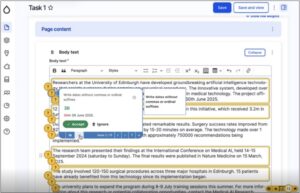
Screenshot of the Drupal Editori11y tool in action, showing the yellow indicator bar at the bottom right of the interface, tallying the total number of style guide errors on the draft page

Screenshot of the Drupal Editori11y tool in action, showing the yellow indicator bar at the bottom right of the interface, tallying the total number of style guide errors on the draft page


Screenshot of Editoria11y showing on the left, the indicator bar at the bottom right of the page, and on the right, the editorial interface revealing the locations of the style guide errors (activated when the indicator bar is pressed)

Screenshot of Editoria11y showing on the left, the indicator bar at the bottom right of the draft page, and on the right, the same draft page, but revealing the locations of the style guide errors (activated when the indicator bar is pressed) and an example of the modal giving detail of the error and the suggested fix


Screenshot of Editoria11y showing on the left, the display with the indicator, and on the right, the reporting dashboard summarising all the errors

Screenshot of Editoria11y showing on the left, the display with the indicator, and on the right, the reporting dashboard summarising all the errors (which opened in another window in the interface)

Watching participants use Editoria11y, we learned what worked and what didn’t

Tests were carried out with seven participants. Observing how they made sense of the different parts of Editoria11y and interacted with it, we were able to draw conclusions about how useful and usable it was to support the context of web publishing in EdWeb2.

Participants understood the relationship between the indicator and the visualisers

The first part of the tests involved showing participants the draft content in the editorial interface with Editoria11y applied. All of them were able to understand that the number of style guide errors on the page were tallied in the indicator bar at the bottom right of the page, and that they could use the indicator bar to reveal precise locations of the errors on the page, together with a modal for each error, explaining the error and the suggested fix.

Placement of the visualisers and modals often made it hard to read the draft content

Taking an overview of the visualisers in the draft content, participants commented that they felt a bit overwhelmed to see so many. Some felt the placement of the question mark visualisers made it difficult to ascertain which parts of the content needed to be corrected, which was slightly helped by yellow outlines around the text. Placement of the modals masked the text beneath, however, meaning participants found it difficult to engage with the original context of the errors to be corrected to assess whether to accept the suggestion or not

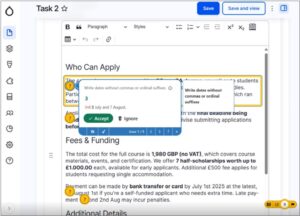
Screenshot of Editoria11y showing a modal detailing the error about writing dates with ordinal suffixes

Screenshot of Editoria11y showing a view that some participants found overwhelming: indicator bar, question-mark indicators, yellow outlines and an open modal

Descriptions of the errors in the modals were not clear to some participants

Reading the information in the modals, some participants were unclear of the error it was pointing out. Specifically, in a modal describing the rule to write dates without including ‘th’ or ‘rd’ after numbers was written as ‘Write dates without commas or ordinal suffixes’. Some participants were unfamiliar with what ‘ordinal suffixes’ were, but seeing the suggested change presented as a ‘before and after’ tracked change with the error crossed out (in red) and the suggested change presented in green helped participants understand the proposed correction.

Screenshot of Editoria11y showing a modal explaining the rule to not include ordinal suffixes when writing dates

Screenshot of Editoria11y showing a modal explaining the rule to not include ordinal suffixes when writing dates

Participants were able to use the modals to correct some style guide errors

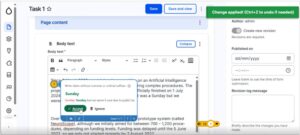
When they had read and understood the errors being highlighted, most participants were able to assess whether to accept the suggested fixes and apply them based on the information contained in the modal. Several participants entered into a flow of using the arrow keys in the modals to clicking through the different errors and accepting the fixes, especially when the fixes related to a recurrent error – for example, capitalising the first letter when writing days of the week. They appreciated a notification alerting them that the fix had been applied, which temporarily appeared at the top right of the screen, although some said they would have appreciated this notification to remain for longer as it was easy to miss. They were also unclear whether they needed to save after applying each fix, or if this could be done when they had worked through all of the fixes on the page.

Screenshot of Editoria11y showing a notification in the top right of the interface to confirm the fix had been applied

Screenshot of Editoria11y showing a notification in the top right of the interface to confirm the fix had been applied

Not all errors were fixable with automatic rule application – some required interpretation and judgement

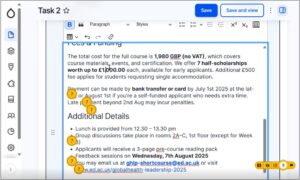
Viewing the suggestions in the modals, several participants noted a problem with the fixes being based on automatic application of the style guide rules. Specifically, relating to the rule about omitting ordinal suffixes for numbers, there were several instances where it didn’t make sense to apply this rule directly. For example, a date written as ‘5th of December’ contained a suggested fix to remove ‘th’ but not to remove ‘of’. Another relating to ‘4th year’ of studies suggested removing the ‘th’ but not writing ‘fourth’ as a way to make the sentence readable, and similarly, another advised removing ‘st’ from ‘1st floor’ which was an incomplete fix.

Screenshots of Editoria11y showing instances where the ordinal suffix corrections couldn't be directly applied

Screenshots of Editoria11y showing instances where the ordinal suffix corrections couldn’t be directly applied

Some participants’ trust in the checker waned when they realised it didn’t catch all the errors

Of those who took part in the tests – some were more familiar with the rules of the style guide than others, and this impacted the trust they placed in Editoria11y. When they reviewed the Editoria11y outputs against the draft content and spotted corrections that hadn’t been picked up or flagged by Editoria11y, they were inclined to disregard the tool and check the content for themselves to ensure the text was completely compliant.

Screenshot of Editoria11y showing a style guide error where the pound sign is missing from an amount that the tool has not picked up

Screenshot of Editoria11y showing a style guide error where the pound sign is missing from an amount that the tool has not picked up

Few participants said they would use the dashboard as they felt that was for a site administrator

Navigating through the different options on the indicator, participants were able to access the dashboard interface, which was titled ‘Content Accessibility Issues’. Reviewing what was there, in sections called ‘Top issues’, ‘Pages with the most issues’ and ‘Recent issues’ most participants said they didn’t feel they would use this feature, and presumed it would be for someone with full responsibility for the whole site.

Editoria11y has potential as a style guide helper tool, but would need contextual refinement

Taking the findings together, Editoria11y showed promise as a way to embed the style guide rules into draft content, to avoid web publishers needing to navigate away from the editorial interface to check the rules in the guide itself to then apply them. Participants understood what the indicator bar was there to achieve, and liked the idea of being able to check off corrections to their content through the modals. Some identified areas for improvement included:

  • Refinement of the style guide rules embedded in Editoria11y, to include examples, exceptions and applications based on scope and context
  • Embedding a more complete set of style guide rules into Editoria11y to help build trust in the tool
  • Adaptation of the modal options to include ‘Accept with edits’ as well as ‘Accept’ and ‘Ignore’ to account for instances where editorial judgement needed to be applied to the suggested correction
  • A way to show corrections in categories (for example, all those relating to numbers together, all those relating to punctuation together and son on) which could be addressed by the editor in sequence, to avoid overwhelm in the interface
  • Suggestions for correcting content when reworked sentences were required – powered by an LLM such as ELM

As well as Editoria11y surfacing style guide rules, there is potential to use it for its intended purpose, as an accessibility checker, containing checks about the heading hierarchy and alt text on images. If this was to be included as well as style guide rules, however, progressive disclosure of the information should be used to avoid the interface becoming too cluttered.

Many of these areas overlap with work currently progressing in open-source Drupal, firstly develop a Context Control Center – as a way of handling rules to enable AI-assisted content production, and secondly to develop an AI Content Review feature, capable of reviewing content against defined rules and conventions.

Read more about these Drupal developments in my related blog post:

Think like a machine: How building a Drupal context-handling feature is providing a new lens on content design and style rules 


Stop chasing, keep researching: Why continuous contextual learning is the only way to build useful AI features

AI development keeps evolving as do the ways people seek to use AI. Traditional software development runs the risk of trying to perfect AI features people won’t use. Revisiting our previous AI research helped me tease out new opportunity spaces for AI features to help with content design tasks.

Last summer, Mostafa Ebid joined the UX team for a summer internship and built an AI assistant tool which integrated the University’s main AI provider ELM into EdWeb2, our Drupal content management system. The idea for the tool came from hearing University describe the difficulties they experienced when publishing web content. The tool included the capability to write content, design content and proofread, and was designed to work by typing prompts in a chatbot interface, right-aligned to the main part of the editorial interface. When prompted, an orchestration of AI agents were triggered to read textual content and use ELM to make suggestions for improvement based on what the publisher had asked for. Improved text was displayed in the sidebar chatbot interface for the publisher to review and consider using.

Read Mostafa’s blog post about how he developed the tool:

Integrating ELM with EdWeb – Building an AI tool for publishers

Initial tests of the tool with publishers revealed some potential, but identified the need to do further tests, specifically to understand limitations around the user interface display and to learn if the tool was useful to publishers in the context of content they were familiar with (as opposed to generic stock content that was used in the first round of tests).

Read my blog post about the initial tests of the tool:

Initial insights from UX testing our Drupal AI content assistant tool 

Mel Batcharj accessibility tested the tool, focusing on keyboard navigability, and Nick Daniels ran tests with two publishers in October last year. I recently reviewed the findings of this research to consider advancements in Drupal AI in the past 12 months, to assess whether the original premise for the tool was still valid, and to think about residual content design challenges AI could potentially help with.

Advancements in Drupal AI have resulted in improved AI features

The Drupal AI Initiative began in April 2025 with a group of participating organisations making a commitment to collaborate to build the future of AI in Drupal. As a result of the initiative, various workstreams began to shape Drupal’s infrastructure to support AI, to experiment with new innovations and to improve the UX.

Read more about this workstream:

Drupal AI Initiative project page on Drupal.org

A more accessible AI chatbot is now available as a Drupal recipe

Our original AI content assistant tool was built into a panel of the editorial interface as a custom build, which worked well when using a mouse, but which accessibility testing showed was restrictive when navigating using a keyboard. Since the tool was built, however, accelerated development in the wider Drupal AI community prompted the creation of an open-source AI chatbot freely available to apply. Adopting this chatbot was preferable as it avoided the need to maintain custom code and it was possible to use it with a keyboard only.

There’s an active Drupal issue to address the need for the AI chatbot interface to be expandable

Several of the participants who took part in Mostafa’s tests of the tool last year found it awkward to scroll through the AI chatbot output as it was presented in the narrow left-aligned interface. The same problem had been noted in the wider Drupal community, and therefore I raised an issue to have this rectified, which is being worked on as part of the AI Initiative task backlog.

We did more tests on our AI tool – this time using participants’ own content

In the first round of tests, four participants were all presented with the same piece of content (on the topic of safety procedures) and asked to use the AI tool to improve it in specific ways (such as writing it for user needs, making link text better, and so on). This approach turned out to be limited, as since participants were unfamiliar with the content, they were unable to assess whether the outputs of the AI tool were an improvement on the original content or not.

In a subsequent round of tests we therefore adopted a looser approach – asking participants to supply a piece of content they were already working on, and then asking them to use the AI tool to improve it to suit their needs. The results from these tests were more indicative of how useful publishers found the tool to make content improvements.

Results of these tests highlighted how the AI tool needed to change

Since we placed participants in a situation where they were using AI on content they knew well and could critique and appraise authentically, the results of these second-round tests gave clearer indications of what worked with the existing tool, what didn’t and where AI could be best applied to help with content design tasks.

Participants didn’t notice the content options in the AI tool, or the help text

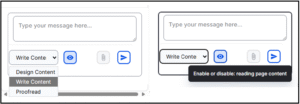
The tool contained three different content options: Design Content, Write Content and Proofread, presented in a dropdown menu in its interface.

Initially, participants didn’t notice these options and used the default Write Content option.  When they later experimented with the Proofread option they found no discernible difference between these options in terms of outputs, which led them to believe that a simpler version with a single conversational interaction option would be preferable.

The tool defaulted to reading the content on the page, and working on this when prompted. Participants were initially unclear that this is how it worked, and they didn’t notice the help text to enable or disable this mechanism presented in the tool interface. Taken together, this feedback suggested that a simpler version of the AI chatbot, such as the one from the Drupal recipe, would be easier for publishers to use.

Close-up screenshot showing detail on the AI assistant tool chatbox

Close-up screenshot showing the content options and the help text on the AI tool

The AI tool had some value as a writing partner to suggest restructures to textual content

Responding to the task to experiment with the AI tool to improve their content, the participants quickly got used to how the tool worked, and recognised its use as a writing partner to prompt about their content and receive suggestions for improvement in a conversational way.

Prompts they used to improve a page of content in the body text field included:

  • ‘Rephrase copy to condense, highlight key messages and make it accessible to pet owners looking to join practice’
  • ‘Proofread copy so that it appeals to pet owners non clinicians’
  • ‘Turn this page into web ready content. It needs to be concise, easy to scan, readable to a wide range of audiences’

These prompts resulted in edited versions of the page content, typically including structural elements like headings, bullet points and calls to action, delivered in the chatbot interface.

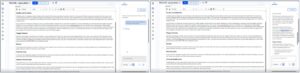
Screenshot showing the output from the AI tool before and after a prompt to rephrase the content for a specific audience (before on the left, after on the right)

Side-by-side screenshots showing the prompt entered in AI tool to improve content for an audience (on the left) and after (on the right), with the output response to the prompt.

The tool lacked capacity to tweak or iterate on previous versions of content – which participants wanted

Once they had reviewed the tool’s initial outputs, both participants entered conversational turns with the tool, asking it to perform successive tasks on the content it had previously produced, to edit it further, in line with their specific requirements and rules.

Prompts they used to tweak initial AI outputs included:

  • ‘Remove adjectives and exclamation marks’
  • ‘Remove brackets’
  • ‘Remove any unnecessary words, fix typing errors, suggest improvements for SEO’

With every new prompt in the conversation, the tool produced a fresh output, meaning the publisher was left to review a succession of different versions of the edited content, presented in the chatbot interface, without any indication of what had been changed. Participants found it difficult to review edits, as they would usually do when working on a piece of content, in order to compare the ‘before’ with the ‘after’ – ultimately to assess whether the AI tool outputs were to their satisfaction.

They said they would have liked the tool to have presented the edits in a ‘tracked changes’ format that they were familiar with from word processing programmes.

Screenshots showing outputs of the tool before and after a prompt to iterate on improved content

Side-by-side screenshots showing a prompt entered to improve existing content (on the left) and (on the right) the output from this prompt – showing a new version of the content

Participants didn’t really need the tool in the interface as they tended to edit text content elsewhere

When describing their usual content process, participants said they would usually prepare their content in a word processing programme like Microsoft Word rather than edit directly in the Drupal editorial interface. There were several reasons they chose this method – a key ­­reason being the need to involve others to check (and in some cases, sign off) their content in preparation for the website. They were more familiar with referring others to check their content or proofread it when it was in the Microsoft suite, than when it was in the Drupal editorial interface.

Furthermore, Microsoft Word accommodated the addition of comments and tracked iterative changes to pieces of content which was not possible within the Drupal editorial interface. This content preparation habit suggested that while the AI tool was useful to suggest content edits, this would have been more useful before the content was in the interface, and therefore could be achieved by pasting content to be edited into a browser-based AI tool or app (such as ELM).

Within the interface, the tool only had use as a ‘final check’ mechanism, to catch any typos, errors or style misalignments before the content was ultimately published.

The tool needed to be able handle more than text as pages were typically made of multiple elements

Reviewing the test set-up and comparing it to their usual ways of working with EdWeb2, the participants said the pages they worked on would usually be made up of more than just textual content in the body text field. They would typically work on pages with multi-column layouts, making more extensive use of Drupal paragraphs or including structural elements like accordions, feature boxes and cards. They were interested to know how the tool may make appraisals or suggest improvements for those sorts of pages to help them arrange their content in appropriate ways.

We identified new opportunities for AI content publishing features

Extrapolating on the feedback from the tests, several use cases and scenarios for applying AI to content design tasks emerged, which will help inform our ongoing work to apply AI to make content design tasks easier for publishers.

AI-assisted content structuring

Describing their typical content writing workflow, participants said they found it difficult to move from a text-based editor like Microsoft Word into the Drupal editorial interface where they needed to make use of Drupal Paragraphs as well as page elements like accordions to structure the content. Potential areas for AI development could therefore include:

  • A mechanism to convert textual content into appropriate structural elements
  • A way to make suggestions for accordion labels or structure
  • A feature to ensure uniform creation of cards or feature boxes
  • A means of cross-checking style consistency of pages made of multiple elements or with a specific layout

AI- assisted content design for SEO/GEO/AEO

Having their content picked up by search engines or being machine read was something participants wanted, but they were unsure how to write, tag and structure their content to make this happen effectively. Potential areas for AI development could therefore include:

  • A way to have their content analysed for SEO effectiveness, based on signals like content quality, scannability and key word alignment
  • A mechanism to suggest content changes aligned to specifically defined SEO goals and target user engagement measures

AI assisted content reviews – against specific style conventions and contexts

As well as ensuring their content followed the rules of the University’s Editorial Style Guide, both participants mentioned other conventions that they needed to apply to their content, that existed at a more local website level. For example, one participant’s site had a rule not to use brackets or exclamation marks, or to overuse adjectives, so they would have found it helpful to have a way to cross check content against these rules before publishing.

The Drupal Context Control Center is an emerging feature designed to handle the application of context rules within a site across various scopes and use cases, and Drupal AI Content Review is a related feature, designed to appraise content against given context rules and conventions. Together, these Drupal features may be a good fit to help University web publishers make use of AI to shape their content with the uniformity they require.

Read more about the Drupal Context Control Center and its development in my recent blog post:

Think like a machine: How building a Drupal context-handling feature is providing a new lens of content design and style rules

Read about AI Content Review on Drupal.org

We’re changing the direction of the AI tool based on what we’ve learned

Last summer it seemed certain that an in-interface AI chatbot content assistant helper was what we needed to build. A few improvements to the UI to make it expandable and navigable with a keyboard and it would be ready to go. As it turned out, things had moved on, and these problems were addressed by the wider Drupal community. This meant we could go back to our research findings to re-examine how AI could be best applied to aid content design tasks, and to consider how it could best fit into existing workflows of our publishers to assist them with difficulties they faced. As we continue with internships this summer, we’re excited to re-focus and plan more research to explore some of these emergent opportunity areas. Aligning with in-progress Drupal AI developments, we’re open to learning how we can apply and adopt the work of the Drupal community to our University digital publishing context.

When good product practice tells you to stop: What we learned trying to externalise our Effective Digital Content course

Riding on the success of our internal Effective Digital Content course, we set out to expand by building an external version for the short courses platform, taking a product thinking approach. Three months on, experimenting with a proof-of-concept course has convinced to pause this work – to avoid falling into a build trap.

The success of our relaunched Effective Digital Content (EDC) course, to date completed by more than 400 University staff, prompted ambitions to reposition the course for external audiences by including it in the University’s Short Online Courses platform. With the help of colleagues from the Short Online Courses team and the Learning Technology team, we did some market research, identified target audiences, defined a product vision and goals and began using the Canvas platform to develop a proof-of-concept.

Read more about our plans to reposition EDC as an external course in my blog post from March 2026:

Repositioning Effective Digital Content as a short online course: A product approach

At the end of sprint three (of a total of seven planned sprints) we faced unknowns and unanswered questions preventing us from achieving some of the fundamentals we’d defined in the product vision and goals. Resisting a sunk-cost fallacy-motivated urge to continue building, we made a sensible decision to stop and to pause until we’re in a better-informed place to have the confidence to continue.

In this post, I reflect on the benefits of adopting product thinking, the discomfort with facing difficult questions upfront and the practicalities of learning about audiences for expansion opportunities.

Revisiting the Product Kata helped clarify feelings of uncertainty

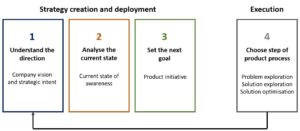
Melissa Perri’s book ‘The Build Trap’ contains a helpful framework to guide product development which I have become familiar with through my involvement with Drupal product teams. On the strategic level, this framework helped me set out a vision for an external version of the Effective Digital Content course, establish the problem the course was aiming to solve and its audiences, and work out the learning outcomes associated with each course module.

Entering the execution phase, however, taking each course module at a time and building each one out to meet the needs of the established audiences, things took longer than planned, and felt more difficult than we’d anticipated.

Pausing for reflection, we unpicked where things were going wrong. Going back to our vision, we had wanted to repeat the success of the internal EDC course, giving learners practical experience of writing digital content for their audiences. We had been able to instill this experience in the internal course because we had been able to regularly engage with University web publishers, to fully understand their content design challenges and design practical experiences for them that specifically addressed their friction points. Without such detailed insight into external audiences, we were effectively basing our course design decisions on guesswork and assumptions, which explained why our initial efforts seemed to be missing the mark. The strategic vision was sound, but our capacity to fully explore the problems and optimise associated solutions was limited, therefore execution was flawed.

Adaptation of the Product Kata diagram from Melissa Perri's book 'The Build Trap' showing the stages: Understand the direction, (Company vision and strategic intent), Analyse the current state, (Current state of awareness), Set the next goal, (Product initiative), Choose step of product process (Problem exploration, Solution exploration and Solution optimisation)

Adaptation of the Product Kata from Melissa Perri’s book ‘The Build Trap’ showing the split between strategy creation and deployment and execution

The practical workbook is EDC’s best asset – but is hard to replicate for broader audiences

A lightbulb moment in our reflections came when considering what worked well about our internal EDC course. When staff complete this course, they are required to complete exercises in a workbook which they submit to the UX team for feedback. This tests learners’ ability to do fundamental content design tasks like structure headings, write hyperlinks and turn lengthy text into chunks to be scan-read. Reviewing more than 400 submitted workbooks, we affirmed the importance of this element of the course both for learners and for our team as owners of the course as a product. Through these workbooks,  learners are able to practice content design in the specific context of the University sites they are responsible for, and as the product team, we are able to see impact the course has had in improving content design knowledge.

Replicating the workbook concept for external audiences would require knowing about the contexts and content they were working with, in order to design exercises that required them to test those skills. Without knowledge of our audiences’ circumstances, the best we could do would be to design a generic set of exercises, devoid of the nuances needed to really engage learners in practising content design techniques.

Testing what we had built so far taught us what we didn’t know

In UX and product design there’s a saying: the best time to test is yesterday, failing that, test now. Resisting the urge to keep building EDC modules, we made the decision to take the three modules that had been built and to test them with University publishers. Feedback from the tests was positive, which was nice to hear, but didn’t really help us assess if the modules we had made were a good fit for external audiences. University staff wouldn’t take an external Effective Digital Content course as they had already taken the internal version. To assess if we’d made a good product we needed to know answers to questions such as:

  • What needs should we prioritise for our target audiences?
  • How do our audiences currently meet these needs?
  • Would univerisities with a distributed content model find an external course useful?
  • What would motivate our target audiences to take this type of course?
  • How well do existing courses meet user needs and expectations?
  • Will our proposed course be valuable to target audiences?

In another of Melissa Perri’s books ‘Product Operations: How successful companies build better products at scale’ by Melissa Perri and Denise Tilles, the authors use a case study at a financial services organisation, Fidelity, to show the relationship between user research and the product design lifecycle. Applying this relationship by positioning EDC external as the product, it was clear that our outstanding questions fell into the ‘Core UXR question’ category at the ‘Discover’ ‘Define’ and ‘Design’ stages and therefore needed to be addressed before proceeding to the ‘Develop’ and ‘Deploy’ stages.

Having worked with other teams both within and outside the University, we knew all too well the potential risks and consequences of building without adequate research – and resolved that it was better to stop building to avoid wasting effort.

Successful expansion will rely on targeting audiences and researching their needs more fully

Taking a pause in the build will allow us to take time to assess the gaps in our knowledge of our target audiences, and work out ways of learning what we don’t know. Understanding the nuanced needs of our target audiences will help us familiarise with the market for content design training in the public sector to assess the value of the expansion opportunity. Referring again to ‘Product Operations’, learning the differences between the markets associated with our expansion opportunity (the total addressable market, the serviceable addressable market and the serviceable obtainable market) will help us decide whether the proposition is viable, deliverable and desirable or not.

In the meantime, we’re using what we’ve learned to improve internal EDC and training

As a team, we really value what we learn from time spent in research, and we always endeavour to act on what we have learned and make sure research does not go to waste. In this case, going through the process of reworking three course modules to aim them at external audiences has pinpointed ways to improve the internal version of our course – in particular to make the introductory module clearer and more impactful and to be clearer on some accessibility concepts. Submitted workbooks and feedback from our regular Content Improvement Clubs also provide a constant source of learning, to identify areas publishers still struggle with that we can continue to address with subsequent tweaked versions of EDC and topics for additional publisher training sessions.

Finding efficiencies through process diagnosis: Refining the Effective Digital Content coursework marking and feedback protocol

As we approach the first anniversary of the launch of the new Effective Digital Content course it was timely to review our approach to marking the content design exercises completed by learners to look for ways to simplify and potentially automate aspects of the process.

In May 2025 the UX Service launched a new version of the Effective Digital Content (EDC) course. The course covers content design fundamentals relevant to digital publishing at the University. To ensure we continue to improve the quality content across our digital estate, all those who publish content for our institution are required to complete the course.

Read more about the Effective Digital Content course, its contents and its development in the blog post from the UX team:

The new Effective Digital Content course is now live

Completing exercises within a workbook is a key part of the EDC learning experience

Content design is a practical discipline that is best learned by doing, therefore, when we redesigned the EDC course, it was important to include an interactive element that ensured learners gained practice trying out key techniques as part of the learning experience.

This practical element manifests as a workbook – as learners work though the different modules of the EDC course, they complete related exercises in a workbook. When they have finished all six EDC modules, they submit their workbook with their completed exercises to the UX team. We mark their exercises, return feedback on their work in the form of comments within the submitted workbook and then issue them with accreditation in the form of a digital badge.

The UX team devised a workflow to manage marking workbooks and providing feedback

The workbook submission, assessment and feedback process represented a new way of training publishers in content design, and back in May 2025, Nick Daniels, Katie Spearman and Mel Batcharj from the UX team came up with a series of steps to ensure they could access the submitted workbooks and mark them, to provider the learners with feedback on their work:

  • Receive the submitted workbooks from the EDC course to a Microsoft OneDrive via a Microsoft Form
  • Allocate them to be marked by members of the UX team using a Microsoft Excel spreadsheet
  • Once marking is complete, the marker returns the workbook with feedback to the learner via email

A year after launch, we observed some kinks in the process

With a steady influx of workbooks from learners, the process worked well, with Nick, Katie and Mel splitting the marking and feedback provision between them. That said, when there were spikes of increased numbers of learners completing the course, prompted for example by reminders to complete it to gain web editing access, the process revealed itself to have some areas of inefficiency. Working as a team, we took some time to map out the existing process in granular detail to pinpoint some areas for improvement, detailed below.

Keeping track of submissions involved manual additions to a spreadsheet

An Excel spreadsheet was set up to keep a record of all the workbook submissions along with their marking history. This spreadsheet was in a different location to the OneDrive where the workbooks were received, however, therefore it was necessary to copy and paste the names and details of learners into the spreadsheet each time a submission was received, to keep it up-to-date. On occasion, this had meant that the Excel spreadsheet and the OneDrive were out of synch – with workbooks to be marked in the OneDrive that hadn’t yet been logged on the spreadsheet.

Notification of submissions came via individual emails and were easy to miss

When a learner submitted a workbook having completed the EDC course, a notification was sent to Nick, Katie and Mel’s email accounts from a Microsoft Forms account email address. These emails could sometimes be overlooked as they existed alongside other emails in individual inboxes, meaning the step to log the submissions in the Excel spreadsheet was delayed.

Returning marked workbooks from individual email accounts made it tricky to keep track

When marking of a workbook was complete, the marker (either Nick, Katie or Mel) composed an email to the learner with the marked workbook as an attachment. In some cases, learners replied directly to Nick, Katie or Mel either with comments in response to their workbook or with feedback on the EDC course or process. As a team, it was helpful to keep track of these interactions with learners as they were a valuable source of feedback, but this was difficult to achieve in a streamlined way since the responses were held in individual email accounts.

There wasn’t an easy way for the team to share marking and feedback approaches

As they marked more and more workbooks, Nick, Katie and Mel developed more and more efficient ways of handling workbook marking and feedback issuing. They shared best practices through meetings and calls but it was clunky to keep track of the tips and techniques they had found since the marked workbooks were passing through individual email accounts.

Issuing digital badges required learners’ UUNs which needed to be manually extracted

Once the marking was complete and the feedback issued, the final step was to issue an EDC digital badge to the learner. This process was managed by the UX team using the learner’s email address to assign the badge. If the learner had submitted the workbook using their alias email address, there was an additional step for the marker to find their UUN email address in order to award them their badge.

We identified ways we wanted to automate and streamline the process

Since the end-to-end process was handled entirely by Microsoft products, using learner data available in the same system, we felt that it should be possible to streamline and automate certain aspects of it. We mapped out a wish-list of areas to improve, largely focused on alleviating active effort required from the team, and on automating aspects of the process that were prone to human error associated with the manual data handling. These were as follows:

  • Workbook submissions automatically dropping into a central location to be marked without the need to log them in a separate spreadsheet
  • Correspondence regarding workbook submissions (including notifications, sending out marked workbooks and emailed feedback responses) centrally handled through a single, universally accessed account
  • Learner data associated with workbook submissions automatically formatted to facilitate returning marks and feedback and issuing digital badges

With help from the SharePoint Solutions team, we were able to make improvements

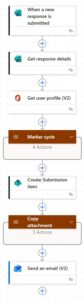
Several of the UX team had researched the potential of Microsoft’s Power Automate to achieve the identified changes but we had little experience of using this service. We reached out to the SharePoint Solutions team and Richard Sharp, SharePoint Solutions Specialist helped us build a Power Automate flow handling data through a SharePoint site and a central EDC Online Course email account to achieve the automations we had requested, helping us optimise the process.

Screenshot of the flow in Power Automate showing the steps starting when a workbook is received, through marker allocation and email marked workbook back to the learner

The Power Automate flow beginning with when a workbook is received, through to marker allocation and return of the marked workbook with feedback to the learner by email

AI culture prompts us to embrace automation but it starts with reviewing processes

In an age where every day brings a new AI-powered innovation, there’s an inherent urge and temptation to seize opportunities to apply AI to our processes and procedures to free up human time and avoid human error. Identifying such opportunities must start with looking at the processes and procedures in granular detail, however.

In this case, AI intervention wasn’t an appropriate solution to the inefficiency problem, but as it turned out, going through the groundwork mapping out the process was still helpful to spark thinking about another automation mechanism to save our team time and effort.

Going through the EDC marking and feedback process diagnosis made me reflect on the broader value of applying AI thinking as a mindset shift to bring in new ways of thinking to old problems, to effect change making best use of the tools available to us.

Think like a machine: How building a Drupal context-handling feature is providing a new lens on content design and style rules

AI tools to support content tasks are becoming more and more widespread. As part of my contributions to open-source Drupal I’ve been researching how to prepare and package content design and style rules that these tools can use effectively.

Using AI to help with content design tasks (and indeed, any other type of tasks) is now standard practice for many. As anyone who has experimented with it knows, the value the AI can provide is largely dependent on the prompt it receives, and the contextual data and information it is given to work with.

The way you provide your chosen AI with context affects the results you get

I have encountered two main methods for providing AI with context data. The first is the ‘prompt and pray’ approach, where you start with vague instructions and then engage in back-and-forth to drip-feed the AI the necessary information in the conversational turns. The second is the ‘context engineering’ approach, where you front-load information to proactive guide the AI, for example, defining its role, setting explicit goals, providing background and adding contextual constraints and rules.

Context engineering is more proactive than prompt and pray

Prompt and pray is better suited to a standard LLM interface or chat assistant (like ELM or Claude), and is the preferred choice when you’re looking to brainstorm and experiment, and are happy to take variable outputs. Context engineering relies on a more structured interface, designed to handle workflows (like Claude Skills) and is therefore the best choice if you’re looking for consistent, predictable outputs within set parameters, but it requires you to prepare your context data upfront, and for your chosen AI mechanism to have a way of handling it.

The Drupal Context Control Center is a management system for context data

Context data is a term given to the structured, site-specific knowledge – such as brand guidelines, regulatory requirements, editorial rules, and terminology – that tells an AI how you want it to work, to ensure its outputs reflect your actual preferences and standards rather than generic defaults.

In January 2025, our team was fortunate to spend a day of Drupal AI experimentation with specialist company Freely Give, in which we applied AI solutions to some of the web content management and design problems faced by the University. One of our experiments involved prototyping a basic style-guide checker into EdWeb2.

Read about this early experiment in my blog post:

An automated Editorial Style Guide? Experimenting with Drupal AI Automators

Looking back, this experiment was a very basic form of context handling, and since then, following the launch of the Drupal AI Initiative in June 2025, there have been rapid developments in thinking about AI and context. The Drupal Context Control Center (CCC) was initiated specifically for the purpose of enabling AI to handle context data and I am proud to have worked on its design, collaborating with Kristen Pol, Aidan Foster and others from the AI Initiative.

Read about the Context Control Centre on its project page on Drupal.org

To design the CCC architecture we brainstormed context application scenarios

Starting with a blank page, we started trying to come up with the main building blocks that the CC needed to have, but we found it very difficult. Drupal is phenomenally flexible which meant every function we wanted could be achieved in various ways. We quickly moved from thinking in the abstract to considering real-life scenarios when people would want to use AI to make use of context data to control what happened with their content which helped us tease out the tasks we wanted the CCC to support.

An example scenario was as follows:

Content creator wants to refresh a prospective student recruitment campaign. They ask the AI, integrated in the content management system, to help. Acting on the instructions, the AI prepares a sample campaign page which includes a slogan that doesn’t match the voice and tone and contains images from winter when the campaign is for summer. The content creator rectifies this by providing the voice and tone guidelines and updated imagery. The AI tries again, it’s better but this time there’s a word spelled differently from the style guide. The creator uploads the style guide rules. The page looks good, but the content creator wants another version to compare. The AI comes up with a version 2. The content creator wants to track interactions with the first version and swap to the second based on performance. To do this they connect their Google Analytics Acquisition reports and give the AI instructions of the thresholds to look for, to initiate the change.

We defined building blocks of the CCC and the relationships between them

Considering what would be needed to support the scenarios we came up with, we identified that the CCC needed to house several types of data and we thought about the dependencies and interactions the CCC would need to support.

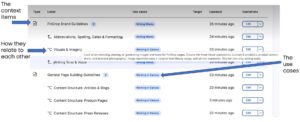
1.     Data items that set out ‘the What’

First and foremost, the CCC needed to include the context items (rules and guidelines) such as:

  • Brand guidelines
  • Voice and tone rules
  • SEO keywords
  • Campaign or project briefs
  • Style guide
  • Image bank
  • Pattern library

In addition, it needed to contain subcontext items (more refined versions or child/subsets of the context items) such as:

  • New product brand guidelines
  • Seasonal campaign copy
  • Seasonal image set
  • Landing page pattern set

2.     Data that set out ‘the When and How’

As well as the various sorts of rules and guidelines, the CCC also needed to include details of the circumstances and situations in which to apply them. Collectively, these were called the context scopes and they mapped out boundaries and constraints such as:

  • Global (site-wide)
  • Site sections
  • Content types
  • Use cases (for example – writing teaser copy, working with images)

3.     Mechanisms that control how agents select context

Connecting the ‘what’ with the ‘when and how’ relied on AI agents identifying context scopes and selecting appropriate context items to apply. For this to occur successfully, the CCC needed to include some means of facilitating as well as guardrails to steer suitable choices. These included:

  • Context limits (limiters on numbers of context items and tokens)
  • Scope subscriptions (agent configurations to define opt-in or opt-out)
  • Target entities (specified content entities with context built-in)

We tried out terms in practice before deciding on labels

Labelling parts of interfaces is always tricky, particularly within Drupal where certain words have legacy meanings and, owing to its flexibility the functionality associated with terms may change over time. It was especially important to make careful label choices for the different parts of the CCC architecture, given its anticipated universality.

To inform my work on the CCC I decided to re-read ‘Design by Definition’ by Elizabeth McGuane, which book sets out and appraises a range of approaches for deciding upon terminology, labels and names for objects.

When choosing a name to fit a system, the author recommends appraising the options against three criteria:

  • Novelty – how standard or unique the name needs to be
  • Flexibility/mutability – how well the name works in different contexts
  • Memorability – how easily the name is recalled

Applying this idiom helped us decide upon several key CCC terms, including:

Context item: any piece of information fed into an AI powered mechanism (typically an agent) to help the AI’s working memory to produce responses and outputs that are accurate and tailored to the users’ requests.

Context source: origin of any piece of information fed into an AI powered mechanism (typically an agent) to help the AI’s working memory to produce responses and outputs that are accurate and tailored to the users’ requests.

A screenshot showing an interface from the beta release of the Drupal Context Control Center, showing the use cases and the context items (with inter-relationships). Arrows point out these different areas.

A screenshot showing an interface from the beta release of the Drupal Context Control Center showing the main building blocks

For the CCC to work as intended, inputs need to be machine-readable

With key parts of the CCC defined and the architecture mapped out, we started to consider how well the CCC could handle variations of context data loaded into it. This required us to think more broadly about how AI makes sense of information.

In the excellent book ‘Machine customers: The evolution has begun’ by Katya Forbes, the author outlines many use cases where people enlist AI agents to take care of tasks for them and diagnoses the underlying factors necessary for the AI to satisfactorily work on behalf of the people concerned.

In one such use case she breaks down the stages required for a human to take a purchasing decision compared to a machine.

For a human to decide on a purchase, they go through the following stages:

  1. Awareness – ‘I have a problem’
  2. Interest – ‘This might solve it’
  3. Consideration – ‘Let me evaluate my options cognitively and emotionally’
  4. Intent – ‘I’m leaning toward this choice’
  5. Purchase – ‘This feels right’

For a machine to decide, the stages are different:

  1. Query initialisation – parameters received ready to begin search
  2. Discovery – options identified that meet basic criteria
  3. Evaluation – comparing options against weighted parameters
  4. Verification – validating performance claims and reliability
  5. Selection – optimal choice identified based on data

From this comparison use case, it is clear that designing contextual data such as guidance documents to be used by AI requires a different approach to designing content to be read by humans. In particular, writing guidance information that relies on sentiment and/or subjective interpretation will be lost on AI and therefore not applied in the ways intended.

In its current form, our Editorial Style Guide is only partially AI-ready

Last year, in the early days with ELM, members of the UX Service tested ELM’s ability to apply the rules of the style guide to check content. They found it had limited success and found that in some cases, ELM applied its own rules to checking the content which couldn’t be traced to the style guide. Reviewing this experiment in light of the machine customer journey, it becomes clear that for an AI like ELM to faithfully and consistently apply style guide rules, the rules need to be written in a way that demands minimal interpretation, in other words, a deterministic way.

Read John Wilson’s blog about experimenting with ELM and the style guide:

Testing ELM’s ability to return useful results with prompts about the Editorial Style Guide

Adopting a ‘machine-first’ lens to the Editorial Style Guide to analyse content in selected sections, it is possible to pull out some of the deterministic (automatable) rules to compare with non-deterministic (requiring judgement) ones.

Analysis revealed deterministic and non-deterministic rules in the Editorial Style Guide

I completed a quick review of three sections of the style guide to assess how AI-ready they were.

  1. In the Headings and page titles section

Deterministic rules:

  • Do not skip heading levels
  • Do not use H5 or H6 headings (maximum four levels)

Non-deterministic rules:

  • Use word and language your users will be looking for and familiar with
  • Write descriptive headings – avoid vague words
  1. In the Acronyms and abbreviations section

Deterministic rules:

  • Do not put full stops or spaces between letters of an acronym
  • Do not abbreviate Professor to Prof
  • Do not use eg, ie or etc

Non-deterministic rules:

  • Spell out acronyms multiple times on long pages or pages with accordions
  • Well-known acronyms don’t need spelling out
  • Use abbreviations only when better known than the full version, or when space is limited
  1. In the Links section

Deterministic rules:

  • Do not use a URL as link text
  • Do not use ‘click here’, ‘more information’, ‘learn more’ as link text
  • Put links on a new line, not inline in a sentence

Non-deterministic rules:

  • Add details about what a link will do (open in a new tab, require a University login) where relevant
  • Avoid duplicating links where you can
  • Reserve button styling for the most important links

Going through this short exercise with our style guide established that before we can make valid use of AI-powered features like the CCC, there is preparatory groundwork required to some of our content design guidance and rules more AI-readable, and potentially to create a new machine-readable version of the Editorial Style Guide.

I’m looking forward to investigating the potential for the CCC at the University

My work with others in the Drupal community on the CCC has led to a successful release of a beta version, with a release candidate coming soon, planned alongside the regular Drupal AI module release cycle.

Building on our early AI experiments with the style guide, I am keen to lead the UX team to explore the CCC’s potential to handle and apply editorial rules within a Drupal-powered CMS like EdWeb2. Our previous research with web publishers tells us that applying the style guide consistently can be genuinely difficult, and as AI-powered content design tools like the CCC continue to emerge, there is real opportunity to put this to work on the challenges our publishers face.

Read about our previous research with publishers about using the Editorial Style Guide

An analysis of responses to our Editorial Style Guide survey by Hannah Watson

Usability testing the Editorial Style Guide site by me in my previous Content Designer role

Full automation of good content design is unlikely and undesirable but it may be possible to offload some of the more straightforward rules to an AI mechanism like the CCC, freeing publishers to focus their attention on the trickier aspects of content preparation. Taking a machine-assisted view will also provide the chance to revisit existing non-deterministic rules to assess whether some could be made more granular, broken into sub-contexts or context scopes for more precise application.

In line with our broader aim of improving the tools available to content publishers, I am excited to see what the CCC can offer for real-world content design challenges at the University.


You don’t know what you don’t know: Improving the way we position inclusive language at the University

Progressive thinking about inclusive content combined with a review of our content design tools prompted us to look at the effectiveness of our Inclusive Language Guide. Before we could think about improving the guide, however, we needed to ensure staff knew it existed.

Since the relaunch of our Effective Digital Content course last year, and following a succession of content improvement club sessions regularly attended by web publishers and content creators, it’s been gratifying to see more and more University staff learning about content design and putting theory into practice. The raised awareness and interest gave the UX team cause to review the guidance we direct staff to follow, to check that it’s as clear and easy to apply as possible.

The Inclusive Language Guide (ILG) was published In June 2022, following months of careful research, investigation and analysis by Ari Cass-Maran, former Senior Content Designer of the UX Service. Nearly 4 years on, amidst increasing UX and content design maturity, it was timely to revisit the guide with a view to improve it. Before we could think about improvements, however, we firstly needed to appraise how well the guide was known and being used by University staff.

Read more about the origins and publication history of the Inclusive Language Guide in Ari’s blog posts:

Inclusive Language Guide

Inclusive Language Guide: how we co-designed with our community as part of a human-centred Design System

Inclusive language awareness and practices have advanced since we published our guide

Since 2022, there have been many positive developments in inclusive language practices and approaches in the public sector and beyond. In November 2023, members of the Home Office Digital team created inclusive language guidance as part of their goal to embed diversity and inclusion into their research and design practices. In September 2024, the Department for Education published the first release of an Accessibility and inclusive design manual and initiated research to learn how easily users could find information within it, with a view to making improvements for a second release. Further afield, in 2024, the Council of Europe published inclusive language guidelines and the European Institute for Gender Equality published ‘Words Matter’ a guide and associated toolkit designed to encourage more gender inclusive language practices. Content-design publications like ‘Considerate Content’ by Rebekah Barry and ‘Designed with Care: Creating Trauma-informed content’ by Rachel Evans and contributors helped shed light on practical ways to prepare content in more sensitive ways, for example, taking into account needs associated with neurodivergent conditions and needs triggered by previous difficult experiences. On a more conceptual level, Karen Yin’s book ‘The Conscious Style Guide: A Flexible Approach to Language that includes, respects and empowers’ prompted a philosophical approach to inclusive language use, going beyond lists of ‘do’s and don’ts’, instead, calling for engagement with changing cultural norms to make decisions around language use within a framework guided by content, context, consequence, complexity and compassion.

Read about some of the developments in inclusive language practices:

Conscious Style Guide website

Inclusive language by design, published 22 November 2023 on the Home Office Digital blog

Accessibility and inclusive design manual blog, published 29 October 2024 on the GOV.UK website

Guidelines for the use of language as a driver of inclusivity by the Council of Europe

Words Matter: Supporting Gender Equality Through Language and Communication, published by the European Institute for Gender Equality

Before we could make improvements, we needed to understand the guide’s current use

Working in UX, with its overarching aim of making things better for people, it can be tempting to track developments in user-centred design and apply emerging thinking directly to the work in front of you – in this case, the iteration of our Inclusive Language Guide. But to make changes that are meaningfully impactful, it is often better to pause first and understand the current state in order to plan accordingly. In this instance, that meant taking time to assess how our existing guide was performing – to find out whether it was known, adopted, and being applied by  University staff with content publishing responsibilities.

Appraising the guide’s effectiveness involved assessing receptiveness, discoverability and findability

We weren’t certain whether staff knew about the Inclusive Language Guide, let alone whether they were using it. In order to find this out, we identified two broad categories of behaviour that would indicate successful engagement with the guide.

The first related to receptiveness – did staff realise the need to write inclusively, or recognise that inclusive language was something they needed to think about at all? , in other words,  that inclusive language was’a thing’?

The second related to information-seeking- once staff had identified the need, how did they go about addressing it? The answer depended on whether the guide was findable (for those who knew it existed) or discoverable (for those who didn’t).

These behaviours mapped neatly onto a framework from an old but still salient blog post from 2006, in which Donna Spencer wrote about four modes of information-seeking:

  • Known item seeking – looking for something specific you know exists
  • Exploratory seeking – browsing when you have a general sense of what you need
  • Don’t know what they need to know seeking – no clear awareness of the gap or what would fill it
  • Re-finding seeking – locating something you’ve accessed before

Four modes of Seeking Information and How to Design for Them (Boxes and Arrows blog)

When it came to the Inclusive Language Guide, the staff who already knew it existed would draw on known item seeking or re-finding behaviours, and if those succeeded, the guide could be considered findable. Those who had identified a need but didn’t know the guide existed would rely on more exploratory methods, and if those succeeded, it could be considered discoverable. Our research needed to probe for all of these.

We developed a scenario-based test to understand perceptions and expectations around inclusive language

Before beginning any piece of research, the UX team thinks carefully about what we want to learn, framing our intentions as explicit research questions. Working together, Mel Bacharj, Content Design Assistant, and I identified three core questions to guide our research:

  • Do staff know the guide exists and the type of guidance it includes?
  • Do they know what it can help them with?
  • Can staff recognise situations where it would be useful to them?

Drawing on UX and product literature, we identified a scenario-based approach as the right method for testing whether staff felt a genuine need for the guide. Rather than asking directly about the guide itself, we would present participants with a content preparation scenario where the guide’s rules could apply, and observe whether they recognised the need unprompted. This approach is grounded in the principle of ‘talk about their world instead of your idea – described by Rob Fitzpatrick in the book ‘The Mom Test: How to talk to customers and learn if your business is a good idea when everyone is lying to you’ – which cautions against asking people about a product or tool directly, since doing so tends to invite polite, unhelpful answers.

From there, the research followed a logical sequence. If participants identified a need for guidance on writing inclusively, the next stage would ask how they would naturally go about finding that information – testing whether the guide was discoverable. If they located it, the final stage would assess whether they could find relevant guidance within it to help them write inclusively in the content preparation scenario we had tasked them with.

Based on initial findings, we’ve improved the guide’s visibility by adding it to key websites

Following our research plan we conducted testing with staff volunteers and the results were insightful – revealing staffs’ current perceptions, expectations and understanding of inclusive writing practices. Further, more detailed analysis will follow, however, having watched participants search for inclusive language guidance, an primary research finding was that the guide was not that easy to find.

We wanted to act upon this finding as soon as possible, so we reached out to relevant site owners and have now successfully added a link to the guide from the following webpages:

Disability Information | Help | Information Services – Linked from the question: ‘How do I make sure I use the right words to write about disabilities and disabled people?’

Helpful links | Help | Information Services – Added to the list of resources

The Social Model of Disability | Health & Safety | Health and Safety Department – Linked from a paragraph ‘The University’s Inclusive Language Guide contains advice about how to write about disabilities and disabled people’.

Staff EDI Learning | Equality, Diversity & Inclusion | Equality, Diversity and Inclusion – Linked from the Available Learning section

Further Reading and Learning | Equality, Diversity & Inclusion | Equality, Diversity and Inclusion – Added to the list of resources

Resources – by topic | Institute for Academic Development | Institute for Academic Development– Added to the list of resources

With the guide linked from more places, we are in a better place to work on improving its content, to ensure it can be found and used more effectively by those preparing content for the University.

Three things I’ve learned about UX leadership in the last three-and-a-bit years: Reflections from an award-winner

Last month I was honoured to receive a national award for Outstanding Leadership from industry body UCISA, recognising my work driving positive change through UX. This achievement prompted me to reflect on my experiences leading UX in different realms over the past few years, and to think about what UX leadership means to me.

At the start of 2025 I was asked to step up to a senior leadership position within the global open-source Drupal community. Drupal, the primary content management system used by the University, has a long-standing reputation for being developer-centric and, coinciding with the launch of a new low-code site-building product, they needed help to steer it towards non-technical audiences.

Without thinking too hard, I jumped at the opportunity. I knew it wouldn’t be easy but I was motivated by the chance to use UX as a force for positive change. I didn’t really have much of a plan, but I was confident I could draw on the UX knowledge and experience I had and figure out ways to make things better. Looking back, this represented a milestone in my UX leadership journey and my broader approach to leadership.

I took over running the University UX Service in October 2022. At the start of 2023, I was a UX team of one and I needed to recruit some team members to rebuild and re-establish the service. I was fortunate to be able to bring in some amazingly talented people to work in my team and with their help, and with some successes, failures and near-misses along the way, was able to transform the UX Service into what it is now – a thriving unit delivering sustained value for the University, one improved digital experience at a time. With that behind me, at the start of 2025, I was open to new opportunities to stretch my leadership capabilities. I had accepted that I would get things wrong before I got them right, but I was drawn for the associated learning, which I recognised would help make me become a better all-round leader.

As it turns out, 2025 became quite the year. I won the Women in Drupal Define Award (in October 2025), and the inaugural UCISA Outstanding Leadership award (in March 2026). Taking on the challenge of leading UX in Drupal paid off in more ways than I could have anticipated. Seeing my work bring about positive UX change in Drupal provided me with a renewed sense of purpose in my job leading the University UX Service, as well as in my roles running the UCISA UX Group and contributing to W3C. I’ve boiled down my thoughts on what successful UX leadership looks like for me into three reflections which I’ve turned into action points to take forward as I progress in UX leadership.

UX needs an adaptive leadership approach, and you always need to promote UX value

When I run brainstorms for UX events with the UCISA UX Group committee, ‘Getting buy-in for UX’ is a topic that regularly comes up. How do we get senior decision-makers to invest in UX? Surely making digital services, products and systems more user-centred is something everyone wants?

Well, yes, but it’s complicated. UX can be disruptive. UX research reveals problems, and once problems are unearthed, there’s an obligation to address them, and that requires time, resource and effort which may not be readily available.

Keeping this in mind helps me shape my UX leadership approach. When I’m contributing to Drupal, I take into account that Drupal is a volatile, fast-moving, open-source community, where new ways of thinking and novel ideas are the norm. There is room for UX amongst the many other forces driving change. The Drupal community has autonomy to make changes and is a solutions-powerhouse, ready to react and respond to the needs and demands arising from UX research. Taken together, this mean I can effectively lead UX in Drupal by presenting and talking about UX on a conceptual level, conducting UX research and openly sharing the findings to prompt and rally the community around making user-centred changes.

Leading UX in the public-sector context of the University context needs to be handled differently. Before initiating any UX research activity, I take time to understand the nuances of a situation, to anticipate the context-specific value UX may bring, and honestly assess the resource and commitment required to achieve that value.

The UX Service receives many requests for UX help, but a fraction of the requests we receive are not progressed, meaning digital experiences that could be improved are left unchanged. I recently led a retrospective with my UX team to understand reasons why, and to look for patterns. We concluded that in a number of cases, there is a gulf between people’s expectations of what UX improvement involves and the reality of making improvements happen. This gap is often what causes teams to abandon their UX plans.

This insight shapes how I lead UX at the University. Rather than describing it in purely conceptual terms, I make a point of bringing teams into the practical reality – the sometimes messy, non-linear steps required to achieve improved UX. Leaning on  the persuasive power of word-of-mouth, myself and my UX team take every opportunity to cite and promote successful case studies and testimonials from teams we’ve worked with, demonstrating the real-world value UX brings, and praising teams that choose to apply agency and sustained will to make things better, acting on what they’ve learned from user research.

If you’re going to be a good UX leader, you need to be worth following

As part of her talk at the UCISA Leadership Conference in March 2024, the inspirational rugby player Maggie Alphonsi shared a short video of a person dancing alone at an outdoor event to make a point about leaders and followers. As the seconds ticked by, another person joined the first dancer, and then another and another until a crowd formed. I reflected that being a leader (akin to being the first dancer) is a lonely existence unless people follow you, and that doesn’t come as a given, it all depends on your actions and the impression people have of you, and whether they can meaningfully relate to you.

Since UX is universally applicable, leading it effectively requires more than UX expertise alone. In the service dominant logic model, value only emerges when operant skills (in this case, UX skills and techniques) are applied to operand resources (digital experiences to be improved) through genuine partnerships. Successful partnerships depend on trust and shared understanding, which in turn rest on contextual knowledge and empathy. To lead meaningful UX improvements, I need to retain a constant understanding of what good digital experiences look like, and that means stepping out of the UX bubble to engage with emergent technologies, developing standards, market forces and digital trends.

Distilling down the focus of UX down to ‘making digital experiences better’ leading UX carries a perpetual invitation to innovate, and to seek creative ways of addressing problems. I approach this with a magpie’s mentality – actively scanning to learn about anything that might help me do my job better, whether that’s a change framework, a data modelling tool, an assessment approach. My radar is deliberately wide and I opt not to stay in my lane, always aspiring to grow my sphere of knowledge, influence and connections, motivated by the learning rewards and staying true to the mantra: ‘to get different results, do things differently’.

The breadth of that knowledge pays dividends. As a UX leader, stepping outside familiar territory and taking a genuine interest in different fields puts me in a stronger position to build partnerships across a wide range of spheres — and to respond intelligently to the UX challenges that arise within them. Technology is constantly evolving, as are human needs from it. So I never turn down an opportunity to learn. Furthermore, adopting a humble position of learner means I can absorb knowledge freely, without the constraints of defending expertise I’ve already declared.

Managing and growing partnerships, is of course, just one dimension of UX leadership. In his Driesnote recorded at DrupalCon Chicago 2026, highly-respected Drupal leader (and all-round duderocker and legend) Dries Buytaert reflected on his own leadership journey, describing how his drive and ambition for building and growing open-source Drupal led to him becoming an ‘accidental leader’.  I reasoned that, being an effective leader needs an inherent passion, goal and inner sense of worth, which emulates to others like the energy from the lone dancer, drawing them to follow.

As a UX leader, you’re responsible for shaping future UX leaders

I take my leadership roles very seriously, and I am committed to using my position as a platform to support and encourage widespread adoption of UX approaches and practices. My goal as a UX leader is not just to convince people of UX’s value, but to inspire them to practise it and learn for themselves.

When I was invited as a guest lecturer to speak about running the University’s UX Service to students from the University of Edinburgh Business School, I emphasised the time and effort I devote to building operational capability – in other words, thinking bout the future, and pre-empting needs and demand for improved digital services and developing a strategy to address these in a sustainable way.

A core part of my UX Service strategy is a UX coaching model, built in response to a clear reality – there will always be more user experiences to improve than there are UX professionals to improve them. Coaching others in UX techniques and approaches is an effective way to address the imbalance. When colleagues have the ability to carry out UX research to diagnose UX problems themselves and then apply UX techniques to address them, it’s a win-win. Not only are more  digital experiences improved, problems are caught earlier and UX becomes firmly on the radar.  Democratising UX skills through coaching embeds UX capability, driving a future-state mindset where UX is part of normal software and digital management processes and procedures across the institution.

As well as converting colleagues to the UX cause, there’s the next generations of UX leaders to consider. In summer 2026, the UX Service will continue working with interns and we will grow the number of student workers in our team from three to four. As in previous years, I am excited for the opportunity to support and learn from these emerging UX leaders, to encourage them to bring  their new ideas, provocations and thoughts on how we can do better. Because when it comes to UX leadership, there are always ways to do things better and therefore continual opportunity for motivation and drive.

Here are some photos of my UCISA award and me

I was unable to attend the UCISA Leadership Summit when my award was presented, but it was transported back to me to enjoy and celebrate after the event.

Photo on the left showing UCISA leadership team and judges with my award for Outstanding Leadership being presented at the Leadership Summit in Liverpool. Photo on the right shows Emma Horrell with the award in her garden

Photo on the left shows the UCISA leadership team and judges with my award for Outstanding Leadership being presented at the Leadership Summit in Liverpool. Photo on the right shows me with my award back home in Scotland.


From recommendations to reality: Applying UX design thinking for a technical solution for staff profiles

The Role of Profiles project produced 10 recommendations for an improved University profile provision. To start actioning these, I assembled a working group of specialists and drew on UX design principles – implementing practical prioritisation while seeking innovative solutions that addressed the research findings.

Recognising the widespread value and strategic importance of communicating the work, accomplishments and status of University staff, the UX Service undertook a research project to investigate the needs and requirements for an improved provision to publish profile content within the University web estate. The project uncovered many insights, brought together in a series of technical and non-technical recommendations. Since the research project closed, I have been looking for ways to act upon the recommendations, in a bid to make them happen and crystallise a new profile provision for the University.

Read about the profile research project in our series of blog posts

To start bringing the recommendations to life, I needed a UX design process to follow

In the absence of a formal follow-up project to implement the recommendations, and recognising the unwavering importance of profile content being available on University websites, I was keen to retain momentum and to keep profiles on the agenda. Having worked as a UX Lead in different realms, I have learned about various UX design processes to effect technical builds. I was keen to experiment with an approach based on the Agile Squad method, which brings together individuals from multidisciplinary teams to focus on specific feature areas of a technological solution. This seemed like a good fit for profiles, firstly as a way to break down the recommendations into smaller tasks, and secondly as a way to harness the University-wide knowledge and expertise about profiles my team had uncovered as part of the research.

Read more about the Agile Squad Model in project management in an article on daily.dev

I set up a specialist squad to continue making progress on profiles

In the latter stages of the profiles research project, I had ran two successful co-creation workshops, bringing together colleagues from different teams, Schools and Groups, all with different perspectives yet a shared interest in profiles. These workshops had demonstrated that, across the University, there were colleagues already developing profile solutions, and that there was a bank of innovative ideas to tap into – to help achieve an improved profile solution.

In the interests of starting small and keeping things simple, I formed a Teams channel which included staff from the Business School, the School of Engineering, the PURE team, IS Apps and EDINA. I initiated a round of discussions, brainstorms and show-and-tells to harness expertise and gather perspectives from each team in turn.

Reviewing the recommendations, I ranked them by what to tackle first

With the help of squad colleagues, I revisited the 10 recommendations from the research project to better understand the dependencies and complexities and accordingly, sort them into a prioritised order. The recommendations that required EdWeb2 expertise needed to be accommodated within the existing EdWeb2 roadmap and therefore were placed in a queue behind other priorities. Recommendations relating to profile creation and maintenance had dependencies on the updated provision being in place, and similarly, it was logical to schedule training sessions to help colleagues write effective profiles to occur once the new provision was available to use.

See the full list of project recommendations in my blog post: The Role of Profiles is to represent our staff: Recommendations and reflections from our project

It made practical sense to start by investigating data exchange solutions

One of the more sizeable recommendations from the profiles project was as follows:

Profiles should support the display of content from other repositories using technical solutions where feasible

This recommendation recognised the tendency of profile owners to publish content about themselves and their work in multiple sources, and their wish to be able to bring those content sources together, to display in a University of Edinburgh profile. To address this recommendation, I began some investigation work – primarily to find out about existing solutions for data exchange (both for profiles and more broadly) that would provide food for thought about how to break the recommendation down into small tasks.

A simple diagram served as a boundary object to align thinking and prompt collaboration

In technology design and innovation, reference is often made to the value of prototypes and wireframes as a way to crystallise thinking and to spark ideas. In this piece of work, a diagram depicting the expected interactions to achieve data sharing between different systems served as a useful artefact to bring a shared way of thinking across the teams and to prompt ideas for achieving the different aspects of the proposed idea.

Diagram to show proposed model for data sharing. On the bottom are three data sources: People and Money, PURE and a School database, these feed into a middleware application which feeds into a presentation layer which ultimately feeds into EdWeb2, University websites and Search

Diagram of the boundary object used to describe the proposed model to achieve presentation of profile data on EdWeb2, other University websites and search via a middleware app, pulling from sources such as People and Money and PURE.

A workshop with Business School colleagues helped formulate a proof of concept

UEBS operates a non-EdWeb site, and to meet the need to display profile content of UEBS colleagues, the technical team had devised a solution that parsed data from fields within PURE (the University’s primary research repository, operated by Elsevier) and displayed it in UEBS staff profiles. As part of the profiles squad, the UEBS team shared details of their solution to enable critique and assessment of its suitability for wider, scaled-up production.

Having learned about what worked, what didn’t and the associated requirements and dependencies, and keeping in mind the user requirements from the research project, it felt appropriate to propose developing a minimal viable product (MVP) for the University-wide profile solution. Defining the MVP was helpful to give us something to aim for in the short-term, and we recognised that in the process of working towards delivering the MVP, we would learn along the way and ultimately get closer to a solution that was feasible to deliver for the whole University.

The MVP contained three parts:

  1. Profile data coming from PURE or from another identity source, such as People and Money or the Active Directory
  2. A Drupal 11 site within EdWeb2 with a profile entity to handle the data
  3. A School site to ingest the data
Diagram to show the MVP where data from PURE is ingested into a Drupal 11 site ready to be presented on a School site

Diagram to show the MVP where data from PURE enters a Drupal 11 site ready to be ingested by a School site

Breaking this down further, we agreed that the first step would be to make some PURE profile data available to be consumed by the Drupal 11 site – envisioned to be achieved with a single PURE ID of a person. A subsequent step would be to expose the data as a JSON feed from the Drupal 11 site, ready to be consumed by the School site.

Meeting the PURE team helped tease out typical repository dependencies

Given a key part of the MVP was data-sharing from PURE, the next logical step was to learn from the PURE team about the possibilities for data extraction from this system. On the technical side, the team shared PURE API documentation with details of data endpoints and new data formats to help with modelling the data consumption planned for the MVP. They also shared information about PURE’s upgrade path and ongoing maintenance needs which was important to consider within the context of the planned profile solution. Reflecting on requirements of PURE end-users, the team revealed trends for PURE profile data – for example, the need for academics to not only capture detail of their publications but also of their research activities within PURE. This was interesting to hear as it mirrored a finding from the profiles research project relating to profile content.

Furthermore, the team provided insight into broader requirements for the use of PURE data, including integrations with other systems, for the purpose of support and publicising research activities in alignment with high-level University strategic objectives (such as REF 2029). Understanding the wider landscape was helpful to reinforce the potential of the improved profiles provision we are aiming to achieve and the key role of PURE within that.

Learning about integrations from IS Apps colleagues offered an innovative way to look at data sharing

The team from IS Apps recently presented about their use of Choreo – a cloud-native platform which powers their newly-launched integration service. Choreo has the capacity to manage APIs and integrate services and systems, affirming its potential usefulness as part of our improved profile provision. Meeting the IS Apps team to explain our goals for a profiles MVP, we began to consider options for being able to make use of identity data APIs to receive baseline data to populate profiles for part 1 of the MVP.

Read more about the Choreo technology on the WSO2 website

Wider interest from the Higher Education Drupal community suggested opportunities for contribution

Having contributed to open-source Drupal for several years, I have built up a network of useful contacts for shared learning about Drupal solutions. Raising awareness of our profiles project in the Drupal community provoked a response from people in other institutions trying to achieve similar goals, leading to knowledge-sharing with institutions such as the University of Cambridge, Stanford University and the University of Bergen. As our squad progresses with its work, I hope that the University of Edinburgh can contribute an open-source technical solution that may benefit organisations like ours, and that may be taken and adapted for more and more use cases.

With EDINA and Drupal we ideated for potential use of AI: balancing opportunities with risks

Reflecting on ways of achieving data exchange between systems, it was natural to consider how AI could assist. Consulting colleagues from the ELM team within EDINA we explained our plans for the MVP as a provocation to understand the potential for AI. Between us, we identified the potential for MCP servers for contextual data transformation, to potentially deliver repository data dynamically in AI-ready formats. We also identified an idea for ELM to potentially deliver profile data from defined sources conversationally, in response to queries. Both ideas were subject to dependencies and further investigation.

Drawing on earlier learnings about use of AI to formulate profile content, we recognised the need for profile owners to be able to sense-check the content before it was displayed, to ensure it did not misrepresent them. For this reason, we resolved that if either of our suggested AI ideas proved technically viable, user research with profile holders should occur to inform actions and progress, to ensure full agency for personal data remained with those the data belonged to.

Read about a project experimenting with AI to generate profile content in the blog post: An AI tool for generating academic staff profiles using a pre-trained LLM – findings from a study

Considering tried-and-tested use cases for ELM, we identified that profile owners may like to make individual use of ELM to assist with the wording of their profile content, in particular to undertake tasks like writing the content in particular styles conference abstracts, providing ELM with the necessary contextual sources to be used to shape profile content in particular ways. I identified a potential test use case for a new Drupal AI module I have been contributing to, the AI Context Control Center (CCC), currently under rapid development within the Drupal community.

Read more about the development of the AI Context Control Center on Drupal.org

We have a way to go to implement the recommendations, but we’ve made a good start

All things considered, we’re getting incrementally closer to an improved profile provision, but we’re not there yet. Taking a UX design lead on developing a profile solution is helping to ensure we keep sight of the recommendations formed from the research project. Working in a squad that brings together people from multiple disciplines from the wider University provides a welcome way to learn about different colleagues’ ways of working, ideas and approaches. It is heartening and motivating to see the appetite and interest in profiles from colleagues around the University and from the wider content management community, and I feel confident that, with continued support, we will, in time, arrive at a better profiles provision to serve staff at the University.

Concept testing: The UX research approach driving user-centred development of Drupal’s interfaces

Drupal is the University’s content management system and Drupal CMS – its new ready-to-use site-building product – is developing apace. As Drupal UX Research Lead, I’ve used concept testing to gather quick insights that keep interface decisions user-focused and keep development moving.

As part of the Drupal CMS leadership team, I take responsibility for improving Drupal’s UX based on findings from user research. In this blog post, I reflect on how I’ve adapted my research approach to ensure we have evidence to hand ready to guide rapid, iterative product decisions at the interface level, while remaining faithful to the overarching product goals.

Ensuring UX research informs agile product development is a well-known challenge

I first grappled with fitting UX into Agile as UX Lead on the University’s Web Publishing Platform (WPP) project. Defining a UX and Design process to keep the project focused on user needs prompted me to think about how UX research and development complemented each other and the need for data-based feedback.

Dual-track Agile emerged as a good way to align the disciplines – with a UX strand focused on continuous discovery around tasks feeding into a staggered development strand focused on defining features.

Dual-track process with a 'Discovery track' on the top with a 3 loops each representing research around a user need. Beneath is the delivery track with 3 loops each representing a feature being built following the research. Feedback occurs at points between the 2 series of loops

Diagram depicting the dual-track Agile process, adapted a diagram by Jeff Patton, from his book ‘User Story Mapping: Discover the Whole Story, Build the Right Product’


When I considered how to implement this in Drupal, I realised the importance of defining a prioritised list of user tasks to act as the target for research and therefore the basis for future feature development.

In September 2025 I blogged about three key task areas on my shortlist for Drupal CMS UX improvement. These included:

  1. How people make sense of Drupal interfaces through the Drupal labels on different features and functionalities
  2. How people maintain and extend their Drupal sites, to keep things up-to-date and add in extra functionality
  3. How people use Drupal AI functionality in a range of contexts within Drupal sites

Keeping these broad task areas front-and-centre helped me remain clear on our research priorities, to ensure I gather appropriate data to pass to the development strand to inform the ongoing build and configuration of the Drupal CMS product.

Read my earlier blog post about aligning UX and Agile:

Making Agile and UX work together – reviewing the UXD process for the Web Publishing Platform project

For the long-term, the Drupal CMS product strategy keeps high-level priorities in focus

When working in tight development cycles, concentrating closely on shaping a product, it is easy to get lost in the small decisions and lose sight of the wider product purpose. When Drupal CMS began (initially as Drupal Starshot), it was launched with a product strategy. Using the framework from the book ‘Playing to Win: How Strategy Really Works’ by A.G. Lafley and Roger L. Martin’ the strategy set out:

  • Our winning aspiration: Putting the power of Drupal into the hands of marketers, content creators and other non-technical users
  • Where we will play: Focusing on marketers, targeting organisations in the mid-market segment
  • How we will win: Prioritise ease of use, ability to grow and scale, directed use of innovative technologies (such as AI) towards marketer and content creator use cases
  • The capabilities we must have: interfaces that are intuitive for non-technical audiences, out-of-the-box marketing and content creation capabilities, and simplified ways to extend site functionality

Keeping points of the product strategy front-and-centre has been essential for me to ensure I design the right research approach, to enable learning about what’s most important in the least amount of time to unblock technical development decisions. It has also helped me remain grounded when working in a constantly-changing development environment.

Read more about the initiation of Drupal CMS in my blog post from 2024:

UX leading the newest developments in Drupal – a mindset shift for Drupal CMS

Read more about Drupal CMS in the Drupal CMS product strategy (on Drupal.org)

Read my post from September 2025 setting out the research priorities for Drupal CMS:

UX leadership in open-source Drupal: Insights, lessons and future aspirations

In the short-term, Drupal interfaces can be constantly changing

As content management systems go, Drupal CMS is no ordinary product. The fact that it is an open-source product means the pace of development and innovation associated with it is particularly rapid and changeable as it can be shaped by an ecosystem of factors in a dynamic global community.

Most recently, innovative solution opportunities have arisen due to the development and launch of Drupal Canvas (Drupal’s newest visual page builder). The launch of Drupal Canvas in November 2025 signalled a new approach to creating and handling content in Drupal, and was a perfect fit for Drupal CMS given the target audience of marketers and content creators, therefore it was added into the v2.0 release of Drupal CMS.

Referring back to my three prioritised task areas, the inclusion of Drupal Canvas in Drupal CMS brought considerations of Drupal interfaces to the forefront. I identified the need to understand how target audiences would make sense of Drupal features and functionalities based on how they were presented in Drupal CMS.

Read more about Drupal Canvas within Drupal CMS in the announcement of Drupal CMS 2.0 on Drupal.org

Concept testing gathers user insights quickly, to support a fast pace of development

Given the rate of change in Drupal, I realised I needed a fast way to seek user feedback on interface designs, so I could feedback findings while development was in flight. Concept testing is a research technique deployed to test product ideas to assess whether they are worth progressing, to sense-check understanding of content and interaction patterns, and to gauge how people instinctively react to interface layouts and arrangements. This approach follows the Lean UX methodology – doing the least amount of work to learn the most important thing – and is particularly valuable in new product development, to avoid wasting effort and time developing solutions or heading in directions which may not align with user expectations.

Access the Lean UX Canvas (Jeff Gothelf)

By continually capturing ideas as visual mock-ups, I’ve built up a bank of concept testing material

Drupal’s flexibility lends itself to experimentation and many ideas and concepts arise from people setting up a Drupal instance and playing with the functionality it provides. Following the progression of Drupal innovations I have started the habit of collecting screenshots of the concepts being mooted on the fly. As things progress, I have been able to use prototyping and wireframing to turn the screenshots into visual representations for test participants to look at. Developing appropriate test scenarios around these visuals, I have been able to run quick online sessions with test participants to gather insights to feed into ongoing development.

Findings from my concept tests with users have provided direction in ambiguous circumstances

Over the past 6 months, I’ve completed multiple rounds of concept testing, drawing on my network of contacts for help shaping appropriate scenarios and recruiting participants that match the Drupal CMS target audience. In some cases, the sessions have focused on engaging participants around a single concept (sometimes referred to as monadic testing), in others I have asked participants to view multiple concepts in sequence to make comparisons and contrast.  My test findings have helped guide Drupal CMS interface choices in changing circumstances – I’ve summarised a selection of the learnings and the decisions made.

Changing the label ‘CMS’ to ‘CMS Content’ will improve understanding while we work out the wider architecture

Drupal Canvas was included in the release of Drupal CMS v2.0, however, it was not technically feasible for Canvas to replace the form-based node-editing content interface traditionally found in Drupal. Therefore, in v2.0, both types of content creation mechanism needed to be present and it was unclear of the best way to present these options, recognising that the architecture could change. Distilling the different possibilities into a series of mock-ups, I ran several tests to find out which made most sense to users. One test sought to discover whether the label ‘Pages’ to access the Drupal Canvas editing interface and the label ‘CMS’ to access different content types was something users would understand.

In a test scenario, I asked participants to imagine they were responsible for a website and needed to look at content that had been published to review it. I presented them with the mock-ups and asked them to talk through what they would expect to find by selecting the different options in the left-hand menu. When they had described their expectations, I showed them what they would actually find, in order to check alignment.

Results of the test revealed that participants associated ‘Pages’ with an editor for individual pages, indicating that it was an acceptable label for entry into the Drupal Canvas editing interface. Participants were less clear of what to expect by choosing ‘CMS’, and they did not associate it with content. When they saw the content types they would find by selecting this label, they grasped the concept. These findings affirmed ‘CMS Content’ would be a better signifier for users, at least in the short term until bigger architectural decisions were made.

Screenshot of Drupal CMS showing the 'CMS' label (outlined in red) and the screen that appears once 'CMS' is selected

Screenshot of Drupal CMS showing the ‘CMS’ label and the screen that appears once ‘CMS’ is selected

Removing icons  for menu labels will reduce ambiguity and cognitive load

As the test participants analysed and commented on the different menu labels, I took the opportunity to seek their interpretation and understanding of the icons associated the labels themselves. There was no clear consensus on the icon meanings from the participants, therefore the decision was made to remove the icons in the interim, to avoid unnecessary confusion or misinterpretation.

Screenshot showing the different icon options for the 'Pages' and the 'CMS' menu labels

Screenshot showing the different icon options for the ‘Pages’ and the ‘CMS’ menu labels

Removing ‘Create’ will make the menu options simpler in the interim

In the same series of tests probing users’ understanding of the labels for the different content options, I asked test participants when they thought they might choose the ‘Create’ option compared to the ‘Pages’ and the ‘CMS’ options. From their responses, it emerged that they were unclear when they would choose ‘Create’, signalling that this label was a ‘nice to have’ rather than a necessity. In the interests of decluttering the interface and making it easier to access content options, this label was removed.

Screenshot showing side-by-side Drupal CMS dashboard designs, the one on the left has the create option (outlined in red) the one on the right has the create option removed

Screenshot showing side-by-side Drupal CMS dashboard designs, the one on the left has the ‘Create’ menu option (outlined in red), the one on the right has the ‘Create’ menu option removed.

Using a vertical arrangement of filter options provides more flexibility than an horizontal layout

Engaging participants further in the test scenario, I sought to gather their preferences for finding content using the Drupal CMS interfaces. By questioning them about their usual search and filtering approaches, it became clear that there were many different facets and factors they could draw on to find content. It became clear that arranging these in a horizontal way would lead to unsightly wrapping and a clunky interface design, which prompted a decision to opt for a vertical filter arrangement.

Reflection: Concept testing is delivering strong returns for minimal effort

Findings from my short series of experiments demonstrate the value and usefulness of concept testing as a research approach, and I am keen to apply it in more areas of my work. The ease with which it can be executed highlights it as an excellent entry-level UX research technique, and as such I am especially motivated to work with both technical and non-technical colleagues in the community to coach it so that others may realise the benefits for themselves.

Repositioning Effective Digital Content as a short online course: A product approach

Following a successful launch of Effective Digital Content, our internal course that staff complete to learn and practice fundamental content design skills, the UX Service saw an opportunity to make the course more widely available, on the University’s Short Courses platform.

In May 2025, after months of user research-informed development work, my UX Service team delivered a new Effective Digital Content course to University staff. To date, hundreds of staff have successfully completed the course with some staff openly celebrating their achievement by sharing their digital badge.

Read more about how the team adopted a staff-centred approach to developing the Effective Digital Content course:

Series of blog posts about the Effective Digital Content course

Demand for the course from other universities prompted us to think bigger

After the launch of the Effective Digital Content (EDC) course, the UX team presented their work to various forums and groups. Following a showcase of the course at the UCISA UX Community Day in September 2025, we received interest in the course from the wider Higher Education sector, with colleagues from other UK universities requesting access to the course content, so that they could apply the concepts to content publishing in their respective institutions. There were various options to make the course public, and following conversations with University colleagues in Open Education and the Short Courses platform, we decided to pursue adding Effective Digital Content to the short online courses portfolio, to make it part of the University’s continuing professional development offering.

University of Edinburgh short courses website

Market research confirmed EDC a good fit for the short online courses portfolio

As the team behind the course, we acknowledged our bias in deeming it suitable for inclusion in the Short Courses platform. In order to make a more objective assessment of its suitability, we needed to do some research into the external target market and also, to identify related courses and programmes. Google Trends data revealed a growth for the content design sector in recent years, and further market analysis showed that although competitor content design courses were available, none were offered by universities or were targeted specifically at the Higher Education sector, suggesting our EDC could fill a market niche.

Content professionals from the public sector were defined as a target audience

Taking into account competitor courses and their respective offerings and critiquing the content in each of the EDC modules we defined the kind of person we felt would be interested in and would benefit from taking the EDC course. These included:

  • Staff working in communications, marketing, academic or administrative roles in the public sector, working with text-heavy content to ensure compliance with standards
  • People with responsibility for creating or managing digital content on websites, social media or other platforms
  • Those new to content design with broader writing or content creation experience
  • Professionals interested in growing skills and confidence working with content as part of continuing professional development.

Our proposal to reposition EDC as a short online course was approved

Supplying the market research findings together with an appraisal of the course against University-wide criteria such as alignment with strategic objectives and sustainability goals meant the proposal for EDC to be included in the Short Courses portfolio was approved by senior management, giving us the green light to proceed with making it happen.

Design and technical constraints prevented us lifting and shifting the existing course

Excited by the prospect of seeing EDC in a new platform, the UX team dived in, familiarising with Canvas and Eduframe – the dual technologies underpinning the Short Courses platform. After some initial experimentation, however, it quickly became clear that a straight migration of the course content wouldn’t work for several reasons:

  • The section headings of the existing EDC course didn’t map directly into the structure of Canvas
  • Some of the existing EDC video module content was directly Edinburgh-centric (referring to systems like EdWeb for example)
  • The workbook element of the course (where learners receive feedback on worked example) wasn’t feasible to scale beyond an internal audience

Considering these problems one-by-one made them difficult to solve, as there were dependencies between them, as well as additional unknowns still to be worked out.

Read more about Learning Management System software Canvas and Eduframe on the Instructure website

I brought in a product development framework to keep things on track

Having worked as a UX Lead on various projects, I recognised that when decisions become difficult, it is worth taking a step back to consider the bigger picture, to avoid getting lost in the details and potentially making decisions based on short-term logic that may have adverse consequences in the longer-term. Drawing on my most recent experience, working as part of the Drupal CMS product team, I referred to a useful product design framework, the Product Kata, from ‘The Build Trap’ book by Melissa Perri.

Adaptation of the Product Kata diagram from Melissa Perri's book 'The Build Trap' showing the stages: Understand the direction, (Company vision and strategic intent), Analyse the current state, (Current state of awareness), Set the next goal, (Product initiative), Choose step of product process (Problem exploration, Solution exploration and Solution optimisation)

Adaptation of the Product Kata diagram from Melissa Perri’s book ‘The Build Trap’ showing the 4 stages: Understand the direction, Analyse the current state, Set the next goal, and Choose step of product process.


This framework follows a classic UX design process whereby the product strategy and vision provide the direction, and an analysis of the current state indicates the work to be done to achieve the vision. With the gulf between the current state and the vision defined, it is possible to set milestone goals and establish the relevant product process step to achieve these: problem exploration, solution exploration or solution optimisation.

I used details from our approved proposal document to define a product vision

Using examples from ‘The Build Trap’ as inspiration, and drawing on the information supplied in the proposal, I pulled together a product vision for EDC as a short online course, outlined as follows:

Product vision

To become the first-choice digital content training course for professionals in Higher Education – equipping them with the practical knowledge and confidence they need to create content that is clear, accessible, transparent and sustainable.

The problem our product is solving

As public sector institutions, universities have strict accessibility, legal and transparency obligations. Thousands of people working for universities are responsible for creating and maintaining digital content – but many have not received support or dedicated training. The result is content that’s difficult to read, costly to maintain and runs the risk of being inaccessible to many users.

The gap our product is addressing

There are lots of content design courses available, but few address the practical realities of writing digital content in the Higher Education sector, where accessibility compliance, inclusivity and  transparency are non-negotiable.

Who our product is serving

The main audience for our product are staff in professional roles who publish digital content a part of their broader roles and need practical guidance they can absorb at their own pace and can immediately apply to their own contexts. A secondary audience  is those wishing to move into content design roles, perhaps from related fields such as copywriting or social media communications.

What makes our product stand out from the competition

Our course was built by content professionals working inside a prestigious Russell Group university, responding to real needs identified by years of research with staff with content publishing responsibilities. It has been refined over years and has been completed by over one thousand staff. Unlike competitor course which are marketing led or are UX-oriented, our course specifically addresses:

  • Hands-on guidance on making content accessible
  • Ways to improve the efficiency of finding information, reducing cognitive load and friction
  • Responsible practices to reduce unnecessary digital waste and promote sustainability
  • Real-world context – with examples and exercises grounded in the Higher Education environment
  • Practical application of theory, designed to be adaptable and applicable in learners’ own contexts.

The strategic value associated with our product

Our course stands to bring value to the University of Edinburgh by:

  • Extending the reach and impact of our in-house content design expertise to a wider audience
  • Positioning the University as a leader in digital content practice
  • Demonstrating commitment to knowledge-sharing and sector collaboration

It also promises to deliver value to learners and their respective organisations by:

  • Building a common language and baseline standard for content design across the sector
  • Addressing growing regulatory and accessibility obligations
  • Supporting staff professional development
  • Helping to reduce costly content errors and accessibility failures.

At a more granular level, I teased out learning outcomes for each course module

Regarding the collection of modules in the internal version of the EDC to represent the ‘current state’, I wrote learning outcomes for each module, to epitomise the purpose of each one.

To form the learning outcomes, I  firstly thought about the practical skills learners would gain on completion, but that felt limited. Perhaps more important for the learners to take away was an appreciation of what these skills could achieve with them and therefore why they were important. Added to this, I felt that each module should also leave learners with an impetus to take the skills and apply them to content in own contexts.

Recalling how we developed EDC for internal staff, I remembered how we worked hard to avoid a static learning experience – and instead provide an experience where the learner is actively guided to apply what they have learned, both to supplied examples in the course but also to their own real-life circumstances.

In the book ‘Learning Experience Design: How to Create Effective Learning that Works’, author Donald Clark refers to this set of emotions as ‘Reflective feeling’:

One important facet of reflective feeling comes through the follow-up, actually doing something. This can be triggered by nudge learning so that the learner gets their kicks through going back to their job and actually implementing a challenge” – Donald Clark, Learning Experience Design: How to Create Effective Learning that Works, 2022

With this in mind I grouped the learning outcomes under ‘practical skills’, ‘knowledge and understanding’ and ‘attitude and awareness’. Examples of each for the module ‘Get link text right’ were as follows:

Practical skill

  • Write link text that is clear, meaningful and make sense on its own out of context

Knowledge and understanding

  • Understand why certain phrases like ‘click here’, ‘more’ and ‘further information’ should never be used as link text

Attitude and awareness

  • Appreciate that good link text improves the experience for all users, not just those with accessibility needs.

The learning outcomes serve as principles to guide content trade-offs and define a proof-of-concept

Having learning outcomes for each module has helped us critique the existing EDC content, to establish what is needed to meet the learning outcomes, what is a nice-to-have and what might be missing. This is, in turn helping to set a blueprint for the minimal content of each module for EDC within the short courses platform.

Referring back to the Product Kata, these outcomes serve as a way to progress from the stage 2 current state to stage 3 where we set our next goals. In real terms this means that as we continue to make decisions about course content – for example, whether to include videos, or how to provide learner feedback, how to replace the workbook element of the course, we can use the outcomes as guardrails to refer to, to drive our decision-making in an auditable way. Collectively these decisions or milestone goals will inform a proof-of-concept ready for testing with representative audiences – the results of which will guide stage 4 and our path of execution – problem exploration, solution exploration or solution optimisation as appropriate.

We’re working with colleagues to deliver the proof-of-concept by summer 2026

Repositioning our EDC course for a new platform has been a learning curve so far, and we’re continuing to draw on the expertise of University colleagues in the teaching and learning realm to ensure we make best use of the technology to deliver a course which meets the need of our target audiences and is an attractive proposition for them to engage with to learn content design.

We’ve set a target to achieve a proof-of-concept course by summer 2026, and are working towards this through a series of three-week long sprints, each focused on one of the course modules – including review of content against learning outcomes, ideation around activities and exercises and testing with at least one user. When we reach the end of these planned sprints, we have a view to testing the entire course with participants representative of the target audience, to iterate on research learnings and deliver a version one of our EDC product by the start of the next academic year 2026/2027.

Exciting times ahead! We’re grateful to the support of the Short Courses team, the Learning Technology team and others to help us bring our content design expertise to life in a new EDC short online course.

How can people trust AI-generated content? Designing provenance data into our prototype AI searchbot

As AI-generated content becomes increasingly prevalent, questions of trust emerge, prompting a growing need for transparency about the creation of digital content. As part of an academic study, I designed and prototyped ways to display provenance data for synthetic content made by an AI searchbot on a University website.

Working in UX, I’m always eager to understand how people respond to digital services, systems and products. With AI fast becoming a part of all aspects of our digital lives, myself and my team have carried out UX research to understand what people expect from these new technologies and how they respond to them. Having watched students and staff interact with AI features, I’ve observed the fundamental importance of trust and learned that if people don’t trust the content from an AI chatbot or interface, they won’t use it.

Read about our UX research of AI features:

How do students respond to AI in an enquiry service? What we learned testing AskEdHelp

How do students respond to AI-powered search, and how does it compare to Google?

Initial insights from UX testing our Drupal AI content assistant tool

Transparency matters when building trustworthy AI features

A research paper looking at how people trust AI systems found that trust depended on various factors, including:

  • How people already feel about AI based on previous experience (antecedent-based cognitive and emotional factors)
  • Accountability – who is responsible for the AI system and its output
  • Accuracy and correctness of output from the AI system
  • Data considerations – what sources the AI system uses and how it handles data
  • Transparency – ensuring the AI system is not a mysterious ‘black box’

Source: Omrani, N., Rivieccio, G., Fiore, U., Schiavone, F. and Garcia Agreda, S. (2022) ‘To trust or not to trust? An assessment of trust in AI-based systems: Concerns, ethics and contexts’, Technological Forecasting and Social Change, 181, August [pp 1-10] (available on DiscoverEd with University login)

It’s important to take all of these factors into account when designing AI features and it is especially crucial to recognise that trust cannot be assumed. It’s  impossible to control the preconceptions a person will bring to something like an AI chatbot – everyone will come with different expectations and prior experiences.

With this in mind, including transparency in the design considerations of AI features is of paramount importance to allow users to be informed enough to make their own judgements. Being upfront and clear about how an AI feature works, what it can do, the data it uses, its accuracy, and who is accountable for it is a responsible approach to take since it enables people to make evidence-based decisions about whether to use it or not to trust it.

The University follows this maxim, highlighting the need for transparency and provenance in its staff guidance about AI use.

Be transparent. If your output is published, cite the tool, version and date, and keep a brief record of prompts/outputs where a provenance trail may be needed – excerpt from Using Generative AI in Your Work: Guidance for Staff

I was interested to consider how to design for trust by ensuring transparency in the context of one of our AI experiments, the AI searchbot built on a demonstration University website, described in this blog post:

Can AI help or hinder search? Trials with Drupal AI-boosted search and AI Assistants

View demonstration video of AI searchbot (on MediaHopper)

CP2A defined an open standard to verify the provenance of digital content

The Coalition for Content Provenance and Authenticity (C2PA) is a global initiative, formed to address issues of digital misinformation and content authenticity. It created a standard to verify the provenance of digital content. This standard sets out specifications that define a Content Credential which is essentially, a record attached to a piece of content to demonstrate its provenance. The Content Credential (or C2PA Manifest) contains different types of provenance data, including:

  • Where the content came from, who made it and when it was created
  • How it was created (whether AI was used)
  • What edits or modifications were made to it (and with which tools)

When considering how to embed the transparency principle in the design of the AI searchbot and its AI-generated responses, it seemed appropriate to try to adopt and apply the CP2A standard. By following the standard’s specifications, I worked out how to show the verifiable history of the AI-generated search responses – which would serve as provenance data to enable people to judge whether to trust the content or not.

Read more about the formation of the CP2A and its uses in these BBC articles:

Mark the good stuff: Content provenance and the fight against disinformation (5 March 2024)

Does provenance build trust? (24 May 2024)

Read more about the CP2A on its website:

CP2A website

Read the full CP2A specifications in the guidance document:

C2PA User Experience Guidance for Implementers: C2PA Specifications

I took part in a study to apply the CP2A standard to our AI searchbot

As part of a research initiative led by DECaDE, the UKRI Next Stage Centre for the Decentralised Digital Economy, I completed a task to design provenance data for the AI searchbot responses. The task required me to work through multiple stages, I needed to:

  • Understand how C2PA terms applied in the context of the AI searchbot responses
  • Identify categories of provenance data to be displayed
  • Decide which types of data would be useful to and expected by the user during their interaction with the AI searchbot
  • Consider placement of the provenance data alongside the AI-generated content

I worked through each of these stages in turn.

I identified three types of provenance data for the AI searchbot responses

Before beginning the design task, I studied the C2PA specifications to understand how they applied to content from the AI searchbot. I extracted key C2PA terms and identified their relevance to the searchbot and its responses, laying this information out in a table:

C2PA term Application to AI searchbot
Asset The AI-generated response
Assertions (actions that made the asset) Indexing and search mechanisms that produced the search results

ELM, the LLM interpreting query and making a conversational response


Ingredients (what is included in the asset) Raw search results (source links)

Details of the models in ELM, used to make conversational response

AI prompt used to shape response

Signer (party responsible for the asset) University of Edinburgh
Timestamp (detailing when the asset was made) Date and time extracted from the AI logs


I established that a Content Credentials record for an AI response produced by the searchbot would contain three types of provenance data:

  1. Content certification data, including:
  • Details of the signer vouching for the response (the University of Edinburgh)
  • Timestamp/date showing when the response was created (from the AI logs)
  1. Digital source data, including:
  • Raw search results (source links)
  • AI model within ELM that created the response
  1. Transformation processing data, including;
  • Search mechanisms that produced raw search results
  • AI prompt used to create the conversational response

Mapping user interaction patterns guided my decisions to display provenance data

To decide how to display the provenance data about the AI response, I referred to my previous research observing students using the AI searchbot. I mapped out their needs and expectations at each stage of the interaction, and referred to levels of data disclosure described in the C2PA standard to work out what provenance data to display and when.

Screenshot of user journey map showing the stages of interaction with the AI searchbot, the user sentiment, searchbot displays and the levels of C2PA provenance data displayed at each interaction stage.

Screenshot of user journey map showing the stages of interaction with the AI searchbot, the user sentiment, searchbot displays and the levels of C2PA provenance data displayed at each interaction stage.

To begin, the user is shown that provenance data is available

At the initial stage of the interaction, the user types in a query to the AI searchbot, and expects a response to be returned. Depending on their previous experience of AI, they may be skeptical about the quality of the response they will receive. I reasoned that a ‘level 1’ C2PA disclosure – typically denoted by the C2PA Content Credentials icon – could be appropriate – as this would show them that some verification was available. If the icon was accompanied by some text which could be expanded for more detail, this would enable the user the option to learn more if they were curious to understand what a Content Credential is.

Screenshot showing the AI searchbot displaying the Content Credential logo to indicate provenance data is available

Screenshot showing the AI searchbot displaying the Content Credential logo to indicate provenance data is available

When the AI searchbot response is generated, the user is shown that the content comes with provenance

Once the user has typed a query and received an AI-generated response, (formed from the search results as part of the search and indexing process), they are in a position where they will want to assess the quality of the response, to judge whether it answered their question and whether they can trust it. I felt that C2PA disclosure at level 1 (the same as in the initial stage of the interaction) would be relevant at this stage,  to show the user that there was provenance data available to accompany the synthetic content in the AI searchbot.

Screenshot showing AI searchbot with a response and associated Content Credential logo to indicate provenance data

Screenshot showing AI searchbot with a response and associated Content Credential logo to indicate provenance data


When the user expands the Content Credentials they see the categories of provenance data available and can choose to expand these

I thought that some users would be satisfied knowing provenance data was available for the AI response – this would be enough for them to make decisions on whether to trust the content or not, and accordingly, decide how to use it. Other users may want to know more specific details of the content provenance before deciding how to proceed with it. To cater for users with this need, I included labels of the different categories of provenance data to indicate what was available, so the user could choose to expand one or more of them to find out more details.  I labelled the categories of data ‘Content certification data’, ‘Digital source data’ and ‘Transformation processing data’ based on my earlier analysis of what was included in the Content Credentials record. Referring back to the C2PA guidance, this design was classed as level 2 C2PA disclosure when the expandable sections were closed, and level 3 C2PA disclosure when they were expanded to reveal the full extent of the provenance data.


Screenshot to show the interface of the AI searchbot with the different categories of provenance data available

Screenshot to show the interface of the AI searchbot with the different categories of provenance data available


Screenshot showing the AI searchbot interface showing all the provenance data available

Screenshot showing the AI searchbot interface showing all the provenance data available (with the categories expanded)


I reflected on the process of designing transparency into AI features

Taking part in the study was insightful from various perspectives. I found it useful to refer to what I learned from earlier research to put myself in the position of someone interacting with the AI searchbot and to consider how they would decide whether to trust the content in its responses. Added to this, the design challenge and thinking about how the the provenance data could be consumed along with the content itself prompted me to think about a future of designing machine-readable content.

I found it useful to unpick how the AI response was formed to affirm its provenance

Before I could design how to display the provenance data for the AI-generated response, I needed to work out the steps in the synthesis process. Having been involved in the development of the AI searchbot, I had an understanding of the various parts, but before feeling confident to describe this in terms to match the C2PA requirements I reconnected with the Drupal AI experts who constructed it, to check I had things correct. This was a useful exercise as it prompted me to think about which signs would indicate that parts of the process had occurred successfully, and similarly which indicators would flag if parts of the process had failed, and how the provenance data would change as a result.

It was difficult to know which provenance data to display – how much was too much?

With the process clear in my own head, I found it a challenge to know where to start with describing it in a way that could be meaningful to anyone who used the AI searchbot. On one hand I wanted to make the information as easy to understand as possible, but on the other I wanted to be completely transparent about the process as the C2PA specification required. I was conscious that every piece of provenance information I included gave the user more to read and parse, and that there was a balance to strike to avoid overwhelm. Thinking about the data in different categories (certification data, source data, processing/transformation data) helped me work out what to include and how to present it.

In the Digital source data  I opted for an overarching sentence to explain where the response came from, which read: ‘AI generated textual answer from content indexed from hca.ed.ac.uk website in response to typed user query’. Thinking about what the users sought in the response I included the links to the source pages. I felt it was relevant to include the model that generated the response as this could be meaningful to users familiar with competencies and reviews of different AI models.

In the Transformation processing data I opted not to go into great detail about the specific steps involved to create the response. Instead, I chose to include an overview of the AI-powered search, which read: ‘Website content indexed by Drupal Search Module for keyword matching. Embeddings created from web content with Milvus vector database for semantic matching’. I was conscious that the style of the response depended on the back-end prompt of the AI searchbot, so I also included the prompt within the processing data (which read: ‘You are a chatbot that can answer questions about the University of Edinburgh History Classics and Archaeology School. Only ever answer questions with content from this website. DO NOT have opinions about things that the user asks for. DO NOT use your own knowledge to provide information, just the context you are given, If the context that you are given does not answer the user, just answer with ‘I am sorry, I do not know that, would you like to ask something else?’.)

I would like to test my designs and experiment with different user interface patterns to display the data

User testing would be a sure-fire way to establish whether my designs made sense to people using the AI searchbot. Assumptions to focus on in a round of testing would include:

  • if they cared about seeing provenance data about the AI response
  • if they grasped the concept of provenance data
  • if people understood what the C2PA Content Credentials icon signified
  • if the names for the different categories of data made sense to them

Testing would also establish if the user interface pattern I had chosen resulted in overwhelm. I wanted the provenance data to be positioned in proximity to the AI response, but given the narrow window of the searchbot, it was a lot of textual data (especially at the C2PA disclosure level 3) to cram into a small space which felt like it would overwhelm the user. To counter this, I would like to explore other patterns to use to display textual data that might be easier for users to cope with.

I was aware that the provenance data may not be read by humans, instead parsed by machines

Thinking about the way people increasingly consume content, I reflected that my goal to display the data in a user-centred interface could be misguided. There could be a scenario where a person typed a query into the AI searchbot and then made sense of the response through automated means (for example an AI summary or an agent) without even looking at the original source of the content.  In this case they might get the points of the AI summary combined with the provenance data in a separate piece of AI-generated content. Would that need provenance data as well?  I considered a provocation from the book ‘Machine customers: The evolution has begun. How AI that buys is changing everything’:

We need to be designing for how the technology wants to work, rather than forcing it into patterns built for fingers and eyeballs –  Katya Forbes

This kind of thinking seemed too meta for the design task in the study, but perhaps something that would become a reality in the not-too-distant future.


Helping students find support online: How usability tests of the student health and wellbeing site led to content improvements

When the team behind the health and wellbeing website contacted the UX Service for help improving their student-facing content ahead of the new academic year, we were happy to oblige. Adopting a coaching approach, we guided them through usability testing to identify and prioritise content changes, to make it easier for students to find out about support.

The University student health and wellbeing site contains critical support content to help students while they learn with us. From this website, students can access important detail about how to engage with the services available to support their physical and mental health. Ahead of the start of semester one of the Academic Year 2025-2026, Essi Kauranen asked for UX support to make some improvements to the site, with a view to making it easier for students to find key pieces of content.

Getting a site map and checking analytics provided insights on site set-up and usage

Before thinking about how we could help the health and wellbeing team with specific improvements, it was important for the UX team to obtain some background knowledge of the health and wellbeing site, its content and its commonly viewed pages and sections. To learn about how the site was composed, we generated an XML site map and converted this to an Excel spreadsheet to provide a list of all the site URLs and page titles. This served as a useful way to visualise all the pages in the site, and to see the different topics covered by the pages. To gauge which pages received most interactions, we used a Looker studio dashboard to cover the period of a year which showed that:

  • The homepage received the most webpage views
  • The wellbeing services page and the student counselling pages received high numbers of website clicks and webpage views compare to other pages
  • Pages about period products, mental health and crisis support were also well-visited

As well as helping the UX team to familiarise with the site, both of these datasets were useful to share with the health and wellbeing team, to give them a fresh perspective on their site and its content.

We established students’ main reasons for visiting the site, and used this to shape usability tasks

In a short call with Essi, who looks after the pages on the health and wellbeing site, we discussed how the site is currently used by students to access the support services available. The analytics figures on the most-visited pages were an indicator of the most sought-after content, however, insights from staff involved with promoting and delivering the support services gave a clearer steer on the associated demand and use of the services available. Logs of enquiries were another useful source of data to highlight which services students wanted and needed to access, and those they had difficulty accessing through the website (which in some cases had prompted them to send direct emails).

These discussions helped tease out typical circumstances which prompt students to access the health and wellbeing site, and the associated tasks they are looking to perform. Furthermore, it helped establish the site’s priority content – in other words the information within the site that was most important for students to be able to access easily.

The scenario-led tasks were as follows:

  1. You’re a current student at the University. It’s a Friday and you want to find out if the Health & Wellbeing Centre is open tomorrow. Where would you go to do this?
  2. You need to find a counsellor to speak to and you want to refer yourself. Can you find where/how you would do this?
  3. Imagine that you are just starting at the University and have just moved to Edinburgh. You want to find out how to register with a GP practice in case you fall ill. Where would you go?
  4. Can you identify where in the King’s Buildings you can find period products?
  5. You are struggling with your finances and you want to see how you can access support. Can you use this website to help you find this sort of information?
  6. You’re concerned about your flatmate, who has appeared sad and withdrawn lately. You want to find out how you can support them. Can you show me where’d you’d go on the site?
  7. You think someone in your course is being bullied and you want to let someone at the University to know about it. Ideally you would like to do this anonymously if possible. Can you identify where on the website you would go to do this?
  8. You feel your mental health is declining and you need to speak to someone urgently about your wellbeing. It’s late Tuesday evening. Can you identify where you could find someone to talk to?

Using a template, we worked together to prepare a usability script to use in tests

With tasks and associated scenarios confirmed, this information could be used to draft a usability script. A usability script is an important tool for conducting usability tests to help ensure that test facilitators follow a protocol that both keeps participants informed and gathers useful data. When watching people interact with technology (as the role of a usability test facilitator requires) it can be easy to forget to explain the test set-up, react to participants’ actions, become distracted or veer in various directions, therefore having a script helps to keep on track, and also helps to provide the facilitator with a level of control to counter feelings of nervousness about conducting the tests.

The UX Service supplied a template script which was adapted to fit the scenario and the tasks. Considering the sensitive nature of some of the tasks, we also added in scripted sentences to advise participants about these tasks in advance, to give them the option to skip them if they wished.

We coached the health and wellbeing team in usability testing

In preparation for running the tests, Essi  the communications manager behind the health and wellbeing website, set about recruiting participants to represent the student audience of the site. Essi was also keen to run the tests herself with support from the UX team, so we arranged a practice run of the test, using the prepared script and with a willing participant. This enabled final tweaks to be made to the script and the tasks before the usability tests with real participants took place.

The test results prompted content improvements to the site

Responding to what was observed in the tests, several changes were made to the health and wellbeing site, focused on making it easier for students to find support content.

The opening hours of the Health & Wellbeing Centre were made clearer

In response to the results from task 1, some small tweaks were made to the layout of the content on the page about the Health & Wellbeing Centre. In particular it was changed to include three lines outlining the opening times of the wellbeing area of the centre and the Bristo Square Pharmacy.

Screenshot on the left shows content about the opening times of the Health & Wellbeing Centre before usability testing, screenshot on the right shows the improved content

Screenshot on the left shows content about the opening times of the Health & Wellbeing Centre before usability testing, screenshot on the right shows the improved content

The number of steps to reach the student counselling service was reduced

The results of task 2 highlighted that there was a need to click through an interim page about the Student Counselling Service before reaching the self-referral form (on a card on the Student Counselling site homepage). Following the tests, this page was removed, making the journey from the health and wellbeing homepage to the Student Counselling site shorter.

Screenshots showing the pathway of pages to navigate to the Student Counselling site before the usability tests

Screenshots showing the pathway of pages to navigate to the Student Counselling site before the usability tests


Screenshots showing the pathway of pages to navigate to the Student Counselling site after the usability testing

Screenshots showing the pathway of pages to navigate to the Student Counselling site after the usability testing

Surplus content was removed from the period products pages

Finding out about the locations of period products in task 4 was impacted by the content on the Health services and Access to free period products pages. As a result of the testing, changes were made to make the key information about where to find the products more prominent by removing content which distracted from the main purposes of these pages.

Screenshots showing the content relating to period products before the usability tests

Screenshots showing the content relating to period products before the usability tests

Screenshots showing the content relating to period products tweaked after the usability tests

Screenshots showing the content relating to period products tweaked after the usability tests

Content about wellbeing services was streamlined

Following the results of task 5, the content on the wellbeing services page was reviewed and content that did not support students finding information about these services was removed, and several design changes were made to the page.

Screenshot on the left shows the design of the wellbeing services page before the usability tests, and on the left, the streamlined wellbeing services page

Screenshot on the left shows the design of the wellbeing services page before the usability tests, and on the left, the streamlined wellbeing services page

A small amount of usability testing goes a long way to improve website content

Often when teams across the University contact the UX Service for help, they have reservations about the time commitment and the effort required to guide user-centred content changes. In this piece of work with Essi from the health and wellbeing team we demonstrated a high return-on-investment for the UX work. In other words, for a relatively low outlay of effort and time spent planning, running and analysing the results of usability tests, content was markedly improved to suit the expectations and mental models of students using the site to access important support content.

If you would like help improving your website content for your audiences, feel free to contact the University UX Service.

From sustainable design principles to practical W3C guidelines: Making digital sustainability happen through UX design

Contributing to the W3C Web Sustainability Guidelines, I enjoyed working with talented editors and UX professionals to shape 21 guidelines in the User Experience Design category. In this post, I spotlight selected guidelines, reflecting on how they were written, and how they encapsulate the ethos of the principles behind them.

The W3C Web Sustainability Guidelines (WSG), scheduled to reach standard status in April 2026, and recently published in Draft Note status, promise to be a milestone in an ongoing drive to make the internet more sustainable. The guidelines have been in development for several years, shaped by groups of contributors around the globe, following W3C protocols and processes to ensure they meet the appropriate standards and are also easily implementable.

Read more about the WSG and my experience contributing to shaping them in my separate blog post:

Shaping the future of the sustainable web: The advent and development of the W3C Web Sustainability Guidelines

Access the Web Sustainability Guidelines on w3.org

The WSG were built on sustainability principles and are presented in four sections

As outlined in the Abstract of the WSG, the guidelines are based on three broad principles:

  • People
  • Planet
  • Prosperity

Furthermore, they draw on the principles of the Sustainable Web Manifesto, which advocates for web services and products to be designed for sustainability by ensuring they are:

  • Clean
  • Efficient
  • Open
  • Honest
  • Regenerative
  • Resilient

Adopting these principles was a good starting point to begin writing the guidelines and over time, four categories of Web Sustainability Guidelines were developed:

  • User Experience Design
  • Web Development
  • Hosting, Infrastructure and Systems
  • Business Strategy and Product Management

Read the Abstract of the Web Sustainability Guidelines

Each UX Web Sustainability Guideline went through multiple rounds of critique

Having worked in and advocated for user-centred design for years I am often asked for guidance on how to ‘do UX design’, from people who appreciate the value UX can bring and want to bring it into their working practice. Many UX text books outline UX design principles and while these are helpful to steer direction, they tend to be open to interpretation and therefore are difficult to implement in specific contexts and circumstances.

When I joined the W3C UX task force for developing the User Experience Design Web Sustainability Guidelines, I recognised the same challenge, to write guidance that is specific enough to be implemented, but broad enough to be adapted to different use cases. Through multiple rounds of drafting, editing and discussion, sharing and learning from each others’ experiences and viewpoints and accompanied by some excellent editorial and authoring work, we progressed 29 UX Web Sustainability Guidelines to 21 guidelines at Draft Note status, satisfied that each guideline had gone through a sufficiently rigorous critique process.

UX WSG summary: Key guidelines aimed at effecting changed mindsets and practices

With the UX WSG now at a milestone Draft Note stage, I found it useful to sense-check the guidelines against the principles, to reaffirm the contribution each guideline would make to greener web products and services, to recognise ways the individual guidelines complemented each other and to start thinking about ways to apply the guidelines.

Guidelines 2.1 and 2.3 are about considering impact on the planet

UX practice advocates considering user needs and putting these front-and-centre in the design process. Sustainable digital design also places an emphasis on designing for users, but additionally takes into account the wider ecosystem that users exist in, aiming to bring social equity benefits as well as environmental ones. By drawing attention to ‘external factors’, ‘planetary needs’ and impacts on ‘non-user, non-human (animal, planet) personas’, guidelines 2.1. and 2.3. encourage applying a planet-focused mindset from the outset. Resources supplied with each guideline relating to consequence-scanning and stakeholder mapping techniques are aimed at supporting people taking practical steps to think through and document potential impacts of their web service or product.

2.1: Examine and disclose any external factors interacting with your project

2.3: Integrate sustainability into every stage of the ideation process

Guidance on anticipating consequences from Climate Product Leaders, listed as a resource with guideline 2.1

Stakeholder Mapping guide from Mightybytes, listed as a resource with guideline 2.3

Guidelines 2.4 and 2.5 encourage clean, efficient design focused on user needs

Good user-centred design results in interfaces that support people to complete tasks effectively and efficiently. Often, this aligns with minimal use of components and design elements, to enable users to focus on the task in hand for a smooth, seamless user experience. A cluster of the WSG contain advice and helpful resources aligned with the ‘Clean’ and ‘Efficient’ sustainability principles, which also speak to achieving good UX. Starting at a high level, guideline 2.6 states ‘Minimize non-essential content, interactivity or journeys’, with success criteria including ‘Efficient paths’ and ‘Patterns for efficiency’, and resources including pattern libraries to refer to.

Building on this concept, guideline 2.5: ‘Ensure navigation and wayfinding are well-structured’ prioritises good navigation and search to support users to find what they need and offers resources that help with website navigation design.

2.4: Minimize non-essential content, interactivity or journeys

2.5: Ensure navigation and wayfinding are well-structured

Guidance on building straight paths to user value from Climate Product Leaders, listed as a resource with guideline 2.4

Menus tutorial from the W3C Web Accessibility Initiative, listed as a resource with guideline 2.5

Open and honest principles manifest in guidelines 2.6 and 2.7

Designing for efficiency with a minimalist approach aligns with measures to reduce distractive design elements and content. Guideline 2.9 ‘Design to assist and not to distract’ specifically calls for respecting users’ attention, minimising distractions and avoiding engagement traps. Guideline 2.7 ‘Avoid being manipulative or deceptive’ calls out unethical practices like use of deceptive design patterns and manipulating search results, and advocates for honesty and openness through measures like: correcting inaccuracies and asking for user consent to gather tracking and analytics data.

2.6: Design to assist and not to distract

2.7: Avoid being manipulative or deceptive

Detail on 106 cognitive biases and principles that affect your UX from Growth Design, supplied as a resource with guideline 2.6

Deceptive Patterns, included as a resource with guideline 2.7

Guidelines 2.11 and 2.17 call for optimisation to support efficiency and regeneration

Recognising the impact of specific types of content on digital sustainability, several guidelines contain recommendations for specific optimisation practices to help reduce energy consumption in data transfer, place less demand on network infrastructure and storage and also improve device efficiency. Guideline 2.11: ‘Optimize media for sustainability’, focuses on media, recommending that actions like compression, deferred loading, progressive enhancement and user-controlled activation be taken to minimise the energy consumption associated with media loading and display. Guideline 2.17: ‘Reduce the impact of downloadable and physical documents’ focuses on documents, offering ways to minimise the environmental impact of document downloads by compression, plus alternatives to downloading like: viewing in browsers and saving documents server-side.

As well as supporting the efficiency principle, these optimisation-focused guidelines have the added benefit of enabling regeneration, since if devices can be made to work more efficiently, they are likely to last longer, alleviating the need to use precious resources to make more, and the need to expend resources for responsible disposal of e-waste.

2.11: Optimize media for sustainability

2.17: Reduce the impact of downloadable and physical documents

Optimize multimedia files from Climate Product Leaders, supplied as a resource alongside guideline 2.11

How to create a PDF from your web application from Smashing Magazine, supplied as a resource alongside guideline 2.17

Resilience is a principle inherent in guidelines 2.18 – 2.21

For web services and products to be sustainable, they need to incorporate a degree of resilience and adaptability, to ensure they continue to work in changeable conditions (for example: power outages, cyberattacks, technology upgrades and resource and data limitations), avoiding the need for rebuilds and the digital waste this process generates. Remaining resilient can be viewed as a kind of continuous improvement, whereby digital artefacts continue to get better to meet the needs and the contexts of those using them. As per the Lean UX method, this is traditionally achieved by repeated cycles of measurement and testing with users, which forms the ethos of the following guidelines:

2.18: Involve users and contributors early in the project

2.19: Audit and test for bugs or issues requiring resolution

2.21: Regularly test and maintain compatibility

As with the other WSG, each of these guidelines includes multiple resources to help people continually test and audit web services and products with users to ensure they remain useful and usable, avoiding the risk of them becoming obsolete.

Applying these guidelines to UX design at the University will help test them out

Now the guidelines are at Draft Note stage, and they will progress through several more W3C-defined stages before they are submitted as standards in April 2026. From now until then, I am looking forward to engaging with them further in the context of forthcoming web-related work of the UX Service, as a way to ensure we get on the front-foot and apply digital sustainability thinking to the work we do along with other well-established and beneficial concepts like user-centred design, security and accessibility. Furthermore, I am keen to look for opportunities to embed these guidelines into a broader strategic approach to incorporating digital sustainability principles into user-centred design work.

Read more about our work on bringing UX and digital sustainability together in these blog posts documenting our recent case studies:

Making a website better for users and the environment: Working on digital sustainability with Edinburgh Innovations

User-centred, planet-focused: How UX and digital sustainability drove a 20% cut in the digital footprint of the Careers Service website

Shaping the future of the sustainable web: The advent and development of the W3C Web Sustainability Guidelines

For the past year I have been part of a UX task force developing the W3C Web Sustainability Guidelines. As the guidelines reach the milestone of Draft Note status, I reflect on what they stand to achieve, and share insights from our process to make these guidelines as useful and usable as possible.

Increasingly, websites are being recognised as a contributor to global greenhouse gas emissions, with a range of metrics comparing website usage to environmentally impactful activities like driving cars, flying and powering electrical appliances. As part of the University’s pledge to reduce carbon emissions and become net zero by 2040, and aligned with an ongoing drive to encourage good digital and content housekeeping across our websites, LTW teams have been working on digital sustainability since 2024.

In the absence of appropriate defined standards and criteria to benchmark the environmental impact of web-based products and services, our approaches to digital sustainability have been experimental and data-driven. We have emphasised ‘learning by doing’, making use of freely-available resources and guidance to simultaneously understand concepts in this important area while seeking to apply them in University contexts.

Read about the University’s climate strategy on our website

Read our team’s blog posts about digital sustainability

These new W3C guidelines recognise digital sustainability and define ways to achieve it

W3C or the World Wide Web Consortium is an international non-profit organisation which develops standards and guidelines to help ensure, as per the title of Tim Berners-Lee’s latest book, the world wide web ‘is for everyone’. Well-known and well-established W3C standards relate to use of programming languages (HTML and CSS), and to accessibility (Web Content Accessibility Guidelines – WCAG). The Web Sustainability Guidelines (WSG) are one of the newest W3C standards, aimed at ensuring a sustainable future for the web through the implementation of recommended actions to web products and services.

I have been privileged to be part of a worldwide community of contributors working to shape these W3C guidelines, to ultimately produce web sustainability standards to govern and direct web practices towards building and running a more sustainable internet. In this blog post, I provide more detail about the WSG and share detail of the process to develop them.

The Web Sustainability Guidelines, published on w3.org

In a separate blog post, I surface the finer points of individual UX-focused guidelines and consider how they may achieve practical digital sustainability improvements:

From principles to practical W3C guidelines: Making digital sustainability happen through UX design

The WSG encourage considering the planet as well as people

Designed to be universally implementable to all web products and services, the Web Sustainability Guidelines are based on a set of three overarching principles: Planet, People and Prosperity (PPP).

Keeping these principles in mind prompts a well-known UX concept of balancing user needs (People) with business needs (Prosperity), but with the additional consideration of wider impacts of the web product or service, for example on non-users, sometimes called non-human users. An example of this applied in the context of an e-commerce site could be taking into account the planetary impact of transportation required for the delivery of the goods being sold to the site’s customers.

Building on the PPP approach, the guidelines also encourage actions to ensure web products and services meet six criteria outlined in the Sustainable Web Manifesto: Clean, Efficient, Open, Honest, Regenerative and Resilient.

Read the Abstract of the Web Sustainability Guidelines for more detail about their development

After various iterations, the WSG will be finalised in April 2026

Standards developed by the W3C understandably follow a rigorous process of editing, critique and assessment before final publication. As such, the WSG began several years ago and have been carefully edited and adapted over time. On 15 December the guidelines reached ‘Draft Note’ (finalised) status, having gone through a horizontal and wide review to gather insight from invited experts and other contributors across W3C. Looking forward, the goal is to submit them as a statement, at which point they reach web standard status and become a W3C specification, in time for Earth Day on 22 April 2026.

Read about the W3C Document Review process on w3.org

Each guideline follows a defined structure, aimed at ease of implementation

Recognising that successful implementation of a guideline is largely dependent on how it is written, when it came to defining a structure for the Web Sustainability Guidelines, a format mirroring WCAG was deemed most appropriate. Each guideline includes a clear statement of intent and associated success criteria, with a gathered set of resources to help with implementation. To recognise the contribution each guideline makes to the broader web sustainability goals, each guideline contains a collapsible ‘additional information’ section laying out detail on reporting and tags, acknowledging the relevant parts of the Global Reporting Initiative (GRI), adopted as the standard reporting framework.

Read about the Global Reporting Initiative

Taking one guideline as an example illustrates this structure (at Draft Note status):

2.1. Examine and disclose any external factors interacting with your project

Identify, track, and publicly disclose negative external factors.

Success Criterion: Impact analysis

Anticipate and identify existing or potential negative external factors. Disclose these in a publicly available resource, identifying areas where digital sustainability can be improved. Perform this audit at the start of your project and at regular intervals.

Success Criterion: External impact

Establish a plan of action for affected parties who might be indirectly impacted by choices made with your project. Examples include neighbors accepting parcels or traffic jams due to deliveries. Other examples include the local health impacts of infrastructure emissions, or supply chain pressure.

Additional information

Reporting

GRI 301: Materials: Medium

GRI 302: Energy: Medium

GRI 303: Water: Medium

GRI 305: Emissions: Medium

Tags

Accessibility, Compatibility, Hardware, Ideation, Networking, Performance, Reporting, Research, Social Equity, Software

View guideline 2.1. Examine and disclose any external factors interacting with your project on w3.org

At Draft Note status there are 80 guidelines, arranged in four sections

After an introduction which lays out the background and structure of the WSG as well as information on their measurability and conformance and their association with other, related standards, and a section of supporting documents the guidelines themselves are presented in four sections: User Experience Design (containing 21 guidelines), Web Development (containing 20 guidelines), Hosting, Infrastructure and Systems (containing 12 guidelines) and Business Strategy and Product Management (containing 27 guidelines). The guidelines conclude with a list of considerations, a glossary, acknowledgements, a changelog and references.

View the Web Sustainability Guidelines in full on w3.org

I was part of a UX task force which worked on the User Experience Design WSG

To review and appraise the guidelines as was required by the W3C process, separate groups or task forces were assembled to tackle guidelines in each of the sections. Weekly meetings led by W3C staff tracked progress of the guidelines development in alignment with the planned schedule. In these meetings, there was time allocated for break-out spaces for each task force to work on guidelines in the respective sections as well as time for sharing and collaboration across the different task forces.

As part of the UX task force I was extremely fortunate to be able to work with and learn from a range of very knowledgeable UX and editorial experts worldwide. Over the months, we all became very familiar with the wording of the individual UX guidelines and brought our different perspectives to shaping them.

Discussions about each UX guideline were documented in individual Github issues

As a group of UX professionals, we were all used to alternating between a wider, zoomed-out view to a more granular, zoomed-in perspective. During our regular meetings, we began collaborating on an online whiteboard to give us oversight of all the UX guidelines, to help us appreciate their collective and complementary purposes. Gradually we progressed to discussing and finetuning the wording of individual guidelines in separate Github issues, following recognised W3C protocol.

The guidelines were ordered to match a typical design process

Thinking through how we would envisage the guidelines being implemented, it made sense to start with the guidelines encouraging research to obtain a holistic picture of user needs, business needs and planetary impacts before getting into the detail of specific design elements covered by other guidelines. As such, the guidelines begin as follows:

2.1. Examine and disclose any external factors interacting with your project

2.2. Understand user requirements or constraints, resolving barriers to access

2.3. Integrate sustainability into every stage of the ideation process

Guidelines covering practices to prepare interface elements and detailing choices about how to present them to users are ordered later, for example:

2.4. Minimize non-essential content, interactivity, or journeys

2.9. Use a design system for interface consistency

2.11. Optimize media for sustainability

Thinking about the need for continued evaluation and review of web products and services, guidelines emphasising auditing and testing bookend the set of UX guidelines. These include:

2.19. Audit and test for bugs or issues requiring resolution

2.20. Verify that real-world users can successfully use your work

2.21. Regularly test and maintain compatibility

In the task force, we thought carefully about how to describe specific technologies and processes

Taken together, the guidelines contain a mixture of broad, abstract advice as well as more detailed recommendations of specific practices and approaches. For the guidelines giving more prescriptive advice, it was important to be mindful of the rapidly evolving technical landscape and to avoid using terms and concepts that may be superseded or become irrelevant.

For example, guideline 2.11, about optimization of media, does not make specific mention of converting to specified formats such as WebP, WebM and so on, instead it considers the different processes and stages that occur when a piece of media is displayed on a web service or product, and advises ‘appropriate code minification, reducing rendering effort and media-specific progressive enhancement’ to account for a range of possible relevant approaches. Detail referring to specific formats is reserved for the resources accompanying the guideline.

In a similar fashion, guideline 2.7, which focuses on avoiding manipulative and deceptive design does not include specific mention of AI or GenAI. Given the emergent nature of these technologies the guideline intent says ‘Avoid using patterns, content, tools or techniques that may artificially manipulate or deceive the user and waste energy’. The resources section of the guideline is where articles can be found with more specific advice on ethical and honest use of different AI technologies.

We streamlined guidelines that overlapped with other web standards

As well as critiquing the guidelines within the web sustainability context, we also assessed them in relation to other W3C guidelines – notably WCAG. In this process we identified that certain WSG covered the same ground as WCAG, which highlighted the shared motivations and impact of responsible web practices. For example, one guideline included in an earlier Draft Note version stated: ‘Offer suitable alternatives for every format used’, and advocated for including accessible alternatives to formats like video and images (such as transcripts and alt text). Some members of the task force felt the advice in this guideline was adequately covered by WCAG, however, others felt it was justifiable to include it in the WSG, arguing that supplying alternate file formats supported digital sustainability by giving users a less environmentally impactful route to consume the web content. Together, we resolved to keep this advice in the WSG, as Guideline 2.14.

It’s hoped the WSG will be to sustainability what WCAG are to accessibility

The publication of the W3C Web Sustainability Guidelines addresses the need for a defined source of standards for digital sustainability, and therefore represents an important milestone in the global need to make the web more sustainable. It is anticipated that the WSGs will facilitate wide-spread adoption of digital sustainability practices in the same way that WCAG prompted action on accessibility, and if the WSG follow the same path as WCAG, it is hoped that they could be adopted and used as a legal benchmark, to ensure that digital sustainability practices are not optional but mandatory.

On a practical note, the WSG play an important role in ensuring that those who make web products and services not only know about digital sustainability, but can take actionable steps to ensure that the digital contribution to the climate emergency is minimalised and, in the process, help ensure digital sustainability practices become the norm, not the exception.

There’s now an opportunity to try out the WSG before they are finalised in April 2026

In their current Draft Note status, the guidelines are now in a format where they can be adopted and applied in different circumstances, to the build, creation and maintenance of a range of web-based products and services. As with any set of guidelines, the WSG are open to interpretation and there is a degree of ambiguity associated, and it is only through practical application that learning about the usefulness and usability can occur. I am looking forward to trying out the different WSG in the University context, to feedback learnings to the W3C community – in the process helping to ensure that each guideline strikes the right balance of being applicable and implementable.

❌