❌

Reading view

There are new articles available, click to refresh the page.

#230 – Adrian Sticea on Navigating the Decline of WordPress Work on Upwork and the Rise of New Opportunities

Transcript

[00:00:19] Nathan Wrigley: Welcome to the Jukebox Podcast from WP Tavern. My name is Nathan Wrigley.

Jukebox is a podcast which is dedicated to all things WordPress, the people, the events, the plugins, the blocks, the themes, and in this case, the decline of WordPress work on Upwork, and the rise of new opportunities.

If you’d like to subscribe to the podcast, you can do that by searching for WP Tavern in your podcast player of choice, or by going to wptavern.com/feed/podcast, and you can copy that URL into most podcast players.

If you have a topic that you’d like us to feature on the podcast, I’m keen to hear from you and hopefully get you, or your idea, featured on the show. Head to wptavern.com/contact/jukebox and use the form there.

So on the podcast today, we have Adrian Sticea. Adrian has been working in the WordPress space since 2013, starting out as a developer for small companies. Then moving into freelancing, agency roles in the US, major projects at IBM, a, stint at StellarWP, and extensive work with enterprise level clients.

Most recently, Adrian’s post on LinkedIn about the dramatic drop off in WordPress work through the Upwork platform, went viral, sparking many conversations and comments.

I suspect that many WordPress professionals listening have seen shifts in their freelance workloads, and maybe wondering what’s behind these changes. And Adrian is here to share his own data-driven account.

He talks about his experience using Upwork as a primary source of project leads. How for years it was a reliable fountain of work, but recently the flow has all but dried up.

We dive into the possible causes, the impact of AI making developers more efficient, and thus reducing hiring demand, changes in the broader economy, increasing competition from rival platforms, and how the nature of WordPress work itself is changing.

Adrian mentions the difference between simple website builds, which are still in demand on Upwork, and complex plugin or enterprise projects, which he thinks might have migrated elsewhere.

We also talk about diversification, whether it’s a mistake to rely on just one marketplace for freelance work, and the importance of building real relationships, collecting testimonials, and seeking recommendations. Adrian shares how he’s pivoted, leveraging LinkedIn for networking, connecting directly with agencies, and building partnerships with recruiters and temp agencies.

If you’ve ever felt your freelance pipeline shrink, are curious where the most interesting WordPress work has gone, or want to hear how other professionals are adapting to marketplace shifts, this episode is for you.

If you’re interested in finding out more, you can find all of the links in the show notes by heading to wptavern.com/podcast, where you’ll find all the other episodes as well.

And so without further delay, I bring you Adrian Sticea.

I am joined on the podcast by Adrian Sticea. Hello, Adrian.

[00:03:34] Adrian Sticea: Hey.

[00:03:34] Nathan Wrigley: Very nice to have you with us. Adrian is joining us today because of something that he posted on LinkedIn, which captured my attention.

I’m not a frequent lurker on LinkedIn, and so I don’t really know how the algorithm works. But Adrian and I have, as far as I know, not been in communication with each other before. But, Adrian’s post went really viral, I think it’s fair to say, and it certainly caught my attention and got into my feed.

And it’s all about the state of work in the WordPress space at the moment, particularly through a particular platform. And we’ll get into that in a minute, though. Adrian, if it’s okay with you, do you want to just tell us a little bit about your backstory? What it is that you’ve been doing these many years and so on?

[00:04:15] Adrian Sticea: Sure. I started working as a WordPress developer in 2013. I worked for a couple of small companies, local companies that needed kind of customer support, and also web development. And after that I started doing freelancing for about two years. I moved to the US in 2016, that’s when I started to look around for better paid jobs.. And I started working as a WordPress developer for a digital marketing agency, and I did that for, about a year and something.

In 2018, I joined IBM to work on one of their WordPress projects. I think it was the largest WordPress one that they had at the moment. Basically it was a learning platform, and the courses were about technology, programming and other stuff. I left IBM at end of 2020 because of multiple factors, and I started doing freelancing.

I freelanced for about three years and after that I joined StellarWP, where I worked in the marketing department as one of their web engineers. And I worked there for about a year and a half. And at start of 2025 I started doing freelancing again. And since 2018, I mostly worked with enterprise-level companies and more complex work than just building websites.

That’s the stuff that I’ve been doing for the past.

[00:05:40] Nathan Wrigley: Thank you for that, and all of that really plays into what we’re going to talk about because, what I’ll do is I’ll link to the post that Adrian wrote, which kind of went viral on LinkedIn. And the first thing you’re probably going to capture is there’s a graph at the bottom, and it’s a line graph, and it’s not pleasant to look at this line graph. Because it starts off and there’s this blue line and it’s fairly high up on the on the axis and it moves across horizontally. And it just goes along and along and then it just starts to tail downwards until finally, it hits the axis and it basically zeros out.

And so I caught sight of that and I thought, “okay, that’s interesting.” And then caught sight of the word WordPress, you know, and you being a WordPress developer, and then noticed that this was the volume of work that you had been receiving. And we’re talking about volume of work coming through a particular platform. The platform is called Upwork.

Now, I confess I don’t know a lot about Upwork, so we can get into that in a moment. But essentially, it looks like from the year 2015 through 2020, more or less everything that you did, bar a couple of percent, maybe 5% in some years and what have you, was through the Upwork platform. And then by the year 2022, 20% of that had been shaved off, so down to 80%. A year later, 2023, 60% and then 40%. And then in this year, 2026, 0%. And I caught sight of that and I thought, “okay, we’ve got to talk about this,” because there’s a lot of interest in the WordPress space at the moment.

So do you just want to just run us through your journey with the kind of work that you’ve been doing through Upwork and, you know how it’s tailed off? And then maybe we can get into the discussion about perhaps why this is happening.

[00:07:32] Adrian Sticea: Sure. Just to preface, I had periods of time where I worked on Upwork just part-time, not as a full-time freelancer because I had jobs here and there.

[00:07:43] Nathan Wrigley: Ok, yeah yeah.

[00:07:44] Adrian Sticea: And I was actually calculating this morning how much time I was full-time freelancing and full-time on a job, and it was kind of split in half. So basically, half of my professional career was spent as a freelancer, and the other half was doing part-time. So if I had a job, I will search for other avenues to get a bit more revenue in. And also I didn’t like the idea of just relying on one source of income.

So I always had running in the background, the project, a couple of hours here and there or, a week or a project a month that doing. And that graph represents the number of basically of leads and projects that I got from Upwork over the years.

[00:08:28] Nathan Wrigley: Okay.

[00:08:28] Adrian Sticea: Even if it’s full-time or part-time, basically that was kind of the lead source that I primarily used.

[00:08:34] Nathan Wrigley: And so what we’re seeing, I guess is you, like many people in the WordPress industry, you’ve taken the approach that, subscribe to a bunch of these, I’m going to call it a marketplace, you know.

[00:08:47] Adrian Sticea: Yes.

[00:08:48] Nathan Wrigley: Something like that, where you subscribe to this marketplace and it can bolster what it is that you do already. So maybe you’ve got a 50% gig somewhere where you’re part-time and you need something to top that up. Or it may be that, come to rely on it, and it genuinely has been 100% of the income that you’ve accrued in particular years.

But how do you explain though, the fact that it has kind of just gone down? Because to me the obvious explanation, and it’s a fairly, you know, this is the kind of explanation which is being rolled out everywhere at the moment, is AI. Simply because it seems to coincide so perfectly with the advent of AI.

Now, I don’t know if you’ve got any thoughts beyond that, you know really the graph takes a massive turn in the year 2023, 2024, sometime there. And that seemed to be the moment at which, the kind of work that many of us have done in the past perhaps was getting done by AI. And if not getting done by AI, people at least had intuitions that there would be a future in which that work could be done by AI.

So that’s my first pass at this. Do you think there’s anything in that whole AI debate, whether or not it’s captured the kind of work that you may have got from Upwork?

[00:10:06] Adrian Sticea: I think the answer is more complex than just blaming AI for everything that is happening in the marketplace right now. Definitely AI plays a role because it made developers more efficient in shipping code, shipping features and stuff that clients need.

But I don’t think it’s only reason because if you work with clients and stuff like that, you’ll know a client will pay you to do a work. They will not go themself, even if it’s with AI, do the work. So because of it, because AI it’s making developers build faster, the need for developers decreased. That’s one of the reasons behind it. If you want to blame AI for anything, it’s that it made developers faster.

[00:10:55] Nathan Wrigley: Okay, that’s an interesting one. So the work in your experience anyway, the work is still there, it’s just the expectations of the clients maybe have gone up. So instead of wanting X amount of work, they may want 1.5X or 2X or whatever it is, or perhaps have it delivered in less time or something like that.

[00:11:12] Adrian Sticea: I think it’s a fair assumption. But also probably market, the way that the economy is right now, I don’t think it’s in a good shape. And also one of the factors. Like, if you look at the number of layoffs, a lot of companies in the tech sector, ’cause I think this was more affected than others, happened in the past three years.

[00:11:35] Nathan Wrigley: Yeah that’s true. Yeah.

[00:11:36] Adrian Sticea: But AI most likely was an accelerator of that just because. And before 2022, a lot of companies needed engineers to support the demand for people staying at home. And after they didn’t need that demand, a lot of layoffs happened and AI came along. And just it was basically a perfect storm for massive layoffs ’cause you had engineers that can deliver more work, and you didn’t need that many engineers because the demand was not there anymore.

[00:12:09] Nathan Wrigley: I suppose the other thing we should bring into question is the popularity of WordPress as an avenue to gain work. So for example, I don’t know, probably 2018 feels like a good place to point the needle. 2018, WordPress couldn’t be more popular.

[00:12:30] Adrian Sticea: Yeah.

[00:12:30] Nathan Wrigley: It was just really really super popular, everybody was talking about it. It was an exciting place to be. Lots and lots of work. Lots of companies getting in and investing in all sorts of bits of WordPress.

[00:12:41] Adrian Sticea: Mm-hmm.

[00:12:42] Nathan Wrigley: Whether that was the community or getting plugins built, and shipping them and all of that kind of stuff.

[00:12:46] Adrian Sticea: Yes.

[00:12:47] Nathan Wrigley: And so I wonder if maybe that plays into it. You know these companies, who require websites to be built, or projects to be built. I wonder if they’ve cast their gaze elsewhere, and so that reservoir of work in the WordPress space on the Upwork side has dried up a little bit.

[00:13:03] Adrian Sticea: Yep definitely today there are more options than there were in 2018, like with the rise of Wix, Squarespace, other page builders. Definitely, made people that just wanted websites built, like presentation websites, simple stuff, not rely on WordPress. Because to be honest, WordPress out of the box is not that user-friendly for building a website as the other competitors are. Because you still, or at least before the full site editing was introduced. But even then, it’s a steeper learning curve than other page builders in a sense.

But where I see the deep is actually in newer projects rather than legacy ones, where companies that used WordPress to build their infrastructure, at least web infrastructure on. Because newer builds probably rely more on AI than on WordPress, and that’s kind of basically the, where the market shifted.

But again, like if companies used to build, because I see this in the clients that I serve. Not one of them that I worked with probably the past two to five years said like “Let’s remove WordPress from our web assets and just build it with AI,” because they understand the value of it, and also like technical debt and what actually maintaining software means so.

[00:14:23] Nathan Wrigley: Do you think then there might be a realignment? Let’s say you’re a fairly large company and you’ve got WordPress website as you just described, you’re willing to let go of that. You’ve got so much stuff in there and legacy, and all of your staff know how to use it and what have you.

Do you think though, perhaps we’re in an era though where the experience that somebody with 20 years building on top of WordPress could bring, would make them an absolutely invaluable asset? You know, you’ve got John Smith over there, he’s done 20 years of really hardcore WordPress development, and therefore he’s the person that we’re going to reach out to, or at least, if he comes through a platform like Upwork, that’s really credible.

I wonder if we’ve entered an era where, and I’m going to use the word vibe coding, we all know that’s fraught, and not really the right term to use, but I hope you get what I mean. I wonder if it’s now that people are questioning that, and thinking more like, do we really need John Smith with his 20 years of experience at $250 an hour? Or could we hire somebody with half the experience, a quarter of the experience, who charges a quarter of the rates? And if we factor in that it might take a little bit longer, but they’re going to use AI along the way. Do you know what I mean?

[00:15:39] Adrian Sticea: Yes.

[00:15:40] Nathan Wrigley: I’m just sort if that that kudos that your experience used to bring you. I wonder if that’s being brought a bit lower in people’s estimation of importance when they’re hiring.

[00:15:50] Adrian Sticea: I think it might. But again like I think the answer is more complex than yes or no. And I think it all depends on what part, or role, the website or web assets that were built on WordPress is valued by the company.

So if it’s really important thing, probably they will not think about redoing it using AI. If it’s not that important, because I saw this, if it’s not that important it’s just probably a brochure website. It doesn’t do a lot. It doesn’t bring in. It’s just for visibility. Some of them they move to, again, like probably Framer or they just vibe code it.

[00:16:29] Nathan Wrigley: So given all of that, and we’re pontificating and guessing why.

[00:16:33] Adrian Sticea: Yeah.

[00:16:34] Nathan Wrigley: And the truth is we don’t really know.

[00:16:36] Adrian Sticea: Exactly, yeah.

[00:16:37] Nathan Wrigley: We’re putting our finger air and kind of trying to figure it out. However, given that we don’t know, what we do know is that this line chart that we can see, of yours has gone really in a very different direction. Flat lining for years, lots and lots of work available, and now kind of like nosedive, and then more recently fell off a cliff. And so does that mean that you are struggling to find work? Or does it just mean that you’ve pivoted and that work in a different way?

Does it mean that the Upwork platform, I don’t know, is no longer aligned to WordPress, or just doesn’t have WordPress as a priority? How can you explain it, and we’re talking about Upwork in particular.

[00:17:20] Adrian Sticea: Yes.

[00:17:21] Nathan Wrigley: How can you explain it happening in that way over on that platform specifically?

[00:17:26] Adrian Sticea: One of the things that happened, it was probably saturation of a marketplace. That’s one.

And the other thing is that different competitors are on the market right now, outsource companies and more like, just to put it in perspective, most of my clients, probably 95%, are US-based clients, are not somewhere in UK or somewhere in Eastern Europe, or somewhere in other places that are still needing WordPress work done. And the type of projects that I’m looking for are not websites, basically. They are complex builds, plugin builds and kind of regular maintenance that people need. If they have legacy code base that they need maintenance, or adjusting rule or a code rebuild and stuff like that.

So those kinds of projects are not there anymore. You can still find work in building websites on WordPress, or having small gigs. But the type of project that I used to get on Upwork, like I said, like pretty complex builds are not there anymore. And my read it’s like I said, it’s more complex. Probably it’s a market.

[00:18:40] Nathan Wrigley: So, there’s a particular kind of work that you used to get in Upwork which has dried up? And the, let me just understand that correctly. So just the website building side of it, did you say that was still okay? know if you’re just trying to hawk your service as a website builder, that’s fine. But the kind of “I need a plugin,” or, “I’d like a plugin adapted,” or what have you, that kid of stuff has gone away?

[00:19:06] Adrian Sticea: So most stuff that are more developer focused are kind of dried up. At least in the US, because I’m not looking outside of US. So the US market shifted away basically from Upwork towards probably different competitors of them. Or using like temp agencies, or recruiters that pre-vet their developers before they are presented with a candidate they can have a discussion with.

[00:19:33] Nathan Wrigley: Okay. So I’m thinking immediately of things like Codeable and things like that, where they’ve just got a slightly, maybe they’ve got a slightly different approach, I don’t know?

[00:19:40] Adrian Sticea: Yes, Toptal I think also they pre-vet their developers. And also like I said, temp agencies like Robert Half or, I don’t know, whatever tech systems that are here in the US. Basically you have a discussion with the recruiter before being presented to a potential project. It’s a different workflow basically. Because of it, it presents a better candidate than Upwork can present to a client.

[00:20:04] Nathan Wrigley: Okay, so that’s interesting. So we’re apportioning some of the responsibility for this on the platform and the way the platform works and what have you?

[00:20:14] Adrian Sticea: Yes.

[00:20:15] Nathan Wrigley: And so, you know one of the things that we constantly talk about in the WordPress space is owning your own stuff. So for example, rather than posting stuff onto Facebook, write it on the WordPress blog, and then if Facebook goes out of business, or somehow decides that your account needs to be closed, you’ve still got access to it.

[00:20:31] Adrian Sticea: Mm-hmm.

[00:20:31] Nathan Wrigley: And so I’m going to flip that into this conversation and say that sort of seems like potentially what’s happened here to you with Upwork. Presumably over the years, you’ve fostered a relationship with Upwork, and built up your kudos over there, and at some point presumably Upwork recognized that, “Oh, this Adrian guy, he’s really good. Look, he’s getting loads of work. Let’s push Adrian,” and so on and so forth.

Do you have any regrets about putting the eggs into that one basket? Now that you’ve got to the point where the line has hit zero and there’s no work coming through? Do you wish that you’d have been on a variety of, maybe you have been, but do you wish that you’d been on a variety of different marketplaces? Or is it just, “Okay, this has happened. I didn’t think it was going to happen. Time to move on and try the different marketplaces”?

[00:21:19] Adrian Sticea: I think not only me, but people usually are nearsighted, so they don’t think long-term. So whenever I started on Upwork, it was pretty easy to get clients because you don’t have to pay a fee, or you don’t have to go to events, or meet people in person, which for developers is pretty hard, at least for me. I’m a pretty introvert person. Going, mingling around with other people, it’s not something that I look forward to do.

[00:21:46] Nathan Wrigley: Yeah, I get it.

[00:21:46] Adrian Sticea: Or it’s something that it’s in my skill set. Over the years, I got better and better because I’ve worked with clients and became more confident in my skills and stuff like that. But Upwork presented a easier way to get clients, and that’s kind of the appeal of those kind of marketplaces, because you don’t have to go outside of your comfort zone. You just have a keyboard, apply for a different bunch of gigs, and you can get accepted or not.

Just to put it in perspective, probably half of the work that I’ve done was only through messaging back and forth, not even interacting with a real person, which for a developer is really appealing.

[00:22:28] Nathan Wrigley: No kidding, yeah.

[00:22:29] Adrian Sticea: It’s easier in a sense because, again, like it’s easier. But to be honest, the larger projects that I took on Upwork, or outside of Upwork needed that human touch. Like meeting with the client, talking about your skills, how you will approach the project and all of that. So they can gain confidence that you are competent enough to take their work.

So that’s kind of the reason why I got into it. If I have any regrets of it, of course, because if you leave that, you are basically handcuffed to that platform if you want to get more work. Because you don’t have any contacts outside, and also, it doesn’t produce any referrals.

So if a client is satisfied, the maximum that they can do with it, is just leave you a good review because they are so scattered around, they don’t have any other contacts that you can get recommendations from. So basically, for all the clients that I had, I didn’t get recommendations altogether. Probably just one in the past 10, 11 years.

[00:23:32] Nathan Wrigley: Okay.

[00:23:33] Adrian Sticea: That’s not good for long term, because you rely on constant getting new and new work from different clients. It’s not sustainable in a sense, because you have to focus yourself on delivering the work, but also getting the work, instead of building a network of clients that can supply that work for you, and recommend you to their friends and other of their peers.

[00:23:56] Nathan Wrigley: Yeah, I suppose a lesson to be learned, with the benefit of hindsight, is to spread yourself around, but also go looking for those kind of recommendations, and ensure that people endorse you and maybe even write you an email or something that you can put away somewhere and kind of have a bank of credible testimonials and so on and so forth.

Now, the piece itself on LinkedIn got quite a lot of commentary. I have to confess, I didn’t go reading all of the different comments that people had put in. But did you get a sense that the people that were commenting had had a similar experience from you? Or do you feel that you’re in some kind of unlucky, unhappy valley that nobody else over on Upwork is experiencing?

[00:24:37] Adrian Sticea: No, I think I talked with agency owner, that most of their work comes off of Upwork, and they said they didn’t get any. Actually, this was the post that inspired me to write this. They didn’t get any work this month or in July from Upwork, even though they constantly applied. And one of the things that he said, it stood up was that, if they increase a bit their prices, they will not get any responses.

So basically, probably the market became more sensitive on spending. And because of the rise of AI, you can say that AI commoditize more development than it used to be. So it’s not just a me thing. I think it’s a general.

[00:25:24] Nathan Wrigley: So it is more broadly across the platform there. So fees you brought up, that’s interesting. I wonder if people are playing a bit of a wait and see game, and just keeping that money in their own bank account just to see how the landscape changes. Maybe this heralds a change in the industry which is going to stick for a while where the fees that people such as yourself can charge are going to be driven down, because less work seems to be available, so people are going to be more sensitive to the cost of it, and the competition will be greater and what have you.

[00:25:53] Adrian Sticea: Yeah.

[00:25:54] Nathan Wrigley: I guess only time will really tell. Yeah.

[00:25:57] Adrian Sticea: And also most likely is, the fact that AI commoditize programming in a sense. They are not the same number of WordPress projects that are started now. And they use, I don’t know, whatever AI is better on building with, which is like JavaScript-based stacks. And that’s probably the new directions where the new projects are going to rather than WordPress.

[00:26:25] Nathan Wrigley: Okay, so just before we wrap it up then, let’s move to this point, which is that, no matter how much you inspect all of this, and out what’s going on, and the reasons behind it. I guess the bottom line is you’ve got to do something.

Maybe you’re perfectly all right, and you can take this hit from the Upwork platform and that’s absolutely fine. You’ve got other irons in the fire. But I’m guessing the next question’s pretty obvious, which is what are you doing to shore up this considerable loss of income? What’s the plan that you’ve got going forward? You may not have a fully hatched plan, in which case your best guess is fine. But I’m curious to know what your idea is to keep your irons in the fire and to keep the through put of your business up.

[00:27:07] Adrian Sticea: Just to put in perspective, my income didn’t decrease because of Upwork. So I’m pretty good, I’m in a pretty good shape. The thing is that I shifted away from relying on it, and trying to get, work through other avenues. And one of the other avenues that I am expanding on right now is basically LinkedIn, and it’s not.

[00:27:27] Nathan Wrigley: You’re suceeding.

[00:27:29] Adrian Sticea: I’ve succeeded on getting viral, yeah.

[00:27:33] Nathan Wrigley: That’s the first step, isn’t it, in a way?

[00:27:35] Adrian Sticea: Yeah, exactly, yeah. So I took three different approaches on LinkedIn. One was to post content, to see if I get any interaction with potential clients. I did get a couple of leads from that, and I get some gigs from it.

The other one is actually talking directly with agency owners that build websites, but from time to time they have a need for either adjusting a legacy code base, or building something more complex that they don’t have in-house tools for. So I started building those relationship, and I do work with couple of different agencies that I they provide work for me from time to time.

And the third one is talking with recruiters from temp agencies. So I build couple of relationship with some of the big temp agencies, and whenever they have a project that it’s my lane, they contact me first basically, and I get to talk directly with the client, and they decide if they want to work with me or not.

[00:28:34] Nathan Wrigley: So in a sense, although there’s this cautionary tale of, gosh, this whole thing dried up, the bigger picture is that actually the whole thing didn’t dry up. There are different ways of getting the same work. In your case, you just had to be a bit creative for a few months, and start to talk in different ways to different people.

[00:28:51] Adrian Sticea: Yeah, and also another thing is that I needed to start thinking a bit more long term rather than one-off projects, not one-off projects, but just thinking that one source of leads will basically provide whatever I need every month budget-wise.

Also this is how business used to work. Like you went, you interacted with a person, and they give you a business or not. Not chatting with a person on the other end of the world, and they give you work.

So basically, fostering those relationships are more beneficial, and to be honest, they pay better than clients on Upwork. And you get into the cycle of recommendation, and you don’t, it’s less work for you to get clients than it is on Upwork, but it takes longer to build those relationships.

[00:29:46] Nathan Wrigley: Right. And that’s a really interesting observation, isn’t it? Because essentially the advice that you’re giving there is as old as the hills really, isn’t it? You could have had that same marketing advice in like 1930s.

[00:29:56] Adrian Sticea: Exactly.

[00:29:57] Nathan Wrigley: Which is, go out, find people who you can work with, build up a longstanding credible relationship with them, and then the next time they need a bit of work, which hopefully they will, you’re going to be the first person who they’re going to call.

But it’s curious how we’ve all fallen into, and I’m just doing air quotes, “the trap” of having these platforms around you know, like Upwork. It just allows you to very easily get work here, there, and everywhere. And it’s only at the point when that starts to dry up for all the reasons that we discussed that you realise, okay, gotta pivot a little bit. But it’s great to hear that in effect, it’s had no impact on your bottom line. It’s just meant that you’ve had to pivot, do things slightly differently, go outside, get out of the office and go and interact with people in the real world.

[00:30:46] Adrian Sticea: And again, like the projects that I was able to get outside of Upwork are for better clients that I did on Upwork. It’s not that I didn’t work on interesting projects on Upwork. It’s that the opportunities that can lead after the work is completed for those clients are bigger than the opportunities that you get from working on, for clients on Upwork.

[00:31:08] Nathan Wrigley: Oh, I see. Okay, so the long tail of work, you know, let’s say that you land a client and they build website in the year 2026, maybe they’ll need an upgrade in 2028, and they’ll need some modification in 2027 that you’re the person to do it.

Yeah, whereas Upwork is more here today, gone tomorrow. Disposable thing, you finish it, move on, another thing, another thing. And that’s worked for years, but maybe that system, certainly for you at least anyway, is drying up and you’re trying out other things, which I hope you are successful with. I guess that’s the perfect place to, to call it a day.

[00:31:40] Adrian Sticea: Mm-hmm.

[00:31:41] Nathan Wrigley: Honestly Adrian, all the best of luck. I know that when you put that post out, it must have been, it’s hard to write that kind of stuff, isn’t it? Because it demonstrates that in some way you’ve had to modify things and that things have been a struggle. But it’s nice to hear that you seem to have got a handle on it.

[00:31:58] Adrian Sticea: Yes.

[00:31:58] Nathan Wrigley: And I would wish you the best for the future.

[00:32:00] Adrian Sticea: Thank you.

[00:32:00] Nathan Wrigley: If anybody wanted to reach out to you, because we have a fairly large audience, and I wouldn’t be surprised if one or two people out there were going through something very similar, where’s the best place to reach out to you? I can obviously link to your post on LinkedIn.

[00:32:14] Adrian Sticea: Yes.

[00:32:14] Nathan Wrigley: And people can click on the link and contact you via that. But is there any place you hang out online?

[00:32:18] Adrian Sticea: Yeah, mostly LinkedIn. And if you want to check my website out, it’s CustomWP.io. That’s kind of my avenues of contacting me and that’s about it.

[00:32:28] Nathan Wrigley: Okay. I will put that into the show notes. So if, dear listener, you’re listening to this, head to the episode with Adrian in it. Probably by the time you listen to this it’ll be one of the first two bits and pieces on the WPTavern.com website. Go and click into the show notes and all of the links will be buried somewhere in there.

So, Adrian Sticea, thank you so much for chatting to me today. Good luck with the future.

[00:32:50] Adrian Sticea: Thank you.

On the podcast today we have Adrian Sticea.

Adrian has been working in the WordPress space since 2013, starting out as a developer for small companies, then moving into freelancing, agency roles in the US, major projects at IBM, a stint at StellarWP, and extensive work with enterprise-level clients. Most recently, Adrian’s post on LinkedIn about the dramatic drop-off in WordPress work through the Upwork platform went viral, sparking many conversations and comments.

I suspect that many WordPress professionals listening have seen shifts in their freelance workloads and may be wondering what’s behind these changes, and Adrian is here to share his own data-driven account. He talks about his experience using Upwork as a primary source of project leads, how, for years, it was a reliable fountain of work, but recently, the flow has all but dried up.

We dive into the possible causes. The impact of AI making developers more efficient (and thus reducing hiring demand), changes in the broader economy, increasing competition from rival platforms, and how the nature of WordPress work itself is changing. Adrian mentions the difference between simple website builds, which are still in demand on Upwork, and complex plugin or enterprise projects, which he thinks might have migrated elsewhere.

We also talk about diversification, whether it’s a mistake to rely on just one marketplace for freelance work, and the importance of building real relationships, collecting testimonials, and seeking recommendations. Adrian shares how he’s pivoted, leveraging LinkedIn for networking, connecting directly with agencies, and building partnerships with recruiters and temp agencies.

If you’ve felt your freelance pipeline shrink, are curious where the most interesting WordPress work has gone, or want to hear how other professionals are adapting to marketplace shifts, this episode is for you.

Useful links

Adrian’s post on LinkedIn

CustomWP

Upwork

Toptal

Codeable

💾

How to code with AI agents

What does it actually look like to work with AI every day as an engineer?

In this piece, Human Made Senior Engineer Ivan Kristianto shares a practical, battle-tested workflow for building with AI agents. From spec-first thinking and parallel execution to disposable code and “vibe user” testing, this is a candid look at what works, what breaks, and how to stay effective as the tooling evolves almost daily.

I use AI agents every day: not just to write code, but for research, brainstorming, planning, and user testing. This post is not a tool recommendation. It is a set of patterns I have found effective: staying tool-agnostic, working spec-first, building skills, isolating work in worktrees, spawning agents in parallel, and using AI away from the keyboard. The goal is to show what a real AI-augmented workflow looks like, trade-offs and constraints intact.

The Non-Deterministic Reality

The first thing to accept about AI is that it is non-deterministic. Run the same prompt twice and you get two different results. This is not a bug to work around. It is the nature of the medium, and once you accept it, everything else about how to use these tools becomes clearer.

Because output varies, I do not commit to one tool or one model. I move freely between Claude Code, Gemini CLI, Copilot CLI, Codex CLI, Codex App, OpenCode, and Anti Gravity, picking whatever fits the task or the moment. The landscape changes fast; most mornings there is a new model or a new release to try. Locking yourself to a single tool means constantly leaving capability on the table.

Spec-First, Then Build

Before writing any code, I spend time on the spec. This single practice separates productive AI usage from frustrating AI usage.

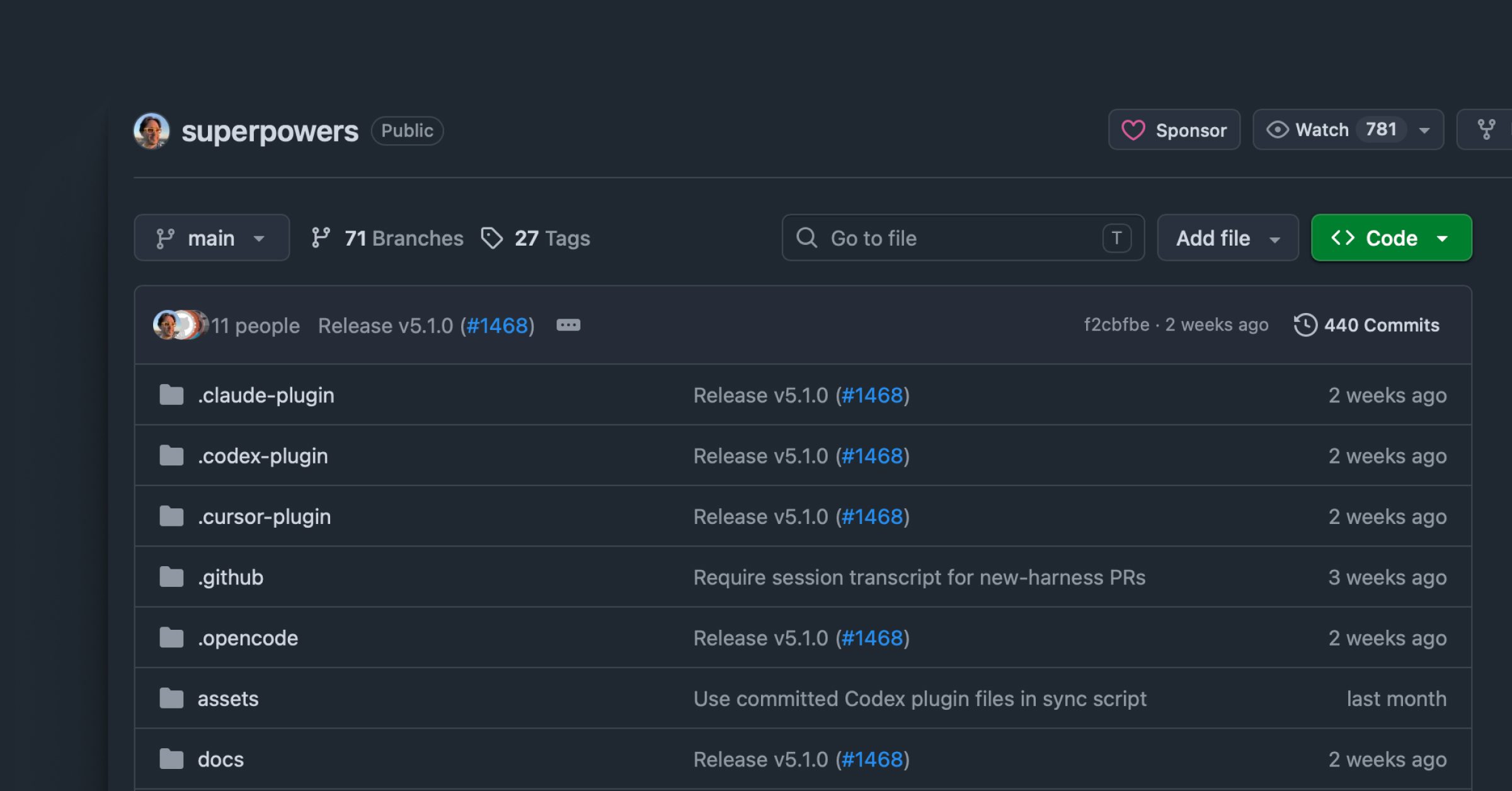
My framework is obra/superpowers, which implements a seven-stage development process: brainstorming, worktree setup, plan writing, subagent-driven development, test-driven development, code review, and finishing. I do not follow every stage mechanically, but the core sequence, brainstorm, spec, plan, build, review, is the backbone of how I work.

Step 1: Create the Worktree

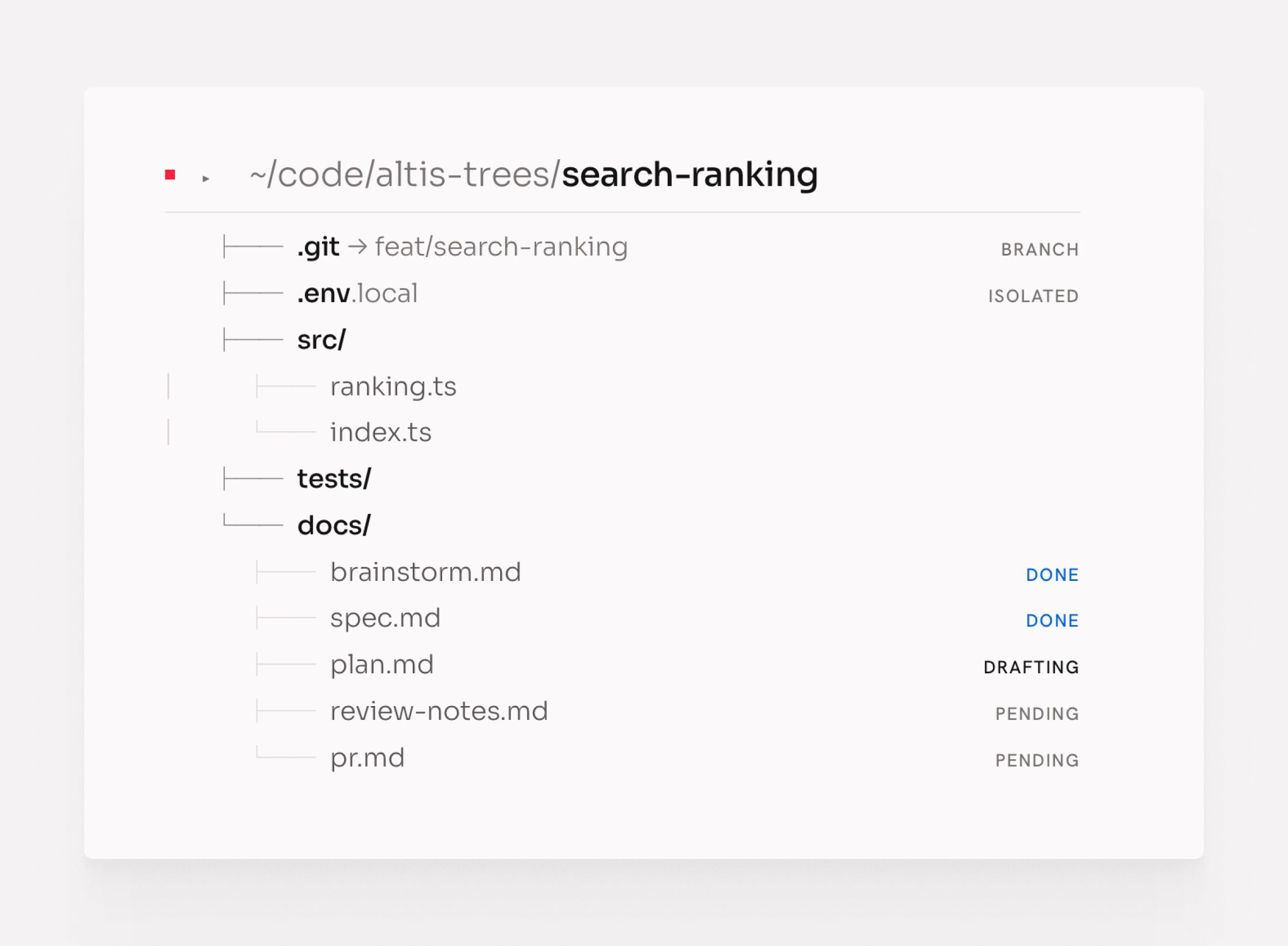
Every piece of work starts with its own Git worktree. A personal skill creates worktrees in an opinionated, consistent way: the right branch name, the right directory structure, the right environment. One command, and the workspace is ready.

This matters because everything that follows happens in isolation. The worktree is the container for the entire feature, from first brainstorm to merged PR.

Step 2: Brainstorm With the Agent

With the worktree ready, I open a brainstorming session using the superpowers brainstorming skill. The agent interviews me, asks questions to understand the problem, explores different approaches, and sometimes visualizes options: diagrams, flow descriptions, comparisons. It does not start designing until it understands what I actually want.

This step is slower than typing “build X.” It is also why the output is worth building.

Step 3: Write and Review the Spec

Once the agent has enough context, it writes the design spec. I read it carefully and improve it where my thinking has evolved. Then I bring in a second agent: I share my vision for the feature and ask whether the spec aligns with that vision. A fresh agent without prior context finds gaps I glossed over.

The spec is the source of truth for everything that follows. Getting it right here prevents rewrites later.

Step 4: Build the Implementation Plan

With a solid spec, I ask the agent to write an implementation plan. Superpowers breaks this into small tasks: each two to five minutes of work, with exact file paths, complete code intent, and verification steps.

I read the plan thoroughly. When I find gaps or steps that do not match my intent, I tell the agent to change them. A vague step in the plan produces vague code. I fix the plan until every step is something I would hand to a junior developer with no further explanation.

Step 5: Cross-Review Spec Against Plan

Before building starts, I spawn a fresh agent and ask it to review the spec and the implementation plan side by side. Does the plan deliver what the spec describes? Does every acceptance criterion in the ticket have a corresponding step in the plan?

This agent reports gaps. I fix them. Then building can start.

Step 6: Execute the Plan

When the plan is solid, I run the executing-plans skill. This dispatches subagents that execute each task sequentially, running checks between steps and stopping if something goes wrong.

I use a detailed prompt for this step to give the agent the right context and constraints:

/superpowers:executing-plans
docs/plans/path-to-implementation-plan.md

Follow the plan strictly and complete tasks sequentially and do not stop until finish.

Execution Rules

1. Implement tasks one by one in the order defined in the plan.
2. Create a separate commit for each completed task.

Code Review Phase
3. When all tasks are completed:
- run the requesting-code-review skill
- review the code changes against the implementation plan
- fix any valid feedback or implementation gaps.

Finalization
4. Run all tests and quality gates again.
5. If everything passes:
- commit final changes
- push the branch

Output
6. Provide a concise summary including:
- tasks completed
- commits created
- issues fixed during reviews
- manual test results
- test and quality gate results
- link to the created PR.

I start it and leave. The agents work through the plan without me.

Step 7: Review as a User

When execution finishes, I review the result as a user, not as an engineer. I do not read the code at this stage. I use the feature. I look for whether it does what I asked, not whether the implementation is elegant.

If the result is significantly wrong or too much is missing, I reset. I discard the code and return to the plan: refine it, try a different model, or rethink the spec. Starting over is faster than patching something fundamentally off.

If the result is mostly right with some gaps, I continue.

Step 8: Code Review by Three Agents

For the code review, I spawn three subagents in parallel, each focused on a different angle:

  • Maintainability: is the code readable, consistent, and easy to change?
  • Performance: are there obvious bottlenecks or inefficiencies?
  • Security: are there vulnerabilities, unsafe inputs, or exposed data?

Each agent reviews independently. When the results come back, I triage them: critical issues get fixed immediately, lower-priority findings get addressed or noted. Then I ask the agent to implement the fixes.

This cycle repeats until the code meets the bar.

Step 9: Ship to PR and Test

When the code passes review, I open a pull request and do a final manual review of the diff. Then I create a test plan as a user: a checklist of scenarios a real user would walk through.

I give that test plan to an agent with browser access and ask it to execute each step using the Chrome integration. The agent runs through the plan, reports what passes and what fails, and I address the failures.

This cycle, fix, retest, fix again, continues until the feature works end to end as a user would experience it.

When it does, I merge.

Code Is Cheap: The Throw-Away Mindset

I treat generated code as disposable by default.

The agent builds. I review. If the result falls short, I throw it away and start again: with a different model, a different prompt, or a refined implementation plan. This sounds wasteful. In practice it saves more time than it costs. Iterating on code going in the wrong direction is expensive. A clean start with a better spec is cheap.

Code is cheap now. The expensive part is reading, deciding, and knowing when to stop.

This mindset only works if you are honest during review. The temptation is to keep patching something that is mostly right. Resist it. If you would not write it yourself, and the agent cannot fix it cleanly in one more pass, throw it away.

Quality Gates: Built-In Self-Correction

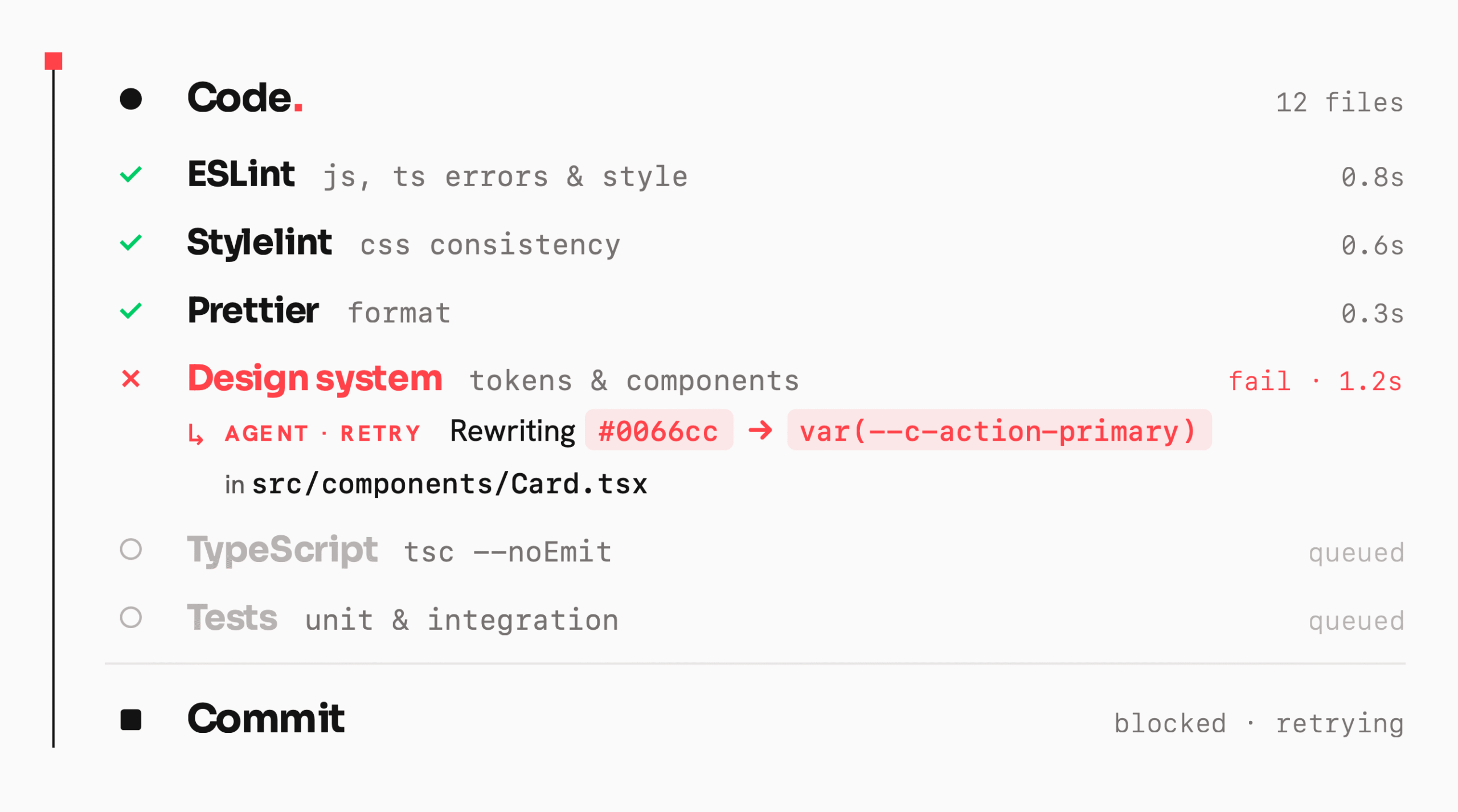
The single biggest improvement to agent output quality is not a better prompt or a smarter model. It is a strict set of quality gates that run before every commit.

Agents still hallucinate (a lot). They produce code that looks right but breaks something subtle. Quality gates change that: the agent catches its own mistakes without you having to notice them. The gates fail, the agent reads the error, fixes it, and tries again. By the time you see the output, it has already corrected itself.

The Gates I Run

I enforce six checks on every project:

  • ESLint catches JavaScript and TypeScript errors, enforces code style rules, and flags patterns that cause bugs. The agent cannot commit code that fails this.
  • Stylelint enforces CSS and SCSS consistency. Without this, agents drift into inconsistent naming, specificity problems, and unmaintainable styles.
  • Prettier formats all code uniformly. It removes every formatting argument and keeps diffs clean.
  • Design system compliance is a custom check that verifies the agent is using the correct design tokens, components, and patterns rather than inventing its own. This gate most often catches an agent going off-script.
  • TypeScript typecheck runs tsc --noEmit to catch type errors that ESLint misses. Agents frequently produce type-unsafe code that passes linting but breaks at runtime.
  • Unit and integration tests run on every commit. If the agent breaks something that was working, the tests catch it immediately rather than at review time.

Why This Works

Each gate provides fast feedback. The agent does not wait for a human review to learn it got something wrong; it gets an immediate, machine-readable description of exactly what needs to change. It reads the error, fixes it, and commits.

This loop, write, check, fix, commit, runs automatically inside the executing-plans skill on every task. By the time the skill finishes, the code has passed all six gates on every commit in the plan.

The code quality you get back is substantially higher than what agents produce without gates, not because the agent got smarter, but because it corrected itself dozens of times before you saw the result.

Skills: Build Once, Reuse

A skill is a reusable prompt or workflow: a precise set of instructions for doing a specific thing well, invocable with a single command. Skills eliminate the overhead of re-explaining context every time.

Finding Skills

Before building a skill, I search for one that already exists. I use skills.sh, a tool that searches available skill libraries and surfaces what fits the task. Most of the time, someone has already built what I need.

When I find a candidate, I read it carefully before downloading. A skill that looks useful can encode assumptions that conflict with how I work, or instructions I would not want an agent following automatically. Reading it first costs a minute; discovering the problem mid-task costs far more.

If the skill works, it earns a permanent place in my toolkit. If it does not, I delete it and move on. No friction, no sunk-cost trap.

Building Custom Skills

For tasks I repeat often and cannot find a skill for, I build one. The process is straightforward: describe what I want to achieve, have the AI draft it, read it carefully, refine it, and test it. Once built, I run it, step away, and come back to the result.

The fire-and-forget pattern works because the skill captures the reasoning once. I do not re-explain the standard every time; I invoke it.

I build new skills whenever I find myself writing the same instructions more than twice. That threshold is the signal.

Skills I Use

These are the skills currently in my toolkit across ~/.claude/skills and ~/.agents/skills:

SkillWhat it does
worktree-environment-setupCreates a Git worktree in an opinionated, consistent way: branch name, directory structure, environment
multi-reviewer-code-reviewSpawns three subagents in parallel to review code for maintainability, performance, and security
generate-test-planProduces a user-facing test plan from git changes
execute-test-planRuns a test plan using Chrome browser automation, step by step
triaging-issuesTriages GitHub issues before implementation: classifies, asks clarifying questions, identifies scope
github-issue-creationTurns a rough idea or bug description into a well-formed GitHub issue
agent-browserBrowser automation for agents: navigating pages, filling forms, extracting data
writing-clearly-and-conciselyApplies Strunk’s rules to any prose I write or edit
reflectAfter a session, extracts learnings and patterns worth keeping
skill-creatorBuilds, tests, and improves skills, including benchmarking and eval runs
frontend-designGenerates production-grade frontend components with high design quality
geminiRuns Gemini CLI for code analysis, refactoring, or automated editing
codexRuns Codex CLI for the same
lfgFull autonomous engineering workflow, end to end
debug-optimize-lcpDebugs and optimises Largest Contentful Paint using Chrome DevTools
seo-auditAudits a site for technical SEO issues

Worktrees: One Branch, One Environment

I use Git worktrees heavily. The rule is simple: one branch of work equals one worktree.

This lets me run multiple repos and multiple workstreams at the same time without context switching. I use supacode.sh daily, which makes managing multiple worktrees across multiple repos workable. Each worktree is isolated: its own environment, its own agent session, its own state.

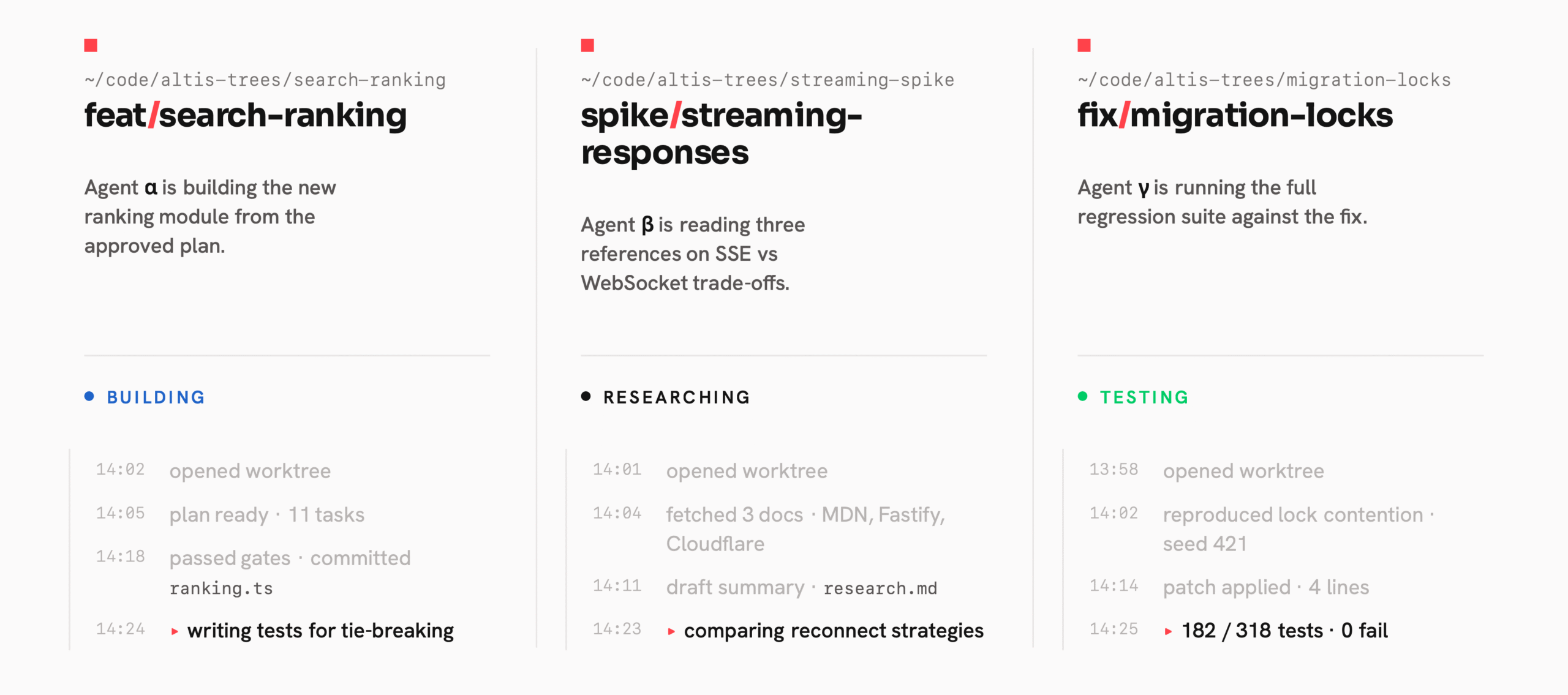
The practical effect is that I can run three or four things in parallel without losing track of any of them. One agent is building a feature. Another is doing research. A third is running tests. I move between them when there is something to review, not before.

Parallel Agents: Do More at Once

Whenever tasks are independent, I spawn multiple agents or subagents in parallel. This is one of the most direct ways to save time.

Instead of running three research tasks in sequence and waiting for each one, I fire all three at once. When they are done, I read the results. The same logic applies to code generation, code review, brainstorming, and exploratory analysis. If the work does not depend on other work completing first, it should run in parallel.

This requires a slight shift in how you think about task planning. Before starting, I ask: which parts of this depend on each other, and which parts are independent? The independent parts go in parallel. It takes practice but becomes instinctive quickly.

Vibe User: Let the Agent Be the User

One technique that most developers miss: ask the agent to use the app as a normal user would.

I call this “Vibe User.” Rather than always using agents to build or review code, I give them browser access, via Chrome DevTools MCP, agent-browser, or the Claude Chrome integration, and tell them to explore the app as a real user with no prior knowledge. The agent navigates, finds friction, forms opinions, and returns ideas, suggestions, and critiques.

This is valuable precisely because I built the thing and know too much. I know where to click, what each error means, where the sharp edges are. A user does not. The agent-as-user surfaces problems I would not notice because I am too close to the code.

Vibe User works well for UX review, early-stage product testing, and any time you need a fresh perspective on something you built. It complements Vibe Coding rather than replacing it.

This is an example of the prompt I use to do UX research on a web app:

You are a Senior Product Designer with 15+ years of experience shipping consumer and B2C products at companies known for design excellence.
Your expertise includes interaction design, information architecture, usability, and design systems.

Role
Act as my design partner and perform a usability and product design review of the application.

Target App
http://YourURL.local/

Method
Use the Chrome DevTools (or Agent Browser) skill to:
1. Open the application.
2. Log in using the provided demo credentials.
3. Explore the product as different user roles.
4. Visit all accessible pages and test core features and workflows.

Demo Credentials

Admin
Email: demo@example.com
Password: demo123456789

Review Framework

For each page you visit, document:

Page
- Page name / route

Observation
- What the page does
- Key UI components and interactions

Critique
- Usability issues
- Interaction friction
- Information architecture problems
- Design system inconsistencies
- UX clarity or affordance issues

Improvement Suggestions
- Specific design improvements
- Interaction changes
- IA or layout changes
- Component-level recommendations

Final Output

After reviewing the entire application:

1. Summarize the overall UX quality of the product.
2. Identify recurring design problems or patterns.
3. Provide the **Top 3 highest-impact improvements** that would most improve usability or product clarity.
4. For each improvement include:
   - Problem
   - Proposed solution
   - Expected impact.

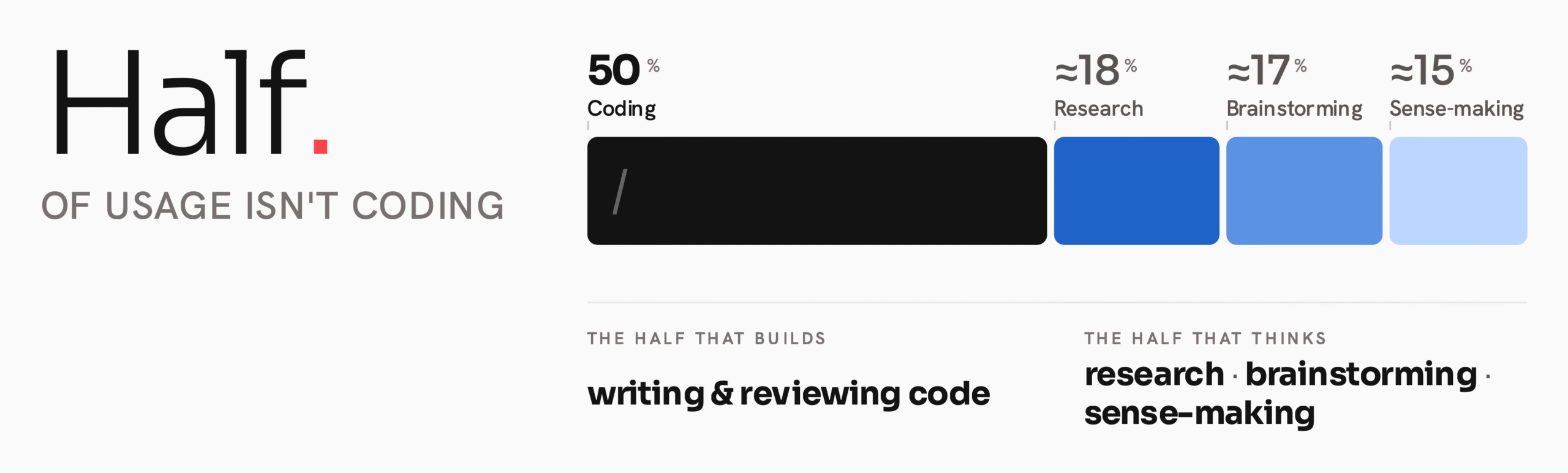
Half of This Is Not Coding

If I add up where my AI usage actually goes, roughly half is not coding at all. It is research, brainstorming, and making sense of information. Agents are as useful for thinking as they are for building, sometimes more so.

On Mobile: Fire and Forget

I use Gemini, Claude, and ChatGPT from my phone throughout the day. When an idea surfaces, on a walk, between meetings, late at night, I open a new thread, ask a question using a skill, gem, or custom GPT, and leave it. I come back when it is ready.

This works because of skills. A good skill means I do not re-explain the context or the standard I am working to. I invoke it, set it running, and move on. Ideas get explored the moment they arise, not when I next find time at a desk.

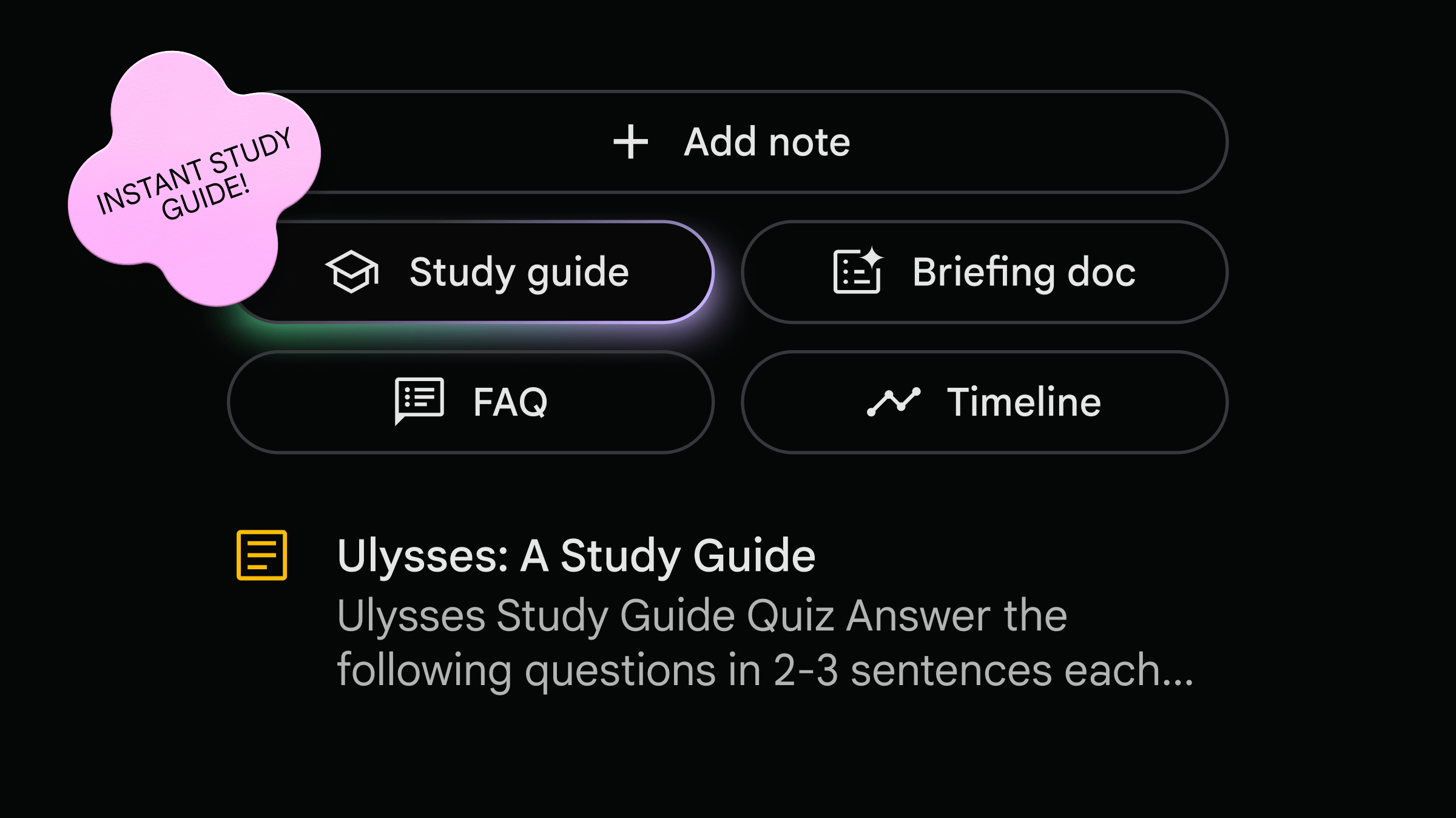
NotebookLM: Making Sense of Messy Sources

For client-facing and sales work, I use Google NotebookLM. The problem it solves is: I have an RFP, a set of Slack notes, a GitHub thread, a Fathom call transcript, and a slide deck, and I need to understand all of it quickly enough to respond well.

I put everything into NotebookLM. Then I ask questions, request summaries, and build mind maps until I have a clear picture of what the client needs. It replaces hours of reading and cross-referencing with a focused conversation.

Two things make NotebookLM useful for this work. First, it hallucinates less than most tools. Second, it cites its sources. Every claim traces back to the document it came from. When I am preparing for a client call, I need to trust what the tool tells me; source citations make that possible.

The Pattern

The pattern is the same across all of it: define the question, send the agent, move on. Come back to the answer.

The agents run while I am doing something else. The work does not wait for my attention. That is the point.

What This Adds Up To

AI agents do not replace thinking. They compress the time between an idea and a result, but only if you show up with clear intent.

The patterns in this post each solve a specific problem. Staying tool-agnostic means no single model’s bad day blocks your progress. Spec-first work means the agent builds what you actually wanted. The throw-away mindset means bad output costs almost nothing. Skills mean repeated work gets faster over time. Worktrees mean you can run many streams without losing track. Parallel agents mean independent work does not wait in a queue. Vibe User means you get honest feedback on what you built.

Together these let you handle more work with less friction. That is the practical part.

What I Had to Unlearn

The harder lesson was emotional.

Early on, I put emotion into my prompts. When the agent produced wrong output, I grew frustrated. When it hallucinated, I pushed back as if it had made a choice. When it kept apologising for the same mistake, I got angry. None of that helped. The agent has no feelings, does not remember being scolded, and frustration in a prompt produces worse output, not better.

I no longer put emotion into how I work with agents. When something goes wrong, I stop, create new session and ask a clear, direct question: what specifically is wrong, and what should change? One precise instruction produces better results than a paragraph of exasperated corrections.

When I genuinely do not know what to do, when I am stuck or the problem is beyond what I understand, I stop guessing and ask the agent to research it. I ask it to return options and reasoning, not an answer. Reading those options helps me think. Then I choose what to do next.

When the output is bad, I throw it away. No negotiating, no patching, no sunk cost. Throw it away, adjust the spec or the model or the approach, and start again. Repeat until it is right.

The Mindset That Stays

The tools will keep changing: new models, new interfaces, new integrations, every week. The underlying approach does not:

  • Clear specs before building
  • Disposable code, not sacred code
  • Fire-and-forget, not babysitting
  • Parallel everything that can run in parallel
  • No emotion, just precision

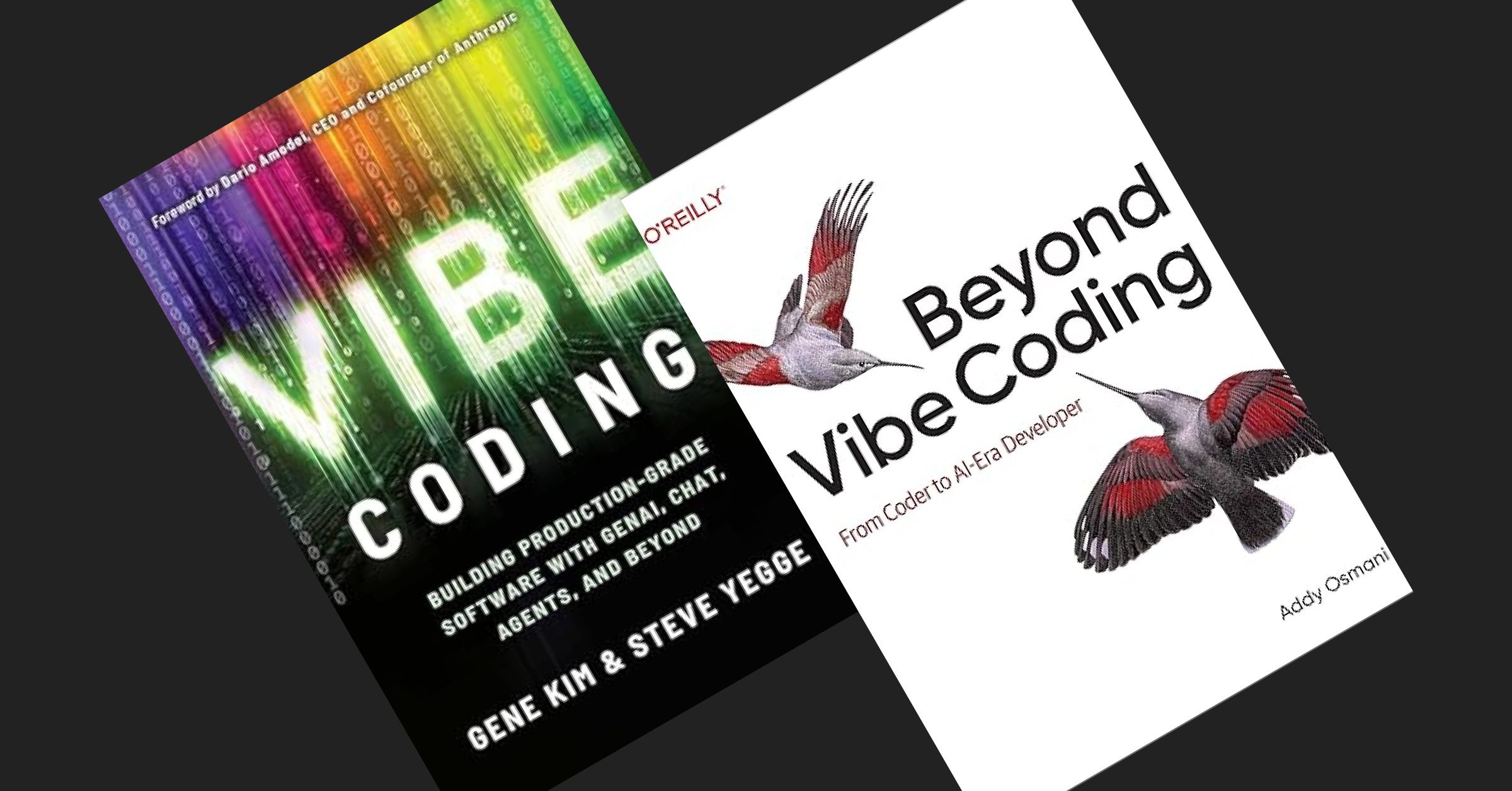
This is what I learnt from reading 2 books about vibe codings (Vibe Coding by Gene Kim & Steve Yege, and Beyond Vibe Coding by Addy Osmani), and experience it myself for the last 3 months.

There are still much to explore, but I have to pick and choose what works for me and improve my flow better.

PS: I brain dumped all my thoughts for this article into Claude Cowork and Claude Code. This article has been through many cycles of review by myself before publishing.

The post How to code with AI agents appeared first on Human Made.

#202 – Charly Leetham on Using WordPress to Enable a Digital Nomad Life

Transcript

[00:00:19] Nathan Wrigley: Welcome to the Jukebox Podcast from WP Tavern. My name is Nathan Wrigley.

Jukebox is a podcast which is dedicated to all things WordPress. The people, the events, the plugins, the blocks, the themes, and in this case, using WordPress to enable a digital nomad life.

If you’d like to subscribe to the podcast, you can do that by searching for WP Tavern in your podcast player of choice, or by going to wptavern.com/feed/podcast, and you can copy that URL into most podcast players.

If you have a topic that you’d like us to feature on the podcast, I’m keen to hear from you and hopefully get you or your idea featured on the show. Head to wptavern.com/contact/jukebox, and use the form there.

So on the podcast today we have Charly Leetham. Charly’s journey with technology spans over four decades, from tinkering with amateur radio as a teenager in Australia, to working in electronic engineering and eventually building a career in WordPress and small business tech support. With a background in field service, sales, and running retail businesses, Charly pivoted to helping people with their websites and tech needs right around the time WordPress was in its infancy. Today, nearly 20 years later, she’s still involved in the WordPress ecosystem, providing troubleshooting, support, and plain English tech translations for business owners who need their digital lives demystified.

But in this episode, we are focusing less on her technical skills and more on her unique lifestyle. Charly is a true digital nomad. Someone who’s not bound to a fixed address, but instead lives and works from a camper van fitted with a Starlink system traveling and working all over Australia.

We talk about what it was like to embrace remote working long before it was commonplace, and how she built a business that supports complete flexibility. We explore both the upsides of the digital nomad life, the freedom to travel, spend quality time with family, and work from beautiful locations, as well as the trade-offs such as limited space, and having to ruthlessly prioritize her longings.

Charlie discusses the essential tech setup that empowers her nomadism. From laptops and microphones to how Starlink satellite internet lets her work reliably from almost anywhere, even in places with little or no mobile signal.

There’s practical advice on working with clients, so support can happen on her schedule, and reflections on building a business that matches her values, even if it sometimes means saying goodbye to clients who aren’t the right fit.

If you’ve ever imagined trading your desk for the open road, or wondered what’s technologically, and personally possible, as a remote WordPress worker this episode is for you.

If you’re interested in finding out more, you can find all of the links in the show notes by heading to wptavern.com/podcast, where you’ll find all the other episodes as well.

And so without further delay, I bring you Charly Leetham.

I am joined on the podcast by Charly Leetham. Hello Charly.

[00:03:29] Charly Leetham: Hi Nathan. It’s really good to be here, and we are literally on other side of the world from each other.

[00:03:35] Nathan Wrigley: We could probably not be further apart. You are in Australia, and we’ve never met. We spent probably the last 20 minutes or so having a good old natter. It’s been really interesting. And actually, the way that this podcast was going to go, I think has been upended by the conversation that we just had. Because you talked to me about your digital nomadism, I’m going to say, and I want to lean into that.

But before we get into all of that story about how you’ve ended up working remotely and things, do you just want to give us a little bit of background about how you’ve come to work, be on a WordPress podcast? What’s your background with tech, your life in general? Whatever you wish.

[00:04:09] Charly Leetham: Okay, well, look, I’ll try and keep it short. There is like 40 years to sort of condense into three or four minutes here.

Look, I have always been interested in tech from a very, very, very young age. My dad kind of encouraged me, if I was showed interest in anything, he’d say, well, go and find out about and let’s do this and let’s do that. The age of 13, I had my amateur radio license. By the time I was 16, I’d just left year 10, grade 10, and I went and did an associate diploma, electronic engineering. I worked full-time as a junior laboratory technician in an electronics lab at the Australian University while I was doing that.

And from there I went to be a field service tech with a private company. I’ve done field service, I’ve done pre-sales, I’ve done sales, I’ve done contract management. I’ve done customer service management. Done bid management.

And then I had a need after I decided, I was really, really sick and tired of doing all of this, so I went and bought myself a business with a franchise. We ran retail businesses for four years. They failed spectacularly. And I had a need that I had to actually get some money through the door so that I could feed the kids, pay the bills, eventually feed myself, and the husband is part of it.

So this was born. And this was, people need help with their technology. People need help with their websites, people need help with their emails, people need help with all of this. And at that point in time, that was 2007 and WordPress was just in its infancy. I think it was, maybe three or four generations in at that point, but it was still in its infancy. And I learned, WordPress from that.

Someone said, I’ve got a WordPress website, it’s not working. Can you look at it? Sure. I can look at it. I know C++, I know Pascal, I know Basic. Oh, this is PHP. What’s that? I learned PHP, I learned themes, I learned plugins, I learned how to troubleshoot things. And here we are nearly 20 years later, doing the thing that I love the most.

[00:06:16] Nathan Wrigley: There’s a lot in there, Charly. Genuinely, there is a lot in there. But what I’ve taken from that is that you have always been a bit of a tinkerer. You’ve always been somebody that’s fascinated by the technology side of things. Not just the software, but also, you know, the engineering side of things. And so, gosh, what a history you’ve got.

We’ll get onto all the WordPress stuff a little bit later. Obviously that’s a big part of why you’re on this particular podcast because we are a WordPress focussed podcast. But it was the conversation that we had about half an hour ago that captured my attention and is just going to divert us for a little while.

And that is, you got on the call, we started talking about where we are in the world and the fact that you are over there and I’m over here, and isn’t it amazing that we can talk to each other? And the fact that this technology is here and, you know, when we were both children, this was the realm of science fiction. Being able to speak to somebody on the other side of the planet without prearranging it, and organising it with a telephone network and a great expense and all that.

And then we started talking about literally where you are. And I was kind of curious about your location. It turns out you are a digital nomad. Now, for those people tuning in who don’t know what this is, a digital nomad, I guess is somebody who is not bound to a specific location. I live in the UK. I have a house and a mortgage and all those kind of things. So I’ve kind of saddled myself to that, and I’ve got this definite spot in the world where I call home. You’ve decided to kind of get rid of all of that. And so just tell us about your life and what it is that you do, and how you move around and how you empower that with technology, and what technology you use to make that even possible.

[00:07:53] Charly Leetham: Okay. Let’s start by telling you a story. When my kids were all, all my kids are now in their early thirties, late twenties, so they’re adults. They’re gone, they’re out doing their own thing. But when my kids were born in the mid nineties, I wanted nothing more than to be able to stay home with them. But because of my experience, because of what I was doing, I was the breadwinner. I was the one that had the money coming in, so I had to go back to work. Went back to it when my kids were really young.

And as much as I loved my job and I loved what I was doing, I really hated not being able to be with him. And what I wanted to do was what I’m doing now, then. The ability to help people with their tech. The technology didn’t exist. We couldn’t remote into computers, we couldn’t do video conferencing. We couldn’t even do audio calls like phone networks for what we had. So if you just think about, you know, a young 20-year-old woman with two kids, working in IT, wanting to do this.

Now we come forward nearly 20 years, or nearly 30 years because my kids are 30. I can do exactly what I wanted to do 30 years ago today. I can sit wherever I am, I can run up my computer, I can get an internet connection, I can talk to you. Someone says to me, my computer’s not working, or my email’s not sending, I can’t do this. I can remote into their computer. I can do a face-to-face call with them. I can remote into their computer. I can give them that support. I don’t have to be on site to do that.

That is what a digital nomad is. That’s what me as a digital nomad does. I provide tech support to people wherever I am, literally in the world. I said to you, I traveled in the US for a couple of years. Well, I got stuck in the US for a couple of years. And I didn’t work over there. I want to be really, really clear because you’re allowed to work in the US when you’re over there on a visitor visa. But I was helping people. People would say to me, my computer’s broken, well, let me remote in. I’ll have a look. Let me go and do this, I’ll help you. My dad would ring me from Australia and say, my email’s broken. What can I do? I’d fix it for him.

So that’s what I do. So how does that work for me today? There is a housing crisis. That’s the first thing that we really need to recognise is there is a housing crisis. Finding a house is really, really difficult. Finding a house that is affordable is even more difficult. Rather than stressing on the fact that I can’t find a house, or I can’t afford the rent for a house, or I don’t want to have that stress of having a rent for a house. I fitted out a vehicle, I got a Starlink system. My brother fitted the vehicle out for me. My son, who is the electrician, put the electrical into it. And I literally live on the road. I go from place to place. I find somewhere I can hook into power for a couple of days. I throw my Starlink out the site, and I work. I support people.

You could talk to me tomorrow, well, not tomorrow. Talk to me in a month, and I’m going to be in far North Queensland. A month from today, I will be in far North Queensland doing things up in far North Queensland because I’ve got to be up there for something. That’s what my life is like.

[00:10:55] Nathan Wrigley: If we rewind the clock, I don’t know, 10 years, did you desire something like that? From what you said, it sounds like you did. You always had some sort of intuition that if the technology allowed, you would wish for something like that. But obviously, kids and bills and all of that kind of got in the way. Has this been something which, if you sort of look back on your life, you think instinctively this was something that you wished to do?

[00:11:17] Charly Leetham: Not on the road. Not mobile like I am. Being able to do it from home, being able to be a work from home mum, absolutely. Being on the road and moving around, no, not even my wildest dreams would I have even imagined it. I didn’t even know that was available to us. I had no idea.

Look, I’ve met people, just to sort of segue very quickly. I have met people while I’m doing this, and they are young families. They are mum and dad and the kids, and they’re living on the road. They’ve got homeschooling curriculums for the kids. The kids do all their schooling. They get all these extra education of the places they’re in, all the things that they’re doing. Mum and dad will arrange to take the kids out on a bushwalk, and go and see a place that very few people in Australia will ever get to see. And these kids are living this life. I didn’t know that was available. If I had known that was available, I might have done that with my kids.

[00:12:08] Nathan Wrigley: I think one of the curious things is that, if you are working in the tech space, and obviously we’ll talk more about WordPress in a moment, there is a significant chance that this is available to you. I mean obviously you may have a job which is office bound. We understand that that means that you’ve got to show up to the office and what have you. But I’m imagining that there’s quite a few people listening to this podcast who, if they were to really examine it, these possibilities are open to them.

But it may not be something that they, A, wish to do, or B, they’ve not really thought about it too much. You know, they’ve decided that, okay, life is fine, I like my local environment or what have you.

What are like the key benefits, if you know what I mean? If you were to advertise this lifestyle to our audience, so we’ll do this in two parts. Let’s do the benefits first and then we’ll do the drawbacks later. What are the key things which you look at in your life at the moment and think, I’m so grateful for that? What are they?

[00:12:57] Charly Leetham: Freedom. Absolutely the freedom. I mean, we’re going to talk about drawbacks in a minute, so that’s going to get balanced out. But it is the freedom. It’s the ability to say, it’s getting cold in the south of Australia, remembering we’re in the southern hemisphere. So, I actually have to say that because people like, it’s hot in the south. No, it’s cold in the south. So as the winter months come and it gets colder, we migrate north. So I can literally say, no, it’s too cold here, I’m going to go north. Going to go to Queensland and spend winter in Queensland. It still gets cold, but not as cold as it does in the south. So you’ve got that ability.

I guess one of the biggest benefits is my dad is, he’s in his late seventies and I get to travel with dad. Dad’s traveled for many, many years and he still is. But I get to travel with dad. I get to spend these years with my dad. There’s not many people that can say they get to spend this sort of time, and this quality time, with their parents at this stage of life, because life gets in our way. But we make it work.

We will, once a week, arrange to go and do something. He’ll come and knock on the door and say, you are working too hard. I’m like, I’m working, go away, leave me alone. But then it’ll be, okay, yes, you’re right. I’m working too hard, so why don’t I take this morning off and we go and visit this place where we are staying. Go and find a touristy place or a bush walk to do, or go for a swim in the sea, or go and do something together so I can spend time with my dad. If the family needs me to be somewhere, I can be there, generally.

I also just to sort of pad this out a little, I also house sit while I’m doing it. So sometimes I’ll get to a place, someone will be advertising, we need a house sitter. We need someone to come and live in the house, or live at the house, for a couple of weeks while we’re away. So I’ll go and house sit for them, and I get another experience in all of that. So that’s the benefits. It’s just that flexibility. I would be doing exactly what I’m doing, but I would be stuck in a house. I’d be stuck in a room, in a house, grinding. I can grind and be in some of the most beautiful places in the country.

[00:15:02] Nathan Wrigley: Do you know, it’s so curious because I’m imagining there’s a proportion of the people listening to this who are just so in awe of that description. You know, oh gosh, you can really spend the time in the locations that you wish. I’m imagining there’ll also be other people who think, no, that’s not what I want at all. But I’ve got to say, I’m really drawn to what you’re saying. The idea of being able to go and, I don’t know, work with a spectacular view. Or work in a particular city for a period of time, and then go somewhere slightly more rural. In other words, it’s not the same view that you get every day when you wake up. There’s that variety in life which, certainly for me, there’s a lot of appeal there. Okay, let’s do the drawbacks. What are the downsides?

[00:15:44] Charly Leetham: The downsize is I live in a car. Literally, I live in a little camper van. My workspace is probably, because I fitted out a little commercial vehicle, a little commercial van as my van and as, you know, as my income improves, my savings improve, I will probably upgrade it. But my workspace is probably a metre by a metre. It’s not very big. And when I finish up for the day, I’ve got to pack everything up so I’ve got room for relaxation. I can’t sort of just walk out of a room, shut the door and say, well, that’s work done.

Now, work’s done for me, I’ve got to pack everything up, I’ve got to put everything away. You are living on the road, so you don’t have all of your stuff. And I’m going to put stuff in double quotes, they’re in inverted commas. You learn very quickly what is important to you, and what is necessary, and you have what is necessary. And then you have a few of those things that you go, these are really important to me and I’m not going to give them up.

So it is not like you can say, oh, I’ve got that plate that is really good for this entertaining thing, and go to a cupboard and pull that plate out that you use maybe once a year. No, you don’t have that. You’ve got the plates that you use every day.

[00:16:50] Nathan Wrigley: Yeah. The plates.

[00:16:52] Charly Leetham: Yeah, well, I travel on my own. I could literally live with one plate, one cup, one bowl, knife and fork. You are trading off that flexibility of having a house where you can have things stored, and all of storage space. You really have to think about what it is you want. I have a rule. I literally have a rule and I think everyone should live with this rule anyway. I have to have needed it four times before I go and buy it. If I haven’t needed it four times, then I’m not going to buy it. If I look at something, I go, oh, that’d be really cool and it’d be really convenient. Then I go, but would I use it? Have I needed it four times? Have I needed the functionality that gives me four times? No, don’t buy it. Because where the hell am I going to put it?

[00:17:37] Nathan Wrigley: Yeah, and I guess whatever you’re buying, you have to buy the tiny version of it as well. You can’t get the sort of jumbo version of whatever it is.

[00:17:44] Charly Leetham: There’s your other trade off is you can’t buy food in bulk. Like, I used to go and buy several cans of food and put them in the cupboard. Whether I used them or not immediately, there would be several cans of the same thing in the cupboard just in case I needed it. And if it was sort of, oh, I’m down to the last can, I’ll go and buy a few more. Well, now I’m down to buying two or three cans at a time. And once I’ve run those out, I’ve got to go and find the nearest shop and go and buy another one just to sort of keep it topped up.

You’re not buying in bulk, you’re not buying your meat, you’re not buying your fruit veg in bulk. Does that matter? No, because when you get to certain places, you normally find the local providers, you normally find the local fruit seller or the local fruit and veg shop, and go and buy there. You go and support the local community, and you pick up a few things there and, yep, that’s what you’re going to use. That’s what we do.

[00:18:31] Nathan Wrigley: Just to interrupt there, Charly, do you try to spend a significant portion of time in a particular place so that rather than just sort of driving through it, I guess, and spending a couple of days here and a couple of days there, do you spend significant amounts of time there, and therefore begin to have some feeling of what that community is like?

I guess the underpinnings of that question really is, how do you get that sort of human interaction that so many people think is important? Because clearly you are meeting fresh people every day, and you probably don’t get the chance to form those roots and what have you. So there’s a lot there. But do you know what I mean? Do you try to sort of spend a bit of time so that you gather some of those human connections along the way?

[00:19:12] Charly Leetham: Okay, so there’s a couple of things there that you’ve touched on. On my way to a location, I may only spend a day in a location, as I’m heading to a final destination or the next stop along the way. When I get to that next stop along the way, I do try to spend a bit of time, because I like to put my roots down. I like to be able to just settle on in, be able to work for really long periods and not have to worry about, oh, I’ve got to pack everything up and be on the road again. I’ve worked for three days, now I’ve got to spend the next two or three hours packing everything up so I can get on the road and drive for another couple of hours. Yes, I know English people are going to say, couple of hours driving, you’d be across the country.

We’d spend a couple of hours driving and then you get to the other end and you’ve got to set it up. So you’re losing a day when you’re doing that. So my preference is when I get to where I want to be, getting my feet down and staying there for a couple of weeks if I can. And then from there, I use that as a base of, okay, what is within a hundred kilometers that I can go and visit, and do the site seeing, and do the local colour, and make that a hub for my activities.

You then asked about human interaction and honestly, I think I’m a little different to people. I don’t need it as much as others. I am really, really quite happy to just be in my sphere. I’ve got my online connections. If I need to speak to someone, I’ve normally got someone on the other, on Discord, or one of the chat programs that I can chat to. And then if I feel like I’m getting to that stir crazy point, you go to the local pub or you go to the local cafe and you sort of sit around and you have a chat to the locals.

That fills that need for me. I’m not a person who is, it sounds terrible, I’m actually really good in a public environment, but it drains me. So I really, once that’s done, I’m done for a couple of days and I can just go sit in nature and not worry about it.

[00:20:58] Nathan Wrigley: Yeah, I think everybody can totally see that. There’s just so many different personality types, isn’t there? I can identify exactly with what you’re saying. I can go for extended periods of time, and not really require that human interaction. And then occasionally I sort of crave it, and so I satisfy it and go and meet people and hang out with all sorts of different people.

And so I guess really that is the piece that you would need to examine in your own life. Because if you were going to go nomadic, for want of a better word, you’ve got to really understand that bit. What is your need? On what level do you need to be with other people and interact with other people? Because that’s really the fulcrum around what makes this whole thing possible.

Speaking of what makes the whole thing possible, I’m interested to delve into the tech a little bit. Because you mentioned this sort of one metre square, and the fact that you’ve got to pack things away and what have you. I’m curious as to what technology do you have which enables this? Ignoring the vehicle and all that, I’m just trying to imagine what you might put in your shopping cart. If you were telling somebody this digital nomad life was available, what would be the requirements to make that happen?

[00:22:01] Charly Leetham: So I’m doing this with my laptop computer. Now, I buy as top of the range as I can when I buy, and it lasts me for years. So I’ve got, I don’t know if you’re familiar with them, I have an MSI gaming computer, because it’s got the extra fans in it. So it really, really works well when you’re doing a lot of processor intensive stuff. So it’s not just for gaming, because I do a bit of graphic design and I do a bit of this and I do a bit of that. So the extra fans make the world a difference.

So I’ve got an MSI gaming computer, or an MSI computer. I have an external microphone. I’ve actually just recently bought an external webcam. I was using the webcam on the computer. It was perfectly fine. I’ve changed my setup to where I now have an external monitor mounted on the wall in my van. So when I settle in, I pull my 21 inch monitor out and I plug my computer into it and I’ve got this beautiful big monitor. I’ve got my external keyboard, and I’ve got my mouse.

[00:22:56] Nathan Wrigley: Okay. I mean it’s the bare essentials, isn’t it? I think we can all understand that. And then I think you mentioned the internet connectivity bit, which I suppose is also a crucial part of the tech. Because where I am, it’s a landline. I obviously have, you know, I’ve got a mobile phone, so there’s the cell signal, which will allow me to roam within Europe and North America and what have you, but there’s all the cost and everything associated with that. Where you go, I think it’s fair to say that you would quickly lose all manner of possibilities because the reception in Australia, you said is not that great in terms of the internet. So how do you overcome that? I think you said Starlink.

[00:23:30] Charly Leetham: Yes, Starlink. I kind of looked into it for a very long time. I was relying on our mobile data and using my phone as a hot link. But in Australia, I was joking with you about it when we started this call, I’m on the NBN here. And if anyone knows anything about the NBN, you’ll know that most Australians hate the NBN. It’s terrible. If it works, you’ve got to consider yourself lucky.

It’s great if you are in a capital city, but you go a hundred kilometers, and I’m being a little flippant when I say that, but I’m not too far wrong. Go a hundred kilometers away from a regional center and you’ve got nothing. There’s no radio signal. By radio signal, I mean mobile signal. You can’t make phone calls. You’ve got that little, there is no signal icon on your phone. You can’t actually get a connection. I say a hundred kilometers, maybe it’s 200, maybe it’s 250, but that’s not a very long way in Australia. It really isn’t.

So I bought Starlink. I spoke to someone who was traveling along the way. And I actually want to come back to just the nomadic lifestyle when we’re done here, Nathan. And I met someone while they were traveling. They said, oh, Starlink, it’s wonderful. And it was still relatively new at the time. I’m like, oh, really? Are you sure? And he explained it to me like, oh. So when I got the car, I went and bought myself the Starlink and it’s fantastic.

Oh my goodness, it’s so good. You’ve got to have power because the routers take power. You can just get, you know, one of the, I don’t know if you’ve got them there, the power stations, the USB power station that you charge up and you can run all your devices off it for a couple of hours. You could do that. I’ve seen people run them off of just car batteries with the clamps on the battery terminals. I’m an Australian, this is pretty normal.

So you’ve got to have the power for the router, to run the router. That then powers the dish and you’ve basically got, in inverted commas, uninterruptable internet for as long as your power lasts. For as long as you’ve got power, you’ve got uninterruptable internet. I have found where I’ve been, I house sat for my sister-in-law during winter, and her internet was terrible. So I went and got my Starlink out and threw it up and connected to it, and I had better internet. The connection speed on the internet on the Starlink versus her landline connection was like 10 times. I had 10 times better internet connection using Starlink than I did on a landline.

[00:25:50] Nathan Wrigley: With the Starlink technology, do you have to, so I really am ignorant of this. I mean I know it’s to do with satellites, and I know that you can have it bolted onto the side of your house, I guess if you live in a rural area where there is no regular landline. But yours is this sort of peripatetic, mobile version of that.

Firstly, do you have to point it at a particular part of the sky? Do you have to spend time lining it up or do you just have to, just plonk it in daylight? So you know, outside basically? And is it bulky, or is it the kind of stuff that you could throw in a backpack if you were nomadic in that sense? You know, you didn’t have wheels, you didn’t have a vehicle, you were just sort of backpacking around. So two things. Where do you have to point it and is it big?

[00:26:27] Charly Leetham: Okay. You asked some really great questions. I’m just going to say they are really, really inspired questions. The first thing I want to say is that the stuff that you see bolted onto the side of a house is typically the stuff that we would use when we’re out mobile. It’s the same hardware. They’ve just got mounting technology, or mounting systems, that will allow you to mount it to the house.

Quick story before I answer the second question about how big is it and all the rest of it. I had a version 2 Starlink, which, it would now be five or six years old, and it’s got a pole and it’s got the dish on it. And the dish is, I say dish, it’s a rectangular panel and you’ve got put it on a base so that it’s stable. That’s heavier than the version three. I had that last week, the week before I had a problem with it and I was a bit concerned. So I contacted Starlink and I said, listen, it’s doing this, here’s all my, being a tech I had all the diagnostics and stuff I’d done and I laid it all out and I said, and I just really want to say that I’m a little concerned. Because I’m traveling and I’m often outside of mobile range, I don’t want to get outside of mobile range, put my Starlink on and have it fail. I’m concerned that I’ve got an intermittent fault that is going to be a problem.

And they said, no worries, we’ll send you a version 3, no charge. Because I’ve been with Starlink now, probably two, two and a half, no, two years now. And they just sent me the new hardware. So I’ve just upgraded to the version 3. So I can actually talk about both. So the version two is a little bigger. You’re probably talking, I’m just holding my hands up. It’s probably about 40 centimeters wide and 70 centimeters tall, the panel. It’s only 10 mil, five centimeters deep, I guess.

[00:28:06] Nathan Wrigley: It’s like the sort of size of a modestly big laptop screen. Something along those lines.

[00:28:13] Charly Leetham: Actually, it would be about the same size as my, I’m just looking at, it would be a little larger than my computer here. And I’ve got a 21, is this the 15? No, this is a 17 inch. This is a 17 inch monitor. So I’ve got a 17 inch laptop.

[00:28:24] Nathan Wrigley: Yeah, so we’re in the order of, got my hands out and I’m imagining how big that is. It certainly answers my backpacking question anyway.

[00:28:32] Charly Leetham: Well, let me answer that question for you in a different way. There is now actually what they call a Starlink Mini, which is designed for backpacks. It’s designed to fit inside a backpack. It’s got a portable power supply so that you can go hiking, you can go backpacking and take your Starlink with you. I don’t know a lot about it. I do know that the plan that you put it on is a little different to what you would put our plans on, the plans you would use for ours, because it’s designed for you to be really, really mobile, not just mobile like we are. And it’s really light. It’s designed for a backpack.

So that answers that question as well as like, you’ve got the technology. The version 3, and I wanted you to say this, the version 3 would probably be half as light as the version 2. So it’s much lighter. And one of the things that I really liked about the way this all works is that they’ve got ground mounts, right? So you just put them down on the ground, which is going to answer your next question. Do you need to position it? No. You just put it out. You’ve got to make sure it’s got a clear view of the sky. You’ve got to make sure that there’s no real obstructions, and that means no trees, no buildings. So nothing that’s going to sort of overshadow it as the satellites go over. And it will find the satellites for you. You don’t have to do anything. You just hit the button and it just works.

[00:29:45] Nathan Wrigley: Miraculous really when you think about it. I mean, actually think about it. You’ve got this box that you just plonk out under the stars somewhere, and a bunch of, I mean, I’m just actually thinking about what I’m about to say, and it is ridiculous. There’s a bunch of satellites, so they had to go into space, moving around the planet. And they connect to the little box somehow send TCP IP packets all over the place, literally off the planet, which then get bounced down somewhere and, you know, end up in this case talking to me. Insane that any of that works.

[00:30:19] Charly Leetham: So let me just add to that, at faster speeds than your standard internet will give you in Australia. I don’t know what it’s like in the US, I don’t know what it’s like in Britain, the UK, but it’s faster and more stable speeds than you get in Australia in general.

[00:30:36] Nathan Wrigley: Yeah, I actually, so it’s probably about six months ago I looked at Starlink. I’ve never seriously looked at it. I’m always just curious about it so I’ve ended up on the Starlink website. In terms of the speeds that you can get, they’re not comparable to what you can get through a landline. You can get significantly faster. But they are still impressive. And there’s nothing that day-to-day use wouldn’t be afforded by a Starlink package. I mean, maybe if you were sort of streaming 4K video left, right and center, maybe it would struggle in that scenario. But for any normal, and I’m doing air quotes, any normal use of the internet, more than enough. Absolutely incredible.

Okay, so all of that stuff, absolutely amazing. I’m so impressed with everything that you’ve just said. It really, it speaks to me. I think there’s an awful lot in your life that I think, oh gosh, wish I was Charly. But I’m kind of curious then as to the kind of work that you do actually do, because you painted this picture of all these infinite possibilities and what have you. And now I’m turning the attention really to what is it that you do do? What are the kind of things that you’ve been able to create in your life in this nomadic way? What kind of work are you able to pull off?

[00:31:43] Charly Leetham: So what I do, what my business is, is I help businesses manage their tech. I like to sit between a business and they’re tech. Some people might call me their CTO, some people might just call me their technical team. I try to translate tech into plain English for business owners so that it takes all of that stress out of it.

When your business owner says, I need an email address, or I need a new email account, or whatever it is, and they’re talking to a provider, and the provider’s giving them all of the marketing guff, and all of the sales thing, and then it’s not working. So then they’re speaking to the technical people and the technical people are talking their jargon to them. It’s overwhelming for them, and they’re not spending time running their businesses when they’re dealing with that.

They need someone who can sit between them and that morass, if you like, and then say, okay, what is it you want? Oh, right, cool. Let me go and talk to people. Let me get you some answers and I’ll come back to you. So I often say, I don’t walk into a business and say, the answer is this, now what was the question? Which is what a lot of product salespeople would do. And I don’t want to, I’m not trying to bag salespeople here, because they’re needed. But I don’t go in and say, the answer is this, now what was the question? I go in and I say, okay, what is it you’re trying to do?

I don’t want to know about the technology you want to use. I want to know about what your business application is. I want to know, what is your input and what is your output? What are you trying to do here? Cool. Now, what systems do you already have? Let me go and investigate those systems. Let me see what they can do for you. Let me see if we can make those systems work to do what you want them to do. They can’t do it, okay, let me go and find some technology that we can plug in and we’ll work with what you’ve got.

The big thing I find with a lot of small businesses is, two things. They get caught with the bright shiny object syndrome. Oh, this new technology’s coming out. It’s going to make my business run well, it’s going to make me money. Technology never makes you money, by the way. Technology only ever helps you make money if you use it right. So they get caught with the bright shiny object syndrome. Or they get caught with the sales person said it would work. I didn’t understand what it did, and I bought this system and now it doesn’t interact with the rest of my systems and I’ve now got to put all these other processes and all these other things in places to make it work.

That’s kind of where I sit. But I’m a tech as well, so I can make it work, I can troubleshoot it. I build websites, which is how I got into WordPress. I build websites. I fix websites. Like I actually also troubleshoot plugins. You know when we upgrade something or something’s not working and you’re getting all the error message? I’ll go and actually troubleshoot a plugin and say, oh, that plugin’s doing this. Can I fix it? No. Okay, I’ll send a support response off to the plugin provider and say, here’s all the logs, here’s what I’ve done, here’s what I’ve found. Can you get this fixed up for me? Or can you get it fixed up for us? Or, I’m really stuck because I’m getting to this point and it’s just not working and I don’t know where it’s going wrong, but I’m pretty certain it’s between here and here.

The other thing I do in all of that is, when you get the two suppliers going, it’s them with the fingers going both ways. I tend to be the one that sits between it and mediates to try and get that sorted out. So that’s what I do, and I do that all remotely.

[00:34:54] Nathan Wrigley: I’ve totally understood all of that. You know, you’ve got this, you’re sort of sitting in between, and being that kind of agent that helps people with the tech because they’re busy and they’re doing all the things and they haven’t got the time to gain that expertise in all of that.

So the follow up question, I guess from that, and it’s kind of leaning into your nomadic thing a little bit as well, is I guess that kind of work, the kind of work that you’ve got for yourself there, you can do it because, and I’m going to say this like it’s true and then you can correct me if I’m false, because you can do that when you have time available.

And what I mean by that is, it’s not like if you were working in an office and you need to be there from nine o’clock in the morning until five o’clock at night, because the telephone lines open up and you’ve got to field all this support. I’m guessing you’ve built a business where the channels of communication are a little bit more async than that. I don’t know, like an email exchange, or Discord, or Slack or whatever it may be. In other words, you can be in the car driving at 7:30 in the morning or 5:30 in the afternoon, or 3 or whatever it may be, because you are not needed at that exact moment by, I’m going to say your employer, but in this case, your clients. It’s more async than that. So I’ve said that like it’s true. Is that true?

[00:36:07] Charly Leetham: It is true for me. You are entirely correct. I’m sort of laughing because you’re like, oh, you can be driving in the car. The amount of times where I’ve been traveling with dad and my phone’s buzzed at me and I’ve gone, oh. And he goes, okay, hang on, I’ll pull over. Because we’ve got radio signal, we’ve got mobile signal. And he pulls over and I’ll fix the problem. Like, it might be a five minute fix and I will actually fix the problem then and we’ll keep moving. I’m sitting having a cup of coffee somewhere and one of my clients messages. And they message. I rarely spend time on the phone, or on video conferences with them. They know that the best way to get me is to book a time. I’ve trained my clients.

[00:36:44] Nathan Wrigley: That’s fascinating. So to you, that piece of the jigsaw puzzle is entirely obvious. And so it kind of just gets glossed over in your head. But you have created a business where that bit is the kind of foundational piece. If you had clients that wanted you on call 24/7, that really wouldn’t work because you’ve carved out a life for yourself where you don’t want to be on call 24/7. You want be able to do what you want to do when you want to do it, with the understanding that the clients are important, but the async nature of it is, they’ll message you. As soon as you can get to it, you’ll get to it.

And I’m guessing that when you onboard these clients, there’s that whole education piece. This is what I do, this is the way we respond to support. You’ll get an answer with, I don’t know, 12 hours, 24 hours, whatever it may be. And it may be that somebody listening to this podcast is firefighting all the time and they kind of haven’t figured that piece out. So I think that’s really interesting that you’ve got that, but yet it’s self-evident to you.

[00:37:39] Charly Leetham: I think I want to also add to that is that my clients trust me. So there might be point in time where I am always on for that client for a while at least. And when, I’m always on for them. If they message me, I will, and I do this for all of my clients actually. If they message me and say, hey, this is a problem, and I’ve got access, I actually have the ability to respond to them. I will normally respond to them and say, I’m letting you know, I’ve seen this on the road today, or I’ve got meetings all day. I’ve got this, you are in my queue, I’ll get to you as soon as I can. And they know that actually means not tomorrow, not the next day, not, whenever it is. I really do mean as soon as I get a space available, they’re going to get my attention. We’ve built that trust relationship.

[00:38:26] Nathan Wrigley: I think probably that is another foundational piece of your business. Without that trust, that’s going to be difficult to onboard clients. Do you tend to gather clients by word of mouth more, or do you have a marketing website where people onboard to you and you have to build that trust up over time? Or is it more a case of your clients recommend your services to other clients who then bring in that trust with them, if you know what I mean?

[00:38:49] Charly Leetham: Mostly column A, little bit of column B and more of column C. So yeah, it’s a bit of everything. I am actually just starting to ramp up my marketing as I start to get more comfortable with what I’m doing. And it sounds strange, right? Because I’ve been doing it for a while, but I’m starting to get more comfortable.

So now I’m starting to ramp up my marketing, because I can talk to people about how it works and what it does. And I have very frank conversations. It’s one of my things is to be, make sure that I am upfront, I am frank, I am honest about what goes on. I don’t like. I can talk salesy. I prefer not to. I prefer to be plain English and real world with people.

I think the other thing because, if we are talking to your audience, the other thing that I really wanted to highlight there is that I have had clients sack me because they don’t like the way I work. That’s not a reflection on me. That’s not a reflection on the surface I provide. It was a reflection on the relationship that was developed, and that relationship didn’t work for them. I’m good with that. I hope I found someone that can actually work with them the way they need them to work.

The other side of that is I have actually suggested to some clients that they would be better off with another provider. And as a service provider, that’s something that we have to be utterly comfortable with. Being able to say this client is not the client that works for us. We are going to spend too much time, too much energy, too much money supporting them, than we are going to get out of that relationship. It is commercial, and it sounds mercantile, and it sounds cutthroat, and it is. But by doing that, what you’re also doing is making space for another client to come in that is actually going to fit your ideals better, it’s going to fit the way you work better. You’re also allowing that client to find a provider that works better for them.

[00:40:39] Nathan Wrigley: This has been such an interesting conversation Charly. This is your life, right? So it’s just oh, this is the way I wake up and I do these things and what have you. But it’s in such contrast to my life at the moment, and yet there’s so many bits of the jigsaw puzzle that you’ve just described that are really fascinating to me.

I would imagine there’s going to be quite a lot of people listening to this who have intuitions that, I got into tech and I got into building WordPress websites so that I too could have a little bit more of that freedom. Maybe even going as far as you’ve done to make it more nomadic. So they own their own vehicle and potter about all over the place. Or they backpack for three months of the year. It’s just fascinating. And because it’s your life, it probably doesn’t seem that extraordinary, but from where I’m sitting, totally remarkable.

[00:41:24] Charly Leetham: No, it doesn’t seem like it’s every day to me. I will say that I think I have a concept of how blessed I am being able to do it. I try not to become so blase about, oh, this is just the way my life is. It’s yeah, I worked hard to get it to this point. So I’ve got to accept that I’ve put in a lot of work to get there, but I’ve also got to accept that there is a lot of blessings that have come from it. And I thank the Lord every day for the life that I have.

[00:41:50] Nathan Wrigley: Well Charly, we’ve reached the 45 minute mark, and although we had a whole range of different things that we could talk about, I hope that you are happy that’s where we ended up. We talked mostly about digital nomadism. We didn’t really stray into WordPress too much, but what a fascinating conversation.

Maybe we’ll have a conversation another day, and lean in heavily to the WordPress side of things, but digital nomadism it was.

Charly, where can people reach you? And I don’t mean that in a physical sense because obviously we have no idea where you’re going to be, but if they were to reach out online, or try and find you on a social network, or a website or whatever it may be, where would be some of the places where we could find you?

[00:42:27] Charly Leetham: The best place to find me is on my website. If you go to askcharlyleetham.com, and then at the end of it put /connect-me. So connect to me with the dashes between it, you will get wherever you can find me. All the networks I’m on. You can book a free 30 minute breakthrough session. And guys, if you just want to come and talk to me about how you can set up your business, or the things that you’re doing and the things that you need to consider, I’d happily talk to you for 30 minutes about that. That’s not a problem at all. And just so you know, I’m on Facebook, I’m on X, I’m on LinkedIn. I’ve got a YouTube channel.

I do a podcast every other day. I do a podcast, Making Tech Easy for Small Business Owners. It’s a 10 to 15, or 15 to 20 minute episode about something tech, and tries to try to simplify it out. I do interviews every now and again, much like this that I put up on there. I’m on Rumble, I’m on Odyssey.

[00:43:22] Nathan Wrigley: I will link to all of those different bits and pieces. Anything that we’ve mentioned just then I will put into the show notes. So if you head to wptavern.com. Search for the episode with Charly in it. And Charly, I should have said at the beginning is not a typical spelling, it’s c h a r l y. So if you search for that this episode will surface.

So absolutely fascinating, Charly. Thank you so much for chatting to me today and good luck. I hope that you managed to get wherever it is that you are going in the days, weeks, months, and years to come. Thank you so much.

[00:43:52] Charly Leetham: Thank you Nathan. I have had an absolute ball. I’ve really enjoyed this conversation, and I love talking about the life I’ve built, so thank you.

On the podcast today we have Charly Leetham.

Charly’s journey with technology spans over four decades, from tinkering with amateur radio as a teenager in Australia, to working in electronic engineering, and eventually building a career in WordPress and small business tech support. With a background in field service, sales, and running retail businesses, Charly pivoted to helping people with their websites and tech needs right around the time WordPress was in its infancy. Today, nearly 20 years later, she’s still involved in the WordPress ecosystem, providing troubleshooting, support, and plain-English tech translations for business owners who need their digital lives demystified.

But in this episode, we’re focusing less on her technical skills and more on her unique lifestyle. Charly is a true digital nomad, someone who’s not bound to a fixed address, but instead lives and works from a camper van fitted with a Starlink system, traveling, and working, all over Australia.

We talk about what it was like to embrace remote working long before it was commonplace, and how she built a business that supports complete flexibility. We explore both the upsides of the digital nomad life, the freedom to travel, spend quality time with family, and work from beautiful locations, as well as the tradeoffs, such as limited space and having to ruthlessly prioritise her belongings.

Charly discusses the essential tech setup that empowers her nomadism: from laptops and microphones to how Starlink satellite internet lets her work reliably from almost anywhere, even in places with little or no mobile signal. There’s practical advice on working with clients, so support can happen on her schedule, and reflections on building a business that matches her values, even if it sometimes means saying goodbye to clients who aren’t the right fit.

If you’ve ever imagined trading your desk for the open road, or wondered what’s technologically and personally possible as a remote WordPress worker, this episode is for you.

Useful links

Charly’s website

Charly can be found on the following platforms:

Starlink

Charly’s podcast

❌