❌

Reading view

There are new articles available, click to refresh the page.

#242 – Mark Westguard on How WordPress Adapts to Rapid Change: the Dot-Com Bubble to AI Hysteria

Transcript

[00:00:19] Nathan Wrigley: Welcome to the Jukebox Podcast from WP Tavern. My name is Nathan Wrigley.

Jukebox is a podcast which is dedicated to all things WordPress. The people, the events, the plugins, the blocks, the themes, and in this case, how WordPress adapts to rapid change the .com bubble to AI hysteria.

If you’d like to subscribe to the podcast, you can do that by searching for WP Tavern in your podcast player of choice, or by going to wptavern.com/feed/podcast, and you can copy that URL into most podcast players.

If you have a topic that you’d like us to feature on the podcast, I’m keen to hear from you and hopefully get you, or your idea, featured on the show. Head to wptavern.com/contact/jukebox, and use the form there.

So on the podcast today we have Mark Westguard. Mark has been building websites for over 30 years, starting out in the early days of the web with his agency, Absolute Internet in the UK, before moving to the US and transitioning into product development. He now runs WS Form, a form plugin for WordPress.

During this episode, we get into the evolution of the internet and WordPress through major technological inflexion points. Most recently, the rise of AI. Mark draws comparisons between the AI era and the frenzy of the .com boom, sharing how rapid influxes of investments and hype, can reshape the entire landscape, often faster than the underlying technology can deliver sustainable results.

The conversation focused not just on the opportunities AI brings to developers and end users, such as dramatically lowering the barrier to entry for building websites or plugins, but also the risks and challenges.

We chat about the overwhelming pace of new product creation, and how the real difficulty today isn’t necessarily building a plugin, but successfully marketing, supporting and sustaining it in a crowded ecosystem.

Towards the end, we talk about the potential saturation of plugin marketplaces and what this means for the future of WordPress businesses, especially as AI continues to accelerate product development.

Mark says that he’s embracing AI in his own workflow, but has some nostalgia for the days when coding was a hands-on craft.

Several other points were raised, including the ongoing demand for trusted, supported, software among non-developers, the looming spectre of AI driven security vulnerabilities, and whether traditional CMS platforms like WordPress might see a renaissance if AI hype collapses.

If you’re curious about how AI is shaping, and challenging, the future of WordPress development and product businesses, this episode is for you.

If you’re interested in finding out more, you can find all of the links in the show notes by heading to wptavern.com/podcast, where you’ll find all the other episodes as well.

And so without further delay, I bring you Mark Westguard.

I am joined on the podcast by Mark Westguard. Hello, Mark.

[00:03:34] Mark Westguard: Hello Nathan, how are you?

[00:03:35] Nathan Wrigley: Yeah, good. We’re going to have a little bit of a chat today about the landscape of WordPress in the era of AI. Let’s explore and see where we go.

So Mark, before we begin, bio time, basically, would you give us your little bio? Tell us what you do in the WordPress space.

[00:03:50] Mark Westguard: In the WordPress space, currently I’m running, WS Form, which is an online form plugin for WordPress.

And I’ve been in the web game far too long. People can’t see our grey hairs, but I’ve been building websites for, oh, I want to say about 30 odd years now.

Yeah, I’ve gone through everything from Netscape Navigator through to where we are now with AI. So, have been building websites for many many companies, for many many years.

So I had a agency in the UK called Absolute Internet back in the day, back in 1996. And then moved to the States in 2005 and carried on with that, and then got into product about, I want to say eight years ago now. And have been enjoying it, but still dabbling in the agency side of things as well.

[00:04:34] Nathan Wrigley: Okay, so you’ve had a long and storied history. Has there ever been a moment where it’s felt like so much was in flux, in your past? Because, I think anybody really listening to this would have some intuition that AI is a moment of great inflexion point. Maybe this is par for the course though, over a 30 year period in the internet. Has there been anything which has disrupted things or changed things as rapidly as this?

[00:04:56] Mark Westguard: I think, for me it was strange because the internet was there when I started university, but definitely was a big game changer for how we accessed information and searched for information.

The next big thing for me was really the .com bubble, and that going bang quite tremendously, which pulled my first agency into the ground. I mean, we went from 40 odd staff to four people in a day. So that was certainly a big flux in the internet industry that hit me.

Once that recovered, it’s been fairly plain sailing, hasn’t it? There’s been a lot of gentle progression in the internet game. We’ve seen CSS 2, CSS 3. We’ve seen HTML get a little bit better here and there, standards have improved. But nothing like AI. I mean, I remember the first time I typed a question into a bot and got a response back and I was like, okay, this is going to change things.

So yeah, we’re definitely in a big evolution here and one that I think is way more rapid than internet hitting us as well.

[00:05:58] Nathan Wrigley: I think the bit that makes it so profound is the fact that we’ve given over so much of ourselves to the internet. So during the .com boom, there were, I don’t know, how many desktop computers in the UK. I imagine there’s significantly more than there were then than there are now. You know, you had to go and find a computer, sit at a computer, switch the computer on, use things like dial up modems to get access.

[00:06:22] Mark Westguard: Yeah.

[00:06:23] Nathan Wrigley: And all of that kind of stuff, many obstacles. And now everything is in your pocket. So we do commerce in our pocket. We communicate from our, the device in our pocket. In other words, everything is wedded to the internet.

So the idea of things changing rapidly because we’ve become so accustomed to the internet being kind of like a utility. The rapid change is more profound, even if the change itself might not be so rapid.

Can I actually go back to the .com boom and bust bit? Because I bet a significant proportion of the people listening to this won’t even know what that was. Do you want to describe it, and how it crept up on you and overnight just decimated probably billions of dollars from stock markets?

[00:07:05] Mark Westguard: Yeah, it was around about, I want to say 2000, right when it hit. And when we first started as an agency, I was building websites using university computers. I didn’t own a computer. This is what you were talking about. Not everybody could have afford that technology back then.

But we were building websites for the most bizarre stuff. We had people coming in saying, I want to sell curry online. And I want to, anything and everything that they could come up with as with an idea, they were getting funding for.

And we were dealing with small one man bands, but we’re also dealing with big companies that had huge investment, that was pumped into these internet ideas. And it’s kind of similar to what’s happening with AI right now.

There’s an immense amount of money being invested into it. And the internet went from a handful of university websites, to everybody doing all manner of things online. The investment just got over the top. And then at some point somebody went, you know what, these investments have no ROI on them. There’s huge amounts of money being poured into this. And, basically the stock market crashed as a result of it.

And we had companies literally within a week saying, we are no longer going to be continuing our management contracts with you. Or we don’t want to build this website with you anymore. We were building $2 – 300,000 websites for the likes of Safeway and Sony and KPMG and all kinds of stuff. And it just stopped overnight. And it caused a lot of agencies to fall over, just completely fail, within a matter of months.

[00:08:37] Nathan Wrigley: I remember seeing an ad, I was on Kensington High Street in London. I used to work on Kensington High Street, and I remember seeing an ad on a bus stop. So it was a prime bit of real estate in the UK, probably one of the more expensive places that you could put an ad. And it was for an internet product. And the product was that they would come to your workplace, take your shirt, iron it, and bring it back to you. And I remember looking at ad and thinking, is that really what they’re selling? Genuinely? Like, is there a market for that? And obviously, within a month the .com bubble had burst.

But it was on that level, wasn’t it? It was the most peculiar ideas that people could come up with. And maybe some of them would’ve swum now. But back then, everything was sort of sinking. But also nobody had a mechanism to pay for it. We didn’t have the sort of access to credit and credit cards and Stripe and all of those payment gateways and all of that.

It was just, we were falling over ourselves to put ideas out there. Nobody seemed to have the capacity to say, no, look objectively, that’s a silly idea. That there’s no business there. It was more, let’s try it.

And then eventually a bit like happened with the Dutch and the tulips way back. Somebody woke up and said, hang on, there’s no money being generated by these things. Then presumably the bankers all took one look at each other and went, oh, what have we done.

[00:10:04] Mark Westguard: Yeah. And there were a lot of big, big ideas out there that caused a lot of that. I had one guy that came in and I won’t mention the project name, to save the guy’s grace. But he had come up with an idea to do an online training platform for children. And this guy we found out afterwards had maxed out his credit cards, had remortgaged his house, had got divorced from his wife, and a tiny part of the reason for the collapse around 2000. But it was that kind of thing that was happening all over the place.

[00:10:35] Nathan Wrigley: Yeah.

[00:10:36] Mark Westguard: We are seeing a similar thing happening now with AI. There’s a huge amount of investment going into it. Now I’m in no way an expert in the financial world and of investment in AI platforms and stuff, but hopefully we don’t see as big a bang as we did back then.

[00:10:50] Nathan Wrigley: It felt, at the time, it felt really normal until it suddenly didn’t. Until I saw that ad for that shirt ironing business, I genuinely I just thought, oh, that’s a good idea. Oh, that’s interesting. Look what they’re doing. Look what you can do now. Ads over and over again.

But then as soon as it starts to unravel, you begin to get the intuition. Wow, that really was hysteria. We were all caught up in this hysteria. Whether or not you are a financial expert, it must be obvious to everybody that we are caught up in some kind of AI hysteria at the moment.

Now, it may be that 80% of all of the business ideas based around AI will succeed. Maybe it’ll be that 80% of them will fail. But have you got any intuitions that point to it being over egged, hysteria? Are there any things that you’ve seen out in the real world where you’ve thought, boy, that really does feel like a moment where we ought to be thinking about whether we’re caught up in mass hysteria here?

[00:11:48] Mark Westguard: I think AI for me is like the next logical progression. We’re talking about coding here, right? AI is used for lots of different things, but in terms of coding, it’s like the next logical transition in terms of making coding accessible.

So if I think back to when I was in college and I was writing machine code for chips, literally like bite by bite, that was quite complicated. And then came along programming languages where we could not have to worry about the machine coding. And then we’ve got things like, for example Basic on a computer, which meant you didn’t have to worry about some of the more underlying code underneath that.

And then came the internet with HTML. And then we had page builders. Now I’ve got AI where we don’t even have to think about writing a line of code. You can literally just ask it what you want, and hopefully you’ll get out of it what you want. At every stage it has made working with a computer, and making a computer do something more accessible to more people.

So now my father can just go online and say, hey, build me this website. I want a green background. I want this font, I want it to say this. Write me a paragraph about such and such, and they can pretty much whip something up in an afternoon. A year ago, two years ago, that was him having to learn how to code to do that, or would have to use a drag and drop page editor to do that. So it really has opened up the ability to develop software and websites to a lot more people.

The thing that I’m seeing is there’s an awful lot of ideas being developed. People are coming up with ideas. Some people not actually thinking about, is this a project that’s got legs? Do people need this? There’s a lot of repetition going on. There’s a lot of things being built where really, even if you build a website solution or a piece of software, you’ve still got to market that. You’ve still got to support it. You’ve still got to get it out to the masses.

And AI’s not quite there with that yet. I can’t just say, right I’ve built this product, go and market it for me. It’s still going to need some feet on the ground to actually go out there and sell a product.

When I got into software and I developed WS Form, building the actual plugin was a lot easier than actually getting out there and getting people interested in it, and telling people about why it’s a good product. That’s what took the time.

[00:13:57] Nathan Wrigley: That’s a curious insight. So we are in a moment now where almost anybody who’s got the capacity to type on a computer can build anything. And I’m seeing that over the internet at the moment. You said multiple things.

So there’s this person that I follow online, I won’t mention their name. They’re not in the WordPress space at all. And if you follow their trajectory, about a year ago, they clearly got the intuition that they could build an app. And so they did for the Mac, and it was really great. It was really good little app and it served its purpose. It was quite a small thing.

Now, a year later, I would think it’s probably fair to say they’ve probably got about 15 apps. And there was some moment, and I don’t know when it was, probably about the 10th one in, I suddenly thought, how does this person maintain this? Is this just a case of just, okay, let’s build another and another and just keep going through that process. Selling, selling more, selling, more selling. But at what point do the people buying that app get the support that they need and the bug fixes that they need? And that I think is maybe a moment that we haven’t yet faced.

[00:15:02] Mark Westguard: Yeah.

[00:15:02] Nathan Wrigley: The marketing bit. You’ve built a plugin with AI for WordPress, but you don’t have the capacity to market it. So you build another one, and you build another one, and you build another one. But the few people that bought it, they’re going to expect updates and what have you. What I’m basically trying to do is agree with what you said. The wider bit is the harder bit. The selling it, not just building it, and then making sure that those people come back for more later.

[00:15:25] Mark Westguard: Yeah, I think that’s one part that a lot of people are missing. I’m seeing a lot of people saying, hey, I built this and I’m making X million per month. I don’t believe a lot of those posts that you see, with these get rich. If that was the case, everyone would be doing it.

But, I love AI. It’s made my ability to bug test and launch new features so much quicker, and so much more efficient. I just worry that there are so many people jumping into wanting to build businesses with it without thinking about all the other stuff that you’ve got to do to make that business a success.

And that’s kind of what I saw back in the two thousands. I saw a lot of people just coming up with ideas, running with it. They were starters but they weren’t finishers. And the actual marketing of that idea, and getting it supported and everything else was the they fell on.

Yeah, it’s, an interesting time and it’s really hard to keep up with it all because it’s moving so quickly. That’s the bit that for me is a challenge, is just keeping up with the best thing to do. And there are so many people online, on social media that are trying to tell you the best way of doing it. Everyone’s got their own, way of doing it. I’ve had to switch a lot of it off. It’s overwhelming.

[00:16:29] Nathan Wrigley: Okay, so that’s a curious insight. And it was where I was going to go next. I genuinely don’t know what our capacity is to consume this. I don’t know where all the people are going to come from to buy all these things. In order for us to to buy all these things, we must all be earning to pay for all these things. And in order to earn, we all need to be selling our own things or doing some kind of lucrative work somewhere. You know to shell out for these things.

That’s the bit that I’m concerned about. I don’t see where all of these products are going to get revenue from. In the WordPress space, let’s cast our minds back three years. Competition was tough already. You know, you’re in a fairly competitive landscape, WordPress forms, there’s several solutions for that. So that’s already competitive.

Now if you flood the zone with 10 more, 15 more, a hundred more, that means it’s much more difficult for everybody to achieve the sort of the weight that they need to have to make that profitable.

It’s very hard to encapsulate what I’m trying to say, but it basically boils down to what is our capacity to attend to all of this stuff. And I was thinking this morning, coincidentally before you and I joined the call, I was thinking before computers came along, I know life wasn’t as rich and wasn’t as varied, but it was a heck of a lot less noisy. And we really do allow a lot of noise to get into our lives. And it feels like AI, WordPress, it’s very noisy at the moment. And I don’t think we’ve yet crossed that Rubicon. The noise, it’s become obvious to us how disruptive that noise was.

[00:18:07] Mark Westguard: Yeah.

[00:18:08] Nathan Wrigley: I think we’re still, in many cases, plugin vendors and theme vendors and things are still relying on previous year’s subscription to renew, but it’s the next year that I worry about and the year after that. And I don’t know if you’ve got any wisdom there.

[00:18:23] Mark Westguard: It’s an interesting time. I think there’s a lot of experimenting going on that is being portrayed as the way to do things. There’s a lot of people, I guess there’s a lot of people panicking. There’s even a lot of people in the WordPress world that have gone from WordPress to now saying, I’m not doing WordPress anymore, and they’re now a hundred percent AI. And, are they actually producing things that are making them a living? Other than maybe, some of these online content producers. Are there solid products that are coming out of AI?

If you just look at the plugin repo, the number of plugin submissions has gone through the roof because so many people can now just produce utility plugins so quickly and easily. There are still only a handful of people out there actually producing proper products, that are selling as plugins for WordPress, sizable plugins that are really expensive to build with AI. I’m fortunate that I didn’t have a suite of small utility plugins. I had quite a large form engine that I intentionally built to be quite complicated, and that’s kept me afloat.

[00:19:23] Nathan Wrigley: Oh, I see. You’ve got like a walled garden around your product a bit because of its complexity, but also it’s not a utility in the sense that you toggle something on and then something happens on your website. I don’t know, SMTP plugin or something like that. It just this one thing and it does it, and that’s all it does.

Yours is much more broad, deep, there’s a learning curve, but also it performs an essential function on the website. If that was to go away, your forms disappear from your website, that’s catastrophic potentially. So you’ve created a bit of a moat around yourself because of that.

[00:19:57] Mark Westguard: Yeah, I don’t think I created it. I just think that happened. Almost the marketing of the product has changed. I used to be pushing, hey, no code forms just drag and drop. Some people don’t even use the UI anymore. They literally are just using AI to talk to it, because it has the MCP server on it. So it has become more of an engine than a user interface for building a form.

And, we were going to talk briefly about block themes and stuff, on this call and I had recently transitioned my theme on my website from a classic theme to a block theme. And the amount of work that went into that was a lot more than I thought it was going to be with AI. And that’s because I think AI still is filling in the holes a lot.

So, the more vague your prompt is, the more AI’s got to do to fit in the gap. So if I just say to it, build me a website, it’ll build you a website, but you are going to have, umpteen different things that it has assumed that you want along the way.

When I was building my block theme, using AI, there was a lot of prompting I had to do to get it to look the way I wanted it to look. And it took a lot more, I forget how many prompts it was now. It was several hundred prompts in the end to get it where I wanted it to be.

Glad I did it. And I did it a lot quicker than I would’ve done had I hand coded it for sure. And it did things that I am not very good at doing, like writing a block from scratch, that’s still something that I struggle with, and it was really helpful to be able to do that with AI.

You see this in social media, people saying, oh, that guy’s built a website and it looks like it was built from AI. And that’s basically AI fitting in the gaps with what it’s been taught that people want. Certain fonts, certain things like that. So you can definitely use it to, I’ve completely digressed here but, you can definitely build it to build things quicker, but it still takes time to prompt it properly.

And also with someone with programming knowledge, I’m still steering it in certain directions to make it work the way I want, and to make it work efficiently. I’ll still look at code that AI generates and be like, what are you doing?

[00:21:51] Nathan Wrigley: I was just going to interrupt there and say, I guess the curious bit about this is that in in every epoch until now, the frailty of the human being, our capacity to forget things, the fact that we can only allocate a certain amount of our brain to a given task. We require sleep and all of these kind of ordinary things. And we get unwell, we’re not always as efficient one day as we are the next, because we went out the night before, and those kind of things.

I suppose that is also a part of the jigsaw puzzle, which has me concerned, is that the state of AI. Let’s assume a trajectory which is the same as the last five years. Let’s assume that in the next five years the trajectory’s going to be the same. Of course it may not turn out that way, but let’s assume that it does. The worst is now. The worst that an AI can do is today, and tomorrow it will be better, and the day after that, it will be better. And it will never be worse.

And so those little wrinkles that you described, you have to prompt it 200 times to get yourself a website. You’ve got to assume that the combined kind of Borg-like, that’s a Star Trek analogy, kind of Borg-like nature of AI, is that in a year’s time, it’ll be a hundred prompts. The year after that, or six months after that, it’ll be down to 50, and then 20, and then 10. And you get what I’m saying.

You know, it just get’s exponentially better. It never gets worse. That, I think, is the bit that me the most. Is that because it’s beguiling and because as technologists we love shiny stuff, that we don’t see this giant problem building behind our backs. That if we’re constantly beguiled by the shiny, and we give everything over to the AI, maybe there’ll come a point where we look and we suddenly realise, oh, it’s now superior than I am in every single regard in terms of website building. So who’s going to use my services anymore?

[00:23:42] Mark Westguard: Yeah.

[00:23:43] Nathan Wrigley: And I find this a curious thing in the WordPress space, because a lot of people seem to be hyping AI to the exclusion of their future selves.

[00:23:54] Mark Westguard: Yeah. Yep.

[00:23:55] Nathan Wrigley: But they can’t, it’s irresistible. You have to do it, because if you don’t, your competitor will. And so you know, the arms race argument comes out and on we go. And it’s a curious thing that we’re in this moment.

[00:24:08] Mark Westguard: It’s a funny time for sure. It’s the buzzword. It’s what everybody’s focusing on right now. I’m doing it. I am using it as much as I can. It’ll be silly for me not to do that. I embrace it.

You know, I was working with James LePage and his team at Automattic when they were developing all of the different AI building blocks. And he very kindly kept me ahead of what was going on there.

And I’m very thankful for that because it’s one of the things that’s made my product ahead of some of the competition. And I’ve got people now recommending WS Form because of the AI capabilities that it has.

But it’s a completely different way of thinking and working from what I was used to. For me to add a new feature meant adding a new UI interface for it, and writing all of that from scratch. And we were talking before this call that I would probably spend a day or two implementing a new feature and working it out. And I used to love that. That used to be good for my brain.

And I was thinking the other day, I am getting to the point where I’m not thinking anymore. Because I, it just, it’s doing the thinking part of it for me. But my experience in building just that block theme from my website taught me that, much like going to an agency and telling it what logo you have and what colours you have and how you want things to look and how you want things spaced out. All of that initial discovery period still needs to be done with AI in order to get it to do what you want.

Now, like you say, it’s going to be able to do that more and more efficiently. You see that with like Claude design where you can set up a, I forget what they call it now, but you kind of build like a design set.

[00:25:39] Nathan Wrigley: Yeah, like a brand kit kind of thing?

[00:25:40] Mark Westguard: Yeah. Where you give it your logo and your styling and everything else. And you can give it, even the current web address of your site and it’ll feed that in. And then it can then use that to build new elements.

So, there’s still a lot of prompted stuff that goes on. I think there’s a little bit of a myth that you can literally one prompt AI for a lot of things, and get some output from it.

One of the interesting things for me is I went to an AI event once, and I met a guy who was, I think he was ex OpenAI. And he said to me and this may or may not be true, but the fundamental software powering everything in AI, the concept behind it has kind of hit a threshold. And what we are now doing is tweaking that and making that work better. We’re tuning it, fine tuning it.

And that’s where we see an improvement in AI and obviously in processor speed and everything else that’s going on. So it’s interesting that kind of the fundamentals of AI are really at a maximum, in terms of what it can do. But it’s really human tweaking it and training it that’s making it work an awful lot better. And I think that’s where a lot of the improvements are going to come from.

[00:26:38] Nathan Wrigley: You mentioned a little bit ago that you’ve really not required to write code anymore in order to improve your plugin. You can get AI in the loop there and tweak it and iterate on it that way. Do you miss that though?

[00:26:51] Mark Westguard: Yeah, I really do.

[00:26:53] Nathan Wrigley: Is there a bit of you that you could close the box on AI and just rewind the clock and go back to the way it was? Because presumably it wasn’t all roses and unicorns over there. It was hard work and probably kept you awake at night and you’re banging your head against the desks, or how do I do this? Is there some kind of halcyon days thinking there, you know, ah it was better before AI. Would you parcel it up and send AI packing if you could, or are you more happy with it.

[00:27:18] Mark Westguard: It’s a love hate relationship for sure. Love hate relationship. I think, much like a carpenter loves doing woodwork. I used to love coding, call me a nerd. But that was my trade. That’s what I did. And I used to love working things out. And that working out is what kept my brain ticking over.

Now if I have something I need to do, I can get AI to build it. Now, I will absolutely, and that’s hopefully where the quality of my product comes is, I’ll go and check what it’s written. I won’t just implement it and launch it. I will always check what it’s done, and nine times outta 10 I’ll find better ways of doing it. Just because of the way that it’s implemented it. It may not understand that I’ve got a method in my code somewhere that already does that. So I don’t want it to recode it.

But the more and more I use it, the more it seems to understand my code base, and the way it works. And it’s getting better and better. It is like having an assistant in the office that can just deal with the coding for me now. But I do miss it. I really do. Sometimes I’ll just get my hands dirty and do a bit of coding for the old days, but I sit there thinking I could have just prompted AI and it would’ve done it in five seconds. So it’s yeah, it’s weird.

[00:28:22] Nathan Wrigley: It’s almost like a hobby. You take time off and pursue a hobby of coding as opposed to the business of coding, which is kind of curious.

[00:28:28] Mark Westguard: Yeah. And I do miss that. Yeah. And it was a hobby. You would get questioned sometimes, what’s your hobby? And I’d think, oh, is it? What do I? Do I write swimming or, or eating at a restaurant? I’m like, no, I actually, yeah, I used to love coding. My hobby was my job, and I was very lucky in that regard that I was doing what I enjoy doing as a career. So that, yeah, part of that’s missing now. And I do miss it.

But at the same time, I love technology and I love seeing new things come to fruition. And I’ve loved learning about and taking advantage of AI. And there’s been things in my product that people probably aren’t even aware that are little bugs that have just been niggling at me that I’ve never got round to fixing.

[00:29:08] Nathan Wrigley: And now you can.

[00:29:08] Mark Westguard: I just spend a day and I’m just like, you know what? Fix that little pixel that’s out that’s been bugging me all these years, and it’ll work it out for me.

[00:29:16] Nathan Wrigley: I am so torn on this subject because I, like anybody that enjoys technology, I really love when I see a new thing. Whether that’s a piece of hardware or software or the capacity of somebody to do something new, raising the standard of people to do a thing. So on that side of it, it’s all, like I said, unicorns and rainbows. It’s brilliant.

But there is a bit of me, which I think growing in size, which is very concerned. And there are so many underpinnings to that. The people growing up now presumably will not be able to go through the process of learning that you went through. Because what would be the point in spending all those hours learning to do all of the things that you had to do and bang your head against the desk. And so that worries me.

It worries me that if we flood the landscape, our capacity to engage with that is going to go away. Like, how many Mac apps can we have and how many WordPress plugins can we have? At what point does that marketplace become so saturated that nobody can make a living from that anymore? I don’t know if that’ll turn out to be the case. But there’s just this niggling thing that there’s maybe going to be some correction.

And I think the bit, which seems to be raising its head at the moment is AI’s capacity to go out and cause mischief in terms of security vulnerabilities and hacking and things like that. And I do wonder if that will be the thing which enables governments, for example, or regulatory authorities and things like that, to say, wait, the brakes need to go on now.

[00:30:54] Mark Westguard: Yeah.

[00:30:55] Nathan Wrigley: We need to figure out how was this allowed to happen? How is it that our banking systems collapsed? Or how is it that the fridges all got switched up to 50 degrees centigrade?

[00:31:04] Mark Westguard: Which they did.

[00:31:04] Nathan Wrigley: Which they did. How did we allow this to happen? But at the moment, we’re in that kind of free market phase of let it all go wild. But I’m not sure that’s going to be possible forever.

[00:31:16] Mark Westguard: I think it’s going wild on the software side. It’s also going wild just on the infrastructure side right now. The amount of money that’s being pumped into building these server farms and everything else, it’s just off the charts crazy.

Who knows how much this stuff actually costs to run. I feel like we’re in an age where we’re getting quite a good deal on this stuff at the moment. Because we’re in the initial Google phase where Google didn’t have Google ads. It was literally just a search engine and losing huge amounts of money.

It was only when they monetized it that they started to make some kind of profit, and even that took them a long long time. And we are there with these AI farms. They’re huge buildings, massive amounts of investment. And we are paying $20 a month to utilise, effectively, we’ve each got a super computer from a decade or so ago on our desk now.

[00:32:02] Nathan Wrigley: Yeah you’ve got God-like capabilities for a few dollars a month.

[00:32:05] Mark Westguard: I know. Yeah.

[00:32:06] Nathan Wrigley: It’s genuinely insane. Okay. So that’s an interesting point as well. I wonder, so two things here.

The first one is, I wonder if a potential course correction there. The economic model turns out to be unsustainable. And it either collapses or it slowly sort of changes and the fees go up and the capacity to use it goes down. So there’s that.

But also, I wonder if more local AI systems where you download something onto your computer and utilise it there. As opposed to needing the big thing out in the, server farm, the data centre, nobody wants them near their backyard. It certainly seems like that in the UK and it sounds like North America is the same.

The follow on from that is then I wonder if there will be some kind of resurgence for older technology like WordPress. Okay, that was all a bit of fun. We all had a great time playing with the AI, but now that it’s gone in the way that we got familiar with, let’s just revive all the things that we knew used to work. Like our old trusty CMS, WordPress.

I think that’s that’s a possibility, right? The curiosity will dwindle in AI and it will return. Certainly that seems to be the kind of pivot that a lot of people in the WordPress space are hoping for. You know, that AI won’t be able to update your website in the way that clients wish. Use a trusty CMS. AI is going to collapse. Don’t worry, you’ve got the old technology like WordPress, that CMS in your back pocket.

I don’t know if any of those will turn out to be the truth, but certainly an interesting piece to put on the chessboard.

[00:33:37] Mark Westguard: Yeah. And I talk to a lot of plugin developers. Obviously, I’ve got a big community of friends that build plugins and we’re all seeing a decline in new customers. And I think part of that is economy. I think part of that is AI. I think that when I think about it and I look at who I’m looking at like on social media, a lot of those people are very good developers. They’re people that are pretty high up on the WordPress ladder, and developed tools and have developed software themselves.

But there’s still a massive user base in WordPress of people that just want to buy a piece of software that’s tried and tested and works. And don’t want to have to work out how to do that with AI. And go through that because, you could, get AI and say, okay, build me a plugin. And then they’re like, okay well, how do I deploy that? How do I test it? How do I do the security on it? Anyway, there’s a lot that goes into it.

And building stuff from scratch, sometimes, isn’t the best way of doing things. For a lot of people that are developers and know how it all works, it’s great. I can build utility plugins day in, day out now. I don’t even build custom field stuff. I don’t even use a custom field plugin now because I can do that with AI for my own theme. I don’t need it.

If I build a site for a customer, then a lot of the custom stuff I am just writing myself because it’s a few lines of code and AI can do that for me. But there’s still people that aren’t developers. They’re not coders and they just want to be able to buy a bit of software for 50 bucks or whatever, install it, and then it does its job.

[00:35:00] Nathan Wrigley: So that’s a curious thing. And I would fit into that camp. If you took me into any industry apart from web development, WordPress, and you asked me to be confident with, okay, you’ve got the AI thing over here, or you’ve got the $50 thing over there, which somebody else is going to maintain, and you can kind of phone them up if the products itself wouldn’t work.

Genuinely I’m going to pay for the $50 thing, or the a hundred dollars thing. I would never rely on AI. And think about WordPress websites. The amount of clients that I had over the years, who wouldn’t even dare to click the save button, because they were terrified that what they were about to do might in some way just destroy the website, you know, and and they would constantly seek reassurance. Are you sure that I can click save? Yeah. Yeah. click save. It’s absolutely fine. Those people are not going away anywhere.

Although we may become slightly more forgiving of AI, and slightly more trustworthy of it. I think most people in the world, most people in the world, let’s say this sentence again, have never touched an AI.

[00:35:57] Mark Westguard: Yeah.

[00:35:58] Nathan Wrigley: They don’t even know how to interact with it. They wouldn’t know what to do with it if you put it in front of them.

We’re that tiny cabal of people who because we’re on the computers already every day AI and code kind of fit hand in glove, we assume that the rest of the world is happy with this stuff and honestly they’re probably not.

[00:36:16] Mark Westguard: Yeah, and the WordPress world is not a hundred percent developers using it. It’s, there’s a lot of just regular end users that want to build a website, or have in the past maybe installed a classic theme or a block theme, or gone to a developer to build themselves the site. But they’re still using blocks of software to this day.

I mean, every customer that I’ve got is built on WordPress. They’re happy with it, they’re still using it. I work with some very large companies and they’re still using WordPress as the foundation. And we take advantage of AI to be able to roll things out quicker, which is great.

But if I wanted to, if there’s a piece of software that’s quite complicated and that the website relies on it, I won’t necessarily build that with AI. I’ll use an off, piece of off the shelf software that is tried and tested and works, and has the support there for it. I do a lot of stuff with Salesforce, for example, and that could be quite complicated. And, it would take a while to get some of the stuff that we’ve built still done with AI. And there’s pieces of software that we are running that we just pay, 50 bucks a month for and it works, it does the job.

[00:37:14] Nathan Wrigley: I think it’ll be a really interesting moment in the next couple of years seeing where we get with this. Not only whether AI can financially support itself, but whether or not there are outcomes which AI presents to the world that are not aligned to our best interests. Hacking scandals, those kind of things. Whether or not we turn our backs on it and say, put it back. We did enough with AI, we had an experiment with it, and it went slightly pear shaped.

[00:37:37] Mark Westguard: It was great for cat videos.

[00:37:38] Nathan Wrigley: It was brilliant for making videos of yourself, or your politician of choice, doing something that they actually didn’t do. Those kind of things. It was a lot of fun. I mean it’s so beguiling, but who knows where we’ll get to in the year 2027, 2028.

[00:37:55] Mark Westguard: It’s an interesting time.

[00:37:57] Nathan Wrigley: Let’s hope we’re all here to. Yeah, that’s right. We hope we’re all here to experience it. Let’s knock it on the head there. Mark Westguard. Where can we find you online?

[00:38:04] Mark Westguard: wsform.com. Just go on there. You can find information about the product. You can find me on, I’m on Twitter, Facebook all over the place. If you search for Mark Westguard, I’m going to come up. There aren’t many Mark Westguards in the world, so.

[00:38:17] Nathan Wrigley: Perfect. Alright, thank you for chatting to me today. I hope that we both get through to 2027. Take care Mark.

[00:38:23] Mark Westguard: Take care. Bye.

On the podcast today we have Mark Westguard.

Mark has been building websites for over 30 years, starting out in the early days of the web with his agency Absolute Internet in the UK, before moving to the US and transitioning into product development. He now runs WS Form, a form plugin for WordPress.

During this episode we get into the evolution of the internet and WordPress through major technological inflection points, most recently, the rise of AI. Mark draws comparisons between the AI era and the frenzy of the dot-com boom, sharing how rapid influxes of investment and hype can reshape the entire landscape, often faster than the underlying technology can deliver sustainable results.

The conversation focused not just on the opportunities AI brings to developers and end-users, such as dramatically lowering the barrier to entry for building websites or plugins, but also the risks and challenges. We chat about the overwhelming pace of new product creation, and how the real difficulty today isn’t necessarily building a plugin, but successfully marketing, supporting, and sustaining it in a crowded ecosystem.

Towards the end we talk about the potential saturation of plugin marketplaces and what this means for the future of WordPress businesses, especially as AI continues to accelerate product development. Mark says that he’s embracing AI in his own workflow, but has some nostalgia for the days when coding was a hands-on craft.

Several other points were raised, including the ongoing demand for trusted, supported software among non-developers, the looming spectre of AI-driven security vulnerabilities, and whether traditional CMS platforms like WordPress might see a renaissance if AI hype collapses.

If you’re curious about how AI is shaping, and challenging, the future of WordPress development and product businesses, this episode is for you.

Useful links

WS Form

💾

Scottish Web Folk 2026: a canny, reflective and honest conference

I’ve had the privilege of attending the Scottish Web Folk conference for the last three years and this year’s event was as informative and candid as always, tackling the topic of ‘Human vs Machine’.

At other conferences and in other industry presentations, excitement about what the machines, specifically AI, can do, often whips up a don’t-get-left-behind fervour. But at this event, I think it would be fair to say that the machines were being viewed with a canny, human eye. We are deep into our new AI era and have an increasingly solid understanding of its possibilities and parameters for safe use in web.

We’ve been here before

In his keynote speech, Andrew Millar from the University of Dundee kicked off the ‘Human vs Machine’ discussion by looking back at points in our industrial history where technological leaps had forced change in the labour market, and then made valuable the associated, human, skills that would correctly manage the new technology. The printing press, for example, made redundant scribes and copyists, created a need for typesetters, and had the knock-on effect of requiring judgement and authority to manage the wider dissemination of the printed word. When computers arrived in offices, the filing clerks that were able to shift from paper to software found their analytical and decision-making skills could usefully harness digital categorisation and reporting. Not long after inception, the internet brought new levels of digital publishing reach, and the associated friction between volume and credibility, but the human vs machine tension has taken a new turn with the introduction of AI-generated web content and AI search.

What I took from the keynote speech was not just that we’ve lived through technological change and adapted, but that we’ve been incrementally building the human muscle required to manage the current technological era where AI is ever more dominant. Judgement, authority, analysis, decision-making and credibility are going to be central to managing AI into maturity.

Highlights of the day

My thoughts were focused on advocacy and responsibility as the conference unfolded. What do we already know about wielding our new technologies well (or facing the fall-out afterwards)? A few sessions in particular stood out.

Just because we can doesn’t mean we should

Stratos Filalithis from UoE and Kris Purdy of the University of Glasgow gave an ‘unscripted’ presentation that shared their frustrations of uncovering enormous legacy web estates. Both Universities, beyond their central platforms, had experienced a two-decade boom in affiliated web publishing without fully centralised or localised content management.

Stratos and Kris shared their strategies to build an accurate picture of their Wild West estates, and then spoke of the challenges ahead of defining ownership and instilling governance to create a supported and managed herd. Not just ‘unscripted’, but ‘unfinished’, the honest, unpolished session offered no pat answers but was a resounding cheer for the humans that tackle backlogs and runaway technologies every day. Collaboration, sharing and never accepting defeat are still singularly human approaches.

We already know how to write for AI

Under-managed, Wild West web content poses a risk to reputation because it potentially serves redundant, out-of-date or incorrect information. Well-managed content, however, seems to be largely AI ready, so it’s heartening to hear that existing skillsets are still valuable here.

Paul Costello and Rob Allen from Numiko showed in their work for the University of Oxford that the findability strategies that have served SEO are still central to GEO (generative engine optimisation; optimising for AI chatbots like ChatGPT or Claude) and AEO (answer engine optimisation; optimising for AI search).

Nick Daniels, Katie Spearman and Mel Batcharj from the UoE UX team presented core approaches to writing for AI, and these are already embedded in existing content design practice. Clear, concise content, meaningful headings and links, and accessible text all create AI-friendly content. If you missed the talk at Dundee, and the session at the UoE, their blog is well worth bookmarking for actionable takeaways.

June Content Improvement Club: Is your content AI ready? – Website and Communications Blog

We have to design technologies for operators as well as end users

As technology and its associated processes mature, we have to design for its operators as well as its end users. This is high on the agenda for me as service manager for the University’s web platform, supporting our internal user community to deliver content for their external users.

Lauren Tormey’s session set out to apply design practice to the processes of an internal team creating user-centred content for UoE Degree Finder. In incremental stages, she workshopped a playbook with an already expert Prospective Student Web Team to

  • stress-test existing content guidance
  • uncover new contexts where ‘If X then Y’ had not yet been defined
  • empower the team through live editing workshops so that everyone was equally experienced in applying the styles as defined in all contexts

With major revisions overdue on our self-service resource, the EdWeb 2 Hub, I have direct takeaways from this session to recreate our existing content stylesheet and editing practices. The platform has evolved significantly in the 18 months since the Hub was initially published, but the team updating the Hub while also supporting the user community day-to-day is tiny. Workshopping our existing styles and processes to update the content might feel like a diversion under our current time pressures, but it’s also an opportunity to stress-test our content practices and invest in the team. It’s important that we are equally and consistently skilled at managing updates, whether working at volume during intense platform evolution or in a more settled pattern of rolling revisions.

Final thoughts

In his keynote speech, Andrew Millar quoted an episode of Doctor Who where an AI bot was nudging the world towards Armageddon. The Doctor observes that it’s not the machine that’s the problem, but the pressures and choices around it.

As professionals working in the higher education web space, it’s our responsibility to employ that canny, human eye to embrace the technologies that benefit us when used correctly. Are we using them because we should or because we can? Are we thinking of the legacy that our actions now will leave? What knowledge have we already accumulated that can inform our use of new technologies?

And how do we ensure that everyone using our technologies, whether operators or end users, is supported and protected from pressures to do more faster so that collectively we all contribute to the successful maturation of a new technology? I came away from the conference with the sense that as long as we keep sharing our experiences of past, current and new technologies, and are honest about our challenges and approaches to managing them, our choices can be positive.

Scottish Web Folk 2026: UX team reflections

With others from the Website and Communications team, Nick and Mel headed up to Dundee to attend the Scottish Web Folk conference. In this post, they share their reflections on the day.

Nick’s reflections 

This was my fourth trip to Dundee for the Scottish Web Folk conference and my third time presenting. Scottish Web Folk is a great chance to hear from people working in digital roles in higher education, and catch up with how people across the sector are approaching similar challenges. 

We presented about optimising content for AI summaries 

This year, Mel Batcharj, Katie Spearman and I presented about AI summaries, such as the ‘AI Overview’ that Google now presents at the top of a search results page. These summaries take information from our websites and repackage it for users, who in some cases no longer click through to the websites themselves. 

In our presentation, we talked about how to create content that is optimised for these summaries, and how we created a Content Improvement Club session to address this topic. 

We emphasised that much of the guidance for creating content optimised for search engines hasn’t completely changed in the age of AI. It’s still important to write clear, structured content that addresses user needs and presents people with the information they need to take their next step. It’s also still the case that following good  digital accessibility practices will help AI tools and search engines to process the information included in your content. 

Read Katie’s write-up of our  Content Improvement Club training session ‘Is your content AI ready?’ 

Speakers discussed the theme of ‘Human versus machine’ 

There were various talks looking at how we can use AI to support and inform our work with websites in higher education. 

In the panel discussion, Marta Krukowska (Web and Digital Manager at Bangor University) described her experiments with using AI tools to interview colleagues to gather information for course pages. If asked to describe their course, colleagues sometimes provided vague information. For example, they might talk about how the university provides access to “state-of-the-art facilities”. But the AI interviewer could push back and ask for the names of specific facilities, and what their availability means for students. This turned out to be a more efficient way to get the information needed to write marketing copy for a course. 

The panel also addressed questions of how prospective students are using AI tools to support their search for a university course. The discussion made me reflect on how difficult it can be to identify a starting point for a complex user journey like this. It’s easy to fall into the trap of thinking that a user journey is a linear process or a series of steps, but this frequently isn’t the case. When people are thinking about what they want to study and where they want to study it, there are typically a wide range of information sources feeding into that decision. The information is coming in from these disparate sources over a broad period of time. So it’s probably not accurate to say that the journey starts with an AI search, even if that forms part of the information environment that a prospective student is using. 

The Prospective Student Web team presented about their content playbook and how they’re appraising degree finder 

Two presentations I particularly enjoyed during the day were from our Edinburgh colleagues Lauren Tormey and Pete Watson. 

Lauren was presenting about how her team had put together a content playbook: a set of patterns that staff can follow when working with content. The playbook helps content designers to take a consistent approach when using page elements such as feature boxes, pull quotes and page summaries. It was interesting to hear Lauren’s account of how they found alignment within their team to produce the guidance in the playbook. I’d sat in one of the alignment sessions myself and liked how everyone had had a chance to put forward their views by editing the same page of content. In her talk, Lauren described how meeting up to discuss a piece of content helped to clarify shared standards and supported a more consistent approach to editorial work. 

Pete’s talk was about how he has been appraising the performance of Edinburgh’s degree finder. Pete used a scorecard similar to the one Lou Rosenfeld describes in his article ‘Stop redesigning and start tuning your site instead’. The scorecard lays out your most important audiences, and for each one, a prioritised list of their tasks and information needs. The final column on the scorecard is a grade for how easy it is to complete those tasks or find that information on your website. 

The challenge then was to find a robust way to give these grades. To do this, Pete created a set of marking criteria of the type you might see associated with educational assessments. With this in hand, he ran a series of usability tests to see how easily people could complete tasks on Degree Finder. The result was a table showing how effectively we’re supporting prospective students to complete their key tasks, and highlighting where further development effort is needed. 

Read Pete’s blog post about appraising the new postgraduate study website 

Thanks to the Dundee team for hosting the event 

As always, the day was brilliantly organised, with a wide range of interesting talks. We’re still learning about how AI is changing our use of digital tools, and this event was a good chance to reflect on how this is having an impact on those of us who work on websites in the higher education sector. 

Mel’s reflections 

This was my second time attending Scottish Web Folk in Dundee, but my first time presenting. I’d been looking forward to returning, as it’s always a welcoming room and a great opportunity to hear what others across the sector are working on. 

We took our AI research into a wider conversation 

Our session, ‘AI search summaries: a new lens on old content problems’, built on a Content Improvement Club training session we’d run recently. Preparing that training was the first time I’d really explored how AI relates to the content we produce, and it involved a lot of research. So it felt like a nice full-circle moment to bring some of that learning to Scottish Web Folk and share it as part of a wider discussion about AI. 

Our presentation focused on AI and content design, while some of the other sessions took a more technical angle. It was interesting (and reassuring!) to hear that our points resonated with others, particularly the idea that well-structured, maintained and accessible content matters for AI as well as for people. 

It was also a lovely surprise to find Claire Gregory from the University of Dundee in the room. Her UCISA talk, ‘Feeding the bot: making content work beyond the webpage’, had been a really useful source when preparing our training. 

Watch Claire Gregory’s talk: ‘Feeding the bot’ 

We also had questions about the training itself and how we get people involved. Our sessions have developed quite a bit over the past year, so it was nice to have a moment to reflect on that and chat about the process with a room of peers. 

Andrew Millar’s opening talk put AI in a wider context 

Beginning the day, Andrew Millar’s got us thinking about how we approach new technology. He took us through a timeline of major technological turning points, from the printing press to the web, and asked what became less scarce, what became more valuable and who lost out. With the printing press, for example, copying text became easier, but judgement and trust became more important. 

We’d actually considered using a timeline in our own presentation, so it was interesting to see a similar approach being used elsewhere. It felt like a useful way to tackle the AI elephant in the room, putting the changes we’re seeing into a wider context rather than treating AI as something entirely without precedent. 

A new acronym has really stuck with me from Andrew’s talk: GIGO, or ‘garbage in, garbage out’. It’s a simple idea, but an important one in the context of AI. If the information we’re putting out there isn’t good in the first place, we can’t expect the systems using it to produce reliable answers. Definitely relevant to what we were talking about! 

Andrew also talked about how, more than ever, we need to advocate for users who aren’t in the room. That really resonated with me. I don’t think the rise of AI search tools means we should start rewriting everything for bots. Rather, it’s another ‘audience’ to consider, while keeping our human audiences at the centre. The things we already think about as content designers (understanding user needs, using plain language and making content accessible) still matter.  

The morning panel discussed making university information work harder for prospective students 

The panel discussion was another highlight for me. I enjoyed the conversational format, which offered something a little different from listening to a series of presentations. 

A key part of the chat was around how prospective students’ questions go well beyond course details. They’re also thinking about the cost of living, student welfare and the practicalities of studying, including whether they’ll be able to work alongside their course. These priorities are changing, and universities need to be upfront about the answers rather than burying the lead. 

This is particularly important as AI search tools may draw on information from outside university websites, such as forums and online discussions. If universities don’t provide clear answers themselves, AI may turn to other sources that aren’t always accurate or complete. There’s an opportunity here for universities to answer people’s questions directly and reliably. 

I also enjoyed hearing about Marta Krukowska’s (Bangor University) example of using AI to introduce a bit of friction when gathering course information from colleagues. Rather than accepting vague descriptions, AI could push people to dig deeper and provide more specific answers. I liked this idea of using AI not simply to speed things up, but to challenge people to provide the useful detail that prospective students actually need. It was another example of finding a suitable use for AI that wasn’t about creating content. 

A day of shared learning 

Overall, it was a really good day and well worth the early start. The ‘Human vs machine’ theme could easily have made the day all about the latest AI tools and technologies. What I took away instead was how much of the conversation came back to the human side. 

Big thanks again to the Dundee team for hosting.

Ancient Rooms, Modern Questions: A Day at the Cambridge Summit 2026

Sitting in a room that has been part of Cambridge University since the 14th century, eating lunch between sessions on AI, headless CMS and behavioural science, I found myself wondering what conversations had taken place in that same room across the centuries. When the railways arrived. During the industrial revolution. When computers changed everything, and then the internet after that. Each era must have had its own version of this question: what does this mean for how we work, and what do we stand to lose or gain?

That contrast between ancient setting and very modern questions felt fitting for a day that asked us to think carefully rather than react quickly.

Janus and boye attendees sitting a round a round table

The Cambridge Summit is an annual event organised by Boye & Co, bringing together around 30 people from both higher education and the private sector for a day of honest conversation, learning and networking. This year’s event was held at The Old Schools, and I was glad to be there.

Here is what stood out for me.

What I learned last week: PHP, security and more

Presented by Simon Jones, Studio 24

This was the second session of the day, and one I found particularly valuable. It centred on a pair of critical PHP vulnerabilities known as PHP2Shell (CVE-2026-109618 and CVE-2026-109619), each rated 9.2 out of 10 in severity. PHP powers roughly 70% of websites worldwide, including WordPress and Drupal, which between them account for a significant proportion of the web, so the exposure was enormous.

What made the story particularly interesting was the history behind it. Signs of one of the flaws had been identified as far back as 2024, but at the time no concrete attack path could be demonstrated and the fix was postponed due to compatibility concerns and limited team resources. It was not until August 2026 that a researcher used an AI model to confirm that unauthenticated remote code execution was possible. OpenAI submitted a separate report on the same issue the same day. Within weeks, exploit attempts were being recorded in the millions.

Patches were released on 21 October 2026. The FBI and the UK’s NCSC both advised that if an immediate update was not possible, organisations should take affected systems offline. Several countries, including the Netherlands, Finland, France, Germany and Belgium, did exactly that, shutting down web services until it was safe to bring them back up.

What struck me about this session was not just the technical detail but the candid account of how it was handled, and in some cases not handled well. It was a reminder that security is not just a technical issue; it is a communication and decision-making one too, and that known risks left unaddressed have a way of returning under worse circumstances.

Making decisions like a leader: a few words on behavioural science

Presented by Nina Dyrberg, BeWaviour

Nina Dyrberg standing presenting on confirmation bias

This was the session that stuck with me most. I went in expecting a familiar leadership talk and came out with a genuinely different way of thinking about how I make decisions.

The session was built around two decision traps that leaders fall into repeatedly. The first is moving too fast: making decisions on the wrong assumptions, falling into confirmation bias where we test an idea with a lens already angled to confirm what we think, or falling into the binary trap where a decision feels like it can only go one of two ways when in reality there are more options available. The second is moving too slow: the status quo bias that keeps us doing what we have always done, choice overload that causes us to stall when there are too many options, and the sunk cost fallacy, the tendency to keep investing in something simply because we have already invested so much.

One practical tool introduced was a matrix for working out what we actually know before making a decision: known knowns (facts we can use), unknown knowns (hidden knowledge we should trust), known unknowns (assumptions we need to investigate), and unknown unknowns (blind spots where we need to get inputs from others). Simple, but genuinely useful for working out why a particular decision feels harder than it should.

The session also addressed procrastination directly. The model was stark: harsh self-talk leads to guilt, which leads to more procrastination. The alternative, self-forgiveness, leads to fewer negative emotions and greater motivation to start again. As a leader, that is easy to overlook both in yourself and in the people you work with.

The slide that has stayed with me most was this:

“If you believe there is one right decision, you become afraid of choosing the wrong one. But if you see decisions as experiments, there is no wrong choice, only something to learn from.”

The practical takeaways were: ask what you actually know, forgive yourself when procrastinating, identify the smallest next step, ask what your future self would do, and plan the decision rather than just making it.

Open health informatics for the digital transformation of healthcare in Ukraine

Presented by John Chelsom, Seven Informatics

This was one of the most striking sessions of the day. It covered how open-source software is being used to support remote healthcare delivery in Ukraine, in extraordinarily difficult circumstances.

It is a powerful example of what open source can do when it is applied with purpose. EdWeb 2 and MyEd are both built on open-source platforms, and hearing how the same principles are being used to deliver critical healthcare services put our own work in a different perspective. It was humbling and motivating in equal measure.

Using AI to understand our work better

Presented by Ben Lee, Instruction

Ben Lee talking beside monitor presenting Using AI to understand our work better

This session opened with a brief history lesson: the 2017 Google paper “Attention Is All You Need”, which introduced the Transformer architecture behind ChatGPT. The key insight from that paper is elegant: every word looks at every other word to understand context. The example used was “bank by the river”, where the word “bank” looks to “river” to know which kind of bank it is. A useful reminder that what feels like intelligence is fundamentally about context.

From there, the session moved to a quote from Greg Isenberg (October 2026) worth sitting with: “We’re maybe 12 months from an agent that watches you work for a week and then does your job.” The slide alongside it made the crucial distinction: AI can see what you do, the steps, the tools, the order, the clicks. It cannot see why. It misses your reasons, what you checked, the times you said “no, that’s wrong.”

That distinction is at the heart of what the session argued: capturing expert judgement becomes the valuable bit. The practical example was building AI agents for pitch review, where the expert’s judgment was turned into a rubric, used to train an assessor agent, and pitch win rate improved from 40% to 60% in a year. The process was clear: understand the work first (interview the expert), write the playbook, validate it, build, test, check, then use it for real. Four of those seven stages require the expert.

The message I took away was that the right question is not “what can AI do?” but “what does the expert know that AI cannot see, and how do we capture it?” Before any agent is built, the session argued for a 45-minute interview covering how the work really runs: the rhythms, the decisions, the dependencies, the knowledge nobody ever wrote down, and where the work hurts. As the slide put it: “You can’t describe work you’ve never been asked to explain.”

This connects to something I keep returning to. If organisations use AI to remove the junior roles that build expertise over time, they also remove the pipeline for creating the people who can answer those questions in the future. The expert judgement that makes AI useful must come from somewhere.

Super, intelligent layouts: headless the way it was always intended

Presented by Markus Schork

Markus Schork standing beside a monitor presenting on headless content to supe rintelligent layouts

The session on headless CMS and intelligent layouts was directly relevant to EdWeb 2 and the future of MyEd portal. The core idea was that layouts should adapt dynamically based on the content that is added, rather than being fixed templates that content is forced to fit.

EdWeb 2 is already designed with this principle in mind to a degree, but this session made me think about how much further we could take it. Making layouts more responsive to what users actually input is something I want to explore further with the team.

Beyond the sessions

Internal view of the old schools gallery where we had lunch

After the formal sessions, we had lunch in a room that has been part of Cambridge University since the 14th century. It is worth taking a moment to appreciate where you are on days like this.

After the event, I joined colleagues from the Cambridge web team at The Eagle, the pub where Watson and Crick famously announced the discovery of DNA. Good conversations continued with the Cambridge University web teams.

The following day I had productive meetings with the web teams at Oxford, which alongside the conversations at the summit gave me a useful picture of how peer institutions are thinking about the development of their web services.

What I am taking away

Three things from this year:

  • Decision-making as a practice. The behavioural science session has given me a more conscious framework for handling difficult decisions, and I want to bring some of that thinking into how we work as a section.
  • Open source has reach beyond our sector. Seeing it applied in Ukrainian healthcare is a reminder of why the open-source model matters and why we should continue to champion it.
  • Ask harder questions about AI. Not whether to use it, but how, and at what cost, including the human cost of removing the roles and pipelines that build the expertise AI depends on.

Back in that room that has looked over Cambridge since the 14th century, I doubt the questions were so different. How do we use what is new without losing what matters? Worth thinking about.

If you are considering attending an event like this, my view is that the value is not just in the sessions but in the conversations between them, and the perspective you get from stepping outside the day-to-day.

How AI makes me a better engineering manager

I’m Kirsty, an Engineering Manager at Human Made, where I look after a team of engineers working on projects for enterprise clients.

There have been a lot of conversations about AI recently. A lot of them are understandably focused on technical skills, productivity and making sure we still own our output.

I’ve noticed that when AI comes up in conversations with engineers, the discussion often gravitates towards technical solutions: writing skills, generating code, automating tasks, building tools and making things faster.

Those things are interesting, but they’re not where I’ve personally found the biggest benefit.

I recently read a LeadDev article called AI made me a better engineering leader, which made me think about whether I was measuring the right things. It also made a good point about using AI to get imperfect thinking onto the page, rather than waiting until an idea is fully formed.

That connected with a recent internal discussion at Human Made about readability and our use of AI, particularly the importance of editing AI-generated content and thinking about the audience rather than just accepting whatever it produces.

Both got me thinking about my own use of AI.

I haven’t used AI to vibe-code a revolutionary new tool, and I’m certainly not 1000% more productive. I am still mulling over building a dashboard for my team, though 😉

What I do think is that AI has made me a better Engineering Manager.

Not because it makes decisions for me, or because it has somehow removed the thinking from my job. It has removed some of the bad friction around doing the job.

It’s made it easier for me to get thoughts out of my head, turn conversations into useful documentation, make sense of large amounts of information and communicate things that I probably wouldn’t have got around to communicating before.

TL;DR

AI hasn’t removed the thinking from my job. It’s removed some of the friction around doing it well.

I use it to communicate more clearly, turn conversations into documentation, analyse information, and challenge my own thinking.

I still own the thinking, the decisions and the final output.

There are plenty of ways I use AI, but I’ll focus on three examples where I’ve found the difference particularly noticeable:

  1. Writing – Getting ideas out of my head and into something I can actually share
  2. Documentation – Turning conversations and existing information into something the team can use
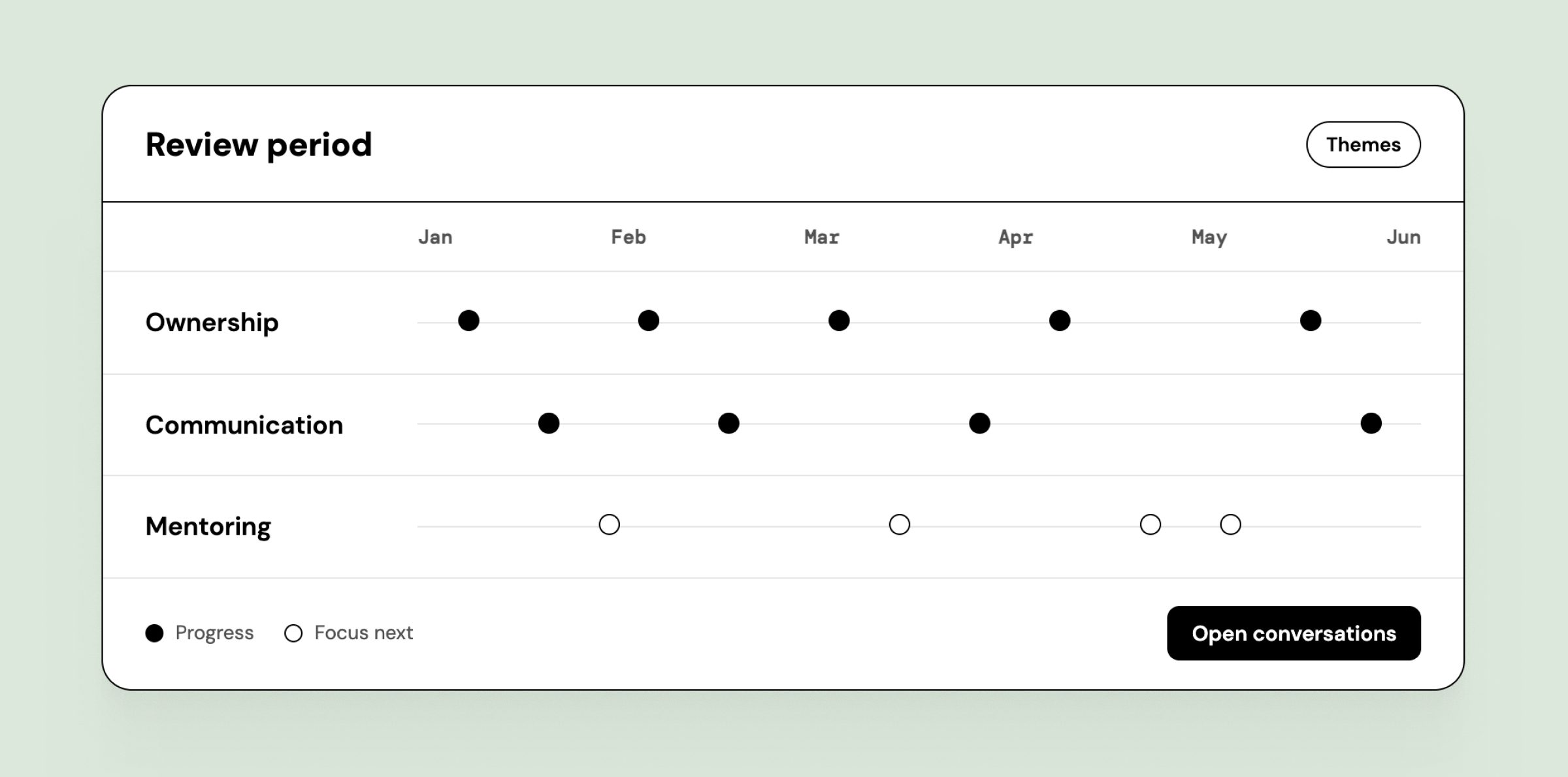
  3. Performance reviews – Using AI to help me see the bigger picture across a whole review period

There are plenty of other examples I could give, but these are three where I’ve found the difference particularly noticeable. If you’re mainly interested in the practical examples, feel free to skip straight to them.

The tools I use

I use a few different tools, and I’ve found they each have slightly different strengths.

ChatGPT is the one I tend to reach for when I’m writing. I’ve found the output generally fits my own writing style better, which means I spend less time fighting with the tone of voice and more time actually editing the content. It’s the tool I use most for internal blog posts and generally turning my messy thoughts into something readable.

Claude is particularly useful when I need to work across multiple sources, pull together a lot of information, create technical documentation or build a framework for analysing something. It’s also the tool I tend to use for things like performance reviews, where I’m asking it to find themes across a large amount of information rather than produce something I’m going to publish directly.

Granola sits slightly differently. I use it to capture conversations and meetings, which gives me much better source material to work from afterwards. The important bit for me is that, while I will publish meeting summaries – edited for accuracy of course – I generally go back to the original transcript, rather than relying on the AI-generated meeting summary for bigger tasks.

I’m sure other people have very different experiences with these tools, and I suspect a lot of this comes down to how you prompt them and what you’re asking them to do. These are just the combinations that I’ve found work well for me.

1. Writing: things I actually want to share

One of the biggest changes for me has been writing posts for our internal blog.

As an engineer, I used to love writing documentation. If you’ve ever had me code review something you’d written, you’ll probably remember just how many comments I would leave trying to make things easier to follow and remove assumptions.

Writing things for the wider company was different.

I would agonise over the wording, structure and tone, and whether I’d explained something properly. I wanted things to be perfect.

The inevitable result was that writing took forever, and a lot of things never got published at all.

AI has changed that.

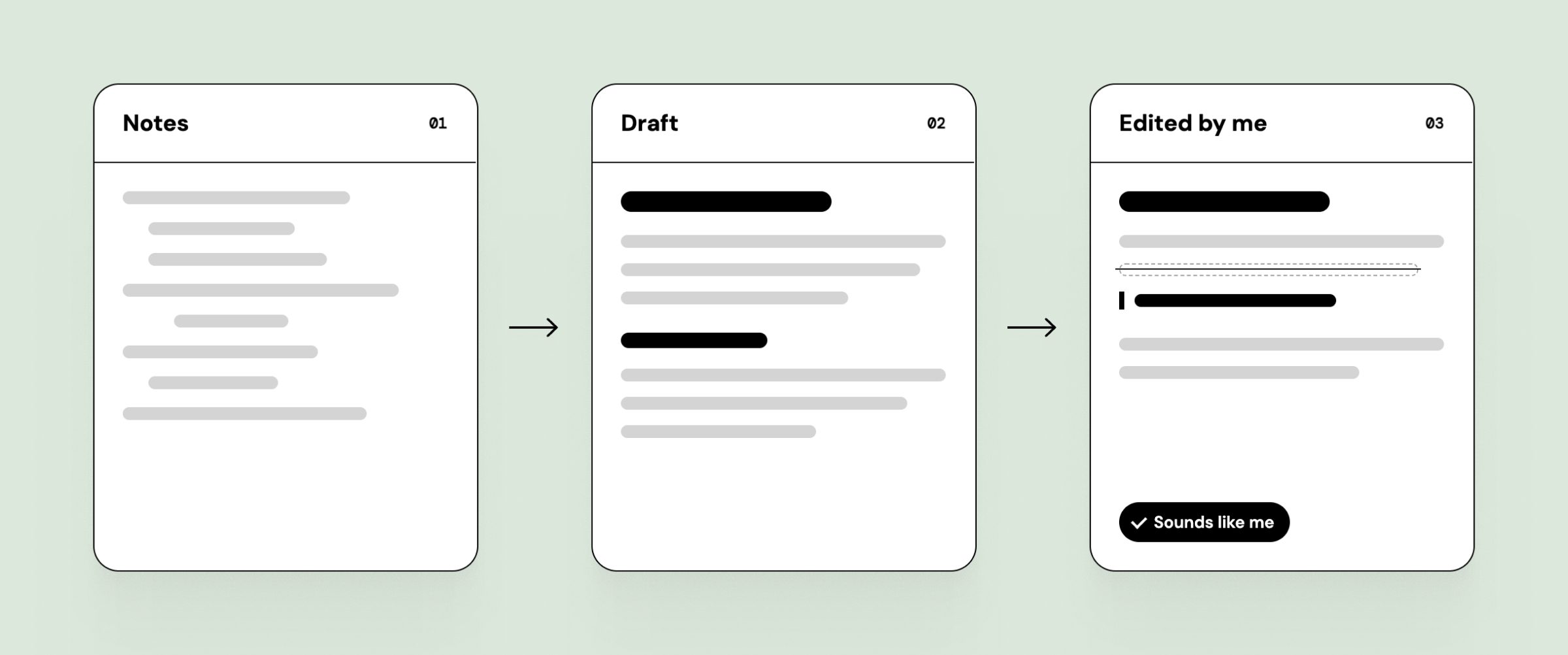
I now start in my markdown notepad, Bear, writing down all my thoughts, arguments, examples and things I think are important. I don’t worry about structure or making it readable. I just get the thinking out of my head.

I then give that to ChatGPT and ask it to turn it into a draft, usually with some guidance about the audience, structure and what I want people to take away.

That’s not normally the finished piece. I’ll edit it myself, changing anything I disagree with, adding what’s missing and removing what’s unnecessary. Then I’ll give it back to ChatGPT to look for repetition, improve awkward sentences or flag anything that doesn’t sound like me.

The important distinction is that the ideas, opinions and decisions are mine. AI is helping me get them into a form other people can actually read.

And I think the results speak for themselves.

Since around July 2025, I’ve written more internal blog posts than I did in all my previous years as an engineer. These aren’t AI-generated thoughts; they’re things I wanted to say but previously struggled to find the time and headspace to communicate.

They’ve covered everything from introducing new tech lead handover documentation and getting better at team communication, to onboarding freelancers into an existing engineering organisation and what we learned from growing the team.

What works for me

  • Get my actual thoughts down before worrying about the prose.
  • Tell the AI who the audience is and what I want them to take away.
  • Edit the output myself, including checking facts and anything important.
  • Use AI again to refine the final version, but make sure it still sounds like me.

The things I try to avoid are pretty simple: letting AI decide what I think, publishing something just because it sounds polished, or using “AI can write it for me” as an excuse not to think about what I actually want to say.

2. Documentation: turning conversations into something useful

The same approach has been incredibly useful for documentation.

When we onboarded five freelancers into my team, for example, we realised our onboarding documentation needed some serious improvement. As a result, we now have a much more robust team wiki that covers onboarding, our approach to project visibility, communication and more.

More recently, one of our engineers had ended up with a huge amount of technical knowledge about a new client project. We had an audit to refer to, but much of the migration work had been done by them and we didn’t yet have much project documentation. Then, unexpectedly, they needed to step away for a few months.

This could have been a serious problem, so I got them on a call and we talked through everything that someone taking over the project would need to know. That conversation was recorded in Granola.

I took the original transcript, not the AI-generated summary, and used Claude to help turn that conversation into a structure for useful project documentation. I then reviewed it, added any information I could from notes they had left, asked Claude to pull in anything relevant from the GitHub repository and the original audit, and then used ChatGPT to make some of the language easier to read without removing the technical detail.

That gave the team a useful starting point much faster than trying to write everything from scratch.

It wasn’t perfect, and that’s important.

I’m not the engineer working on that project, so I couldn’t personally verify every technical detail. I asked engineers in the team to review it, and the expectation is that the documentation continues to evolve as people use it.

AI got us from “all of this information is in one person’s head” to “we have something we can work with” very quickly.

I’ve used similar approaches elsewhere. Conversations about handling support requests on small retainers became a documented support process for one client, which has since evolved into a broader team approach and client-facing documentation. In cases like this, one conversation can end up producing useful documentation for more than one project.

What works for me

  • Start with the original source material wherever possible.
  • Give AI enough context to understand what the documentation is actually for.
  • Get people with the relevant subject-matter knowledge to review it.
  • Treat the first version as a starting point and keep updating it as you learn more.

The main thing I try to avoid is treating an AI summary as a substitute for the original conversation, or letting documentation become “AI-generated and therefore nobody’s responsibility”.

3. Performance reviews: finding the bigger picture

This one is a little less visible because the output isn’t something I’m publishing.

Performance reviews are something I take seriously. I want to understand what has happened over the whole review period, whether someone has genuinely progressed, how that compares with their previous review and where they should focus next.

Historically, that meant manually going through 1:1 notes, project conversations, Slack messages and meeting notes.

Granola has made it much easier to have meaningful conversations without simultaneously worrying about capturing every detail, and I now use Claude to analyse the meeting transcripts and relevant Slack conversations from the review period.

I don’t ask whether someone has had a good review. I ask it to identify themes and pull out the specific conversations so I can review them myself. The judgement and feedback remain mine.

That gives me a much better starting point for asking myself:

What’s the story of this review period?

It helps me avoid over-weighting whatever happened most recently or whatever conversation happens to be freshest in my head.

AI just helps me see the forest rather than spending all my time looking at individual trees.

And, yes, I also occasionally ask it to make my review shorter because apparently I am physically incapable of writing a small amount of text.

What I’ve learned

1. Give AI something real to work with.

The better the raw material, the better the output.

2. Don’t outsource the thinking.

I want AI to help me communicate what I think, not decide what I think.

3. Treat the output as a starting point.

I expect to edit it, challenge it and have other people validate it where appropriate.

4. Be careful what you put into these tools.

Think about what you’re sharing, which tools you’re using, and what your organisation’s policies say. “AI is useful” isn’t a reason to ignore confidentiality, privacy or security.

I’ve been careful throughout to keep things within the tools Human Made has approved, and private where they need to be.

So, has AI made me a better Engineering Manager?

I think it has.

But not because it has made me faster at doing the job. It’s helped me do more of the things I already believed were important.

I communicate more. I document more. I capture more of what we learn. I’m more consistent in things like performance reviews. I’m able to challenge my own thinking more often. And, perhaps most importantly, I’m less likely to have a good idea and then never do anything with it because the friction of writing it down feels like a monumental task.

One of the things from the LeadDev article that has stuck with me is the warning not to confuse feeling faster with actually improving our work. I’m not particularly interested in how many words AI helped me write, how many minutes it saved me, or how many things I can get through in a day.

The improvements I care about are harder to measure:

  • Am I communicating things I wouldn’t otherwise have communicated?
  • Are we capturing knowledge that might otherwise be lost?
  • Are my reviews better because I have more time to look at the bigger picture?
  • Are decisions clearer for the people who need to act on them?

Ultimately, AI hasn’t replaced my judgement. It has made it easier for me to apply it.

So rather than asking “What can AI do for us?”, I’m increasingly interested in asking:

“What good work am I currently not doing because the friction around it is too high?”

That’s where I’ve found the biggest gains.

And for those of you who think I still haven’t answered the most important questions: yes, AI helped me write this, yes, I did ask it to shorten it (this is the best it could do), and no, I still haven’t built that team dashboard.

Yet…

The post How AI makes me a better engineering manager appeared first on Human Made.

Just do it for me? Balancing human and AI input in content improvement

Working with student interns and contributing to the Drupal community, I’ve experimented with AI in various  tools designed to support content improvement. I reflect on what I’ve learned about peoples’ preferences for engaging with AI tools and consider wider design challenges for web content to support co-browsing.

Writing good quality, user-centred content has always been a challenge, and accordingly, a suite of tools evolved to address this; Hemingway, Grammarly and many more. With their ability to learn patterns and predict word sequences, the advent of LLMs provided a new direction for content improvement. Where previous tools had used fixed rules, algorithms and formulas to flag content problems and score sentences, LLMs changed the playing field as they were able to be prompted to rewrite and create text and to adapt words and sentences not only in line with fixed rules, but also aligned to different interpretations of style.

The UX Service’s content design course, Effective Digital Content, and our ongoing Content Improvement Club meet-ups are both designed to help staff publishing digital content for the University. It’s been encouraging to see a positive uptake for both training formats, however, we realise we can do more to help staff publish the best quality content they can, and to this end, for the past few years it’s been a privilege to support a series of interns in the UX Service to look at how we can innovate and apply AI to the persistent challenge of writing good quality, user-centred content.

Thinking beyond – embracing the spirit (or grasping the nettle, depending on how you look at it) of AI innovation, it’s sensible to note that, more broadly, the browsing landscape of the web is increasingly shifting to include AI agents as well as humans, giving cause to consider what using AI to design content to be consumed by AI might look like. That’s the subject of another blog post (or several).

For now, as I begin another phase of work with a new student in the role of AI and UX Innovation intern (Viktor Sharha), it felt timely to pull together what I’ve learned so far.

Designing, creating and editing content happens in various ways

When designing any user-centred assistive features, a good place to start is the current workflow or user journey people adopt to achieve the task in question. In other words, to look at the stages content editors currently go through to make sure their content is as good as it possibly can be.

One of my earliest research tasks when I joined the University was to usability test the Editorial Style Guide, to find out how publishers used it to keep their content consistent in EdWeb. This work gave me insight into the type of workflows publishers followed to get compliant content published. Some publishers worked in Microsoft Word, using the in-built spelling checker for typos, and cross-checking against a printed-out copy of the style guide for University-specific errors before pasting content into the EdWeb body text. Others went straight to EdWeb, checking their content line-by-line with a PDF version of the guide. Others relied on colleagues giving their work the once-over before pressing publish. Some used Grammarly and Hemingway, some didn’t.

Overall, there wasn’t a dominant content-publishing workflow, with unified friction points waiting to be alleviated through a standard user-centred design process. Instead, there were varied approaches, habits and ways of working which people had adapted over time to suit their specific circumstances and to address the areas they found difficult as individuals. Tools were used at different stages of the process, and to a greater or lesser extent depending on personal preferences.

Therefore, designing content improvement tools isn’t one-size-fits-all

It follows that, since people follow different pathways to create, design and edit content, tools to assist this process need to be developed in different ways to suit varied preferences. Since 2025, interns in the UX team have prototyped our own different content improvement tools to test with publishers, and we’ve also tested open-source tools that exist already, developed within the Drupal community. From our testing and research, we found pros, cons and nuances associated with different tools. The summary below pulls together detail of the tools and how they compared.

Tool 1: Drupal Editoria11y – no AI, flags errors in the editing interface

Editoria11y is a Drupal module built by John Jameson from Princeton University that automatically checks content inside the editorial interface. It was originally designed to catch accessibility issues, but it can be configured to check content against other rules too, such as institutional style guide conventions.

What it does and how it works: Editoria11y checks content as authors type, and also on previews and published pages. It includes an indicator bar to show how many issues are on the page and has inline markers to show where each issue is, as well as a dashboard summarising site-wide errors. When an issue is opened, a pop-up modal explains the problem and suggests a fix.

What worked well: In tests, publishers were able to make sense of the inline markers and understand how these related to the indicator bar for the whole page. They liked the tracked change visualisation in the pop-up modals, and were able to work through successive modals, accepting or ignoring the suggested changes.

What needed improvement:  Some publishers found the number of markers overwhelming, and since the pop-ups covered the text, it was difficult to judge each recommendation in context. In the pop-ups, some of the rule descriptions used formal grammatical terms (such as ‘ordinal suffixes’) which were unfamiliar to some publishers meaning they were confused about the problem to be fixed. Since rules were applied mechanically, there were instances where errors were missed, or where awkward fixes were suggested (such as swapping ‘1st floor’ for ‘1 floor’ due to straight removal of the ordinal suffix) – these degraded publishers’ trust in the tool.

Read more about what we found testing Drupal Editoria11y

Embedding the rules: What we learned UX testing a style guide helper tool built with Drupal Editori11y

Tool 2: ELM-powered content design chatbot – with conversational advice

This tool was developed by student Mostafa Ebid during a 2025 summer internship. It connected ELM, the University’s AI platform, to EdWeb2, so publishers could get help with their content by conversing with the University’s suite of LLMs without leaving the Drupal editing interface.

What it does and how it works: This tool sits in a chat sidebar next to the main Drupal editorial interface and offers three modes: Write Content, Design Content and Proofread. In response to a user prompt to improve content, it activates an orchestration of agents (each with specific tasks such as checking the style guide, structuring pages, profiling audiences) which read the page content and act on it accordingly, publishing the revised content in the chatbot window.

What worked well: In tests, publishers understood how the tool could be used as a writing partner, and were impressed with the way it restructured content with headings, bullet points and calls to action and hyperlinks.

What needed improvement: When faced with the empty chatbot interface, some publishers weren’t sure where to start, and they didn’t notice the three modes to work on content. Some were also unsure of the sources the chatbot was using for its revised content and skeptical that the revised content contained hallucinogenic content. They would have appreciated tracked changes to be able to pinpoint what had changed and found the long thin sidebar chat interface awkward to review the updated text. The chatbot was also limited to reviewing body text content, whereas publishers needed it to review content in other page components used in Drupal.

Read more about what we found developing and testing the ELM-powered content design chatbot:

Initial insights from UX testing our Drupal AI content assistant tool

Tool 3: QuillMark v1 and v2 – some AI, clusters errors with correction suggestions

QuillMark was an AI-enhanced tool which worked in Drupal to check content against the University’s Editorial Style Guide. Shlok Gupta built and tested two iterations of Quillmark during his 2026 summer placement as AI and UX Innovation Intern.

What it does and how it works: QuillMark sits in a side panel of the Drupal editorial interface and scans content on the page in two stages. The first stage uses code-based pattern matching (without AI) to catch straightforward errors. The second stage brings in AI to find deeper issues (such as passive instead of active voice) and to suggest fixes. Findings from both stages are displayed in the side panel – each finding describes the problem, links to the relevant rule in the style guide and offers an ‘Apply fix’ button (which can be reverted). Findings are grouped by category, and this panel also includes an indicator of the environmental impact and cost of the scan.

What worked well: In tests, publishers understood that the tool was there to help them correct content on the page, they liked the environmental and cost indicator, the suggested fixes and the links to the style guide reassured them that the tool was applying University-specific rules.

What needed improvement: Publishers reported feeling overwhelmed by the number of findings on a single page and they wanted a way to deal with related findings and fixes in bulk, to avoid going through them one-by-one. Related to this, they wanted

Read more about what we found developing and testing the QuillMark tool:

QuillMark, iterated. How user research helped us evolve an AI-enhanced Drupal style guide assistant

Tool 4: Drupal AI Content Review – full AI, with a plan provided to improve content

As part of the Drupal AI Initiative, I’ve contributed to shaping the self-explanatory Drupal AI Content Review module. This module plugs into a Drupal site, references content rules and good practice from context items in Drupal Context Control Center (within the same site) and uses the configured AI provider to review site content

What it does and how it works: The feature reads the page content and checks it against criteria set by the site owner, such as tone and voice guidelines, inclusive language rules and target readability levels. These rules are stored in the Drupal Context Control Center, along with examples of good and bad content. The review gives the page a score for each criterion and recommends fixes to improve it. Accepted recommendations become an improvement plan, which is applied in the editorial interface. Re-reviewing the page shows the updated scores, with the option to keep making improvements. Over time, the rules can be refined by adding more examples of good and bad content to the Context Control Center.

Read more about Drupal AI Content Review on Drupal.org

Read more about the Drupal Context Control Center on Drupal.org

View a demonstration of AI Content Review in a mocked-up university website as part of the Drupal AI demo on the Drupal Forge platform

What worked well:  In tests of this module within the AI demo, people liked seeing the red, amber and green indicators against page content for an easy visual highlighting areas to be worked on, and they liked being able to select a checklist of recommended improvements to apply to improve their content.

What needs improvement: The screens explaining the recommended improvements were difficult to scan read, and it was also difficult to compare the original text and the text with the recommended improvements side-by-side (despite colour shading to denote which was which). The stage where the recommendations were turned into an improvement plan felt like an unnecessary extra step, it would have been better to have implemented the recommendations directly. Also, it was presumed that implementing the plan would have corrected all errors resulting in a score of 100%, without the need for further work and re-review. Finally, it wasn’t immediately clear how to use the Drupal Context Control Center and the AI Content Review together.

When designing AI-enhanced tools, consider three AI design maxims

Taking on board variations in blending human effort and automated operations, there are three approaches to designing AI features and AI-assisted workflows worth considering. These are defined below, with ideas for how they may apply to content improvement.

1.      Human-in-the-loop

In this set-up, humans typically share the task-load with AI – actively working alongside an automated operator to supervise or influence actions, and to approve AI decisions before they happen (ensuring AI outputs are not released without the green-light from a person).

Human-in-the-loop tends to be adopted when:

  • there is a need for human judgement to get something correct
  • the consequences of an error could be high-profile or damaging
  • trust in an automated tool is still being built, and the boundaries of its capabilities are still being realised
  • the goal is for the system to facilitate shared learning between the person and the automation

For content improvement, human-in-the-loop is appropriate in these scenarios:

  • ensuring correctness of important factual data – for example, prices, dates, contact details, terms and conditions
  • checking the tone of sentences in line with inclusive language guidance
  • verifying accuracy of high-stakes published content such as legal information, policy wording or written instructional content
  • rewriting complex topics in plainer language
  • writing meta descriptions or page summaries to be accessed by search mechanisms
  • translating content into other languages

2.      Human-on-the-loop

These systems involve the AI or automator acting on its own, with the human reviewing and spot-checking at intervals, monitoring output quality over time, and intervening to correct failures periodically, where required.

Human-on-the-loop tends to be adopted when:

  • there is a high volume of low-risk tasks to be completed, which would be tedious for humans to do themselves
  • consequences of errors are minimal
  • there’s a need for tasks to be completed quickly, and including human-input at each task would be too time-consuming
  • consistency is required across tasks, and there’s a risk of human error introducing variability

For content improvement, human-on-the-loop is appropriate in these scenarios:

  • fixing straightforward style rule violations such as correcting spelling errors
  • categorising and tagging text content (for example, to facilitate its discovery in search)
  • scanning content for readability and accessibility, to flag or report areas to be addressed

3.      Human-out-of-the-loop

In this arrangement, the human sets up the AI to act autonomously, and leaves it to proceed, with no routine review.

Human-out-of-the-loop tends to be adopted when:

  • there are very low-risk, behind-the-scenes tasks to be completed where errors have little or no consequence and can be fully reversed

For content improvement, human-out-of-the-loop is appropriate in these scenarios:

  • autocorrecting typing errors
  • detecting content duplication
  • auto-optimising media content to defined parameters

Choice, pacing and transparency are constant design requirements

Testing four different tools has showed that options always need to be available, whatever balance of human and AI the tool includes. People approach AI differently based on preferences and past experiences. Some love nothing more than a good grappling of a sticky sentence, some just want an agent to do the work for them, and many sit somewhere in between, happy to have some AI help as long as they have the final say.

Alongside humans in, on and out of the loop, it’s important to remember the fourth option: human only, where people can choose to do their content unaided, using the methods they relied on before AI came along. AI shouldn’t be forced on anyone, so all tools need to come with a ‘no thanks to AI’ option.

AI is a fast-evolving and non-deterministic technology, so at any point in time it may work differently to the way it did before.  Responding to challenge from a design perspective, it’s important to factor in pacing. People need to be taken through how a tool works, and the options available. They need time and space to experiment and try it out, so they can learn for themselves how it can work for them. Pacing not only matters in the way tools are introduced, but also in the way their outputs are presented, to avoid the overwhelm that comes when AI does the heavy lifting all at once, and so people know what changed and how, and they have a way to accept, decline or edit what it produced.

If people don’t trust an AI tool, they won’t use it. Earning trust requires transparency, explainability, relatability and reliability – so AI tools need to be upfront about what they can and can’t do, with clear, intuitive interfaces and labels. Reliability will always be hard to promise given AI is probabilistic, so instead of accuracy guarantees which may fall short, a better approach is to design for experimentation, so people can find their feet and make their own judgements.

Designing for humans and AI together – metadata, markdown and MCPs

Looking at the broader digital landscape, the challenge widens from designing tools that help humans make content to designing websites with content ready for both humans and agents to use.

In co-browsing, people are increasingly arriving at a website with an agent alongside them, handing off some tasks while keeping control of others and wanting to see what their agent is doing. That means firstly deciding which tasks belong to humans and which one to AI, and secondly designing for each. Humans need intuitive interfaces. Agents need data they can read and act on without ambiguity:

  • metadata, such as schema markup that tells an agent what a page is about, who it’s for and how it connects to other content
  • markdown versions of pages and llms.txt files, which give agents clean, structured text without layout and navigation getting in the way
  • MCPs (Model Context Protocol servers), which let sites expose what they can do as well as what they say, from simple actions declared directly in HTML to more complex ones written in JavaScript – in preparation for use by the emerging WebMCP browser standard.

Labels matter for humans and agents alike, because words are becoming a currency that machines read as well as people. Alignment on terminology facilitates the creation of a single source of truth, to prevent the human experience from drifting from the agentic experience. On another level, humans need a way to consistently communicate with AI – to give AI the rules and instruct it and to train it with new insight. ‘Rosetta stone’ mechanisms like the Drupal Context Control Center will play an important part in designing for human and AI interaction and collaboration and I am excited to keep working and researching in this area to address these evolving design challenges.


Show me your sources! What students make of content provenance data, AI signifiers and sparkles

The line between human-made and AI-generated content is blurring fast. I added a disclosure indicator to an AI-powered search tool and tested it with students, which taught me about perceptions of AI-influenced content and what signals authenticity. I reflected on the need for a shared language around provenance and disclosure.

Estimations of the proportion of AI-generated content on the web vary and are becoming progressively difficult to measure. New legislation advocates for disclosure of AI use, but the nuances of communicating how AI has been used within a feature, and detailing the finer points of the provenance of AI-generated content both remain a challenge.

Earlier in 2026, I took part in a study to design a C2PA provenance indicator into a prototype AI searchbot. I revisited my designs to test them with students, to assess if this authenticity data made sense and to understand its impact on students’ potential trust of the AI searchbot. In this blog post, I describe what I tested and what I learned, and make broader considerations of designing with provenance data, the impact of AI legislation and what makes people trust AI features.

People’s trust in technology depends on explicit and implicit factors

The ISO 9241-210 standard for UX defines user experiences as ‘a person’s perceptions and responses that result from the use of anticipated use of a product, system or service’, which sums up the influence trust can have on the way a person experiences a technology.

I was interested to explore more about the relationships between human trust and AI, so I read a selection of papers on the topic and extrapolated four factors that commonly affect how people trust AI technologies:

  1. Transparency (surface and presumed credibility)
  2. Reliability (earned and reputed credibility, how consistently it works and how dependable it is)
  3. Explainability (how clear the purpose of the AI is and how clear it is how it works)
  4. Relatability (how well the AI supports the person’s interests, how easily they can use it and how it resonates with them)

When it comes to designing AI features people trust, and communicating how AI has been used within those features, it’s important to try and convey each of these factors in ways that make sense to the user in context. In other words, striking a delicate balance of providing sufficient trust indicators to allow people to make reasoned judgements, without going overboard and running the risk of confusion or skepticism.

The EU AI Act has set out obligations to disclose AI usage

From an ethical perspective, advising people that they’re using an AI feature has always been the right thing to do, in order to foster a sense of user trust. Legislation published in August 2026 made the requirement to disclose AI usage more explicit and provided more detail. Article 50 of the EU AI Act details Transparency Obligations for Providers and Deployers of Certain AI systems and includes recitals which cover areas including the following:

  • Designing AI systems to ensure users know they are talking to AI
  • Marking content from AI systems (text, images, videos, audio) so it is detectable as such
  • Informing people of AI systems that include emotion recognition or biometric categorisation
  • Disclosing deepfakes (audio/video/image content that has been manipulated as well as public-interest text, unless human-reviewed with editorial insight) as AI-made
  • Clarity, timing and accessibility of AI disclosures – to be provided at the first interaction or exposure and to be clear and accessible.

With this legislation now in place, it’s anticipated that a growing number of ways to disclose AI usage will emerge, making AI disclosure as mainstream as AI features.

I adopted the C2PA digital content provenance standard into an AI searchbot prototype

When it comes to icons that disclose AI usage, sparkles, neurons, and robots are all widely used, but they only signify that AI is present or available, they don’t provide any detail of how it has been used or how it has shaped content. C2PA is an established provenance standard which has been designed to convey progressive levels of content provenance data. I incorporated C2PA to disclose how AI was used to shape synthetic chatbot responses in a search feature and wrote about my process in an earlier blog post:

How can people trust AI-generated content? Designing provenance data into our prototype AI searchbot

I concluded this design work with a resolve to test my designs with users to understand the following:

  • if they cared about seeing provenance data about the AI searchbot response
  • if they grasped the concept of provenance data
  • if they understood what the C2PA Content Credentials icon signified
  • if the names for the different categories of data made sense to them

Drawing on my recent reading into trust factors, and taking into account the new EU AI disclosure guidance I also wanted to use my designs to understand more about how users make sense of AI features, and what affects their trust of them in context.

Testing revealed students’ responses to progressive levels of AI disclosure in the searchbot

In a simple test, I asked the student participants to imagine they were in a scenario where they had used the AI searchbot to find information from a website. I then showed them mock-up screens with the indicator in progressive levels of disclosure, going from the C2PA ‘CR’ logo, to ‘content credentials’, ‘About this response’, ‘Certification data’, ‘Digital source data’ and ‘Transformation processing data’. At each stage, I asked them to speak aloud to describe what they saw, what they thought it meant, and how it resonated with them.

Screenshot showing the AI searchbot interface showing all the provenance data available

Screenshot showing the AI searchbot interface with progressive levels of provenance data on display

The C2PA icon was unfamiliar but content credentials made more sense

Students’ first exposure to the provenance data was as the C2PA ‘cr’ icon which was displayed at the opening interface of the searchbot (when the searchbot was ready to receive a user query). On its own, the icon was pretty meaningless to them. One felt it could be a watermark, others thought it was a button to make the chat window bigger, others said they would Google ‘cr’ to find out what it was. The next level of disclosure was a signifier that read ‘content credentials’, which appeared once the searchbot had received a query and produced a response. Students found this indicator more meaningful – they felt it was a way to verify where the response came from, and said they would be inclined to press it to find out more.

The level 1 disclosure ‘About this response’ was too vague to be useful

When asked what they thought they would find in the section ‘About this response’, students were largely unsure. Some thought it would contain a hallucination warning, others thought it would contain sources. When they read the generic descriptor about the C2PA provenance data, which explains that the response was AI generated and had content credentials and assertions to demonstrate authencity, they felt it was too vague to be useful to them, and didn’t feel it was telling them anything new. They were unfamiliar with ‘content credentials’ as a term and by the language, they reasoned that this message was aimed at a legal team rather than someone reading the output of the searchbot.

‘Certification data’ wasn’t a term that resonated with student participants

Reading the label ‘certification data’ students had mixed ideas of what this section would contain. Some felt it would reveal intellectual property details, some thought it would show licensing agreements relating to data entered in the searchbot, and others thought it would explain how the searchbot handled data. There was a further expectation that this section would contain the sources behind the searchbot response.

When they expanded this section to see the identity data (name of the organisation certifying the content) and the associated timestamp of when the content was certified, they were unclear what was being certified (the output of the searchbot or the AI model), and how they would use this information. Some reasoned that the responses from the AI searchbot were stored in a database and that this certification data could help keep track of a bank of these responses.

‘Digital source data’ made more sense to them

Of all the data categories displayed, ‘Digital source data’ was the one students gravitated towards. This is where they assumed they would find the links to the sources used to create the AI searchbot response, and their assumptions were correct. For many students, seeing the links to the sources proved the authenticity of the AI content more strongly than any other sections of the data they had seen. As well as the source links, this section included the C2PA Actions assertion (which recorded the stages used to create the digital content (or asset) including the AI model used). Students recognised the AI model but questioned the terminology ‘Actions assertion’, thinking it would be more straightforward to just list the AI model used.

In the ‘Transformation processing data’, detail of the AI prompts was of particular interest

Preconceptions of what they would find in the ‘Transformation processing data’ section varied from a logical set of steps to show how the responses were formed from source data, to details of how data inputs would be used to train AI models, to sustainability data showing energy expenditure in the formation of the AI searchbot responses. When they saw information labelled ‘Search mechanisms’ which detailed how embeddings were created and a vector database was used in semantic matching, most students felt this was too much technical detail. Some who were familiar with the process felt this section would be more appropriately labelled as a technical stack, rather than search mechanisms. The ‘Transformation processing data’ section also contained the AI prompt, and most students responded positively to this, saying they felt it gave them a fuller picture, it helped them understand ‘the personification of the AI’ and made the process more transparent.

The effectiveness of my C2PA designs largely depended on students’ existing knowledge

Reviewing the findings together, I concluded that my designs partly succeeded in communicating details of how AI had formed the searchbot responses, but this depended on students’ perceptions and what they knew already, as well as what they wanted to know. Overall, my designs fell short when it came to instilling a sense of trust in the students, largely due to unfamiliarity with the C2PA terminology, the challenges of targeting implicit trust factors and the partic.

Students familiar with AI responded positively, but others wanted a non-AI option

The C2PA indicators focused on the provenance of the AI-generated searchbot responses, but for some students this was irrelevant as they wanted a choice to be able to not use the AI feature at all. Several students were skeptical and negatively pre-disposed to AI features based on their previous experiences and concerns about the environmental cost, and therefore upon seeing the sparkle icon realising the searchbot was AI-powered they were sought for a way to turn it off, or to make a choice about whether to use it or not. This reinforced the need to ensure AI features are a choice, and in the case of the AI searchbot example, an alternative way to achieve the same task is provided.

The C2PA terminology was off-putting to students

As they read the data in the different categories, students felt alienated by some of the C2PA language, particularly terms like ‘content credentials’, ‘provenance’ and ‘assertion’. When they were able to see contextual detail associated with these terms, most were able to fathom what the terms meant, but I concluded that including these terms in the designs and in the labels of the different data categories was giving students an extra unnecessary hurdle of jargon to overcome before they could reach an understanding of the data presented to them.

Some C2PA data was clear and useful, other data felt unnecessary

The four categories of data resonated differently with the students, and, based on their reactions, some of these data sources felt unnecessary to show data provenance.

Most students found the source links useful, and what they expected in the category labelled ‘Digital source data’. They also found the AI prompt useful, but they didn’t expect to find it in ‘Transformation processing data’. Almost all felt the notification that the response was AI-generated (in the ‘About this response’ section) was unnecessary. Other data points that students felt confused and nonplussed by included the ‘CR’ logo, the identity data, the certification data (including the timestamp), and the technical terms describing the response-generation process.

Some of the data students were expecting was missing

As they reviewed the different categories of data they were presented with, students commented on data they would have expected to see. This included: environmental impact data, information about how input data would be used to train AI models, and details of how the data was processed and held by the searchbot feature. While these data points largely fell out of the realm of content credentials, it was interesting to understand the types of data students looked for when making judgements about whether to use and trust this type of AI feature.

The C2PA designs targeted some trust factors but not others

Re-examining factors that affect trust highlighted that trust is heavily influenced by implicit factors or emotional cues which are specific to individuals. Targeting subjective trust factors such as relatability, (which depends on how well something supports a person’s interests and resonates with them) was very difficult to achieve without research to understand the nuances of the target audience. Some students were reassured by the mention of AI models involved in generating the content, but for others, this merely caused confusion.

Targeting explicit trust factors like transparency and explainability in displaying content provenance was more straightforward, but it meant striking a balance. Providing too much technical detail about the production process, although this was intended to build trust by being upfront, could end up causing confusion and therefore result in the opposite effect, as I observed in the student tests.

Conveying reliability remains a challenge when AI is involved. Since AI is probabilistic, its results are variable, and in the context of a feature like an AI searchbot, it was not possible to make assurances in the provenance data. Instead, I used the progressive disclosure levels to encourage exploration and a gradual building of understanding, to help people come to their own conclusion about whether to trust the AI-generated content. I saw this working in the student tests, as they made reliability judgements about the AI responses when they saw the source data revealed.

Provenance indicators should replace the sparkles and it’s time for a unified AI vocabulary

The C2PA standard is several years old, yet content provenance is still a relatively unfamiliar concept. With new AI legislation published and the advent of more formalised requirements to disclose AI usage and application, I predict more rhetoric and discussions around disclosure, authenticity and provenance, to evolve the language and terminology around these concepts and to make them more mainstream.

Those who consume AI-generated content want to know how it was made, and the sources it came from, and those who use AI to generate or shape the content they publish have an obligation to disclose how AI was used, to ensure transparency from both perspectives. When designing AI features, consistent labelling will play an growing part in conveying meaning. As people become more familiar with AI, they will rely on these labels more and more to make judgements and decisions about AI features and AI-influenced content.

This small study has re-emphasised the importance of choosing terms and wording labels carefully, to strike a balance between technical and non-technical and to provide just enough detail to resonate with audiences but not so much that it confuses them. It highlights the need for a unified vocabulary for AI, to effectively communicate about its usage and application. As AI usage progresses, I expect provenance indicators and associated design patterns to continue progressing, and I’m keen to keep a close eye, to keep iterating on ways to display provenance data. I look forward to seeing sparkles replaced by more meaningful signifiers of AI usage and disclosure.

Key Takeaways from Scottish Web Folk 2026

It was a busy day at the Scottish Web Folk conference, packed with ‘quick-fire’ sessions that lasted just 30 minutes each. The theme was Human vs Machine, however I took away no negative vibes about AI. The general feeling was positivity, and I enjoyed hearing how AI is altering things – how it can enhance our workflows and what it can add to a process with the correct guardrails in place.

Andrew Millar, Head of Digital Engagement & Marketing at the University of Dundee, kicked off the day. His session was thought provoking, and I jotted down several key takeaways that set the tone for the day ahead:

  • AI is a gateway to something both amazing and terrifying.
  • Just because things have worked out previously regarding innovation, we shouldn’t view that as comfort; we must accept the responsibility that comes with it.
  • Machines are now using our content and information to speak on our behalf.
  • How has this shift broken our existing metrics?
  • The machine has inserted itself into the conversation and is now providing the answers.
  • How do we determine if it is actually using our content?
  • We are using AI more and more in our daily lives, yet people are trusting it less.
  • A new acronym for me: GIGO – Garbage In, Garbage Out.

These points framed the day perfectly, as the subsequent presentations addressed these challenges and more.

The human side of digital transformation

It was interesting to hear from Mark Kennedy, Web Development Manager at Ulster University, about how he leads his web team of four, who support over 400 publishers. Mark and his team do not sit within Information Services, but instead they are integrated into Marketing and Communications. He mentioned that this can come with some challenges but also fosters more involved collaborations around content. For us in the Web Development Team at the University of Edinburgh, we are somewhat removed from the quality and accuracy of the content our publishers upload to their sites. As a wider team, we focus on providing the tools, training, and advice required to produce good-quality, accessible content. In contrast, at Ulster, the web team works closely with their MarComms colleagues, acting as gatekeepers for good content.

This close working relationship benefitted the team when Mark’s MarComms colleagues requested a sandbox to experiment with the new component-based platform, they built a publish-ready site within just one week. Although intended only as a playground, they fully embraced the reusable components – a surprising yet fantastic outcome that truly illustrated the human side of digital transformation. It struck me how accustomed we become to our own ways of working and the specific colleagues and disciplines we interact with daily. Mark’s talk sparked a thought: what would it be like if we were structured differently?

Post deployment testing

I also attended Rob McCreary’s talk (University of Dundee) on testing. He emphasised the importance of introducing automated testing techniques to enable quick fixes that can be deployed with confidence, specifically detailing how his team uses Behat feature files to confirm the live environment is healthy immediately after deployment. This was quite a complex topic, and while our team is just at the start of introducing automated testing, here are my main takeaways:

  • It’s not only developers who ship bugs – integrated content can too.
  • Import and integration failures can reach the live page before anyone notices.
  • A GitLab pipeline can run a test report and display the results clearly.
  • Build in a clean-up process: if entities (pages or users for example) are created as part of a test, they must be cleaned up afterwards.
  • Fast smoke tests can provide an early warning system.
  • Scheduled regression tests cover the wider system without holding up releases.

Side note: As I write this post, I find myself cross-referencing my notes, reviewing photos of the slides, and looking up terms I didn’t fully grasp during the sessions. This process itself feels like part of the lesson to me.


Thorough scoping with the help of AI

Matthew Jones and Robin Butler from Vepple, a virtual experience platform for universities, presented on using AI to draft development specifications. Their workflow begins with an MRD (Market Requirements Document), which outlines the problem statement and testable acceptance criteria. The most intriguing part of their talk was the concept of a ‘Grilling Session.’

At the time, I jotted down that this should be ‘thorough in a positive way,’ but I wasn’t entirely sure what that looked like. Researching it later revealed that this practice flips the conventional use of AI on its head. Instead of the user simply prompting the AI to generate content, the AI agent takes the lead. It prompts the developers with tailored, iterative questions – effectively ‘grilling’ the user to clarify scope and refine requirements. This rigorous interrogation ensures nothing is missed before the AI outputs a PRD (Product Requirements Document).

As they put it: “The agent writes with us and not for us.”

Once the specification is solid, the agent can slice it into actionable tickets for humans to follow, organising them into epics (projects). They also mentioned that automated tests are used to ‘pin’ existing functionality, ensuring that new changes remain small and manageable.

Takeaway: We don’t keep a platform in good shape by going faster – we do it by being thorough.

A presentation at Scottish Web Folk 2026

Findability and AI-driven search

Paul Costello and Rob Allen from Numiko talked about their work on findability with the University of Oxford. I know about SEO – it’s been around for some time! – but GEO and AEO were new to me. These stand for Generative Engine Optimisation and Answer Engine Optimisation, which are basically the same thing: looking at how AI-driven search works. This ties neatly back to the points from the introduction.

Honestly, this session was very content-focussed, so it’s not entirely relevant to my daily work as a developer. But I think it’s still really interesting and valuable for us to understand. And actually, it makes a lot of sense:

  • Think of a list of non-branded prompts that a user might type into an AI.
  • Structure your content around the questions users will actually ask.
  • Clear out old, out-of-date content.
  • Make sure how you talk about your organisation matches how the audience would phrase it or ask it.

It’s a simple idea – if people are asking AI questions in their own words, our content needs to speak the same language.

Extensive web estates and the importance of governance

To finish the day, I sat in on an unscripted presentation by Stratos Filalithis (University of Edinburgh) and Kris Purdy (University of Glasgow). There were no slides, just an open conversation between them and the audience about governing their massive web estates. It’s incredible just how large these estates are and I was genuinely surprised when Stratos quoted around 2,000 sites.

It’s a huge task – finding these sites, documenting them, establishing if they’re still required, tracking down owners, checking where they’re hosted, and essentially (fitting perfectly with the theme of the day) auditing the content.

The scary part? Sites from the late nineties could still be out there, serving AI agents with outdated answers! Eek!!!

Conclusion

Looking back at the day, the common thread wasn’t about fearing AI but was much more positive – it was about how we prepare our content and how we can employ agents to help with workflows, development, scoping to name just a few use cases.

Quality matters more than speed.

If we don’t audit our estates, we risk those forgotten sites from the late nineties feeding bad information to AI agents. And if we don’t speak the same language as our users, AI won’t find our answers anyway.

The landscape will keep changing, but if we focus on getting the basics right, we’ll be ready for whatever comes next.

QuillMark, iterated. How user research helped us evolve an AI-enhanced Drupal style guide assistant

AI and UX Innovation Intern Shlok Gupta and I worked together to build and test Quillmark, an AI-powered Drupal content design tool that tackles the persistent problem of keeping content consistent with the University’s style guide. This post covers how we iterated from version 1 to 2.

Leading a UX Service, it’s critical to stay informed about the latest technologies, as these dictate user expectations and perceptions. I recognised the potential for AI to transform publisher experiences of using Drupal when Drupal AI experts Freely Give came to work with our team in January 2025. Since then, I’ve been committed to experimenting with AI application in content management, both through my involvement with the Drupal AI initiative and by supporting a succession of interns in my UX team at the University.

As a technology, AI is becoming increasingly mainstream. That said, its rapid rate of evolution and flux means adopting it consistently remains a challenge, as does designing AI features that are centred around user needs and expectations. AI features can be built and released in a matter of days, but can just as quickly become superseded and obsolete as technologies and capabilities change, and user expectations and perceptions of AI features can vary widely depending on individual experiences, trust factors and preferences. Continuous research is necessary when developing any user-centred software, but it’s particularly important when designing user-centred AI features, which I wrote about in a related blog post:

Stop chasing, keep researching: Why continuous contextual learning is the only way to build useful AI features

In the spirit of continuous research, the students who occupy the AI and UX Innovation Intern role in my UX team spend as much time testing as they do building. Shlok Gupta joined the team from May – August 2026, in which time he prototyped and tested two versions of an AI-enhanced style guide checker tool in Drupal. Shlok described his process to build and test Quillmark v1 in two blog posts, and also produced a video to show it in action:

Building QuillMark: testing a Drupal style-guide assistant with web publishers

Quillmark: the technical details behind my Drupal style-guide assistant

View a video of Quillmark v1 on MediaHopper

In this post, I continue the story, to explain how version 2 was built based on feedback from version 1, and what we learned testing version 2 with publishers.

QuillMark v1 had a non-AI stage and an AI stage and the ability to flag and fix errors

Shlok designed QuillMark v1 to have two stages as a way of making most economical use of AI time and tokens. Stage 1 used basic pattern-matching and code-based rules to catch straightforward style-guide errors without AI, and stage 2 then brought in AI to find and recommend fixes for deeper issues. This meant AI resource wasn’t spent identifying and resolving simpler problems that didn’t need it. The screenshots indicate how v1 worked.

Screenshot showing Quillmark v1 (in the right-hand panel of a Drupal site) ready to review content

Screenshot showing Quillmark v1 (in the right-hand panel of a Drupal site) ready to review content

From right-left, four screenshots showing detail of the QuillMark guide in the right-hand panel before a scan, the panel expanded to show the guide, results of a stage 1 scan and detail of selected stage 1 findings

From left to right, detail of QuillMark in the right-hand panel – before a scan, expanded to show the guide, results of a stage 1 scan and detail of selected stage 1 findings

Three screenshots of QuillMark, showing the panel ahead of running the stage 2 scan, combined results of the stage 1 and stage 2 scans and detail of selected stage 1 and stage 2 findings alongside each other

From left to right: the panel ahead of running the stage 2 scan, combined results of the stage 1 and stage 2 scans and detail of some stage 1 and stage 2 findings alongside each other

QuillMark screenshot showing how a finding from a stage 2 scan mapped to a sentence in the passive voice highlighted in the editorial interface

QuillMark screenshot showing how a finding from a stage 2 scan mapped to a sentence in the passive voice highlighted in the editorial interface

QuillMark screenshot showing the highlighted sentence changed to active voice - which resulted from pressing the ‘Apply fix’ button on the finding

QuillMark screenshot showing the highlighted sentence changed to active voice – which resulted from pressing the ‘Apply fix’ button on the finding

Tests revealed the need to simplify QuillMark v1

In the tests of QuillMark v1, participants were asked to read a guide about how the tool worked, use it to scan some pre-prepared content and then review the resulting findings and say how they would act upon them. The results indicated several areas for improvement.

All participants understood that QuillMark v1 was a tool to help them correct content errors. Despite being directed to read the guide upfront, however, some participants were unclear of the difference between stages 1 and 2.  Having run stage 1, participants were uncertain what stage 2 of the tool would do. Some identified the AI detail in the stage 2 labels and therefore realised that stage 2, unlike stage 1 used AI, but others thought stage 2 was the ‘repair’ or ‘fix’ stage to follow stage 1 as the diagnostic stage.

As they reviewed the different categories of finding in the right-hand panel, most participants said they felt the amount of information was overwhelming, and difficult to scan read. They especially found it difficult to interpret abstracted recommendations to fix errors, preferring to receive suggested fixes through the ‘Apply fix’ option. As a way to reduce the overwhelm, some participants said they would be inclined to go and fix several of the errors manually first, and then rescan, so that the tool only presented them with the errors they missed themselves.

Other observations from the test participants fell into two categories, lack of understanding of how Quillmark worked, and feedback on how they felt it could work better for them.

Participants were confused about how to use QuillMark and how it worked

Several aspects of participants’ behaviours indicated they weren’t sure how QuillMark worked. These were as follows:

  • There was some confusion over how to start QuillMark running. Participants did not immediately realise that the Stage 1 and Stage 2 buttons would start the tool. They looked for a button that said ‘Run’ or similar. When they worked out how to activate the different stages, they were unclear about what was happening in each.
  • Several participants raised questions about the cost and environmental impact of running the AI stage of the tool, saying this would affect whether they would choose to use it.
  • There was a lack of clarity from participants about whether QuillMark was using generic grammatical rules to flag errors and make recommendations or if it was using the specific University of Edinburgh style guide rules
  • Several participants did not initially recognise that QuillMark could suggest fixes as well as flagging errors.

Participants suggested ways to change QuillMark, to help it support publishing practices better

When they had got used to working with QuillMark, several participants suggested ways they felt it could work better. There were as follows:

  • A request to be able to apply bulk fixes to recurring errors, rather than addressing them one-by-one (for example, removing full stops in repeated headings or switching sets of times from the 24 hour clock to the 12 hour clock)
  • An ask from several participants to be able to preview fixes offered by the ‘Apply fix’ buttons before accepting them to change the text in the editorial interface (however, they soon realised they could switch between the ‘Apply fix’ and ‘Revert fix’ buttons to achieve this).

QuillMark v2 worked in the same way but the interface was simpler

Taking on board the feedback from the QuillMark v1 tests, Shlok made a version 2 which included several changes:

  • A single ‘Scan’ button to start both stages of the tool working, replacing the need for publishers to run stage 1 and stage 2 scans in sequence
  • Progress indicators that appeared once ‘Scan’ had been pressed, to communicate what was happening, and to affirm that the editorial style guide was being checked
  • Inclusion of an ‘Advanced settings’ panel giving users the option to decide whether to include deterministic error scanning and fixing and the use of AI to suggest replacements
  • A panel that estimated monetary cost and environmental impact of each scan resulting in the findings

View a short video demonstration of QuillMark v2 on Media Hopper

The screenshots indicate how v2 worked and show the differences between v1 and v2

QuillMark screenshot showing the tool in the right-hand panel ahead of a scan being run on a page of content titled ‘Research projects’

QuillMark screenshot showing the tool in the right-hand panel ahead of a scan being run on a page of content titled ‘Research projects’

Series of QuillMark screenshots, from left to right, showing the tool with the guide displayed, and the successive stages once ‘Scan’ has been pressed – reviewing, preparing, checking editorial style rules and then the notification that QuillMark has completed the scan.

QuillMark screenshots, from left to right, showing the tool with the guide displayed, and the successive stages once ‘Scan’ has been pressed – reviewing, preparing, checking editorial style rules and then the notification that QuillMark has completed the scan (showing that AI suggestions are included in the ‘Advanced settings’ pane

Tests showed v2 was better, but still had room for improvement

The testing protocol for QuillMark v2 remained the same as for v1, however, this time participants were asked to use the tool on three separate pages of University website content, to give them more practice of engaging with the tool to learn how it worked.

Participants found it easier to understand how QuillMark v2 worked

With the new blue ‘Scan’ button, participants were more easily able to get started with running QuillMark. Since it was running an AI and a non-AI stage QuillMark v2 took longer to produce findings than QuillMark v1, but the newly added progress indicators kept participants informed about what was happening.

The indicator with the data about environmental and monetary costs was noted by all participants, and some said this was welcome information to help them make responsible choices about AI use.

Participants were still directed to the guide, which some wanted to refer back to once they had got started with the tool, to remind them of how it worked.

There were fewer questions about the source of the rules powering Quillmark v2 than for v1, and several participants verified that the tool was using rules from the University editorial style guide by pressing the ‘Link to rule’ button on individual findings (which connected to the relevant page or section of the style guide).

Some still found the interface and display overwhelming

Although QuillMark’s interface had been simplified by the removal of stage 1 and 2 indicators, participants still commented it contained a lot of textual information and was difficult to scan. Some were unclear what the different labels in the findings meant (Errors vs Warnings vs Notes), and several found it easy to miss some of the tool’s functionality simply because there was too much to read through.

Participants were still uncertain about the ‘Apply fix’ button

As they worked through the individual findings, participants were able to recognise the need for corrections that had been highlighted, but some did not appreciate that QuillMark v2 offered a fix as well as flagging the error.

As they used QuillMark v2 to scan a page about research projects, the tool flagged an instance of poorly worded link text (‘Project Website’). The ‘Apply fix’ button contained a suggested improvement (‘Visit the Hillforts Atlas website’) but several participants did not select this, instead they manually addressed the error themselves, by checking the link destination and then writing appropriate link text. Those that did notice that ‘Apply fix’ had made a suggested improvement were happy to accept it and apply it.

Screenshot showing a QuillMark v2 finding flagging poorly written link text

Screenshot showing a QuillMark v2 finding flagging poorly written link text

Screenshot showing QuillMark v2 a fix to improve poorly written link text applied in the editorial interface

Screenshot showing QuillMark v2 a fix to improve poorly written link text applied in the editorial interface

They still wanted repeated findings to be consolidated, to be addressed together

Some categories of findings contained recurring instances of the same issue. Participants wanted these to be grouped or summarised instead of being listed individually, as they wanted to address all the findings on a particular issue together in one action (either dismissing them or applying suggested fixes), rather than going through them one-by-one. This problem was particularly prevalent on pages where the content followed a structural pattern, for example a series of headings all written in non-sentence case (with misuse of capital letters) or a labelling convention applied consistently to rows of a table (for example numerals in sequence).

Screenshot showing individual instances of an error flagged as separate findings in the QuillMark v2 interface

Screenshot showing individual instances of an error flagged as separate findings in the QuillMark v2 interface

There was concern over saving progress when working through lots of findings

In the tests, one of the pages scanned by Quillmark v2 generated 166 findings to be addressed. As participants worked through those in a particular category (for example ‘Links and calls to action’) they felt uncomfortable that they were unable to save as they went, seeking some reassurance that their work was being logged sequentially. They looked for a ‘Save’ button associated with each individual finding, and some wrongly assumed the ‘Dismiss’ button saved the change they had made (whereas in actual fact, this button removed the finding from the list to be addressed).

QuillMark was unable to reconcile multiple errors on the same content

In some instances, a piece of content contained multiple style guide errors, so it appeared in separate findings in separate categories. An example was ‘Prof Smith’s website’ used as a piece of link text. This error appeared in the ‘Spelling, wording and abbreviation’ category, flagged for the incorrect use of ‘Prof.’, but also in the ‘Links and calls to action’ category, flagged for unclear link text.

When participants encountered an error in one finding, they corrected it there, but then when the same piece of content was also flagged for another error in another category, Quillmark v2 had already noted that the content had been changed, and had no way of layering on another, different correction. In these instances, a warning flag disabled the ‘Go to field’ preventing participants from going to the incorrect content, therefore forcing them to try and find the location of the incorrect content themselves, which they found disorientating and tricky, especially in long pages of content.

Screenshot showing the blocker message that displayed when there were multiple errors on a single field of content

Screenshot showing the blocker message that displayed when there were multiple errors on a single field of content

Participants wanted QuillMark to fix heading levels and reposition inline links

Errors relating to content structure, such as incorrect heading hierarchies and inline links were flagged by Quillmark, but the tool was unable to suggest an automatic fix to apply. Several participants said they would have liked for an autocorrect functionality for these errors, since they found them difficult and fiddly to manage within the EdWeb2 editorial interface.

The next iteration of the tool will focus on one category of style rules: Links

Since the last round of tests on QuillMark v2, Shlok completed the internship, and was succeeded by Viktor Sharha in the role of AI and UX Innovation Intern, to continue the work on the Drupal style guide checker tool. Taking all the findings from the tests of QuillMark v1 and v2 together, I concluded that the most pressing problem to address was that of overwhelm.

When a page contains many errors or style guide violations, there is a dual design problem: Firstly how to detail each error, the root cause and the suggested fix, so that publishers understood what was wrong and how it can be corrected, and secondly to do this concisely, taking up the minimal space possible, to avoid publishers having a long scroll through multiple errors with the associated cognitive load.

Going forward, it made sense to focus on the first problem of presentation of individual findings first, and to do so at a site level (recognising that publishers may not do their checking on a page-by-page basis), before scaling this up to design for multiple errors. To maintain a tight remit, and to focus on the style guide violations which are highest priority to fix, we have decided to specifically look at links, to consider how the tool can spot instances of poor link text, how it can describe ways to improve these, and the options for applying automated fixes.

At Scottish Web Folk 2026, the theme was Human vs Machine. The takeaway was Human plus Machine.

The theme of this year’s Scottish Web Folk conference in Dundee was “Human vs Machine”, and AI dominated the programme, as you’d expect. But session after session told another story: the successes came from humans and machines working together, with people firmly in charge of the judgement calls. Here’s my reflections from a day packed with very interesting sessions and networking with colleagues from the Higher Education sector.

Four years in, and still the friendliest room in Scottish higher education

The annual Scottish Web Folk conference began in 2023 to bring Scottish universities’ digital and web professionals back together after the hiatus of the pandemic. Colleagues from University from Dundee (can’t say thank you enough to Andrew Millar and Rob Ryder-Richardson enough for keeping this community together) organise a day of more than twenty sessions, with teams from across the UK and Ireland attending. When I reflected on the 2024 edition, I called it a ceilidh, and the description still fits.

The Scottish Web Folk ceilidh at Dundee – Blog post by Stratos Filalithis, October 2024

Alistair Campbell used the title of “Challenging times, brilliant people” for last year’s conference, and this description still stands, even stronger.

Scottish Web Folk 2025: Challenging times, brilliant people – Blog post by Alistair Campbell, November 2025

A large lecture theatre, with people sitting on the foreground and a large screen welcoming attendees of the Scottish Web Folk 2026 conference.

The opening of the Scottish Web Folk 2026 conference.

This is a working conference rather than a showcase: people turn up to talk about their challenges and successes and leave with valuable insights, ideas and new friends to follow up after the day. The University of Edinburgh was very well represented, with colleagues from our teams sharing their work.

Scottish Web Folk 2026 conference programme

In Edinburgh and Glasgow, we “never waste a crisis”

During the last few years, Kris Purdy, Head of Digital Experience at University of Glasgow, and I have met regularly to exchange thoughts and ideas, and compare your approaches against very similar challenges in our web estates. In this year’s conference, we were given the opportunity to stand and share our stories, findings and action plans to bring order to our chaotic web estates. We agreed to “freestyle” the session, having an open discussion without any slides. This allowed us to be frank in an informal environment, and, hopefully, better engage with our audience, allowing questions to be asked during our discussion and not waiting until the end, as is the usual format.

We spoke about our common challenges, like the risk of not knowing the size, shape and individual ownership of our websites, and differences, for example Glasgow’s web estate counts approximately 900 websites, half of which are hosted in their corporate website, while Edinburgh’s web estate counts more than 2,000 websites, with less than 8% using the centrally-supported web platform, EdWeb 2. Some of these numbers triggered audible gasps from the crowd, like the fact that Google regularly indexes more than 2 million pages and files under our corporate domain (ed.ac.uk), which is way more than those hosted in our web platform, or expected to manage.

There was a very special mention to last week’s PHP2Shell vulnerability incident which highlighted the need for an up-to-date web estate registry, as well as the immediate and quick action everyone took to update it with information about ownership, technology usage, which helps identify those websites that need to be retired immediately. This is a crisis we will not waste.

Through our journeys, though, we identified a very strong conclusion: the lack of clear web estate governance and ownership increases multiple risks across reputation, ability to stand out in search results, content accuracy, compliance, cyber security and higher costs associated with the web services. As I have blogged recently, these risks are untenable in the are of the great amplifier: Artificial Intelligence (AI).

2,117 websites and counting: welcome to our Wild West Web Estate – Blog post by Stratos Filalithis, October 2026

With a day full of insights and interesting sessions, here are the main themes that stood out for me:

The threat was never the machine

The customary introduction by Andrew Millar, Head of Digital Engagement & Marketing at University of Dundee, sets the tone for the rest of the day, and this time was not different. I fully agree with his argument that humanity had always had a challenge with transformative and disruptive technologies. AI is the most recent addition in a list having the printing press, factory power, office computers and the web, all of which provided a turning point making some things scarce and other more valuable.

Slide titled “Not the first turning point”, comparing the printing press, steam power, office computers, the web and AI. Each earlier shift made one skill cheap and another valuable, such as judgement and trust after the printing press. For AI, drafting and summarising are no longer scarce, but what becomes valuable and who loses out are marked with question marks. Caption: “It worked out previously…

Andrew Millar’s slide listing the human technology turning points and their impacts.

Each of these technologies had an impact relative to their era and world, making AI the most impactful (yet). What we do with it, though, is up to humans since technology by itself is not a threat. How we use it and for which purposes and benefits is. Andrew concluded by pointing out that to achieve this, we need to make sure to ask the right questions, like “Did the user get the right answer, anywhere in our website?” instead of “How many people viewed this page?”, or “Does key content have an owner and a review date?” instead of having “Machines make unlimited content”.

Most of the sessions in the day were focussing on just that, how to leverage the powerful technologies at hand to enhance our capability, experience and skills to fulfil our objectives.

AI bots are an audience too

This wasn’t the first time that I attended a session about building website and webpages for AI bots. This is a very real subject because optimizing how AI bots scan and index our content, supports what they respond on our behalf to a rising number of user using them as their first point in searching for a programme, degree or research opportunities.

Rob Ryder-Richardson shared how University of Dundee improved their programmes’ entry requirements presentation to ensure both humans and AI bots got the most out of it. The journey through each iteration of the page exposed that the human experience is not necessarily useful for an AI bot, which then impacts the accuracy of their responses. More specifically, personalised content via location was triggering wrong answers by AI bots, since they had indexed their responses based on their location, the United States of America, and not the visitor’s location, which could be any other country in the world.

The current solution is to publish a single, plain HTML page containing all information in structured tables. This page more than 60,000 lines, making it unusable by humans but perfect for AI crawlers, allows AI bots to provide accurate answers per location. His “five things to check on Monday” slide provided an easy guide for everyone to check on their websites (higher education or not):

  • check what bots are allowed to reach.
  • turn JavaScript off and look at your key pages.
  • check what a US visitor sees on any content personalised by location.
  • write ten questions applicants really ask.
  • put them to Google, Gemini, ChatGPT, Claude and others, then see what they say about you.

And yet, humans still hold the keys

However much AI might have dominated the sessions and discussions, the human element was hard to miss. From Andrew’s opening session, highlighting human-verified as a key element for a good website, and Ulster University’s Mark Kennedy highlighting the role a very small team of 4 plays to support a community of around 400 publishers, to the very informative panel discussion where Marta Krukowska, from Bangor University, highlighted how students are asking real-life questions to make their decision to apply for any University, and Neil Allison, from The University of Edinburgh, raising the issue of cost of living for those considering Edinburgh as their study destination, all had one thing in common: real people.

Later in the day, Neil’s session focussed on how to make the most of stakeholder workshops, He provided easy, practical guidance and real-life examples to maximize engagements and outcomes in a very useful, and directly applicable, guide to human input. His premise is that workshops take many forms, but a few fundamentals sit underneath every successful one: bringing people together, solving a problem and ending with something tangible that everyone can get behind.

A slide with the title "What should a workshop facilitate?" listing Sharing, Collaboration, Democratisation, Ideation and Prioritisation as the key goals of a workshop. A diagram showing a workshop journey from diverging to exploring ideas and then covering to those that matter at the end.

Neil’s slide listing a successful workshop’s facilitation phases and goals.

A slide with the title “What should a workshop facilitate?” listing Sharing, Collaboration, Democratisation, Ideation and Prioritisation as the key goals of a workshop. A diagram showing a workshop journey from diverging to exploring ideas and then covering to those that matter at the end.

Human plus Machine

The theme of the day was “Human Vs Machine”, but the best sessions were about both: bots that need clean structure and humans who need honest answers, AI that speeds up the build and people who still decide what is worth building. The old, but always relevant acronym GIGO: Garbage in, garbage out, that Andrew referenced in his opening talk, has never been more true, and people are still the ones deciding what goes in.

As for what’s next? I have already booked Wednesday 27th of October 2027 in my calendar to travel back to Dundee for the 5th Scottish Web Folk conference.

Thank you to everyone who spoke, sponsored and chatted over coffee and lunch. If any of this sparks a thought, a challenge or a question, I would love to hear from you. Please get in touch directly at stratos.filalithis@ed.ac.uk.

UX for real-world higher education – UCISA UX Community Day recordings now available

If you design, build or manage digital experiences in higher education, the content from this year’s UCISA UX Community Day has plenty for you. The day included a panel discussion, case studies and practical advice from UX professionals, all focused on user-centred approaches in the university context.

As co-chair of the UCISA UX Group, a highlight of my year is planning and organising our annual UX Community Day, which sits alongside our regular webinars. Now in it’s third year, this all-day event is our flagship. It’s aimed at anyone striving to make digital products, services and platforms better for those who use them.

Read more about the UCISA UX Group on our UCISA webpage

Read more about previous UCISA UX Community Days in previous blog posts:

Growing our UX maturity by leading a Community Day for UK higher education institutions

Sharing and gaining knowledge at UCISA’s UX Community Day 2025

Eighty UX HE professionals sharing, collaborating and ideating: The magic of UCISA UX24

Clearly, I’m biased, but here are my top five reasons why this event is worth your time:

  1. It provides a safe-space, non-performative opportunity for higher education professionals to speak and share – to present ideas and work and gain feedback and input – no conference pressure, no vendors or suppliers, just a supportive community ready to listen.
  2. Depending on the UX maturity of your organisation, doing UX in higher education can be lonely at times, as UX practitioners can be outnumbered by other roles. Bringing user-centred folks together to talk openly about their UX work not only fosters welcome discussions, critique and questions, it also provides reassurance, boosts confidence and sparks new ideas to take forward for everyone taking part.
  3. It offers the chance for attendees to build and expand networks and in the process, get real-life practical help from those in-the-know. Not sure how to structure a workshop? Struggling to analyse your research data? Looking for some metrics to show impact? Show up and ask your questions – chances are, someone will be able to assist.
  4. Often said, but people make our universities what they are. Taking time out for this event, to specifically think about the digital experiences of those groups of people, and how we can work to make them better, is the right thing to do and is therefore time well spent.
  5. It’s completely free to UCISA members (which includes most UK universities). Need I say more?

So much for the plug. If you missed attending the event live on 26 September 2026, don’t worry, the recordings are now available. More details below.

This year’s theme spoke to UX trends as well as the broader state of the sector

Our chosen theme for the 2026 community day was UX for the real world: having lasting impact in higher education. This theme served a dual purpose. Firstly, it acknowledged how UX practice in higher education is changing: less by-the-book, more adaptable to the realities of the way things work in the ecosystem. Secondly, it captured the potential for UX to be a ‘north star’ – a prioritisation mechanism to bring clarity and direction to the sector at a time when change often has to happen fast, decisions need to be made quickly and therefore unpredictability is rife.

The theme therefore worked at two levels:

  • Top down (strategic): it reflected a growing move to ‘do UX without telling me you’re doing UX’. In other words, treating UX as part of how the organisation already works, rather than as a separate function.
  • Bottom up (practical): it spoke to the need for UX practitioners to be opportunistic and adaptable in the midst of shifting conditions – for example, moving between short- and long-term priorities, bringing users and designers closer together, and keeping track of successes.

With this in mind, the overarching theme cascaded into five sub-themes:

  1. UX within the machine: Making UX happen relies on aligning with ‘how things work’ in your organisation – understanding how things actually get done in an organisation, and planning UX work to fit.
  2. Playing the long game: You’ve reached the end of the project or the initiative, but now what? Projects are often short term, so how do we keep UX going once they end?
  3. Putting numbers on it: How have you demonstrated the impact of UX in ways decision-makers understand? Making the case for sustained UX means showing its value, including in numbers.
  4. Designing with, not for: Co-designing with students, staff and other audiences – creating a more direct link between user needs and user-centred design.
  5. AI in UX: Beyond the chatbot: AI is everywhere – but how is actually being used in UX practice? Using AI as a tool to support UX work, and recognising its growing role in shaping user experiences.

With the theme set, we went public, we started accepting speaker proposals and opened the event for sign-ups in July, ahead of the event date on 16 September 2026.

The event was met with a positive community response – from the proposals, to the sign-ups to engagement on the day

A real test of a theme is the speaker submissions and the response was strong, particularly for the ‘UX in the machine’ subtheme. It’s always a great privilege to work with the UCISA events team and fellow committee members to select and sequence the sessions and to curate the schedule for the day. We aimed for a balance of themes, talks that would appeal to seasoned UX practitioners and newcomers alike, with a mix of formats. Taking on board feedback from previous events, we also built in time to pause, reflect and interact.

The event attracted nearly 200 registrations from UCISA members, with over 100 people from 49 institutions attending on the day. It was interesting to see a split across job roles of attendees. As expected, UX/UI design and content roles were the best represented. But the audience stretched well beyond them, taking in leadership and strategy, digital learning and education, as well as technical and systems roles. We were also joined by people working in digital experience, engagement and communications and people in library services and data and accessibility positions.

I’ve often found activity in the shared chat to be a good gauge of the success of an online event. On the community day, the Teams chat was lively from the start, with people introducing themselves at the start, then going on to share comments, questions and resources, right up until the event closed at 4pm. Even once the event was over, messages were being exchanged to set up follow-ups, suggesting the day had succeeded in bringing the community together over shared goals and challenges.

Watch the recorded sessions in order, or just pick those of interest

There’s nothing quite like attending a community event live to experience it as it happens and to be part of the conversations in your own way. That said, it’s not always possible to take a day out of the working week, so thankfully UCISA records the event and makes the recordings available through the UCISA Connect portal (free to access for all UCISA members).

Access the recordings through UCISA Connect portal (log in required)

You’ll find the recordings available in two slots – one morning and one afternoon. Underneath the recordings, you’ll also find slide decks provided by the speakers to help you follow along in your own time and revisit specific topics of interest.

Here’s a synopsis of each of the sessions to guide you through:

UX Within the Machine: Making user experience work inside complex institutions (Sam Fanning, Director of Digital Experience at University College London)

Long-standing UX community contributor Sam Fanning shared how UX works at UCL. She covered UCL’s product delivery model, how the digital experience team is set up, and how they measure the success of their UX service. Sam also explored how UX can get involved earlier, and the challenge of managing dependencies between the SaaS products and bespoke builds that underpin many UCL services.

How usable is it, really? When UX evidence starts to add up (Juliana Matos, UX Manager, King’s College London)

Juliana shared her experience of tackling a long-term UX problem: demonstrating impact through metrics. She discussed sample sizes, the familiar ‘five users is enough’ rule, and the difficulties of producing statistically significant numbers. Using the Moodle VLE as a case study from King’s, she showed how the team applied the well-established System Usability Scale (SUS), and why hearing directly from users was necessary to add qualitative depth to the scores.

‘Clearing’ a path through the chaos: transforming operational processes one-on-one (Jen Doyle, Senior Content Designer (Content Operations), University of Edinburgh)

Improving a key stage of the student journey is something anyone doing user-centred work in higher education can relate to. Jen Doyle described how she and her team analysed each stage of the Clearing process at Edinburgh, looking for ways to improve the content and streamline the processes behind it. They were able to make changes and improvement resulting in easier, more efficient updates for staff and a more consistent experience for everyone.

UX within the machine – panel discussion (Chaired by Emma Horrell, UX Manager, University of Edinburgh, Panellists: Sam Fanning, Juliana Matos and Neil Allison)

 Clearly I’m biased (again), but this 30-minute panel flew by and is well worth revisiting, even if you caught it first time round. Sam, Juliana and Neil described what ‘the machine’ looks like in their organisations, sparking ideas for making UX fit. They shared how they prioritise UX resource, show impact, and win buy-in and championing from the top, along with honest reflections on what has and hasn’t worked and advice for people new to the field. If you’ve ever wondered how to get UX applied where you work, there was plenty to take away.

Designing for students: Using quantitative UX research methods to design a new VLE student experience (Adam Ellison, Phil Tubman and Stephen Owens, all from Lancaster University)

The team from Lancaster shared a case study on improving the UX of their VLE, tackling inconsistent structure, content overload and unclear navigation. For me, this talk was a welcome chance to revisit how my own UX Service approached work on Learn, the primary VLE at Edinburgh. It was a chance to learn from Lancaster’s experience, and join a wider conversation about why VLEs deserve more UX attention.

Designing the Digital Journey to Wellbeing Support: Co-creation in Practice (Holly Thomson and Jade Alexander, User Researchers at the University of Glasgow)

Holly and Jade shared how Glasgow co-designed Wellbeing Home, a one-stop shop for wellbeing services, and Support Finder, a self-triage tool, working together with students with lived experience. They described how they used card sorting and a build-your-own homepage activity to work out how to organise services in ways that made sense to students and explained how they tested designs based on students’ real-life needs and scenarios, to ensure every user journey had clear steps for students to follow. They concluded with tips on making co-design work in practice.

AI in UX. Beyond the chatbot (Paul Boag, Boagworks)

UX expert Paul Boag shared practical ways to get more value from user research data using AI. Drawing on examples, he shared how feeding AI forgotten reports, surveys and slide decks on can surface fresh patterns and insights, and can shape virtual personas. He also revealed how AI can highlight gaps, to signal where more research is needed. His talk sparked discussion about the importance of being transparent when using AI to analyse and apply research data.

Exploring AI and the UX process (Madeline Linnell, Website and Application Developer, Oxford Lifelong Learning, University of Oxford)

Madeline shared the process her team at Oxford followed to develop an AI-assisted way for users to discover courses on the Lifelong Learning website. She covered the research process (including use of AI tools such as Google AI and Cursor) the ideation phase (using AI to brainstorm creative ways to discover academic learning opportunities), prototyping (using Google AI to generate interactive screens from static files) and user testing (using AI to analyse the findings), concluding with what the team learned and their plans for implementation.

Workshopping essentials: the fundamental principles for inclusive, democratic engagement and design (Neil Allison, Head of Prospective Student Web, University of Edinburgh)

Neil gave a practical talk which served as a primer on designing workshops. He unpacked when something should be a workshop rather than a meeting or an email, with workshops best suited to collaboration, democratising decisions, generating ideas and prioritising. He explored how to strike the right balance of facilitation to guide people through the divergent, emergent and convergent stages, and shared examples of successful workshops he has run at Edinburgh.

Thoughts, suggestions, reflections? – reach out to me on email

A UXer through-and-through, I take my responsibility of organising a user-centred UX Community Day seriously – therefore I’m always looking for feedback to guide how we do things better. If you signed up for the UX Community Day, you will have received a feedback form. If you didn’t, or the window to complete the form passed you by, you can still share your thoughts by emailing me directly. Drop me a line at ehorrell@ed.ac.uk I would love to hear from you.


Why critical thinking matters in agencies

Critical thinking in agencies means questioning assumptions. It means weighing evidence. It means reasoning through a decision before committing to it, rather than accepting the first plausible-sounding answer just because it arrived quickly. And it matters more now than it did five years ago. Templates, automation, and AI-generated drafts increasingly shape the daily judgement calls an agency makes. It has never been easier to mistake a fluent answer for a correct one.

This article sets out why critical thinking matters. It covers what the habit looks like in day-to-day agency work, and how teams can build it back in.

This isn’t an argument against automation, templates, or AI tools. All three have a legitimate place in how agencies deliver work efficiently. It’s an argument for keeping a deliberate human check in the loop. The cost of removing that check is higher than it first appears, and it tends to surface much later than the decision that caused it.

When technology promises to think for us

The World Economic Forum’s Future of Jobs research has consistently placed critical thinking near the top of the skills employers expect to matter most. Critical thinking and problem-solving top the list of skills employers believe will grow in prominence. That ranking has held steady since the Forum’s first report in 2016.

This consistency is worth pausing on. It suggests the demand for critical thinking in agencies isn’t a passing trend tied to one technology cycle. It’s a structural response to how quickly information, tools, and expectations change.

Agencies sit in an unusual position here. Clients often pay not just for execution but for judgement, and judgement is precisely what critical thinking protects. A team can defer entirely to whatever a template, a process document, or an AI system produces. But without pausing to check that output actually fits the situation, the agency stops adding the one thing a client can’t easily get elsewhere.

What this looks like in day-to-day agency work

Critical thinking rarely announces itself dramatically. It tends to show up as small, repeatable habits in how a team reaches a decision, not a single heroic moment of insight. In client-facing agency work, it tends to include the following.

  • Asking why before how. Pause before execution to check that the underlying assumption behind a brief, a recommendation, or a plan is actually sound.
  • Separating correlation from causation. Notice when two things happened together without immediately assuming one caused the other, especially when reporting results back to a client.
  • Actively seeking disconfirming evidence. Look for the data point, the client, or the colleague’s opinion that challenges the current plan, rather than only gathering support for a conclusion already reached.
  • Distinguishing a confident answer from a correct one. Fluency and confidence, whether from a person or an AI system, are not the same thing as accuracy.
  • Applying the most scrutiny where a mistake would be most costly. Don’t spread the same shallow level of review evenly across every decision.

None of these habits are dramatic on their own. That’s exactly why they’re the first thing to slip when a team is moving fast.

AI and critical thinking: why the two now depend on each other

People often frame AI and critical thinking as opposites. Using one, the thinking goes, means giving up the other. The more accurate framing is that AI has made critical thinking a precondition for using the technology safely, not a nice-to-have alongside it.

Generative AI systems are remarkably good at producing fluent, confident-sounding output. That fluency is exactly what makes uncritical reliance on them risky. An AI system has no internal sense of when it has got something wrong. Catching that falls entirely to the human reviewing the output. When a team treats AI-generated material as a finished answer rather than a first draft worth interrogating, the habit of critical evaluation weakens from simple lack of use.

We’ve written before about how agencies use AI internally, covering quality, safeguards, and transparency. The underlying argument there is the same one this piece makes: those three things are critical thinking, applied systematically to AI output.

Avoiding cognitive bias in decision making

Avoiding cognitive bias in decision making is one of the more concrete, evidenced reasons critical thinking earns its place in agency work. Cognitive biases such as confirmation bias, anchoring, and overconfidence quietly distort judgement long before anyone notices. They affect experienced decision-makers just as much as inexperienced ones. That’s part of why they’re so persistent.

Research summarised by McKinsey on behavioural strategy found that organisations which actively work to reduce bias in major decisions tend to see meaningfully better outcomes. That work draws on behavioural economics research into the limits of rationality, and how systematically decision-makers deviate from purely rational calculations.

That evidence matters for agencies specifically. Many of the recommendations an agency makes carry real stakes, whether about a platform choice, a migration approach, or a content strategy. An unexamined bias can quietly steer a client toward the wrong outcome.

A few practical steps help counteract this. Assign someone in a review to deliberately challenge the prevailing view. Separate when a team makes a recommendation from when it needs to deliver it. Treat any option that arrived first or loudest with a little more scepticism.

The cost of skipping it

The cost of skipping critical thinking in agencies rarely announces itself at the point a team takes the shortcut. It tends to surface later, once the consequences have compounded into something harder to unpick.

A team mistakes a confident pitch for genuine substance, and a hiring or vendor decision goes ahead on that basis. A plan goes unchallenged in a meeting because no one wants to be the person who slows things down, even when several people privately have doubts. A team ships AI-generated material to a client without checking it against the underlying facts, because it read fluently. The same mistake keeps recurring across projects, simply because no one paused long enough after the first instance to ask why.

Individually, each of these looks like a minor lapse. Collectively, they tend to be the actual root cause behind the moments a team looks back on and asks how they missed something so avoidable.

Building the habit back into how teams operate

Critical thinking skills in the workplace are a practice, not a fixed personality trait. A person or a team can deliberately reintroduce them, even after they’ve slipped. A few concrete habits tend to make the most difference.

  1. Build in a pause before sign-off. Ask a single question, such as what would have to be true for this to be wrong. It costs very little time and catches a surprising number of avoidable errors.
  2. Assign a deliberate challenger. Rotate responsibility for pressure-testing a plan across a team. It normalises disagreement as routine, rather than personal.
  3. Treat AI output as a first draft, not a finished answer. Review AI-generated work the way an experienced editor reviews a junior colleague’s first pass. Keep the habit of scrutiny active, not dormant.
  4. Separate the decision from the deadline. Decouple when a team needs to decide from when the work needs to ship, wherever that’s possible. It reduces how many decisions get made under artificial time pressure.
  5. Keep an honest record of past mistakes. A simple, ongoing log, reviewed periodically rather than filed away, makes the case for slowing down concrete rather than theoretical.

How to evaluate a WordPress agency for critical thinking, not just capability

Anyone working out how to evaluate a WordPress agency tends to focus first on technical capability, delivery process, and security credentials. All three matter a great deal. But critical thinking in agencies is one of the clearest, most practical signals of whether a prospective partner will actually serve an organisation well, rather than simply agreeing with whatever brief lands on their desk.

A partner willing to push back on a flawed requirement is demonstrating exactly this. So is one who asks why before jumping straight to how, or says plainly that a proposed approach isn’t right. These are the habits this piece describes above, under real commercial pressure rather than in the abstract.

We’ve explored this in more depth in what to evaluate when choosing an agency, which sets out the four pillars we think matter most: technical capability, delivery maturity, security and governance, and strategic alignment. Critical thinking runs underneath all four. A partner can score well against every documented pillar and still fail to apply real judgement when a client’s situation doesn’t quite match the template.

Critical thinking in agencies isn’t a soft skill sitting alongside the real work. It’s the difference between a decision that happens to turn out well and one an organisation can actually rely on. The more useful question usually isn’t whether something looks right at first glance. It’s why you believe it actually is.

FAQ: Critical Thinking in Agencies

It’s the discipline of evaluating information, assumptions, and recommendations on their actual merits. It means not accepting them simply because they arrived confidently, quickly, or from an authoritative-sounding source.

Because AI and critical thinking now depend on each other, rather than sitting in opposition. Generative tools can genuinely widen the range of options a person considers. But that only holds if the human reviewing the output keeps questioning it.

Through small, repeatable habits practised consistently. Pause before sign-off. Actively seek out disconfirming evidence. Assign someone to challenge the prevailing plan. Treat both AI output and expert opinion as a starting point, not a settled conclusion.

Cognitive bias describes the specific, largely unconscious distortions, such as confirmation bias or anchoring, that quietly skew judgement. Critical thinking is the broader, deliberate practice that catches and corrects for those distortions.

Look for evidence that the agency questions a brief rather than simply executing it. Look for a team that asks why an approach is right for the specific situation, and one willing to disagree with a client when the evidence points elsewhere.

The post Why critical thinking matters in agencies appeared first on Human Made.

How WordPress Agencies Use AI — and What Clients Should Ask About It

Most WordPress agencies now use AI somewhere in their workflow. But the real question isn’t whether an agency uses AI. It’s where, how carefully, and what still requires a human to sign off.

This matters more than it might seem. AI genuinely reduces repetitive work, but it doesn’t replace judgment. The agencies worth hiring can explain that difference clearly. Below, we break down how WordPress agencies use AI in practice, where it doesn’t belong in enterprise delivery, and the questions worth asking any agency about their approach.

Where AI Actually Shows Up in Agency Work

Code generation and scaffolding

AI coding assistants generate boilerplate, scaffold new components, and speed up repetitive implementation work. Agencies increasingly use these tools during development, particularly for well-understood, low-risk code. They don’t use them for the architectural decisions that shape how a platform holds up over time.

QA and testing

Visual regression testing and automated QA checks increasingly rely on AI to flag unexpected changes across a site. This catches issues that would otherwise require a person to manually compare screenshots page by page. It speeds up testing, but a person still has to decide whether a flagged change actually matters. The WordPress core handbook on testing sets out how testing rigor works at the platform level, AI-assisted or not.

Content migration and modeling

Migrating a large, messy legacy site into a clean content model plays to AI’s strengths: repetitive, pattern-matching work at scale. AI tools can map old content types, auto-tag content, and flag inconsistencies far faster than a person working through the same site manually.

Documentation

AI tools can draft technical documentation directly from code, which teams then review and refine. This keeps documentation from falling behind development, a common failure point on long-running platforms.

Research and internal operations

Many agencies use AI for competitive research, accessibility audits, meeting notes, and early drafts of proposals or reports. Clients rarely see any of this, and that’s generally the point. It’s productivity tooling, not a deliverable.

Where AI Doesn’t Belong in Enterprise Delivery

AI struggles with decisions that carry real consequences if they go wrong. Strong agencies draw a clear line here instead of letting AI creep into places it shouldn’t be — a distinction we cover in more depth in our Definitive Guide to Choosing an Enterprise WordPress Agency.

Architecture and technical decisions

Choosing how a platform scales, how integrations connect, or when to take on technical debt requires context AI doesn’t have: the organization’s history, its constraints, its future plans.

Governance and compliance judgment calls

Accessibility, security, and regulatory requirements involve trade-offs specific to an organization’s risk tolerance. That’s a human decision, not something to automate. The W3C’s Web Accessibility Initiative guidelines show the kind of nuanced, context-dependent standard that still needs human interpretation.

Client-facing strategic recommendations

Advice that reflects real judgment about a client’s specific situation should come from someone who understands that situation, not a generated summary.

Agencies that treat AI as a tool for reducing grunt work, rather than a replacement for expertise, tend to be the ones worth trusting with a serious platform. We describe the same pattern in our breakdown of WordPress agency red flags and green flags: confidence and specificity matter more than the tool itself.

Safeguards for Responsible AI Use

Using AI well isn’t just about where an agency applies it. It’s about what surrounds that use. A few safeguards worth looking for:

Human review before anything ships. A person should review AI-generated code, content, or documentation before it reaches production or a client, particularly for anything that touches architecture or security.

Clear data handling policies. Client data shouldn’t go to third-party AI tools without a clear understanding of what happens to it, and under what terms. This matters especially for platforms handling sensitive or regulated content.

Some form of audit trail. When AI plays a role in a decision, someone should be able to trace what it generated, what a person reviewed, and what changed.

Written internal guidelines. Agencies with a genuine AI policy, even a simple one, tend to apply it more consistently than those making it up as they go.

Questions to Ask About AI Use

A short list of questions that tend to reveal how seriously an agency takes this — and a natural extension of the broader questions worth asking before choosing a WordPress agency:

  • Where in your workflow do you currently use AI?
  • What does a person review before it reaches me?
  • Do you ever send my data to a third-party AI tool, and under what terms?
  • What would you never let AI decide on its own?
  • What’s changed about how you work because of AI, and what hasn’t?

Vague or evasive answers here are worth paying attention to. Agencies that have thought this through can usually answer quickly and specifically, because they’ve already had to define the boundaries for themselves.

Why the Best Use of AI Is Invisible

The agencies getting real value from AI tend to describe it in fairly unglamorous terms: less time on repetitive work, more time on the decisions that actually require expertise. That’s a productivity story, not a marketing one.

This lines up with how we think about agency selection more broadly. The details that actually predict a good partnership rarely make for an exciting pitch, a theme we explore further in the total cost of choosing the wrong agency. AI works the same way. If an agency’s AI story sounds more like a sales pitch than a workflow decision, take note.

Choosing an Agency With Your Eyes Open

How WordPress agencies use AI is changing fast, but it hasn’t changed what actually matters in choosing one: judgment, transparency, and a clear sense of where human expertise still needs to lead.

For a broader framework on evaluating agency partners — including questions to ask, red flags to watch for, and a full evaluation scorecard — see our Definitive Guide to Choosing an Enterprise WordPress Agency.

FAQ: How WordPress Agencies Use AI

Ideally, yes. Agencies confident in how they use AI generally have no reason to hide it, and transparency here is a reasonable proxy for how seriously they take the underlying practice.

It depends on where and how they use it. Reviewed, AI-assisted work is generally low-risk. AI making unreviewed decisions about architecture, security, or governance is a different matter, and worth asking about directly.

With AI-assisted work, a person uses AI as a tool within their own process, then reviews and takes responsibility for the result. AI-generated work implies less human involvement, and in an enterprise context, that distinction matters.

This varies. Some agencies treat AI tooling as part of their standard process, similar to any other software they use. Others may factor efficiency gains into pricing. It’s a reasonable question to ask directly during procurement.

The post How WordPress Agencies Use AI — and What Clients Should Ask About It appeared first on Human Made.

#236 – Brian Coords on WordPress as the Source of Truth

Transcript

[00:00:19] Nathan Wrigley: Welcome to the Jukebox Podcast from WP Tavern. My name is Nathan Wrigley.

Jukebox is a podcast which is dedicated to all things WordPress. The people, the events, the plugins, the blocks, the themes, and in this case, making WordPress the source of truth across web projects, not just the website.

If you’d like to subscribe to the podcast, you can do that by searching for WP Tavern in your podcast player of choice, or by going to wptavern.com/feed/podcast, and you can copy that URL into most podcast players.

If you have a topic that you’d like us to feature on the podcast, I’m keen to hear from you and hopefully get you, or your idea, featured on the show. Head to wptavern.com/contact/jukebox and use the form there.

So on the podcast today we have Brian Coords. Brian’s journey started in teaching and after a surprise detour, thanks to a growing family and a need for new work, he jumped headfirst into WordPress, spending a decade in agency and freelance roles before landing as a developer advocate at WooCommerce. He’s known for his knack for explaining the complicated parts of WordPress, championing documentation, blogging, podcasting, and bridging the gap between community needs and product development.

Brian recently delivered a talk at WordCamp US entitled, The Site is the Source of Truth, Block Themes, AI and Agency Workflows, and that’s the focal point for our conversation.

We start with Brian’s background in both education and development, and how he finds his DevRel role the perfect bridge between those worlds. We then get into the evolution of WordPress from its early days to the present, questioning just what it is that has given the platform such staying power, especially as agencies race to adopt shiny AI tools or static site builders, and are tempted to throw WordPress out with the bath water.

Brian sees unique value in the WordPress ecosystem, especially for sites with longstanding content, integrations, and complex needs. And he makes the case for why the platform is built to last.

We talk through the idea of the site as the source of truth, using WordPress, and increasingly block themes, not only as a publishing platform, but as the repository for all your design, content, and workflow guidelines. Instead of letting generative AI run wild, and potentially cause chaos, Brian outlines how agencies and product teams can centralise approved patterns, templates, and even content guidelines directly in the WordPress site, helping both AI and human users maintain brand and design consistency.

We also unpack the state of block themes, why agency adoption is taking longer than expected? What’s coming soon for WooCommerce users, and how the move to block-based building is reducing plugin sprawl and making sites more resilient. And of course, we wrestle with the tight rope walk of what should go into WooCommerce Core, versus what is better left to the ecosystem, especially in a world where AI can spin up basic plugins in seconds.

If you’re curious about how WordPress agencies can survive and thrive alongside AI, what the future holds for block themes, and how to build smarter, more sustainable workflows, this episode is for you.

If you’re interested in finding out more, you can find all of the links in the show notes by heading to wptavern.com/podcast where you’ll find all the other episodes as well.

And so without further delay, I bring you Brian Coords.

I am joined on the podcast by Brian Coords. Hello, Brian.

[00:04:05] Brian Coords: Thank you for having me.

[00:04:05] Nathan Wrigley: Oh, you’re so welcome. Brian and I were supposed to record this podcast episode at WordCamp US, but, Jamie Marsland.

[00:04:14] Brian Coords: He ruined it, yeah.

[00:04:16] Nathan Wrigley: Yeah, we’re going to blame him. We had another engagement, which was to watch Jamie Marsland. But I appreciate you giving me the time after your WordCamp US experience. We’re both back home now.

But if anybody isn’t familiar with you, Brian, we’re going to be talking a little bit about a presentation that you did at WordCamp US. That’s going to be the fulcrum around which the conversation goes. I’m going to encourage everybody, probably to go and look at the WP Tavern show notes, check them out. We will link to that presentation, which is called The Site is The Source of Truth: Block Themes, AI, and Agency Workflows.

Hopefully gives you some intuition of what we’re going to talk about. Brian, do you just want to tell the audience a little bit about you? I know it’s a rather generic question, but tell us about you, your background, lo these many years.

[00:04:58] Brian Coords: Yeah, so currently I work at WooCommerce as a developer advocate, so just working on community documentation, release posts, the blog, all that kind of communication stuff for WooCommerce.

But before that, I spent like 10 years in the agency and freelancer world building WordPress sites, so I leaned on that for WordCamp US. Especially because you can only talk about WooCommerce so much at a WordCamp, so I leaned on my agency background and figured block themes, AI, all this stuff mixing around, what can I try to make sense out of it, and I don’t know if I did, but I got some thoughts out.

[00:05:34] Nathan Wrigley: I remember a couple of years ago, prior to you getting that job, you were doing various bits and pieces, one of which actually for a tiny period of time was writing for The Tavern. And then I remember you getting the job. I was looking at your profile on social media, I think, and you landed the developer relations job, and I thought, “Oh, if ever there was a job which fitted a character,” it felt like you had dropped into something absolutely ideal. Do you just want to tell us what that role actually involves? And is it as ideal as it sounds for somebody of your characteristics?

[00:06:03] Brian Coords: Yeah. To be honest, I saw that that was a type of job that existed in tech, and before I worked in any web development, I was a teacher. I was a high school teacher, so kind of wanted to bring back teaching and writing into what I did as a day job. So I saw that’s what a developer advocate, that’s like what DevRel does, and I basically spent like a year or two doing it for free, to prove that I could do it and get a job. And was like, “I’ll just pretend to be one, and then eventually somebody will pay me”,. And that’s kinda how it worked out.

I mean that’s basically the job, is you’re teaching, you’re doing a lot of writing, you’re doing a lot of explaining things, you’re taking a lot of community feedback and bringing it back internally and saying, “This is what people are asking for, this is what they like or don’t like about the new feature”. You’re just bridging that communication gap, but you are also not responsible for any code, and that’s the best part of it. I’m less stressed about code overall.

[00:06:57] Nathan Wrigley: I’m just going to go totally off piste here because I want to dig into what you said there, because I find that really interesting.

One of the most important pillars of, I think, every society is the education piece, particularly of the younger generation, the children. I have reasons to be into that, but I won’t share them here. But, very, very meaningful to me.

Do you miss that aspect of life? Obviously there’s a reason that you stepped away from that. Perhaps it was paperwork or burnout or whatever it may be. But do you miss the kind of face-to-face bit? Because obviously I’m imagining that you were, there was you, Brian, at the front talking to actual humans who you could reach out and touch if you needed to. How does this map to that, and the desire that you obviously once had to be an educator with real humans inside a real classroom?

[00:07:39] Brian Coords: I left it sort of accidentally. We got pregnant with our first kid and needed to move, and I just needed to find a job closer to home. And it just was an accident, and I stumbled into WordPress and tech and everything. And so, I did miss it and I felt, I think I had an experience where I spoke at a WordCamp and I was like, it felt like teaching, because it was like I know everybody in the room. This is a community, I know everybody, I have a relationship with them. I’m up in front of the room talking to them, but they’re also yelling at me and heckling me because we know each other so well.

So it reminded me of that vibe. So I kind of did look for this job as a way to bridge the two things, the WordPress and the tech side, and also a chance to do writing and teaching and bring it back a little bit. And maybe one day I’ll go back to a classroom or something.

[00:08:27] Nathan Wrigley: Yeah, maybe. One of the curious things that I think about when you see education done well online, you watch somebody’s YouTube content or wherever that content may land. You sort of get the impression that they just turned on the camera and began. Oh, they’ve added in some animations, and they’ve cut and done transitions and things like that.

But for every, let’s say 30 minutes that you produce online, is there, an hour, two hours, three hours of thinking it through, figuring out the pedagogy, who’s the audience, how do you write to their skill level? Just talk us through that bit a little bit, and I promise that’s the last off-piste bit we’ll do.

[00:09:03] Brian Coords: Yeah, I mean, for everything that I record, I spend a lot of time doing drafts of it. I’ll try to write the whole thing and just, what would this look like if I wrote the whole thing out?

And then, I’ve tried doing, a prompter where you read into the camera, and that never feels natural, it doesn’t work. But if I do three or four takes of it, by the time I get to that fourth take, I’ve internalized it, and then I can free flow it after that. And that’s how I approach my talk at WordCamp, where I just kept doing it personally, to the point where I felt like I could just say the stuff naturally.

But I do bring in some of the teaching stuff of thinking about what is the student doing at the time? What are their goals? What is the one thing that they should walk away from this? And I try to bring as much of that into it, but, it’s hit or miss, you know.

[00:09:49] Nathan Wrigley: Yeah, I guess one of the things that you always were going to miss is the sort of the feedback loop of having people in front of you, you know you’re, if all the children in front of you are gazing at the floor, then you know you’ve definitely pitched it incorrectly and you probably need to rethink. But you’re not necessarily going to get that shooting YouTube videos, but perhaps would, inside of a WordCamp. I can see you nodding, I hope that’s not actually what’s happened.

[00:10:12] Brian Coords: Yeah, your YouTube comments are pretty close to being in front of a bunch of middle schoolers, right? That’s pretty similar. But the face-to-face and being in a real room is important. That’s why I took this job too, is more WordCamps, more Meetups, more time in person, but also I don’t have to leave my house every day.

[00:10:29] Nathan Wrigley: Yeah, there is that.

[00:10:30] Brian Coords: I get a balance.

[00:10:30] Nathan Wrigley: That’s really nice, isn’t it? Yeah, so you can be working at the time of day that suits you and your family.

Okay, so back on the piste. The title of the presentation, as I said, is The Site is the Source of Truth, Block Themes, AI, and Agency Workflows. I’m just going to read some of the blurb just so that the listener has context, and it goes like this.

“Block themes give WordPress an opportunity to become more than a publishing tool or a place where finished designs are implemented. With the right theme structure, patterns, templates, and brand guidelines, a WordPress site can become the source of truth for how new pages and layouts should be built. That matters even more as agencies begin using AI in their build process. AI is useful when it can work from existing pieces, approved patterns, real content, design tokens, reusable blocks, and known template structures. It is much less useful when it starts every landing page from scratch.”

And it goes on, but I’ll stop there. Do you want to just summarize what you actually did in that presentation? Then we’ll dig into the bits and the pieces.

[00:11:27] Brian Coords: Yeah, so you submit the idea for a talk months before a conference, and then you get to the conference and three weeks ahead they tell you, “Hey, your talk got selected.” I submitted a couple. That was the one they picked, and then I read all that and I thought, “Did I write that?” I couldn’t even remember writing all that.

But it, the timing actually worked out because we are doing a block theme in Woo right now, and I’m spending a lot of time focusing on that. It all lined up. But I definitely read that description, and I had already started working on some slides and I thought, “Oh, I don’t know how much this lines up to what I actually am presenting.”

But I think the goal of what I wanted to do is talk about, I feel like a lot of agencies these days are saying, “We don’t need WordPress. We’re moving to static sites. We’re just letting AI vibe code everything on our sites.” And I wanted to kind of say there’s some value in the systems that WordPress has. It’s maybe a little more work, but there’s reasons for it.”

And I ended up doing a history lesson of, “Here’s where WordPress started. Here’s where we took the journey of why things are the way they are, and the benefits for agencies.” and so I kind of ended up in a place where I got to that topic, but I did a lot of rambling throughout the presentation. I felt like the context was really important. The like, why are we here? Why is WordPress the way it is.

[00:12:45] Nathan Wrigley: Yeah. Okay, that’s really interesting. So you said there, values in the systems that we have, and we’ll explore that in a moment. But technology’s such a weird one, isn’t it? In that most of the evolution of humans, we come up with ideas and then we finesse them a little bit. We adapt them over time, but it can be, a decade, 100 years before any major improvement takes place. You think the printing press, it just carried on as that printing press for many hundreds of years before it got slightly tweaked with linotype and things like that.

But technology seems to be quite happy to wholesale throw the baby out with the bathwater on a more or less continuous cycle. So, why then do you feel that WordPress should buck that trend in the advent of AI? Like, why does it stand a chance when AI systems are becoming ultra-capable, static sites, or just talk to your agent and it’ll just build whatever you want. What is it? What’s the intrinsic value that you think will mean that it will be around in a, I don’t know, 5 years, 10 years, whatever that may be?

[00:13:42] Brian Coords: Yeah, I think that’s a question everyone’s asking, which is, “Is there a unique value to WordPress that you can’t replace with AI?” And I think some people will point to the community and just the ecosystem and the fact that so many solutions already exist. I feel like AI is really good when you have nothing, and you’re going from zero to one. I have nothing and I’m going to make something brand new.

Once you get to something where you’ve had a site for 10 years and it has tons of content and tons of authors and all these integrations and all these sorts of things, AI is helpful, but everything has to move a little slower, everything has to be a little bit more resilient, and those are the places where having a little framework underneath, something like WordPress holding everything together, ends up being a little bit more valuable. But it’s definitely changing when you would use it, when you would reach for it, and I think that’s the part people are struggling with right now.

[00:14:30] Nathan Wrigley: Yeah. There’s so many examples in my life where there’s a new innovation, but I stick with the older thing, just because it’s tried and it’s tested, and I know the limitations of it and I know what I can do with it. So maybe that’s a good comparison.

It will be interesting to see how AI is able to adapt and just simply build things which are robust and usable. But I think at the moment, the core promise for anybody trying to sell a website to a client, for example, is exactly that. It’s reliable. It’s battle tested. It’s been used on millions of sites all over the world, and it’s got a familiar interface and you can go in and do this, that, and the other thing, and click save and publish and what have you, and it’ll just work. Whether or not that remains the case a, a decade from now, I guess only time will tell.

But, have this idea in your presentation of the site being the, and you said the, source of truth. What did you mean by that? What is the underpinning of that? What are the bits that kind of spin off if the WordPress site is the source of truth, what are the bits that sort of rely on that foundation?

[00:15:28] Brian Coords: Yeah, I think one of the things that people see when they start using AI is it will just do whatever it wants. So you could ask it for two pages on your site, and they might look completely different. It might pull in some design trend here. The language might be completely different on this other one. It might not understand your audience and your values.

And so with AI, you end up doing a lot of shepherding that’s kind of like, “well, no, this is the target audience. This is my color palette. This is the design things I like to use.” And so I leaned a lot in the talk to things like patterns in WordPress. Where, it’s something we do in WooCommerce where we have a designer, they’re very talented, they make really nice patterns that really conform to our brand. And then AI can go in and say, “pull the patterns down from the site first and use those. Don’t spin up crazy new designs. Use the ones that our human designer put a lot of care and effort into, that live in the pattern library on the website.”

And so the more you put into the website and the more you train AI to, don’t go crazy and create new things, use the stuff I already have, use the tools I have, that I think makes things a little bit more reliable, a little bit more consistent. And so I think for agencies, finding ways to put stuff into the website that’s going to help the AI, and guide it directly to doing things the right way. Instead of it always wanting to like, come up with some brand-new chunk of code that you now have to look at. So that was kind of a part of it definitely.

[00:16:52] Nathan Wrigley: So, what you’re saying there is instead of having all these disparate things like, I don’t know, you’ve got a Figma file over there. And you’ve got a Google document over here. And you’ve got another three different things and you can’t really figure out where the heck they are.

Put it all in a WordPress website, and from the point of view of the design, patterns would fit beautifully for that. You can organise your typography, and basic colour palettes, and layouts, and the way things ought to look. And I don’t know, here’s two dozen ways that we might structure a page. Lock all of that away. You don’t necessarily have to publish it anywhere on the front end, but the AI can go and creep around in there and get some guidance.

But then also presumably you could do the same with, I don’t know, your writing style. You could have draft posts where you outline the manner in which you would like to convey your company. And the words which are off limits, or the words which are definitely going to be used. So in that sense because WordPress can do video, it can do audio, it can do designs, it can do layouts and typography, why not just have that as the source of truth? Is that a sort of summation of what you were saying?

[00:17:54] Brian Coords: Yeah, I think that’s essentially right. And I talked a little bit about, there’s a project in WordPress called Content Guidelines, I think, and it does that. Where you put in a lot of your rules. And then I also talked, a lot of agencies use GitHub and Git repos for their WordPress sites, and in there you can do things like having agents files, and skills and stuff that share across your team.

So sometimes it’s in WordPress, sometimes it’s in that kind of GitHub code base for your website. So it depends on your agency’s workflows and stuff. But the point is, everybody puts stuff in the same place, because when I worked at an agency, it was that. It was, they used Figma and they used XD, and they have a Google Doc with all the technical specs, and then there’s 15 emails from the client. And AI actually is really good at taking all those things and putting it in one place and building a little knowledge base. And then when you bring on another developer, their AI is going to know exactly where that is, and it’s going to make things a little bit more scalable.

So it’s just an organizational principle, like just cleaning things up, putting stuff in one space, and making WordPress sort of the home for that, instead of using all these different tools that maybe you don’t need, or maybe you’re going to lose access to.

[00:19:00] Nathan Wrigley: I can’t remember the name, I think you just called it content guidelines or something like that. I can’t remember the name of that project, and I also can’t remember whether the intention is to ship that in Core at some point.

That seems like a really curious idea. Presumably it’s a non-public facing repository of, I’m doing air quotes, “stuff”. So you just dump into there all of the different bits and pieces. Presumably by trial and error over many iterations, you’ll figure out exactly what the agent’s creeping around in your site, and that content guidelines portion of your site is going to be able to take from that.

And you would amend it, and then when you begin another client site, that would be your first port of call. Get your client guidelines figured out, get that set of constraints worked out, and then move on with the design process.

That’s a really neat idea. Somewhat hidden from the public, but pretty neat. Now, I don’t really deal with agencies. I don’t have any communication with them. Do you have a sense that they’re open to these ideas, or it’s just some sort of curiosity which the core team think they might ship, but who knows whether anybody will use it? Have you got intuitions that this would be used?

[00:20:00] Brian Coords: Yeah, that’s been an interesting one. That content guidelines feature almost shipped, and then it got pulled at the last minute and was kind of like, “Let’s see some real world usage of this.” I think it’s probably really helpful for big news publications. That’s what I’ve heard a lot of. Where they have 20 authors and they want to make sure their authors are doing the right thing, and so that makes sense.

I think for agencies, a lot of the ones I talk to, they really, they like putting things in GitHub. That’s where they like to put stuff, and they like putting it in the code. I don’t know if they’ll put it in WordPress, but I think it’ll be interesting to see. But I feel like we’re all just dealing with, there’s just tons of content, and markdown files, and prompts and skills and all these overwhelming amounts of things, and it’s like everybody together is trying to figure out what are the best ways to do this. And I think it’s just fun to explore the ideas and see. In two years maybe we’ll all have the answer to this.

[00:20:54] Nathan Wrigley: Yeah. We’ll have a fresh set of new problems in two years.

[00:20:57] Brian Coords: Yeah.

[00:20:57] Nathan Wrigley: It was curious there, we’d been talking about AI for a while and then when you, corroborated your examples there, you described the humans using it, which I thought was quite interesting. So you’ve got these 20 people working for, let’s say, TechCrunch or something like that. Big organization, lots of editors, lots of authors and what have you. But even if the AI never touches base on that, just the idea that the humans can access it in a human-readable way, not all about the AI.

Just that seems worth shipping. If all that you do is have some mechanism to show brand new author to techcrunch.com, how you would like things to look and feel and what have you, that seems like a reason to ship it even if the AI portion isn’t launched at the beginning.

[00:21:38] Brian Coords: I think everybody’s explored, I know I did, where you go all in on AI and it’s going to write all my stuff, and it’s going to do all these things for me. And then internally we’ve had a, I forget what the post, but somebody wrote this kind of, writing is for humans post, and a lot of people in the company rallied around that. Which is like, it was fun to let AI do some stuff, but writing is important, and writing should be done by humans. We don’t want to put AI content out. So at the end of the day, we expect humans to write, and we still really value that, and writing is a valuable thing in and of itself.

But then AI can come in a little later and say, “Well, maybe I’ll review it for you. Maybe I’ll give you some feedback and you can take it or not.” But it’s been an interesting, I feel like there was a pendulum where AI will do everything, and now it’s like, no, I think we’ll find the places for it to make things move faster, but there’s just still human value, and I’m glad to see that pendulum maybe coming back, at least internally for us it is.

[00:22:34] Nathan Wrigley: Sorry, going slightly off piste here, but I have an intuition that by the time another decade has passed, I think there is a version of the universe in which people have become really sick and tired of AI. I think it’s a really plausible future that some things will be viewed with enormous incredulity and skepticism if there’s any hint of it being done by an AI.

So perhaps that won’t be design. Perhaps it won’t be music. Perhaps it won’t be coding. But I’ve got a feeling that writing, especially fictional writing and things like that, but also opinion pieces and things, I think that is highly likely to become, once again, the domain of a human being. And I know for certain that my own children are very skeptical about AI and the future that’s presenting. So yeah, I welcome that commentary. I’ll leave it there if you’ve got anything to follow up with. If not, I’ll ask another question.

[00:23:22] Brian Coords: Yeah, I go back and forth on it. I’ve never listened to AI music, and I don’t think I ever will.

[00:23:28] Nathan Wrigley: No.

[00:23:29] Brian Coords: Maybe I have and I just don’t know it.

[00:23:31] Nathan Wrigley: Curiously, I bet you have. Yeah.

[00:23:32] Brian Coords: Yeah, I probably have. AI writing is the same way. It’s if you can’t tell that it’s AI, will that matter? And I think at the end of the day it will, because I don’t read things unless I know who the author is and I’m interested in their perspective, and I don’t really listen to music if I don’t know, I like to know the story of the band, and I like to know the context. If I’m reading a book, I like to know when the author lived and what culture they’re filtering everything through and, yeah, maybe we’ll be unique and some people will just want to doom scroll AI videos of cats, but I never did that before, so I don’t know if I’ll do it starting now.

[00:24:05] Nathan Wrigley: No, but curiously, it might offer a slight marketing edge, let’s put it that way. If you can certify provably that you are the real thing. Whether that be in the music space and you simply have to record the process of you going through the process of creating a song with all of the mistakes, and heartache, and anguish that that is.

But I feel that maybe there will be a craving for that in the future. Maybe people will literally work harder to find people online who are provably writing their own material, be that songs or making videos or writing and what have you.

So we’ve all been swamped AI and been beguiled by it, I think as you’ve said, the pendulum feels like there’s a bit of a swing in the other direction, and it might be that you can have a marketing edge simply because you’re actually taking the time to, to write things out. So anyway, there you go.

Let’s move on slightly. So block themes. You were mentioning that at Woo you’re currently playing with a block theme. I don’t know how many of those are actually in the bag already and out there in the wild coming directly from Woo. But it does feel that many years ago block themes were being touted as the thing.

It feels like it didn’t turn out quite the way we expected. There hasn’t been this deluge of block themes, and everybody’s put the classic themes behind them. I think people are clinging to classic themes for a variety of reasons. Do you want to just talk about why you think block themes fit into this whole agency source of truth piece as well?

[00:25:28] Brian Coords: Yeah, block themes have been interesting. I’ve seen a lot of agencies that really start to like them, and agencies understand the value. I think, for a lot of existing websites, just changing your theme is hard. There has to be a really good reason to change your theme, because who knows what’s going to break? Who knows how everything is going to work, especially with e-commerce? It’s like if it’s not broken, don’t touch it. There better be a good reason for it.

And so I think in some ways for a lot of people, block themes for existing sites maybe haven’t given them a really good reason to switch yet. But I think it will for a number of reasons. I was actually just talking to a coworker about our block theme that we’re getting ready to launch. Probably by the time this is out, it might be in a public beta.

But one of the things that was interesting is in WooCommerce, there was a theme called Storefront, which was like, that was the WooCommerce theme. And we’re doing a comparison right now, where if you wanted to move from Storefront to our block theme, Storefront had all these plugins. A plugin to do a header on your site, and a plugin to do a little mini cart, and a plugin to do product carousels, and all these plugins you would have to install. And that meant testing them and making sure they work and updating.

And we did a comparison of how many of these things can you already just do in the block editor, and it was like 90% of it already exists in the block editor. And you don’t need a plugin for it, and you don’t need extra code, and you don’t need to buy a new extension. So I think people are starting to see the value of it, once they realize how much is just included. I can change anything. I don’t need a plugin to add this or that to my site.

So I think there’s a lot of value to it, and it just ends up being a little safer because it’s just WordPress and WooCommerce and a theme that only has a little bit of styling. I’m not worried about the compatibility of plugins, and I’m not worried about paying for updates and all these sorts of things, and is it going to break on the next version?

And so I think there’s a lot of value to it, and it just makes WordPress itself more the thing you’re relying on. You’re just relying on the blocks. You’re just relying on the things that WordPress gives you. So I think there’s going to be a lot of benefits to it, but yeah, we have not, there is no WooCommerce official block theme yet, but we’re hoping that there will be one soon.

[00:27:31] Nathan Wrigley: One of the things that I thought block themes would tackle really quickly soon after launching, which never kind of ended up being the case, was for example, things like WooCommerce, atomising every bit of a WooCommerce site into a separate, let’s say block. So for example, I don’t know, the add to cart block, and the the I don’t know, show the quantity in the cart in the menu block, and yada, yada.

And you go to the cart page or the payment page, and you would just fill it up with the blocks as you’d like, and add spacing and add margins and what have you. That never seemed to take off, but also I don’t know if it’s still talked about, or the promise of that is still something that you are hoping to deliver.

Just talk us through where we’re at in terms of atomising the entirety of a WooCommerce site into individual blocks. So rather than dropping entire sort of templates or structures, you can pick and cherry pick. obviously there’d be dependencies. If you’ve got this, you must have that. But just tell us where we’re at.

[00:28:28] Brian Coords: Yeah, so overall you can do that for most of a store. I think the only thing that doesn’t have blocks right now at all is like the account pages. Somebody logs in and they see their downloads and their order history and all that. That stuff is, I don’t even think is anywhere blocks at all. But that was one of the things as part of this process is, we looked at all the blocks, because there is a add to cart button block, and there is a quantity selector block, and there is a product image gallery block. I mean there’s like a, more than 100, maybe 200 blocks in WooCommerce.

There’s a lot, but the thing that they were missing was the style controls, which is I think what a lot of people wanted. Which is if I have the button, is it going to look like every other button on my site? And can I customize it? Are all the form inputs on my checkout page going to look just like the drop down on my product selection page?

And so that’s been the big push recently, like actually building the block theme, like 90% of the work of what they’re doing is just fixing the blocks, and making the blocks better. And the theme is just a very thin layer.

So it’s gotten a lot better, and that’s kind of the goal is once we have our own theme we can show, okay, all this stuff is customizable and editable. And I think probably in the next release you’ll see a huge focus on those block style changes showing up in WooCommerce.

[00:29:44] Nathan Wrigley: I have a curious question that you may or may not wish to answer. Let’s see how this one goes. If you, as you just described, you were talking about you don’t need a plugin for that. You don’t need to worry about an update or a payment for this thing. We’re bringing all that functionality into Core.

I’m wondering what that tightrope looks like, where over there somewhere, part of the community, somebody’s got a paid plugin, which is the basis of their entire livelihood. But it just so happens that, we could really ship that in Core, and that would be really useful to have in Core. We reckon that 80% of the people who use WooCommerce will use that.

How do you decide when something gets made and the obvious sort of community impact that that thing may have had? So as I said, that’s a tricky question. I will leave you to answer it or not.

[00:30:31] Brian Coords: Yeah, it is a huge topic of discussion. James Kemp, who is the Core product lead has been pushing for more of these things in Core. And I think that the big question right now is, are a lot of the people making money on plugins going to be able to continue making money on some of those plugins with AI? Because there’s a lot of plugins that are 100 lines of code that an AI will happily spit out for you.

And so I think the floor is raising on people building plugins. Where if your plugin isn’t doing anything super complicated, if it’s set it and forget it, then there’s probably not going to be a market for it in the future.

But that said, there’s this whole other area of opportunity where there’s tons of plugins that need to be built still. There’s integrations that are really complicated that you don’t want to leave to AI. There’s things around modifying payments and modifying how your checkout works and different types of products. And all of that stuff I think is still available, and I think most people will choose to pay for those sorts of things.

But if your plugin is something, I will just say we’ve, all the ones we’ve brought in are our own plugins so far. So this new WooCommerce release that’s coming out this week is different product variations can have image galleries on each variation. That’s a thing. But that was our plugin. So we took our plugin and we put it in Core, and gave it away for free. We don’t really try to go after if somebody’s got an established community plugin and they’re supporting it. We don’t want to go after them. But we are definitely cannibalizing a few of our own plugins, and turning off a little bit of revenue we get from those to put those in Core. And that’s, we think it’s worth it in the long run to just have a better WooCommerce.

[00:32:09] Nathan Wrigley: I think that’s a really difficult tightrope to walk, isn’t it? Because obviously you would love to have every piece of functionality available in a, you know, easy to use manner in Core, or at least all the bits and pieces that were essential. But at the same time, there’s this delicate balancing act of the community, which at the moment seems to be, how shall we say it, in a holding pattern? Let’s go with that.

There’s a lot of uncertainty, people who have this sort of utility plugin that does this one thing, as you’ve described, it may be 100, 200 lines of code. Where in the past that was probably going to make you some nice pocket change. It does feel like that is going away.

So if that is the calculus upon which you’re basing whether you build something into Core or not, you’re potentially swooping in and creating something for which there is no business anymore anyway, Because now in the advent of AI, anybody with half a minute can whip that same functionality up, and you might as well have it all security checked and what have you inside of Core.

But very difficult to figure out how to balance damaging, I suppose, is the wrong word, but it’s adjacent to what I’m after. Damaging relations with community members who are great great advertisements for building on top of WooCommerce, and yet shipping all these things in Core. Difficult. I’m glad, I don’t have to square that circle.

[00:33:23] Brian Coords: Yeah, and we have a very vocal extension developer community. They give us feedback all the time. And some of them, I think they’re well aware that they’re much more likely to be threatened by AI, than they are us wanting the functionality of their plugin in Core.

But there’s also a general sense in WooCommerce from, like the customers, which is, “Why do I need so many plugins?” And that’s kind of a concern and that fear of, when I update WooCommerce and I have 30 to 50 extensions, which is very normal for a WooCommerce store, is each one of those going to work? Do I have to worry about that?

And so it is also a balance where it’s almost damaging WooCommerce that you need so many plugins just to run a store. And that why do I need a plugin for this and this, you know? So we’re trying to balance that, where we want to make it feel more secure and reliable.

But also I think a lot of those plugins are much more threatened by AI than they are us getting around. We have plenty to work on before we get around to taking other people’s plugins. We have plenty to work on our own to improve basically WooCommerce, subscriptions, all the kind of Core stuff we already manage.

[00:34:25] Nathan Wrigley: Yeah, I feel that in the WordPress space, the most likely bit to survive, is potentially WooCommerce. Just simply because there is so much that is at stake by messing up your website by injecting a bunch of AI slop. Again, I’m doing air quotes.

Because, this is your revenue. If you take your site down for half a minute, that really could lose you, I don’t know, thousands of dollars in orders. But I don’t know if that’s your intuition as well. It feels like brochure sites, that is very much up for debate at the moment. We’ll have to see how the landscape goes with that. But it feels like the WooCommerce bit, the e-commerce of WordPress’s community, it feels like you’re on a bit of safer ground just simply because of the revenue that’s generated by those sites and the reluctance of people to meddle with them.

[00:35:14] Brian Coords: Yeah. I mean that’s what I’ve been yelling internally, so I’m glad you agree. I think e-commerce is definitely much more, has a much stronger moat than static brochure sites. And I think that’s what people in WordPress are sort of dealing with, which is for all these sites that are on WordPress how many of them need WordPress? How many of them need this functionality? WooCommerce definitely. You need a database, and you need security, and you need updates and you need all this stuff.

For a marketing brochure site, you probably didn’t need it to begin with, but WordPress was easier. So the question is for those simple marketing sites, do we make WordPress easier so that they can keep using WordPress, or do we say, “No, we’re going to lean in on publishing, commerce, really complicated, heavier duty sites that probably generate more money, but maybe the total market share goes down,” I don’t know. I think that is a big question.

[00:36:05] Nathan Wrigley: Yeah, it’s interesting. I can imagine in a decade from now, the UI for a typical brochure site almost not even a UI. It’s something that we can’t really conceive of at the moment. It might be that, you speak to a thing, and the thing reacts and amends as necessary. Maybe WordPress will have to fight that territory to keep its market share.

But I do feel that the WooCommerce side, I think people are going to be able to justify the time put in to logging into a platform and going through a list of products and adding, “Okay, I’ve got some shoes that I’m selling over here and they come in seven different varieties. I want to sell the shoes. I’m going to upload the color palettes for each of those shoe,”. There’s just some calculus of the work that needs to be done and the maintenance that needs to be done. I feel that you’re on much, much stronger ground as you described. So yeah, I think you’ve every reason to be sanguine.

[00:36:52] Brian Coords: Yeah, and I still think people want to log in to something and look at something. Especially with e-commerce, they want to just see a screen of how their orders are doing. They don’t want to ask AI to generate that every single second that they want to see how many orders they have, and what their revenue is for that day and all their analytics. They just want to log in and see the thing that they see every day. They don’t need to vibe code that on the fly by asking AI to generate it, right?

[00:37:15] Nathan Wrigley: Do you know that’s really interesting? I have genuinely never thought about the desire to log into a thing, but that actually makes a lot of sense to me.

This is going to sound extremely out there, but I’m going to say it anyway. There is something of akin to getting home when you’ve been on a long journey, and you finally get to your own front door after sleeping in hotels, beds, and all of that. There’s just something quite nice about getting into you own environment and it’s, “Ah, I’m at home.”

And I actually have started blogging again recently, and I get a real great feeling when I log in and all that familiar stuff is there, and, “Oh, look, there’s all the pictures that I’ve posted on this website these many years.” I think there’s something there. I think that’s really curious. The idea of logging into something, being purposeful about it. Not speaking to the exact same interface that you talk to every other thing to do the job. Having a place, a URL that you go to, the environments how you’ve set it up, I can’t believe I’ve never thought of that before, but I think that’s quite profound. I hope you’re right.

[00:38:18] Brian Coords: Yeah. I hope I’m right too. I hope that there’s just some things in life you don’t want to ask an agent to go do for you, and you just say, “Let me just click on this and change this thing.” Some things are just faster than, “All right, I’m going to text my agent, and hopefully he does it right, and then he’s going to send me a screenshot that it got done.” I mean, I love doing that kind of stuff. I do it for some things, but yeah, sometimes you’re just, “show me that same dashboard.”

[00:38:41] Nathan Wrigley: Yeah. And I do wonder in the years to come how ready we are going to be to submit all of that control. Just the idea that an essential part of your business, like your e-commerce site could be done by an AI with very little intuition as to what’s happening once that command has been given and it updates that stuff.

But not just that you don’t know what that thing did, what the thousand other things that were done prior to that one prompt. Okay, it looks nice at the minute, but how did it even get there? Well that was about two years of prompting. Okay. All right. Can we unpick that? Not really. We haven’t the faintest idea how it got to this. Yeah, that’s really interesting. Okay. I think I’ve asked everything I wish to ask. Is there anything you wanted to get out before we knock it on the head, Brian?

[00:39:24] Brian Coords: No, just hopefully we’re still here in five years, not just prompting away in our basements.

[00:39:29] Nathan Wrigley: You know what? I think if you’d have asked me that question six months ago, I had less certainty than I do now. I think I’ve seen a sort of, tsunami is the wrong word, it certainly is not that, but a general sense out in the world at at large of distrust and a move towards the sort of more artisan side of life.

And so I think it’ll be curious to revisit this conversation in a few years time and see how that pendulum has swung. If the AI overlords are listening to this in the year 2028, please do not come and get me. I was wrong. But there we go. Let’s hope that we’ve all got somewhere to stand, a beachhead to stand in a few years. That’d be nice to think about.

Okay, Brian, thank you so much for chatting to me today. I really appreciate it.

[00:40:10] Brian Coords: Thank you.

On the podcast today we have Brian Coords.

Brian’s journey started in teaching, and after a surprise detour, thanks to a growing family and a need for new work, he jumped headfirst into WordPress, spending a decade in agency and freelance roles before landing as a Developer Advocate at WooCommerce. He’s known for his knack for explaining the complicated parts of WordPress, championing documentation, blogging, podcasting, and bridging the gap between community needs and product development.

Brian recently delivered a talk at WordCamp US entitled “The Site Is the Source of Truth: Block Themes, AI, and Agency Workflows,” and that’s the focal point for our conversation. We start with Brian’s background in both education and development, and how he finds his DevRel role the perfect bridge between those worlds.

We then get into the evolution of WordPress, from its early days to the present, questioning just what it is that has given the platform such staying power, especially as agencies race to adopt shiny AI tools or static site builders and are tempted to throw WordPress out with the bathwater. Brian sees unique value in the WordPress ecosystem, especially for sites with longstanding content, integrations, and complex needs, and he makes the case for why the platform is built to last.

We talk through the idea of ‘the site as the source of truth’, using WordPress (and increasingly block themes) not only as a publishing platform, but as the repository for all your design, content, and workflow guidelines. Instead of letting generative AI run wild (and potentially create chaos), Brian outlines how agencies and product teams can centralise approved patterns, templates, and even content guidelines directly in the WordPress site, helping both AI and human users maintain brand and design consistency.

We also unpack the state of block themes, why agency adoption has taken longer than expected, what’s coming soon for WooCommerce users, and how the move to block-based building is reducing plugin sprawl and making sites more resilient. And, of course, we wrestle with the tightrope walk of what should go into WooCommerce Core versus what is better left to the ecosystem, especially in a world where AI can spin up basic plugins in seconds.

If you’re curious about how WordPress agencies can survive and thrive alongside AI, what the future holds for block themes, and how to build smarter, more sustainable workflows, this episode is for you.

Useful links

Brian’s website

The Site Is the Source of Truth: Block Themes, AI, and Agency Workflows – Brian’s presentation at WordCamp US 2026

WooCommerce

Content Guidelines: A Gutenberg Experiment

💾

Websites are not forever, and neither is fragmentation: reflections from HE Connect 26

The annual HE Connect came to Edinburgh this week, and I had the privilege of opening it before spending two days listening to peers wrestle with the same problems we have. Here’s what stuck with me, from large University web estates to AI recommending (or rejecting) your university before you’ve even said hello.

Coming home to HE Connect

At the end of HE Connect 25 in Manchester, it was announced that the 2026 edition would be held in Edinburgh. I wrote then that I couldn’t wait to welcome colleagues from the UK and beyond.

Reflections from a conference focussing on digital leadership in higher education: HE Connect 25 – Blog post by Stratos Filalithis

On Tuesday 6th of October, digital leaders from across higher education and agencies specialising in the sector met at the Royal Society of Edinburgh, and I welcomed everyone with presenting on “Websites are not forever: what to keep, what to fix, what to retire.”

In it, I followed the lifecycle of a website, from the excitement of launch to the less glamorous questions of maintenance and retirement, and argued that most of our estates are in trouble because we’re much better at the first stage than the last. I also made the case that AI and security have turned forgotten content from an untidy habit into a real, current risk. Furthermore, I had the opportunity to do a 5′ lightning talk going through our work in digital sustainability and testing Artificial Intelligence’s (AI) capabilities in supporting accessibility testing.

A large room hosting approximately 40 attendees sitting in rows of chairs. A man is standing presenting in front of a large screen having a photo of a landscape with sea and forests.

On Wednesday 7/10, I presented a 5′ lightning talk covering our work in Digital Sustainability and testing AI’s capabilities against accessibility testing.

I’ll share more in a separate post, because this one is about what I was most looking forward to: sitting back, listening and learning from digital leadership peers sharing their challenges, experiences and approaches, and discussing with them in an honest, collaborative and constructive way.

HE Connect 26 programme and speakers

If there was one common thread, it was this: nobody designs fragmentation. It happens to us as “a result of disconnected and, sometimes, very sensible decisions”. The interesting question is what we do about it.

Coherence, not centralisation

That line came from Samantha Fanning, Director of Digital Experience at University College London (UCL), and it might be my favourite of the conference. UCL is a similar size to the University of Edinburgh, having around 50,000 students and 17-18,000 staff, so it was hard not to see our own estate in her slides.

Her advice was simple: don’t focus in superficial approaches to fix “the front door”, like a homepage. The issue is not the door, it’s the house itself. Part of UCL’s approach is a 3-space model, which covers all levels from trusted, owned and governed centrally, institutional knowledge and services, owned and governed centrally; to local knowledge and innovation. The principle to take away is to create shared foundations before seeking control, make ownership visible, and aim for coherence, not centralisation. UCL backs this with their own design system and experience framework. A well researched and supported design system is fundamental to implementing effective digital governance, and establishing one is one of our own objectives here in Edinburgh, too.

Johannes Nygaard, Chief Digital Advisor at the University of Copenhagen, showed what web estate transformation looks like. In 2023 they had one site serving everything from recruitment to science communication: 130,000 pages, 900 editors and 1,200 subsites. Two stepping stones, a new CMS and a new governance structure, signed off by the university’s senior management, included simple core principles: Every site targets specific external audiences, and who the most important are, resources should be prioritized based on importance of interaction and traffic, usage of templates for sites and pages. Perhaps the most controversial one in a University setting is that pages and sites with very little traffic would be closed, but it’s also the difference between a managed web estate and a digital museum.

Both of these sessions struck a chord with our work in Edinburgh, especially since the contain some of the possible answers to our own fragmented web estate challenges, and I have been encouraged to see what takes place in UCL and Copenhagen.

When AI is the front door

Piero Tintori, CEO of Terminalfour, brought numbers justifying the rise of AI usage in selecting a University programme: About 7% of prospective students go to an AI chatbot first for a specific institution request, with 18% of then having removed one from consideration based on an AI-generated result only. Still, 73% of parents name the college website as their top source, and 43% of applicants still start on a university website compared to 13% who start with AI. Most people still visit and trust our websites more than AI, but the latter covers the ground faster, and we will need to keep checking these numbers to keep track of if, and how fast, the prospective students and parents decisions change.

A very interesting sharing was that old content pollutes AI answers. Archived and outdated pages get used as sources, results vary from session to session, and the parts most likely to be wrong are the ones that matter most, like entry requirements, fees or key programme information. Piero’s answer was a move to content engineering: modelling, metadata, schemas and separating content from design, with AI helping to reduce the effort involved by ensuring the published content is accurate across all the web estate. My action will be to expedite action to archive and retire heritage content.

It’s clear that, especially in the age of AI, effective web governance and coordination is the key to address the evolving challenges and risks that carries a devolved web publishing environment.

Why is digital so hard?

Kris Purdy, Head of Digital Experience at the University of Glasgow, asked exactly that. His answer was even though digital sits in the middle of business, user and technology: “we built the digital, but we didn’t build the organisation to support it.”. Glasgow’s challenges are very similar to our own: many websites without a named owner, and uncertain plan for decision making, consolidation and retirement. Our own estate is larger, but the problem is exactly the same one, and I am very happy working closely with Kris to share how best to address these.

I really liked the mention of the “missing link” between strategy, which sits at board level, and delivery, which sits at team level. The defined step between approval and development, which translates strategy into “how”, is often the most critical part to unlock effective change, yet is missing either due to lack of funding, availability or prioritisation within our organizations.

This workshop triggered my interest a lot since I wanted to hear what the delegates had to say, especially those representing agencies as there could be insights directly related to our own web estate journey.

Governance is about people (again)

One unsurprising common theme across all sessions and informal discussions was that people is the catalyst and enabler to any change. This is not a technology challenge and has never been. Its fast evolution, though, like AI currently, amplifies the risks of not having a coherent and effective governance structure, alongside the appropriate technology.

This was a key takeaway from June Shannon’s and Paul Leigh’s sessions, both from the University of Limerick, too. In a very similar note, Helen Robertson and David Jones from GAIN Higher Education in their session, “What does your frontline know before your numbers do?”, also made a very good point: the person closest to the problem is the one closest to the solution. Finally, I thoroughly enjoyed Lucía Tornero González’s, who travelled from Madrid, about how Universidad Pontificia Comillas is approaching the graduate experience, creating everlasting moments for them and their families.

A big thank you to Janus Boye, who organised and facilitated the conference, and to every speaker for being so open about what works and what doesn’t. If any of this sparks a thought, a challenge or a question, I’d love to hear from you. Use the comments below, or get in touch directly at stratos.filalithis@ed.ac.uk.

❌