
 Login
Dhruva Dock extension for GNOME revives old school desktop bling
 Ubuntu’s had a dock (or launcher, if you will) down the left-hand side of the screen since it made Unity the default desktop in 2011, a design point it stuck to when it switched back to GNOME in 2017. If you want something a bit different, like a floating dock with flashy effects or an all-in-one dock and panel, there are (plenty of) alternatives available – but you normally have to choose one or the other. A new option, Dhruva Dock, caught my eye recently. It’s pitched as a ‘customisable’ dock for GNOME Shell and, having played around with it […]
You're reading Dhruva Dock extension for GNOME revives old school desktop bling, a blog post from OMG! Ubuntu. Do not reproduce elsewhere without permission.
 Accent Hold is a GNOME Shell extension that brings fast, macOS-style press-and-hold accent and diacritic character picker to Linux apps.
 A new version of Extension Manager, the desktop app that makes it easier to browse, install and manage GNOME Shell extension without a web browser, has been released. Extension Manager 0.7.0 includes a number of welcome improvements, new features and restores a few nifty bits that had stopped working in earlier versions. With the new update, you can now find and open installed extension preferences from the Activities overview as the app now bundles a GNOME Search provider. Enable that (after installing this version) from Settings > Search, if it’s something you’d use. Extension detail pages show more details, including […]
 A new global menu extension for GNOME Shell was released this week, and unlike ones you may might tried (and given up on) in the past, this one seems to work well. Earlier global menu efforts have been scuppered by Wayland, API changes and the fact that many modern Linux apps no longer ‘export’ menus, leaving the top panel empty for most apps. This one has menus for 292 well-known app and, by installing an optional companion tool, allows apps like GIMP and Shotwell to display their full apps menus too. For more than 290 well-known applications, ones which don’t […]
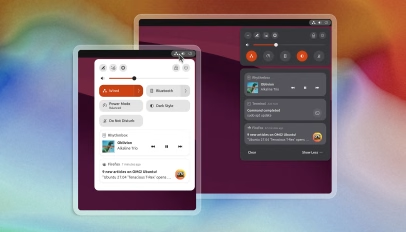 Sanket is a GNOME Shell extension that lets you rejig how the desktop’s date menu, calendar, notifications and Quick Settings look and behave – and then some. It can put notifications beneath the Quick Settings menu in a floating island, or embedded inside of it. Quick Settings toggles can shrink to dots when space is tight, and expand again as and when needed, Android-style. As well as shrinking Quick Settings pills to dots, other menu tweaks let you show up two rows of controls and choose if volume and brightness sliders remain visible in compact mode. An ‘edit’ mode lets […]
 Ever wondered what your Ubuntu desktop would look like if you were watching it on a chewed up VHS tape or an old monochrome CRT monitor? You probably haven’t, but a new GNOME Shell extension lets you find out anyway. The Shader Effects extension applies GPU-accelerated filters, things like scan lines, NTSC RGB bloom and flickery green CRT glow, to your entire desktop or, if you’d rather, just a specific window(s). You can see three of the effects demoed in this video clip: The extension’s preference panel lets you fine-tune how intense the chosen effect is, and you can dial […]
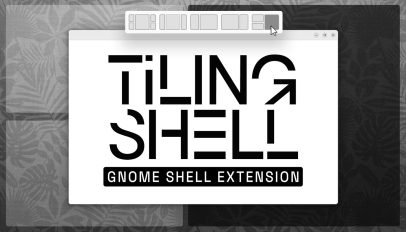 A new version of the Tiling Shell GNOME extension is out, adding support for GNOME 51 and a faster way to tile app windows using nothing but your mouse. Tiling Shell v18.0 lets you use your right mouse button for tiling system activation. It’s feature fans of Tiling Shell had requested, many accustomed to it from Windows’ PowerToys’ FancyZones. You click your left button to grab and drag the window then, with it held, hold the right mouse button to trigger the on-screen tiling layout. Release the left button over a zone and the window snaps to it – no […]
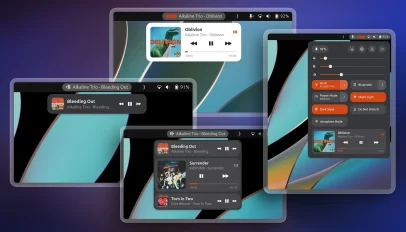 Now Playing Card is an extension for GNOME Shell that can show playback info and media controls from multiple sources at the same time.
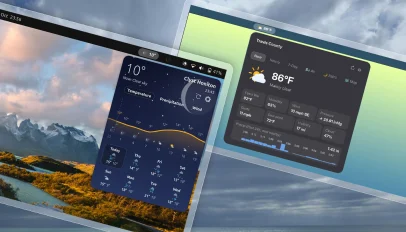 I revised my list of the best Linux weather apps recently, but I know most people prefer to use panel applets to glean current conditions and future forecast data. There’s no drought in weather extensions for GNOME Shell. All kinds – some like Weather or Not show a simple label on panel, others dish out reams of meteorological data in a dropdown of varying designs (and, in a few cases, vertical length). I’ve seen a flurry of newer weather extensions for GNOME Shell emerge in recent months. The searing heatwave that spread the globe this year may have had developers […]
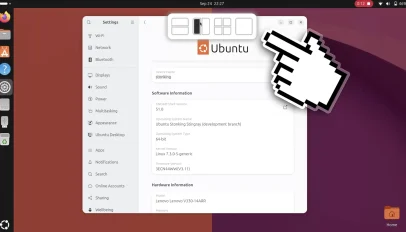 Ubuntu 26.10 offers a new way to tile your apps, with a layout picker sliding in from the top of the screen when you move a window. This “dropzone” concept for quick tiling will be familiar to users of Windows 11 users or those who’ve tried the Tiling Shell extension for GNOME Shell – they do, broadly, the same thing. When you drag a window a layout picker with a small set of preset layouts drop zones moves in from the top of the display. You drag your window up over a layout zone (a ‘ghost’ preview of where the […]
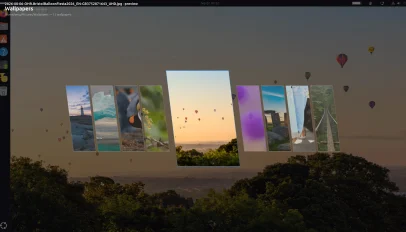 Wallpapi is an Omarchy-inspired wallpaper switcher for GNOME desktops that offers a slicker. When installed, it lets you “browse a folder of wallpapers as a full-screen carousel of parallelogram cards”. As you page through available options, the focused image is previewed as your wallpaper in the background, so you can see it larger, which is pretty cool. When you spot the drape you want, you hit Enter to set it as the desktop background. Choices are scheme-aware. If a light or dark variant is available, Wallpapi will set the correct version of an image per your system dark mode preference. […]
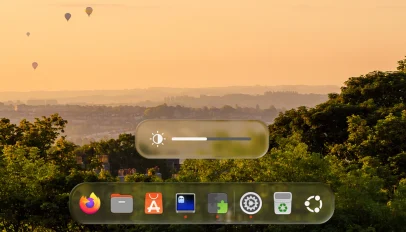 You can now give the Ubuntu desktop a ‘Liquid Glass’ makeover using a new GNOME Shell extension that was written with ‘significant’ help from AI. Its developer, Ryosuke Watanabe, said they loved the look of Liquid Glass – Apple’s new design material that gives UI elements light-bending surfaces with depth and motion – but, not owning an Apple device, wanted a way to enjoy it on their Linux desktop. So they created an extension to do it. “The design, the shader math, the architecture decisions, and all of the testing on real hardware are mine”, says Watanabe, but adds that […]
 Ubuntu’s Desktop Icons NG (DING) extension has a little-known way to bring order to a chaotic desktop: stacks. Stacks groups multiple files of the same type in a collapsible icon, e.g. images in one stack, PDFs in another and so on. Folders don’t get grouped, and if there is only one of a type of file on the desktop, it is not stacked. Expanding a stack by clicking on it reveals all files in the stack (other file icons bump out of the way). Multiple stacks can be expanded or collapsed at the same time, and stacks can be left […]
 You can bring Ubuntu’s clock, calendar and weather app icons to life with the Dynamic Calendar, Clocks and Weather Icons [Reborn] GNOME Shell extension – which has been updated with new icon styles. The extension already has Yaru, Adwaita, Paprius, Big Sur and other icon styles built-in (the dynamic versions don’t depend on the icon sets themselves), so you see real-time clock, date and weather info on icons that look like their static equivalents. Two new icon choices land in latest update, v9, released this week (17 August 2026), Stylish and Pure: In the screenshot above, you can see how […]
 If you remember that desktop picture widget for GNOME I wrote about last year, but found it a bit too basic for your personalisation preferences, you weren’t alone. Another user felt it could lacked enough flexibility, so forked and improved it. Picture Desktop Widget Remake improves on the original. It lets add multiple picture widgets to your Ubuntu desktop, and assign each one a different folder to pull images from, at random. Plus, you can set the size, position, border radius and aspect ratio of each widget individually. Each photo frame has its own on/off button in Preferences, so you […]
 An updated version of Dynamic Music Pill, the GNOME Shell extension to put now playing track info and lyrics in your panel or dock with animated flourishes, is out. If you’re prone some desk-side crooning, Dynamic Music Pill v1.3.0 brings two new lyrics provider APIs, BetterLyrics and BiniLyrics, with TTML parsing to provide word-by-word karaoke-style highlighting. If there’s word-level synced lyrics for the track being played, the extension shows them in the applet controller (click on the album art inside of to access the lyrics view) or the panel, depending on how you’ve configured it: Dynamic Music Pill can show […]
 Dropbeat is a new riff on an old tune, a panel-based music applet for GNOME Shell that gives you an alternate way to pause, play and skip tracks in MPRIS-friendly Linux media players. Applets of this ilk are legion, and this panel applet doesn’t do anything that different to ones you may have tried in the past or currently use. But it does do some things differently. When installed, it adds a button to your panel that, when clicked, “shows a cool card to control your media player”, to quote the project’s GitHub. Dropbeat uses imagemagick to generate the blurred […]
 Mosaic brings automatic tiling to GNOME Shell, but without asking you to use it permanently. Turn it on when you want windows to arrange themselves, turn it off when you want floating windows back. The extension works with GNOME 45 and up, adding a toggle to Quick Settings to enable the auto-tiling mode. When off, you’re in floating mode (which still has tiling features). Expand the toggle to access more options or get at Mosaic’s settings. It’s the easy on-demand nature that makes Mosaic different to similar extensions that exist. When the auto-tiling mode is active (the toggle is turned […]
