
 Login
Euro-Office, the ONLYOFFICE fork, now has a desktop app
 Euro-Office, the Nextcloud-backed fork of ONLYOFFICE, is now available to download and install on desktops as Nextcloud Office Desktop. Announced in March 2026, Euro-Office is a European-based alternative to Microsoft 365 and a fork of ONLYOFFICE. It’s currently something users can run and host (or pay someone to host) on a server, and then access via a web browser or mobile app. Much like ONLYOFFICE Docs. That’s no longer needed, Nextcloud Office Desktop is Euro-Office desktop client that installs and works like a traditional desktop office suite. You do not need to host a server or be online to use […]
You're reading Euro-Office, the ONLYOFFICE fork, now has a desktop app, a blog post from OMG! Ubuntu. Do not reproduce elsewhere without permission.
 A major new release of Ghostty, the open-source terminal emulator, is out. Ghostty 1.4.0 brings a varied set of changes after seven months of development. There are welcome performance optimisations on Linux and macOS, a more capable SSH implementation and an easier way to rearrange tab splits – dragging them! This update to the Zig-based app offers complete Kitty graphics protocol support (including animation and relative placements) – the first terminal besides Kitty to do so. If you use TUI tools or script to render images in the terminal, this is a major feat. Devs say performance is improved hugely […]
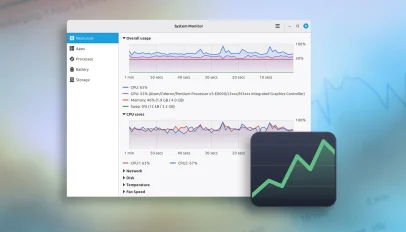 December’s Linux Mint 27 release will include a brand new system monitor tool preinstalled. The app is called Superlight (well, that’s the project and package name; the user-facing label is just System Monitor). It shows hardware, app and process usage, relays battery stats and has an interactive storage page to find out what files and folders are using the most space. It’s still under active development, but I took it for a spin to see how it fares and what it offers. Keep in mind that more features may be added or changed between now and when it gets its […]
 Linux Mint shook up its release schedule this year and now it’s shaking up its versioning scheme as well – the next major release won’t be Linux Mint 23, but Linux Mint 27. Releases will now be numbered by year. Linux Mint 27 will be followed by v28, and so on. The release also sees the start of a new series of release codenames. Mint has traditionally used feminine first names, cycling through the alphabet from Linux Mint 1.0 ‘Ada’ in 2006 through to Linux Mint 22.3 ‘Zena’ in 2026. The series returns to ‘A’ with Linux Mint 27 and […]
 A revived Banshee music player is now available on the Snap store, making it possible to use it on modern Linux desktops decades after its last stable release. Packaged by Alan Pope (aka popey), this new Banshee snap lets you run the old Banshee 2.6.2 release – the final stable one from 2014 – on modern Linux desktops. Not merely a code repack; the Snap Store description says the snap build features ‘compatibility fixes and restores selected online services’. It does notes that not all ‘historical’ services may work, though. Is it an official continuation? No. Think: ‘reanimated corpse’ rather […]
 An option pick a default terminal is to GNOME Settings, as the image above, teased by developer Ignacy Kuchciński last week, shows. Those of you who don’t use the command line often enough to care about what terminal is set as your system default, may be surprised to hear you can’t currently change it via a GUI. If you go to Settings > Apps > Default Apps you can pick your preferred web browser, email client, imager viewer and others apps, but you can’t set a terminal emulator as your system default. For developers, the missing option can be annoying. […]
 Two new apps are coming to Linux Mint later this year: a new calendar and eBook reader. Plus, the Ubuntu-based Linux distribution has redesigned its (overlooked) document hub, Library, to make it easier to find and manage documents scattered across you device from one place. Both new apps join the XApp Project, Linux Mint’s collection of home-grown, cross-desktop GTK apps (which now has a new website wearing the popular Claude design aesthetic). Clockenstien is Mint’s new Calendar app Clockenstein is Linux Mint’s new calendar app but, lest anyone scream in horror at the terrible name, the user-facing label is just […]
 Photos is a new(ish) image viewer and organiser for KDE Plasma aiming to give Gwenview a run for its pixels. Linux distributions that use KDE Plasma typically ship Gwenview, which has been the KDE image app for over 25 years. It’s a solid, feature-filled and Qt-based tool that and many love and rely on to view, manage and edit images. But development on Gwenview has slowed – and its legacy could be to blame. As GNOME found during efforts to modernise the Evince document viewer, updating old software can require rewriting and rewiring large chunks of an antiquated codebase. It […]
 They say never judge a book by its cover, and few do if said book is a dictionary, but what about desktop dictionary apps? I recently came across Wordbook, a modern English-English dictionary powered by OpenEnglish WordNet and eSpeak for pronunciations. Wordbook is in GNOME Circle, and its GTK4/libadwaita UI is a good fit for the desktop. Wordbook uses a lexical database, with words grouped into ‘synsets’ based on their meaning. It makes it easier to explore related words, distinguish between words that look similar (but have different meanings) and find different precise alternatives. A random word option, favourites and […]
 Whisp is a Linux notes app with a difference. A gesture-driven GTK4/libadwaita UI offering a scratchpad for note taking. Inspired by Antinote for macOS.
