Normal view

There are new articles available, click to refresh the page.
Today — 27 June 2026Human Made

Enterprise CMS Costs: What Total Cost of Ownership Really Means

26 June 2026 at 09:34

Enterprise platform discussions often begin with software costs.

Licence fees, subscription models, implementation budgets, and support agreements are relatively easy to compare during procurement. They are visible, measurable, and usually well documented by vendors.

The challenge is that software costs represent only one part of a platform’s economic impact. Once a platform is embedded across teams, workflows, and business processes, a much broader set of costs begins to influence its value.

Integrations need maintaining. Governance models need evolving. New channels emerge. Teams expand into new regions. Business priorities shift. Technologies that were not part of the original requirements become important.

Over time, these factors often have a greater influence on platform economics than the original software agreement.

This is why enterprise organisations increasingly evaluate platforms through the lens of total cost of ownership (TCO).

The largest platform costs often emerge after launch

Many digital platforms begin with a relatively clear set of requirements. A website needs to be rebuilt. A content platform needs modernising. Multiple properties need consolidating onto a shared foundation.

Those projects have a defined scope and budget.

The complexity arrives later.

As organisations grow, digital platforms become connected to a wider ecosystem of services. Content management systems frequently sit alongside customer data platforms, analytics tools, ecommerce services, identity providers, DAM systems, marketing automation platforms, translation workflows, and increasingly, AI-powered tools.

Each integration creates value. Each integration also introduces dependencies that require maintenance, governance, and operational oversight.

At enterprise scale, platform ownership becomes less about running a CMS and more about managing an evolving digital ecosystem.

Understanding how a platform supports that evolution is central to understanding its long-term cost profile, and thus the total cost of ownership.

Why platform flexibility has financial value

Enterprise requirements rarely remain static for long.

A business may acquire a new brand, expand into a new market, launch a new product line, or introduce entirely new customer experiences. Regulatory requirements change. Internal operating models evolve. New technologies create opportunities that were not anticipated when the platform was first selected.

Every one of these developments places demands on the underlying platform.

Some platforms accommodate change relatively easily. Others require significant redevelopment, specialist expertise, or commercial agreements before new capabilities can be introduced.

The difference has a direct financial impact.

When introducing a new integration takes months rather than weeks, costs increase. When teams are forced to work around platform limitations, productivity declines. When architectural decisions made years earlier restrict future options, innovation becomes slower and more expensive.

This is one reason enterprise leaders increasingly assess a platform’s adaptability alongside its feature set.

Understanding the economics of proprietary platforms

Proprietary platforms provide a clear commercial model. Organisations pay for access to software that is owned, developed, and governed by a vendor.

For many businesses, this structure offers reassurance. Product roadmaps, support models, and accountability are clearly defined.

As digital estates grow, however, the relationship between platform usage and platform costs often becomes more complex.

Licensing models frequently scale alongside adoption. Additional users, environments, websites, markets, or capabilities may introduce additional costs. Access to advanced functionality may require higher pricing tiers. Integrations and customisations can become dependent on vendor-approved approaches or specialist expertise.

None of this is unusual. It reflects the incentives built into commercial software businesses.

The important consideration for enterprise buyers is how those costs behave over time. Growth, complexity, and change are constant features of large organisations. Understanding how a platform responds to those forces is often more valuable than comparing feature lists during procurement.

Where open source creates a different economic model

Open source platforms approach the same challenge from a different direction.

Rather than charging for access to the software itself, open source shifts investment towards implementation, operations, and capability development. Organisations retain ownership of their code, data, infrastructure decisions, and platform architecture.

This changes how investment is allocated.

Budget that might otherwise be committed to recurring licensing costs can be directed towards improving editorial workflows, strengthening integrations, enhancing customer experiences, modernising infrastructure, or introducing new capabilities. The organisation has greater discretion over where resources are invested and how priorities are balanced.

Control also extends beyond budgeting.

Teams can choose hosting providers, adopt new technologies, work with different implementation partners, and evolve their architecture as requirements change. Decisions are shaped by business priorities rather than vendor roadmaps or commercial constraints.

For enterprise organisations operating in environments where change is constant, that flexibility has practical and measurable value.

Vendor lock-in is an operational and financial consideration

Vendor lock-in is often discussed as a technical issue, but its effects extend much further.

Organisations that become heavily dependent on a single vendor ecosystem can find future decisions increasingly constrained. Replacing services becomes more difficult. Negotiating commercial agreements becomes more challenging. Migrating data or introducing alternative technologies requires greater investment.

These constraints affect both risk and the total cost of ownership.

By contrast, platforms built on open standards and open technologies provide more options when business requirements change. That does not eliminate complexity, but it does reduce dependency on a single supplier or ecosystem.

For many enterprise leaders, preserving optionality has become a strategic objective in its own right.

The cost that rarely appears in TCO models

One area that receives relatively little attention in platform evaluations is the cost of delayed innovation.

Organisations compete through their ability to adapt. New products, services, workflows, and customer experiences all depend on how quickly teams can turn ideas into reality.

When platform constraints slow experimentation, the impact is rarely captured in procurement spreadsheets. Lost opportunities do not appear as line items. Delayed launches rarely show up in platform budgets.

Their effect is still significant.

Teams that can test new ideas quickly tend to learn faster. Organisations that can integrate emerging technologies more easily tend to adapt more effectively. Platforms that support continuous evolution create fewer barriers between strategy and execution.

These advantages accumulate over time.

A broader view of return on investment

Enterprise platform decisions influence far more than technology stacks.

They affect how teams collaborate, how quickly organisations can respond to change, how easily new capabilities can be introduced, and how much control businesses retain over their digital future.

Viewed through that lens, total cost of ownership becomes a measure of resilience and adaptability as much as financial efficiency.

The most valuable platforms are rarely those that simply minimise costs. They are the platforms that allow organisations to evolve without repeatedly rebuilding, replatforming, or renegotiating the foundations of their digital estate.

Download The Enterprise WordPress Playbook to explore platform strategy, governance, composable architecture, AI adoption, and the factors that shape long-term enterprise platform success.

Animal, Bee, Insect
Advertisement, Poster, Animal

Download The Enterprise WordPress Playbook to explore platform strategy, governance, composable architecture, AI adoption, and the factors that shape long-term enterprise platform success.

The post Enterprise CMS Costs: What Total Cost of Ownership Really Means appeared first on Human Made.
Before yesterdayHuman Made

Why platform evolution beats replatforming

30 April 2026 at 10:14

Enterprise platform decisions are often framed as a choice between build or buy. Either you invest in something bespoke, or you purchase a proprietary system that promises speed and structure.

But for many enterprise organisations, that framing no longer fits.

Digital platforms now have to support multiple brands, markets, teams, channels, integrations, and increasingly, AI-enabled workflows. Requirements change quickly. New services need to be added. Legacy systems need to be replaced gradually. Teams need to move faster without losing control.

In that environment, the strongest platform strategy is not always to rebuild from scratch or commit to a single vendor-led roadmap. It is to evolve.

The limits of traditional replatforming

Large-scale replatforming projects often begin with good intentions. The current platform feels too slow, too expensive, or too difficult to change. A new system promises a clean break.

The problem is that enterprise complexity doesn’t disappear when a platform changes. It moves.

Content models, integrations, governance, editorial workflows, compliance requirements, performance needs, and internal processes all still need to be understood and supported. A big-bang migration can create risk, delay value, and force teams to make decisions before they have had a chance to test what works.

By the time the new platform is live, requirements may already have shifted.

Why evolution is a better fit for modern digital teams

An evolution-led approach treats platform change as an ongoing process, not a one-off transformation.

Instead of replacing everything at once, organisations build on a flexible foundation and improve it over time. Capabilities can be added, replaced, or refined as business needs change. Integrations can be modernised in stages. Teams can validate decisions earlier and reduce disruption.

This is where open platforms like WordPress are especially powerful.

WordPress gives enterprises the ability to shape the platform around their needs, rather than adapting their organisation to fit a fixed product model. It can support traditional, headless, hybrid, multisite, and composable architectures, depending on what each part of the business requires.

Flexibility reduces long-term risk

At enterprise scale, the cost of change matters.

A platform that is quick to launch but difficult to adapt can become expensive over time. Licensing tiers, constrained integrations, vendor dependencies, and customisation limits all affect how easily an organisation can respond to new priorities.

Open architecture changes the equation.

With WordPress, teams can change hosting providers, integrate specialist tools, adopt new services, and evolve workflows without being tied to a single vendor’s roadmap. That flexibility reduces lock-in and gives organisations more control over both cost and direction.

Evolution supports better governance

Continuous evolution doesn’t mean uncontrolled change.

In fact, it works best when governance is built in from the start. Shared standards, reusable components, role-based permissions, approval workflows, security practices, and clear ownership models all help distributed teams move quickly while staying aligned.

For global, multi-brand, or multi-language organisations, this balance is critical. Central teams can maintain consistency while local teams retain the flexibility to serve their own markets.

The role of WordPress in an evolving enterprise stack

Modern enterprise platforms rarely operate alone. They sit within a wider ecosystem of DAMs, CDPs, analytics tools, commerce platforms, search services, and AI providers.

WordPress fits naturally into this kind of composable architecture. It can act as the content layer, the publishing interface, the integration point, or part of a wider digital experience platform.

That makes it well suited to phased change. Organisations can start with a focused use case, prove value, then expand over time.

From replacement mindset to evolution mindset

The most successful enterprise platforms aren’t static; they improve continuously.

That requires a shift in mindset. Instead of asking which platform will solve every problem today, leaders should ask which platform gives them the most room to adapt tomorrow.

For many organisations, WordPress provides that foundation: open, extensible, widely adopted, and capable of supporting complex digital operations at scale.

Replatforming may still be necessary. But the goal should not be another fixed end state.

The goal should be a platform that can keep changing.

The post Why platform evolution beats replatforming appeared first on Human Made.

Checklist: 5 must-do performance audits before Q1 begins

11 March 2026 at 09:04

Q1 has a habit of arriving fast.

New campaigns launch. Product updates go live. Traffic spikes. Leadership wants reporting. And suddenly your WordPress platform is under more scrutiny than ever.

If you manage an enterprise WordPress estate, performance is not just a technical concern. It directly impacts revenue, search visibility, user satisfaction, and operational efficiency.

Before the new quarter begins, now is the time to pressure test your platform.

Here is a practical checklist of five performance audits every enterprise team should complete before Q1 kicks off.

1. Full-stack performance benchmarking

Before you optimise, you need a clear baseline.

Enterprise sites are complex. Multiple integrations, global audiences, high editorial velocity, and layered caching all influence performance. A superficial PageSpeed score is not enough.

Start with:

  • Real user monitoring data, not just synthetic tests
  • Core Web Vitals across key templates
  • Performance under peak load conditions
  • Geographic performance for global audiences
  • Logged-in versus anonymous user experiences

Look at performance by template type, not just the homepage. Product pages, landing pages, search results, and editorial content often behave very differently.

You should be asking:

  • Where are we slowest, and why?
  • Are performance issues systemic or template-specific?
  • How does performance change during traffic spikes?
  • Are recent releases impacting speed?

For enterprise WordPress, performance issues are often architectural, not cosmetic. This audit helps identify whether you are dealing with frontend inefficiencies, backend bottlenecks, infrastructure constraints, or a combination of all three.

2. Infrastructure and hosting review

Your infrastructure is the foundation of performance. If it’s misconfigured or under-provisioned, no amount of frontend tuning will compensate.

Before Q1, review:

  • Hosting architecture and scalability model
  • Autoscaling policies and thresholds
  • Database performance and indexing
  • Object caching implementation
  • CDN configuration and cache hit rates
  • PHP version and runtime configuration

Enterprise traffic patterns are rarely consistent. Campaign launches, media coverage, and seasonal demand create unpredictable spikes. If your autoscaling policies have not been tested recently, you are taking a risk.

Load testing is critical here. Simulate realistic Q1 traffic scenarios. Don’t just test maximum concurrent users. Test editorial workflows, logged-in traffic, API usage, and background jobs running simultaneously.

A mature enterprise platform should degrade gracefully under load, not fail abruptly.

3. Plugin and dependency audit

Enterprise WordPress sites accumulate plugins over time. Some are essential. Others linger long after their purpose has passed.

Each plugin introduces:

  • Additional database queries
  • Extra HTTP requests
  • Potential conflicts
  • Security and maintenance overhead

Before Q1, conduct a thorough plugin and dependency review.

Ask:

  • Is this plugin still necessary?
  • Can its functionality be consolidated or custom-built more efficiently?
  • Is it actively maintained and compatible with your WordPress version?
  • Does it introduce frontend performance overhead?

Pay particular attention to:

  • Page builder plugins
  • Analytics and tracking scripts
  • Marketing automation integrations
  • Search enhancements
  • Personalisation tools

Also review third-party scripts injected via tag managers. Marketing tags often expand quietly over time, increasing JavaScript execution costs and affecting Core Web Vitals.

Enterprise performance is often eroded gradually. This audit should help you regain control.

4. Frontend performance and Core Web Vitals deep dive

These days, Core Web Vitals aren’t just SEO metrics; they’re user experience indicators. And for enterprise brands, experience is everything.

Audit:

  • Largest Contentful Paint on key templates
  • Cumulative Layout Shift caused by dynamic content
  • Interaction to Next Paint and JavaScript execution time
  • Image optimisation and responsive image handling
  • Critical CSS and render-blocking resources

Enterprise WordPress themes evolve over years, and design refreshes, campaign components, and microsite features accumulate. The result can be bloated bundles and redundant CSS.

Look for:

  • Unused JavaScript
  • Excessive client-side rendering
  • Overuse of large component libraries
  • Inefficient image formats or missing lazy loading
  • Web font loading strategies

If your design system has expanded without a performance review, this is where you’ll find hidden costs.

5. Editorial workflow and backend performance audit

Performance concerns what users see, but it’s also about how your teams work.

Slow admin screens, delayed publishing, and heavy block editor experiences reduce productivity and create operational friction.

Audit:

  • Admin load times
  • Block editor responsiveness
  • Media library performance
  • Search performance in large content repositories
  • Background processing queues

Enterprise WordPress sites often contain hundreds of thousands of posts, assets, and metadata entries. Database growth affects both frontend and backend performance.

Check:

  • Database indexing and query efficiency
  • Post revisions and autoloaded options
  • Taxonomy usage and optimisation
  • Cron job configuration

If your editorial team is preparing for Q1 content pushes, campaign launches, or product updates, backend performance matters just as much as frontend speed.

A fast publishing workflow supports business momentum.

Why this matters before Q1

Q1 is when budgets reset, expectations rise, and new initiatives go live.

Performance issues during this period are more visible, more disruptive, and more costly.

An enterprise performance audit before Q1 helps you:

  • Reduce risk before traffic spikes
  • Protect SEO visibility
  • Improve conversion rates
  • Support marketing and product teams
  • Strengthen confidence at leadership level

It also gives you a clear roadmap for prioritising improvements, instead of reacting to issues once they surface.

Ready to audit your platform?

Enterprise WordPress performance is rarely about a single fix. It is about architecture, governance, infrastructure, and ongoing optimisation working together.

If you want a comprehensive, expert-led assessment of your platform, our team can help.

Explore our performance audit offering and speak to our specialists about preparing your WordPress platform for Q1 success.

Let’s make sure your platform is ready before the quarter begins.

The post Checklist: 5 must-do performance audits before Q1 begins appeared first on Human Made.

WordPress as an agentic platform

17 March 2026 at 13:48

At WP:26, Human Made’s virtual event exploring the future of WordPress, we brought together technologists, publishers, and platform leaders to discuss one big question:

What patterns are emerging that will shape WordPress in 2026 and beyond?

Across a day of talks and conversations, speakers explored how AI, accessibility, enterprise publishing, and evolving web standards are reshaping the role of a CMS.

To open the event, Human Made’s CGO and Partner Noel Tock set the tone with a provocative idea:

What happens when software agents start interacting with websites as much as people do?

It’s a question that sits right at the centre of how the web is changing. AI systems are already summarising content, generating answers, and navigating websites programmatically. The next step is systems that don’t just read the web, but act on it.

And when that happens, the role of a CMS starts to look very different.

The web is becoming machine-operable

For most of the web’s history, websites have been designed primarily for human interaction. People visit a page, read content, click buttons, and navigate between sections.

But increasingly, machines are doing the same things.

Search engines have been crawling and interpreting websites for years. Now AI assistants and software agents are beginning to go further, understanding context, extracting information, and triggering workflows across systems.

As Noel put it during the talk:

“The web is shifting from something humans browse to something agents can act on.”

That shift has significant implications for how digital platforms are designed.

If agents can interact with websites directly, the web becomes less like a collection of documents and more like a network of programmable interfaces.

Rethinking what a CMS actually does

This is where the conversation gets interesting for agentic WordPress.

Traditionally, a CMS has been thought of as publishing infrastructure. A system for managing content, rendering pages, and delivering experiences to users.

But in an agent-driven environment, a CMS becomes something more powerful: a platform for orchestrating workflows between systems, people, and AI agents.

Content becomes structured data. Interfaces become programmable endpoints. Publishing workflows become automation pipelines.

That’s not a distant future scenario. In many organisations, it’s already starting to happen.

Why WordPress is well positioned for an agentic future

One of the most compelling ideas in Noel’s keynote was that WordPress may actually be unusually well suited to this transition.

Not because it was designed for AI agents — it wasn’t.

But because of the way the platform has evolved over time.

WordPress already has many of the characteristics needed for this next, agentic phase of the web:

  • Open APIs that allow systems to interact with content programmatically
  • Extensibility through plugins and custom development
  • Flexible architectures that support headless, hybrid, and full-stack approaches
  • A large ecosystem constantly experimenting with new patterns

In other words, the platform has the structural flexibility needed to adapt as the web changes.

That adaptability has been one of WordPress’s quiet strengths for more than two decades.

Open ecosystems move faster

Another thread running through the session was the role of openness.

When technology shifts quickly, proprietary systems often struggle to keep up. Innovation tends to happen faster in open ecosystems where developers can experiment, integrate new tools, and build on top of shared infrastructure.

We’re already seeing that pattern play out across the AI landscape itself, where many of the most influential tools and frameworks are emerging from open communities.

WordPress fits naturally into that model.

Its openness allows teams to integrate new AI capabilities, experiment with agent-based workflows, and adapt their platforms without waiting for a vendor roadmap to catch up.

From publishing system to programmable platform

If there was one idea that framed the rest of WP:26, it was this:

WordPress is evolving from publishing infrastructure into a programmable platform for intelligent workflows.

That doesn’t mean the fundamentals of content management go away. Publishing, editorial workflows, and content creation are still at the heart of the platform.

But the context around them is expanding.

Content isn’t just read by people anymore. It’s processed by systems.
Websites aren’t just visited. They’re queried and acted upon.

And platforms that can support that shift will play an important role in how the next generation of digital experiences are built.

A fitting start to WP:26

Noel’s keynote set the tone for the rest of the event.

Throughout the day, speakers explored related themes from different perspectives: how AI is changing search and discoverability, how accessibility overlaps with machine-readable content, and how enterprise organisations are adapting their WordPress platforms to support increasingly intelligent workflows.

In many ways, those conversations all traced back to the same underlying idea.

The web is changing.

And platforms like WordPress are evolving right alongside it.

Catch up on all the sessions from WP:26 and find out what the changing web means for enterprise teams.

The post WordPress as an agentic platform appeared first on Human Made.

7 ways to get the most out of WordPress in 2026

26 January 2026 at 11:14

For a long time, enterprise teams have been stuck with an uncomfortable trade-off. In 2026, WordPress breaks it.

You could scale fast, but only by accepting rigidity, brittle tooling, and a growing maintenance burden. Or you could stay flexible, at the cost of control, consistency, and long-term sustainability.

That false choice has shaped how digital platforms are designed, built, and governed for over a decade.

Until now, that is. WordPress is no longer just a publishing platform: it’s evolving into an intelligent CMS. One that combines structured data, reusable patterns, and increasingly agentic workflows to help teams move faster without creating fragility.

This shift changes what enterprise teams should prioritise, what they can safely stop over-engineering, and how they can build systems that adapt over time instead of fighting change.

Here’s how to get the most out of WordPress in 2026.

1. Stop chasing stacks

For years, enterprise digital platforms have grown by accumulation.

Another tool to manage content.
Another service to orchestrate workflows.
Another layer of glue code to hold it all together.

The result is complexity that slows teams down and makes change expensive.

Modern WordPress reduces that complexity by delivering more integrated capability out of the box. Core concepts like blocks, patterns, data relationships, and extensibility now work together as a system rather than isolated features.

Less glue code.
Fewer fragile integrations.
More momentum.

The opportunity for enterprise teams is to simplify their stacks, not expand them, and to treat WordPress as a platform that can carry more responsibility without the traditional complexity tax.

2. Design systems, not pages

One of the most important mindset shifts is moving away from page-by-page thinking.

Reusable blocks and synced patterns allow teams to design systems rather than individual experiences. You build once, then scale everywhere. Updates propagate safely. Consistency becomes an asset rather than a constraint.

For large organisations, this changes how design, development, and content teams collaborate. Governance no longer means locking things down. It means defining strong patterns and letting teams move quickly within them.

3. Structure first, visual always

Enterprise platforms often fail editors in one of two ways.

Either they prioritise structure and governance but make publishing slow and frustrating. Or they prioritise visual freedom but sacrifice consistency and data quality.

WordPress in 2026 makes it possible to have both.

Structured data sits underneath flexible, visual interfaces. Editors can move quickly without breaking rules they never see. Platforms remain robust without feeling heavy.

This balance is essential for teams producing content at scale, across markets, brands, and channels.

4. Think in capabilities, not features

Traditional platforms are built around features. Each new requirement leads to another custom build or plugin.

WordPress is increasingly built around capabilities.

Block bindings, composability, and shared data models allow teams to create systems that evolve. Future change becomes configuration and extension, not a rebuild.

When platforms are designed this way, adaptability becomes the default. Custom code becomes the exception rather than the foundation.

5. Let workflows do the work

Another major shift is the rise of agentic workflows.

Repetitive effort that once required manual intervention can increasingly be orchestrated. Content preparation, transformation, quality checks, and distribution become coordinated systems rather than individual tasks.

This allows teams to scale output without scaling headcount. It also reduces risk by removing human error from routine processes.

For enterprise organisations under constant pressure to do more with less, this isn’t a nice-to-have – it’s a competitive advantage.

6. Govern without slowing down

Control and speed no longer need to be opposites.

Centralised patterns combined with decentralised execution allow platforms to remain governed while enabling teams to act independently. Standards are enforced through design, not policy documents. Guardrails replace bottlenecks.

This is where WordPress is heading, and where many enterprise platforms need to go if they want to stay relevant.

7. Build for what comes next

The real power of WordPress in 2026 is what it enables tomorrow.

Platforms built around adaptability outperform those built around custom code every time. They absorb change rather than resist it. They evolve without constant reinvention.

Enterprise teams now face a clear choice.

Build on an intelligent CMS.
Or compete against teams who already are.


Go deeper: WordPress in 2026

This post only scratches the surface of what’s changing and why it matters.

Our new report, WordPress in 2026: The dawn of the intelligent CMS, explores what this shift means for enterprise teams, platforms, and the next decade of digital experiences. It covers what to prioritise, what to stop over-engineering, and how to design systems that remain resilient as WordPress continues to evolve.

We are also hosting WP:26, a dedicated event where we will unpack the themes from the report, share real-world examples, and explore what intelligent CMS architecture looks like in practice.

If you’re responsible for the future of a WordPress platform at scale, now is the moment to rethink what your CMS can be.

The post 7 ways to get the most out of WordPress in 2026 appeared first on Human Made.

Why Accessibility is a Business Advantage

15 December 2025 at 14:15

Accessibility often enters the conversation through the lens of compliance. Laws like the ADA or the European Accessibility Act make it non-negotiable. But compliance is only the beginning. Teams that treat accessibility as a strategic investment discover benefits that reach far beyond legal risk.

Accessibility drives performance, efficiency, and growth: the same outcomes every digital leader is trying to achieve.

Here’s how accessibility can unlock business advantage.

1. Accessibility improves conversion and retention

When a site is accessible, it reduces friction for every visitor. Accessible design is simply good design: faster, clearer, and easier to act on.

Consider these examples:

  • Forms that work with keyboard navigation also convert better on mobile.
  • Descriptive link text improves comprehension, which in turn supports SEO and click-through.
  • Readable contrast ratios reduce bounce rates by making content easier to scan in all lighting conditions.

A study by the UK’s Click-Away Pound project found that inaccessible sites cost British retailers £17 billion each year in lost revenue. The logic is simple: when people can use your site, they stay, buy, and return.

Takeaway: Every accessibility improvement increases usability, which directly impacts conversions and customer loyalty.

2. Accessibility lowers technical debt

Accessibility often feels expensive because teams try to add it after launch. Retrofitting fixes into an existing product is the real cost driver.

When accessibility is built in from the start — during design systems, component creation, and content workflows — it prevents common issues that later require developer rework.

Accessibility standards like semantic HTML, ARIA roles, and clear focus states also make code cleaner and easier to maintain. Teams gain long-term efficiency by removing ambiguity and duplication.

Takeaway: Accessibility built early saves both time and money later. It’s a form of quality assurance that protects future budgets.

3. Accessibility strengthens your brand and customer trust

Accessibility sends a clear signal about your organisation’s values. It tells people that inclusion is part of your culture, not a campaign.

Customers increasingly choose brands that reflect their ethics. Inclusive design and accessible experiences demonstrate respect for diverse audiences and reinforce trust — particularly important for sectors where credibility is key, like finance, healthcare, and higher education.

Human Made’s work with Standard Chartered is a strong example. Accessibility was treated as a global design principle across multiple markets and languages. The outcome was not only compliance but a more consistent user experience for every customer.

Takeaway: Accessibility builds trust at scale. It’s an investment in brand equity as much as technical capability.

4. Accessibility helps teams scale responsibly

Enterprise WordPress environments can span hundreds of sites, each with different editors, themes, and plugins. Without a shared accessibility standard, quality becomes inconsistent.

Embedding accessibility into design systems and governance models brings control and predictability. Reusable, accessible components make it easier for distributed teams to deliver consistent results without starting from scratch each time.

This also supports compliance across regions with differing regulations — a growing challenge for global organisations.

Takeaway: Accessibility governance creates efficiency and consistency across complex ecosystems.

5. Accessibility fuels innovation

Constraints are often where creativity begins. Designing for accessibility encourages teams to think differently about interaction, language, and structure.

Voice interfaces, dark-mode design, and responsive layouts all originated from accessibility thinking. Today, AI-driven captioning, pattern recognition, and alt-text generation are continuing that trend.

Teams that treat accessibility as a driver of innovation discover better solutions for all users — not just those with specific needs.

Takeaway: Accessibility challenges assumptions and leads to better digital products.

Building a culture of accessibility

At Human Made, we believe accessibility is a marker of maturity. It reflects how a company approaches design, development, and content creation as a unified practice.

That’s why we’re sponsoring accessibility specialist Rian Rietveld to create the WordPress Accessibility Knowledge Base, a central resource that will make accessibility knowledge easier to find and apply across the ecosystem.

Accessible design is not a compliance task. It’s an operational advantage — one that makes digital experiences faster, cleaner, more consistent, and more inclusive.

Take action:
Start by auditing one site, one workflow, or one component library. Identify the quick wins — like colour contrast, form labels, or keyboard navigation — and build from there.

Every improvement you make strengthens your platform. Why wait to unlock the business advantage accessibility can bring?

See where your site stands on accessibility.

The post Why Accessibility is a Business Advantage appeared first on Human Made.

5 Key Takeaways from the 2025 State of Enterprise WordPress Report

8 December 2025 at 15:31

The 2025 State of Enterprise WordPress report offers one of the clearest pictures yet of how large organisations are using WordPress to deliver at scale. The findings reveal a platform maturing in capability, broadening in adoption, and steadily gaining influence inside enterprise technology stacks. For teams navigating digital strategy, this year’s report provides valuable insight into what is working, where investment is growing, and how leaders are thinking about the future of their CMS ecosystems.

Here are the five takeaways that matter most.

1. Enterprise adoption is deepening across sectors and regions

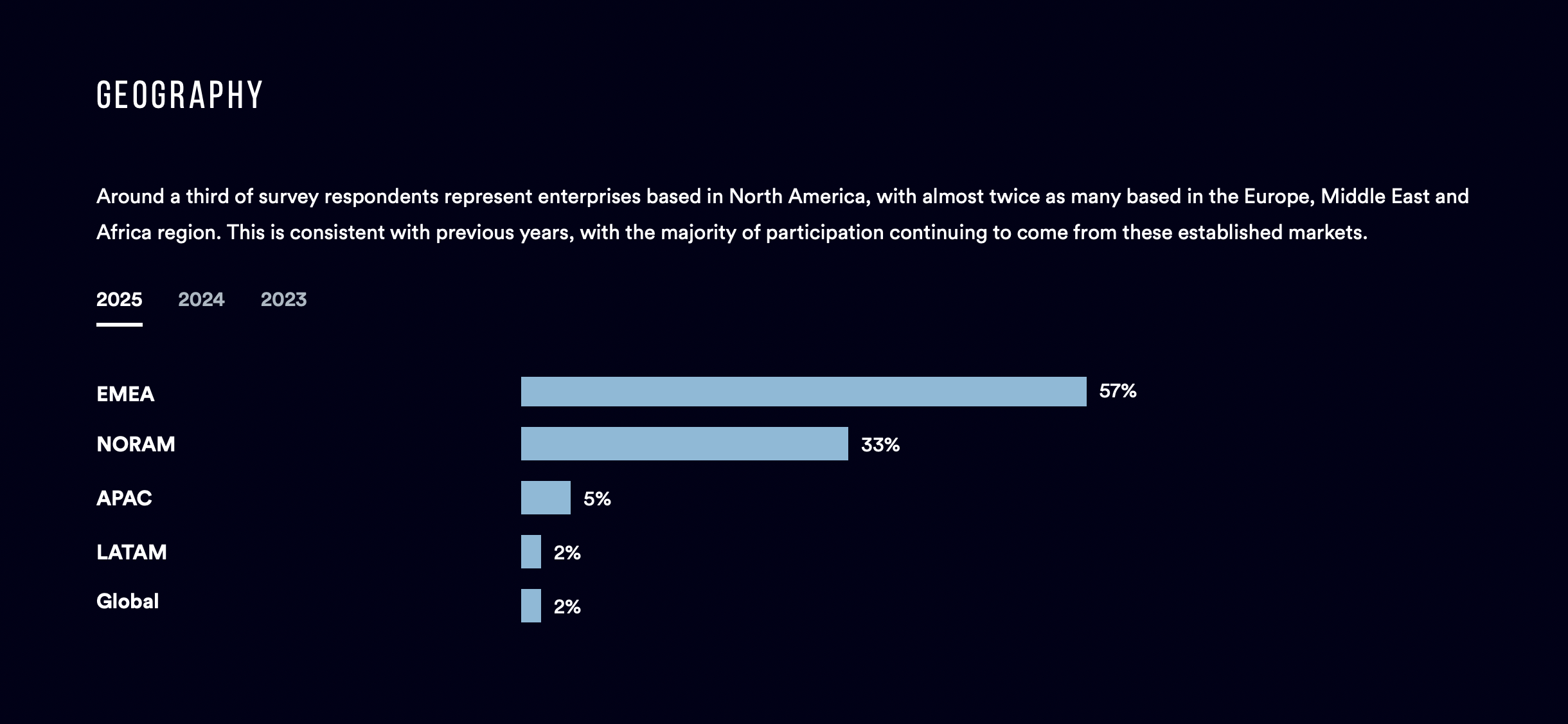
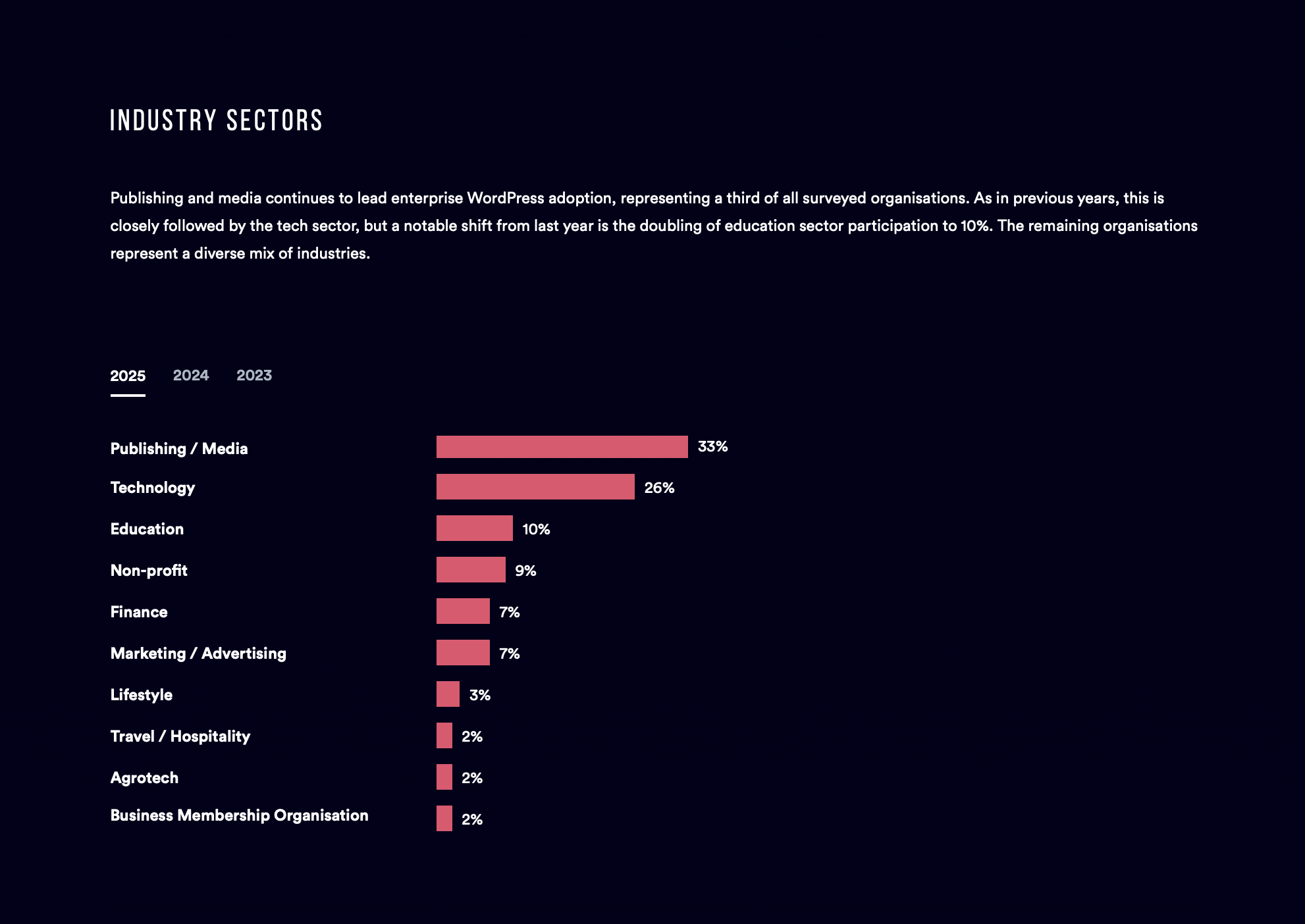
WordPress is not only well established in the enterprise; it’s diversifying. Participation in the survey shows strong representation from media and technology, but also rising engagement from education, non-profit, and a wider mix of commercial sectors.

Organisations are also reporting far higher traffic volumes than in previous years. A growing share now serves more than ten million unique visitors each month. This shift signals confidence in the platform’s performance profile and a recognition that WordPress can anchor large scale digital estates.

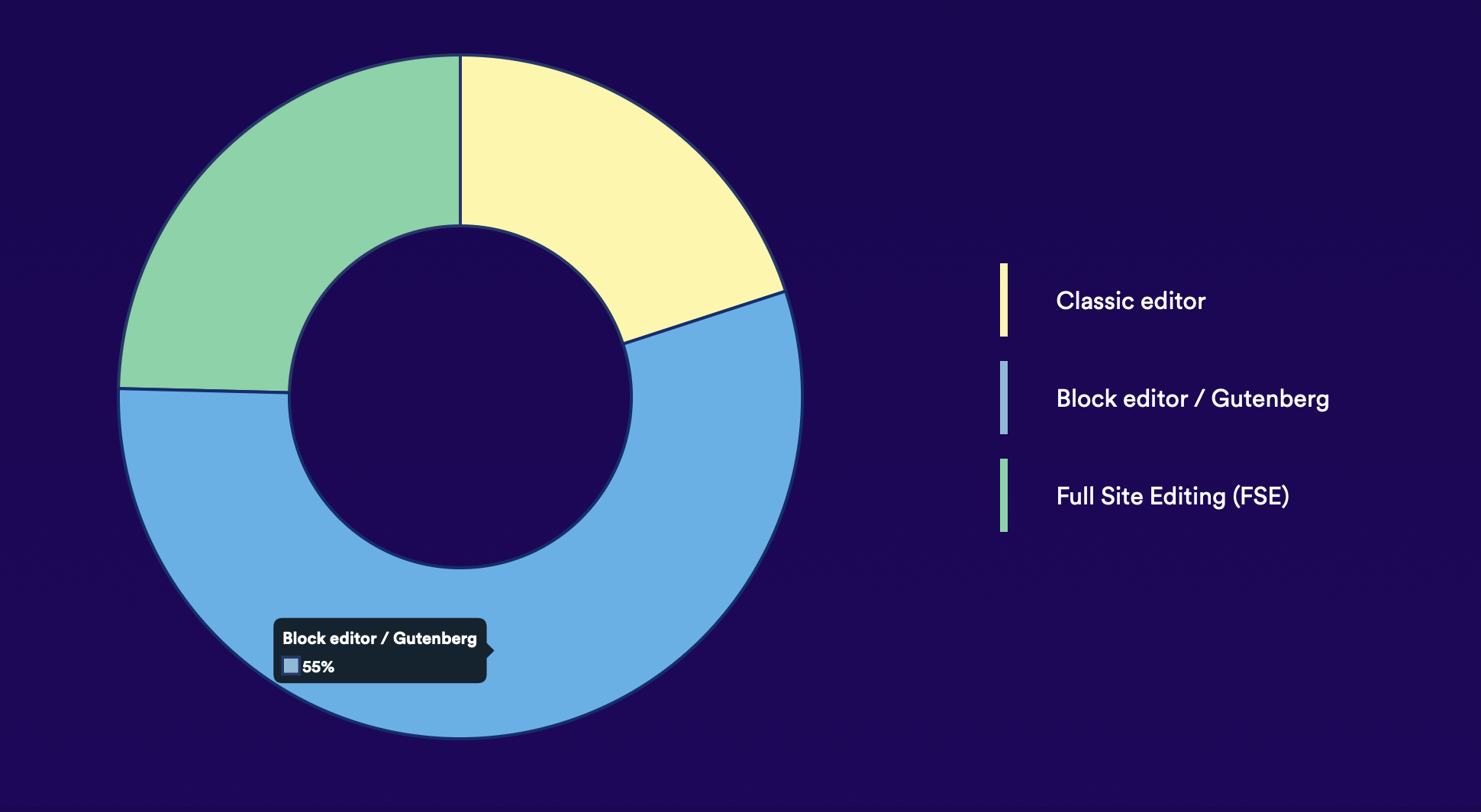
2. The block editor is now the default way enterprises create and manage content

More than eighty percent of respondents are using the block editor in production. Teams report that it makes content creation significantly easier and supports more flexible workflows across large editorial groups. Daily usage of WordPress has also increased, which suggests that the editor experience is maturing in ways that genuinely support high output teams. As more organisations embrace block based workflows, the expectations for modular, reusable, and collaborative content operations continue to rise.

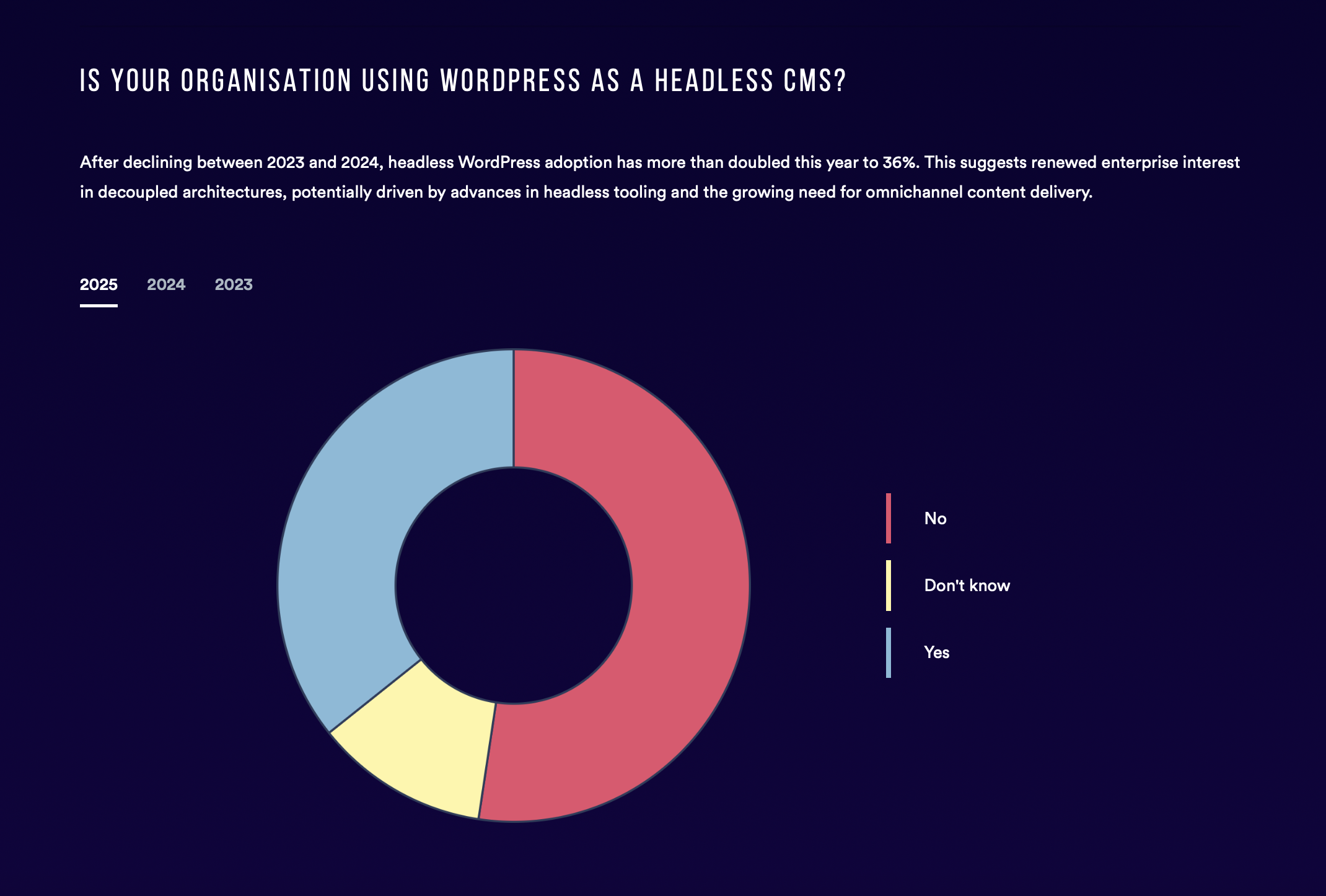
3. Headless adoption is expanding as organisations seek greater technical flexibility

Use of WordPress as a headless CMS more than doubled this year. The shift reflects a growing desire for decoupled architectures that support multi platform experiences, high performance front ends, and more specialised engineering choices. WordPress remains at the centre of the content layer, yet is increasingly paired with modern frameworks and custom delivery channels. For enterprises managing complex digital estates, the ability to choose the right tool for each part of the stack has become a major advantage.

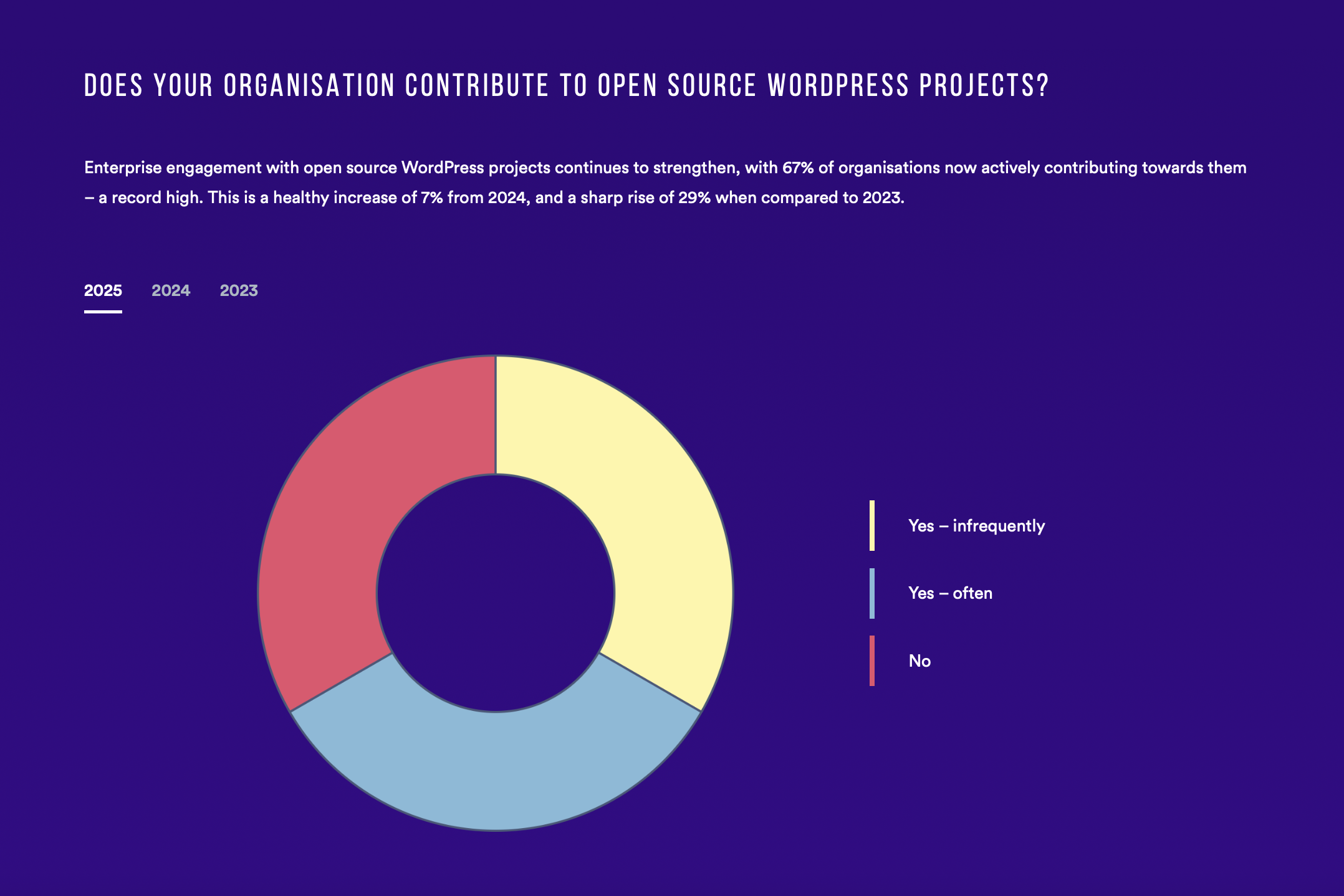
4. Open source contribution is becoming a strategic priority

Two thirds of surveyed organisations now contribute to WordPress in some form. This is the highest level of participation ever recorded in the report. Large scale users are recognising that investing in the ecosystem is essential for long term stability, better tooling, and a healthier platform. Contribution is no longer viewed as a nice to have: it’s becoming part of responsible digital stewardship. Enterprises that shape the tools they rely on gain a more resilient and cost effective foundation for the future.

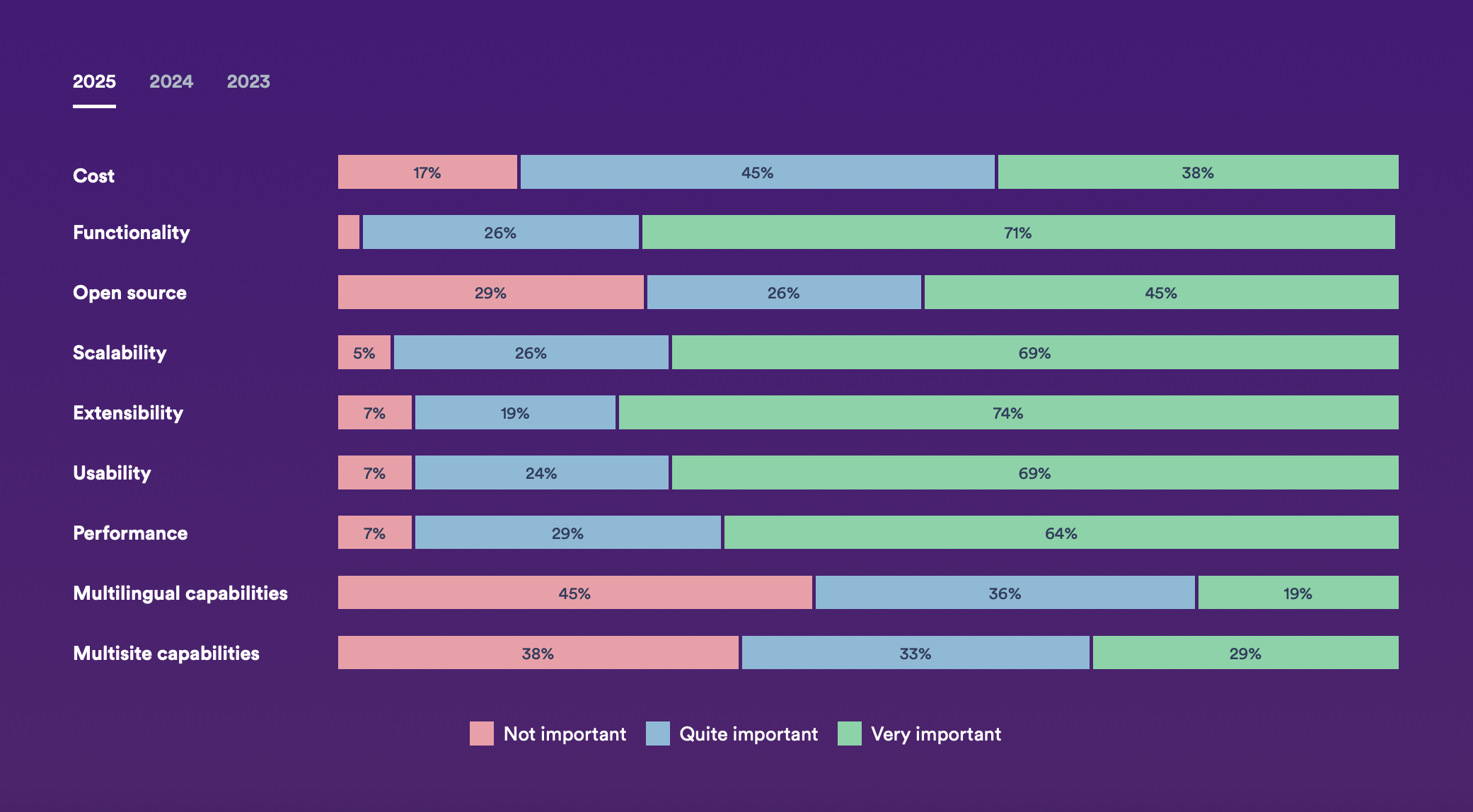
5. WordPress continues to win as a strategic choice rather than a cost saving measure

Functionality, scalability, usability, and extensibility are the strongest reasons organisations choose WordPress. These factors outrank cost by a wide margin. Senior leadership teams, including Boards and C level executives, are now more involved in CMS decisions. This shift signals a recognition that the CMS is not simply an operational tool. It is a strategic asset that influences speed to market, customer experience, and the ability to evolve digital products over time. WordPress is increasingly chosen for its adaptability and long term value rather than short term budget efficiency.

The 2025 report shows a platform that is scaling with enterprise needs and evolving through active industry participation. WordPress continues to offer a flexible foundation for organisations that want control of their digital futures. With rising investment in open source, stronger editorial workflows, and greater architectural choice, the enterprise WordPress ecosystem looks well positioned for another year of growth and innovation.

Read the full State of Enterprise WordPress 2025 report here, or get in touch to see how well WordPress could work for your team.

The post 5 Key Takeaways from the 2025 State of Enterprise WordPress Report appeared first on Human Made.

Introducing Accelerate: Redefining Experimentation in WordPress

18 November 2025 at 15:15

For more than two decades, WordPress has powered the web by making content creation simple, flexible, and open. Yet as digital experiences have evolved, the way businesses think about their websites has changed. 

Marketers no longer think in pages and posts; they think in campaigns, audiences, and offers. They expect their content tools to integrate seamlessly with the rest of their marketing technology, giving them the same precision and control they have in other parts of their workflow.

That’s where Accelerate comes in.

Accelerate is a new experimentation platform for WordPress, created by the team at Human Made to bring enterprise-grade optimisation capabilities to the world’s most widely used CMS. It enables marketers and content teams to test, personalise, and promote content directly within the block editor, transforming WordPress from a content silo into a connected, data-driven growth platform.

The Idea Behind Accelerate

Accelerate was born from a fundamental disconnect between how marketers and WordPress sites operate.

WordPress is content-centric. Modern marketing is customer-centric.

That gap, between what WordPress was built for and what marketers need today, creates friction. Integrating with CRMs, CDPs, or analytics systems often requires custom development. Running A/B tests or personalising content demands external tools that sit outside the familiar WordPress workflow.

We saw an opportunity to bridge the two.

Accelerate connects WordPress to the wider marketing technology ecosystem, so it becomes not just a publishing platform but an integrated part of the customer journey. It gives marketers the ability to experiment, measure, and act on insights, all without leaving WordPress.

Challenging the Page-Centric Paradigm

The central hypothesis behind Accelerate is simple: the most powerful unit of marketing is not the page, but the block.

Blocks are inherently modular and reusable. They can represent a single creative, message, or offer. By treating blocks as individual marketing assets, Accelerate allows teams to test and refine their content at a granular level, creating a faster feedback loop between hypothesis and result.

This block-level experimentation unlocks a new model for content optimisation:

  • Test variations of a call to action, image, or message
  • Personalise what different audiences see based on behaviour or data
  • Promote high-performing content across the entire site with just a few clicks

The result is a continuous cycle of improvement that happens inside the WordPress editor, where content already lives.

Performance by Design

For enterprise and high-traffic environments, performance and governance are non-negotiable. That is why Accelerate’s architecture offloads heavy computation to its own backend, ensuring that front-end speed and stability are never compromised.

It’s built for technical approval as much as marketing agility, delivering optimisation power without the performance trade-offs of a traditional plugin.

Performance isn’t a feature; it’s the foundation.

Why We Built Accelerate

At Human Made, we’ve spent years helping global organisations scale WordPress for complex, high-performance use cases. 

Again and again, we saw teams trying to connect their marketing workflows to WordPress, running experiments and personalisations through third-party systems that never quite fit.

Accelerate was built to change that. As our CGO, Noel Tock, puts it:

“Ultimately, the purpose of Accelerate is to help businesses grow. By making it simple to implement high-impact optimisation strategies, we’re giving our users the tools they need to turn their website from a static content repository into a dynamic and powerful engine for engagement and conversion.”

By bringing experimentation into the heart of WordPress, we’re helping businesses unlock the full potential of their content platforms. Marketers get the precision of modern SaaS tools with the flexibility and control that make WordPress unique.

What Accelerate looks like in practice

1. Testing that turns insight into action

The Human Made marketing team wanted to improve conversions on our newsletter sign ups. 

Before Accelerate, testing two versions of a headline or call-to-action might involve an external optimisation tool, tracking scripts, or developer setup. With Accelerate, the process happens directly inside WordPress.

The content editor duplicates the “Newsletter sign up” block, creates a new variant with a revised headline and/or image, and launches the test in seconds. As visitors interact, Accelerate tracks which version attracts more clicks on the subscription link. Once a clear winner reaches statistical significance, the plugin automatically promotes the high-performing variant across the site.

Human Made's Accelerate interface showing A/B testing of newsletter sign up variants

The result: faster decisions, cleaner data, and continuous improvement, all within the native block editor.

2. Personalisation that makes every visit relevant

As a global agency, Human Made works with clients and partners across multiple regions. Visitors to the website arrive from all over the world, each expecting to see information that feels relevant to their location and market; in other words – personal.

With Accelerate, the team can deliver tailored experiences to every visitor, automatically adjusting content based on geography.

A visitor from Sydney might see case studies highlighting Human Made’s work in the Asia-Pacific region. Someone browsing from New York could be presented with thought leadership and event content focused on the North American market. Visitors in London might see information about local partnerships and open roles in the UK.

Human Made's Accelerate interface showing localised case study previews

All of this is configured directly within the WordPress block editor, without any code or external platform. Accelerate handles the targeting and tracking behind the scenes, helping the team understand which regional messages drive the strongest engagement and conversions.

3. Promotion that feels effortless

Like many organisations, our marketing team puts significant effort into maintaining a strong reputation through platforms such as Clutch, where verified client reviews showcase our work and expertise.

Rather than manually updating testimonials or featured quotes, the team uses Accelerate’s Broadcasts to rotate through a curated selection of Clutch reviews across the site. These blocks might appear in the homepage hero, within case studies, or alongside service pages, giving visitors authentic insight into the value Human Made delivers.

Each page view can present a different review, keeping the experience dynamic and ensuring that a diverse range of client voices are heard. When a new Clutch review is published, it is simply added to the Broadcast, and Accelerate automatically distributes it across every relevant area of the site.

Behind the scenes, performance analytics reveal which reviews attract the most engagement, helping the team understand which messages resonate most strongly with visitors and prospective clients.

Human Made's Accelerate interface showing Broadcast blocks with Clutch reviews

The Future of WordPress Optimisation

Accelerate is a new lens through which to understand and activate WordPress content. It’s designed for creators, marketers, and developers who believe that every website can be an engine for growth when informed by data and driven by insight.

If you’ve ever wished WordPress could move as quickly as your marketing strategy, Accelerate is built for you.

Ready to set a new baseline for growth? Download Accelerate

Preview of Accelerate's user interface

The post Introducing Accelerate: Redefining Experimentation in WordPress appeared first on Human Made.

The Hidden Cost of Digital Fragmentation

11 November 2025 at 10:42

Digital teams today have more tools than ever before. There is a platform for every channel, a system for every workflow, and a service for every new idea. At first, this feels like progress. Each tool promises speed, efficiency, or autonomy. Over time, though, these decisions begin to add up. What once felt empowering can slowly turn into a complex web of disconnected systems that drain time and energy from the teams meant to be driving growth.

This quiet accumulation of platforms and providers is what we call digital fragmentation. It often happens unintentionally, but the consequences are hard to ignore.

What digital fragmentation looks like

Digital fragmentation happens when an organisation’s digital presence spreads across multiple, unconnected systems. A marketing team might use one CMS, while a regional office uses another. E-commerce lives on its own platform. Customer data is stored elsewhere again. Each system works well enough on its own, yet together they create silos that make collaboration, measurement, and consistency far more difficult.

The result is a digital estate that feels busy and advanced on the surface but becomes harder to manage with every new tool added to the stack.

The illusion of progress

Fragmentation often starts with good intentions. A team needs to move quickly. A local partner wants flexibility. A new campaign calls for an experimental platform. These choices make sense in isolation, but when repeated across a large organisation they lead to inefficiency, duplication, and confusion.

Multiple systems mean multiple workflows, permissions, and integrations to maintain. Content and data become scattered. Brand consistency weakens. The short-term gain in autonomy often creates a long-term burden on resources.

The hidden costs of digital sprawl

Operational inefficiency
Teams spend time managing logins, moving data between systems, and recreating content that already exists elsewhere.

Brand inconsistency
When design and content live in different platforms, it becomes harder to deliver a unified experience across channels and markets.

Security and compliance risks
Each system adds another potential vulnerability, making oversight and data governance more complex.

Scaling challenges
Growth multiplies complexity. Expanding into new regions or channels means replicating infrastructure and managing even more technology debt.

Learn how Green Street News’ unification project laid the foundations for future growth

The real price of complexity

The most significant cost of digital fragmentation is not always visible. It shows up in slower delivery times, inconsistent decision-making, and missed opportunities. Teams spend more time managing tools than creating value. Innovation slows, not because of a lack of ideas, but because the environment makes change difficult and expensive.

Digital sprawl limits agility. It prevents organisations from adapting quickly and makes it harder to see the bigger picture.

A better path: coherence and connection

Reducing fragmentation starts with a shift in mindset. Rather than adding new platforms to solve each problem, focus on creating a cohesive digital foundation that can grow and adapt over time.

A unified content platform allows teams to collaborate more easily, manage governance effectively, and maintain a consistent experience across every digital touchpoint. This approach also improves data accuracy and security while lowering the total cost of ownership.

For many organisations, WordPress provides the ideal foundation for this cohesion. Its flexibility allows for localised experiences and integrations, while its extensibility supports enterprise-scale governance and performance. WordPress can act as a central hub that connects teams, content, and workflows, creating a single source of truth that supports both creativity and control.

Find out how we helped global bank Standard Chartered move to a Unified Digital Platform their 1575 back-end users love

Moving toward digital cohesion

  1. Audit your digital ecosystem
    Identify where tools and platforms overlap. Look for areas where consolidation could improve efficiency and consistency.
  2. Define ownership and governance
    Ensure that teams understand who is responsible for managing each system. Clear accountability helps maintain focus and security.
  3. Prioritise interoperability
    When full consolidation is not practical, focus on integrating systems in ways that share data and workflows effectively.
  4. Plan for growth
    Choose technologies and partners that allow your digital ecosystem to evolve without adding unnecessary complexity.

The value of connection

Digital maturity depends on connection. When platforms, data, and teams work together, organisations gain clarity and confidence. They can deliver experiences faster, manage content more intelligently, and adapt to new opportunities with less friction.

Consolidation is about creating the conditions for better decisions, stronger collaboration, and meaningful innovation. With the right foundation, one that’s open, extensible, and built for scale, a digital ecosystem becomes an enabler, not an obstacle.

And for many enterprise organisations, that foundation is WordPress.


Find out how we could help your digital estate become better connected. Get in touch.

The post The Hidden Cost of Digital Fragmentation appeared first on Human Made.

❌
❌